
SVBONY SVHub Omni2
5.0Editor score
Four-microphone 360-degree pickup
AI noise and echo cancellation
USB and Bluetooth 5.1
Eight-to-ten-hour call battery
Our guide compares the best speaker for conference calls, covering noise cancellation, mic coverage, connectivity, portability, battery life, and meeting
A speaker for conference calls should make every participant easier to hear without turning a meeting into an audio-science project. The right unit combines directional microphone coverage, effective noise reduction, full-duplex conversation, and connection options that suit your devices and meeting software.
This guide compares ten conference speakers using the specifications and feature details supplied for each product. It covers microphone arrays, voice processing, supported connection methods, portability, battery life, room capacity, platform compatibility, and specialized controls for hybrid workplace use.
Each review highlights the circumstances in which its speaker stands out, from portable everyday calls to larger meetings and enterprise workflows. Ratings and feature sets are included for quick reference, while availability and prices can change, so confirm the current listing before purchasing.
5.0Editor score

4.6Editor score

4.4Editor score
The table below compares the ten recommended conference speakers by core hardware, connectivity, portability, and meeting-focused features, making it easier to identify the right model for your devices and room.
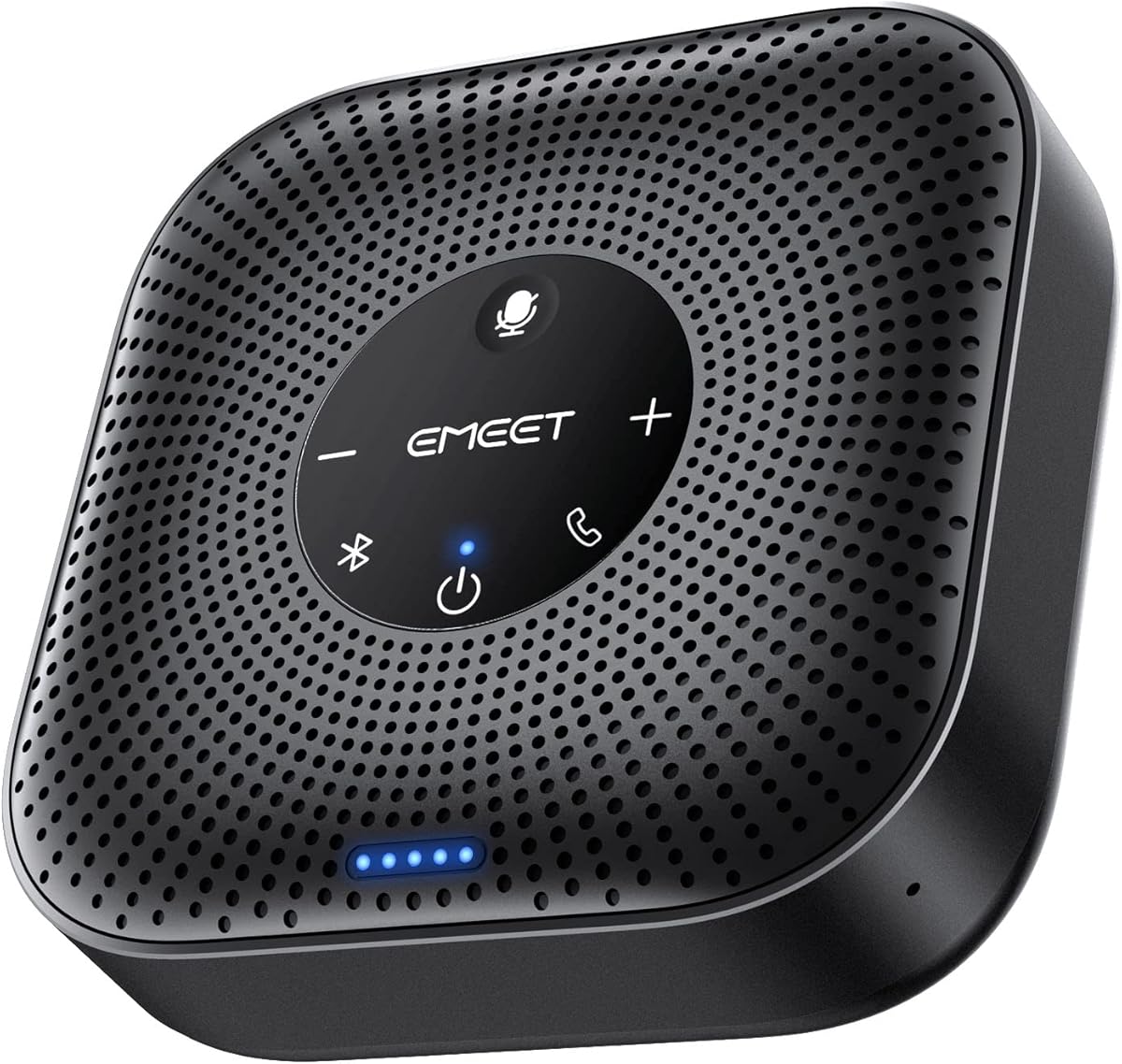


The EMEET M0 Plus combines four microphones, a three-watt speaker, and AI-assisted voice processing in a compact conference speaker designed for calls that involve more than one person in a room. Its supplied feature information emphasizes 360-degree pickup, full-duplex conversation, and compatibility with major services such as Zoom, Microsoft Teams, Slack, and Webex. It is a practical all-around choice for home offices, small meeting rooms, and travel.
We may earn a commission when you buy through this link, at no additional cost to you.
VoiceIA is the key processing feature. EMEET says the upgraded algorithm filters background noise and suppresses the echo created when a speaker is picked up by the microphone array. That is especially useful in rooms with common distractions such as air conditioning, household activity, or keyboard noise. The four-microphone arrangement gathers voices from different directions, while full-duplex operation lets participants speak and listen naturally without repeatedly muting and unmuting.
Connection flexibility is another strength. The M0 Plus supports USB-C with the included USB-C-to-A adapter, as well as Bluetooth 5.0 with single-device or dual-device pairing. No drivers or separate software are required, which reduces setup friction for employees, guests, and traveling professionals. The main trade-off is that the product information does not claim formal certification for individual meeting platforms, so buyers whose organizations require certified hardware should verify requirements before purchase.
For a room too large for one unit, EMEET supports a wired daisy-chain arrangement with another compatible EMEET speakerphone. The stated capacity reaches up to 16 attendees, making the M0 Plus useful as a building block for larger meetings rather than an isolated desktop accessory. It is best suited to buyers who want strong voice pickup, multiple connection paths, and expandable capacity in a relatively portable speaker.
The four-microphone array is designed to capture speech from around the table rather than only from the side facing the device. Combined with VoiceIA noise filtering and echo elimination, this gives the M0 Plus a practical foundation for rooms where several people may speak from different positions.
USB and Bluetooth options let users move between a laptop, phone, or paired devices without relying on platform-specific drivers. The plug-and-play approach is especially convenient for temporary meeting rooms, home offices, and business trips where dependable setup speed matters.
We may earn a commission when you buy through this link, at no additional cost to you.
The 2025 edition of the Jabra Speak 510 is a portable USB and Bluetooth speakerphone aimed at professionals who regularly join calls away from a fixed desk. Its 4.7 rating is the highest among the Jabra Speak 510 listings in this guide, while the supplied information highlights professional meeting sound, quick setup, and broad compatibility. It is a natural fit for laptop users who want one compact audio device for calls and streamed music.
We may earn a commission when you buy through this link, at no additional cost to you.
Jabra designed the speaker around flexibility rather than a complicated setup process. Users can connect through Bluetooth or USB and move the same unit between a laptop and smartphone. It works with online meeting platforms and can also connect to desk phones, mobile phones, and softphones, giving it wider applicability than a speaker limited to computer calls. The slim wireless form also makes it easier to carry between a home office, shared workspace, and hotel room.
There are some limitations to note. The supplied listing does not provide a specific talk-time figure, wireless range, microphone count, or platform-certification statement, so the product is less transparent about technical specifications than several alternatives. It also does not mention room-expansion features, meaning buyers anticipating very large meetings may need to examine other options. Those omissions do not undermine its core value for ordinary portable conferencing, but they make it harder to compare detailed hardware capabilities.
The Speak 510 is best recommended for mobile workers and small teams that value portable construction, a high rating, and straightforward connectivity over advanced enterprise controls. It may also serve buyers who want one speaker for conference calls and ordinary audio playback. For fixed large-room installations, a product with a documented pickup range and dedicated certification may be a more straightforward fit.
The portable design gives the Speak 510 more flexibility than a permanently installed desk speaker. Its combination of Bluetooth and USB connections supports use with a range of computers and phones, making it convenient for people whose meeting location changes frequently.
The product information emphasizes clear, professional meeting audio rather than a technical microphone specification. For typical interviews, team check-ins, and collaborative calls in compact spaces, that focus can provide a more useful and uncomplicated experience than a feature-heavy enterprise device.
We may earn a commission when you buy through this link, at no additional cost to you.
This Jabra Speak 510 2025 edition is especially relevant to Microsoft Teams users because its product title explicitly identifies Teams compatibility while retaining support for other online meeting platforms. With a 4.6 rating, it combines clear meeting sound, portable construction, and straightforward USB or wireless setup. The result is a versatile speaker for home offices, shared rooms, and traveling professionals.
We may earn a commission when you buy through this link, at no additional cost to you.
Its defining benefit is straightforward operation. Users can connect the speaker through Bluetooth or USB, then use it with a laptop, smartphone, desk phone, or softphone. The device is described as suitable for conference calls and streaming music, giving it value beyond scheduled meetings. Its portable design makes it easier to place centrally at the start of a call and carry to the next location afterward.
Compared with enterprise-oriented models, the listing provides less detail about internal specifications. It does not state the microphone count, exact battery duration, supported wireless range, or whether it carries formal Unified Communications certification. Teams compatibility is clear, but organizations with procurement standards for certified devices should examine whether the word certified appears in their requirements. It is also a single-unit solution without a documented larger-room expansion method.
This model is a strong recommendation for individuals and small teams that use Microsoft Teams but do not want a permanently mounted or highly complex conference system. It also makes sense for users who need a portable speaker that can move between calls and multimedia playback. Buyers prioritizing detailed beamforming specifications, certified enterprise controls, or expandable room coverage should look farther down the list.
Explicit Microsoft Teams support makes this a straightforward choice for organizations centered on that platform. The speaker still supports other online meeting services, so it remains flexible for users who switch between collaboration tools.
Bluetooth and USB connectivity remove the need for a complicated installation process. The compact design can sit beside a laptop or phone, making it well suited to temporary workspaces and travel.
We may earn a commission when you buy through this link, at no additional cost to you.
The SVBONY SVHub Omni2 combines a four-microphone array, AI noise cancellation, a five-watt full-range speaker, and a rechargeable battery in one home-office conference unit. Its 5.0 rating is the highest listed in this guide, and the supplied feature set is unusually broad. It is especially interesting for buyers who want advanced transcription options, broad platform support, and flexible connectivity in a single device.
We may earn a commission when you buy through this link, at no additional cost to you.
The microphone system is designed to distinguish human speech from background noise while suppressing echoes and other distractions. The four built-in microphones support 360-degree capture in rooms up to 18 feet across, and the 5W speaker aims to create a natural meeting atmosphere. Full-duplex operation allows simultaneous speaking and listening, reducing the need to wait for a turn in fast-moving discussions.
Connectivity is handled through USB or Bluetooth 5.1, and the device requires no drivers. It is listed as compatible with Windows, macOS, Zoom, Teams, Skype, Webex, Google Meet, and other major services, although users may need to select it manually as both microphone and speaker. The 2,000mAh battery supports eight to ten hours of calls or music and recharges in about two hours with the specified adapter. NFC touch-pairing provides another quick route to compatible devices.
The most notable caveat concerns the coAI-powered transcription and translation claim. These functions depend on pairing with third-party applications, so buyers should confirm the required app, account, language support, and privacy expectations. The product is still an attractive feature-rich recommendation for home offices and small meeting rooms, especially for users who value AI processing, full-duplex discussion, and a broad connection interface.
The combination of voice recognition, echo suppression, and background-noise reduction targets a common home-office problem: the microphone hearing everything in the room. Four microphones provide wider spatial coverage, while full-duplex operation supports a more natural exchange.
Real-time captions, speech-to-text, and translation are presented as capabilities enabled through compatible third-party applications. Users should review those services before purchasing if this feature is central to the purchase.
We may earn a commission when you buy through this link, at no additional cost to you.
The EMEET Luna is a full-duplex conference speaker designed for small and medium rooms, with three microphones for 360-degree pickup and an upgraded VoiceIA system for background-noise reduction. Its 4.4 rating and wide range of connectivity options make it a versatile alternative for both home offices and business meeting spaces. The ability to link two units also gives it a path toward larger audiences.
We may earn a commission when you buy through this link, at no additional cost to you.
VoiceIA is described as filtering air-conditioning noise, keyboard clicks, and general background sound. An automatic vocal-increase function estimates the distance of a sound source and adjusts volume to create a more balanced sound level. Maximum output is listed at 85 dB, which provides useful headroom for a larger room, while the three-microphone array allows speakers to talk naturally from different positions.
Two Luna units can be connected with EMEET's special cable, creating a wired daisy chain that is stated to support up to 16 attendees. The wired approach is presented as more resistant to environmental interference than a wireless link. One important purchase detail is that the daisy-chain cable is sold separately. The unit also automatically shuts down after one hour of inactivity to conserve battery, a feature some users may appreciate and others may find limiting.
USB, Bluetooth, AUX, and dongle connections give the Luna broad device support without drivers. It works with Zoom, Skype for Business, and Webex, making it suitable for a variety of meeting environments. The Luna is most attractive to buyers who need a single compact room today but may need wired expansion later. Those who require a preincluded expansion cable should plan to purchase that accessory separately.
The automatic vocal-increase function is intended to keep remote participants from struggling to hear someone at the far end of a table. Combined with the three-microphone array, it offers a more consistent group-call experience.
A wired daisy chain offers a predictable path to a larger room and avoids some environmental interference associated with wireless links. Buyers should account for the separately sold cable when planning a two-unit setup.
We may earn a commission when you buy through this link, at no additional cost to you.
The Dell SP3022 is a compact desk speakerphone for business conferences, home offices, and shared workspaces where reliable controls and recognized platform support are important. It is listed as both Microsoft Teams certified and Zoom certified. Its 4.2 rating reflects a practical business tool centered on full-duplex audio, AI noise cancellation, clear LED status feedback, and straightforward USB connectivity.
We may earn a commission when you buy through this link, at no additional cost to you.
The physical design resembles a small desktop soundbar, making it suitable for placement beside a laptop, desktop, or monitor base. LED indicators show Microsoft Teams application status, call and hang-up state, volume level, and microphone mute status. These visual cues can be especially helpful in shared rooms because the user can confirm the device state without opening software or asking another participant whether the speaker is muted.
A dedicated Microsoft Teams button provides quick access to meetings and notifications. Connectivity through USB-A or USB-C allows use with a wide range of modern computers, and the full-duplex system lets multiple people speak at once while remaining intelligible through AI-assisted noise cancellation. The listing does not provide a battery duration, wireless protocol, or documented daisy-chain capacity, so it appears better aligned to a powered desk setup than travel or expandable-room use.
The SP3022 is a sensible choice for organizations that specifically require Teams or Zoom certification and want a stationary speaker with useful physical controls. It may fit best on an executive desk, conference table, or hot-desking station where USB power and a stable surface are available. Buyers seeking wireless freedom, long battery life, or a much larger room should consider the portable or enterprise options elsewhere in this guide.
LED indicators and a dedicated Teams button make meeting state easier to understand at a glance. These details are valuable in spaces where participants enter quickly and need to confirm mute, volume, and call status without additional training.
Microsoft Teams and Zoom certification are the SP3022's most distinguishing features for organizational buyers. They provide a more explicit platform guarantee than listings that merely state general compatibility.
We may earn a commission when you buy through this link, at no additional cost to you.
The Lenovo Speakerphone 6000 is built for enterprise hybrid meetings, combining eight beamforming microphones, AI noise cancellation, a 50 mm speaker driver, and full-duplex operation. Its 4.4 rating and documented five-meter pickup range make it a compelling option for medium meeting spaces. Teams certification, a dedicated button, and broad wired and wireless connectivity add particular value for organized office environments.
We may earn a commission when you buy through this link, at no additional cost to you.
The eight-microphone array prioritizes voices and reduces background distractions, while the stated pickup range extends to five meters. A 50 mm driver provides the speaker output, and full-duplex audio supports simultaneous conversation without forcing participants to take strict turns. These characteristics make the device better suited to group discussions than a basic phone speaker, particularly when the room is not perfectly quiet.
The Lenovo supports Bluetooth 5.3 with dual-device connectivity, meaning it can hold connections to two devices at once, and it can pair with up to eight devices overall. USB-C and USB-A connections support plug-and-play use and charging, while the dedicated Microsoft Teams button provides fast call control over the certified USB connection. Battery life is listed at up to 12 hours of talk time, and IP54 protection adds resistance to dust and splashes.
This is a strong recommendation for enterprise buyers, hybrid meeting rooms, and users who move regularly between shared offices and remote workspaces. Its feature set is more extensive than that of basic portable models, and the carrying case supports travel. The tradeoff is that five-meter pickup, advanced beamforming, and multi-device pairing are intended for users who can take advantage of those capabilities rather than simply wanting the smallest speaker.
Eight beamforming microphones and a five-meter pickup range provide a substantial improvement over basic laptop audio for group discussions. AI noise cancellation further improves clarity by prioritizing speech over ambient distractions.
Teams certification, a dedicated Teams button, dual Bluetooth connections, and USB plug-and-play operation support demanding hybrid-work environments. The included carrying case and IP54 protection also make the speaker practical beyond a permanently assigned desk.
We may earn a commission when you buy through this link, at no additional cost to you.
The Jabra Speak2 55 is a polished portable conference speaker built around four beamforming microphones, voice-level normalization, and flexible wireless connectivity. Its 4.4 rating reflects a balanced premium feature set that includes up to 12 hours of battery life, a stated 30-meter Bluetooth range, and full Microsoft Teams compatibility. The 2025 package also includes a USB-C charging adapter and carrying pouch.
We may earn a commission when you buy through this link, at no additional cost to you.
The beamforming microphones pick up sound from all directions, while voice-level normalization aims to equalize the volume of people speaking around the room. This makes the speaker a good fit for meetings in which one participant may sit farther away than another. It also connects wirelessly through Bluetooth or through the supplied USB-C cable and USB-A adapter, giving users the option to use it with either a phone or PC.
The stated battery life of up to 12 hours and Bluetooth range of up to 30 meters offer useful freedom for meetings away from a desk. The 2025 edition's included charging adapter is a practical improvement for users who want to top up the battery at a hotel or shared office. The carry pouch protects the main unit during travel, and the stated 280-gram weight remains portable. A two-year warranty is available with registration.
The Speak2 55 is best for professionals who want a refined portable speaker with stronger room coverage than a simple phone speaker. It is also a logical choice for Microsoft Teams users and for people who regularly carry their meeting equipment. The trade-off is that it does not advertise a multi-unit room-expansion feature, and its premium positioning may be unnecessary for a single user who only holds occasional calls in a quiet room.
Voice-level normalization is designed to make remote participants hear a more consistent mix of voices. Combined with four beamforming microphones, it can improve the experience when participants are seated at different distances from the unit.
The 2025 edition includes a USB-C charging adapter, cable with USB-A adapter, and carrying pouch. These additions make it easier to keep the speaker charged and protected while moving between meetings.
We may earn a commission when you buy through this link, at no additional cost to you.
The Jabra Speak 510 2025 edition is a portable conference speaker for users who want wireless freedom combined with several wired options. Its 4.6 rating supports its reputation as a versatile everyday meeting device. The listing highlights Bluetooth, USB-A, and Link 370 USB adapter connectivity, making it useful with laptops and phones that may use different physical ports.
We may earn a commission when you buy through this link, at no additional cost to you.
The speakerphone is designed for quick setup, with no complicated installation procedure. It can work with a desk phone, mobile phone, softphone, and other devices, while supporting online meeting platforms for conference calls. It also handles streaming music, adding a secondary use that may appeal to buyers who want one compact device for both work calls and personal audio.
This listing is particularly useful for people whose devices do not share the same USB connector. The inclusion of multiple wired approaches means a direct connection may remain available even when Bluetooth pairing is inconvenient. However, the product information does not disclose an exact talk-time figure, microphone count, wireless range, or room size. Those details are less important for a portable personal speaker but may limit its appeal for technical procurement.
The Jabra Speak 510 USB is a good recommendation for mobile professionals who need flexible adapter support and broad device compatibility. It is particularly attractive to hybrid workers who alternate among USB-A laptops, modern computers, phones, and softphones. Buyers focused on documented room capacity, enterprise certification, or large-meeting expansion should look for a more specialized model.
Bluetooth is supported, but USB-A and the Link 370 adapter add useful direct-connection alternatives. This makes the speaker more accommodating when a computer lacks the expected port or wireless pairing is inconvenient.
Beyond conference calls, the speaker supports streaming music from connected devices. That flexibility can make it a more useful everyday accessory for users who travel and want clear audio for work and leisure.
We may earn a commission when you buy through this link, at no additional cost to you.
The Jabra Speak 510 UC is a portable wireless speakerphone distinguished by 360-degree microphone pickup, a 4.7 rating, and certification for Zoom and Google Meet. It is also listed as certified for Avaya, Cisco, and Skype for Business, giving it broad relevance for business communications. The compact form and integrated cable management make it especially suitable for mobile professionals and home offices.
We may earn a commission when you buy through this link, at no additional cost to you.
The 360-degree microphone is intended to capture people from different sides, allowing the speaker to sit centrally rather than directly in front of one participant. Setup does not require IT support: users connect through Bluetooth or USB and then dial into a meeting. Compatibility with leading unified communications platforms, along with support for desk phones, mobile phones, and softphones, gives the model flexibility across different call workflows.
This listing provides fewer technical details than some newer competitors. It does not state an exact talk-time duration, Bluetooth range, microphone count, or maximum room size, and there is no documented multi-unit expansion feature. The major trade-off is therefore less about missing modern conveniences and more about a focus on proven portability and broad certified platform support.
The Speak 510 UC is best recommended to buyers whose priority is portable meeting performance combined with recognized unified communications certification. It is well suited to consultants, remote employees, traveling professionals, and small teams that regularly use Zoom, Google Meet, or major business calling platforms. Those who need longer battery specifications or larger-room capacity should compare the more technical specifications of the Lenovo, EMEET, or Jabra Speak2 55.
Zoom, Google Meet, Avaya, Cisco, and Skype for Business certifications make this a practical choice for varied business environments. The model can connect with computers, desk phones, mobile phones, and softphones, extending its usefulness beyond a single application.
Its slim body, included carrying case, and integrated cable management simplify transport. The speaker can quickly move from a home office to a client site or temporary meeting space without becoming a cumbersome setup.
We may earn a commission when you buy through this link, at no additional cost to you.
The right conference speaker depends on room size, participant positions, connection requirements, portability, and the platforms your organization supports. Use the following factors to narrow the field before comparing final options.
A conference speaker should capture voices clearly from around a table rather than only from directly in front of the device. A multi-microphone array with 360-degree pickup is especially useful when participants sit in different directions, while beamforming can help the system prioritize speech. The EMEET M0 Plus and SVBONY Omni2 each use four microphones, the EMEET Luna uses three, the Lenovo Speakerphone 6000 uses eight, and the Jabra Speak2 55 uses four beamforming microphones.
Choose based on room geometry and participant count, not just microphone quantity. Check the documented pickup range when available: the Lenovo is stated to cover up to five meters, while the SVBONY is described for rooms up to 18 feet across.
Prioritize directional coverage and room capacity for group meetings. For one person at a desk, a basic conference microphone may be sufficient.
Background noise, keyboard clicks, air conditioning, and room echo can make a technically capable speaker difficult to understand. AI noise cancellation, echo suppression, and voice-level normalization are therefore central features rather than minor refinements. EMEET's VoiceIA system filters common distractions, the SVBONY Omni2 uses AI to distinguish human voices, and the Dell SP3022 and Lenovo Speakerphone 6000 also advertise AI-assisted noise cancellation.
Voice normalization can add another layer of consistency by adjusting the perceived level of participants located at different distances. The Jabra Speak2 55 includes this function, which is useful when one person speaks softly from across the table.
Look for both noise reduction and echo control. For busy rooms, use a model that explicitly handles both rather than relying on generic call quality claims.
Full-duplex audio allows a speaker to listen and talk at the same time, mirroring a face-to-face discussion. This is important in remote meetings because half-duplex behavior can cut off a participant who begins speaking before another has finished. It also reduces the need for users to mute, unmute, and repeat themselves during fast exchanges.
All of the featured products emphasize clear meeting audio, and several explicitly state full-duplex operation. Confirm this feature when the product description calls it out, especially for interview, workshop, and collaborative team sessions.
Choose full duplex for interactive calls. It is a meaningful advantage whenever participants need to interrupt, respond, or discuss points simultaneously.
The best conference speaker should work with the devices already used by your team. USB connections tend to offer a simple, dependable route with computers, while Bluetooth provides mobility and can pair with phones. Some models add AUX, a wireless dongle, or proprietary USB adapters. EMEET Luna supports USB, Bluetooth, AUX, and dongle options, while the Jabra Speak 510 USB includes support for USB-A and the Link 370 adapter.
Check the physical ports on your laptop or docking station before ordering. For business environments, also verify whether the company requires certification for Microsoft Teams, Zoom, Google Meet, or another specific platform.
Favor a mix of wired and wireless options. Wired access is useful for fixed desks, while Bluetooth or dual-device pairing adds flexibility for mobile users.
General compatibility and formal certification are not identical. A product may work with a platform while lacking a specific certification label, which can matter in procurement, help-desk, or enterprise deployment situations. The Dell SP3022 is listed as certified for Microsoft Teams and Zoom, the Lenovo Speakerphone 6000 is Teams certified, and the Jabra Speak2 55 is described as a fully compatible Microsoft Teams speaker.
The Jabra Speak 510 UC listing adds Zoom, Google Meet, Avaya, Cisco, and Skype for Business certifications. Other models state compatibility with leading services such as Zoom, Teams, Slack, Skype, Webex, and Google Meet without making a formal certification claim.
Ask IT about certification requirements before buying. Choose a certified listing for managed deployments; general compatibility is adequate for personal or less regulated use.
Microphone pickup, output volume, and coverage do not increase indefinitely as a room becomes larger. A compact portable speaker can work well for one or two people, while a group meeting may need a stronger driver, a documented pickup range, or more than one unit. The Lenovo offers a stated five-meter range, the SVBONY covers rooms up to 18 feet across, and the EMEET Luna can reach 85 dB maximum volume.
The EMEET M0 Plus and Luna can be daisy-chained with compatible EMEET devices for larger configurations, with the Luna supporting up to 16 attendees when two units are linked. Luna's required daisy-chain cable is sold separately, so include that accessory in the purchase plan.
Match the unit to the room and expected attendance. Use expansion only when necessary, and verify cable or accessory requirements in advance.
A conference speaker that cannot survive a full schedule can undermine an otherwise smooth meeting day. Battery figures vary considerably among the choices: the EMEET M0 Plus supports more than ten hours of talk time, the SVBONY provides approximately eight to ten hours, the Lenovo and Jabra Speak2 55 list up to 12 hours, and the SVBONY recharges in about two hours. Several Jabra listings do not state an exact duration.
Portable speakers should also be easy to carry. The Jabra Speak2 55 includes a pouch and charging adapter, the Lenovo includes a carrying case, and the Jabra Speak 510 UC integrates cable management into its compact design.
Prioritize a full workday of talk time if the unit travels with you. For a permanently powered desk, battery life matters less than a stable connection and appropriate room coverage.
A good speaker should be easy to control during a live meeting. Mute buttons, call-status lights, dedicated meeting keys, and volume indicators can prevent avoidable interruptions. The Dell SP3022 uses LED indicators for Teams status, call state, volume, and microphone mute, while it also includes a dedicated Teams button. The SVBONY includes a one-click mute control.
Durability can matter when equipment moves between a home, office, and travel bag. The Lenovo Speakerphone 6000 has IP54 dust and splash resistance, while several Jabra models include carrying cases. The EMEET Luna uses a full-metal matte casing and has an automatic shutdown after one hour of inactivity to conserve power.
Evaluate controls and physical design in the context of your room. Easy mute visibility, intuitive buttons, durable materials, and convenient storage often improve daily use more than a small increase in specification.
Start by placing the speaker near the center of the group and within its documented pickup range. Connect it through USB for a fixed computer setup or pair it over Bluetooth for a phone or portable meeting. If the meeting application opens with the wrong audio, select the conference speaker manually as both the microphone and output device, then set a comfortable volume before participants join.
For the clearest result, keep the speaker away from laptops, fans, loose papers, and other noisy objects. Use the mute control when nobody is speaking, especially in shared rooms, and begin with short test calls to identify echo, delay, or voice-level issues. Features such as AI transcription and translation may require a compatible third-party application, so review its account, privacy, and network requirements before relying on them.
Recharge the unit between major meeting days and keep ports and microphone openings free from dust or residue. Use the supplied case or a protective bag when traveling, and follow the manufacturer's charging guidance rather than using an adapter with an unsuitable output. Check compatibility before expanding a room with daisy-chain equipment, and purchase any required proprietary cable separately.
A conference speaker includes a microphone designed to capture voices around a table, usually through a multi-microphone array and voice-processing features. A regular Bluetooth speaker may produce good sound but often has weaker microphone placement, less echo control, and fewer meeting-oriented controls. For group calls, the dedicated microphone and full-duplex behavior of a conference speaker are generally more useful.
USB is usually the simplest and most consistent option for a fixed computer, while Bluetooth offers greater mobility and works well with phones. Many users benefit from a model that supports both. If your laptop has only one USB port, verify whether the speaker includes the necessary cable or adapter before buying.
Most modern conference speakers connect to the computer as a standard microphone and speaker, allowing them to work with major meeting applications. However, general compatibility does not always equal formal platform certification. Organizations with procurement standards should check for explicit Microsoft Teams, Zoom, or Google Meet certification, as offered by several picks in this guide.
Capacity depends on microphone pickup, speaker output, room acoustics, and how far participants sit from the device. Compact models are best for small groups, while the Lenovo Speakerphone 6000 specifies a five-meter pickup range and the SVBONY Omni2 describes rooms up to 18 feet across. For large meetings, check whether a second unit can be linked through a supported daisy-chain method.
Yes, several featured Jabra Speak 510 models support streaming music as well as conference calls. Other models may also work as standard Bluetooth audio devices, but the supplied information explicitly mentions music for the Jabra lineup. For business-only use, prioritize microphone coverage, echo control, and meeting-platform support instead.
AI noise cancellation can be valuable in a home office because household sounds, keyboards, and room echo may otherwise be transmitted to remote participants. EMEET M0 Plus, EMEET Luna, SVBONY Omni2, Dell SP3022, and Lenovo Speakerphone 6000 advertise noise-reduction functions. It is especially useful in shared or active rooms, although a quiet space still improves any microphone system.
No. Ratings are useful signals, but platform certification, pickup coverage, connectivity, controls, and room fit can matter more for a particular buyer. For example, a portable Jabra Speak 510 may suit a traveling professional, while the Dell SP3022 or Lenovo Speakerphone 6000 may better fit a managed Teams environment. Choose the model that matches the room and workflow first.
The required accessories depend on the product. The EMEET Luna requires EMEET's separate daisy-chain cable to link two units, while compatible EMEET speakerphones can be combined for larger setups. Confirm that the second unit, cable, platform support, and room placement are all appropriate before ordering an expansion package.
The SVBONY SVHub Omni2 offers the strongest budget feature set, combining four microphones, AI noise control, full-duplex audio, USB and Bluetooth 5.1 connectivity, and an eight-to-ten-hour battery. The Jabra Speak 510 stands out for portable simplicity and broad device support, while the Jabra Speak2 55 is the premium option for beamforming pickup, voice normalization, extended wireless range, and a travel-ready package.
For a fixed business desk, prioritize documented platform certification and clear physical controls; the Dell SP3022 is particularly relevant for Teams and Zoom. The Lenovo Speakerphone 6000 is the stronger enterprise option when beamforming, a five-meter pickup range, dual-device pairing, and durable hybrid-work design are priorities. Choose a daisy-chain-capable EMEET model when the room may need to grow.
Whichever option you favor, verify the ports, meeting platform, pickup range, and accessories before buying. Product features, ratings, availability, and prices can change over time, so check the current Amazon listing and your organization's technical requirements before making the final purchase.