
M.2 NVMe & SATA to USB C Docking Station
4.5Editor score
Supports NVMe and SATA
Up to 10Gbps transfer speed
Works across major operating systems
Our NVME to USB Docking Stations guide compares ten options for speed, drive compatibility, cooling, portability, cloning, Mac mini expansion, and ease of use.
NVME to USB docking stations turn an internal M.2 solid-state drive into a convenient external storage device without requiring you to build a permanent enclosure. A worthwhile dock should support your drive protocol and size, provide a fast USB connection, manage heat effectively, and work with the computers and devices you already use.
We compared the ten featured docks by examining their stated protocols, transfer interfaces, supported M.2 form factors, operating-system compatibility, enclosure materials, cooling features, capacity limits, and specialist functions. The list includes general-purpose adapters, aluminum desktop docks, an offline duplicator, and two purpose-built Mac mini hubs with integrated NVMe storage.
Each review explains who benefits from a particular design and where its limitations matter. The highest-rated products lead in overall appeal, while others stand out for budget value, cloning, or Mac mini integration. Availability and pricing can change, so compare the current listing details carefully before ordering.
4.5Editor score

4.6Editor score
4.5Editor score
The comparison below highlights each dock's purpose, drive support, connection speed, and defining feature, making it easier to match a specific workflow with the right adapter.


The ACASIS 10Gbps M.2 NVMe & SATA SSD to USB Docking Station is a strong all-purpose recommendation for users who want one adapter to handle both common M.2 NVMe and SATA drives. Its 4.6 rating reflects a favorable balance of useful capacity, broad compatibility, and a design that treats heat management seriously. The horizontal aluminum enclosure is practical rather than decorative, making it equally suitable for a desk, repair workspace, or travel kit.
We may earn a commission when you buy through this link, at no additional cost to you.
Its main advantage is a clear USB 3.2 Type-C connection with transfer speeds stated up to 10Gbps. The dock accepts M.2 PCIe NVMe M Key and B+M Key SSDs in 2230, 2242, 2260, and 2280 sizes, along with compatible SATA drives. That gives buyers flexibility when reusing an older laptop drive, moving files from a desktop, or connecting a spare SSD without first buying a permanently installed enclosure.
The aluminum body and open, toaster-style layout encourage passive cooling, while tool-free insertion makes drive changes quick. No drivers are required, and the stated operating-system support spans Windows versions, Linux, and macOS 10.3 or later. The listed capacity reaches 8TB, making the adapter useful for large media libraries, working project folders, and periodic backup destinations as well as simple file transfers.
There are limits to consider. It supports a defined set of M.2 sizes and key configurations rather than every conceivable module, and the product does not add cloning, card-reading, or multi-port hub functions. It also has no integrated screen or status display, so drive mounting and file management remain the user's responsibility. For most people, though, these omissions are reasonable because the dock concentrates on dependable external storage access.
Choose this ACASIS model if you want strong NVMe and SATA versatility, a 10Gbps connection, and an enclosure that actively addresses heat without adding unnecessary complexity. It is particularly well suited to home users, technicians, and mobile professionals who need one dependable M.2-to-USB adapter for several common drive types.
Supporting both NVMe and SATA removes a common source of buyer confusion when shopping for an M.2 adapter. The four listed form factors cover the sizes most likely to appear in laptops and desktop upgrades, while the USB Type-C connection makes the dock suitable for modern computers and compatible mobile devices.
Aluminum construction combines with the open horizontal arrangement to improve passive airflow around the installed SSD. That design matters during long file copies, backups, and recoveries, although users should still avoid touching an exposed drive if it becomes hot.
We may earn a commission when you buy through this link, at no additional cost to you.
The ACASIS green aluminum dock is a compact storage adapter with the same core strengths as the leading general-purpose option. Its 4.6 rating, 10Gbps interface, and support for both NVMe and SATA make it a credible choice for users who want fast transfers and a more deliberate thermal design. The green finish also makes it easier to distinguish from other docks in a crowded workspace or technician's bag.
We may earn a commission when you buy through this link, at no additional cost to you.
The aluminum alloy housing is intended to draw heat away from the SSD, while the toaster-style shape leaves the drive exposed enough for air to circulate. This is a practical benefit during sustained backups or large project transfers. Installation is tool-free, and the listed compatibility includes PCIe NVMe M Key and B+M Key modules in the common 2230, 2242, 2260, and 2280 formats, plus compatible SATA SSDs.
This is not merely a basic enclosure. The stated 10Gbps performance provides ample headroom for NVMe media and working files, while the 8TB capacity figure gives users room to employ larger drives. It also works with the stated range of Windows, Linux, and macOS systems, and its driver-free approach reduces setup friction when moving between a personal computer, a repair system, or another compatible host.
The main trade-off is that it remains focused on storage. There is no offline duplication mode, card reader, display output, or collection of USB peripherals. It also needs the user to verify that an M.2 module fits the supported key and size combination. A drive with an unusual protocol or an integrated heatsink should not be assumed to work without checking the listing details.
The green ACASIS dock suits buyers who value a compact, metal-bodied adapter, broad SSD compatibility, and cooling-conscious construction. It is an especially good fit for technicians, content creators, and power users who repeatedly connect NVMe or SATA modules but do not need a full-featured workstation dock.
The aluminum alloy shell gives the adapter a durable, compact profile and acts as a passive heat spreader. Combined with the open layout, it is a sensible choice when the dock will remain connected during lengthy file operations rather than serve only as a short-term transfer adapter.
Tool-free installation and the absence of additional drivers make the dock approachable even for users unfamiliar with M.2 hardware. Compatibility with major desktop and mobile operating systems makes it easier to carry one enclosure between devices rather than maintaining separate storage solutions.
We may earn a commission when you buy through this link, at no additional cost to you.
The universal M.2 NVMe and SATA to USB-C docking station is the strongest value-oriented choice in this guide. It combines a 4.5 rating with broad protocol support, a stated 10Gbps NVMe transfer rate, and compatibility with Windows, macOS, Linux, and Android. That combination makes it attractive for users who want capable external storage without committing to a model-specific desktop accessory.
We may earn a commission when you buy through this link, at no additional cost to you.
The dock accepts SATA/NGFF and NVMe/PCIe drives in 2230, 2242, 2260, and 2280 sizes. Its stated performance reaches 10Gbps for NVMe and 6Gbps for SATA, and the included two-in-one USB-A-to-USB-C cable allows it to connect with a wider range of host devices. The listed use cases extend beyond conventional laptops to tablets, phones, smart TVs, and other USB-capable hardware.
Ease of use is a defining feature. Installation is tool-free, additional drivers are not required, and the drive can be inserted or removed without opening a case or attaching screws. For quick backups, system-image storage, or sharing media between devices, that simplicity can be more valuable than a specialized enclosure with extra ports or controls.
Compatibility requires care. The listing specifically excludes M.2 SATA AHCI B Key SSDs and modules with heat sinks. It also warns that an operating SSD may exceed 60 degrees, so touching the exposed drive during operation is discouraged. These restrictions are reasonable for the design, but they should be checked before purchasing, particularly if you own an older or less common M.2 module.
This model is a strong recommendation for budget-conscious buyers who need a general-purpose adapter and want compatibility with both NVMe and SATA. Choose it when broad operating-system support, a simple included cable, and easy drive changes matter most. Users needing advanced cloning or a multi-port hub should look elsewhere.
The stated 10Gbps NVMe interface and 6Gbps SATA limit allow the dock to take advantage of faster M.2 media while remaining compatible with SATA drives. Those figures describe the connection ceiling, so actual results also depend on the installed SSD, host port, cable, operating system, and files being transferred.
The included USB-A-to-USB-C cable and the broad device list make this a practical option for mixed environments. It is particularly useful when one external drive must move between a modern USB-C computer, a USB-A system, or compatible mobile equipment.
We may earn a commission when you buy through this link, at no additional cost to you.
This M.2 NVMe SATA to USB-C dock is built for people who need a small external-storage adapter that can travel easily. Its 4.4 rating reflects a capable set of features, including 10Gbps NVMe performance, support for both NVMe and SATA, and a compact 66 by 51 by 13 millimeter body weighing 61 grams. The enclosure includes a non-slip silicone base for steadier desk use.
We may earn a commission when you buy through this link, at no additional cost to you.
The drive compatibility covers 2230, 2242, 2260, 2280, and 22110 sizes, with support for PCIe M Key and B+M Key NVMe modules as well as SATA/NGFF drives. The USB connection is USB 3.2 Gen 2, with stated transfer speeds of up to 10Gbps for NVMe and 6Gbps for SATA. Thunderbolt 3 and 4 compatibility is also listed, allowing suitable host hardware to provide a faster path when all other conditions align.
Its broad host compatibility is useful for IT professionals, data-recovery work, and everyday users. The listed operating systems include Windows 10 and 11, macOS, Linux, Android, and Chrome OS, while the device list spans desktops, laptops, Chromebooks, tablets, phones, smart TVs, and Raspberry Pi. A 12-month manufacturer warranty and a stated support response within 12 hours add reassurance for buyers who need help with compatibility questions.
The plastic construction is the clearest trade-off when compared with aluminum alternatives. It is lighter and highly portable, but the passive airflow design cannot match the heat-spreading properties of metal. The drive may become hot during operation, and the listing specifically says not to touch it while running. Capacity is also listed as up to 4TB, lower than the 8TB figure associated with several ACASIS models.
The dock also excludes M.2 SATA AHCI B Key drives and SSDs already fitted with heat sinks. Buyers should verify those points, use a suitable host port, and allow the drive to cool before handling. Subject to those conditions, this is an excellent choice for technicians or mobile users who value compact dimensions and cross-platform flexibility over a premium metal shell.
At 61 grams and with dimensions of 66 by 51 by 13 millimeters, the dock fits comfortably into a laptop sleeve or technician's toolkit. The included one-foot USB-A-to-USB-C cable and silicone base add convenience without turning the adapter into a bulky desktop accessory.
Supporting common NVMe and SATA modules makes the adapter relevant to users recovering files, moving a system to a new drive, or making a temporary external copy. The no-driver installation reduces delays when a computer has limited time or restricted software access.
We may earn a commission when you buy through this link, at no additional cost to you.
The ACASIS 10Gbps M.2 NVMe and SATA SSD to USB docking station is a dependable general-purpose adapter with a 4.6 rating. Its core specification is conventional but complete: a 10Gbps USB 3.2 Type-C connection, support for both NVMe and SATA M.2 drives, broad operating-system compatibility, and a listed capacity of up to 8TB. That makes it suitable for anyone building a flexible external-storage setup around spare internal SSDs.
We may earn a commission when you buy through this link, at no additional cost to you.
The enclosure is made from aluminum and uses an open, horizontal toaster-style design. This construction improves passive heat dissipation while keeping the drive easy to insert and remove. No tools or extra drivers are required, so a user can move from a Windows computer to a Mac or Linux system with minimal setup and use the same adapter across different workflows.
The supported M.2 modules include PCIe NVMe M Key and B+M Key drives in 2230, 2242, 2260, and 2280 sizes, with SATA compatibility also listed. The stated operating systems encompass multiple versions of Windows, Linux, and macOS 10.3 or higher. The combination of broad drive support and a high stated transfer ceiling suits large backups, photo libraries, and active project files.
As a focused storage adapter, it does not provide cloning, card readers, display output, or additional USB ports. It also does not claim compatibility with every M.2 module, so checking the drive's key type and physical size remains essential. These are sensible boundaries for a simple enclosure and prevent unnecessary complexity for users who only need direct file access.
This ACASIS dock is a solid recommendation for buyers who want a proven-looking, well-rounded adapter rather than a narrowly specialized accessory. It is best suited to daily use, system migrations, temporary backups, and reuse of existing M.2 drives. Its 4.6 rating, metal cooling design, and 8TB capacity make it one of the most complete general options in the guide.
Large-capacity SSDs can work hard during backups and transfers, making thermal management an important part of an enclosure's design. Aluminum and the open layout help dissipate heat, while the tool-free top lets users access the module without dismantling a permanent installation.
NVMe and SATA support make it easier to reuse a mixed collection of internal drives. The four supported form factors cover common laptop and desktop modules, reducing the chance that a perfectly good SSD will be unusable simply because it lacks a purpose-built permanent enclosure.
We may earn a commission when you buy through this link, at no additional cost to you.
The ACASIS aluminum alloy NVMe SSD reader is another polished storage-first option, earning a 4.6 rating while emphasizing heat dissipation and a 10Gbps connection. It is a compelling option for users who want a durable enclosure for repeated use, particularly if the adapter will spend much of its time connected during backups, transfers, or drive-maintenance tasks.
We may earn a commission when you buy through this link, at no additional cost to you.
Its aluminum alloy housing and horizontal open design are intended to move heat away from the installed module and maintain airflow. The M.2 slot supports PCIe NVMe M Key drives and SATA-based B+M Key SSDs in 2230, 2242, 2260, and 2280 sizes. USB 3.2 Type-C connectivity is stated to reach 10Gbps, giving compatible SSDs room to perform without being limited by a slower interface.
Installation is tool-free, and no additional driver is required. The stated operating-system compatibility includes Windows, Linux, and macOS 10.3 or later, which makes the dock suitable for a mixed home office or repair environment. The listed capacity reaches 8TB, so it can serve as a full-size external drive rather than only a temporary transfer accessory.
The trade-off is functional simplicity. This product does not add a card reader, cloning button, display output, or multiple USB hub ports. Buyers who need those features should consider the SSK duplicator or one of the Mac mini hubs. The design also asks users to avoid touching a drive that becomes hot and to confirm that their module has one of the supported interfaces.
Overall, the ACASIS aluminum model is an excellent fit for a user who wants a simple, cool-running, fast M.2 adapter in a sturdy metal shell. It is best for external storage, backup, and data-transfer duties where broad drive support and passive thermal management matter more than an expanded desktop feature set.
The aluminum alloy enclosure provides a more effective passive heat spreader than a basic plastic shell. Combined with the open frame, it helps keep the module cooler during sustained activity while retaining a small footprint for portable use.
A 10Gbps Type-C interface and driver-free setup make the adapter feel immediate once the SSD is inserted. This convenience is valuable for quick transfers, recovering files from a retired system, or temporarily attaching a high-capacity drive to a compatible workstation.
We may earn a commission when you buy through this link, at no additional cost to you.
The aluminum M.2 NVMe SATA to USB dock combines a compact 61-gram body with a 10Gbps interface and support for both major M.2 protocols. Its 4.4 rating makes it a balanced choice for users who want a metal enclosure and cross-device flexibility without moving into a more specialized docking product.
We may earn a commission when you buy through this link, at no additional cost to you.
The drive slot accepts SATA/NGFF and NVMe/PCIe modules in 2230, 2242, 2260, 2280, and 22110 formats. NVMe transfers are stated at up to 10Gbps, while SATA reaches up to 6Gbps through USB 3.1 Gen 2. The included two-in-one USB-A-to-USB-C cable makes it easier to use the same dock with different host ports, which is useful for people who alternate between desktop systems and laptops.
The open aluminum design, premium metal construction, and silicone base provide a stable platform while encouraging passive cooling. The dock supports Windows, Mac OS, Linux, and Android, along with personal computers, laptops, smartphones, tablets, smart TVs, and other devices. Tool-free insertion and the absence of required drivers keep the setup straightforward.
The important limitations are clearly defined. The maximum listed capacity is 4TB, and the product does not support M.2 SATA AHCI B Key SSDs or modules with installed heat sinks. The listing also warns that the operating drive can exceed 60 degrees, so it should be left alone while running and allowed to cool before handling. These constraints deserve attention for users with older or unusually configured drives.
This dock is recommended for users who want a compact, aluminum-bodied adapter and a supplied cable for mixed USB connectivity. It is well suited to general file transfers, backups, and reusing common internal SSDs. Those needing a larger stated capacity, offline cloning, or a Mac mini-specific hub will find better matches elsewhere in the guide.
The 66 by 51 by 13 millimeter enclosure and 61-gram weight keep the adapter easy to carry. A silicone pad improves stability on a desk, while the metal shell offers more passive heat-spreading potential than a very light plastic alternative.
The included two-in-one USB-A-to-USB-C cable reduces the need to carry separate leads for different computers. That simple feature is helpful for technicians, students, and mobile workers who need to connect an M.2 drive to more than one kind of USB port.
We may earn a commission when you buy through this link, at no additional cost to you.
The SSK dual-bay M.2 SSD cloner is the most specialized product in this guide. Rather than simply connecting one drive to a computer, it combines NVMe and SATA docking with offline one-key duplication. Its 4.4 rating makes sense for buyers who regularly need to copy an entire SSD without relying on operating-system imaging software or a running computer.
We may earn a commission when you buy through this link, at no additional cost to you.
The dock uses an RTL9210CDP chip and supports USB 3.2 Gen 2 transfers up to 10Gbps, with UASP protocol support. SATA SSDs are limited to their native rate of up to 6Gbps. Two bays allow a source drive and destination drive to be connected at once, and pressing the cloning button begins a one-to-one duplicate without a computer. Cloning is limited to matching protocols: NVMe to NVMe or SATA to SATA.
Built-in S.M.A.R.T. health checking and adaptive TRIM optimization add maintenance value beyond basic file transfer. These features can help users check drive status and maintain operating efficiency, although the stated functions should be understood as dock-level support rather than a substitute for a complete backup strategy. The open-frame construction also promotes airflow around both modules.
Thermal handling still deserves attention. The product warns that drives may become hot during use and should be allowed to cool before being handled. The two-bay format also occupies more desk or travel space than the compact single-drive adapters in this list. The dock does not solve every backup problem, and a duplicate should still be verified before the source drive is erased or repurposed.
This SSK model is a strong recommendation for technicians, IT departments, system builders, and users who need an offline cloning workflow. It is less compelling for someone who only wants to read files from one SSD, but for repeated drive duplication, the dedicated button and two-bay layout provide real functional value.
The offline duplication function is the centerpiece of this product. By pressing the clone button, a user can create a one-to-one copy while the dock operates independently of Windows, macOS, or Linux, which can simplify imaging and workstation provisioning.
S.M.A.R.T. checking and adaptive TRIM support make the dock useful beyond a simple adapter. These functions can help users monitor drive health and maintain performance, while the open construction helps dissipate heat during the intensive work involved in duplicating a full drive.
We may earn a commission when you buy through this link, at no additional cost to you.
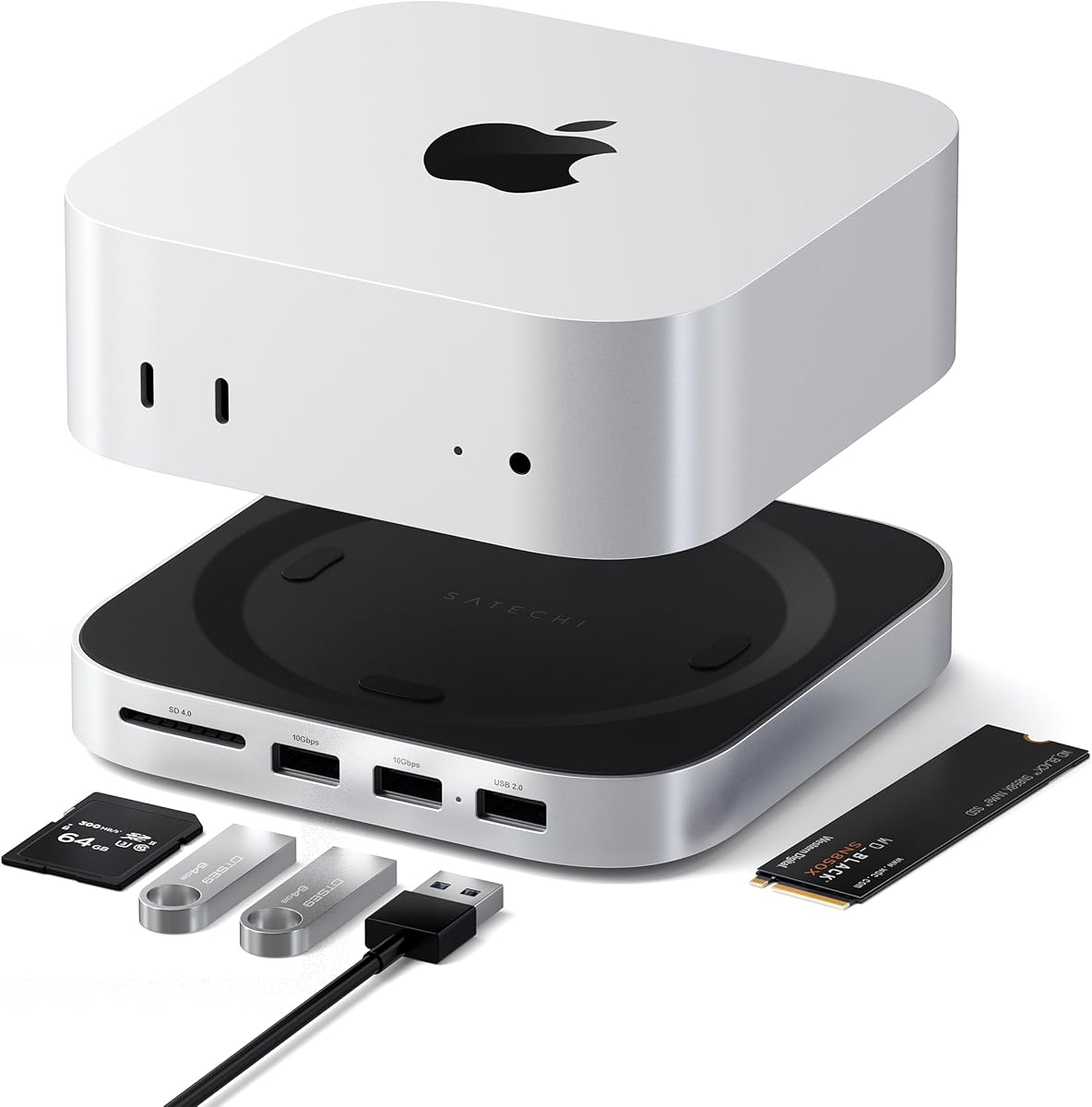
The Satechi Mac mini M6, M5 Pro, M4 Hub & Stand is a premium solution for users who want more than a generic M.2-to-USB adapter. Its 4.5 rating reflects a tightly integrated design that combines NVMe storage expansion, a raised stand, and front-facing USB connectivity. The aluminum construction and dedicated controls are intended to complement supported Mac mini setups rather than compete with them as a separate box.
We may earn a commission when you buy through this link, at no additional cost to you.
The enclosure accepts M.2 NVMe SSDs in 2230, 2242, 2260, and 2280 sizes, with storage expansion stated up to 4TB and data transfer up to 10Gbps. The SSD is not included, and modules with heat sinks or double-sided layouts are incompatible. That distinction makes the product less universal than a standard USB enclosure, but it enables a cleaner integrated installation for the Mac mini models it was designed to support.
Its front panel includes two USB-A 3.2 ports with speeds up to 10Gbps, one USB-A 2.0 port rated at 480Mbps, and a UHS-II SD card reader with a stated maximum of 312MB/s. These additions make the hub more useful for photographers, editors, and other creative professionals who regularly move media. The front-facing layout also keeps frequently connected peripherals within easy reach.
Thermal design and physical fit require attention. Bottom vents and a recessed top are designed to provide airflow without obstructing the Mac mini M4 fan, while the 12.7 by 12.7 by 2.06 centimeter stand adds only modest height. USB-A limitations include no support for CD readers, Apple SuperDrive, or iPad charging, and only one bus-powered device should be connected at a time.
The package includes a screw, screwdriver, thermal pad, manual, and access to customer support, and Satechi provides a two-year limited warranty. This dock is ideal for a compatible Mac mini owner who values a clean desk and integrated front ports. It is less suitable for portable work or computers outside the targeted Mac mini ecosystem.
The Satechi stand integrates an M.2 NVMe enclosure with several front-facing ports, reducing the number of separate accessories on the desk. Users can gain removable NVMe storage while keeping card and peripheral connections accessible from the front of the Mac mini setup.
Vent placement, the recessed top, and the aluminum finish are tailored for the targeted Mac mini models. The included thermal pad and installation hardware help position the SSD correctly, although buyers should confirm their exact Mac mini version and verify the drive's physical construction before installation.
We may earn a commission when you buy through this link, at no additional cost to you.
The Acer Mac mini Dock Hub combines M.2 storage expansion with display, USB, and memory-card connectivity, making it the most feature-rich model here. Its 4.9 rating is the highest among the ten products. It is designed for Mac mini M6, M5 Pro, M4 Pro, and M4 configurations, so its strongest appeal is to users building a polished, high-capacity workstation around one of those systems.
We may earn a commission when you buy through this link, at no additional cost to you.
The storage section supports M.2 NVMe PCIe and NGFF SATA SSDs in 2230, 2242, 2260, and 2280 sizes, with M-Key and B+M Key interfaces listed. Capacity can reach 8TB, and data transfer is stated at up to 10Gbps. The raised aluminum stand functions as a passive heatsink, while the elevated position improves airflow around the Mac mini and leaves the power button accessible.
Its integrated HDMI 2.1 output supports 4K at 144Hz with HDR, and it can work with the Mac mini's native HDMI connection for a dual-display arrangement. Actual results depend on the computer, monitor, and cable. The front or exposed connectivity includes 10Gbps USB-C and USB-A connections, while integrated SD and TF card readers support media transfers up to 104MB/s.
The accessory is purpose-built rather than universal. It does not suit a laptop, ordinary desktop, or unsupported Mac mini version, and the storage bay may not accept every SSD configuration, including modules with heat sinks. Its listed display capability also should not be interpreted as universal external-display support for every Mac configuration. The included 5V/3A power adapter and recommendation to connect power first are important for stable operation with high-capacity drives.
The package includes a USB-C cable, screwdriver, thumb screws, thermal pad, and power adapter. The SSD itself is not included. Overall, this is an excellent choice for a compatible Mac mini owner who wants high-capacity storage, fast media ingestion, modern display output, and a tidy single-cable desk setup. Buyers outside the target platform should choose a general-purpose M.2 USB dock instead.
An 8TB stated capacity makes the dock relevant to large media libraries, high-resolution project archives, and 4K editing workflows. Support for both NVMe and SATA provides flexibility, while the 10Gbps interface allows suitable host hardware and drives to move data efficiently.
HDMI 2.1 output, fast USB ports, and integrated SD and TF readers reduce the need for separate accessories. The elevated aluminum stand also serves a practical purpose by improving airflow around the Mac mini and creating a more accessible front connection area.
We may earn a commission when you buy through this link, at no additional cost to you.
The right dock depends on your M.2 drive, host ports, intended tasks, and need for portability or expansion. Review protocol support, connection speed, thermal design, and specialized features before choosing.
An M.2 shape alone does not guarantee compatibility. NVMe and SATA M.2 modules use different interfaces and protocols, so the dock must support the type of drive you own. The featured models generally support both major standards, but several exclude M.2 SATA AHCI B Key modules. Confirm the protocol, key, and dimensions printed on the SSD or in its documentation before ordering.
A 10Gbps USB interface provides a strong connection ceiling for NVMe media, while SATA drives are generally listed at up to 6Gbps. The host computer must also offer a suitable USB 3.2 Gen 2 or Thunderbolt port, and the attached cable must support the required data rate. Otherwise, the slower side of the connection will limit performance.
Common M.2 lengths include 2230, 2242, 2260, and 2280, with some docks also supporting 22110. The drive's key, such as M Key or B+M Key, must also be supported. These specifications determine whether the module can physically fit and whether the dock's controller can communicate with it.
Sustained transfers can make an SSD warm, and excessive heat may affect sustained performance or drive longevity. Aluminum housings and open-frame layouts generally provide better passive heat dissipation than compact plastic shells. No design eliminates the need for airflow, so avoid blocking vents and let a hot drive cool before removing it.
A portable dock should be small, light, and easy to connect to different systems. Several single-bay adapters weigh about 61 grams and include a USB-A-to-USB-C cable, while a dual-bay cloner or a Mac mini stand naturally occupies more space. Consider the tools you regularly carry and whether one drive or several must remain connected.
A standard M.2 dock provides access to files, but it does not necessarily duplicate a complete drive. The SSK model adds offline, one-key cloning between two matching-protocol drives. That feature is valuable for provisioning systems or creating a direct copy, though the destination should still be checked and an independent backup remains advisable.
A Mac mini-specific dock can combine NVMe storage with front USB ports, card readers, display output, and a raised stand. These integrated designs reduce desk clutter but are less versatile and usually more specialized than a universal USB adapter. Confirm the exact Mac mini model and the features you need before choosing a platform-specific accessory.
Broad operating-system support is valuable if the dock will move between Windows, macOS, Linux, Android, or Chrome OS. General-purpose adapters tend to offer the widest device compatibility, while premium Mac mini products are intentionally restricted. Also consider whether your chosen host has USB-C, USB-A, Thunderbolt, or another required connection.
Before inserting a drive, confirm that its protocol, key, and size are supported by the dock. Power off or safely shut down the host if the instructions require it, connect the dock with the appropriate USB cable, and insert the M.2 SSD in the stated orientation. Secure the drive with any retaining screw or latch, then connect the host and allow the operating system to recognize the new volume.
Format a newly purchased drive in the operating system you intend to use, and choose a file system appropriate for that device if the drive will move between systems. Back up important files before making major changes, and use the normal shutdown or eject process before unplugging the dock. If a drive is used for boot media, cloning, or a system migration, follow the software's instructions rather than assuming ordinary file copying will create a bootable copy.
To preserve performance and drive health, keep the enclosure's vents unobstructed and avoid touching an exposed SSD that becomes hot. Allow a drive to cool before changing modules, and do not use the dock as a frequent source of abrupt power removal. For cloning, verify the destination after completion and maintain at least one separate backup of irreplaceable data.
It is an adapter that lets you connect an internal M.2 NVMe or SATA SSD through USB. The drive becomes accessible as external storage without permanently installing it in a computer. A suitable model must support the drive's protocol, key, physical size, and the connection standard available on the host.
Only if the dock explicitly supports both protocols. Many M.2 modules look nearly identical but communicate through different controllers, so physical fit alone is not enough. Check for NVMe and SATA support and confirm that your drive's particular key configuration is not excluded by the manufacturer.
The advertised rate is a connection ceiling, not guaranteed file-transfer speed. The SSD itself, host port, cable, operating system, file sizes, and background activity can all reduce performance. Use a USB 3.2 Gen 2 or suitable Thunderbolt connection and compare large-file transfers rather than many tiny files.
Yes, if the computer has a compatible USB port and the dock lists support for its operating system. General-purpose models support several platforms, including Windows, macOS, Linux, and sometimes Android or Chrome OS. Mac mini-specific stands are more restricted and should not be treated as universal laptop accessories.
Most single-drive docks draw power directly from USB and do not include a separate adapter. Larger, dual-bay, cloning, or Mac mini hub designs may include a power supply to support high-capacity drives, displays, card readers, and multiple peripherals. Follow the product instructions and connect power first when instructed.
The terms are sometimes used interchangeably for a compact USB enclosure. In this guide, a dock also describes models with broader hub functions, a duplicated two-bay layout, or Mac mini integration. A simple enclosure usually focuses on one drive, while a docking product may add card readers, USB ports, display outputs, or offline cloning.
Not automatically. A standard dock provides file-level access, but full-drive duplication normally requires cloning software or a dedicated duplicator. The SSK model in this guide supports offline one-key cloning between NVMe drives or between SATA drives, but the source and destination must use the same protocol.
Some warmth is normal during sustained transfers, and the listed products include warnings that operating temperatures can become high. Avoid touching the drive while it is running, keep the enclosure's airflow open, and let it cool before removal. Persistent heat or unexpected shutdowns still warrant checking the drive, connection, and system logs.
The ACASIS 10Gbps gray dock is the strongest all-around choice because it combines broad NVMe and SATA support, a 10Gbps Type-C connection, an 8TB listed capacity, and an aluminum open-frame design. The universal M.2 USB-C dock is the best budget option, while the Satechi Mac mini Hub & Stand is the premium pick for users who value integrated storage, card reading, and front-facing USB access.
Prioritize exact drive compatibility before focusing on headline speed. Confirm the protocol, key, physical size, capacity expectation, host connector, and operating-system support. Then consider whether passive cooling, portability, offline cloning, card readers, or display expansion are important enough to justify a more specialized or premium enclosure.
Product listings, promotions, and prices can change, so check the current details and recent customer feedback before buying. A lower price does not help if the dock excludes your drive, while a feature-rich model is less useful if you only need a simple and reliable way to access a single M.2 SSD.