
Hyperkin Trooper 2 Premium USB Game Controller
4.1Editor score
Atari-style four-way joystick
Explicit macOS support
Six mappable action buttons
Ten-foot USB cable
Explore the best Mac game joysticks for arcade, flight, farming, and general gaming, compared for compatibility, controls, precision, and features.
Mac game joysticks range from retro arcade sticks to modern wireless controllers and highly specialized flight controls. A useful joystick should feel comfortable, communicate cleanly with your chosen software, and provide the axes, buttons, and connections your games require. The right choice depends heavily on whether you play fighting games, flight simulations, farming games, or classic arcade titles.
We compared all ten products by examining their stated platform compatibility, control layouts, joystick or stick technology, connectivity options, programmability, feedback features, and intended game genres. The list includes the Hyperkin Trooper 2, Thrustmaster flight controls, modern gamepads, two MAYFLASH arcade sticks, and other options with distinct strengths for Mac gaming setups.
Each review explains what the product is best suited for, the features that set it apart, and any limitations worth considering before purchase. The top picks represent the strongest options for different priorities, while the full guide covers ten alternatives. Availability, compatibility details, and prices can change, so verify the current listing and your game requirements before ordering.
4.1Editor score
4.6Editor score

4.0Editor score
The table below compares all ten options by control style, platform support, connection method, and the standout feature that makes each product most useful for Mac gaming.


The Hyperkin Trooper 2 is a USB arcade-style game controller built around a four-way joystick and a deliberately nostalgic layout. It carries a 4.1 rating, but its clearest advantage is explicit support for PC, macOS, and Linux. That cross-platform statement makes it a practical choice for Mac owners who want one controller for classic computer games, emulated arcade titles, and retro console experiences.
We may earn a commission when you buy through this link, at no additional cost to you.
Its joystick uses a short, directional design rather than a full circular analog stick. Six mappable buttons, a separate Escape function for menus, and a ten-foot cable provide a practical foundation for fighting games, arcade conversions, and older-style computer releases. The chamfered corners and rubber grommet are also intended to improve grip and comfort during longer sessions, while the solid base and plastic stick emphasize a familiar arcade aesthetic.
The tradeoff is that the four-way stick cannot reproduce full analog input. Games that require circular movement, free aiming, or standard modern console-style control are better served by an analog gamepad or an arcade stick with a full lever. It is also wired, which avoids battery management and wireless pairing but restricts cable placement. Its stated macOS support is nevertheless a major advantage over options that are primarily marketed for Windows or PC gaming.
This is an excellent choice for a Mac player who specifically enjoys classic arcade games, retro emulators, or anything designed around eight-way-era arcade controls. It may not be the right controller for modern shooters, but for its intended style of play, the Trooper 2 offers a simple, familiar layout without an unnecessary collection of modern features.
The four-way stick and six-button arrangement closely reflects the feel of traditional arcade machines. That makes the Trooper 2 especially approachable for fighters, early platformers, and old computer titles built around keyboard or joystick input.
The attached ten-foot USB cable provides a straightforward connection to compatible Mac systems. Its gaming focus is clear, and there is no charging dock, wireless protocol, or companion app to complicate the setup.
We may earn a commission when you buy through this link, at no additional cost to you.
The Thrustmaster T-Flight Stick X is a dedicated flight joystick rather than a conventional gamepad, and it earns a 4.2 rating for its focused control package. It combines a weighted base, adjustable stick tension, an integrated throttle, and a rotating handle with rudder control. The result is a compact flight setup for players who want realistic cockpit inputs without assembling several separate devices.
We may earn a commission when you buy through this link, at no additional cost to you.
Twelve programmable buttons, a dedicated mapping button, and a preset button with internal memory make it possible to organize commands for different aircraft or simulation profiles. The weighted base helps prevent movement during aggressive maneuvers, while the adjustable resistance lets the user tune the feel of the main stick. The integrated throttle and twisting rudder mechanism also reduce desk clutter compared with a full pedal and throttle arrangement.
Its primary limitation is that the supplied product information identifies the T-Flight Stick X as a PC joystick. Mac support is not explicitly stated, so a buyer should confirm compatibility in the current product documentation and the game itself before ordering. Its controls are also purpose-built for flight simulation, which means it offers little value for platformers, fighting games, or ordinary console-style titles. The need to learn separate axes and programmed commands may feel complicated to a first-time flight-sim player.
For a Mac user whose game library centers on compatible flight simulators, this is a capable and space-efficient option. The combination of resistance adjustment, integrated throttle, rudder control, and stored presets is particularly useful. For broader gaming, however, a modern multi-platform gamepad is the more adaptable purchase.
The integrated throttle and twist-to-rudder handle provide the core axes needed for a compact flight setup. This lets players manage speed and directional control without immediately adding standalone pedals or a separate throttle unit.
Adjustable resistance supports both smooth flight and more forceful combat inputs. The base remains planted while the stick tension can be adjusted to suit different control preferences and simulation demands.
We may earn a commission when you buy through this link, at no additional cost to you.
The abxylute C6 is a modern wireless gamepad with explicit Mac compatibility and a 4.3 rating. It supports Windows, macOS, Switch and Switch 2, Steam Deck, Android, iOS, and other listed platforms. That unusually broad support, combined with wired, Bluetooth, and Bluetooth dongle modes, makes it a flexible option for Mac players who also use other devices.
We may earn a commission when you buy through this link, at no additional cost to you.
Its dual Hall effect joysticks and Hall effect triggers are designed to resist drift and wear. The controller also supports 1000Hz polling in wired and Bluetooth dongle modes, offers adjustable turbo functions, and includes four vibration levels. A 600mAh rechargeable battery is stated to provide up to 18 hours of continuous play, while a gyroscope and motion-sensing support are available for compatible Switch games.
Not every feature will be useful in every Mac game, and the most favorable polling specification depends on the connection method used. Bluetooth wireless is convenient, but the manufacturer recommends the USB dongle for ultra-low latency and uninterrupted gameplay. There is also a learning curve around turbo, motion, and multi-platform setup. A PC game title that does not support Mac, or a Mac game with unusual input requirements, may still limit what the controller can do.
The C6 is well suited to a Mac user who wants one modern controller for games, Steam Deck play, Switch sessions, and mobile devices. It is also a compelling choice for players who value Hall effect sticks and high polling. Choosing a modern gamepad over a traditional joystick, however, means it is less ideal for games specifically designed around a single lever.
Explicit Mac support and three connection options make the C6 useful beyond desktop gaming. Players can choose a cable for reliable low-latency input, Bluetooth for convenience, or the dongle when competitive response matters most.
The Hall effect sticks and triggers are intended to reduce analog drift and physical wear. Their value is especially apparent for owners who play frequently and want consistent directional and trigger response.
We may earn a commission when you buy through this link, at no additional cost to you.
The MAYFLASH F300 Fight Stick is an open, customizable arcade platform with a 4.5 rating. It is compatible with macOS, Windows, Steam Deck, Android, Switch, and several Xbox and PlayStation systems. Unlike a fixed gamepad, its controls are designed to accept compatible Sanwa Denshi buttons and joysticks, letting users configure the layout for their preferred games.
We may earn a commission when you buy through this link, at no additional cost to you.
On PC, the F300 supports both XInput and DInput. That flexibility is important because different games and emulators may expect different control protocols. The platform also supports Turbo functions with different speed settings, giving fighting-game players a practical way to automate repeated inputs. Its broad console compatibility makes it a flexible base for a mixed gaming setup.
The F300 is a bare platform rather than a fully specified premium stick-and-button bundle. Buyers should confirm whether compatible Sanwa components are included with the current configuration before shopping for extras. The metal deck and raised control surface also occupy more desk space than a compact gamepad. Input modes, macros, and Turbo functions may require game-specific knowledge, so setup is less effortless than simply connecting a wireless controller.
For Mac fighting-game and arcade-game players, the F300 offers an excellent balance of adaptability, stated platform support, and customization potential. It is especially attractive for anyone who wants to change sticks or buttons over time. Those wanting a ready-to-use premium configuration may prefer the F300 Elite instead.
Compatibility with Sanwa Denshi joysticks and buttons allows the control layout to evolve with different genres. Fighting games, shmups, and classic arcade titles can each benefit from an appropriately configured stick and button arrangement.
XInput and DInput support helps the F300 work with a wider selection of software. Turbo functions with adjustable speed settings add convenience for compatible fighting games without changing the physical controls.
We may earn a commission when you buy through this link, at no additional cost to you.
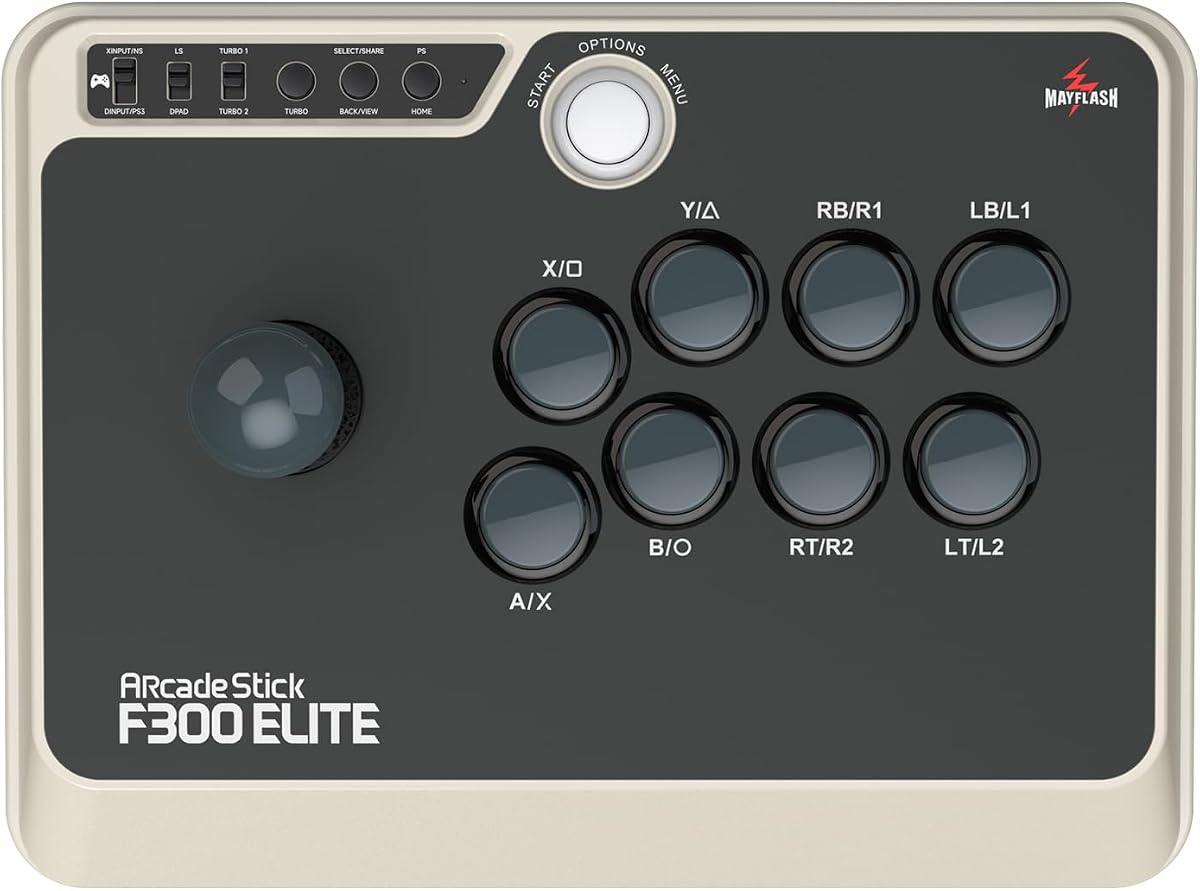
The MAYFLASH F300 Elite combines a customizable arcade platform with a complete set of nine Sanwa buttons and a precision four-way joystick. Its 4.6 rating is the highest among the products in this guide, and its stated compatibility includes macOS, Windows, Steam Deck, Android, Switch, Xbox, and PlayStation systems. That combination makes it the most versatile all-around arcade joystick here.
We may earn a commission when you buy through this link, at no additional cost to you.
The included Sanwa components provide responsive face and auxiliary buttons, while the four-way joystick suits classic fighting-game movement. The interior is accessible, allowing the joystick and buttons to be switched as the player's setup changes. On PC, both XInput and DInput are supported, and Turbo functionality is available. Compatibility with PS5 is possible through the separately referenced MAYFLASH adapters.
As an arcade stick, it has a larger footprint than a modern gamepad and is not intended to provide dual analog sticks, motion controls, or a rotating stick for 3D games. The included joystick is limited to four directions, so flight, racing, and modern third-person action games may feel ill-suited to it. It also requires a suitable playing surface and can take up a meaningful portion of a compact desk.
For a Mac player building an arcade or fighting-game setup, the F300 Elite is the most complete and flexible recommendation in this roundup. It arrives with premium components, supports customization, and explicitly covers macOS. The result is an option that can grow with the user's game library rather than being tied to a single genre.
Nine responsive Sanwa buttons and a precision four-way joystick give the F300 Elite a strong foundation immediately. It saves the buyer from having to source a complete set of standard arcade components before the first session.
The accessible interior and replaceable joystick and buttons make the platform attractive to modding enthusiasts. Players can reconfigure the control layout when moving between fighting games, arcade classics, and other supported genres.
We may earn a commission when you buy through this link, at no additional cost to you.
The Thrustmaster SimTask FarmStick is a specialized controller designed for Farming Simulator 25 on PC and PS5. It earns a 3.7 rating, but that figure does not fully convey how specifically it targets heavy-machinery play. The three-axis joystick, numerous programmable inputs, and magnetic sensors are intended to make tractors, loaders, and construction equipment feel more methodical and realistic.
We may earn a commission when you buy through this link, at no additional cost to you.
Its control set includes buttons, a thumbwheel, mini-stick, triggers, and rocker switches, providing up to 33 programmable inputs. Hall effect magnetic sensors are designed to improve accuracy and resist drift and wear. The ambidextrous design also makes it possible to pair the FarmStick with a racing wheel or use two units to create a broader cockpit-style setup.
A racing wheel is required for use alongside it, which increases both the cost and complexity of a complete setup. More importantly, the product information identifies PC and PS5 rather than macOS, and its advertised design focus is Farming Simulator 25. Mac compatibility therefore needs careful verification. Its many specialized controls would also be unnecessary for ordinary action games, platformers, or arcade titles.
This FarmStick is for a narrow but serious audience: Mac owners who play Farming Simulator 25 on a compatible PC system and want authentic machinery inputs. If the required game and platform configuration do not align, a general-purpose gamepad will offer much broader value. Within its intended farming cockpit, though, the specialized controls are unusually thorough.
The three-axis stick is designed around tractors, loaders, and construction machinery rather than general game movement. It offers a more specialized way to handle positioning, attachment work, and machine functions.
Up to 33 programmable inputs allow frequently used vehicle and attachment commands to be placed on the controller. This can reduce dependence on the keyboard and make complex machinery sequences more manageable.
We may earn a commission when you buy through this link, at no additional cost to you.
The 8Bitdo Ultimate 2 is a polished wireless gamepad for PC, Apple, Steam, and Android, earning a 4.5 rating. It combines TMR joysticks with the 8Speed 2.4G wireless system, a 1000Hz polling rate in 2.4G and wired modes, and a broad set of competitive and convenience features. Its clean styling and included charging dock also make it appealing as a primary everyday controller.
We may earn a commission when you buy through this link, at no additional cost to you.
The stick system is designed for higher sensitivity, greater precision, and improved durability. Users can switch between linear Hall effect triggers and non-linear tactile triggers, allowing the response to suit different game genres. Additional features include configurable six-axis motion control, rumble, turbo, two pro back paddles, extra R4 and L4 bumpers, and tactile shoulder and directional controls.
The specified 2.4G performance depends on using the corresponding 8Speed connection rather than an arbitrary Bluetooth connection. Although the product is designed for PC, Apple, Steam, and Android, a buyer playing a particular Mac title should verify that the game's input layer accepts the controller. The conventional dual-stick design also does not reproduce the full lever movement of an arcade stick, and the included dock adds a permanent place to the setup.
For Mac players whose library includes modern PC, Steam, or Apple-compatible games, the Ultimate 2 is an excellent general-purpose wireless controller. It is particularly compelling for owners who want low-latency wireless input, adjustable triggers, motion features, and a charging dock in one package.
The 1000Hz polling specification applies to the controller's 2.4G and wired connections. This provides a responsive foundation for action, racing, and competitive games where timely input is important.
A switch between linear Hall effect and non-linear tactile triggers lets the user select the response that feels right for a given title. This is a useful distinction between smooth analog control and a more physically pronounced trigger.
We may earn a commission when you buy through this link, at no additional cost to you.
The Moonag Wireless PC Controller is a multi-platform gamepad with a 4.3 rating. It supports Windows PC through a 2.4G USB receiver and Nintendo Switch, iOS, and Android through Bluetooth. Its most relevant attraction for a Mac-focused buyer is the 1000Hz polling rate offered in both 2.4GHz wireless and wired modes, together with Hall effect joysticks designed to resist drift and wear.
We may earn a commission when you buy through this link, at no additional cost to you.
The controller also includes Turbo, programmable macro buttons, dual vibration motors, and dynamic RGB lighting around the sticks and buttons. An 800mAh rechargeable battery supports extended play, and the supplied product information states that the controller can be used while charging. The textured, non-slip grip and balanced weight are designed to improve comfort during extended sessions.
The stated platform list does not include Xbox or PlayStation consoles, which may disappoint buyers with a broader console library. Mac is not explicitly named in the platform description, so Mac support should be confirmed with the seller and game. Macro, Turbo, lighting, and vibration behavior also depends on the title and operating system's input support. A game that only recognizes standard inputs may ignore some advanced features.
The Moonag controller is a good fit for a Mac user who wants fast polling, flexible connections, and a broad collection of modern features. It is particularly attractive for players who enjoy RGB equipment or use macros in supported games. Those who require verified console and Mac support should look for a model whose product listing explicitly names those platforms.
The 2.4G receiver and Bluetooth modes allow the controller to move between Windows, Switch, iOS, and Android devices. This makes it useful for a gaming setup that extends beyond a single computer.
A 1000Hz polling rate is available in both 2.4GHz and wired modes. Players can therefore prioritize a stable cable when needed or retain the convenience of wireless operation without accepting the lowest listed polling specification.
We may earn a commission when you buy through this link, at no additional cost to you.
The Logitech G X56 H.O.T.A.S is a premium combined throttle-and-joystick flight control with a 4.0 rating. It brings a stick, twin throttles, numerous switches, and a separate mini analog stick into one unit. Its Hall effect sensors and adjustable four-spring system are designed for flight simulation, space simulation, and other applications that reward detailed cockpit control.
We may earn a commission when you buy through this link, at no additional cost to you.
The main stick uses accurate 16-bit aileron and elevator axes, while the mini analog stick can handle additional directions and separately controlled gimballed weapons. The throttle section includes a friction adjuster and locking system. More than 189 programmable controls, RGB backlighting, and a two-meter cable complete a sophisticated control surface for players who want extensive configuration options.
The supplied system requirements specifically list Windows versions and two USB 2.0 ports, so Mac compatibility is not established by the product data. A buyer should confirm current driver, software, and game support rather than assuming the Windows-focused configuration will work natively. The device is also large, requires desk space, and is overkill for standard gamepad input. Learning curve and setup time are additional considerations.
The X56 is the most advanced premium flight control in this roundup and the natural choice for a compatible Mac flight-sim enthusiast who wants comprehensive, realistic controls. It offers considerably more than a simple flight stick, including programmable surfaces, dual throttles, and adjustable resistance. Mac owners should treat native support as a key verification point before buying.
The mini analog stick and extensive switch layout supplement the primary flight axes. This makes it possible to manage navigation, weapons, and other cockpit functions without constantly reaching for the keyboard.
A four-spring system changes the resistance of the main stick, while the twin throttles include adjustable friction and a lock. These settings let the pilot tailor the hardware to different control styles and aircraft.
We may earn a commission when you buy through this link, at no additional cost to you.
The SPEEDLINK SL-650212-BKRD Competition PRO EXTRA is a retro-arcade joystick inspired by the original Competition Pro arcade machine stick. It carries a 3.9 rating and is styled in black and red for players who value a nostalgic setup. The Anniversary Edition also includes a collection of 20 retro games available for download.
We may earn a commission when you buy through this link, at no additional cost to you.
Its digital USB connection suits arcade and retro games that rely on digital directional input rather than analog motion. The design is straightforward and focuses on recreating a recognizable cabinet-style control experience. It is also listed for PCs and Android devices, giving it some value for a broader retro-gaming collection.
Mac compatibility is not stated in the supplied information, so users should verify it before purchase. Digital controls may not meet the requirements of modern games that need analog movement, pressure-sensitive input, or multiple axes. The listing does not describe extensive programming, remapping, or platform-specific features, and the included downloads should be checked for Mac availability and usability.
This SPEEDLINK is best for a Mac owner who is assembling a nostalgic retro-gaming corner and has confirmed compatibility. Its appeal lies in the classic silhouette and arcade focus rather than modern versatility. Players seeking more flexible controls, current platform support, or customizable fighting-game inputs should favor one of the modern gamepads or MAYFLASH arcade sticks.
The design takes its visual cues from the original Competition Pro arcade stick. That makes it a natural fit for a home setup built around classic cabinet games and retro software.
The Anniversary Edition includes 20 retro games for download. Buyers should confirm the operating-system requirements of the included titles, particularly when using them with macOS.
We may earn a commission when you buy through this link, at no additional cost to you.
Choosing the right Mac game joystick starts with the games you play, the input format they support, and the amount of desk space available. Compatibility, control layout, connection method, and long-term reliability should all be considered before making a choice.
In short, explicit Mac support is the safest starting point, while vague USB compatibility is not enough to guarantee a smooth experience.
Choose the control geometry that mirrors your most-played genre instead of choosing based on appearance alone.
Use four-way sticks for direction-based arcade games and dual analog sticks for modern 3D movement.
Prefer a cable for the simplest dependable setup, or verify that the Mac and game support your chosen wireless protocol.
Favor programmable inputs and editable presets only when the setup process and software work on your Mac.
Prioritize stable controls and low-drift sensors, then treat vibration, lighting, and motion as useful secondary features.
Measure your desk and plan the control position before committing to a full-size arcade or flight rig.
Choose a ready-equipped stick for convenience or an open platform when component replacement and modding are central goals.
Begin by confirming that the game supports your chosen controller and checking the current manufacturer instructions for Mac connection steps. Connect a wired device through its USB cable, or power on a wireless controller and select the appropriate pairing method. For products that support both 2.4G receivers and Bluetooth, use the mode recommended by the manufacturer for the game and prioritize the lowest-latency option when responsiveness matters. Once connected, open the game and verify that movement, action buttons, triggers, and menu controls all register correctly. If inputs are reversed, missing, or mapped incorrectly, consult the game-control settings before modifying the hardware.
For customizable arcade sticks, photograph the original button and stick arrangement before making changes. Power the device down before opening the platform or swapping components, and keep screws and small parts organized in a container. Program one control layout at a time and test it in a training menu or a low-stakes game session. Store Turbo, macro, axis, and preset configurations carefully after they work as intended, especially when using a Mac application that saves profiles to the device. For flight and farming controls, calibrate only as directed and begin with the default sensitivity before adding custom axis curves or dead zones.
Keep arcade sticks stable on a clean, level surface and avoid pulling hard on a stick or button during calibration. For wireless controllers, follow the stated battery guidance and recharge them before long sessions; leaving a controller connected while charging is supported only for products whose specifications say so. Protect USB cables from sharp bends, clean the top of buttons with a lightly damp cloth, and avoid liquids near the control surface. Periodically check stick movement, trigger response, firmware updates, and any changed compatibility notes, especially when a Mac operating-system update or game patch may affect device recognition.
No. Several products explicitly list macOS, including the Hyperkin Trooper 2, both MAYFLASH F300 models, and the abxylute C6, but others are described primarily for PC, Windows, PS5, or Android. Mac compatibility can also depend on the game and any required configuration software. Always check the current listing, driver support, and game's input requirements before purchasing.
It depends on the game. Four-way sticks are excellent for classic fighting games and arcade titles whose movement is based on discrete directions. Dual analog controllers are better for modern 3D games, platformers, and action titles that need continuous circular movement. A Mac player with both genres may find a modern gamepad and a dedicated arcade stick more useful than one universal device.
A basic USB controller is usually the simplest because it avoids pairing, batteries, and configuration software. The Hyperkin Trooper 2 is a straightforward wired example, while the MAYFLASH arcade sticks also avoid complex setup. Wireless gamepads offer more convenience, but their Mac behavior depends on game support and the chosen 2.4G or Bluetooth connection.
A standard gamepad can control some flight games, but a dedicated flight joystick offers separate throttle, rudder, and axis controls. The T-Flight Stick X combines a stick, throttle, and twisting rudder in one unit, while the Logitech X56 provides a much larger and more programmable premium setup. Confirm macOS and game support before choosing either device.
Choose the F300 Fight Stick if you want an open customizable platform and intend to install compatible Sanwa Denshi components. Choose the F300 Elite if you prefer a complete set with nine Sanwa buttons and a four-way joystick already included. Both support macOS and PC, but the Elite offers a more turnkey arcade or fighting-game setup.
They are designed to reduce drift and physical wear associated with some conventional analog stick mechanisms. The abxylute C6 and Moonag controller use Hall effect sticks, while the 8Bitdo Ultimate 2 uses TMR technology. They can be attractive for frequent players, although the overall control experience still depends on the game, connection, and build quality.
Sometimes, but not perfectly. A modern wireless gamepad handles console-style games well but may not reproduce the lever movement and button spacing of an arcade stick. A four-way arcade joystick excels in fighting and retro games but cannot provide full analog movement. Owning both can create a more complete setup than trying to force one control style onto every title.
First confirm that the game supports the controller and that its Mac input requirements are met. Reconnect the cable or repeat the documented Bluetooth pairing process, then restart the game and Mac. For specialized products, check whether configuration software or a driver is required and whether the application has current macOS support. If the game supports only standard XInput or DInput devices, verify that the controller offers the appropriate mode.
The MAYFLASH F300 Elite stands out as the strongest overall choice because it combines a complete set of Sanwa components, a four-way stick, broad platform support, and an interior designed for future customization. The Hyperkin Trooper 2 delivers the most approachable retro-focused experience, while the Logitech G X56 H.O.T.A.S represents the premium end of the category for flight simulation enthusiasts who can confirm the required software and game support.
Prioritize the control style your games actually require rather than choosing solely by features. Fighting-game players should examine four-way sticks, button spacing, Turbo support, and input protocols. Modern action and strategy players should look for dual analog sticks, reliable triggers, and a Mac-compatible wireless connection. Flight and machinery players need the correct axes, throttles, and programmable commands, while retro players should consider a wired design and a nostalgic layout.
Before ordering, verify current Mac compatibility, game support, included parts, and any adapter or accessory requirements. Prices and availability change, and software updates can alter compatibility or feature behavior. Checking those details at the time of purchase helps ensure that the selected joystick works as intended with your Mac and the games you want to play.