
PoE-T100 Inline Tester
4.1Editor score
Bright OLED display
Inline PD DC modes
Self-powered operation
This Inline POE Tester guide compares ten tools for voltage, current, power, polarity, standards, cable faults, and network diagnostics.
An inline POE tester helps technicians determine whether a Power over Ethernet connection is delivering the expected power while a cable or endpoint is installed. The most useful models identify PoE standards and measure voltage, current, wattage, polarity, and power sourcing behavior, while some also check continuity, cable length, or basic Ethernet faults.
This guide compares ten inline and multifunction PoE testing tools using the supplied product information. The evaluation considers supported standards, measurement ranges, operating modes, display features, cable-testing functions, portability, and whether a device can function as a standalone tester, an inline monitor, or both. Products with limited or unavailable customer ratings remain included for feature-based comparison.
Each review explains what the tester is best suited to, along with practical advantages and trade-offs. The top selections favor broad standards support, clear real-time measurements, useful diagnostic modes, and straightforward field operation. Product availability, included accessories, technical specifications, and customer ratings can change, so readers should confirm current listing details before purchasing.
4.1Editor score

4.1Editor score

4.5Editor score
The comparison below highlights the supported PoE technologies, measurement capabilities, diagnostic modes, display type, and cable-testing functions of all ten models, helping technicians identify the most suitable tool for a particular installation environment.


The TRENDnet TC-NTP1 combines broad PoE coverage with an approachable inline workflow, making it our overall selection for technicians who need to test modern and legacy power-delivery systems. Its supplied rating is 4.1, and its strongest features are three clearly defined operating modes, support for IEEE 802.3af, 802.3at, and 802.3bt devices up to 100W, and the ability to measure actual voltage, amperage, and wattage.
We may earn a commission when you buy through this link, at no additional cost to you.
T-mode evaluates a PSE device, such as a PoE switch or injector, and reports supported PoE behavior and output voltage. N-mode addresses non-standard passive PoE equipment, while I-mode is designed for inline testing and displays the power consumed by a connected PD. A step button cycles through measurements or locks the display on a chosen value, which is useful when monitoring load during extended troubleshooting.
The main limitation is that this is primarily a power diagnostic tool rather than a comprehensive cable analyzer. Its listed capabilities do not include detailed wire mapping, cable-length measurement, or fault-location features found in some multifunction competitors. The compact, battery-free design is nevertheless a major advantage because it removes charging and battery-management concerns from mobile work.
This is a strong choice for network installers, security integrators, and IT technicians who regularly test PoE switches, injectors, cameras, access points, and other powered devices. Choose it when standards coverage, real-time inline readings, and simple plug-in operation matter more than full cable continuity diagnostics. For most general PoE troubleshooting, it offers the most balanced feature set in this group.
T-mode, N-mode, and I-mode let one compact unit handle source testing, passive-device testing, and inline load monitoring. That versatility reduces the need to carry several specialized diagnostic tools.
The step button can cycle among voltage, amperage, and wattage or hold a selected reading on screen. This makes the tester practical for observing consumption while troubleshooting a powered endpoint.
We may earn a commission when you buy through this link, at no additional cost to you.
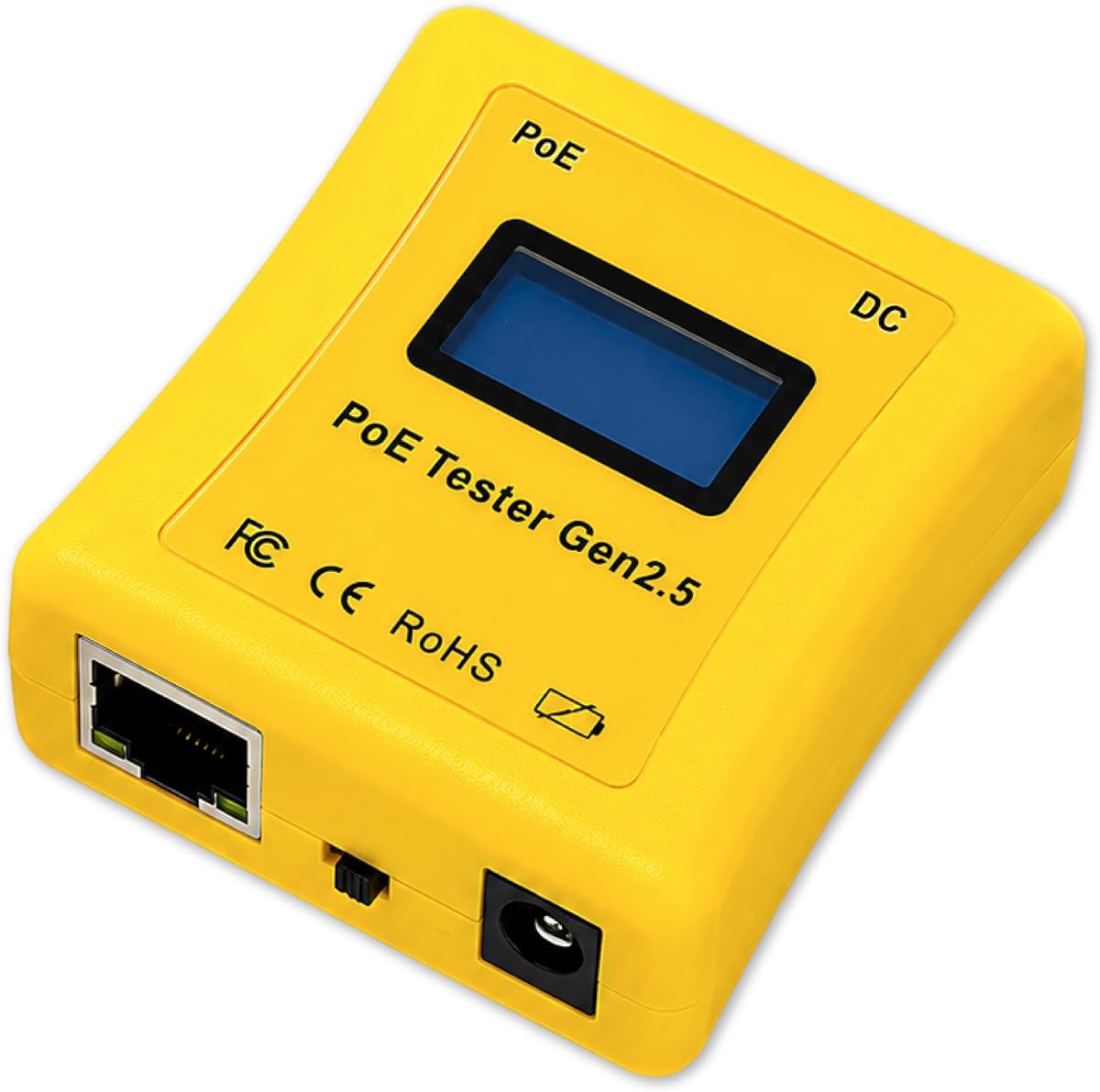
The PoE-T100 stands out for its bright OLED display and its ability to combine PoE testing with measurement of conventional DC supplies. It carries a supplied rating of 4.1 and supports IEEE 802.3af, 802.3at, 802.3bt, PoE++, passive PoE, and 12–57V DC sources. The result is a flexible tool for modern high-power devices, legacy endpoints, and non-PoE installations.
We may earn a commission when you buy through this link, at no additional cost to you.
PD Mode simulates a powered device, Inline Mode measures power as data passes between a PSE and PD, and DC Mode evaluates voltage, current, and polarity from a conventional power source. The OLED presents power, voltage, and current together on one page, reducing the need to cycle repeatedly through separate values. It can also distinguish standard 36–57V PoE from non-standard 12–57V passive arrangements.
Its self-powered design draws energy directly from the connected PoE or DC source, so no external supply or battery is needed during powered operation. The tradeoff is that this design is inherently dependent on having an appropriate source to test. Unlike dedicated continuity testers, it does not advertise wire mapping, fault finding, or cable-length measurement, so it should be viewed as a power-and-inline diagnostic instrument rather than a full cable analyzer.
The PoE-T100 is well suited to installers and network engineers who want one compact display for PSE identification, PD simulation, inline monitoring, and DC supply checks. It is especially attractive when readability and real-time data matter. Buyers needing physical cable diagnostics should choose a multifunction model, but for focused power troubleshooting, this tester offers excellent mode flexibility.
The screen can show power, voltage, and current together, allowing a technician to interpret the relationship between source output and endpoint demand without repeatedly changing screens.
Support for 12–57V DC broadens the tool beyond standard PoE. It can assess non-standard passive systems and conventional supplies when a field technician needs one diagnostic instrument for several power types.
We may earn a commission when you buy through this link, at no additional cost to you.
The PoE Texas Tester combines a 4.3 supplied rating with strong diagnostics for modern 802.3bt installations. Its most appealing feature is a completely self-sustaining design: the tester draws power from the PoE line, eliminating the inconvenience of carrying or charging batteries. It is built for technicians who need to identify PoE type, measure endpoint consumption, and verify a source before committing to an installation.
We may earn a commission when you buy through this link, at no additional cost to you.
A dedicated Simulate PoE Device mode is particularly useful when working with managed or auto-negotiating switches because it lets the tester act as a powered-device endpoint. The LCD automatically cycles through voltage, current, and power, while the measurement range extends from 3.5 to 56 volts and supports current up to 280 watts at 56 volts. It can check DC supplies as well as AF, AT, and BT PoE configurations.
Compared with multifunction cable testers, this model focuses on power rather than physical wiring. The supplied information does not mention continuity mapping, opens, shorts, or cable-length measurement. Another practical limitation is inherent in its self-powered design: it needs an energized PoE line for normal PoE operation, making it less suitable for diagnosing a completely dead or unpowered run by itself.
The tester is a good fit for field service professionals supporting cameras, VoIP phones, wireless installations, and other PoE endpoints. Its compact, curved body is easier to carry than a full cable analyzer, and the simulated-device mode makes source testing more practical. For a technician whose main goal is understanding power delivery, it is one of the most focused and convenient options listed.
Simulate PoE Device mode lets the tester request or observe power as though it were the connected endpoint. This is useful for checking a switch or injector without attaching the final equipment.
The stated capability reaches 280 watts at 56 volts, giving technicians room to inspect higher-output systems. The broad voltage and power coverage is relevant for contemporary 802.3bt deployments.
We may earn a commission when you buy through this link, at no additional cost to you.
The NOYAFA NF-488 earns a place for technicians who need both PoE diagnostics and basic network-cable testing in one unit. It has a supplied rating of 4.5 and can identify standard or non-standard PoE information, including AF and AT voltage standards, power-supply polarity, and jumper methods across a 0–60V range. That makes it useful for installation and troubleshooting tasks involving security, communications, and low-voltage cabling.
We may earn a commission when you buy through this link, at no additional cost to you.
Its remote wiring function checks for open circuits, short circuits, and crossovers and can also measure shielded wires. A backlit LCD presents results clearly, while separate illumination and shutdown timers improve visibility and control in dark workspaces. A power test function can evaluate DC current along with voltage, current, and power between a supply and connected equipment.
Although the product is called an inline tester in some contexts, its supplied feature list emphasizes remote cable and loop-back diagnostics rather than continuous pass-through monitoring. It also does not state the exact current or power measurement limits, so technicians working near maximum loads should verify those details in the manual. It is therefore a versatile inspection tool but not the clearest choice for watching a live PoE load.
The NF-488 is a strong option for installers who need to verify both wiring and power during commissioning. It is particularly useful for security monitoring and communication installations where diagnosing a failed endpoint requires checking both continuity and PoE behavior. Choose it when cable-fault coverage is as important as power measurements.
The combination of PoE identification and remote continuity checks reduces the need to diagnose cable faults and power faults separately. It is a practical approach for commissioning installed runs.
Independent backlighting and illumination improve readability where a rack, wall cavity, or under-desk installation lacks direct light. The shutdown timer also helps conserve the tool during intermittent testing.
We may earn a commission when you buy through this link, at no additional cost to you.
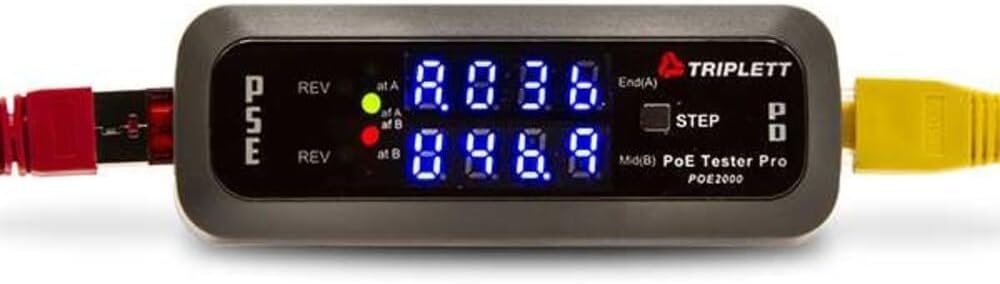
The Triplett POE2000 is built around fast visual identification of PoE source behavior. Its supplied rating of 3.5 is the lowest numerical rating among the products with published scores, but its LED-focused design remains useful for technicians who prefer immediate status indications over a dense, continuously changing display.
We may earn a commission when you buy through this link, at no additional cost to you.
Dual seven-digit LED groups identify whether power originates from an End Span source, a Mid Span source, or all four pairs. Separate indicators detect reversed polarity, and the tester can determine whether the connection uses standard PoE or non-standard passive PoE. These functions help isolate source configuration and wiring problems quickly.
When placed inline, the display alternates among voltage, current, and power. A step button lets the user select a specific measurement, allowing the display to remain on the most relevant value. The limitation is that the unit focuses on PoE classification and power rather than comprehensive continuity, mapping, or cable-length testing. The LED-heavy presentation may also require more interpretation than a full-screen numerical interface.
The POE2000 is a practical option for network installers who often need to identify PSE type, power source, and polarity before troubleshooting an endpoint. It works well for rapid inspection of standard and passive systems. Buyers who require a detailed screen, advanced high-power measurements, or a complete cable analyzer should look to the more instrument-oriented alternatives in this list.
End Span, Mid Span, and all-four-pair indications narrow down how the source is supplying power. This can reveal whether a problem comes from an unusual wiring arrangement or injector configuration.
Dedicated reversed-polarity indicators help users notice incorrect power orientation quickly. The visual warning is easy to interpret during installation or source replacement.
We may earn a commission when you buy through this link, at no additional cost to you.
The Triplett POE3000 extends the POE2000 concept with explicit IEEE 802.3af, 802.3at, and 802.3bt support. No customer rating is supplied, so its appeal should be assessed from its specifications. It detects PSE type and class, identifies the power source, reports polarity, and distinguishes End Span, Mid Span, and all-four-pair arrangements.
We may earn a commission when you buy through this link, at no additional cost to you.
Four main LEDs indicate the recognized PoE standard, while two yellow LEDs warn of reversed polarity. Inline operation alternates between voltage, current, and power, and a step button allows a specific value to be selected. It also determines standard or non-standard passive PoE behavior, making it suitable for environments that contain a mixture of modern PoE and legacy passive devices.
As with the POE2000, the POE3000 is primarily a power diagnostic instrument. The supplied information does not describe detailed wire mapping, opens and shorts testing, cable length, or endpoint simulation. Its lack of a published rating also means buyers cannot compare customer satisfaction using the provided data, and should instead judge it by the required standards and diagnostic functions.
The POE3000 is best suited to technicians who prioritize detailed PoE source classification and inline power readings. Its standards support makes it relevant for current networks, including 802.3bt equipment. It is a solid choice when standardized indicators and selectable measurements are preferable to a large graphical display.
The primary LEDs distinguish 802.3af from 802.3at and 802.3bt behavior. This gives technicians a quick way to verify that a source and endpoint are operating within the expected PoE category.
PSE type, class, source arrangement, polarity, and inline measurements are all included. Together they provide a useful diagnostic profile without moving to a full cable analyzer.
We may earn a commission when you buy through this link, at no additional cost to you.
The Jonard Tools POE-1 is a comprehensive field kit that combines PoE measurement with cable continuity and resistance checks. It supports passive PoE as well as IEEE 802.3af, 802.3at, and 802.3bt, while measuring voltage and amperage. No customer rating is supplied, but the included cable remote, adapter, manual, and batteries make the package practical for mobile work.
We may earn a commission when you buy through this link, at no additional cost to you.
For cable inspection, it verifies continuity and resistance across Cat5, Cat5e, Cat6, and Cat6a wiring. Its operating flexibility is another strength: the tester can draw power directly from a PoE line, while the included AA batteries allow it to test unpowered cables. That dual-power approach avoids the limitation seen in tools that work only when a source is present.
The package also includes an RJ45 female-to-female adapter, which can be useful for different connection arrangements. The primary trade-offs are that no customer rating is available, and the supplied description does not identify the display type, measurement accuracy, or whether true pass-through monitoring is supported. It is therefore less immediately transparent than models with detailed OLED specifications.
The POE-1 is a good choice for technicians who need both wiring and power diagnostics in one portable package. It is especially useful for preliminary installation checks because it can inspect unpowered cables as well as energized PoE links. Choose it when broad standards support, continuity testing, and a complete accessory set outweigh the benefit of a large color display.
Included AA batteries let the continuity and resistance functions work on unpowered cables. Technicians can inspect a run before connecting expensive powered equipment.
The cable remote, female-to-female RJ45 adapter, instruction manual, and batteries cover several common connection and testing needs. The included belt clip supports hands-free transport.
We may earn a commission when you buy through this link, at no additional cost to you.
The IEEE 802.3 PoE Tester combines the highest supplied customer rating in the group, 4.6, with unusually broad installation diagnostics. It supports standard IEEE 802.3af, 802.3at, and 802.3bt systems, detects non-standard 5–60V DC PoE, and checks 2–80W loads. A 1500mAh rechargeable battery supports extended work away from an energized source.
We may earn a commission when you buy through this link, at no additional cost to you.
Cable diagnostics extend to length measurement for CAT5 and CAT6 runs from 5 to 300 meters. Continuity testing reaches up to 600 meters and identifies shorts, opens, and miswires in both STP and UTP cables. Port flash detection can locate an active network port, while load testing verifies whether connected devices receive adequate power. These additions make it more of a complete installation tool than a simple inline meter.
The main limitation is its stated 80W maximum load detection, which is lower than the 100W capability advertised for some 802.3bt-oriented competitors. Although it identifies 5–60V non-standard PoE, the description does not explicitly guarantee full passive-PoE operation. Its rechargeable design also requires attention to battery charge and may not offer the immediate self-powered convenience of the TRENDnet or PoE-T100.
This tester is a strong fit for cable installers who need to validate both physical runs and power delivery. Length, fault, active-port, and load checks can reduce repeated trips between a remote endpoint and a distribution rack. Choose it for comprehensive commissioning, while considering the load ceiling when working with the highest-output PoE equipment.
Cable length, continuity, fault type, port status, and PoE load can all be checked with one unit. This breadth is valuable when validating newly installed infrastructure.
The 1500mAh battery, adjustable auto-shutoff, and low-battery indicator are designed for repeated field sessions. Automatic shutdown helps preserve charge when the tester is temporarily unattended.
We may earn a commission when you buy through this link, at no additional cost to you.
The Inline Cat5/6 DVM and Network PoE Tester is a specialized tool for technicians who want digital voltmeter functionality alongside basic network and PoE diagnostics. It supports CAT5 and CAT6 and is described as an inline tester with a power panel. No customer rating is supplied, and the available product information is more abbreviated than that of the other models.
We may earn a commission when you buy through this link, at no additional cost to you.
Its defining feature is the combination of DVM-style voltage measurement and network PoE checking in a compact inline format. That pairing may be useful for installation and service work where a technician needs to inspect both an Ethernet run and the electrical condition at a connection. The product title indicates Cat5/6 support, but the supplied description does not enumerate individual PoE standards or detailed measurement ranges.
Because the factual information is sparse, buyers should not assume support for 802.3bt, passive PoE, cable mapping, length measurement, or advanced PSE classification. The absence of a published rating also prevents a direct customer-satisfaction comparison. In addition, the listing's abbreviated wording leaves unclear whether the unit performs simultaneous pass-through monitoring or provides only point diagnostics.
This product is best considered for users whose work specifically calls for a combined DVM and Cat5/Cat6 PoE tester. It may fill a niche toolbox requirement, but anyone responsible for choosing equipment for an entire technical team should seek clearer specifications or a better documented model. Its strongest rationale is specialized functionality, not verifiable breadth of features.
The DVM function adds electrical voltage measurement to the network-testing role. That combination can be convenient when assessing both cabling and the power side of an installation.
The product is designed for inline placement between network equipment and a cable run. This makes it relevant to technicians who routinely monitor or diagnose active Ethernet connections.
We may earn a commission when you buy through this link, at no additional cost to you.
The NF-488 Cat5e/6 Tester is a multifunction entry-level option with a supplied rating of 4.4. It checks CAT5e and CAT6 wiring for shorts, crossovers, and open circuits, while its PoE functions identify AF and AT standards, voltage, polarity, and operating mode. It also detects non-standard PoE information, making it suitable for mixed standard and passive installations.
We may earn a commission when you buy through this link, at no additional cost to you.
Loop-back testing helps determine whether a wiring loop is functioning correctly. The tester can also measure the voltage, current, and power consumed by connected DC appliances. Its stated ranges include 0–60V for voltage, 0–3A for current, and 0–180W for power, giving installers useful limits for routine power diagnostics.
The built-in LED lamp is a practical addition for dark work areas, where a screen alone may be difficult to read. The tradeoff is that this is not a true live inline monitor and lacks the advanced source classification or simulated-device functions found among the higher-end models. It is better suited to commissioning and fault-finding than continuous observation of a production PoE link.
The NF-488 is a good choice for installers who need broad baseline testing without a specialized high-end model. Its combination of wiring faults, loop-back results, standard PoE identification, and DC measurements offers solid everyday coverage. Choose it when practical field convenience and multifunction testing matter more than a large display or continuous wattage monitoring.
The listed ranges of 0–60V, 0–3A, and 0–180W are clear for routine field decisions. They also help buyers understand whether the tool aligns with the power levels used in their installations.
The integrated LED lamp illuminates low-light spaces where a tester screen may be difficult to inspect. It is a small feature with meaningful value in racks, crawl spaces, and service areas.
We may earn a commission when you buy through this link, at no additional cost to you.
The right inline POE tester depends on the equipment being installed, the power standards in use, and whether you need basic fault finding or continuous monitoring. Reviewing these factors prevents a technician from carrying a tool that cannot measure the required voltage, identify the correct PoE mode, or diagnose a faulty cable.
Start by checking whether the tester recognizes the standards used in your network. IEEE 802.3af is common on older and lower-power devices, 802.3at supports higher output, and 802.3bt extends the range for the most demanding modern endpoints. A tester limited to older standards may identify that power exists without revealing the operating class or precise source capability. Compatibility with passive PoE is also important when installing non-standard equipment such as some cameras or injectors.
Voltage alone confirms that power is present, but it does not reveal whether the source is delivering enough current for the connected device. A useful tester should display voltage, current, and wattage so a technician can compare actual draw with expected consumption. Check the measurement limits against the output of your switches, injectors, and powered devices. Higher-wattage systems may require a tester capable of assessing 802.3bt at demanding power levels.
A true inline tester connects between the power-sourcing equipment and powered device so the link remains operational while measurements are observed. This differs from a tester that probes a port or checks cable continuity with a remote unit. Continuous monitoring is especially helpful when an endpoint fails intermittently, consumes more than expected, or works only at a particular distance. Look for a step button or display mode that locks onto the relevant reading.
PoE measurements cannot identify every physical cable problem. Opens, shorts, crossovers, miswires, poor shielding, and incorrect length may need dedicated continuity or mapping functions. Multifunction testers can save time by combining wiring checks with PoE identification, while dedicated inline meters are often more focused on power delivery. Cable-length measurement is useful for verifying contractor-installed runs, and port flash testing can help locate the correct active connection.
The display determines how quickly a technician can interpret a result. A bright OLED can present several live values together, while an LCD that cycles through readings is adequate for simpler checks. LED indicators are useful for quick source and polarity classification but provide less detail than numerical measurements. Consider readability in dark environments, backlighting, how measurements are selected, and whether the screen can hold a selected value for extended observation.
Battery-free tools that draw power from the connected PoE line are convenient for active-network troubleshooting, although they cannot fully test a dead or unpowered run. Rechargeable or removable-battery designs are better for cable-only work and repeated jobs away from a source. Consider the tool's size, weight, belt clip, screen visibility, and field battery life. A pocket-sized model is easier to carry, but a larger multifunction device may justify its extra bulk when cable diagnostics are equally important.
Identifying whether power comes from an End Span switch, a Mid Span injector, or all four pairs can narrow down many installation faults. Polarity detection reveals whether conductors are reversed, while PSE type and class information helps determine whether the source is operating as expected. These features are particularly valuable in mixed environments where several switches and injectors may serve different endpoints. A tester that also includes PD simulation can check a source before the final device is installed.
Field tools should be easy to carry, store, and operate. Useful extras include backlighting, a work lamp, a belt clip, auto-shutoff, and a low-battery indicator. Multifunction packages may include a cable remote, RJ45 adapters, instructions, and spare batteries, reducing the need for separate accessories. Also consider manufacturer support and warranty coverage, especially when a tester will become a permanent part of a service kit rather than an occasional troubleshooting aid.
Before testing, identify whether the connection uses standard IEEE PoE, passive PoE, or conventional DC. Inspect the tester, remote, adapters, and cable ends for visible damage, then confirm that the model supports the expected voltage and power range. For a simple first check, connect the tester to the source as directed by the manual, select the appropriate PSE or PD test mode, and verify that the displayed standard, polarity, and voltage agree with the equipment documentation.
For inline diagnosis, place the tester between the PSE and the endpoint so network traffic and power can continue flowing. Read the voltage, current, and power values, and compare them with the endpoint's expected consumption. A device that is not drawing power may indicate a disconnected PD, incompatible power mode, faulty cable, or source issue, while unexpectedly high draw can suggest an abnormal load. Use the step button to lock the relevant reading when monitoring over time.
After each job, disconnect the tester before changing adapters or moving it to another circuit. Wipe the housing and contacts with a dry or lightly damp cloth, avoiding corrosive cleaners and excessive moisture. Store cable remotes and adapters together, recharge or remove batteries according to the manufacturer's guidance, and replace damaged leads or accessories promptly. Periodic testing against a known-good PoE source helps confirm that the display, controls, and measurement functions remain dependable.
An inline PoE tester evaluates power delivery across an Ethernet connection, often while data remains active. It can report voltage, current, wattage, polarity, PoE standard, and PSE type. Inline placement also allows technicians to compare a switch or injector's output with the actual power consumed by a camera, access point, phone, or other endpoint. The most useful models also identify passive and non-standard PoE arrangements.
Not necessarily. A simple voltage tester checks whether electrical power is present, while an inline tester may also measure current and wattage, identify the PoE standard, and remain in the data path. A multifunction cable tester may add continuity, loop-back, and length checks. The best choice depends on whether you need basic power confirmation, live load monitoring, or full installation diagnostics.
A correctly designed tester should be safe when used according to its instructions and within the specified voltage and power ranges. Check compatibility with the switch, injector, cable category, and endpoint before connecting it. Passive PoE can use voltages and pinouts outside standard conventions, so installers should confirm both voltage and polarity. Never use damaged equipment or force an adapter into a port.
Begin by testing the source port and separating power delivery from data connectivity. Verify the negotiated PoE standard, source type, polarity, voltage, and available current, then inspect the cable for opens, shorts, crossovers, or miswires. If the source appears healthy, test the endpoint on a known-good cable or port and confirm that the device supports the same PoE mode as the source.
It depends on the equipment connected to the network. Older IP phones, basic cameras, and many access points may operate with 802.3af or 802.3at, while newer high-power devices may require 802.3bt. A tester with broad support is useful across mixed installations, but a device limited to older standards may still be sufficient when every endpoint has a known, lower power requirement.
Some models can, particularly those that support a defined DC voltage range. For example, the PoE-T100 supports 12–57V DC, while the PoE Texas Tester measures DC supply voltages from 3.5 to 56V. Confirm the voltage, current, and polarity limits before connecting a conventional supply, and never assume that a PoE-specific connector or test mode is safe for arbitrary DC equipment.
Battery-free operation is convenient when testing live PoE links because the tester can draw energy from the line and avoid charging interruptions. However, a self-powered model may not work on a completely dead or unpowered cable. Hybrid tools, or testers that accept removable or rechargeable batteries, provide more flexibility when continuity and fault checks must be performed before a source is connected.
A separate tester is unnecessary if your chosen model includes continuity, open, short, crossover, miswire, and loop-back checks. A dedicated inline power tester may provide better live-load readings but fail to locate a physical cable fault. Installing a cable and diagnosing PoE simultaneously often makes a multifunction tool more efficient, especially during commissioning or service visits.
The TRENDnet TC-NTP1 is the most balanced overall choice because it combines three testing modes, broad IEEE standards support, 100W capability, and live voltage, current, and wattage monitoring in a battery-free design. The PoE-T100 is especially appealing for its bright OLED, DC support, and flexible PD, Inline, and DC modes, while the PoE Texas Tester delivers a strong power-diagnostic package for technicians who want no battery dependency.
For broader installation work, the NOYAFA NF-488, Jonard POE-1, IEEE 802.3 PoE Tester, and NF-488 Cat5e/6 models add continuity, loop-back, resistance, fault, or cable-length capabilities. The Triplett POE2000 and POE3000 remain useful for quick source and polarity identification, while the Inline Cat5/6 DVM appeals to users seeking a combined digital-voltmeter and network-PoE format.
Prioritize the standards, voltage range, power ceiling, operating modes, and cable functions required by your actual equipment rather than selecting on features you will rarely use. Check the latest product listing, included accessories, operating instructions, and customer feedback before purchasing, as specifications, availability, ratings, and included components can change over time.