
TP-Link AV600 Powerline Ethernet Adapter Kit
4.2Editor score
100 Mbps Ethernet port
Up to 750 feet reach
No new wiring required
Explore the best Ethernet Line Extender options in this guide, comparing powerline kits, long-range copper systems, passive couplers, Wi-Fi models, reach, and
An Ethernet line extender can carry a wired network beyond the normal 328-foot cable limit, across building additions, through thick walls, or over electrical wiring already installed in a home. The right solution depends on whether you need a simple powerline connection, a very long copper run, passive cable joining, or combined wired and wireless coverage.
We compared all 10 featured products by examining their connection method, maximum reach, supported speed, port configuration, installation requirements, and intended networking scenarios. The list includes HomePlug AV2 powerline kits, VDSL and copper-based extenders, a 10Gbps coupler, and systems that add Wi-Fi to an extended Ethernet backbone.
Each review explains the standout strengths, practical limitations, and ideal buyer for that model. Product ratings and specifications reflect the supplied listing information, while availability and pricing can change, so readers should confirm current details and compatibility before making a final purchase.
4.2Editor score

4.2Editor score

4.8Editor score
The comparison table highlights the central differences among these extenders: how they move data, how far that data can travel, and which devices can use the resulting connection. It is the fastest way to distinguish powerline systems, active copper extenders, VDSL kits, and passive RJ45 couplers.



The TP-Link AV1000 Powerline Ethernet Adapter Kit combines a compact form with a Gigabit Ethernet connection and HomePlug AV2 technology. Its 4.2 rating reflects a generally capable approach to extending networks through existing electrical wiring, especially where pulling a new Ethernet cable would be inconvenient. The included pair can create a wired link without installing fresh network wiring.
We may earn a commission when you buy through this link, at no additional cost to you.
Its primary attraction is the combination of Gigabit Ethernet and a stated AV1000 speed class, with listed reach of up to 250 feet. The adapter works well for a desktop, smart television, game console, or another wired endpoint located beyond the router's immediate Ethernet cable. Power-saving mode is also included, automatically reducing consumption when the network is idle, although that feature can affect powerline performance.
The important limitation is that this is a powerline product rather than a conventional Ethernet-over-copper repeater. Both adapters must connect directly to wall outlets on the same electrical circuit. Surge protectors, power strips, and extension cords are unsuitable, and large appliances such as refrigerators, washing machines, and air conditioners can interfere. Performance may also be limited or blocked in homes with AFCI breakers or certain non-standard router firmware.
This kit is a strong general recommendation for households that want a wired extension with minimal installation work. It is especially sensible for basements, attics, garages, and multi-story homes where thick walls or difficult cable routes complicate conventional networking. Buyers should confirm that their electrical circuit is compatible and accept that real throughput depends on wiring quality, distance, interference, and the speed of the internet connection.
The Gigabit Ethernet port makes this kit more accommodating for modern broadband, streaming, and gaming devices than a basic 100 Mbps adapter. It is a practical way to move a wired endpoint beyond the normal cable distance while relying on the electrical wiring already present in the home.
The Nano-sized units plug directly into suitable outlets and work as a pair without software or advanced configuration. Their small form also makes them easier to position than a larger adapter, provided the outlet remains directly connected to the intended circuit.
We may earn a commission when you buy through this link, at no additional cost to you.
The NETGEAR PLP2000 is a two-adapter powerline kit built around HomePlug AV2 and an advertised speed class of up to 2000 Mbps. It carries a 4.2 rating and is designed for households that want to extend internet access to rooms where a direct Ethernet run is inconvenient. Unlike a basic powerline adapter, each unit includes two RJ45 Ethernet ports.
We may earn a commission when you buy through this link, at no additional cost to you.
Those dual ports offer more flexibility than a single-port adapter. One connection can link the powerline network while the other can serve a nearby wired device, reducing the need for a separate switch in simple layouts. The built-in noise-filtered outlet is another thoughtful feature, while MIMO with beamforming is intended to improve the signal traveling over household wiring.
It is important to distinguish the advertised powerline speed class from actual internet transfer rates. The system is designed to support Gigabit connectivity for smart televisions, streaming players, and game consoles, but its performance still depends on the electrical circuit, distance between adapters, wiring quality, and interference from other devices. The listing also states that the product is made for use in the US.
This kit is best suited to users who want flexible wired access plus a high advertised powerline ceiling and do not mind using existing electrical wiring. It can be especially useful for 4K streaming devices and gaming consoles that benefit from a stable wired connection. Prospective buyers should still verify outlet compatibility and understand that a powerline adapter is not a substitute for a properly installed long Ethernet run when maximum consistency is the priority.
Two RJ45 ports on each adapter make it easier to connect both the upstream powerline segment and a local Ethernet device. This is useful in offices and living areas where the nearest outlet can serve more than one wired endpoint.
The 2000 Mbps speed class targets demanding connected devices such as 4K televisions, streaming boxes, and game consoles. The listing emphasizes Gigabit support and uses beamforming to direct the powerline signal through household wiring.
We may earn a commission when you buy through this link, at no additional cost to you.
This VDSL Ethernet Extender Kit is built to overcome the normal 328-foot Ethernet limit and extend a connection up to 7000 feet. Its 4.4 rating makes it one of the higher-rated options in the list, while the long stated reach distinguishes it from ordinary powerline adapters and passive couplers. It is intended for properties where a substantial copper line already exists or can be installed.
We may earn a commission when you buy through this link, at no additional cost to you.
The remote LAN extender can carry a signal over CAT5, CAT6, CAT7, CAT8, or phone cable, with RJ45 and RJ11 connectivity listed among the supported connections. It comes as a matched central and remote pair with preset roles, allowing installation without choosing drivers or configuring software. This makes the kit approachable for extending service to a detached structure, remote office, garage, or camera location.
The central tradeoff is that reaching a very long distance requires appropriate wiring. Line quality, conductor type, resistance, interference, and installation practices all influence the usable bandwidth and stability. The product extends a network over a copper path; it does not create a physical Ethernet cable spanning the full distance. A connection that works at the far end may not provide the same performance as a shorter modern network run.
This is a compelling choice for buyers who prioritize distance above convenience. It can use existing phone or network wiring and avoids the restrictions that apply to powerline systems sharing an electrical circuit. It is less appropriate when no usable copper path exists or when a short, simple extension is all that is needed. Buyers should verify the cable type and distance before installation.
The kit can use existing twisted-pair or phone cable, reducing the need to replace an entire cable route. That makes it useful for buildings where a long Ethernet cable already runs but terminates too far from the primary router.
The supplied pair is preset for central and remote placement, removing much of the configuration complexity. Installation focuses on connecting the correct ends and checking that the extended devices appear on the network.
We may earn a commission when you buy through this link, at no additional cost to you.
The StarTech C2-ETHERNET-Extender has a 4.8 rating, the highest in this selection, and provides an unmanaged way to extend an Ethernet network over copper cabling. It can reach as far as 800 meters using two cable pairs, overcoming the usual 100-meter limit of standard Ethernet while remaining transparent to normal network protocols.
We may earn a commission when you buy through this link, at no additional cost to you.
The system supports both one-pair and two-pair arrangements, allowing users to trade distance against bandwidth. At the stated maximum distance, the link is limited to 10 Mbps; with a single pair, the listed maximum distance is 300 meters at 100 Mbps. This flexibility makes the extender relevant for IP cameras, remote sensors, VoIP equipment, Wi-Fi access points, automation systems, and equipment-management connections.
It is a single-port solution rather than a multi-gigabit switch, so it is best matched to a client or network segment that does not require several simultaneous connections. DIP switches handle configuration, while LEDs report power, master or remote status, network condition, LAN speed, and LFPT. The kit includes power adapters for both ends and supports phone-line cabling as well as Ethernet cable.
This is the top choice for installers who need predictable long-range copper extension and value diagnostic visibility. Its limitations are the unmanaged architecture and 100 Mbps maximum link speed. It makes more sense for specialized or remote equipment than for a high-bandwidth home entertainment hub, although a 100 Mbps connection can still support many ordinary network services. For long runs, cable quality and pair configuration must be planned carefully.
Using one or two cable pairs lets an installer tune the deployment for the available wiring. The specification gives 100 Mbps over a single pair to 300 meters and 10 Mbps over two pairs to 800 meters, making distance-versus-speed planning essential.
Status LEDs for power, operating mode, network status, LAN speed, and LFPT provide useful confirmation during installation. The transparent Layer 1 behavior also allows features such as VLAN tag pass-through, WoL, jumbo frames, and PXE to operate across the link.
We may earn a commission when you buy through this link, at no additional cost to you.
The TP-Link AV600 Powerline Ethernet Adapter Kit offers a straightforward way to extend a wired connection through existing electrical wiring. Its 4.2 rating matches the higher-speed TP-Link kit in the selection, but the 100 Mbps Ethernet port creates a clear distinction for value-oriented buyers who need connectivity rather than maximum throughput.
We may earn a commission when you buy through this link, at no additional cost to you.
Using HomePlug AV2 technology, the kit lists a reach of up to 750 feet and is marketed for multi-story homes, basements, attics, and garages. The two included adapters form a complete point-to-point system, and the setup process requires no new wiring or software configuration. This makes the product attractive when a router or Wi-Fi range extender cannot provide a satisfactory signal in the target room.
Its main limitation is the 100 Mbps Ethernet interface, which is modest compared with the Gigabit options in the list. That ceiling is still adequate for many browsing, video, VoIP, and management tasks, but it may restrict large downloads, intensive local file transfers, or modern high-resolution streaming compared with a full Gigabit path. Electrical conditions and the placement of large appliances can further affect actual performance.
This kit is a sensible budget recommendation for extending a basic wired connection in a compatible home. It works best when the user wants a straightforward solution without running a long cable or setting up a complex long-range network. Direct wall-outlet placement, a shared electrical circuit, and the absence of surge protectors or extension cords are essential installation conditions.
A 100 Mbps port provides ample capacity for common household and small-office tasks while keeping the setup straightforward. It is most convincing where the goal is to reach another room or floor rather than maximize transfer speed.
The kit includes a power-saving mode that shifts the adapter from working to efficient idle operation. This reduces energy use when the connection is not active, with the product information noting a reduction of up to 85 percent.
We may earn a commission when you buy through this link, at no additional cost to you.
The TP-Link AV1000 Powerline Ethernet Adapter and AX1500 Wi-Fi 6 Extender Kit combines a powerline backbone with wireless coverage. Its 4.1 rating is the lowest among the TP-Link products featured, yet it offers the broadest mix of connectivity in the list: AV1000 powerline, Gigabit Ethernet, and dual-band Wi-Fi 6 in one two-adapter package.
We may earn a commission when you buy through this link, at no additional cost to you.
The powerline connection has a stated reach of up to 980 feet, while the wireless side provides 1201 Mbps on the 5 GHz band and 300 Mbps on 2.4 GHz. Up to 64 devices can connect at once. A Gigabit Ethernet port supports a game console, smart television, desktop, or other bandwidth-conscious endpoint, while the Wi-Fi radio serves nearby phones, laptops, tablets, and smart-home devices.
The system is designed for hard-to-reach areas where a conventional router or range extender struggles, particularly across thick walls or between floors. It can also join an EasyMesh-compatible router or range extender for broader whole-home coverage. One-click Wi-Fi cloning copies the router's network name and password, and the included web interface, desktop application, and mobile app provide several management options.
This kit is the most versatile choice for a household seeking both wired and wireless service at a remote outlet. However, all the usual powerline restrictions remain: direct outlet placement, one compatible electrical circuit, no surge protectors, and variable performance due to distance, wiring, or interference. Choose it when eliminating the need to run a new cable is more important than keeping the installation minimal.
The powerline link provides a path back to the router while the adapter adds both Gigabit Ethernet and Wi-Fi 6. This allows a remote room to support high-bandwidth wired equipment alongside ordinary wireless clients without relying solely on a distant wireless signal.
One-click cloning reduces the work involved in matching a Wi-Fi name and password. EasyMesh compatibility also gives users an option for integrating the kit with compatible mesh equipment when a broader coordinated network is desired.
We may earn a commission when you buy through this link, at no additional cost to you.
The TP-Link AV1000 Passthrough Kit is designed for homes where the location of the wall outlet is more important than having the smallest possible adapter. Its 4.0 rating is still positive, and the integrated passthrough outlet allows another device to use the receptacle while the kit handles the powerline and wireless connection.
We may earn a commission when you buy through this link, at no additional cost to you.
The powerline side uses HomePlug AV2 and is listed for reach up to 750 feet through existing electrical wiring. It adds AC1200 dual-band Wi-Fi with 867 Mbps on 5 GHz and 300 Mbps on 2.4 GHz, plus a Gigabit Ethernet port for a desktop, smart television, or game console. This combination gives users more flexibility than a strictly wired powerline adapter.
As with the other TP-Link powerline kits, connection quality depends on the electrical circuit. Both units must use direct wall outlets on the same circuit, and surge protectors should be avoided. Speed can decline because of wiring quality, separation between adapters, and interference. The passthrough outlet improves convenience but does not eliminate the need to select a suitable location away from large appliances.
This model is best for a user who wants a wired and wireless extension but cannot sacrifice an outlet to the adapter. It also suits anyone combining the system with compatible TP-Link OneMesh equipment. Those wanting the newest Wi-Fi standard may prefer the AX1500 kit, while a buyer focused purely on Ethernet can choose a smaller powerline model.
The integrated socket prevents the adapter from taking the only available receptacle. This makes the kit particularly useful in older homes, offices, and guest rooms where outlet placement is limited or where a wall plate would be inconvenient.
One-click cloning simplifies joining the adapter to the existing wireless network, while OneMesh compatibility offers an integration path for compatible TP-Link systems. The result is a remote access point that can feel more integrated than a standalone range extender.
We may earn a commission when you buy through this link, at no additional cost to you.
The UGREEN 10Gbps Ethernet Coupler is a passive two-pack designed to join RJ45 network cables while preserving compatibility with speeds up to 10 Gbps. Its 4.7 rating is the second highest in the selection, and it offers a very different proposition from powered long-range extenders: there is no signal regeneration, configuration process, or electrical connection to manage.
We may earn a commission when you buy through this link, at no additional cost to you.
Each coupler connects two Ethernet cables through female RJ45 ports and can extend a run up to 328 feet. It is downward compatible with 1000 Mbps, 100 Mbps, and 10 Mbps networks, while supporting Cat8, Cat7, Cat6A, Cat6, Cat5e, and Cat5 cable. The listed arch-pin and Z-shape construction is intended to maintain a stable connection between the joined cable ends.
PoE support makes the coupler relevant to powered network equipment such as IP cameras. Power can travel through the joined cable without requiring a separate power supply at the coupler. However, a passive coupler does not overcome the fundamental distance limitation of a standard Ethernet segment in the same way an active repeater does, and actual performance remains influenced by the cables and devices involved.
This is a best-fit product for extending a conventional Ethernet run slightly beyond the length of one cable, joining premade cables, or moving a router to a more favorable wall outlet. It is particularly useful when the user wants a quick, tool-free solution with support for modern cable standards. It is not appropriate for a property-wide extension, thousands of feet of coverage, or a location where active signal regeneration is required.
The coupler joins two standard RJ45 cables without introducing a powered device into the network path. That simplicity makes it useful for desk moves, temporary network arrangements, and locations where the router should be connected to an existing wall jack.
PoE pass-through supports powered devices such as network cameras without a separate local supply. Compatibility with Cat5e through Cat8 gives the couplers flexibility across older and newer wiring installations.
We may earn a commission when you buy through this link, at no additional cost to you.
The Two-Wire 600m Ethernet Range Extender Kit is built to move an Ethernet connection across as much as 600 meters of copper, which makes it suitable for long property runs and unusual wiring environments. Its 4.6 rating reflects a capable design that can use almost any two copper conductors, including spare pairs in Cat5e or Cat6, alarm wire, bell or intercom cable, and the core and shield of RG59 or RG6 coax.
We may earn a commission when you buy through this link, at no additional cost to you.
Unlike a passive coupler, both units are powered and actively receive, regenerate, and retransmit the signal. The remote and master units use the same hardware, and the package includes a 12–24 VDC adapter for each end, two power supplies, and BNC-to-terminal adapters for coax. This active design is what allows the system to cross much farther than a simple joined-cable arrangement.
The RJ45 ports operate at 10/100BASE-T, with a maximum listed link rate of 92–100 Mbit/s that declines over distance and with wire quality. The span is transparent at Layer 1, allowing VLAN tags, DHCP, RTSP camera streams, NVR discovery, and multiple VLANs to pass without alteration. The case has no IP rating, so exterior installations require both units to be mounted inside a sealed enclosure.
This kit is an excellent option for installers who have access to a long pair of conductors but cannot run modern Ethernet. Its transparent operation and coax adapters also make it useful for cameras, sensors, and remote equipment. It is less attractive for a home user seeking plug-and-play connectivity, because both endpoints require power and a suitable two-conductor line.
The two-conductor design extends beyond conventional Ethernet cabling. Existing twisted-pair, alarm, intercom, or coax wiring can carry the link, with the included BNC adapters simplifying coax connections.
The powered units rebuild and retransmit the network signal rather than merely joining conductors. This active processing is essential for the system's long-distance capability and allows network-layer protocols to remain transparent across the span.
We may earn a commission when you buy through this link, at no additional cost to you.
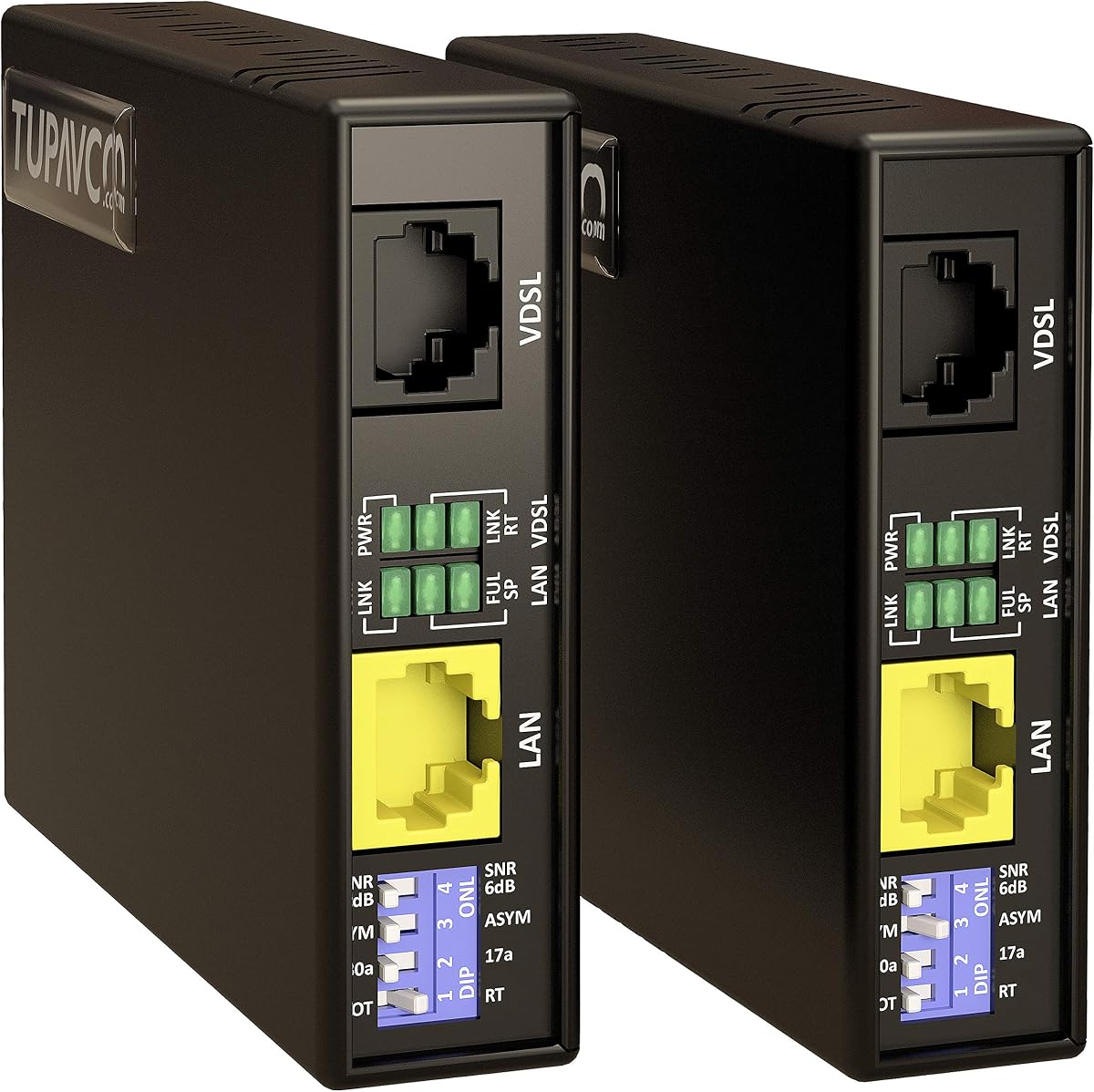
The Tupavco TEX200 VDSL Ethernet Extender Kit is designed to increase the effective range of network cabling beyond the normal 300-foot Ethernet limit and provide a connection of up to 5000 feet. Its 4.6 rating places it near the top of the selection, and the combination of long reach, a listed 300 Mbps rate, and configurable profiles gives it broad utility.
We may earn a commission when you buy through this link, at no additional cost to you.
The system can use existing VDSL2 phone cabling or Cat5 and Cat6 network cable, reducing the need for a complete wiring upgrade. A four-position DIP switch provides eight different profile settings, allowing the installer to select an operating mode based on the line and deployment. G.INP support is included to improve the broadband signal's resistance to noise and interference.
Installation requires no software installation, and the kit is ready for use with standard RJ45 ports and LEDs that provide status information. Despite the long stated reach, the service level depends heavily on the copper line. Distance, wire gauge, terminations, interference, and the quality of the intermediate connections can all reduce the usable speed.
This model is best for a user who already has a long phone or network cable and needs a configurable bridge rather than a standard Ethernet switch. It can connect remote rooms, outbuildings, or network equipment where a 300-foot cable is insufficient. Buyers should verify the existing line quality and confirm that the selected profile suits their installation before expecting the listed maximum.
The four-position DIP switch offers eight profile combinations, providing installation flexibility without requiring software. This is particularly helpful when existing copper infrastructure varies in length, type, or signal quality.
G.INP support is designed to improve signal tolerance and reduce sensitivity to interference. In a long copper run, maintaining a cleaner signal can make the difference between a stable connection and one that becomes unreliable.
We may earn a commission when you buy through this link, at no additional cost to you.
The right Ethernet line extender depends on the wiring already available, the distance involved, the required speed, and whether the remote location also needs Wi-Fi. These factors help distinguish among powerline adapters, active copper extenders, VDSL systems, and passive couplers before installation begins.
A powerline adapter uses electrical wiring to carry an Ethernet network, while an active extender sends data over copper pairs and a VDSL kit uses telephone-style signaling. A passive coupler simply joins two RJ45 cables and does not regenerate the signal. Choose the method that matches the wiring you already have rather than assuming all Ethernet extenders work in the same way.
Standard Ethernet commonly reaches up to 328 feet, or 100 meters, over suitable twisted-pair cable. Powerline models list different in-wall ranges, while the dedicated long-range kits extend to 5000 or 7000 feet and the StarTech system reaches 800 meters. Measure the actual path rather than relying on a straight-line building estimate, especially when cable must navigate walls, floors, or outdoor areas.
The headline powerline speed is a theoretical speed class, not a guarantee of internet throughput. Real results depend on internet service, wiring condition, distance, electrical interference, and the Ethernet port at each end. For local file transfers or high-resolution media, prioritize Gigabit ports; for basic access, a 100 Mbps connection may be sufficient and can simplify installation.
Powerline systems require both adapters on the same electrical circuit, direct wall-outlet placement, and the use of a suitable outlet. AFCI breakers may limit performance, and large appliances can create interference. Dedicated copper extenders do not have those same circuit rules, but they do require continuous, correctly terminated conductors and compatible power at the remote endpoint.
A pure Ethernet extender is ideal when the destination has a desktop, game console, camera, or access point. Powerline kits with Wi-Fi can cover both nearby wireless clients and wired endpoints. If the remote location only needs a strong internet connection, a combined kit may reduce equipment clutter, while a dedicated wired adapter usually offers a smaller and simpler installation.
Powerline adapters draw power directly from wall outlets and generally require no configuration beyond pairing. Active long-range systems need power at both ends, and passive couplers need no power at all. VDSL and copper kits may also require DIP switch selection, correct master and remote placement, and a short patch cable from each unit to the equipment being connected.
Users of managed networks may need VLAN pass-through, jumbo-frame support, WoL, PXE, or transparent Layer 1 operation. The StarTech and two-wire kits specifically describe these capabilities, while many powerline systems are intended for straightforward residential internet access. Matching advanced protocol support to the existing network prevents surprises during deployment.
Indoor extenders should remain in a dry, ventilated location and powerline units should be kept away from interference-producing appliances. The two-wire 600m kit has no IP rating, so outdoor use requires both active units to be placed inside a sealed enclosure. Long runs also need secure cable routing, strain relief, and protection from moisture and physical damage.
Begin by mapping the route between the router or network switch and the remote device. For powerline systems, identify two wall outlets on the same electrical circuit and avoid outlets near large appliances. For copper and VDSL systems, confirm that the required continuous cable is already installed or can be routed safely, then prepare both endpoints with access to suitable power where the model requires it.
Connect the local unit to the router with the supplied Ethernet cable and place the remote unit in the intended destination. Pair or configure the units as instructed by the manufacturer, connect the remote Ethernet device, and allow the network to stabilize. For a passive coupler, connect one cable to the network port and the other to the device; for a long copper extender, install the master and remote ends in their correct roles and select the appropriate profile or cable arrangement.
Test the connection with the applications and devices that matter most, including web access, streaming, calls, camera feeds, or local transfers. If performance is weak, check cable quality, outlet distance, electrical interference, firmware compatibility, and the extender's status indicators. Keep units dry and unobstructed, avoid extension cords for powerline equipment, and route long cables away from sharp edges and sources of moisture.
An extender normally carries an existing connection farther; it does not increase the speed supplied by the internet plan. It can improve performance compared with a weak Wi-Fi signal, but the final result depends on the original connection, the extender's port speed, wiring quality, distance, and interference. A Gigabit endpoint and a suitable network path are still required for maximum wired performance.
A conventional Ethernet segment is generally limited to 328 feet, or 100 meters, under common structured-cabling rules. The products in this guide address that limitation in different ways: passive couplers join cables without truly resetting the distance limit, while active extenders and VDSL systems can send signals over much longer runs with reduced speed as distance and cable limitations increase.
The featured TP-Link powerline instructions specifically advise against power strips, surge protectors, and extension cords. Both adapters should plug directly into wall outlets on the same electrical circuit. Using an intermediate power strip can interfere with communication, while placing an adapter near large appliances can reduce performance because of electrical noise.
No. A passive coupler simply connects two RJ45 cable ends, and it does not regenerate or boost the signal. Active extenders receive the signal, rebuild it, and transmit it again, which is why they can cover longer distances. The UGREEN coupler is best for short cable joining, while the active products in this guide are intended to overcome longer cable-range limitations.
The two VDSL kits and the two-wire active extender can use suitable existing copper wiring, but the exact connector and electrical method matter. Phone cable may require RJ11 termination, while Cat5 or Cat6 can use the appropriate RJ45 connection. Compatibility, conductor count, and cable quality should be confirmed before installation.
Powerline adapters generally need to be on the same electrical circuit for reliable communication. Some homes have electrical circuits that appear connected but remain separated by breakers, subpanels, or other wiring arrangements. If the adapters fail to establish a connection, moving one to another outlet or testing another circuit can help identify the issue, but the manufacturer's pairing process should still be followed.
Choose a combined model if the remote location needs both a wired connection and wireless access for nearby devices. A pure Ethernet extender is simpler and usually more appropriate when the destination has one or more wired endpoints. Wi-Fi specifications such as AC1200 or AX1500 describe the wireless side, while the powerline link remains dependent on electrical wiring.
The amount of loss depends on the extender, cable type, distance, wiring quality, and selected configuration. The StarTech product lists 100 Mbps over a single pair to 300 meters and 10 Mbps over two pairs to 800 meters, illustrating that longer spans may require lower speeds. The two-wire kit similarly lists a maximum of 92–100 Mbit/s with performance declining over distance and cable quality.
The TP-Link AV1000 Gigabit Powerline Kit is the most balanced overall choice for homes that want an uncomplicated wired extension through existing electrical wiring. The TP-Link AV600 kit serves as a budget-oriented alternative with a 100 Mbps port, while the StarTech system leads the premium group for installations that require transparent, configurable extension over very long copper runs.
The right priority depends on the environment. Choose powerline when convenient access to a compatible circuit matters, a VDSL or active copper system for long dedicated lines, a passive coupler for a simple short join, and a combined Wi-Fi model when the remote room needs wireless clients as well as a wired connection.
Before buying, verify the exact cable path, available outlets, power requirements, and port speed. Confirm current product availability and pricing at the time of purchase, since both can change, and follow the manufacturer's pairing and safety instructions closely during installation.