
Tattoo Power Supply Kit
4.4Editor score
Dual liner and shader control
Includes foot pedal
Includes clip cord
Three labeled connection jacks
Compare the best tattoo machine power supply options for coil and rotary machines, checking voltage control, displays, dual outputs, accessories, and portabilit
A tattoo machine power supply is the control center for a tattoo setup, converting mains power into the adjustable, consistent output your machines need. A good unit should provide clear voltage control, dependable connections, useful safety features, and compatibility with the coil or rotary machines in your workflow.
This guide compares ten power supplies based on their documented voltage ranges, displays, machine capacity, connection options, included accessories, protective features, and physical design. It covers single-machine, dual-machine, standard-sized, compact, touchscreen, and LCD models for different tattooing environments.
Each selection highlights the information that distinguishes it from the alternatives, from adjustable voltage increments and preset controls to foot pedal operation, compact housings, and complete kits. Product availability and pricing can change, so confirm current details before purchasing.
4.4Editor score

4.4Editor score

4.4Editor score
The following comparison makes the principal differences easy to assess, including output range, display type, machine capacity, connection style, and whether a foot pedal and clip cord are included.




The Mast Halo Tattoo Power Supply earns its place at the top because it combines a clear digital control scheme with a display that can be rotated through 360 degrees. It carries a 4.4 rating and is designed for artists who want straightforward voltage control without a complicated layout. Its stated output range runs from 1.5V to 12V, with adjustments made in 0.1V increments.
We may earn a commission when you buy through this link, at no additional cost to you.
The most distinctive feature is the rotatable OLED white display. Instead of being locked into one viewing angle, the screen can be turned to suit the artist's position or the arrangement of cables on the workstation. That flexibility makes the unit easier to consult during setup and helps prevent the display or power leads from pulling awkwardly in a fixed direction.
Its dedicated 0.1V increment control is useful for fine-tuning the response of a particular coil or rotary machine. The 12V ceiling also places it among the more compact, controlled options in this list, rather than a unit with a particularly broad voltage range. The trade-off is that its documented selling points center on one power source rather than two independent machine channels.
This is a strong choice for an artist who values readable information, fine adjustment, and flexible screen positioning at a fixed station. Verify the current connector configuration and machine requirements before ordering, but for a clean, compact control unit, the Mast Halo offers one of the most thoughtful feature combinations here.
The 360-degree rotating OLED display can be oriented to match the workstation, reducing the need to twist the entire unit while checking voltage. It is especially practical where the power box sits below or beside the working surface.
The 1.5–12V range and 0.1V adjustment increments offer more granular control than supplies that move in larger steps. This can be helpful when adapting the output to the specific response of a coil or rotary machine.
We may earn a commission when you buy through this link, at no additional cost to you.
The Pirate Face Tattoo Dual Digital Tattoo Power Supply is a feature-rich option for artists who regularly alternate between machines or work with two different setups. It has a 4.2 rating and includes a foot pedal and two clip cords, reducing the need to assemble a basic dual-machine station from separate components.
We may earn a commission when you buy through this link, at no additional cost to you.
Its LCD display provides more than a simple voltage number, with the listing also identifying amperage, speed, duty cycle, and follow-through information. Presets for liner and shader configurations make the dual channels more practical. Users can switch between saved operating modes, while the two and four machine memory options add flexibility for different working arrangements.
Non-volatile memory is a particularly practical feature because it preserves programmed settings during a power interruption. The unit also accepts rotary machines, tattoo guns, and other machine types, making it less dependent on one specific machine architecture. Adjustable increments of 0.1V, 0.2V, and 0.5V support both precise and quicker changes.
The main drawback is that the specification list includes an unusual overload-protection notation that may require careful reading before purchase. It is also more elaborate than a buyer needs for one simple machine. Still, for a busy workstation that benefits from saved profiles and dual-machine control, it offers one of the most complete packages in the roundup.
Programmable liner and shader presets allow an artist to move between machine configurations without rebuilding each setting from scratch. The two- and four-mode memory options make this especially useful for stations that handle several machine pairings.
Two machine outputs and two included clip cords create a more consolidated workstation. Artists working with separate liner and shader machines can keep both connected and use the unit's switching controls.
We may earn a commission when you buy through this link, at no additional cost to you.
The Dragonhawk Airfoil Tattoo Power Supply P087 combines a bright OLED interface with an output range reaching 16V and a current capacity of 2A. Its 4.4 rating reflects a favorable balance of protective features, control accessibility, and broad machine compatibility.
We may earn a commission when you buy through this link, at no additional cost to you.
Protection against overvoltage and short-circuiting makes the unit reassuring for a permanent workstation. Switch-mode technology is used to convert electrical energy efficiently, while the easy-to-operate control dial supports direct voltage changes. Compatibility with RCA cords and clip cords gives artists more freedom in how machines and accessories are connected.
The OLED display is a useful upgrade over a basic indicator because it can present operating information in a compact panel. It also gives the box a more refined appearance than a minimalist rotary controller. The 16V maximum provides ample headroom for a range of machine requirements without making the controls unnecessarily complicated.
One operational note is important: the manufacturer instructs users to press the power button for three to five seconds to illuminate the unit. Some users may initially mistake that behavior for a fault. For a single-machine artist who prioritizes display quality, protection, and broad output, however, the Airfoil is a compelling premium-style choice.
Dedicated overvoltage and short-circuit protection adds layers of safety around a device that operates close to the artist during every session. These protections are especially relevant in a fixed studio installation.
A maximum output of 16V and 2A current capacity cover a broad collection of tattoo-machine requirements. The simple dial lets the user make direct changes without navigating a complicated menu.
We may earn a commission when you buy through this link, at no additional cost to you.
The Dragoart T700 is a 3–18V touchscreen power supply intended for managing voltage and machine connections at a fixed tattoo workstation. Its 4.2 rating and specification-led design make it easy to compare, though the available listing information focuses more on the model identity and intended workflow than on a complete accessory breakdown.
We may earn a commission when you buy through this link, at no additional cost to you.
A broad 3–18V range gives the artist considerable room to adapt to different coil and rotary machines. The touchscreen provides a more visual and direct way to access settings than a simple analog-style controller, while the explicit support for both machine categories makes the unit relevant to mixed-workload studios.
Its design is clearly aimed at a permanent station rather than a highly mobile setup. That focus can be advantageous because the T700 is intended to manage recurring voltage and connection tasks in one place. Compared with a compact kit, it appears better suited to an artist who prioritizes interface clarity and a broad adjustment range.
The limited published detail is the main consideration. Buyers should confirm connectors, included cables, pedal compatibility, and any other station requirements before ordering. If the touchscreen and 3–18V specification align with the setup, the T700 is a clean and potentially more modern choice than a basic rotary supply.
A touchscreen interface can make voltage and machine management more direct during setup. The information is presented without relying on the interpretation of a small indicator or a single printed scale.
The T700 is conceived as a workstation manager rather than a portable accessory. It is best suited to artists who keep their coil and rotary equipment connected in a consistent, dedicated setup.
We may earn a commission when you buy through this link, at no additional cost to you.
The Dragonhawk P076 combines a dual-machine design with a compact body and a 4.5 rating, the highest numerical rating among the products presented. Its dimensions of 90 by 87 by 32.5mm and weight of 145 grams make it easier to position in a crowded workstation than a larger dual-box design.
We may earn a commission when you buy through this link, at no additional cost to you.
The LCD display supports quick activation and voltage adjustments, while the manufacturer describes the output as smooth and consistent. Overvoltage protection adds a safety layer, and the included anti-fatigue mode is intended to reduce repetitive strain during extended work sessions. A foot pedal and clip cord are included, making the package substantially more complete.
Its dual configuration allows an artist to keep more than one machine in the setup without relying on separate controller boxes. That is valuable for liner and shader combinations, although the short published specification does not provide a detailed voltage range or explicitly list a foot-pedal mode setting.
The included power plug is described as fitting the buyer's country, but international customers should verify compatibility before ordering. For an artist seeking a space-efficient dual unit with a strong rating and essential accessories, the P076 offers a balanced and practical feature set.
Two-machine support does not require a large rectangular housing. At 145 grams and less than 90 millimeters wide, the P076 is designed to conserve valuable space around the tattoo bed or workstation.
A Dragonhawk foot pedal and clip cord come in the package, so the core workstation connections are already represented. This reduces the number of separate accessories an artist must assemble.
We may earn a commission when you buy through this link, at no additional cost to you.
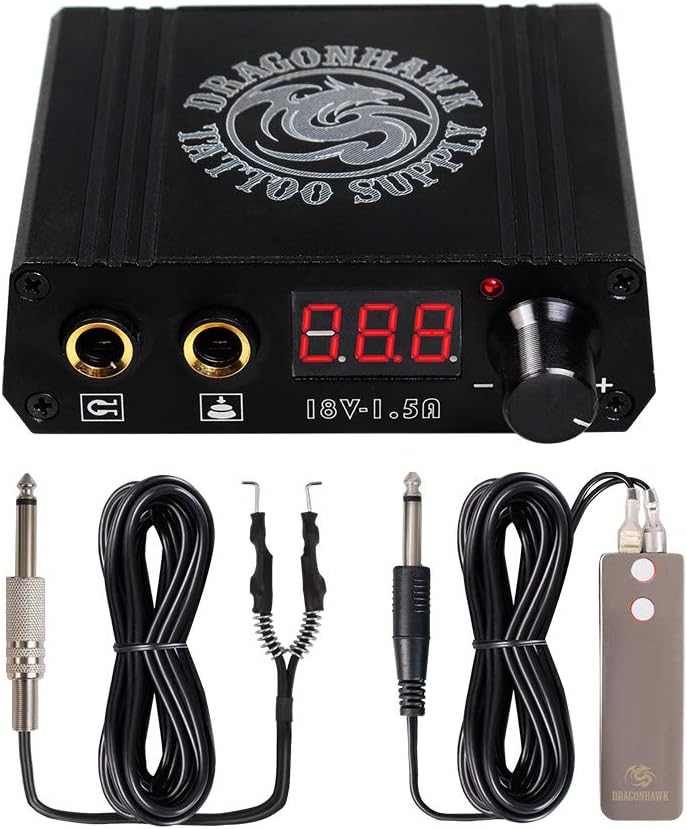
This Tattoo Power Supply Kit offers a practical introduction to dual digital control, with a 4.4 rating and a package that includes the power box, foot pedal, and clip cord. It is especially relevant to beginners building a first setup, although the listing's references to both Narkysus and the generic package title make brand labeling inconsistent.
We may earn a commission when you buy through this link, at no additional cost to you.
Three jacks are identified as line, shader, and pedal connections, helping the artist organize the setup more clearly. Both sides of the rotary control adjust liner and shader voltage independently, allowing each machine type to retain its own setting. That arrangement reduces the need to reset one configuration whenever the artist changes tasks.
The included foot pedal uses an anti-slip base and a sensitive touch-switch design. Its rubber-insulated clip cord has sturdy springs intended to maintain a firm connection with the machine. Together, these details show that the package considers the peripheral parts as well as the power supply itself.
The published information does not state a detailed voltage range, and buyers should confirm jack standards and machine compatibility before ordering. Even so, the combination of dual controls and included essentials makes this one of the most approachable kits in the comparison.
Independent liner and shader adjustments let the artist optimize each machine without constantly resetting the other. The two-sided rotary control also makes the difference between configurations easy to see and change.
The box, anti-slip foot pedal, and rubber-insulated clip cord cover the central connections of a basic tattoo workstation. This makes the kit easier to evaluate as a complete setup rather than as a bare controller.
We may earn a commission when you buy through this link, at no additional cost to you.
The ATOMUS LCD Mini is a compact power supply centered on simple rotary voltage control and an LCD readout. It has a 4.2 rating, accepts a 100–230V AC input, and adjusts output in 0.1V steps, offering fine control in a small package.
We may earn a commission when you buy through this link, at no additional cost to you.
One button press activates working mode, allowing the machine to run without continuous foot-pedal control. A second press changes the behavior to require the pedal throughout operation. This two-mode arrangement gives the artist flexibility between hands-free running and conventional pedal activation without moving to a separate mode switch.
Energy management is another strength. After five minutes without use, the unit automatically enters sleep mode, then resumes when the control is rotated, pressed, or the pedal is touched. Abnormal current triggers automatic shutdown, which is intended to protect the supply from overload damage and extend its service life.
The mini format and unspecified machine capacity make it important to check the exact requirements of the intended tattoo machine. The product information also focuses on the power box and RCA pedal port rather than listing a full bundle. It remains a strong option for a simple, compact, low-consumption single-machine setup.
Working mode permits continuous machine operation without holding the foot pedal, while pedal mode restores conventional control. A single button changes between the behaviors.
Entering sleep mode after five minutes reduces unnecessary energy use. The abnormal-current shutdown adds another layer of protection around the device during operation.
We may earn a commission when you buy through this link, at no additional cost to you.
The Aurora II Power Supply is a distinctive circular unit that combines dual-machine capacity with a colorful voltage display. Its 4.4 rating and second-generation design make it appealing for artists who want their equipment to look as considered as the rest of their workstation.
We may earn a commission when you buy through this link, at no additional cost to you.
Compatibility with all coil and rotary tattoo machines is one of its main selling points. Users can select maintained or momentary foot-pedal modes, and the listing notes that the foot pedal is not required to run the machine. Standard 1/4-inch mono inputs support common clip cords and pedals.
The housing is CNC-machined from anodized aluminum, while integrated magnets and silicone grips help it remain stable on different surfaces. That design is more portable than a permanently fixed desktop controller and can be useful for mobile artists or studios where the workstation layout changes.
Its circular format and 1.75-inch diameter make the unit visually compact, though the listing does not state a specific output range. A separate foot pedal may be required for conventional operation. For buyers prioritizing portability, machine flexibility, and colorful status feedback, the Aurora II offers a distinctive package.
The illumination color changes with the voltage display, making the current setting easier to identify at a glance. This adds visual character without sacrificing the basic voltage readout.
Built-in magnets and silicone grips help the power box stay in position on a variety of surfaces. The compact circular housing suits mobile or reorganized workstations better than a large fixed box.
We may earn a commission when you buy through this link, at no additional cost to you.
The 1TattooWorld OTW-P008-3.3 is a dual digital tattoo power supply with a 4.4 rating. Its defining advantage is directness: it supports two machines, displays operating information digitally, and arrives with both a foot pedal and a clip cord.
We may earn a commission when you buy through this link, at no additional cost to you.
The two-machine capacity makes it suitable for an artist who wants to keep a liner and shader available without maintaining two separate power boxes. A digital LCD provides a clearer operating reference than a unit with no display, while the included accessories cover the principal pedal and machine connections.
This restrained feature set can be an advantage. Artists who want uncomplicated control and broad machine compatibility may find the OTW-P008 easier to integrate than a more specialized unit. It also avoids requiring a separate purchase for the foot pedal and clip cord shown in the product package.
Detailed voltage range, adjustment increments, and protection specifications are not provided in the supplied listing information, so those points deserve confirmation. Within the limits of the available facts, it remains a strong basic dual-unit option with a favorable rating and a practical included set.
Dual capacity and a digital LCD combine useful monitoring with a smaller overall component count. This is a practical configuration for artists balancing liner and shader equipment.
The foot pedal and clip cord are included, making the package more convenient for a new setup. It also provides a simpler way to compare the unit with bare power supplies that require extra connections.
We may earn a commission when you buy through this link, at no additional cost to you.
The New Star Mini Tattoo Power Supply Set is a compact package designed for permanent makeup and tattoo use. It carries a 4.3 rating and includes the mini power box, a stainless steel foot pedal, a six-foot clip cord, and a US plug, making it one of the more complete compact sets in the roundup.
We may earn a commission when you buy through this link, at no additional cost to you.
Voltage can be adjusted below 18V using dual precision dials. The mini housing uses an aluminum alloy construction and a dual-interface design, while the clip cord provides a flexible six-foot run with a standard 1/4-inch phono plug. The included components are clearly aimed at creating a workable station from a smaller kit.
The set is described as compatible with rotary and coil tattoo machines, giving it broader relevance than a permanent-makeup-only controller. The stainless steel pedal and substantial cord length are useful for arranging a compact station where distance between the power box, pedal, and machine matters.
Its small dimensions and emphasis on permanent makeup make it less suitable for an artist wanting a large, highly visible desktop controller. Current plug compatibility should also be confirmed outside the United States. Even so, it is a well-equipped portable option with a broad documented voltage adjustment range.
The mini controller, stainless steel pedal, clip cord, and plug cover the basic elements of a portable tattoo or permanent-makeup station. This makes the set especially convenient for travel or limited workspace.
Support for both rotary and coil machines prevents the compact format from being tied to a single machine style. Two precision dials allow the artist to refine the output while retaining a broad adjustment range.
We may earn a commission when you buy through this link, at no additional cost to you.
The right tattoo machine power supply depends on machine type, voltage requirements, workstation layout, operating habits, and the accessories you already own. Comparing these factors before ordering helps prevent incompatible connections, undersized output, and unnecessary accessory spending.
Start by confirming whether you use a coil, rotary, or both. Some supplies explicitly support both categories, while others provide dedicated liner and shader outputs. The connector arrangement also matters: RCA-style leads and 1/4-inch mono plugs are common, but the exact jack and cord standard should be verified against the machine and pedal you intend to use.
Also consider whether one machine is enough. A dual unit can keep a liner and shader independently configured, reducing repeated adjustments, but a single artist working with one machine may gain little from the additional complexity.
Choose only a supply whose documented machine types and connection standards match your equipment. Compatibility comes before display style or extra features.
Voltage determines how the machine behaves, and the appropriate setting varies with the machine, handpiece, configuration, and technique. A useful supply should cover the range required by your equipment and offer adjustment increments fine enough for meaningful control. Models in this roundup range from a 1.5–12V Mast Halo to a 3–18V Dragoart T700, while the New Star mini allows adjustment below 18V.
Fine 0.1V increments are useful when small changes produce a noticeable difference in machine response. Larger increments can be quicker for broad setup work, but less precise during a session. A broad range offers more compatibility, while a narrower range may be easier to master if it comfortably covers the intended machine.
Prioritize a range that fits the machine with some flexibility, then choose the finest practical adjustment step.
A display helps an artist confirm the current output rather than estimating from a dial. LCD and OLED screens are both useful, although their exact information depends on the model. The Pirate Face unit displays voltage, amps, speed, duty cycle, and follow-through, while the Dragonhawk P076 and ATOMUS mini emphasize a simpler voltage readout.
Control design is equally important. A touchscreen may offer direct visual navigation, a rotary knob can be intuitive for quick changes, and a dual-dial arrangement can separate liner and shader settings. The best interface is the one that remains easy to understand when the artist is focused on the client rather than the controller.
Look for a readable display and controls that match your preferred operating method. Extra readout fields are helpful only if you intend to use them.
A single-output supply is adequate when one machine handles the entire session. It is usually simpler, more compact, and easier to carry. Dual outputs make more sense for artists who alternate between machine types, want independent settings, or maintain a more complex professional station. The Pirate Face, Dragonhawk P076, Dual Digital Tattoo Kit, and Aurora II offer two-machine configurations.
Dual capability does not always mean every channel has identical controls. Some units provide separate liner and shader dials, while others use presets or shared adjustment features. Check how the channels are configured, especially if you expect to save different voltages for each machine.
Choose dual outputs for workflow flexibility and single output for simplicity. Independent controls are valuable when both machines must remain ready simultaneously.
The foot pedal and clip cord are the links between the power supply, pedal, and tattoo machine. Some packages include both, as seen with the Pirate Face, Dragonhawk P076, Dual Digital Tattoo Kit, 1TattooWorld OTW-P008, and New Star mini set. Others, such as the Aurora II, accept a standard 1/4-inch mono foot-pedal connection but do not include the pedal.
A power supply with a pedal port is not necessarily supplied with a compatible pedal. Confirm whether the unit supports maintained, momentary, or continuous operation and whether the included pedal matches that behavior. The ATOMUS mini also offers a working mode that does not require continuous pedal control.
Check the connector, cable length, plug size, and operating mode before buying. An included accessory still needs to fit the machine and intended control method.
Protection can limit the consequences of incorrect voltage, short circuits, or abnormal current. The Dragonhawk Airfoil lists overvoltage and short-circuit protection, the Dragonhawk P076 includes overvoltage protection, and the ATOMUS mini automatically powers off during abnormal current. These features are especially useful when the supply remains connected during busy studio sessions.
Other useful operating details include automatic sleep, non-volatile memory, and smooth output. The ATOMUS mini enters sleep after five minutes, the Pirate Face preserves programmed settings through a power interruption, and the Dragonhawk P076 includes an anti-fatigue mode. These conveniences support long-term use, although no protective feature replaces correct setup.
Favor documented protection over vague claims of quality. Clear overload behavior and stable output are more meaningful than general durability language.
A fixed studio can favor a larger dual unit with a prominent display, while mobile artists and permanent-makeup professionals may need a compact box that fits into a smaller case. The Dragonhawk P076 weighs 145 grams, the ATOMUS is explicitly mini, and the New Star set combines a mini aluminum housing with a six-foot cord. The Aurora II adds magnets and silicone grips for placement on varied surfaces.
Measure the available area before buying, including room for the foot pedal and adequate cable movement. A rotating screen, such as that on the Mast Halo, can improve usability in an awkward workstation even if the box itself is not portable.
Choose a size and mounting approach that suit the actual workspace. Portability matters only if it does not compromise readability, stability, or connections.
The contents of the package can affect convenience. A unit supplied with a foot pedal, clip cord, and appropriate plug may be easier to integrate than a bare controller, while a premium interface may be worthwhile for an established artist who already owns compatible cables. Compare what you need to purchase separately, not just the headline features of the box.
Avoid paying for redundant accessories if you already have a compatible pedal and cords. On the other hand, do not treat a large accessory bundle as a substitute for checking output range, connectors, and safety features. The most useful package is the one that fills actual gaps in your setup.
Count compatible accessories and required purchases together. The best-value supply matches your equipment rather than simply including the most components.
Before connecting a machine, inspect the power supply, foot pedal, and cords for visible damage. Confirm that the voltage specification, connection type, and machine compatibility are correct. Read the unit's startup instructions because some models require a button press of several seconds before the display illuminates, while others use a rotary control or a separate power switch.
Connect the machine and foot pedal with the power supply turned off or fully asleep, then set the output to a low starting level. Turn on the unit, select the appropriate liner or shader channel if it is a dual model, and increase the voltage gradually while observing the display and the machine's response. Save a preset or note the working setting once the machine behaves consistently.
Keep the power box dry, ventilated, and stable, and avoid placing liquids or conductive clutter near it. Route cords so they cannot be pulled, stepped on, or snagged. Do not exceed the documented output range, and use the provided protections as safeguards rather than as permission to operate outside specifications. When not in use, disconnect power as appropriate and store cables without sharp bends.
The correct voltage depends on the tattoo machine, handpiece, and technique being used. The supplies in this guide offer different documented ranges, including 1.5–12V, 3–18V, and adjustment below 18V. Follow the machine manufacturer's guidance and confirm the power supply's connector requirements before making changes.
A dual supply is more useful when an artist regularly switches between a liner and shader or wants both configured at once. A single supply is simpler and may be sufficient for one-machine work. The key considerations are independent controls, preset support, connector layout, and how often the second channel will actually be used.
Several products in this roundup explicitly support both coil and rotary machines, including the Dragonhawk Airfoil, Dragoart T700, Aurora II, and New Star mini set. Compatibility also depends on the appropriate cords and connectors. Check the machine type, jack format, and included leads before operating a new setup.
No. The Pirate Face, Dragonhawk P076, Dual Digital Tattoo Kit, 1TattooWorld OTW-P008, and New Star mini set include a foot pedal in their documented packages. The Aurora II includes a foot-pedal connection but does not include the pedal, so verify the complete package and any separate accessory needs.
A maintained mode keeps the machine running as long as power is supplied, while a momentary mode requires the pedal to be held to activate it. The Aurora II supports both modes, and some other supplies offer continuous or foot-pedal-controlled operation. The right mode depends on workflow, machine response, and local operating preferences.
Voltage requirements can vary by machine, coil configuration, capacitor, handpiece, and technique. A digital display helps the artist make deliberate adjustments, but it does not determine the correct setting by itself. Establish the voltage using the machine maker's guidance and adjust incrementally based on the documented machine behavior.
Compactness does not by itself indicate whether a supply is appropriate for professional work. Evaluate the documented output range, protections, machine compatibility, controls, and connection quality. The Dragonhawk P076, ATOMUS mini, Aurora II, and New Star mini set each offer portability alongside features intended for tattooing or permanent makeup.
An LCD is generally useful for clear numeric voltage readings, while an OLED can provide a more visually refined interface and may suit users who prioritize display presentation. The more important question is whether the information shown matches your needs. Compare voltage visibility, control navigation, startup behavior, and available preset functions rather than display technology alone.
The Mast Halo stands out for its rotating OLED display and fine 0.1V adjustments, while the Dual Digital Tattoo Kit offers one of the most approachable complete packages with separate liner and shader controls. The Dragonhawk Airfoil combines an OLED interface, 16V maximum output, and documented electrical protections for a more premium-style setup.
Prioritize machine compatibility, correct connectors, and the voltage range your equipment requires before considering display style or accessories. Compact users may prefer the Dragonhawk P076 or ATOMUS mini, while artists running multiple machines should examine independent channels, memory, and preset support. A package with a suitable pedal and clip cord can simplify initial setup.
Finally, review the current product listing before ordering because configurations, package contents, ratings, and prices can change. Confirm the selected variation, plug type, included accessories, and current specifications so the power supply integrates cleanly with the machine and workstation you already use.