
GL.iNet Comet 5G Redcap GL-RM10RC
4.6Editor score
5G RedCap multi-WAN failover
Near-field hotspot control
64GB eMMC image storage
4K H.264 remote streaming
Flexible encrypted access options
Our Remote KVM over IP or WiFi guide compares ten systems for 4K access, BIOS control, network failover, power management, security, portability, and setup.
Remote KVM over IP or WiFi devices provide direct access to computers and servers when the operating system is unavailable, unattended, or located somewhere physical travel would be inconvenient. A worthwhile unit should combine dependable video capture, keyboard and mouse control, secure remote connections, and practical recovery features.
The ten products in this guide were compared by considering resolution, supported operating systems, connection methods, BIOS-level operation, remote power functions, storage, security options, form factor, and ease of deployment. The list covers dedicated IP devices, Wi-Fi-oriented models, USB-C portable units, PoE options, and open-source platforms.
Each review explains the strongest reasons to consider a particular model, along with its limitations and ideal operating environment. Ratings and specifications reflect the supplied product information, while product availability and pricing can change. Buyers should confirm the required cables, accessories, and network features before ordering.
4.6Editor score

4.4Editor score

4.5Editor score
The comparison below highlights each device's strongest differentiators, from high-resolution streaming and cellular failover to PoE installation, compact portability, open-source operation, and browser-based recovery access.




The GL.iNet GL-RM10 Comet Pro is a balanced remote KVM for users who want wireless flexibility without giving up a wired network path. It carries a 4.4 rating, and its defining combination is dual-band Wi-Fi 6, 4K passthrough, two-way audio, a local touchscreen, and several ways to establish secure remote access.
We may earn a commission when you buy through this link, at no additional cost to you.
Its strongest feature is the combination of 2.4 GHz and 5 GHz Wi-Fi with wired connectivity. The local display can continue operating while a remote session is active, making the device useful for offices, home laboratories, and unattended computers. H.264 hardware encoding supports low-latency 4K streaming, while two-way audio adds a more natural dimension to IT support and remote meetings.
The 2.22-inch touchscreen is particularly helpful during initial setup because network selection and service controls can be managed without a separate interface. Tailscale uses encrypted WireGuard-based transmission, while the web-based cloud control, the GLKVM app, and a self-hosted option provide several paths to the console. Remote BIOS access and OS reinstallation make the unit useful when software-based remote tools no longer work.
This is a strong general recommendation for administrators, developers, and home-lab enthusiasts who need both local and remote control. The need for optional ATX Board or Fingerbot accessories for some power functions is the main qualification, but the device itself offers an unusually flexible and approachable feature set.
Overall, the Comet Pro is the most balanced selection in this roundup. It combines useful everyday remote access with the recovery capabilities and connectivity choices expected from a more specialized remote KVM.
Supporting both wired and dual-band wireless connections reduces dependence on a single network path. This flexibility is valuable when local infrastructure changes or when a user needs nearby access without routing remote traffic through an external service.
BIOS access and operating-system reinstallation extend the device beyond ordinary screen sharing. Those hardware-level recovery capabilities matter when a target system will not load an operating system, and they are central to the Comet Pro's disaster-recovery proposition.
We may earn a commission when you buy through this link, at no additional cost to you.
The GL.iNet Comet 5G Redcap GL-RM10RC is the premium option in this guide, earning a 4.6 rating for its combination of 5G RedCap, Wi-Fi 6, Gigabit Ethernet, 4K remote management, and unusually substantial onboard storage. It is designed for environments where losing the local network must not mean losing access to a critical machine.
We may earn a commission when you buy through this link, at no additional cost to you.
Its multi-WAN failover is the decisive advantage. The device can move among Gigabit Ethernet, Wi-Fi 6, and 5G or 4G when a preferred connection is misconfigured or unavailable. This is especially relevant for branch systems, edge computers, and servers where an outage could otherwise turn a minor network issue into a physical service visit.
A built-in Wi-Fi hotspot supports near-field control, allowing an on-site technician to manage the target without depending on an external network. The 3.69-inch touchscreen provides direct status checks and network management, while H.264 hardware encoding supports 4K management with stated latency of 30 to 60 milliseconds. The 64GB eMMC repository can hold operating-system images, ISOs, and recovery tools for repeatable deployment work.
Browser-based access, Tailscale, ZeroTier, and lightweight self-hosted cloud support give administrators a choice between convenience and tighter infrastructure control. The trade-off is complexity: buyers must understand cellular availability, interface configuration, and the device's broader feature set. It is better suited to managed fleets and serious homelabs than a simple one-computer installation.
For users who need cellular resilience and local media storage, this is an excellent choice. It goes beyond standard Wi-Fi KVMs while remaining more specialized than a conventional network extender.
Automatic failover among Ethernet, Wi-Fi, and cellular links gives the device a meaningful advantage during outages. The system can remain reachable even when the local LAN or wireless configuration becomes unavailable.
The 64GB eMMC repository allows important images and recovery tools to remain attached to the KVM rather than stored on the managed system. That makes reinstallation and repeated recovery workflows more dependable when the target computer cannot provide usable storage.
We may earn a commission when you buy through this link, at no additional cost to you.
The GL.iNet Comet GL-RM1 is an approachable remote KVM with a 4.5 rating. It supports 4K output at 30Hz, BIOS control, H.264 hardware encoding, remote audio, and file transfer without requiring software installation on the computer being managed.
We may earn a commission when you buy through this link, at no additional cost to you.
Its main appeal is the short path between installation and useful remote access. The controlled computer requires no additional application, and a one-click app connection is designed to make setup straightforward. It can be used with laptops, desktops, and servers, making it useful for technical support, home offices, and server maintenance.
Remote reboot, power-on, and operating-system installation through the BIOS interface are the features that distinguish it from basic screen-sharing hardware. File transfer adds convenience for administrators who need to move information between computers, while remote audio output helps users work with multimedia content or communicate with an on-site person.
The important limitation is the note that the controlled device cannot use PD adapters. The GL-RM1 also offers fewer network choices than the Comet Pro, and its 30Hz refresh rate is not the smoothest option for demanding interactive graphics. These constraints are reasonable for a value-focused remote administration device.
This is a strong budget recommendation for anyone who needs dependable out-of-band-style control without a complex installation. It provides the essential remote KVM functions in a relatively straightforward package.
Keeping management software off the controlled computer is valuable when that system is unstable, offline, or configured only for a specialized role. The hardware-based approach also supports BIOS tasks that ordinary remote desktop software cannot perform.
Remote file transfer, audio output, reboot controls, and OS installation cover a broad range of routine support needs. These utilities make the device more useful than a bare video-capture box with keyboard and mouse emulation.
We may earn a commission when you buy through this link, at no additional cost to you.
The GL.iNet Comet PoE GL-RM1PE combines a 4.6 rating with a clean installation method suitable for managed offices and racks. Its Ethernet connection can carry both network traffic and power through a PoE-enabled switch, removing the need for a separate power cord at the KVM location.
We may earn a commission when you buy through this link, at no additional cost to you.
Power can also be supplied through 5V USB Type-C, giving the device flexibility outside a PoE environment. The unit supports IEEE 802.3af, 802.3at, and 802.3bt PoE modes in Mode A and Mode B, so compatibility with established network infrastructure is broad. Its 32GB eMMC storage is larger than the basic RM1 configuration and better suited to professional recovery workflows.
Tailscale and GL cloud browser access provide routes for remote management, while the target computer needs no additional software. The device works with Windows, Linux, and macOS, which makes it practical for mixed client environments. Four KVM streaming through the hardware encoder is suitable for general administration, troubleshooting, and system recovery.
PoE is the decisive advantage, but it also creates the main dependency. A compatible switch or injector and sufficient network capacity are required, and a single Ethernet connection simplifies cabling rather than eliminating the need for proper network design. The USB-C option preserves usability where PoE is unavailable.
For IT teams already using PoE switches, the RM1PE is a particularly tidy and professional choice. It reduces outlet and cable clutter while preserving the recovery functions expected from a dedicated remote KVM.
PoE combines network connectivity and electrical power over standard Ethernet cabling. This simplifies installation beside managed switches and can reduce the number of nearby power outlets required for a remote KVM deployment.
The 32GB eMMC gives the device room for locally retained tools and media. Tailscale and browser-based cloud access add remote-management choices without requiring installation on the target operating system.
We may earn a commission when you buy through this link, at no additional cost to you.
This Open-Source KVM Over IP is a strong fit for homelab operators, Proxmox users, and administrators of headless servers. Its 4.6 rating reflects a feature set centered on BIOS access, reboot control, open-source Rust firmware, 32GB eMMC, PoE, and an operating-system-independent design.
We may earn a commission when you buy through this link, at no additional cost to you.
The device captures full 1080p at 60Hz through full-size HDMI and provides keyboard, video, and mouse control with stated latency below 100 milliseconds. That is sufficient for system installation, firmware configuration, and diagnosing a machine whose operating system has crashed or failed to boot. PoE supplies both network connectivity and power through one Ethernet cable, while the full-size HDMI port avoids fragile adapters.
Auditability is its defining feature. The firmware is described as fully open-source and GPL-licensed, allowing users to inspect the software rather than depend on an opaque agent. On a local network, the direct web console requires no account, while the included free relay and optional Tailscale integration support remote access without mandatory VPN configuration.
Wake-on-LAN, virtual-media mounting, remote power control through an optional ATX expansion board, and the on-device touchscreen extend its utility. There are no subscription fees, and the device works with Windows, Linux, macOS, and Raspberry Pi. The main compromises are 1080p rather than 4K and the need for an optional expansion board for some power-control functions.
For buyers who value transparent software and one-time ownership, it is an attractive alternative to proprietary enterprise IPMI systems. It is especially well suited to technically confident users who want control over firmware, networking, and deployment.
Inspectable Rust firmware lets administrators evaluate the code running on the remote-management hardware. A direct local web console and optional Tailscale support also reduce dependence on a vendor-controlled account ecosystem.
PoE, full-size HDMI, virtual media, and BIOS-level control address common problems in racks and home servers. The system can install an operating system or recover a failed machine without requiring a monitor to remain attached.
We may earn a commission when you buy through this link, at no additional cost to you.
The GL.iNet Comet Q GL-RMQ1 is the compact, travel-oriented member of the lineup. It has a 4.4 rating and a distinctive foldable USB-C cable that carries video, audio, keyboard, and mouse data through a single connection to compatible devices using DisplayPort Alternate Mode.
We may earn a commission when you buy through this link, at no additional cost to you.
Its internal dual-core ARM system runs Buildroot with 512MB LPDDR4 and 512MB NAND. The unit supports iPhone 15 and later, iPad Pro, Mac mini, MacBook, and Windows PCs, making it useful for family IT support and mobile troubleshooting. A remote wake function can resume supported sleeping, locked, or logged-out devices, with the screen active only during authorized sessions.
Privacy is addressed through Tailscale, ZeroTier, two-factor authentication, and the physical USB-C connection. Unplugging the cable ends control, while the device has no background process or residual access on the target. Remote sessions can use a computer browser or the touch-oriented GLKVM app on a phone or tablet.
Wi-Fi 6 provides stated link rates up to 286Mbps across the 2.4GHz and 5GHz bands, while preset profiles simplify movement between home, office, and family networks. The 1.8-inch touchscreen and 70 by 70 by 22mm enclosure make status checks and network changes convenient. The target can stream at up to 2560 by 1440 and 60FPS, although real quality depends on bandwidth.
The principal constraint is compatibility with USB-C DP Alt Mode. Users should also verify that the target device is among the supported categories. For portable support work, the Comet Q offers a more focused design than larger desktop KVM units.
The compact touchscreen, mobile app support, and preset network profiles make the device convenient for helping relatives or traveling to a client. A single USB-C connection also reduces the number of accessories that must be carried.
Two-factor authentication and private-network options add protection beyond a simple exposed web console. Physically disconnecting the cable provides a clear endpoint for the remote session.
We may earn a commission when you buy through this link, at no additional cost to you.
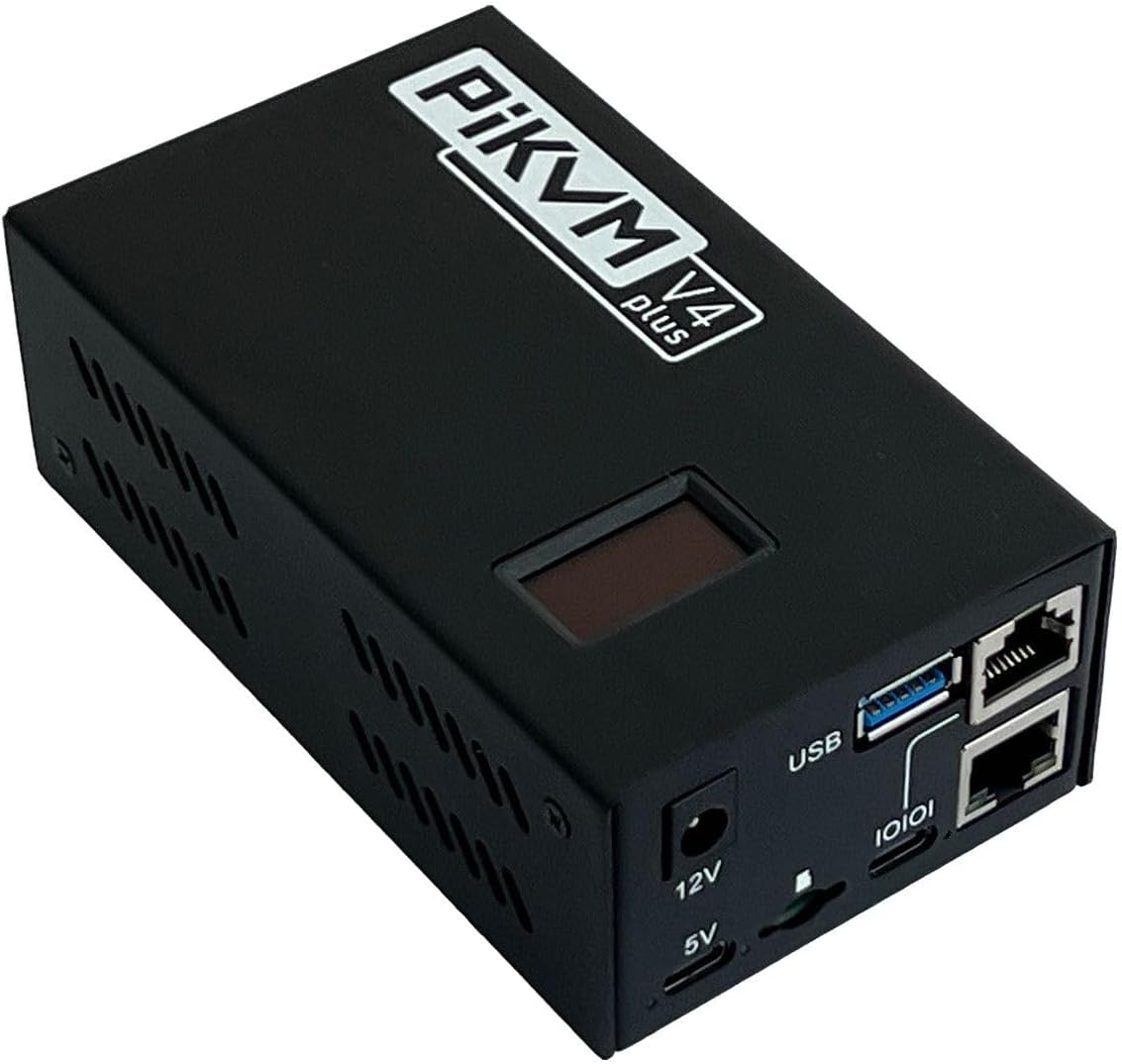
PiKVM V4 Plus is a production-oriented, Raspberry Pi-based remote KVM with a 4.3 rating. It is designed for users who value open-source operation, recognizable hardware, and a broad set of connectivity options for managing servers and personal computers.
We may earn a commission when you buy through this link, at no additional cost to you.
The package is positioned as a turnkey solution that includes a power supply, USB and Ethernet cables, and PCI brackets. Based on the Raspberry Pi CM4, it supports 1920 by 1080 and 1920 by 1200 at 60Hz, improving compatibility with UEFI and BIOS interfaces. Two extra HDMI outputs add flexibility for local operation and configuration.
Three connectivity channels support Wi-Fi with an optional external antenna, Ethernet, and cellular. Internal USB 3.0 storage allows a flash drive to be attached for additional capacity, which is useful when local media or system images are needed during recovery. These characteristics align well with home labs, small server rooms, and technically confident administrators.
The main disadvantage is the comparatively high cost. PiKVM also benefits from users who understand network addressing, browser consoles, and occasional hardware configuration. It is less attractive for someone seeking a simple consumer appliance, although the included components reduce the number of separate purchases required to begin.
For open-source enthusiasts and homelab builders, PiKVM V4 Plus is a compelling platform. Its strengths lie in transparent software, flexible connectivity, and a mature focus on out-of-band management rather than conventional remote desktop use.
The CM4 foundation gives the platform a recognizable and approachable hardware ecosystem. Users can work with its open-source foundation while using familiar computer interfaces and storage options.
Ethernet, Wi-Fi, and cellular support allow the unit to fit into different network environments. The optional external antenna and internal USB 3.0 storage extend those possibilities for rack, lab, and remote-site use.
We may earn a commission when you buy through this link, at no additional cost to you.
The AV Access 4K HDMI USB KVM Extender is optimized for long-distance extension rather than conventional browser-based remote administration. Its 4.2 rating accompanies support for HDMI video, audio, and USB signals over a single Cat5e, Cat6, Cat6a, or Cat7 cable as far as 390 feet.
We may earn a commission when you buy through this link, at no additional cost to you.
The extender supports 4K at 30Hz and 1080p at 120Hz, along with 7.1-channel audio. A receiver-side USB 2.0 KVM connection permits use of a keyboard, mouse, controller, flash drive, gamepad, or printer at the remote endpoint. It can therefore serve control rooms, studios, classrooms, digital-signage installations, and distributed workstations.
Using existing Ethernet infrastructure simplifies deployment where pulling long dedicated KVM cables would be inconvenient. DIP switches can pair transmitter and receiver units, and as many as 16 extender sets may operate on the same network. A Gigabit network switch is identified as important for maintaining the bandwidth required by video and USB traffic.
The system works without drivers on Windows, macOS, and Linux, and locking power connectors help protect rack installations. ESD protection adds another layer of physical resilience. However, it requires paired endpoints and does not offer the same cloud or private-network access methods as dedicated IP KVMs.
For long-distance point-to-point control across an office or building, this extender is a practical option. It is less appropriate for users who need to reach a target across the internet, but it is exceptionally well suited to extending a console over structured network cabling.
Using a single Ethernet run for video, audio, and USB control can simplify difficult installations. The 390-foot maximum gives administrators and AV integrators considerable placement flexibility.
The plug-and-play approach avoids driver installation on managed computers. Multiple paired sets can share a network, making the system useful for offices and control environments with several remote endpoints.
We may earn a commission when you buy through this link, at no additional cost to you.
The ONE KVM IP KVM combines a 3.7 rating with a broad collection of connection, power, and monitoring features. It supports 4K at 60Hz with stated latency below 60 milliseconds, and can be controlled through a web-based cloud platform or the ONE KVM app.
We may earn a commission when you buy through this link, at no additional cost to you.
Installation is hardware-focused. The target computer connects through HDMI and USB, while an Ethernet cable links the KVM to the network. No additional software or drivers are required on the managed system, which makes the device useful for servers, PCs, streaming equipment, and IP cameras across Windows, macOS, Linux, and Android environments.
Remote power control is handled through the motherboard F_PANEL header and the KVM's ATX port using the supplied wiring. This is a valuable addition for desktop systems, although it is not supported for laptops. Built-in ZeroTier is designed to create secure peer-to-peer access without port forwarding or a separately configured VPN, though an online upgrade is required.
A local LCD, webcam, TF card capability, wake support, and BIOS-level OS installation further distinguish the unit. The package includes USB, HDMI, and Ethernet cables, a power adapter, Phoenix connector, and motherboard wiring. These extras make it a potentially complete installation kit.
The lower rating is the principal reason this model does not rank higher. Buyers should verify how the listed features operate in their target environment, especially the online-upgrade requirement and ATX restrictions. Even so, the combination of 4K, low latency, remote power, and no-host-software operation is attractive for the right user.
Connecting the KVM through standard HDMI, USB, and Ethernet links avoids adding a persistent agent to the target. This is important for systems where stability, locked-down configuration, or failed software prevents normal remote-access tools from working.
ATX wiring and wake support extend control beyond the screen. These capabilities are most relevant to desktop computers and servers, since laptop power control is explicitly unsupported.
We may earn a commission when you buy through this link, at no additional cost to you.
The JetKVM IP KVM has a 4.4 rating and focuses on approachable browser access, open-source software, and extensive expansion potential. Setup involves connecting USB-C and HDMI to the target, attaching the KVM to Ethernet, and entering its displayed IP address in a browser.
We may earn a commission when you buy through this link, at no additional cost to you.
Three access routes are offered: direct local access through the IP address, optional remote cloud access, and Wake-on-LAN through a magic packet. Video is presented at 1920 by 1080 and 60FPS with stated latency of 30 to 60 milliseconds. High, Medium, and Low quality settings let users balance visual clarity and bitrate according to network conditions.
Power is flexible: the KVM can receive power through USB-C from the controlled device, a separate 5V supply, a DC extension, or an ATX board extension. The extension port also supports RS-232 serial control, temperature sensors, mechanical button pressers, and other modules, giving this model unusual depth for a compact IP KVM.
The software is built on a Go foundation and Linux, with an open-source cloud option using WebRTC. STUN and TURN support is intended to improve connectivity through restrictive network-address-translation environments. Remote recovery features include viewing a failed screen, restarting the computer, entering Safe Mode, and reinstalling an operating system.
JetKVM is a strong recommendation for builders who want to customize a remote KVM or add serial and power hardware. Its 1080p ceiling and extension-dependent advanced functions are the main qualifications, but the straightforward initial setup makes it approachable for everyday use.
Three video-quality settings give users a practical way to accommodate changing bandwidth. The device can favor detail on a stable connection or reduce the stream when the network becomes constrained.
The extension port supports ATX control, DC power, serial console access, environmental sensors, and mechanical interfaces. That flexibility makes JetKVM useful for builders who want a remote-management platform rather than a fixed-function console.
We may earn a commission when you buy through this link, at no additional cost to you.
The right remote KVM depends on where the target computer lives, how it connects, and what must happen when the operating system fails. Resolution, network resilience, power control, security, and installation requirements should be considered together.
Resolution determines how much detail is visible during BIOS navigation, troubleshooting, and ordinary desktop work. Models providing 3840 by 2160 at 30Hz or 60Hz are attractive for detailed interfaces, while 1080p at 60Hz remains a practical and broadly supported target. The advertised maximum does not guarantee the same result in every session because network conditions, the source display, and the viewer can all affect image quality.
IP KVMs depend on Ethernet, Wi-Fi KVMs depend on wireless coverage, and portable models may use a combination. Wired links are generally straightforward in fixed installations, while dual-band Wi-Fi offers placement flexibility. Cellular support can preserve access when the local network fails, but it may require separate service coverage and setup. Buyers handling critical servers should consider automatic failover rather than relying on one transport.
A major advantage of hardware KVM over IP is access when the operating system is absent, frozen, or unable to start. BIOS-level control allows administrators to change boot order, reinstall an operating system, inspect firmware, or diagnose a failed machine. Wake-on-LAN, virtual media, and locally stored recovery images add resilience. Verify that the target exposes compatible controls and that the device includes the necessary cables or expansion hardware.
Remote power control can restart a locked system or recover a server without physical access. Many implementations use an ATX extension or motherboard front-panel wiring, which generally applies to desktops rather than laptops. USB-C power is convenient but may not provide the same control as a dedicated ATX interface. Compare the unit's supported power methods and note whether required expansion boards are included or sold separately.
Remote KVM interfaces expose powerful controls, so account protection and encrypted transport deserve careful attention. Tailscale, ZeroTier, WebRTC, private-network access, and self-hosted services can reduce direct exposure to the public internet. Two-factor authentication adds another layer, while a direct local console avoids unnecessary cloud dependencies. The best option balances convenience with the security requirements and IT policies of the target environment.
Internal eMMC or removable storage can hold operating-system images, ISOs, and recovery tools directly on the KVM. This is useful when the target system cannot provide files. Desktop models suit offices and racks, PoE devices simplify fixed installations, and pocket models support travel and family support. Consider screen size, mounting needs, connector availability, and whether a local display is useful at the installation site.
Remote KVMs work at a hardware level, but the target still needs compatible video and USB connections. HDMI, full-size HDMI, USB-C DisplayPort Alternate Mode, and USB-A devices support different combinations of computers. Some laptops and tablets require specific display modes, while servers may depend on physical ATX headers. Check the stated operating-system support, video standard, connector shape, and any adapter restrictions before buying.
A local touchscreen or hotspot can be invaluable when the wide-area network is unavailable. On-screen status checks, nearby control, and loop-out simplify initial installation and physical troubleshooting. Touchscreens are particularly useful in racks where pulling a laptop onto a work surface is inconvenient. Consider whether a separate display can be connected and whether configuration can be completed locally without cloud access.
Begin by identifying the target's video output, USB connection, power method, and any motherboard headers needed for remote control. Connect the KVM according to its manual, power it using the specified supply or PoE connection, and join its local network. Before enabling internet-facing access, update the firmware, change default credentials, and configure a strong administrator account.
Confirm the local console first, including keyboard, mouse, video, audio, and any wake or ATX functions. Test the remote browser or app from a separate device on the same network, then try a second network to verify the intended external route. If the product supports Tailscale, ZeroTier, a self-hosted service, or WebRTC, choose the access method that matches the organization's security requirements.
For ongoing care, keep the device's firmware current, retain recovery images on its internal storage, and label network and power cables clearly. Keep ventilation openings clear, avoid placing the unit where heat or moisture can accumulate, and periodically verify that PoE capacity or Wi-Fi coverage remains adequate. A brief test after network or infrastructure changes helps reveal failover or authentication problems before they become urgent.
An IP KVM uses a wired network connection to carry video, keyboard, mouse, and control data. A Wi-Fi KVM provides similar remote control over a wireless network, reducing cabling but introducing dependence on radio coverage and network configuration. Some products combine both, and a few add cellular failover for greater resilience.
Yes, provided the KVM captures video directly from the target's HDMI output and emulates keyboard and mouse input at the hardware level. It does not depend on a functioning operating system, so administrators can enter BIOS or UEFI, change boot settings, and launch installation media even after a crash or failed boot.
Most hardware-based KVMs do not require an agent on the target because they capture video and emulate USB input directly. The operator generally uses a browser, mobile app, or local client. Software may still be required on the viewing device, and certain remote-access or virtual-media functions may depend on optional components or online upgrades.
It depends on the target and the work being performed. 4K makes small text, firmware menus, and dense interfaces easier to inspect, while 1080p at 60Hz can be sufficient for general administration. Network bandwidth, the target's output capability, and local display quality also affect the visible result, so the highest advertised resolution is not automatically the best choice for every environment.
It can if the hardware and target support the appropriate method. An ATX motherboard connection or compatible expansion board can provide remote power-on and reset, while Wake-on-LAN may wake a system that remains connected to power. Laptop support varies, and some methods require a powered USB connection, Ethernet activity, or additional wiring.
Use a private overlay such as Tailscale or ZeroTier when possible, or implement a self-hosted access layer that you control. Enable two-factor authentication, use unique administrator credentials, keep firmware updated, and restrict unnecessary access. Avoid exposing an administrative console directly to the internet without appropriate authentication, encryption, firewall rules, and network monitoring.
It can be, especially in an office or rack with a PoE-enabled switch. One Ethernet cable provides both network connectivity and power, reducing cable clutter and eliminating the need for a nearby outlet. The network must provide compatible PoE standards and enough power budget for every connected device, and a USB-C or local power alternative remains useful during installation.
The best choice depends on whether the priority is cellular resilience, open-source firmware, local recovery media, Raspberry Pi familiarity, or simple browser access. The Comet Pro offers flexible Wi-Fi and wired connectivity, the Open-Source KVM emphasizes auditable firmware and virtual media, and PiKVM V4 Plus provides a mature open-source platform. Compare the target connectors, power needs, and operating system before deciding.
The GL.iNet GL-RM10 Comet Pro is the most balanced overall choice, combining dual-band Wi-Fi 6, 4K passthrough, two-way audio, a touchscreen, and several secure remote-access routes. The Comet 5G Redcap is the premium selection when cellular failover and 64GB of on-device recovery storage are worth the added complexity, while the Comet GL-RM1 is the straightforward budget option.
For fixed professional installations, the RM1PE offers an efficient PoE workflow, and the open-source KVM appeals to administrators who want auditable firmware and no recurring fees. Portable support is better served by the compact Comet Q, Raspberry Pi enthusiasts may prefer PiKVM V4 Plus, and long structured cable runs are better handled by the AV Access extender.
Before ordering, verify target connectors, power-control requirements, network coverage, storage needs, and the exact remote-access method you intend to use. Product pricing and availability can change, so check current listings and included accessories before making a final purchase decision.