
JOYUSING 14MP HD Document Scanner
4.6Editor score
14MP visual scanning
A3 capture support
Multi-language OCR
Portable book scanning
Compare the best OCR scanners for documents, photos, books, and mobile workflows, with key features, connectivity, speed, and usability evaluated.
OCR scanners turn printed text into searchable, editable digital files, making them useful for records, invoices, receipts, photographs, books, and archived paperwork. The right model depends on document size, scanning speed, desired destinations, and whether portability or an automatic document feeder matters more than a low footprint.
This guide compares ten scanners based on their published specifications, stated OCR capabilities, supported formats, connectivity options, paper handling, and document-management features. It covers portable wand scanners, visual book scanners, compact sheet-fed units, and high-speed desktop models suited to different personal and professional workflows.
Each review identifies the scanner's strongest use case, important limitations, and ideal buyer, while the comparison table offers a quicker overview. Ratings and specifications reflect the supplied product information, and prices and availability can change, so confirm the latest listing and software requirements before purchasing.
4.6Editor score

4.5Editor score

4.3Editor score
The comparison highlights each scanner's format, OCR support, connectivity, and paper-handling approach so buyers can quickly match a model to mobile, office, archival, or photo-scanning needs.






The Epson Workforce ES-50 is a compact, lightweight sheet-fed scanner aimed at travelers, students, home users, and mobile professionals who need reliable text capture without carrying a full-size desktop model. Its 4.3 rating reflects a generally favorable balance of portability, scan speed, document handling, and included OCR tools.
We may earn a commission when you buy through this link, at no additional cost to you.
Its standout feature is the combination of a genuinely small format and USB-only operation. A single sheet can be scanned in approximately 5.5 seconds, and the scanner supports documents up to 8.5 by 72 inches. That makes it useful for long receipts, narrow forms, ID cards, and multipage documents that would be awkward to capture on a standard flatbed scanner.
Epson ScanSmart helps users scan, review, and save files, while Nuance Optical Character Recognition can create searchable PDFs and editable Word and Excel documents. Automatic Feeding Mode accepts each inserted sheet and combines multiple pages into one file. The TWAIN driver and cloud support add useful compatibility for common document workflows.
The main limitation is that this is a single-sheet scanner, so handling a large archive requires repeated manual feeding. It also needs a computer and USB 2.0 connection rather than operating as a standalone wireless unit. Those constraints are acceptable for someone who values a small, straightforward scanner for occasional mobile use.
Because the ES-50 draws power through USB, it avoids battery aging and battery-management concerns. It is a practical choice for a laptop bag, fieldwork kit, or shared office drawer where a full desktop scanner would take up too much room.
Nuance OCR adds meaningful value beyond image capture by producing searchable PDFs and editable Word or Excel files. Those formats are particularly helpful when organizing receipts, accounting paperwork, and records that may later need to be searched or revised.
We may earn a commission when you buy through this link, at no additional cost to you.
The Brother DS-640 is a compact mobile document scanner for users who want fast sheet-fed capture in a highly portable package. It has a 4.3 rating and is built around convenience, with a body under one foot long and a weight of about 1.5 pounds according to the supplied specifications.
We may earn a commission when you buy through this link, at no additional cost to you.
The scanner can process color and black-and-white documents at up to 16 pages per minute, with no stated reduction in color scanning speed. It can send files to a PC, network, cloud services, email, or OCR destinations through Brother's iPrint&Scan desktop app. Support for Windows, Mac, and Linux broadens its appeal across different working environments.
Image tools include automatic color detection and adjustment, rotation on PC, bleed-through prevention, background removal, text enhancement, and color-drop processing. A software suite adds document management and OCR functions, helping turn raw scans into more useful working documents.
Its limitations are the small single-sheet format and the need to connect it to a computer. It is not designed for unattended multi-page stacks or standalone cloud operation. Even so, the DS-640 offers a compelling mix of size, speed, destinations, and operating-system support for a mobile scanner.
The DS-640 can fit into a bag, purse, or even a pocket according to the product information. That portability makes it especially suitable for users who scan a few pages at a time in different locations rather than processing a large volume at one desk.
Sending scans to email, a network, cloud services, a computer, or an OCR workflow reduces the need to move files manually. This flexibility is useful for quick filing, remote collaboration, and bringing paper documents into digital systems.
We may earn a commission when you buy through this link, at no additional cost to you.
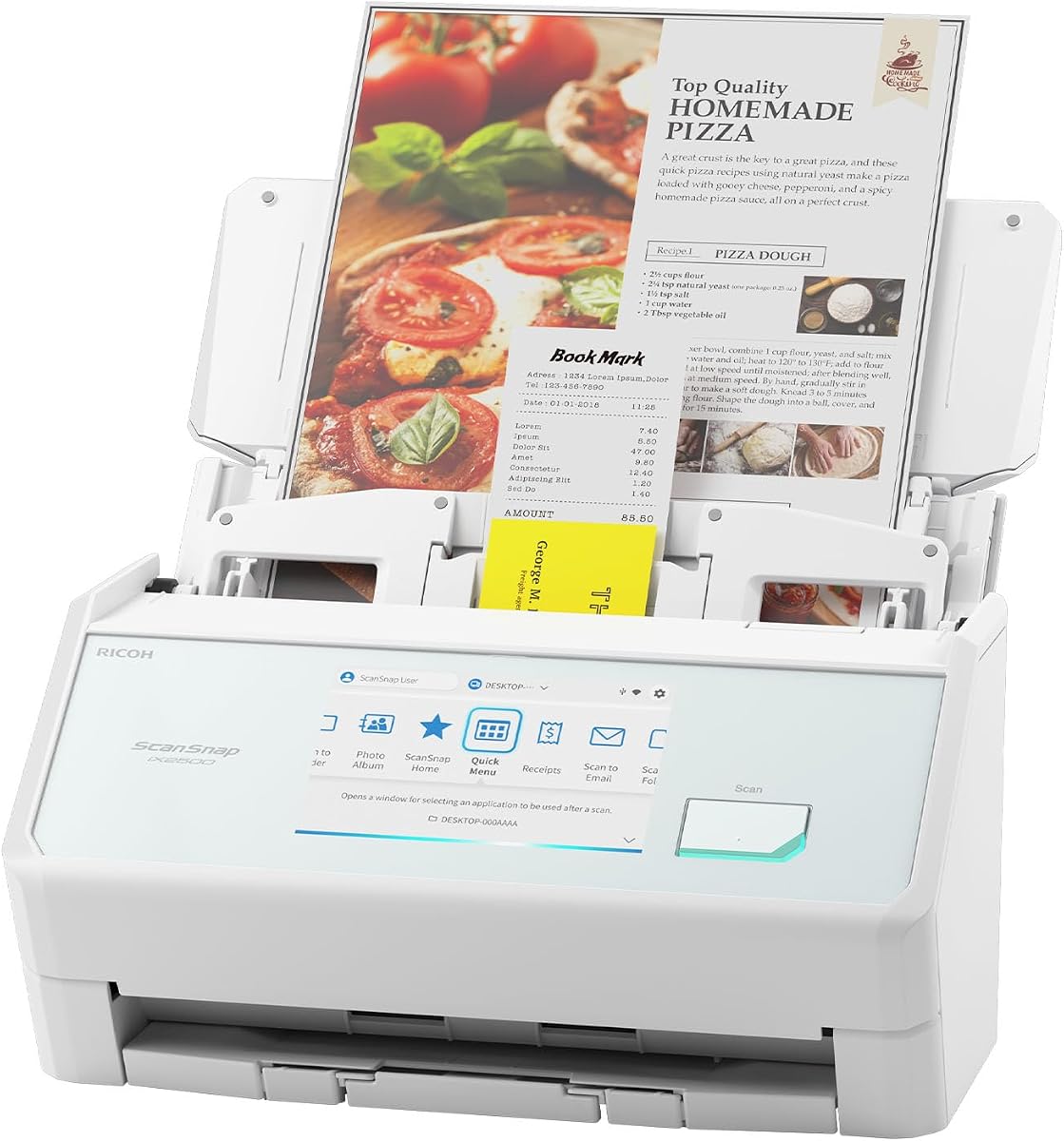
The ScanSnap iX2500 is a feature-rich desktop scanner positioned for busy offices, administrative teams, and users with substantial document volumes. Its 4.3 rating accompanies a large touchscreen, 45-page-per-minute duplex scanning, a 100-sheet feeder, and both wireless and wired connectivity.
We may earn a commission when you buy through this link, at no additional cost to you.
Its standout quality is the combination of speed and direct touchscreen control. Personalized profiles let users choose common destinations without repeatedly navigating software, while Quick Menu supports a scan-drag-drop workflow into favorite computer applications. Files can be sent to Windows PCs, Macs, mobile devices, and cloud services.
Built-in Wi-Fi 6 allows the scanner to operate with smart devices or cloud services without a computer, and USB-C provides a modern wired connection. Automatic optimization, naming, and sorting reduce the manual work required after scanning. A brake roller, multi-feed sensor, and skew detection are also included to help avoid jams, damage, and lost data.
This is a large, advanced machine, and its hardware may be unnecessary for someone scanning only a handful of receipts. Its price also exceeds simpler models in this list. Even with those considerations, the iX2500 is the strongest choice here for a high-volume office that values speed, feeder capacity, wireless control, and document organization.
At 45 pages per minute, the iX2500 is built for continuous work rather than occasional single-page capture. The 100-sheet feeder supports batch processing, while duplex scanning captures both sides of each sheet in a single pass through the machine.
The large display makes destinations and personalized profiles easy to select. Combined with Quick Menu, automatic optimization, file naming, and sorting, it reduces the number of steps required to move a document from paper into a structured digital workflow.
We may earn a commission when you buy through this link, at no additional cost to you.
The Epson Workforce ES-60W is a wireless compact scanner designed for people who need to digitize paperwork away from a fixed desk. Its 4.1 rating reflects a useful mix of rapid scanning, mobile connectivity, OCR functions, and a document length that extends well beyond standard letter paper.
We may earn a commission when you buy through this link, at no additional cost to you.
The ES-60W can scan a single page in as little as four seconds and wirelessly send files to a PC, Mac, iOS device, or Android device. Its LCD displays wireless and battery status, and the scanner automatically switches between USB and battery-powered wireless operation without requiring user intervention.
Epson ScanSmart supports scanning, review, and saving, while included Nuance OCR produces searchable PDFs and editable Word and Excel documents. Cloud scanning sends files directly to supported online storage, and Automatic Feeding Mode combines manually inserted pages into one document.
The trade-offs are the same ones associated with a portable sheet-fed design: pages must be inserted one at a time, and a battery is needed for wireless use. Its rating is slightly lower than several alternatives, but for a traveler or mobile worker who values cable-free operation, the convenience can outweigh the limitations.
Wireless transfer to computers and mobile devices makes this model more flexible than a USB-only portable scanner. It is useful for capturing a form in the field and sending it to a desktop, phone, or cloud location without searching for a cable.
A four-second scan time helps preserve momentum when digitizing receipts or multi-part forms. Supporting lengths up to 72 inches also means long receipts and narrow documents can be captured without relying on a flatbed scanner.
We may earn a commission when you buy through this link, at no additional cost to you.
The Epson Workforce ES-400 II is a well-balanced desktop document scanner for home offices, small businesses, and administrative work that requires dependable OCR without the complexity of the most advanced enterprise models. It carries a 4.5 rating and stands out for its 50-sheet automatic document feeder.
We may earn a commission when you buy through this link, at no additional cost to you.
The machine handles color, duplex scanning, which captures both sides of a document automatically. Epson ScanSmart allows users to preview scans, email files, upload them to the cloud, and use automatic file naming. The included TWAIN driver supports integration with most document-management software, making it easier to incorporate scanned information into existing workflows.
Its OCR capabilities are particularly relevant for this category. The scanner can create searchable PDFs and convert scans into editable Word or Excel files. Straight-to-email and cloud-storage options include Dropbox, Evernote, Google Drive, and OneDrive, while automatic cropping, blank-page removal, and background removal reduce post-processing work.
Ultrasonic double-feed detection and dynamic skew correction help prevent missed pages and skewed results. The trade-off is that it is a stationary desktop scanner rather than a portable model, and the supplied information does not identify built-in wireless connectivity. For regular paper-heavy office work, however, its 50-sheet feeder, duplex operation, and document integration make it the most balanced selection.
The 50-sheet automatic document feeder is one of the most important details for office users. It reduces the time and attention needed to handle receipts, forms, reports, and multi-page records compared with a portable single-sheet scanner.
Searchable PDFs, editable Word and Excel files, automatic naming, and cloud sharing make captured text easier to store and use. TWAIN support provides another layer of compatibility for businesses that already rely on document-management platforms.
We may earn a commission when you buy through this link, at no additional cost to you.
The ScanSnap iX1300 is a compact duplex scanner that emphasizes efficient operation and a smaller desk footprint. Its 4.2 rating makes it a practical middle ground for home offices, students, and small teams that want more automation than a wand scanner without the size of a high-end office system.
We may earn a commission when you buy through this link, at no additional cost to you.
Its space-saving design is designed to remain out of the way even while in use. The scanner handles documents, photos, cards, and thicker items, while a one-touch control starts duplex scanning at speeds of up to 30 pages per minute. Automatic deskew, color optimization, and blank-page removal improve output without requiring advanced driver setup.
Connectivity includes USB and Wi-Fi, with destinations for Macs, PCs, mobile devices, and cloud services. It can scan to a Chromebook through the mobile app and can operate without a computer. ScanSnap Home organizes scans from receipts, business cards, photos, and ordinary documents in one software environment.
Its feeder is not as substantial as the 100-sheet feeder offered by the iX2500, and the iX1300 lacks that model's large touchscreen and 45-page-per-minute rating. Even so, it is a versatile option for users who want duplex scanning, wireless access, and media flexibility in a relatively compact design.
Many homes and small offices have limited desk space, making the iX1300's compact form relevant. It still captures both sides of a sheet and automatically improves alignment, color, and page selection for a more streamlined daily workflow.
Support for photos, plastic cards, thick items, receipts, and business cards extends the scanner beyond conventional office documents. The included organization software makes it easier to route different material into the right application or destination.
We may earn a commission when you buy through this link, at no additional cost to you.
The JOYUSING 14MP HD Document Scanner is a portable visual scanner built around accessibility, compactness, and flexible document capture. Its 4.6 rating is the highest among the listed products, and its ability to scan books and pages up to A3 size gives it a distinctive place in an OCR-focused lineup.
We may earn a commission when you buy through this link, at no additional cost to you.
The 14-megapixel sensor captures documents, while Smart Multi-Language OCR can convert content into PDF, Word, text, or Excel files on Windows and PDF on Mac. Its three-level LED lighting allows scanning in dimly lit environments, and the stated scanning time is under three seconds per page.
Unlike a sheet-fed model, this scanner visually captures pages from above, which makes it useful for books and bound material that would be difficult or risky to feed through rollers. It supports book thickness of up to 3 centimeters when the supplied black pad is used as instructed. The portable design also allows use away from a permanent desk.
The trade-off is that it is not an automatic feeder and requires careful manual positioning for each page. Buyers must download the appropriate software from Joyusing's support center. For students, book owners, and users with a limited budget who need broad page-size support, those requirements are reasonable, but high-volume users should choose an automatic document feeder.
Visual capture avoids pulling bound pages through a narrow feeder, which can reduce concerns about damaging books. The black pad and guided scanning process are especially useful for preserving margins and keeping page images consistent.
Multi-language OCR and several export formats make the scanner useful beyond English-language documents. Windows users can create PDF, Word, text, and Excel files, while Mac users can save PDFs, offering flexibility for both study and office use.
We may earn a commission when you buy through this link, at no additional cost to you.
The IRIScan Book 7 is a portable handheld scanner intended for documents, photos, and bound material. It has a 4.0 rating and combines a rechargeable battery, removable MicroSD storage, a small color display, and OCR software in a travel-oriented package.
We may earn a commission when you buy through this link, at no additional cost to you.
The scanner offers 300, 600, and 1050 DPI resolution options. Stated A4 scanning times are four seconds at 300 DPI, seven seconds at 600 DPI, and 11 seconds at 1050 DPI. A 1.5-inch color LCD shows scanning status and previews, while a built-in contact image sensor is designed for A4 color capture.
Files can be stored as JPEG or PDF on the included MicroSD card or transferred through USB. Included Readiris tools support OCR and PDF editing, and the scanner can convert documents to editable Word, PDF, or Excel formats. The built-in rechargeable battery is stated to handle 750 A4 pages per day at 300 DPI in color when scanning to a MicroSD card.
There is an important naming caveat: although the product title includes the word wireless, the supplied specifications explicitly state that the scanner does not support Wi-Fi connectivity. It is also a manual wand rather than an automatic feeder. Despite those limitations, it is a capable choice for travelers and collectors who value independent storage, a built-in screen, and dedicated book-scanning handling.
Recording directly to a MicroSD card allows users to capture pages without a nearby computer. The card can then be connected to a phone or computer, making the scanner useful in archives, classrooms, and locations where immediate uploading is not convenient.
The 1050 DPI option gives users a higher-resolution result when fine print or image detail matters. The lower 300 and 600 DPI settings can be more practical for quicker captures and routine documents, creating a useful balance between speed and detail.
We may earn a commission when you buy through this link, at no additional cost to you.
The white ScanSnap iX2500 offers the same advanced document workflow as the black version, wrapped in a light-colored desktop design. It has a 4.4 rating and combines a large touchscreen, 45-page-per-minute duplex scanning, a 100-sheet feeder, Wi-Fi 6, and USB-C connectivity.
We may earn a commission when you buy through this link, at no additional cost to you.
Personalized profiles make frequent tasks easier by placing common destinations close at hand on the touchscreen. The scanner can send files to PCs, Macs, mobile devices, and cloud services, while Quick Menu supports a direct scan-drag-drop process. It can also work with smart devices and cloud destinations without a computer.
Automatic optimization, naming, and sorting reduce the time needed to organize documents, receipts, photos, and business cards. Its brake roller system is designed for smooth feeding, a multi-feed sensor detects pages stuck together, and skew detection helps reduce damage and data loss during longer jobs.
As with the black iX2500, the main compromise is size and the higher cost associated with advanced hardware. Its color is useful for buyers who prefer a lighter visual style, but all core capabilities closely mirror the black model. It is best suited to high-volume offices that want fast, guided, wireless document capture.
The white finish differentiates the scanner in offices where coordinated equipment matters. Functionally, it preserves the large display, high feeder capacity, and flexible connectivity that make the iX2500 platform attractive for routine administrative work.
Wi-Fi 6, USB-C, 45-page-per-minute duplex scanning, and a 100-sheet feeder create a flexible high-volume setup. The machine is particularly well suited to teams that digitize many documents and want fewer manual steps between capture and filing.
We may earn a commission when you buy through this link, at no additional cost to you.
The Epson FastFoto FF-680W is a high-speed photo and document scanner with a strong 4.5 rating. It is especially attractive to families and archivists who want to digitize large boxes of printed photographs, although its OCR tools also make it a capable general-purpose document scanner.
We may earn a commission when you buy through this link, at no additional cost to you.
The standout feature is photo throughput. It can scan as quickly as one photo per second at 300 DPI and batch up to 36 photos at once. It supports Polaroid photographs, panoramas, postcards, and images up to 8 by 10 inches. Auto enhancement, color restoration, red-eye reduction, deskew, cropping, and rotation help reduce manual correction.
Single-step duplex technology captures the image and handwritten notes on the back of a photograph in one scan. Resolution options include 300 DPI for sharing, 600 DPI TIFF for archiving, and 1200 DPI for enlargement. Document scans can reach 240 inches, and stated document speeds reach 45 pages per minute or 90 images per minute.
Epson ScanSmart includes OCR for converting scanned images into readable text, while the FastFoto app supports adding voice or text and creating slideshows on a smartphone. USB and wireless connectivity provide flexible placement, and Dropbox and Google Drive support assists with sharing and backup. The trade-off is that its strengths center on photos, making it less specialized for ordinary office paperwork than the ES-400 II.
One-photo-per-second capture and 36-photo batches make the FF-680W particularly effective for albums, shoeboxes, and family archives. Built-in enhancement features also help restore color and alignment before files are saved or shared.
Duplex scanning can preserve handwritten notes printed or written on the back of a photograph. For regular documents, searchable OCR, cloud backup, editable output, and a long maximum scan length expand the scanner's usefulness beyond image archiving.
We may earn a commission when you buy through this link, at no additional cost to you.
The best OCR scanner depends on how much you scan, what kinds of pages you handle, how documents must be stored, and whether wireless access or a computer-based workflow is more important. These factors help narrow the field before comparing software, destinations, and technical specifications.
Sheet-fed scanners are best for ordinary loose paper and business records because they move pages through a feed mechanism automatically or accept one page at a time. Visual scanners and handheld wands are better for books, photographs, and bound material because they capture pages without pulling them through a narrow mechanism. Flatbed-style visual scanning can handle unusually large pages, while compact sheet-fed units prioritize portability.
OCR should do more than make a PDF image appear on screen. Look for searchable PDF output, editable Word and Excel files, and plain text when available. Multi-language recognition is valuable for international documents. Also consider whether OCR runs automatically during capture, whether the software identifies document types, and whether users can review text before saving it.
Single-sheet scanners require the user to insert and confirm every page, making them appropriate for receipts, forms, and occasional records. An automatic document feeder is more appropriate when scanning dozens or hundreds of pages at once. The Epson ES-400 II offers a 50-sheet feeder, while the ScanSnap iX2500 models include a 100-sheet feeder for heavier batch work.
Scanning speed is most noticeable when processing long stacks. Sheet-fed specifications are often stated in pages per minute, while handheld visual scanners may be described by seconds per page. Duplex scanning captures both sides of a sheet in one workflow, saving paper movement and reducing the chance that a back page will be missed. Compare speed together with feeder capacity rather than in isolation.
Some scanners must be connected to a computer through USB, while others can operate over Wi-Fi and send files directly to a phone, cloud service, or network location. Wireless access can be invaluable for shared offices and remote workflows. Computer-based operation may be more familiar, particularly when the scanner integrates with existing document-management or imaging software through TWAIN, ICA, or SANE drivers.
The usefulness of OCR depends on the surrounding software experience. Look for previewing, automatic file naming, image cleanup, document sorting, cloud integration, and editing tools. The JOYUSING scanner requires the appropriate software to be downloaded from the manufacturer's support center, while the IRIScan Book 7 includes Readiris utilities and can store files on a MicroSD card. Confirm operating-system support before making a final decision.
Paper-handling features can prevent missed pages and damaged originals. Double-feed detection alerts the system when pages are fed together, while skew correction keeps text aligned. Visual book scanners offer an alternative to roller-based feeders, and photo scanners may include carrier sheets or protective accessories. Multi-feed sensors, brakes, and rotation systems are especially relevant for unattended or lengthy scans.
Resolution affects detail, file size, and scan time. Lower resolutions can be sufficient for ordinary text and quick records, while higher resolutions help preserve fine print, handwriting, and photographs. The IRIScan Book 7 offers 300, 600, and 1050 DPI, and the Epson FastFoto FF-680W provides 300, 600, and 1200 DPI options. Choose based on the source material rather than selecting the highest available setting for every task.
Start by reading the included setup instructions, installing the specified software, and checking that the scanner and computer or mobile device meet the listed operating-system requirements. Clean the platen, feeder rollers, sensor, or camera area before the first scan. For sheet-fed models, align the paper guides properly and avoid overloading the feeder beyond its stated capacity.
Choose a destination before scanning, such as a computer folder, cloud service, email address, network location, or removable storage device. Select a resolution and file format appropriate to the material, then enable OCR when searchable text or editable output is required. Review the first scan for alignment, contrast, cropping, page order, and text recognition before processing a large batch.
For visual and handheld scanners, move the device steadily over the page and keep the document flat. When scanning a book, follow the manufacturer's pad and page-capture instructions, and avoid pressing hard enough to bend the binding. Periodically clean the imaging surface, keep the device away from moisture and direct heat, and store the scanner with its power disconnected when it will not be used for an extended period.
A regular document scanner primarily creates image files of each page. An OCR scanner can recognize characters in those images and place the recognized text into a searchable PDF or editable document. The hardware may be similar, but the bundled software, language support, file destinations, and text-recognition accuracy are the major differences.
It can replace a flatbed for many narrow, loose documents, receipts, forms, and photos, but it may not match a flatbed for fragile originals, unusual sizes, or bound material. Visual and handheld models can capture books, while automatic sheet-fed models are efficient for loose paper. A flatbed remains useful for oversized pages and delicate originals that require a flat surface.
Searchable PDF is the most versatile format for preserving the appearance of a page while retaining recognized text. Editable Word files are useful for reports, notes, and articles, while Excel can help organize tabular or receipt data. Text files are compact and easy to search but generally preserve less visual formatting.
It depends on the model. The Epson ES-50 and Brother DS-640 operate through a computer connection, and their destinations are handled through desktop software. The Epson ES-60W, ScanSnap iX1300, and ScanSnap iX2500 support wireless workflows, while the IRIScan Book 7 can save directly to a MicroSD card. Check the software and destination requirements for the exact model.
OCR performance on handwriting varies with handwriting clarity, document quality, language support, and the scanner's processing software. Printed text is generally more consistent than freehand writing. For important handwritten records, review the OCR output and retain the original scan so that any recognition errors can be corrected against the source.
The JOYUSING 14MP and IRIScan Book 7 are the strongest dedicated options here because both are designed to capture pages visually without feeding bindings through a roller mechanism. The JOYUSING supports A3 capture and multi-language OCR, while the IRIScan Book 7 offers three resolution levels, removable storage, and a built-in display. Personal collection size, output needs, and software preferences should guide the choice.
It is valuable when both sides of a document need to be digitized. Duplex capture reduces the need to turn and reinsert pages, improving speed and making it easier to preserve page order. It also lowers the chance that a back page will be overlooked, particularly when processing a long stack through an automatic feeder.
Start by increasing the resolution, cleaning the scanning surface, and correcting the page alignment. Good lighting is essential for visual scanners, while a steady scanning pace helps handheld models. For bound material, use the supplied pad and instructions to reduce shadows and distortion, then review the scan before saving or processing the remaining pages.
The JOYUSING 14MP HD stands out as the best budget choice for books, A3 pages, and portable visual capture, while the Epson Workforce ES-400 II is the strongest all-around office recommendation thanks to its 50-sheet feeder, duplex scanning, and searchable document formats. The ScanSnap iX2500 takes the premium position with 45-page-per-minute throughput, a 100-sheet feeder, a large touchscreen, and advanced wireless organization tools.
Your priorities should determine which model makes sense. Choose a compact sheet-fed scanner for occasional mobile work, a visual or handheld model for books and photos, and an automatic feeder for routine office records. OCR output quality also depends on using the correct software, resolution, lighting, and language settings, so compatibility deserves attention before the final purchase.
Ratings can change as reviews are added, and prices and availability fluctuate over time. Before ordering, verify the current listing, included accessories, operating-system requirements, OCR formats, and the availability of cloud or wireless services. That final check helps ensure the selected scanner fits both your documents and your everyday workflow.