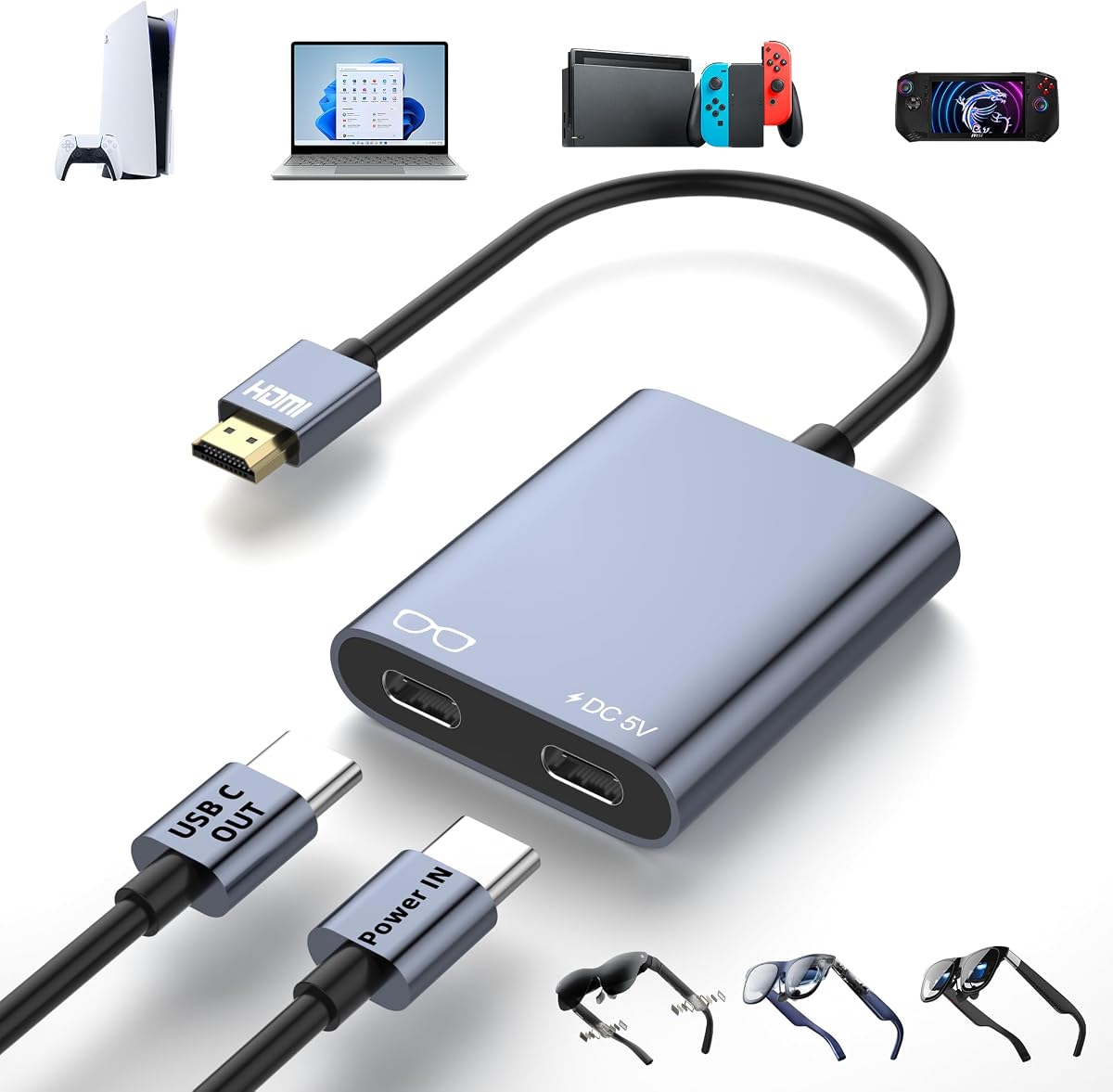
HDMI to USB C Adapter for AR Glasses, 4K@60Hz
4.6Editor score
4K at 60Hz output
External power for stability
Wide AR glasses support
Our Rayneo HDMI Adapter guide compares ten options for AR glasses, gaming, streaming, HDR, charging, portability, and compatibility.
A Rayneo HDMI adapter can transform compatible AR glasses into a portable home-theater or gaming display, but choosing the right model requires more than matching connectors. Resolution, HDR support, charging architecture, glasses compatibility, and connection direction all affect the experience. The best adapter is the one that fits your source device and display without demanding unnecessary setup.
We compared ten Rayneo-compatible HDMI adapters and closely related USB-C AR glasses converters for output resolution, supported devices, power requirements, portability, installation, and practical compatibility. The list includes native RayNeo options, multi-brand HDMI-to-USB-C adapters, a Lightning-capable model, and converters designed for portable monitors as well as AR glasses.
Each review explains the adapter's strongest benefit, important limitations, and ideal user so you can choose with confidence. Ratings and specifications can change over time, as can current prices and retailer availability, so confirm the latest listing and device requirements before making a purchase.
4.6Editor score

4.5Editor score

4.1Editor score
This side-by-side overview highlights each adapter's signal direction, supported output, power approach, and best-fit devices, making it easier to identify the right option for RayNeo glasses and other compatible AR equipment.


The RayNeo HDMI 2.0 Adapter is the premium-focused choice in this roundup, carrying a 4.1 rating and the most distinctive feature among the ten products: HDR10 output. It is built for RayNeo Air 4 Pro and GT Series users who want deeper contrast, more vibrant color, and a cinema-like 201-inch virtual screen rather than a simple mirrored image.
We may earn a commission when you buy through this link, at no additional cost to you.
Its headline output mode is 4K at 30Hz, with additional support for 2K at 30Hz and 1080p at 120Hz. That makes it especially relevant for cinematic viewing, where a 60Hz 4K mode is less critical than stable high-resolution imagery. Simultaneous charging is another meaningful benefit for long streaming or gaming sessions because the connected device can remain powered while the adapter is in use.
Compatibility is broader than the name may initially suggest. HDMI sources such as Xbox, PS4, and PS5 are supported, and Lightning devices are also addressed through the HDMI and Lightning path. The important qualification is that Lightning operation requires an Apple Digital AV Adapter, which is not included. HDR10 output likewise requires an HDR10-capable source, so the source device and content must support the format.
This is the right recommendation for an Air 4 Pro owner who values HDR, simultaneous charging, and a dedicated virtual-screen experience more than 4K at 60Hz. It is less compelling for buyers who need high-refresh 4K gaming, use the older Air 3 or Air 2 families, or want a USB-C display converter for several different glasses brands.
HDR10 is the defining advantage for this RayNeo adapter because it can reveal stronger contrast and richer color when the source supports the format. It is most compelling for movies, drama, and visually detailed games rather than competitive gaming that depends on very high refresh rates.
Simultaneous charging reduces the risk of an interrupted session, while explicit Air 4 Pro and GT Series support makes the product easier to match with RayNeo hardware. Check the glasses model and source format before purchase because Lightning and HDR10 have additional requirements.
We may earn a commission when you buy through this link, at no additional cost to you.
The RayNeo HDMI Adapter for Air 3, Air 2, and GT Series is a straightforward choice for owners of those glasses, with a 4.2 rating and support for several members of the RayNeo range. Its appeal comes from a balance of plug-and-play operation, useful display modes, and simultaneous charging rather than advanced conversion features.
We may earn a commission when you buy through this link, at no additional cost to you.
The adapter supports 4K at 30Hz, 2K at 30Hz, and 1080p at 120Hz. Those modes cover a 201-inch virtual display for gaming, movies, and streaming, while 1080p at 120Hz can suit smoother motion when the source and glasses support it. The adapter also keeps the connected device charged during longer sessions, which reduces interruptions compared with a passive converter.
The main tradeoff is model specificity. The listing explicitly states that it is not for Air 4 Pro, so buyers with that glasses model should choose the HDR10 version in first position instead. It also lacks HDR10, making it less attractive for users whose content library and source hardware can take advantage of high dynamic range.
Choose this model if you own RayNeo Air 3, Air 2, or a compatible GT Series headset and value simplicity. It is particularly useful for travelers who want one compact adapter for media, console gaming, and charging without installing software or navigating complicated configuration menus.
The strongest feature is its immediate usability: connect the source and glasses, and the adapter expands the display without requiring downloads or configuration. That simplicity makes it well suited to casual viewers and anyone who wants a predictable large-screen experience.
Air 4 Pro users should favor the HDR10-capable option, while Air 3, Air 2, and compatible GT Series owners can focus on this lighter alternative. The key decision is glasses compatibility first, followed by whether HDR10 matters more than the newer adapter's resolution modes.
We may earn a commission when you buy through this link, at no additional cost to you.
This HDMI-to-USB-C adapter is the budget pick because it combines a 4.6 rating, 4K at 60Hz support, and broad compatibility with an approachable price. It is designed to carry video from an HDMI source to USB-C AR glasses or portable displays, making it a flexible choice when you use RayNeo Air 2s or move between XREAL, VITURE, and Rokid hardware.
We may earn a commission when you buy through this link, at no additional cost to you.
The adapter uses a strictly one-way signal path: HDMI male connects to the source, and USB-C female connects to the display. It supports 4K at 60Hz and is marketed for low latency and smooth play, which makes it more suitable for modern gaming than the native 4K at 30Hz RayNeo option. It is not a USB-C-to-HDMI adapter and cannot send a signal in reverse.
External power is the most important operational requirement. A Type-C 5V power port must be connected to a compatible source using the included USB-A-to-USB-C cable. Without adequate power, the product can show a black screen, flicker, or experience dropouts. The target display also needs DP Alt Mode for video and audio input, and some XREAL models may require switching to DisplayPort mode.
This is a strong recommendation for a buyer who wants 4K at 60Hz, broad glasses compatibility, and a simple aluminum converter at a budget-conscious level. It is less suitable if you need bidirectional operation, a USB-C source, or a solution that works without external power.
Compatibility with XREAL, VITURE, RayNeo Air 2s, and Rokid models makes this converter useful for mixed-device households. The shared form factor reduces the need to carry several specialized cables when moving between gaming, viewing, and presentation setups.
The dedicated 5V input is not merely a charging convenience; it is necessary for reliable operation. Connecting a suitable 5V source before the display can prevent black screens, flickering, and dropouts during extended sessions.
We may earn a commission when you buy through this link, at no additional cost to you.
The AR Glasses HDMI to USB C Adapter is an editor's choice because it blends a 4.5 rating, 4K at 60Hz, broad source support, and a particularly compact aluminum body. It works with RayNeo Air 2s as well as XREAL, VITURE, and Rokid glasses, and it can also serve compatible USB-C portable monitors and projectors.
We may earn a commission when you buy through this link, at no additional cost to you.
Its play-and-charge design adds a 5V Type-C power input, allowing the adapter to provide stable power to connected displays during movies, gaming, or presentations. The product also supports a wide range of sources, including PS4, PS5, Switch, Xbox One, Steam Deck, ROG Ally, streaming devices, laptops, and compatible mobile hardware.
There are meaningful limits. Signal flow is one way, from HDMI source to USB-C display, and the adapter cannot power headphones, docking stations, or VR headsets. It is also not reversible. The listing warns that Studio Display does not support audio through this unit, so external speakers may be required, and the display must support DP Alt Mode for video and audio input.
This is a compelling general-purpose converter for travelers, gamers, and productivity users who want one small adapter for several AR glasses brands. Its compact dimensions and low weight are especially useful for mobile use, while the two-year warranty provides additional confidence.
At 2.3 by 1.2 by 0.5 inches and weighing only 0.08 pounds, the adapter is easy to carry between home, office, and travel. The attached 5.9-inch cable provides flexibility without turning the setup into a collection of separate bulky components.
HDMI direction remains consistent across the included source list, which simplifies setup after the first connection. Source-side features such as display settings and DP mode may still need adjustment depending on the glasses and operating system.
We may earn a commission when you buy through this link, at no additional cost to you.
The HDMI to USB-C AR Glasses Adapter is a versatile hub for connecting HDMI sources to USB-C displays, and its 4.3 rating reflects a generally capable feature set. It supports RayNeo, VITURE, XREAL, and Rokid glasses along with USB-C portable monitors, covering both AR entertainment and conventional display use.
We may earn a commission when you buy through this link, at no additional cost to you.
Output specifications reach up to 4K at 60Hz, with support for 1080p at 120Hz and 144Hz. The final resolution depends on both the source and the connected display, so high-refresh claims cannot be realized unless every device in the chain supports the chosen mode. A USB 3.1 or newer video cable, or a suitable Thunderbolt 3 cable, is required.
Power only runs toward the AR glasses or display, reaching a maximum of 10W. It cannot charge the source device, and portable monitors should be powered before the hub is connected. Some laptops, consoles, and streaming sources also require their DHCP feature to be disabled, and the product includes both a 60-centimeter 4K HDMI cable and a 50-centimeter power cable.
Choose this adapter if you want one product to bridge consoles, boxes, and laptops to several glasses brands or portable monitors. Be prepared to adjust source settings and carefully follow the power sequence, especially if you use XREAL or Viture equipment.
The advertised 4K and high-refresh modes are maximum capabilities rather than automatic output settings. Every connected device must support the target resolution and refresh rate, and the cable between the adapter and display must carry video signals.
For a portable monitor, connect external power before attaching the hub. This avoids intermittent operation and blackouts, while the adapter's 10W output continues to support the connected display without attempting to power the source.
We may earn a commission when you buy through this link, at no additional cost to you.
This HDMI to USB C Adapter 4K is a balanced option for AR glasses and portable displays, earning a 4.4 rating in the supplied data. It supports 4K at 60Hz, carries a dedicated power supply port, and works with RayNeo Air 2s alongside XREAL, Rokid, and VITURE glasses.
We may earn a commission when you buy through this link, at no additional cost to you.
The adapter's aluminum housing is compact at 2.3 by 1.2 by 0.4 inches, with a 6.1-inch attached cable and a weight of 0.08 pounds. Those physical characteristics make it easy to carry for travel, presentations, or a mobile entertainment kit. Plug-and-play operation removes the need for software or driver installation.
The connection path is one-way and cannot be reversed. It also cannot be connected to another adapter, which is worth checking if you currently rely on a conversion chain. XREAL One users receive specific guidance for entering settings, selecting sound mode, choosing DP mode, and assigning the XREAL One as the HDMI audio output.
This model suits buyers who want a small, polished converter with broad compatibility and a 4K-capable output. It is especially convenient for people who also use USB-C projectors, portable monitors, streaming sticks, computers, tablets, and cameras as display targets.
The adapter combines a 4K at 60Hz capability with a small housing intended for mobile use. Its modest weight and short attached cable also reduce the amount of equipment required for a temporary AR or portable-monitor setup.
XREAL One users may need to change audio and DisplayPort settings before the picture and sound appear correctly. Updating glasses firmware, reconnecting the USB-C output, and confirming source support can resolve many setup issues.
We may earn a commission when you buy through this link, at no additional cost to you.
The Hagibis HDMI to USB C Adapter is a practical choice for users who want one portable converter across AR glasses, portable monitors, projectors, televisions, consoles, and computers. Its 4.2 rating reflects solid versatility, while 4K at 60Hz support makes it more current than the native RayNeo adapters that top out at 4K at 30Hz.
We may earn a commission when you buy through this link, at no additional cost to you.
The physical arrangement is straightforward: HDMI male connects to the source, and USB-C female connects to the display. A full-function USB-C cable is needed between the adapter and the target, and that cable should meet USB 3.1, USB 3.2, USB 4, or Thunderbolt 3 or 4 standards. Charging-only cables will not carry the required video signal.
A dedicated power supply port supports 5V at 1A and must be connected during use. The power can come from a suitable supply or a laptop's supported data port. Although the product description discusses several productivity and travel scenarios, the adapter remains a display conversion device rather than a universal docking station.
It is a good recommendation for a mixed ecosystem containing RayNeo Air 2s, XREAL, VITURE, or Rokid glasses alongside standard displays. Users should confirm cable capabilities and power requirements before purchase to avoid disappointing results.
The same HDMI-to-USB-C path can serve AR glasses, a portable monitor, a projector, or a television. That flexibility is useful for travelers who alternate between entertainment, presentations, and conventional desktop viewing.
A full-function cable with sufficient bandwidth is essential, and a charging-only cable will not work. Matching the cable standard to the desired 4K or high-refresh output reduces the chance of missing video, audio, or synchronization.
We may earn a commission when you buy through this link, at no additional cost to you.
The Guermok AR Glasses Adapter is a low-latency HDMI-to-USB-C converter designed for gaming, movies, mirroring, presentations, and business use. It carries a 4.2 rating and supports 4K at 60Hz and 1080p at 120Hz on displays that can accept the corresponding USB-C video signal.
We may earn a commission when you buy through this link, at no additional cost to you.
Compatibility extends beyond RayNeo to XREAL, Rokid, and other glasses with USB-C video and audio input, as well as compatible portable monitors. The product is also compatible with a broad range of HDMI sources, including PS4, PS5, Xbox, desktop PCs, laptops, media players, and consoles connected through a suitable dock.
The unit is strictly one-way, and the USB-C end cannot act as a computer source. It also does not support USB data transfer, device recognition, spatial features, 3D modes, companion-app functions, or reverse video. A full-function USB-C video cable is not included, and a 5V source supplying 1 to 1.5 amps is required for the adapter to output a stable picture.
This adapter is best for gamers and mobile professionals who value low latency and broad device support more than reverse conversion or data features. It is not a capture card, so VR headsets and applications that require capture should be considered outside its intended use.
The low-latency design makes the adapter appropriate for action-oriented games where delayed feedback can be distracting. Actual performance also depends on the source, display, connection mode, and whether the selected resolution is supported end to end.
HDMI is always the source and USB-C is always the receiving display. Trying to send a laptop or tablet image to a television through the reverse path will not work, so identify the direction of your intended signal first.
We may earn a commission when you buy through this link, at no additional cost to you.
The Lightning HDMI Adapter is the most distinctive mobile option because it combines HDMI-to-USB-C conversion, support for older iPhones, and a built-in 3000mAh rechargeable battery. It can power compatible AR glasses or Type-C mobile phones, reducing reliance on a wall outlet during travel and extended viewing.
We may earn a commission when you buy through this link, at no additional cost to you.
Video output reaches 4K at 60Hz and 2K at 120Hz, and the adapter works with Viture, XREAL, Rokid, and RayNeo glasses. Its HDMI side supports standard sources including consoles, PCs, laptops, set-top boxes, streaming sticks, Apple TV, Fire TV Stick, Chromecast, and DVD players.
Its iPhone support depends on an official Apple Lightning Digital AV Adapter, which is not included. The listing specifically distinguishes the genuine Apple product from third-party versions described as certified. The adapter itself is also unidirectional, so it cannot send a USB-C source back through an HDMI display.
This model makes sense for an older iPhone user who wants a battery-powered AR viewing kit and already owns the necessary Apple adapter. Its lower listed rating and extra accessory requirement make it a more specialized choice than the directly powered HDMI-to-USB-C converters.
The internal rechargeable battery can keep compatible glasses or Type-C phones powered when an outlet is inconvenient. That makes the adapter particularly relevant to long movie sessions, commuting, and other mobile viewing situations.
Owners of iPhone 14, 13, 12, and earlier supported models need the genuine Apple Lightning Digital AV Adapter for the intended path. It is an additional purchase and should be accounted for when comparing convenience with the simpler HDMI-only converters.
We may earn a commission when you buy through this link, at no additional cost to you.
The AR Glasses 4K HDMI Adapter is a complete connector kit for users who want 4K at 60Hz, a play-and-charge design, and a full-function USB-C cable in the package. Its 4.1 rating and broad compatibility make it relevant to RayNeo, XREAL, VITURE, and Rokid users as well as owners of portable monitors.
We may earn a commission when you buy through this link, at no additional cost to you.
A one-meter full-function USB-C cable is included, reducing the need to source one immediately. The adapter's 5V power port accepts a 1 to 1.5 amp source and must be connected for operation. No power means no video signal, so this requirement should be considered whenever the adapter is used away from a convenient outlet.
The signal path is display-only and one-way, moving from an HDMI source to a USB-C display. It cannot connect to headphones, docks, or VR headsets, and Studio Display does not carry audio through it. Compatible AR glasses must support DP Alt Mode, while the source and display must be able to handle the selected HDMI 2.0 output mode.
This is a solid choice for buyers who want a straightforward 4K adapter, included cable, and compact aluminum body for gaming, movies, streaming, or work. It is particularly useful for travelers who can carry a small compatible power source and prefer a ready-to-use kit.
The included one-meter USB-C cable is rated for full-function use and provides enough length for many seating arrangements. A compatible 5V power source remains necessary, but the core signal connection is ready to use.
The adapter does not add docking, headphone, or capture functions. Keeping expectations focused on video delivery makes it easier to judge whether the one-way 4K path matches your glasses, source, and viewing setup.
We may earn a commission when you buy through this link, at no additional cost to you.
The right RayNeo HDMI adapter depends on your exact glasses model, source connectors, desired resolution, and tolerance for external power. These factors determine whether an adapter works smoothly or introduces setup complications.
Begin with the exact model and generation of your RayNeo glasses. The native Air 4 Pro option is built around HDR10 and the older Air 3 and Air 2 families have different requirements. Multi-brand HDMI-to-USB-C converters commonly list RayNeo Air 2s, but that does not mean every RayNeo product uses the same port, protocol, firmware behavior, or power arrangement. Check the listing for a specific model and review the glasses manual for any required display mode.
In short, match the adapter to your exact RayNeo model rather than relying on the brand name alone.
Most adapters in this category are one-way converters. HDMI is the source side, while USB-C is the display side, so a console, laptop, media player, or streaming box sends video to the glasses or portable monitor. The reverse path is generally unavailable. Some listings contain awkwardly worded descriptions, so identify the physical flow before buying and never expect a USB-C phone or tablet to feed an HDMI television through these products.
In short, choose an HDMI source and a USB-C display for the signal path these adapters are designed to handle.
The native RayNeo adapters support up to 4K at 30Hz, while several third-party converters advertise 4K at 60Hz. Higher resolution is not the only consideration: 1080p at 120Hz can be useful for smoother motion, and one alternative lists 1080p at 144Hz. The source device, adapter, cable, and receiving display all need to support the target mode. Output will not exceed the weakest link in the chain.
In short, prioritize 4K at 60Hz for modern mixed use, or 1080p at 120Hz when smooth motion is more important.
HDR10 can improve contrast and color depth, but it requires compatible glasses, an HDR10 source, and matching content. Among the listed products, the RayNeo HDMI 2.0 Adapter is the one that explicitly supports HDR10. Its 4K output is limited to 30Hz, making it a better fit for cinematic content than for users who want high-refresh 4K gaming. The other converters focus on 4K at 60Hz and do not advertise HDR10.
In short, choose the native HDR10 adapter for richer imagery, and choose a 60Hz converter for gaming-oriented performance.
Most third-party converters require a 5V power connection, and several explicitly state that the product will not output video without it. This is important for travel because it means carrying a suitable power adapter, power bank, or compatible powered setup. The power should be 5V and within the current range specified by the manufacturer. A USB-C cable that only charges, rather than carrying video, will also fail to establish a display connection.
In short, plan for a reliable 5V source and use a full-function cable rated for video and audio.
The cable between the adapter and the glasses or display can determine whether you receive video, audio, and the intended resolution. Charging-only USB-C cables do not carry display signals. Several products specify USB 3.1 or newer, USB 4, or Thunderbolt 3, 4, or 5 compatibility. Some listings include a suitable full-function cable, while the Guermok adapter explicitly does not. Always verify the included accessories before ordering another cable.
In short, prioritize full-function, high-bandwidth cables and confirm whether one is already included.
AR glasses and portable monitors may need a specific mode selected through their controls or companion software. XREAL models can require DisplayPort or glasses mode, while some source devices need their DHCP feature disabled before the adapter functions correctly. Audio can also depend on the selected source output and the display's input capabilities. A few products have model-specific notes, including an unusual Viture Beast firmware warning, so read the full instructions rather than assuming every device behaves identically.
In short, check source settings, glasses mode, firmware, and audio selection before troubleshooting hardware.
The smallest adapter is not necessarily the most convenient if it requires several separate cables and power sources. The native RayNeo options are compact and focused, while the multi-brand converters vary in whether they include an HDMI cable, power cable, or full-function USB-C cable. The battery-powered Lightning model can reduce outlet dependence but adds charging management and still requires an official Apple Lightning Digital AV Adapter for iPhone use.
In short, compare the complete carry kit, not just the adapter housing, before choosing a travel setup.
Confirm that the source has a working HDMI output, the RayNeo glasses or other display supports the required USB-C video mode, and you have a full-function cable capable of carrying video and audio. For adapters with a dedicated 5V input, connect the prescribed power source first. Then attach the HDMI plug to the source and the USB-C output to the glasses, making sure each connector is fully seated.
Power on the source and glasses, then select the appropriate display or DP mode if the manufacturer requires it. If no picture appears, reconnect the USB-C end, update the glasses firmware, verify the source resolution, and confirm that the cable supports the desired signal. Some laptop and console sources may need DHCP disabled. If sound is missing, choose the correct HDMI audio output and the appropriate DP audio mode on the glasses.
For safe storage, disconnect power and all cables before placing the adapter in a case. Keep the aluminum housing away from moisture, excessive heat, and impact, and avoid using a power supply above the stated 5V range. Clean the connectors with a dry, soft cloth rather than liquid, and inspect cables for bent contacts or damaged insulation before the next session.
No, but the correct adapter still depends on the model and its connection requirements. The native options are designed around specific RayNeo families, while third-party HDMI-to-USB-C adapters may support RayNeo Air 2s and several competing brands. Confirm the exact model, required video protocol, and power arrangement before purchasing.
No, the listed HDMI-to-USB-C adapters are one-way. HDMI is the source side and USB-C is the display side, so they are designed to move video from a console, laptop, or streaming device to compatible glasses or a USB-C display. A separate USB-C-to-HDMI product is required for the opposite direction.
The most common causes are missing external power, a charging-only USB-C cable, an unsupported display mode, or a source that needs its DHCP feature disabled. Reconnect both ends, install a full-function cable, power the adapter as directed, update the glasses firmware, and select DP or glasses mode where required.
It depends on the selected product and every device in the chain. The native RayNeo adapters support 4K at 30Hz, whereas several third-party converters support 4K at 60Hz. Your source, adapter, cable, and glasses must all support the same resolution and refresh rate, and some third-party models require external 5V power.
Conversion hardware can introduce a small amount of delay, but several of the listed adapters are specifically designed around low-latency video. Performance also depends on the source, display mode, cable, and glasses settings. Testing the complete chain is more meaningful than comparing adapters without identical source equipment.
The iPhone 14 and earlier path is specifically addressed by the Lightning HDMI Adapter, and it requires the genuine official Apple Lightning Digital AV Adapter, which is not included. The standard HDMI-to-USB-C options are intended for HDMI sources, so check the phone's connector and required Apple accessory before ordering.
For the native RayNeo adapters, simultaneous charging is a listed feature. Most third-party converters in this roundup require a dedicated 5V power source and may provide no signal without it. The Lightning model differs by including a built-in rechargeable battery, but that battery still needs to be charged.
No. The target glasses must support USB-C video input, generally through DP Alt Mode, and may need a particular display or audio mode. Compatibility can also vary because of EDID differences, so look for the exact glasses model in the product listing and check the manufacturer's instructions.
The best overall choice depends on whether you value HDR, high-refresh 4K, portability, or a dedicated RayNeo connection. The Air 4 Pro HDR10 adapter is the premium pick for cinematic color, the Air 3 and Air 2 model offers simple native operation, and the 4K-at-60Hz third-party converters provide broader compatibility and modern gaming performance.
Start by confirming your exact RayNeo glasses model, then verify the source connector, required USB-C video mode, power needs, and included cable. Choose a native adapter for a tightly matched RayNeo setup, or a multi-brand converter if you also use XREAL, VITURE, Rokid, portable monitors, or projectors. Do not overlook one-way operation or mandatory external power.
Ratings, specifications, availability, and current prices can change, so review the latest listing and user guidance before buying. Checking the exact requirements of your glasses and source device will prevent most connection problems and help ensure that the adapter delivers the intended viewing experience.