
MUSETEX Y6 PC Case
4.7Editor score
Four non-LED fans included
270-degree glass display
360mm liquid cooler support
Independent PSU ventilation
Discover the best all black PC cases for builds, comparing airflow, hardware compatibility, cable management, cooling support, expandability, and included fans.
An all-black PC case creates a cohesive, understated appearance for a gaming desk, workstation, or professional build. The strongest choices combine a uniform finish with effective airflow, practical component clearance, convenient cable routing, and enough flexibility to accommodate modern graphics cards, processors, and cooling hardware.
This guide compares ten black ATX-oriented cases using the specifications and features listed for each product. It considers included fans, radiator support, motherboard formats, graphics card clearance, power supply accommodation, drive layouts, glass-panel visibility, and features that simplify installation or cable management.
The recommendations cover full-size and compact mid-towers for different space and cooling needs, from restrained everyday designs to elaborate panoramic showcase cases. Each entry explains the product's strongest benefits, likely compromises, and ideal build scenario, while current prices and availability should be checked before purchase.
4.7Editor score

4.8Editor score

4.7Editor score
The comparison below places all ten cases side by side, highlighting their form factors, included cooling, graphics card clearance, and principal installation features.





The Lian Li V100-ATX combines a restrained black mid-tower design with an unusually complete cooling package. It carries a 4.8 rating and stands out through four pre-installed PWM-controlled 120mm ARGB fans, an integrated 26-LED lighting strip, and compatibility with several common motherboard formats, including back-connect ATX and Micro-ATX models.
We may earn a commission when you buy through this link, at no additional cost to you.
Its practical specifications suit ambitious gaming builds. The case supports graphics cards up to 420mm, CPU coolers up to 178mm, and a top-mounted radiator up to 360mm. The ARGB fans use daisy-chain connectivity, while their stated specifications include fan speeds from 1800 RPM, airflow around 60.4 to 61.47 CFM, and hydraulic bearings. Both side panels use tool-less mounting for easier access during assembly and later maintenance.
The main trade-off is that the lighting ecosystem is more involved than a simple non-LED design. Users who want RGB can take advantage of motherboard synchronization, but builders seeking an entirely dark, visually quiet case may prefer alternatives with standard fans. The case's broad hardware support also means it is better suited to owners with a full-size motherboard and a long graphics card than to very small form factor systems.
This is the strongest all-around recommendation for a modern black gaming PC. It balances attractive ARGB presentation with useful pre-installed cooling, generous clearances, clean motherboard options, and straightforward panel access. Choose it when you want a visually coordinated build without having to source the initial fan set separately.
Four pre-installed 120mm PWM ARGB fans provide a useful foundation for airflow and illumination. Their daisy-chain connection simplifies the physical arrangement, while software control allows the lighting to coordinate with compatible motherboard controls.
Support for a 420mm graphics card, 178mm CPU cooler, and 360mm top radiator gives builders room for high-end components. Back-connect motherboard support can also produce a cleaner rear cable area when the chosen board and other parts support that layout.
We may earn a commission when you buy through this link, at no additional cost to you.
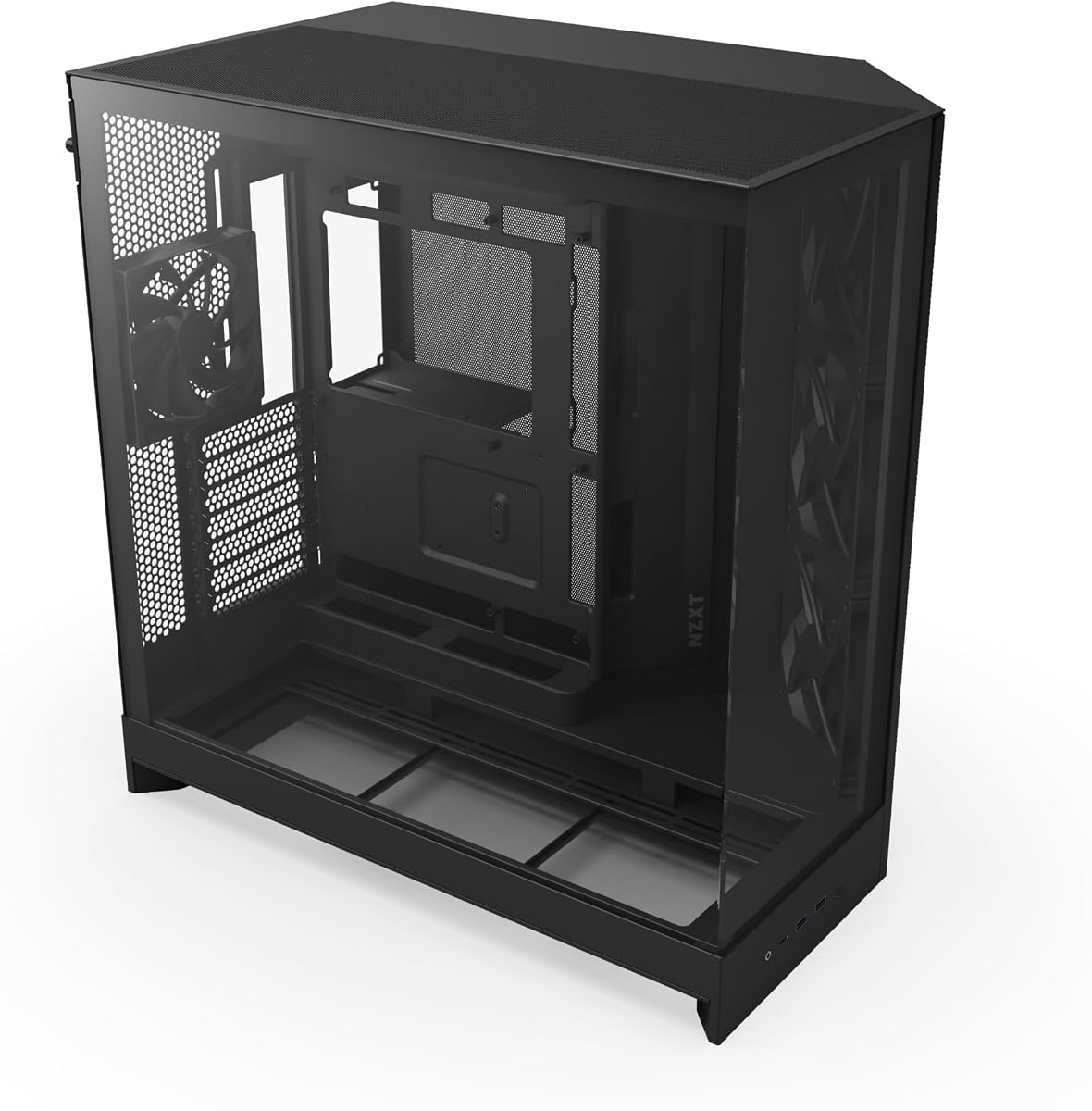
The MUSETEX Y6 is an ATX mid-tower designed to deliver a black, understated presentation and a generous view of the internal components. Its 4.7 rating, matte black finish, and 270-degree transparent dual tempered glass panels distinguish it from cases whose visual appeal depends entirely on RGB lighting. Four non-LED 120mm fans are already installed.
We may earn a commission when you buy through this link, at no additional cost to you.
The layout supports ATX, Micro-ATX, and Mini-ITX motherboards, along with graphics cards up to 410mm, CPU coolers up to 160mm, top-mounted liquid cooling up to 360mm, and power supplies up to 230mm. A dual-chamber arrangement separates the main components from the power supply compartment, while a dedicated ventilation channel helps move air around the power supply. Magnetic dust filters appear at the top and bottom.
Its most obvious limitation is the absence of lighting on the included fans. That makes the Y6 especially appropriate for a restrained, uniformly black build, but it also means the interior is less dramatic under RGB components. The stated CPU cooler limit is also more modest than that of the Lian Li V100, so builders should measure unusually tall air coolers before ordering.
For shoppers who want a visually clean case, four fans, modern Type-C connectivity, and broad cooling options without relying on lighting, the Y6 is a practical choice. It is particularly compelling for builds that emphasize the black finish, tempered glass presentation, and organized dual-chamber layout.
The matte black finish and non-LED fans create a consistent dark appearance without the glow of a lighting-heavy chassis. The wraparound tempered glass panels still provide a strong view of the graphics card, motherboard, and other visible components.
The dual-chamber design gives the power supply its own ventilated area. Three reverse fans on the side and one forward fan at the rear create the included airflow arrangement, while magnetic filters help reduce dust around major intake zones.
We may earn a commission when you buy through this link, at no additional cost to you.
The Lian Li O11 Vision Compact is built for builders who want a dramatic, carefully framed view of a high-end system. It has a 4.8 rating and uses a patented three-panel tempered glass arrangement across the front, top, and left side. The black finish, column-free appearance, and multiple viewing surfaces make it especially appropriate for a showcase-oriented gaming build.
We may earn a commission when you buy through this link, at no additional cost to you.
Developed in collaboration with PCMasterRace, the case supports back-connect motherboards and includes a mesh top panel suitable for a 360mm AIO. Its most distinctive engineering detail is the secondary chamber, which can conceal AIO tubing when the cooler is mounted on the side. That feature preserves visual continuity around the glass panels while keeping the cooling hardware visually out of the main viewing area.
The supplied product information focuses on appearance and layout rather than a stated bundle of fans, so buyers should not assume cooling hardware is included. They also need to account for the cost and specialized nature of a premium showcase chassis. The compact designation may appeal to builders seeking a refined footprint, but the precise external dimensions and detailed component limits are not provided in the available specifications.
The O11 Vision Compact is ideal for an enthusiast system where the case itself is a central part of the visual design. Its back-connect support, continuous glass, top mesh panel, and AIO tubing management deliver a polished foundation for compatible high-end components, particularly when the builder wants minimal visual interruptions.
Tempered glass on the front, top, and left side allows the hardware to be observed from several angles. The column-free, three-panel layout creates a continuous presentation that remains visually restrained despite the case's more elaborate construction.
The side-mounted AIO arrangement can place tubing in a dedicated second chamber. This keeps the cooling lines away from the main component view and helps the interior appear more carefully organized.
We may earn a commission when you buy through this link, at no additional cost to you.
The NZXT H5 Flow is a compact ATX mid-tower with a clear emphasis on airflow and tidy construction. Its 4.6 rating reflects a practical approach, while the perforated PSU shroud, ultra-fine mesh panels, and two pre-installed 120mm Quiet Airflow fans provide a useful foundation for cooling and help keep dust out of the main intake areas.
We may earn a commission when you buy through this link, at no additional cost to you.
The shroud can draw air through two 120mm fans on its side and bottom, although those fans are not included. Cooling flexibility is strong for a compact model: a radiator up to 360mm can be mounted in front, and one up to 240mm can be placed at the top. Cable routing is assisted by wide channels, hooks, and straps, reducing the visual clutter that can otherwise dominate a compact chassis.
The basic airflow bundle is modest compared with several cases in this list. Users who prefer a glass display filled with illuminated components may also find the straightforward black design less dramatic. Nevertheless, the lack of a stated lighting feature can be advantageous for a fully restrained setup that relies on the hardware itself for visual interest.
The H5 Flow is best for builders who value efficient airflow, compact proportions, and straightforward installation over elaborate presentation. It is especially relevant when the planned cooling setup uses the perforated shroud and additional front or top fans, since those positions allow the case to scale beyond the two included fans.
The PSU shroud is perforated along its side and bottom rather than forming a completely sealed barrier. Two optional 120mm fans can draw air through those openings, helping direct cooling toward the graphics card and lower interior region.
Wide routing channels, hooks, and straps provide several ways to guide power and data cables away from the viewing area. These details are particularly useful in a compact case where every available space may be needed for components or cooling.
We may earn a commission when you buy through this link, at no additional cost to you.
The Fractal Design North stands apart from conventional all-black gaming cases by combining a charcoal black structure with genuine walnut wood front bars. Its 4.7 rating and open-front design make it an attractive option for builders who want a warm, natural material to complement dark metal, glass, and understated components.
We may earn a commission when you buy through this link, at no additional cost to you.
The case supports ATX, Micro-ATX, and Mini-ITX motherboards and includes two 140mm Aspect PWM fans. Graphics card clearance reaches 355mm, or 300mm when a 360mm radiator is installed at the front. Natural ventilation comes through the open front and integrated mesh, while a clear tempered glass side panel provides a scratch-resistant view of the internal build.
Its wood elements may not suit a strictly monochrome setup, and the 355mm graphics card limit is lower than several larger cases reviewed here. The North also does not provide the same multi-panel showcase presentation as the O11 Vision Compact or Hyte Y70. However, these are matters of design preference rather than a lack of construction features.
Choose the North when you want a black case that feels less aggressive and more like part of the room's furniture. It suits a refined gaming system, a warm-toned desk setup, or a build where natural materials and understated front ventilation are central priorities.
Front bars cut from sustainable oak or walnut introduce texture that cannot be replicated by a conventional painted steel panel. The charcoal structure preserves an overall dark appearance, while the wood prevents the case from feeling visually anonymous.
The North includes two combined 3.5-inch and 2.5-inch drive mounts plus two dedicated 2.5-inch positions. Removing the side panels, unclipping the front, and lifting off the top with an integrated tab makes routine access more convenient.
We may earn a commission when you buy through this link, at no additional cost to you.
The CORSAIR 3200D RS combines a black mid-tower format with extensive cooling and installation features. It has a 4.6 rating, accommodates as many as nine 120mm fans, and comes with three RS120 ARGB fans. Its practical feature set includes a built-in GPU anti-sag stabilization arm, a cable-hiding shroud, and support for reverse-connector motherboards.
We may earn a commission when you buy through this link, at no additional cost to you.
Liquid cooling options are broad, with top support for 360mm, 280mm, and 240mm radiators. The front panel provides USB Type-C and USB Type-A connectivity, while a single front-cable connector is intended to simplify the connection process. Generous cable tie-down locations and the built-in shroud help maintain a clean internal appearance even when the system uses many power leads.
The ARGB ecosystem and extensive hardware support mean the case is best appreciated by builders who intend to expand it. Someone wanting the simplest possible chassis may prefer a product with fewer adjustable options. As with other illuminated cases, proper control may depend on compatible motherboard software or a separate controller, although the product information does not state the precise control method.
The 3200D RS is a strong match for a powerful black gaming system that may need additional fans, a large top radiator, or a heavy graphics card. Its included anti-sag support, three ARGB fans, reverse-connector readiness, and single front connector make it a versatile foundation for a modern build.
Nine 120mm positions offer considerable flexibility beyond the three included RS120 ARGB fans. Combined with 360mm, 280mm, and 240mm top radiator support, the case can accommodate a more elaborate cooling plan as component requirements change.
A built-in GPU stabilization arm supports heavier graphics cards, while a shrouded cable area and numerous tie-down points reduce clutter. The single front-cable connection and reverse-connector motherboard support also target a simpler installation process.
We may earn a commission when you buy through this link, at no additional cost to you.
The Lian Li O11D Mini V2 Flow delivers a compact black showcase chassis with a substantial cooling package. It carries a 4.7 rating and includes five pre-installed 120mm reverse-blade fans, which create a clean, uniform interior while directing air through the case in a way that suits a visual-first build.
We may earn a commission when you buy through this link, at no additional cost to you.
The 10-degree slanted bottom design is intended to improve cold-air intake and graphics card cooling. A protruding mesh side panel allows the chassis to accommodate full-size ATX power supplies despite its compact layout. It supports standard ATX, Micro-ATX, and Mini-ITX motherboards and is specifically optimized for ATX back-connect boards, making it relevant to clean cable-routing configurations.
Horizontal and vertical graphics card anti-sag brackets provide support for heavy cards from more than one orientation. Special brackets for the 24-pin motherboard cable help preserve a tidy layout. As with other non-illuminated designs, however, the included fans do not provide a colorful centerpiece, and reverse-blade orientation may not suit builders who prefer the brighter face of standard fans facing the viewing window.
This case is ideal for a compact system that still needs to accept full-size ATX components. It balances a modest footprint with five included fans, modern back-connect support, and careful graphics card management, making it particularly attractive for builders who prioritize cooling and component support over RGB effects.
The case retains support for ATX motherboards and full-size ATX power supplies despite its compact designation. A protruding mesh side panel makes room for the power supply while preserving ventilation around that area.
Five reverse-blade fans provide a uniform look across the interior. The slanted lower intake is designed to improve direct airflow and GPU cooling, combining thermal positioning with a less distracting presentation.
We may earn a commission when you buy through this link, at no additional cost to you.
The JONSBO TK-3 is built around a dramatic one-piece curved glass panel that creates a 270-degree view of the internal hardware. It has a 4.6 rating and a column-free black chassis, making it one of the most visually expressive cases in the lineup. The curved panel is intended to present the system as a continuous display rather than a conventional box with a flat side window.
We may earn a commission when you buy through this link, at no additional cost to you.
Cooling capacity is extensive, with ten fan positions and support for two 360mm AIO coolers, positioned at the top and bottom. The case also supports ATX, Micro-ATX, and Mini-ITX motherboards, including back-connect designs, and fits full-size ATX power supplies up to 220mm. Graphics cards can reach 420mm in length, while CPU coolers are supported up to 165mm.
Its listed dimensions of 288mm wide, 438mm deep, and 415mm high make this a substantial chassis rather than a compact one. The one-piece curved glass also deserves careful handling during assembly because the product information specifically advises against removing its explosion-proof film. Large cases also require enough desk space, and buyers should confirm that the visual footprint suits their setup.
The TK-3 suits builders who want the case to function as a central visual object. Its broad viewing area, extensive fan layout, dual-AIO capability, and long GPU clearance offer considerable room for a high-performance system, provided the builder can accommodate its physical size.
The column-free, one-piece curved panel wraps around enough of the chassis to create a 270-degree side view. This gives the motherboard, graphics card, and cooling system a more continuous presentation than conventional single-window cases.
Ten mounting positions allow substantial fan flexibility, while dual 360mm AIO support creates two major cooling zones. A maximum 420mm graphics card and 220mm power supply support further distinguish the TK-3 as a spacious enthusiast platform.
We may earn a commission when you buy through this link, at no additional cost to you.
The Hyte Y70 is a premium pitch-black showcase case with a distinctly modern layout. It carries a 4.7 rating and uses a three-piece panoramic glass enclosure around a dual-chamber interior. Its major attraction is the included luxury PCIe 4.0 x16 riser, which allows a graphics card to be mounted vertically in a four-slot arrangement with a color-matched canopy.
We may earn a commission when you buy through this link, at no additional cost to you.
Cooling flexibility is another strength. The side accommodates a 360mm radiator up to 125mm thick, while the adjustable top position supports radiators up to 68mm thick. A cold-floor area can hold either three 120mm or two 140mm fans up to 32mm thick, contributing to the stated 10-fan capacity. The spacious dual-chamber structure separates the main display area from the rear cable-management space.
The vertical four-slot graphics arrangement is not universal, although the included riser makes the stated orientation achievable. This is also a premium-focused design, and buyers should judge the case's physical footprint and component compatibility against their planned system. Tool-less panels, reusable Velcro straps, floating storage sleds, labels, and a clicky power switch support a refined installation experience.
The Y70 is an excellent choice for a polished display build where the graphics card, motherboard, and cooling hardware are meant to be seen from several angles. It is particularly suited to builders willing to embrace vertical GPU placement and a large panoramic layout rather than a traditional compact mid-tower.
The included PCIe 4.0 x16 riser makes it possible to position the graphics card vertically within a four-slot footprint. A matching canopy continues the visual design across the chamber, reducing the exposed mechanical appearance of the riser arrangement.
Radiator support at the side and top provides flexibility for liquid cooling, while the cold-floor area adds a dedicated lower fan position. Together with the rear chamber, this layout separates cooling airflow from cable storage.
We may earn a commission when you buy through this link, at no additional cost to you.
The NZXT H9 Flow combines a dual-chamber ATX layout with wraparound tempered glass and strong radiator options. Its 4.7 rating reflects a balanced design that separates the main components from the power supply and drives, improving thermal organization and giving cables a dedicated rear space.
We may earn a commission when you buy through this link, at no additional cost to you.
Four case-version fans are included: three F140Q models in the front-right and one F120Q at the rear. The chassis can hold as many as nine 140mm fans across the top, front-right, and bottom, plus one 120mm fan at the rear. It supports radiators up to 420mm at the top and front-right, offering more length than most of the other cases in the guide and requiring careful clearance planning.
The included F140Q CV and F120Q CV fans use three-pin DC connections, so compatibility with the rest of the build's fan-control setup is worth checking. Some users may also find the tall radiator positions and broad glass design more visually dramatic than a conventional compact chassis. Despite those considerations, the dual chamber and wraparound panel make the interior suitable for a clean presentation.
The H9 Flow is a strong choice for a high-performance build that may use an unusually large radiator or benefit from plentiful fan positions. It is also well suited to ASUS BTF and MSI Project Zero users because it supports back-connecting motherboards and offers extra-wide cable channels, built-in Velcro straps, and additional tie-down points.
Support for radiators up to 420mm at both the top and front-right creates unusually broad liquid-cooling flexibility. The available space and mounting orientation should be confirmed against the selected radiator, pump, and other installed hardware.
Compatibility with back-connecting motherboards such as ASUS BTF and MSI Project Zero can produce a much cleaner rear chamber. Extra-wide routing channels, built-in straps, and dedicated tie-down points support the same tidy aesthetic when standard connectors are used.
We may earn a commission when you buy through this link, at no additional cost to you.
The right black case depends on hardware dimensions, cooling strategy, display priorities, and the build's tolerance for additional components. Use the following factors to narrow the options before making a final selection.
Confirm the case supports the exact motherboard standard planned for the build. Every product reviewed here supports ATX, but many also accept Micro-ATX and Mini-ITX boards. Back-connect motherboard support is also valuable because compatible boards move cable connections behind the tray, reducing visible wiring. Cases such as the Lian Li V100, O11D Mini V2 Flow, JONSBO TK-3, and NZXT H9 Flow explicitly support this arrangement.
Modern graphics cards can be both long and heavy, so clearance should be checked in two ways. First, compare the card's length with the case's stated maximum, and second, consider whether the recommended support bracket or anti-sag arm is included. The JONSBO TK-3 and Lian Li V100 reach 420mm, the MUSETEX Y6 supports 410mm, and the NZXT H9 Flow is designed to accommodate high-end graphics cards without providing one fixed maximum length in the supplied specifications.
Start with the fans already installed, then determine how many additional positions the build requires. The Lian Li V100, MUSETEX Y6, and O11D Mini V2 Flow include four or more fans, while the CORSAIR 3200D RS supports nine 120mm positions and the JONSBO TK-3 lists ten positions. Pay attention to orientation as well: reverse-blade fans can provide a cleaner visual, while forward-facing fans may prioritize airflow toward radiators or components.
A case that accepts a large radiator is not automatically suitable for every liquid cooler because pump orientation, tubing, motherboard placement, and radiator thickness can affect the result. The V100 and MUSETEX Y6 support top radiators up to 360mm, while the O11 Vision Compact includes a top mesh panel for a 360mm AIO. The NZXT H9 Flow reaches 420mm, and the Hyte Y70 supports a thick side radiator, so each offers a different cooling layout.
Dual-chamber layouts can make the power supply easier to install and keep cables out of the main viewing area. The NZXT H9 Flow separates the power supply and drives, while the O11D Mini V2 Flow uses a protruding mesh side panel to accommodate full-size ATX power supplies. The Fractal Design North provides two combined 3.5-inch and 2.5-inch mounts plus two dedicated 2.5-inch mounts, whereas the JONSBO TK-3 offers a specified combination of 2.5-inch and 3.5-inch drive positions.
All-black appearance depends on more than the chassis color. A case with non-LED fans and dark framing may look more uniform than one filled with illuminated components. The Fractal Design North adds walnut accents, while the Hyte Y70, O11 Vision Compact, and JONSBO TK-3 prioritize large viewing areas. The Hyte Y70 and TK-3 use panoramic designs, and the O11 Vision Compact can conceal side-mounted AIO tubing in a second chamber.
Ease of assembly depends on panel access, routing space, connector design, and motherboard layout. The Lian Li V100 uses tool-less side panels, the CORSAIR 3200D RS provides a single front-cable connector and a cable shroud, and the Hyte Y70 uses tool-less panels with a separate rear chamber. Back-connect motherboard support can further simplify the visible side, provided all other components are compatible with that arrangement.
Front-panel connections determine how conveniently accessories can be attached. The MUSETEX Y6 includes USB Type-C, one USB 3.0, and one USB 2.0 port, while the JONSBO TK-3 lists a USB 3.2 Gen2 Type-C port and two USB 3.0 ports. The Fractal Design North and CORSAIR 3200D RS also highlight Type-C connectivity. Confirm that the included front connections match the ports and headers available on the planned motherboard and accessories.
Begin by checking the motherboard, graphics card, power supply, cooler, storage devices, and case dimensions before assembly. Install the power supply and storage in the appropriate chamber, then mount the motherboard and connect its power and data cables. Add the required fans and radiator, leaving enough clearance around vents, filters, and the tempered glass panels.
Manage cables as the build progresses rather than leaving the entire routing process until the end. Use the supplied straps, hooks, channels, tie-down points, or dedicated brackets to keep power leads away from fans and out of the main viewing area. Connect front-panel cables only after confirming the motherboard header layout, and follow the case and motherboard instructions when using reverse connectors or back-connect boards.
During routine care, power the system down and disconnect it before removing panels or touching internal components. Use a soft, dry cloth to wipe dust from glass and black surfaces, and gently vacuum or brush accessible filters and vents without dislodging components. Avoid harsh cleaners, compressed air directed into tightly packed radiators, and leaving protective films on visible glass longer than necessary.
The Lian Li V100-ATX is the most balanced overall recommendation because it combines four included ARGB fans, generous component clearance, tool-less side panels, and back-connect motherboard support. The MUSETEX Y6 is a more restrained budget-oriented option, while the Hyte Y70 offers the most elaborate panoramic presentation.
No. The color of the chassis does not determine thermal performance. What matters is the design of the intake and exhaust paths, fan placement, radiator support, mesh coverage, and the separation of hot components from cooler zones. Several reviewed models include mesh panels, dedicated airflow paths, or multiple pre-installed fans.
Pre-installed fans can reduce both cost and assembly work, making them useful for a first build or an upgrade. Check how many fans are included, whether they are reversible, and how many additional mounting positions remain. A case with ample expansion flexibility may be a better long-term choice if the included fans will later be replaced.
A back-connect motherboard places connectors on the rear of the board so cables can route behind the motherboard tray. This can create a cleaner visible interior, but it requires a compatible case and careful planning around the power supply and other components. Several models in this guide explicitly support back-connect boards.
No, but a glass panel can make a coordinated internal layout and illuminated components more visible. A restrained build may prefer a darker, non-illuminated presentation, while a showcase system may benefit from panoramic glass. The Fractal Design North instead combines tempered glass with walnut front accents for a more natural design.
Compare the card's overall length and thickness with the case's stated graphics card clearance, then verify that the power supply, front fans, or radiator will not obstruct it. Also check whether a horizontal anti-sag support is included or recommended for a heavy card, particularly in cases with vertical GPU options.
Most can support a 360mm radiator in at least one location, but the intended position varies by model. Some emphasize top mounting, while the O11 Vision Compact and Hyte Y70 provide side-oriented options. Confirm radiator thickness, pump placement, tubing direction, and clearance with the CPU cooler before installation.
A dual-chamber design can make routing easier by separating the power supply and sometimes the drives from the main component area. It also allows cleaner cable runs behind the motherboard tray. The space requirement of the additional chamber should still be considered when choosing a case for a smaller desk.
The Lian Li V100-ATX leads this guide for its balanced combination of four ARGB fans, useful clearances, back-connect support, and accessible panels. The MUSETEX Y6 serves buyers who want a restrained, non-illuminated black design with four included fans, while the Hyte Y70 stands out as the premium panoramic showcase option.
Prioritize motherboard format, graphics card dimensions, radiator placement, and power supply fit before appearance alone. A case may look excellent but still prove unsuitable if it cannot accommodate the selected hardware. Back-connect support, dual-chamber routing, and pre-installed cooling can make the build process more practical, but every added feature should complement the intended system.
Ratings, availability, and prices can change, so check the current product listing and confirm the full specification set before buying. Comparing the case against the exact motherboard, graphics card, cooler, power supply, and storage devices will help ensure that the chosen black enclosure supports the completed build as well as its intended appearance.
