
Caregiver Pager System 1200+ft Nurse Call System with 15 Buttons
4.4Editor score
Up to 200 numbered buttons
Extended open-area range
Combined number-letter display
Hospital pager systems compared for range, call capacity, alert clarity, waterproofing, portability, and setup ease to help you choose the right model.
Hospital pager systems provide a practical way for patients, residents, and staff to request assistance without relying on hardwired call bells. A useful system should identify the source of each call, remain audible in busy care environments, and provide dependable coverage across the rooms and floors where it will be used.
This guide compares ten wireless hospital pager systems based on their documented call-button capacity, wireless range, alert formats, display functions, power options, water resistance, and intended settings. It covers compact home-care arrangements as well as multi-room clinics, nursing homes, assisted living facilities, rehabilitation centers, and hospital wards.
Each review highlights the configuration that distinguishes the product, along with practical limitations involving walls, floors, metal surfaces, and facility size. The top picks represent different priorities: budget-friendly simplicity, portable staff alerts, and expanded capacity. Product prices and configurations can change, so confirm current details before purchasing.
4.4Editor score

4.4Editor score

4.6Editor score
The comparison highlights the main differences among these ten systems, including included hardware, maximum call-point capacity, documented range, alert options, and water resistance. Specifications are most useful when matched to the size and construction of the intended care environment.


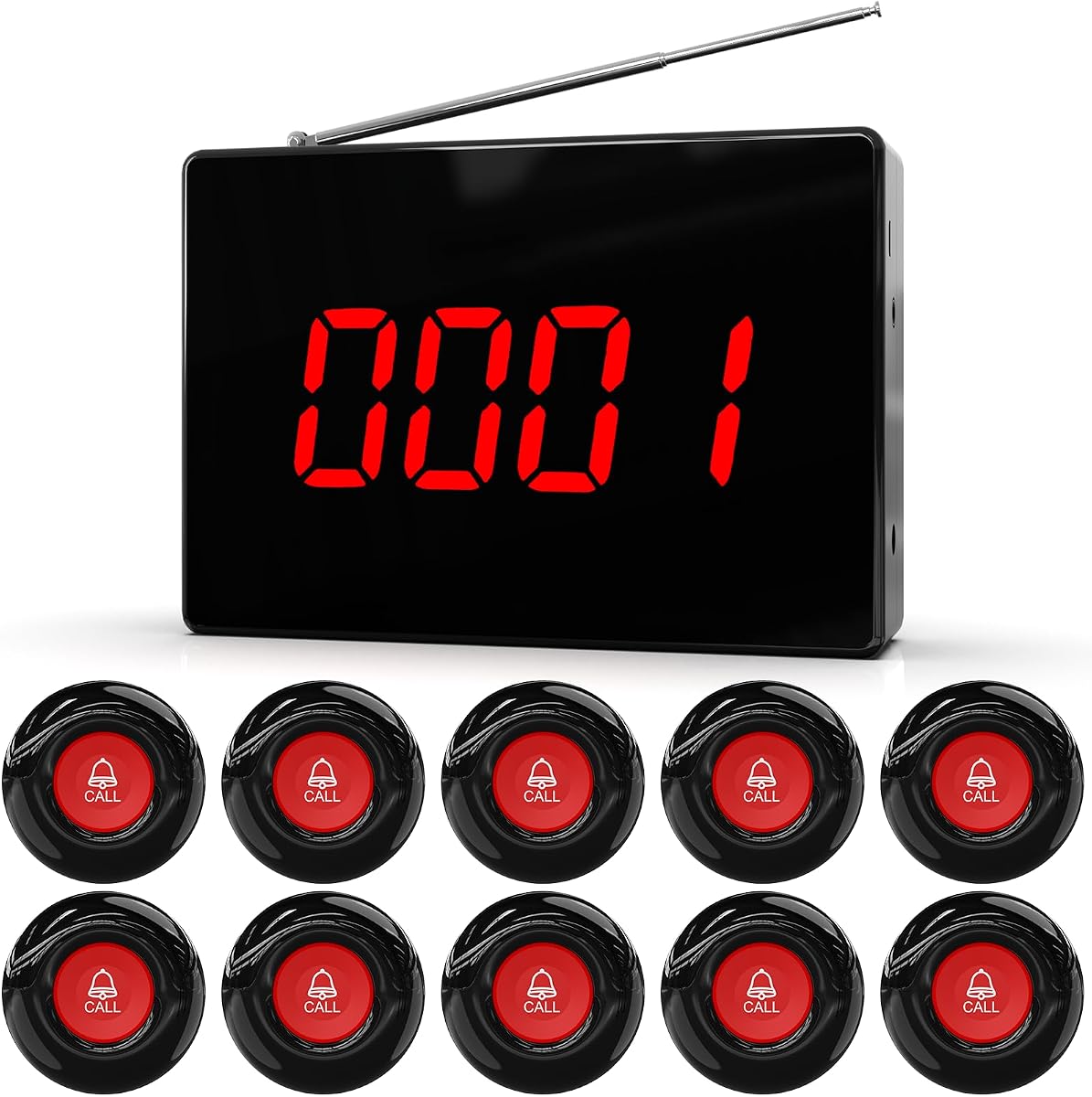



This wireless nurse call system combines a 30-number LCD display, 10 included waterproof buttons, and centralized desktop or wall-mounted monitoring. Its 4.4 rating reflects a broadly capable design for clinics, nursing homes, and assisted living environments. The numbered display gives staff a direct way to identify the origin of a request for help.
We may earn a commission when you buy through this link, at no additional cost to you.
The system supports voice alerts in seven languages and eight alert tones, allowing teams to select a presentation that fits their staff and residents. One-Off Mode is useful for routine notifications, while Repeat Mode continues alerting until the call is cleared. That distinction matters in environments where an unanswered request could leave a resident waiting unnecessarily.
Its stated range reaches 1,000 feet in open areas, although walls, floors, and metal surfaces can reduce the effective distance. Expansion to 255 numbered call points provides more flexibility than the included ten-button configuration. AC power supports daily operation, and four C batteries provide backup power during an outage, though battery installation and monitoring remain the buyer's responsibility.
This is a strong selection for a fixed nursing station where staff need to see and hear incoming calls. It is less suitable for teams that need alerts delivered to roaming caregivers, since no wearable pager is included. Buyers should also map walls and equipment before installation. For a centralized system with expandable capacity and outage support, it offers a practical balance of features.
The numbered LCD display reduces ambiguity by showing which call point has been activated. Staff can respond more efficiently when multiple rooms, bathrooms, or service areas are equipped with buttons.
Choose one-off alerts for standard requests or repeat mode for calls that require persistent attention. This gives caregivers control over urgency without requiring every call to be handled identically.
We may earn a commission when you buy through this link, at no additional cost to you.
This caregiver pager system is designed for facilities that need more call points and detailed source identification. It includes 15 buttons, supports up to 200 numbered buttons, and can display combinations of numbers and letters. Its 4.4 rating reflects a feature-rich configuration suited to hospitals, nursing homes, clinics, hotels, churches, and rehabilitation centers.
We may earn a commission when you buy through this link, at no additional cost to you.
Seven prompt tones, ten volume levels, configurable announcement repeats, and external audio support give staff several ways to manage incoming calls. The receiver can mute alerts at level zero, while external audio can provide louder broadcasting where required. Included lanyards offer a wearable call option, and the remote control makes configuration more convenient.
The stated maximum range is 1,312 feet outdoors between the display and buttons, but the listed indoor range is only 164 to 328 feet. Watches have a shorter range of 200 feet outdoors and 60 to 98 feet indoors. Obstacles can reduce performance further, and the product information recommends a signal booster when range is insufficient.
This system best suits buyers who value capacity, display detail, and adjustable announcements more than portability for staff. Facilities should test signal strength in the actual rooms before committing to a full deployment. If the documented indoor reach fits the building and external audio can be placed effectively, it is a comprehensive option for larger care operations.
The combined number-and-letter display can represent many different call locations. That makes it easier to distinguish rooms, beds, or service areas when the facility has a large number of call points.
External audio support is useful where the receiver's normal output may not reach staff. Adjustable announcement repeats add another layer of visibility for calls that need continued attention.
We may earn a commission when you buy through this link, at no additional cost to you.
This system stands out by including a portable QM003 caregiver pager alongside a monitoring unit and 10 call buttons. Rather than keeping staff tied to the nurse station, it can send alerts to a caregiver carrying the pager. Its 4.4 rating and broad compatibility make it particularly interesting for nursing homes, clinics, and assisted living facilities.
We may earn a commission when you buy through this link, at no additional cost to you.
The portable receiver allows staff to respond from elsewhere in the facility, while the monitoring unit provides a central location for call management. The system supports up to 255 wireless buttons, seven-language voice announcements, eight selectable tones, and adjustable volume. One-off and repeat alert modes let teams choose whether a standard notification or persistent escalation better fits each call.
The listed open-area range is up to 1,000 feet, but building materials can reduce real-world coverage. Front-facing controls and wireless installation avoid complicated wiring, although the portable pager requires regular charging and the system still needs careful placement. A signal test in the intended rooms is advisable before a large rollout.
This is the most practical choice in the group for facilities that want staff to move while remaining reachable. It combines centralized monitoring with wearable alerts and ample expansion capacity. Choose it when mobility is central to the response workflow, and pair installation planning with regular pager charging to avoid missed alerts.
The included portable pager is the defining feature. It allows a caregiver to leave the monitoring station without losing access to incoming call notifications.
Support for as many as 255 wireless call buttons allows gradual expansion. Facilities can begin with the included set and add numbered call points in other rooms or service areas.
We may earn a commission when you buy through this link, at no additional cost to you.
This CallToU system focuses on an uncomplicated receiver-and-button arrangement that can be used in a home, clinic, hospital, or nursing home. It earns a 4.5 rating and offers a large numbered display, 55 ringtones, and five volume levels. The core package is especially approachable for a single resident or a small care space.
We may earn a commission when you buy through this link, at no additional cost to you.
Its receiver uses a plug-in power connection, while the wireless call button can be attached to a wall or other surface. Each panic button is paired to a unique number for straightforward identification. A receiving range of up to 500 feet is listed for homes and small institutions, and additional receivers or buttons can be paired to expand coverage.
This product does not include the larger button bundles offered by several competing systems, so scaling up requires additional hardware. The documented range can also be reduced by walls, floors, and other obstructions. The IP65-rated button offers useful water protection, but each receiver still requires access to a suitable outlet.
This system is a good match for home care, a single clinic room, or a compact residential setting where simplicity matters more than a large call-point inventory. Buyers should verify that the listed range and button quantity suit the intended space. For a straightforward receiver-based pager with a clear display and flexible tones, it is easy to recommend.
A unique number for each paired panic button helps the person receiving the alert determine where assistance is needed. The large display is also designed to improve visibility for users who may have difficulty hearing.
With 55 ringtone choices and five volume levels, the receiver can be configured for different surroundings. The options are useful for distinguishing alerts or matching a particular household or clinical environment.
We may earn a commission when you buy through this link, at no additional cost to you.
This CallToU system combines 10 waterproof call buttons with a display receiver, voice announcement of the call number, and a repeatable alert feature. It has a 4.6 rating, placing it among the highest-rated products in this guide. It is aimed at clinics, nursing homes, restaurants, businesses, and residential care settings.
We may earn a commission when you buy through this link, at no additional cost to you.
Callers do not need to press again when a request is not noticed, because the receiver can repeat the alert multiple times. Its expansion capacity reaches up to 1,000 buttons, making the system unusually flexible for facilities that expect growth. The listed open-area range is 1,000 feet, and the product information notes successful use in a 5,000-square-foot home.
That range should not be treated as guaranteed through every type of building, because walls and other environmental factors can affect wireless performance. A large system also requires disciplined numbering, button placement, and staff training. Additional buttons use a separately identified ASIN, which buyers may need to obtain when expanding the installation.
This product is a strong choice for an institution that wants voice identification and a very high expansion ceiling without moving to a wired alarm platform. It is less attractive for someone who needs only one basic call point, since the package includes ten buttons and a display receiver. For flexible multi-location calling, however, its capacity is the standout feature.
Announcing the call number lets staff identify the requesting location without relying only on visual recognition. This is helpful when the receiver is across the room or viewed by several caregivers.
The stated support for up to 1,000 buttons makes this suitable for institutions planning to add rooms or service areas. Each location still needs consistent numbering and an appropriate button location.
We may earn a commission when you buy through this link, at no additional cost to you.
This caregiver system is built around six waterproof panic buttons and three receivers, making receiver placement more flexible than systems that include only one. It has a 4.5 rating and is intended for homes, hospitals, and clinics. The LED number display shows the source of a call, while each button can be programmed with its own sound.
We may earn a commission when you buy through this link, at no additional cost to you.
Thirty-eight ringtones and five volume settings range from silent to 110 decibels. The listed 500-foot receiving range is suitable for many two- or three-story homes, and the system can be expanded with additional receivers or buttons. Multiple receivers allow caregivers to keep an alert device in more than one occupied area.
Each receiver requires a plug-in power source, so a multi-receiver installation needs access to suitable outlets. The starting package supports only six call locations, and adding more will require additional buttons. As with all wireless products, walls and obstructions may reduce the nominal range, so placement should be tested rather than assumed.
This is a sensible pick for a household with several caregivers or a small facility where alerts should reach more than one part of the building. The programmable tones can help users recognize different call points, and the LED display adds a second identification method. It offers a more distributed arrangement than a single-receiver kit without requiring the largest button inventory.
Three receivers let caregivers keep alert devices in separate rooms or zones. Placement near a kitchen, bedroom, or clinical work area can reduce the need to carry a receiver constantly.
Programming each panic button with a different tone provides another way to distinguish call locations. The LED number display reinforces that identification when a sound is recognized.
We may earn a commission when you buy through this link, at no additional cost to you.
This caregiver pager is built for a straightforward one-receiver, one-button arrangement. It has a 4.6 rating and serves a clear purpose: allowing a caregiver to move around while a resident or patient can request assistance. The receiver's open-area working range is listed as more than 500 feet.
We may earn a commission when you buy through this link, at no additional cost to you.
The receiver can be moved between areas such as a bedroom, kitchen, or living room, although it must remain connected to an outlet. The call button may be worn around the neck like a pendant or secured with a bracket or adhesive pad. That flexibility makes the kit useful for a single individual who may need help in different parts of a home.
The system provides 55 ringtones and five volume levels from zero to 110 decibels. Both the button and receiver are described as waterproof and dustproof, which is useful in bathrooms, kitchens, and exposed areas. Because there is only one included button and no detailed multi-location display, the product is less appropriate for institutions that need room-level identification across many beds.
This is the simplest and most economical option in the guide for a one-person care arrangement. It offers more sound and placement options than a basic mechanical bell while keeping the hardware count low. Choose it when one person needs to summon one nearby caregiver and the distance between them is well within the tested signal range.
The plug-in receiver can remain in the room where assistance is most likely needed. Moving it to another area lets the caregiver continue receiving alerts without sitting beside the patient.
A neck strap turns the call button into a wearable pendant, while a bracket or adhesive pad supports fixed placement. The same basic component can therefore serve different mobility and caregiving situations.
We may earn a commission when you buy through this link, at no additional cost to you.
This CallToU system emphasizes clear voice announcements and an extended digital display, helping a caregiver learn the caller's location without relying solely on a visual glance. It has a 4.6 rating and includes six waterproof buttons with one plug-in receiver. The buttons are paired before shipment, which should simplify initial setup.
We may earn a commission when you buy through this link, at no additional cost to you.
Call numbers from one through six can be announced, while 44 ringtones and five volume levels from zero to 110 decibels provide alert customization. The listed open-area range is 500 feet, and the system can be paired with more receivers or buttons. This makes it possible to begin with a small installation and expand as the user's needs change.
The product information is explicit that walls can affect reception, so a 500-foot outdoor figure should not be interpreted as a guaranteed indoor radius. The single receiver also limits how many caregivers can independently receive alerts unless additional units are purchased. Those trade-offs are reasonable for a home or compact care space but may be limiting for a busy ward.
This system is most compelling when spoken location information is important and a caregiver is based near the receiver. Its long display time, pre-paired buttons, and waterproof call points make daily use relatively approachable. For a small residence, clinic room, or single-caregiver arrangement, it provides useful identification features without a very large hardware package.
Voice announcements identify the call number while the LED display keeps that information visible. Using both channels lets staff confirm a call even if they do not hear every word.
The included buttons arrive paired for straightforward installation. Users can mount them in intended locations, connect the receiver, and begin assigning practical call locations with less initial configuration.
We may earn a commission when you buy through this link, at no additional cost to you.
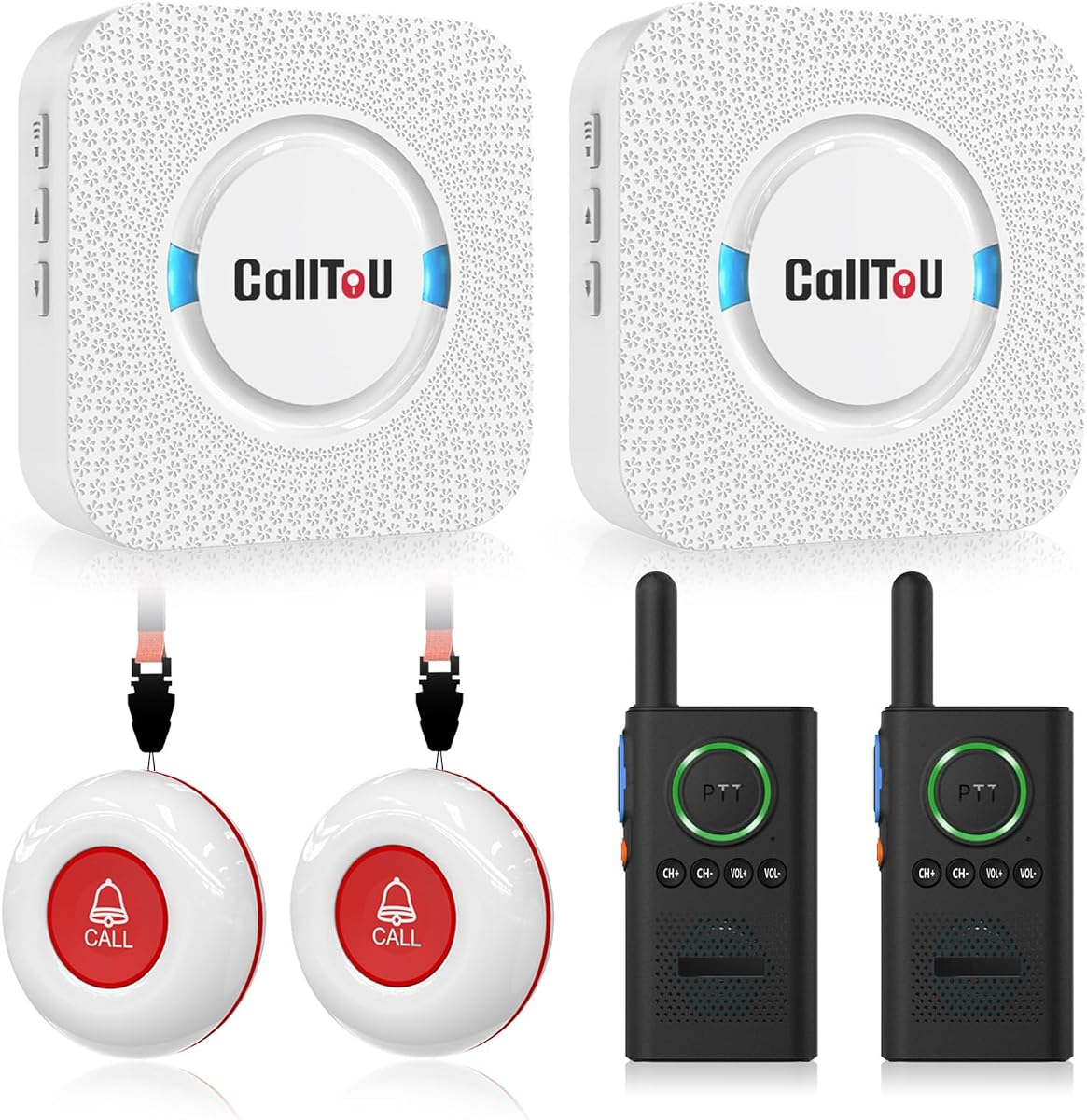
This system expands on a conventional caregiver pager by including two receivers, two call buttons, and two walkie-talkies. It has a 4.6 rating and is aimed at households caring for elderly people, patients, or people with disabilities. The radios allow spoken conversation without holding a button during an exchange.
We may earn a commission when you buy through this link, at no additional cost to you.
Each receiver can be moved to a different room while remaining connected to an outlet, and the call buttons can be worn as pendants or attached with brackets and adhesive pads. The pager's listed open-area range is 500 feet, with 55 ringtones and five volume levels providing the usual alert customization. The waterproof and dustproof construction suits locations where moisture or dust may be present.
An important limitation is that the wireless intercom and pager are separate systems and cannot be paired with each other. The product information also recommends keeping indoor pager use below 300 feet because obstacles affect the signal. Users who expect one integrated network linking buttons, receivers, and radios may be disappointed by the separation.
This product is a good fit for a household with two caregivers who want both one-way call alerts and two-way radio communication. It offers more flexibility than a single-receiver kit without approaching the call-point inventory of a large nurse station. The tradeoff is that the two communication functions remain distinct rather than functioning as one unified system.
The included walkie-talkies allow a caregiver and another user to converse hands-free after a call. This is helpful for checking on a situation without walking to the person immediately.
The stated 500-foot range applies in an open area, while the guidance advises keeping indoor use below 300 feet. Testing the actual layout prevents avoidable delays in response.
We may earn a commission when you buy through this link, at no additional cost to you.
This medical-clinic-oriented system offers one of the largest expansion capacities in the guide, supporting up to 999 call buttons and call bells. It has a 4.6 rating, a numbered display, and a documented open-area range of 1,000 feet. The design is aimed at clinics, assisted living facilities, nursing homes, hospitals, and other multi-room venues.
We may earn a commission when you buy through this link, at no additional cost to you.
Its receiver shows the room number of the calling button and continues beeping until the call is cleared. Settings are automatically saved and remain intact after a restart, which reduces configuration loss in a large installation. Fifteen volume levels offer fine-grained sound control, and the included call buttons use a durable ABS shell with pre-pairing.
Range remains an environmental variable. The manufacturer specifically advises installing away from metal and brick walls to optimize coverage, while also noting that walls and other objects reduce operating distance. Although the numerical capacity is impressive, a useful deployment still depends on signal tests, organized button numbering, and placement near the people who need assistance.
This is the strongest choice for a buyer whose long-term priority is very large expansion potential and durable call hardware. It may be more than a small household needs, but institutions that anticipate adding hundreds of locations can benefit from the programmable architecture. The most important next step is a site-specific signal and workflow assessment.
Automatic setting retention helps preserve programmed buttons, volume choices, and display behavior. That is particularly useful in a large installation where reconfiguration would be inconvenient.
The ABS housing is designed for regular use and can be wall-mounted or worn on a lanyard. This gives teams options for bedside, bathroom, corridor, and mobile-patient call points.
We may earn a commission when you buy through this link, at no additional cost to you.
The right hospital pager system depends on the number of people needing assistance, building construction, staffing patterns, and whether alerts must reach caregivers beyond a fixed nursing station. These factors help narrow the features that matter most.
Start with the number of people or rooms that may need to call for help. Included configurations range from a single button to 15 buttons, while some systems document expansion limits of 200, 255, 999, or even 1,000 call points. Capacity is more than a headline number: each button must have a clear, memorable identifier, and staff need a reliable process for assigning locations.
Published ranges are usually open-area maximums, not guaranteed distances through walls or between floors. Metal, brick, concrete, plumbing, and dense furnishings can weaken signals. A system advertising 500 to 1,312 feet outdoors may behave very differently inside a hospital or nursing home, so measure actual call points against receiver placement and test the proposed layout before buying many components.
A fixed display receiver works well when staff remain near a nurse station. A portable caregiver pager is more valuable when staff routinely move through rooms or wings, and multiple receivers help distribute alerts across separate zones. Walkie-talkies can add two-way conversation, although they may operate as a separate system rather than integrating directly with the pager buttons.
Numbers, voice announcements, and LED displays help staff identify the source of a call. A large display is useful for a caregiver who cannot hear clearly or who needs to glance at a receiver from across a room. Voice announcements can make the system usable while multitasking, while separate tones allow call points to be recognized by sound. The best setup often combines audible and visual identifiers.
A wide volume range is important because clinical and residential spaces differ in background noise. Many systems offer five levels, while some reach 15 levels or provide more than 50 ringtone choices. Repeat mode is particularly useful for urgent or unanswered calls because it continues reminding staff until the call is cleared, while one-off mode is better for routine assistance requests.
Bathrooms, kitchens, rehabilitation spaces, and resident rooms expose call buttons to moisture and dust. Waterproof or IP65-rated buttons are valuable in these settings, while the receiver may require a dry location and reliable outlet access. Confirm whether the button, receiver, or entire set carries the protection, since a water-resistant call point does not make every component weatherproof.
Most receivers use a plug-in power connection, so an outlet must be available in every location where a receiver is placed. One system in this guide also provides battery backup for its central display. Portable and wearable components require their own charging routine, and low-battery alerts should be included in staff procedures. A power outage response plan is essential in facilities where urgent calls cannot wait.
Wireless buttons can reduce wiring work, but they still need deliberate placement, numbering, programming, and testing. Put buttons where a patient can reach them easily, away from direct heat, water exposure beyond the stated rating, and metal fixtures. Staff should know how to identify and clear calls, what repeat alerts mean, how to test the system, and who handles receiver battery checks.
Begin by mapping every intended call point and assigning a consistent number or letter. Install each button where the person can comfortably reach it, commonly near a bed, chair, bathroom, or service counter. Pair and program the buttons according to the manual, then place the receiver where staff can see its display and hear its alert. Test every location from the actual receiver rather than relying solely on a specification sheet.
Teach staff how to distinguish one-off alerts from repeated alerts, how to identify the source of a request, and how to clear a call after responding. Portable pagers and walkie-talkies should be charged on a defined schedule. If a system includes multiple receivers, assign responsibility for checking each one and establish a backup plan when a device is offline or a battery is low.
Care for the system by keeping call buttons clean using the manufacturer's recommended method and avoiding exposure beyond the stated water-resistance rating. Inspect adhesive mounts, straps, receivers, and power connections during routine checks. Test representative buttons at planned intervals, document the results, and revisit placement if staff report missed alerts or if building renovations introduce new walls and obstructions.
Yes. Many of the systems in this guide are marketed for both hospitals, clinics, and nursing homes and for elderly or disabled people receiving care at home. A one-receiver, one-button arrangement is usually sufficient for one patient, while multiple buttons and receivers make more sense in shared care environments. Check the available power outlets and test the signal in the relevant rooms.
The listed maximum generally applies to an open area and should not be treated as a guaranteed indoor distance. Walls, floors, metal fixtures, brick, and other obstructions can reduce the range considerably. One product specifically recommends keeping indoor use below 300 feet even though its open-area rating is 500 feet. A live test at every planned call point is the most reliable way to confirm performance.
Both can be useful. A numbered display helps staff identify the source at a glance, while a voice announcement makes the information audible during busy work. Products with both are often more adaptable, particularly where a caregiver is not looking directly at the receiver. The best option is a system whose identifiers are large enough to understand in the intended environment.
The correct number depends on the people and rooms that require assistance, not simply the facility's total size. One patient needs at least one call point, while a ward may require buttons in patient rooms, bathrooms, treatment areas, and service locations. Choose a starter set that covers immediate needs and confirm the system's documented expansion limit before planning a larger installation.
These products are best understood as wireless caregiver pager and nurse call systems rather than complete clinical communication platforms. They can provide valuable call buttons, displays, alerts, and portable notifications, but buyers should verify integration requirements, coverage, escalation procedures, and institutional policies. Larger facilities may need professional site testing and a clear process for assigning responsibility.
Most included receivers are plug-in units and will not continue operating during a power interruption unless they have a backup source. One system in the guide provides four C batteries for backup operation, while portable components require regular charging. Facilities should consider outage procedures, spare batteries, and alternative ways to summon assistance rather than assuming every pager will remain active.
Waterproof or IP65-rated buttons are generally more suitable for bathrooms and other damp locations than standard call buttons. The protection level applies to the listed components, so receivers and power connections should still be placed in dry areas. Follow the manufacturer's cleaning guidance and do not expose a button to water beyond its stated rating.
Test each installed button from every relevant receiver and record whether staff can identify the source clearly. Include checks during normal background noise, at the intended night-time volume, and from different floors or wings. Repeat the test after moving furniture, changing receiver placement, or completing construction that introduces new radio obstructions.
The three leading options serve different needs. The 10-button wireless nurse call system is a balanced fixed-station choice, the 15-button caregiver pager system offers extensive capacity and flexible announcements, and the single-button home care pager provides a simple, economical way to monitor one person. The nurse call system with a portable caregiver pager is especially attractive when staff need to move beyond a nursing station.
Prioritize the number of call points, tested indoor coverage, visibility of call identifiers, and the receivers' locations within the actual facility. Water-resistant buttons and repeat alerts are particularly valuable in bathrooms and other high-priority spaces, while backup power or an outage procedure is essential where calls may be urgent. Choose a system that staff can understand and maintain, not simply the one with the largest advertised capacity.
Before ordering, confirm the current configuration, included accessories, compatibility, and expansion requirements. Product prices, bundled components, and seller details can change, so check the current listing carefully. A site-specific signal test and a clearly written installation plan can make a greater practical difference than a modest difference in headline range.