
Ponkor 2-Pack 6200mWh Kit
4.6Editor score
Two 6200mWh battery packs
Three charging input options
Multi-layer safety protection
Our 2026 guide compares the best battery backup for Xbox, covering capacity, charging speed, compatibility, safety, play-and-charge options, and value for
Battery backup for Xbox gives players a dependable way to extend controller runtime, recharge between sessions, and avoid pausing a game when disposable batteries run low. The best options balance usable capacity, safe charging, broad controller compatibility, convenient indicators, and a design that suits your gaming setup.
We compared ten rechargeable controller battery kits on capacity, supported Xbox controller models, charging methods, runtime claims, recharge times, safety features, package contents, portability, and practical extras. The list includes charging stations, play-and-charge designs, and multi-battery sets for different household and travel needs.
Each review highlights what distinguishes the product, where it is most useful, and any trade-offs based on the supplied specifications. Ratings and technical claims reflect the information available when the guide was prepared, while prices and availability can change, so check the current listing before buying.
4.6Editor score
4.7Editor score

4.6Editor score
This side-by-side comparison covers every kit in the guide, with particular attention to battery quantity and capacity, charging behavior, Xbox controller compatibility, and whether the design supports charging while gaming. It helps distinguish multi-controller systems from compact two-battery options and play-and-charge setups.


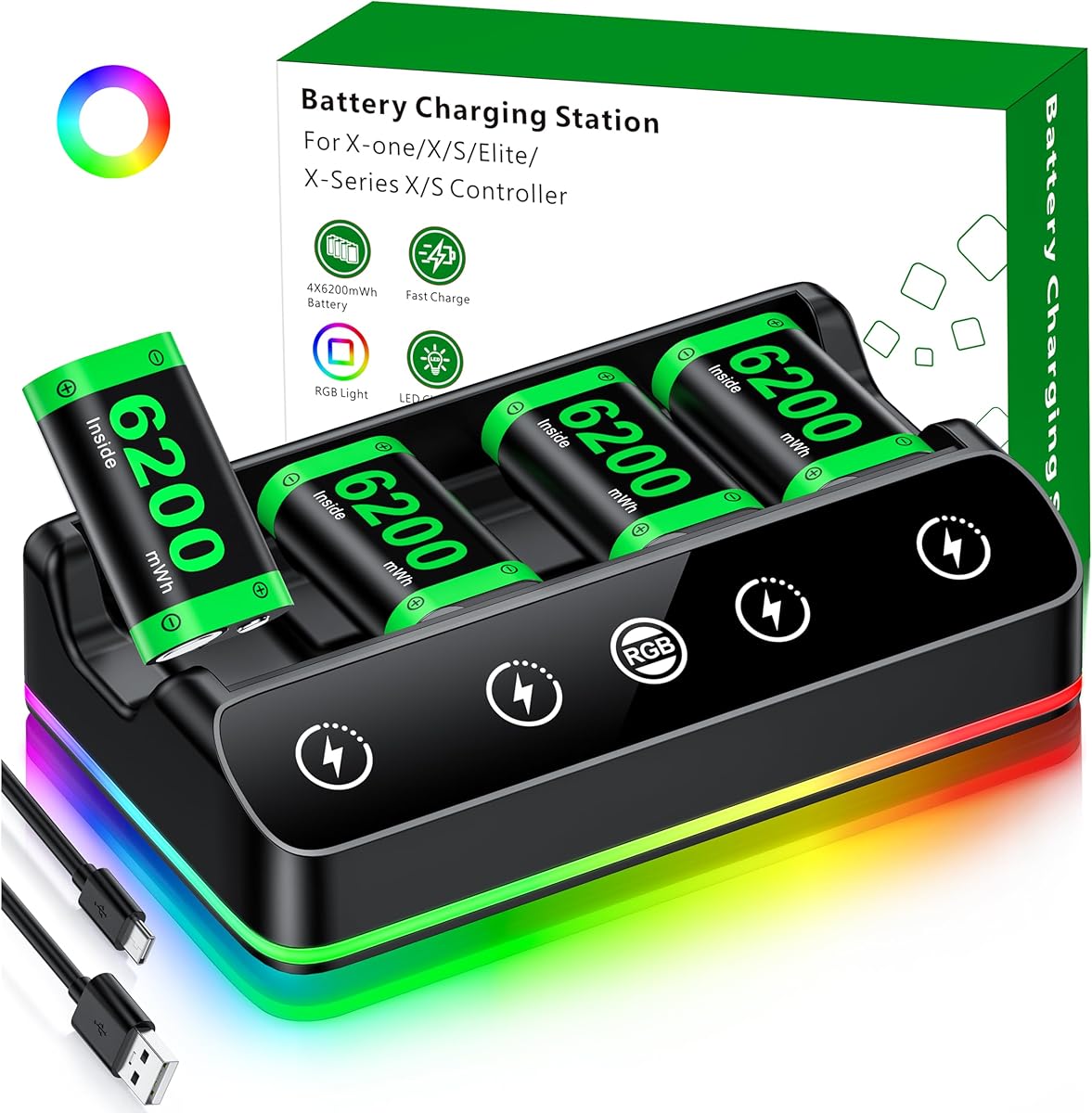
The DINOSTRIKE 4X 6200mWh kit combines four rechargeable controller batteries, a dedicated station, and an extended USB-C cable. Its 4.7 rating reflects a strong balance of capacity, convenience, and presentation. The station measures 4.25 by 7.55 by 1.57 inches, making the substantial four-battery set reasonably portable for parties, travel, or a shared gaming room.
We may earn a commission when you buy through this link, at no additional cost to you.
Each battery is rated at 6200mWh, and the product information claims roughly 15 to 20 hours of play after a full charge. The batteries recharge in approximately four to five hours in the included stand. A one-button touch control cycles through seven LED effects, including breathing, running, and static monochrome modes, while a three-second press turns the lighting off.
The main trade-off is the comparatively long stated charging time, which makes planning more important for owners who rotate several packs. The lighting effects may also be unnecessary for a minimalist setup, although turning them off is straightforward. Even with those qualifications, the four high-capacity packs, clear status lights, anti-slip base, and broad USB power-source support create a notably complete package.
This is the strongest general recommendation for households or gamers who regularly use multiple Xbox controllers. It is especially useful when keeping spare charged batteries is more important than obtaining a full charge in under three hours. Choose it for capacity, flexibility, and visual flair rather than for the fastest possible turnaround.
Keeping four 6200mWh packs gives players a practical rotation system. One can charge while another is in a controller, and the remaining packs can remain ready for multiplayer sessions, guest controllers, or quick swaps.
The seven LED modes make the station more than a utilitarian charger. Players who prefer a subdued setup can disable the ambient lighting with a three-second press, while those who enjoy visible effects have several presets without needing another accessory.
We may earn a commission when you buy through this link, at no additional cost to you.
The Ukor 2X 6200mWh kit delivers two high-capacity rechargeable packs, a charging dock, and a 2.5-hour charging claim. It carries a 4.7 rating and supports Xbox One, One X, One S, One Elite, and Series X|S controllers. That combination makes it a practical choice for players who want fast replenishment without a four-battery station.
We may earn a commission when you buy through this link, at no additional cost to you.
A notable strength is the ability to charge both batteries simultaneously in approximately 2.5 hours when the input provides more than 5V and 1A. The product information states that the packs can deliver up to 28 hours of running time and are rated for up to 2,000 recharge cycles. An attached cable keeps the main charging connection available, while an additional Micro-USB port and Type-C port provide input flexibility.
The charging dock uses a clear LED convention: red means charging and green means fully charged. Its protection system is designed against overcharging, overcurrent, overheating, and short circuits, which gives the set useful overnight-charging safeguards. The principal limitation is that one shared indicator provides less granular status information than a station with a separate light for every slot.
This kit is well suited to a two-controller gaming setup, especially for players who prioritize recharge speed. It may be less convenient for families sharing several official Xbox controllers because there are fewer spare packs, but its broad compatibility and fast turnaround compensate for that. It is a strong all-around alternative to larger four-battery systems.
The stated 2.5-hour dual charging time is useful for players who drain batteries during long sessions. A quick top-up between gaming periods can keep the rotation moving without waiting for a full overnight cycle.
The listed overcharge, overcurrent, overheating, and short-circuit protections make the dock suitable for charging while the household is asleep. As with any battery system, correct placement and an intact charging system remain important.
We may earn a commission when you buy through this link, at no additional cost to you.
The Feirsh 4X 5800mWh is the most visually ambitious option in the guide. It includes four rechargeable batteries, a dedicated charging station, a USB-C cable, and a manual, with a 4.6 rating. The defining feature is its touch-controlled RGB lighting, which can cycle through 10 effects and give a charging area a customized gaming-room appearance.
We may earn a commission when you buy through this link, at no additional cost to you.
The four packs are rated at 5800mWh each, and the stated performance reaches 25 hours of play. They can charge together or individually in approximately three to four hours and are said to remain reusable for more than 3,000 cycles. Independent lights make status easier to identify because each battery position displays red during charging and green when full.
Compatibility extends across Xbox One, One S, One X, One Elite, Series X, and Series S controllers. The extra package weight and larger four-position station are the main trade-offs, as are the illuminated features if you want the charging setup to blend into a room. The listed charge times are also longer than the Ukor two-battery system's advertised 2.5-hour cycle.
This is the premium pick for gamers who view controller charging as part of the room's entertainment setup. Its four-pack capacity, extensive lighting choices, and individual status lights distinguish it from conventional two-battery docks. Players focused only on maximum capacity or shortest charging time may find simpler options more compelling.
The touch-controlled RGB system gives users far more visual choice than a basic red-and-green charger. It is particularly appealing for display setups, streaming areas, and game rooms where accessories are part of the aesthetic.
A separate indicator for each battery lets players identify which pack is still charging. That convenience reduces the need to remove batteries and check their status one at a time.
We may earn a commission when you buy through this link, at no additional cost to you.
The PowerA Play & Charge Kit is a streamlined alternative for Xbox Series X|S and Xbox One players. Its 4.6 rating and official licensing make it appealing for buyers who value recognized accessory design and straightforward integration over a large set of specified battery capacities.
We may earn a commission when you buy through this link, at no additional cost to you.
The core feature is flexibility: the kit supports charging while the player continues gaming, or users can charge directly through the battery pack. It is also designed as a universal solution for compatible PowerA Charging Stands and Stations. This ecosystem approach can be especially useful for gamers who already own other PowerA charging accessories.
The product information is intentionally concise, so there are no detailed runtime, recharge-time, or battery-capacity claims to weigh against the larger kits in this guide. A two-year limited warranty provides reassurance, and the green color gives the accessory a distinctive look. Its main limitation is that compatibility with third-party stands or stations is not claimed.
This is a good fit for someone who primarily wants a licensed, uncomplicated way to keep an Xbox controller powered. Players with several controllers or a preference for detailed battery specifications may prefer a multi-pack system. For a single-controller setup in an existing PowerA charging arrangement, however, the simplicity is a genuine advantage.
Play-and-charge functionality keeps a controller powered during use, while direct charging offers a conventional alternative. That choice makes the kit easier to adapt to different play habits and controller positions.
Official licensing and compatibility with PowerA stands and stations make this a natural fit for an existing PowerA setup. It avoids the need to compare a large collection of unrelated third-party charging specifications.
We may earn a commission when you buy through this link, at no additional cost to you.
The Dual Dock 2X 6200mWh combines two rechargeable battery packs, a two-slot charging station, and four controller back covers. With a 4.6 rating, it is a comprehensive option for Xbox One and Series X|S households that want a fixed charging location and replacement doors close at hand.
We may earn a commission when you buy through this link, at no additional cost to you.
The supplied information lists compatibility with Xbox One, One X, One S, One Elite, Series X, and Series S controllers. The included covers cover both older and newer controller families. Two 6200mWh packs offer a stated 18 to 25 hours of play and recharge in roughly four to five hours, which is a reasonable balance for everyday use.
Soft X-shaped indicators show green for standby or a full charge and red while charging. The station also provides storage for controllers and uses a multi-protection system designed to prevent overcharging, overcurrent, overheating, and short circuits. A significant limitation is that its batteries work only with official controllers and do not support third-party Xbox controllers.
This kit is best for owners of several official Xbox controllers who want one charger to serve different console generations. The bundled replacement covers improve long-term convenience, while the broad compatibility simplifies household setup. Buyers using third-party controllers should choose a product without that restriction.
The included doors cover Xbox One-era and Series X|S controller layouts. Having them in the package helps users replace a loose or damaged cover without sourcing a separate accessory.
Beyond charging batteries, the stand gives controllers an organized home near the console. That helps keep a gaming area tidy while preserving quick access to each controller.
We may earn a commission when you buy through this link, at no additional cost to you.
The 6amLifestyle 2-Pack uses rechargeable 1400mAh NiMH controller batteries and includes a play-and-charge cable, four replacement covers, and a compact battery-focused design. Its 4.4 rating is the lowest among the products compared, but the kit still offers a useful combination of charging flexibility and long stated runtime.
We may earn a commission when you buy through this link, at no additional cost to you.
Its most attractive capability is charging a controller while continuing to play. The included Micro-USB cable is described as long enough to permit comfortable use, and the alternate approach is to keep the second rechargeable pack charged for a quick swap. The batteries are claimed to provide up to 40 hours of continuous play and recharge in about 2.5 to three hours.
An integrated Micro-LED changes from red during charging to green when full. The four covers are divided between Series X|S controllers and older Xbox One, One S, One X, and One Elite models. Protection against over-voltage, overcurrent, short circuits, and overcharging is included. The reliance on Micro-USB, rather than a modern USB-C connection, is the clearest practical drawback.
This kit is a good fit for one or two official Xbox controller users who value the ability to play during charging. It also includes more replacement-door options than many compact alternatives. Those wanting the latest connector standard, more than two batteries, or independently illuminated charging slots may prefer a larger USB-C-based system.
The charging cable provides a practical solution when a player does not want to end a session for a battery swap. Keeping the second pack charged remains a useful backup when the cable is inconvenient.
A red-to-green Micro-LED communicates the basic charging state without adding complicated controls. That makes the system approachable for users who value simplicity over elaborate station lighting.
We may earn a commission when you buy through this link, at no additional cost to you.
The DXKK 2X 6200mWh offers two rechargeable batteries and one of the most flexible charging arrangements in the guide. With a 4.7 rating, it is positioned for gamers who want strong capacity, broad controller support, and several ways to connect the charging station to different power sources.
We may earn a commission when you buy through this link, at no additional cost to you.
The product supports Type-C, Micro-USB, and USB adapter charging. Both 6200mWh batteries can charge simultaneously in about three hours when supplied with an input greater than 5V and 1A. The stated runtime reaches 30 hours, and the packs are described as retaining their performance through more than 2,000 recharges.
Protection against overcharging is built into the charging case, while red and green LEDs show whether each charging position is active or complete. The indicators also shut off when no battery is present. Compatibility includes Xbox One, One S, One X, One Elite, Series S, and Series X controllers. The kit does not include replacement back covers, which may be a minor inconvenience for owners whose doors wear out.
This is a strong choice for a one- or two-controller setup that needs flexible power-source options. It is especially useful near a PC, console, USB hub, or other accessible USB source. Those needing more batteries or replacement covers should compare one of the four-pack kits, but DXKK remains efficient and quick for its category.
Type-C, Micro-USB, and adapter input support make it easier to place the dock where the best power source is available. This is particularly helpful in shared rooms where the console and a computer may use different USB ports.
A stated three-hour charging time balances high capacity with a practical turnaround. It can be especially useful for weekend gaming sessions when a full set of batteries cannot wait an entire night.
We may earn a commission when you buy through this link, at no additional cost to you.
The Ponkor 2X 6200mWh kit includes two 6200mWh rechargeable battery packs, a charging station, and USB-C charging. It earns a 4.6 rating by offering a focused core set of features: high capacity, broad compatibility, multiple inputs, and extensive protection without decorative lighting.
We may earn a commission when you buy through this link, at no additional cost to you.
The station accepts Micro-USB, Type-C, or USB cable connections, giving users flexibility in how it is powered. The batteries take around five hours to reach full charge, and the listed red and green light conventions make the status easy to understand. A flashing red light is identified as a warning that a battery pole may be connected in reverse.
Compatibility spans Xbox Series X, Series S, One S, One X, and One Elite controllers. The built-in smart protection system is specified against overcharging, overheating, overcurrent, overvoltage, short circuits, and over-discharge. Fire-resistant material is also mentioned, adding another layer to the safety-focused design.
This is the best-budget recommendation for a player who values reliable essentials over lighting effects or a large battery count. The main drawback is the five-hour recharge time, which makes a planned charging routine important. It is a straightforward and versatile choice for two official Xbox controllers, particularly when a spare can be charged while the other is being used.
Protection against six named electrical risks makes this one of the more thoroughly specified kits in the comparison. The reverse-polarity warning also helps users identify an incorrectly positioned battery.
Three charging connections make the station useful in more locations. Users can connect through USB-C, Micro-USB, or a standard USB cable, reducing dependence on a single proprietary or legacy-style input.
We may earn a commission when you buy through this link, at no additional cost to you.
The DINOSTRIKE 2X 4800mWh is a white play-and-charge kit with two rechargeable packs, four replacement controller covers, and a 1.5-meter USB-C cable. Its 4.6 rating makes it an appealing option for players who want to charge in a controller while continuing a session.
We may earn a commission when you buy through this link, at no additional cost to you.
There are two operating approaches. The included cable can connect to the battery pack inside a compatible controller, allowing play to continue, or the two spare batteries can be charged separately and swapped as needed. Each 4800mWh pack is stated to deliver eight to 12 hours of play and recharge in around four hours.
A small LED near the charging port glows red while charging and goes out when charging is complete. The extended USB-A-to-USB-C cable can draw power from a console, PC, USB hub, or wall adapter. Four back covers support Xbox One and Series X|S controllers, while a stated limitation is that the batteries do not fit third-party Xbox controllers.
This kit is a good fit for owners of official Xbox controllers who prioritize a modern USB-C connection and the ability to keep playing. Its eight-to-12-hour runtime is lower than the 25-to-40-hour claims associated with several other two-pack systems, and the absence of third-party compatibility narrows its audience. It remains a tidy, coordinated solution for mixed-generation controller setups.
Charging through the controller is convenient during a long session, while separately charged packs provide a quick swap. Having both methods makes the kit useful across casual play and uninterrupted gaming.
The included doors support older Xbox One and newer Series X|S layouts, reducing the need to purchase replacement covers separately. Their white finish also matches the kit's overall design.
We may earn a commission when you buy through this link, at no additional cost to you.
The Ukor 4X 4800mWh combines four rechargeable controller batteries with a four-position charging dock and a charging cable. With a 4.7 rating, it stands out for offering a large battery count, a stated three-hour recharge time, and a distinctive green, spaceship-inspired design.
We may earn a commission when you buy through this link, at no additional cost to you.
All four batteries can be fully charged in approximately three hours, according to the supplied information. Each 4800mWh pack is claimed to provide more than 15 hours of gameplay and remain reusable for up to 2,000 cycles. Every port has an independent indicator that shows red during charging and green when complete, while the dock's casing remains illuminated while connected to power.
The charging system includes overvoltage, overcurrent, overheating, and short-circuit protection. A snap-on design is intended to keep each battery secure in its slot. Compatibility includes Xbox One, One S, One X, One Elite, Series X, and Series S controllers, and the product listing mentions a one-year support window for buyers experiencing problems.
This is a practical choice for a shared household or gaming group that wants four ready batteries without moving to a larger 5800mWh or 6200mWh system. The four-slot dock needs more space than a two-battery model, and each battery's 4800mWh capacity is lower than the leading options. Even so, the combination of quantity, quick charging, and separate status lights is well balanced.
Four packs are useful when several people share a console or when a player wants to avoid interruptions during long sessions. Each controller can be assigned a pack, and spare capacity remains available for quick changes.
The snap-in construction is designed to keep batteries stable within the dock. A visible and green design also makes the station easy to identify as part of a gaming setup.
We may earn a commission when you buy through this link, at no additional cost to you.
The right Xbox controller battery backup depends on how many official controllers you use, how quickly you need replacements, whether charging during play matters, and how much space the system will occupy. Capacity, connector design, runtime, safety features, and controller fit should be evaluated together rather than treating one specification as decisive.
Battery capacity determines how much stored energy each pack provides, while the number of packs determines how conveniently you can rotate between controllers. Products in this guide range from 4800mWh to 6200mWh, with two- and four-pack configurations. A larger capacity is attractive for long sessions, but the stated runtime also depends on the controller, play intensity, and other conditions, so claims should be treated as comparative guidance rather than guaranteed results.
Choose capacity based on your normal session length and how many controllers need power. Two 6200mWh packs are a strong middle ground, while four 5800mWh or 6200mWh packs suit multiplayer households.
Most kits list support for Xbox One, One S, One X, One Elite, Series X, and Series S controllers. However, official-controller support does not always extend to third-party pads, and some products explicitly warn that their batteries or covers do not fit third-party controllers. This is especially important for the 6amLifestyle, DINOSTRIKE 2X 4800mWh, and Dual Dock kits described in the supplied information.
Check both the battery shape and the replacement back cover before ordering. If you use a third-party controller, favor a listing that explicitly states that support and avoid inferring it from general Xbox branding.
Fast charging can reduce the downtime between gaming sessions, particularly when several batteries need to be replenished. Stated full-charge times in this comparison range from about 2.5 hours to five hours. Runtime claims range from eight to 12 hours for one compact kit up to as much as 40 hours for another, although the differing capacity formats and test methods make direct comparisons imperfect.
Prioritize a kit whose charging time fits your routine. Frequent short-session players may value a two-and-a-half-hour cycle, while overnight charging makes longer cycles less disruptive.
A charging dock is only convenient if it can be powered where you want it. Most kits offer USB-C, while some also accept Micro-USB, a standard USB cable, or an attached cable. The DINOSTRIKE 4X 6200mWh package includes a 3.28-foot Type-C cable and states that the extended USB-A-to-USB-C connection can work with consoles, PCs, hubs, and wall adapters.
Match the input to the power sources already available in your setup. USB-C is convenient for newer accessories, but a multi-input dock can be more adaptable if you want to place the station near different devices.
Play-and-charge systems connect a cable to the rechargeable pack inside the controller, allowing play to continue while the pack receives power. The PowerA Play & Charge Kit and DINOSTRIKE 2X 4800mWh explicitly emphasize this method, while the 6amLifestyle 2-Pack also includes a Micro-USB cable for charging during use. The advantage is continuity, although cable length and comfortable controller positioning matter.
Choose play-and-charge when uninterrupted sessions are your priority. If you prefer wireless freedom, a conventional charging station with enough spare packs may be the better fit.
Rechargeable packs sit close to an expensive controller, so sensible protection features deserve attention. Across the guide, manufacturers list defenses against overcharging, overcurrent, overheating, overvoltage, short circuits, and over-discharge. The Ponkor kit specifies the broadest set of named protections, while the Ukor 2X and DXKK options prominently emphasize overcharge and overheating safeguards. These claims do not eliminate all risk, but they show attention to safe charging design.
Look for recognized protection features, use the intended charger, and inspect cables or contacts if damage appears. Overnight charging is claimed by several products, but following the manufacturer's instructions remains essential.
Basic red-and-green indicators communicate when a dock is charging or complete, which is enough for most users. Individual indicators improve visibility in multi-battery stations by showing the status of each position. The Feirsh 4X 5800mWh goes further with ten RGB effects, and the DINOSTRIKE 4X 6200mWh offers seven ambient modes with a one-button touch control. Such lighting can complement a gaming room but may be unnecessary for a minimalist setup.
Prioritize separate per-battery indicators if you use several packs. Choose decorative lighting only when appearance is a meaningful part of your setup rather than a charging requirement.
The best station is the one that fits where you actually play. Four-battery docks generally occupy more surface space, while a two-pack system is easier to carry or store. Package contents also affect long-term convenience. Several products include replacement controller back covers, and others provide only the batteries, dock, and cable. Check the supplied lists carefully to determine whether a separate cover or adapter will be needed.
For travel, favor a compact two-pack with a flexible cable. For a permanent gaming-room station, prioritize capacity, individual indicators, storage, and replacement covers.
Before first use, confirm that the controller model is compatible and that the rechargeable pack fits securely. Place the batteries in the controller with the correct polarity, close the supplied or appropriate back cover, and allow any initial charge to complete. For a station-based system, seat each pack fully in its slot and check that the status light changes to the appropriate charging color. For play-and-charge models, connect the provided cable to the controller's charging port before beginning a session.
Rotate batteries intelligently rather than waiting until the controller has no power. Keep one pack in the controller, one or more in the charging station, and allow a pack to cool before reuse if it becomes warm. Use the dock with a suitable wall adapter, console, PC, or USB hub as permitted by the product instructions. Do not reverse a battery, force a cover, or continue using a pack or cable that shows visible damage.
Long-term care matters because capacity and protection features work best when charging conditions remain consistent. Store spare packs away from direct heat, moisture, and prolonged sunlight, and follow the stated charging procedure rather than leaving the dock unattended with unknown or incompatible power supplies. Periodically clean exposed contacts with a dry, lint-free method if dust appears, and replace damaged covers, cables, chargers, or batteries rather than trying to repair them.
The best type depends on how you play. A two-pack station is convenient for one or two controllers, while four batteries suit multiplayer households and frequent rotation. Players who need uninterrupted sessions should consider a play-and-charge design, and those who value fast replenishment should prioritize the stated charging time.
Many rechargeable packs work across Xbox One, One S, One X, One Elite, Series X, and Series S controllers, but compatibility is not automatic. Several products in this guide explicitly limit fit to official controllers, so always check the exact controller model and the listing's compatibility notes before buying.
Yes, if the battery and controller support a wired charging connection. The PowerA Play & Charge Kit, 6amLifestyle 2-Pack, and DINOSTRIKE 2X 4800mWh are designed with charging-during-play options. Cable length and controller placement can affect comfort, and many players still prefer a charged spare for a fully wireless experience.
The stated runtime across these products ranges from eight to 12 hours to as much as 40 hours per pack. Actual playtime varies with the controller generation, battery condition, screen brightness, vibration, wireless signal, and game intensity, so treat the advertised figure as a model-specific estimate rather than a guarantee.
Higher capacity can support longer sessions or fewer swaps, but charger speed, pack count, fit, and protection design also matter. A 4800mWh four-pack may serve a shared gaming room better than a single 6200mWh pack, while a compact 4800mWh play-and-charge kit may suit a travel-focused player.
Several products specifically include overcharge, overcurrent, overheating, and short-circuit protections and state that overnight charging is safe. You should still use the intended charger, confirm correct placement, and follow the manufacturer's instructions. Replace any damaged charger, cable, controller, or battery rather than continuing to use it.
It depends on the product. The Dual Dock 2X 6200mWh and DINOSTRIKE 2X 4800mWh state that third-party controllers are not supported, while the other listings focus on official Xbox controller families. Check the physical battery shape, contact arrangement, and back-cover fit rather than relying on the Xbox name alone.
Two batteries are enough for a single-controller setup and make charging more portable. Four batteries allow uninterrupted rotation, shared use, and easier guest access. If you regularly play with friends or own several controllers, four packs are generally the more convenient choice.
The DINOSTRIKE 4X 6200mWh is the strongest all-around recommendation because it combines four high-capacity packs, a portable station, clear charging indicators, and seven ambient lighting modes. The Ponkor 2X 6200mWh stands out as the best-budget core kit, while the Feirsh 4X 5800mWh offers the most polished premium presentation with ten lighting effects and individual status lights.
Prioritize controller fit first, then choose between a two-pack and four-pack system based on how many people regularly use the console. Charging time matters for quick rotations, play-and-charge functionality matters for uninterrupted sessions, and USB-C or multiple inputs determine how easily the dock fits into your setup. Safety protection and individual indicators are especially useful on larger stations.
Product prices, promotions, and availability can change, so review the current listing before purchasing. Confirm the exact controller model, check the package contents, and compare the latest specifications with the gaming habits and power sources you actually use. The right battery backup should reduce interruptions without creating extra clutter or charging headaches.