
Amazon Basics USB-Powered Computer Speakers
4.2Editor score
Direct USB power connection
Front-mounted volume control
Headphone output jack
Driver-free plug-and-play setup
Small speakers for computers can improve your setup; this guide compares ten compact options for sound quality, connectivity, controls, and ease of use.
Small speakers for computers can make online meetings, videos, music, and games more enjoyable without taking over the desk. The right pair should deliver clear dialogue, useful volume controls, straightforward connection options, and a footprint that fits comfortably beside a monitor, laptop, or compact workstation.
This guide compares ten small computer speaker systems based on the supplied specifications, ratings, connection methods, driver configurations, power requirements, controls, and intended uses. It covers simple USB-powered stereo sets, Bluetooth-capable systems, a sound bar, a conference speakerphone, and a larger 2.1 setup.
Each pick reveals a different balance of size, convenience, output, and features. The Creative Pebble V3 stands out for flexible wired and wireless use, Amazon Basics options provide straightforward budget models, and the Dell SP3022 focuses on meetings. Product ratings and availability can change, and current prices should be checked before buying.
4.2Editor score

4.4Editor score

4.2Editor score
The table below compares all ten systems by their most useful attributes, including power, audio input, wireless support, and physical format. It makes it easier to separate dedicated desktop stereo speakers from wireless, conference, sound-bar, and 2.1 designs.





The Creative Pebble V3 is a compact 2.0 desktop system that combines USB-C computer audio, Bluetooth 5.0, and a 3.5mm AUX input. Its 4.4 rating reflects a well-rounded option for users who want clear spoken content, flexible connectivity, and a modern physical design without moving to a full-size audio system.
We may earn a commission when you buy through this link, at no additional cost to you.
Custom-tuned 2.25-inch full-range drivers are specified as 50% louder than the earlier generation, while the gain switch can provide amplified audio when connected to a 10W USB-C or USB-A port. Clear Dialog processing is designed to make speech intelligible in videos, television, and online content without unnecessarily raising the overall level. The 45-degree elevated drivers also help direct sound toward the listener.
There are some practical limitations. Bluetooth and AUX broaden compatibility, but the AUX cable is not included. The supplied USB-C-to-USB-A converter is useful for older computers, although modern USB-C systems can use the single-cable arrangement. The product is still primarily a desktop pair rather than a portable speaker, and its one-button control scheme may not satisfy users who want extensive equalization or multi-device switching.
This is the strongest all-around recommendation for a computer setup that needs more than basic USB speakers. It is particularly useful for hybrid workers, students, and everyday listeners who alternate between computer audio, Bluetooth music, and analog devices. For a compact desk, strong dialogue clarity, and several connection options without a separate subwoofer, the Creative Pebble V3 is a balanced and practical choice.
Clear Dialog processing is the feature that most directly improves spoken content. It is designed to clarify words in YouTube videos, films, and television while leaving background effects intact, making it useful for lectures, interviews, and streamed shows.
USB-C provides a clean desktop connection, while Bluetooth 5.0 and AUX make the speakers useful away from a computer. The included USB-C-to-USB-A converter broadens support for older systems, although the auxiliary cable itself must be supplied separately.
We may earn a commission when you buy through this link, at no additional cost to you.
The Creative Pebble 2.0 is a straightforward USB-powered stereo pair for a PC or laptop. It carries a 4.6 rating, the highest among the ten products here, and focuses on a tidy installation, accessible controls, and a compact design that suits home offices, dorm rooms, and everyday desks.
We may earn a commission when you buy through this link, at no additional cost to you.
A single USB cable handles both power and computer audio, removing the need for a separate power adapter or 3.5mm connection. The custom-tuned far-field drivers work with rear-facing passive radiators to improve bass reproduction, while the elevated driver angle directs audio upward toward the listener. Front-facing controls make volume changes convenient without reaching behind either speaker.
The main limitation is its focus. It does not list Bluetooth or AUX connectivity, so it is less versatile when audio needs to move between a computer, phone, and television. Its stated frequency response of 100Hz to 17kHz also makes it more of an everyday desktop solution than a specialized system for listeners seeking deeper low-frequency extension.
For buyers who want dependable computer audio with virtually no setup complexity, this model remains an excellent choice. It is best suited to a fixed workstation where USB is the only source and the goal is clear, balanced stereo sound with a small footprint. Its high rating, single-cable operation, and accessible controls justify its place near the top.
A single USB cable reduces both cable clutter and setup complexity. That makes the Creative Pebble 2.0 well suited to a laptop docking arrangement or a monitor desk where every visible wire matters.
Rear-facing passive radiators support the full-range drivers and provide more low-end response than a basic single-driver speaker. They offer a useful balance of compact size and fuller sound for music and effects.
We may earn a commission when you buy through this link, at no additional cost to you.
The Amazon Basics Stereo 2.0 Speakers offer a conventional, no-frills way to upgrade laptop or desktop audio. Rated 4.4, this black pair is powered directly from a computer USB port, accepts 3.5mm audio, and provides an inline volume control for convenient daily adjustments.
We may earn a commission when you buy through this link, at no additional cost to you.
The design is intentionally straightforward. Blue LED lights indicate operation, the metal finish gives the enclosure a more refined appearance, and padded feet help protect the desk. A bottom radiator is included to add bass response and give the speakers a fuller presentation than basic single-driver units, particularly for compact computer speakers.
Its limitations reflect the basic nature of the design. There is no listed Bluetooth support, and the product information does not identify a headphone output. Computer audio arrives through the 3.5mm input while USB supplies power, so users must confirm that their computer has a compatible analog audio output.
This set is a good match for students, office workers, and anyone who wants simple stereo speakers without spending time configuring wireless pairing. It offers more control and bass support than many ultra-basic options, while remaining easy to move and position. For a fixed computer setup, it represents a sensible, uncomplicated choice.
USB power and a familiar 3.5mm input create an uncomplicated setup for most computers. Inline volume control makes it easy to adjust the system without opening a media player each time.
The bottom radiator is designed to improve low-end response while the pair remains small enough for a modest desk. Its padded base and metal finish also help it fit neatly into a functional workspace.
We may earn a commission when you buy through this link, at no additional cost to you.
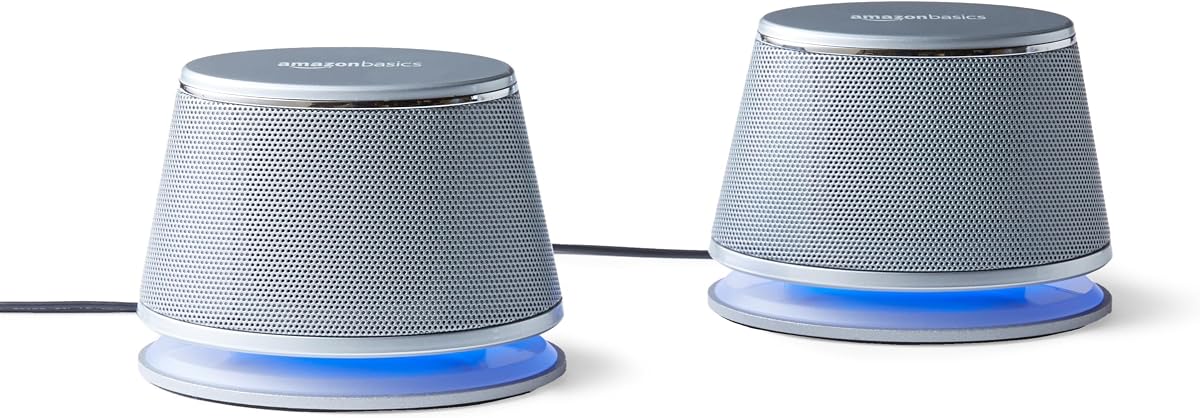
The Amazon Basics USB-Powered Computer Speakers are a compact, budget-oriented pair for users who want an easy improvement over laptop audio. They have a 4.2 rating and a simple design centered on direct USB power, a front control, and plug-and-play operation without software.
We may earn a commission when you buy through this link, at no additional cost to you.
The speakers draw 5V power from the computer and connect audio through their 3.5mm input. Their front control combines power or standby with volume adjustment, eliminating the need to reach around the enclosure. The included headphone output gives users another way to connect private listening devices without unplugging the speakers themselves.
The specification lists 2.2 watts of total RMS power, or 1.1 watts per speaker, which means the goal is practical near-field listening rather than room-filling volume. The frequency range is 103Hz to 20kHz. Buyers should also note that this is a wired-only design with no listed Bluetooth support.
This pair is best for dorm rooms, temporary office setups, study desks, and anyone prioritizing affordability and simplicity. Its compact dimensions of 2.76 by 3.55 by 5.3 inches make it easy to position, while the headphone jack is a useful extra for a basic model. It is a compelling budget choice when simplicity matters more than wireless flexibility.
The compact enclosure helps preserve working space beside a laptop or monitor. The system is also easy to carry between locations, making it useful for changing workspaces where permanent speaker placement is limited.
The front-mounted 3.5mm headphone output lets a user switch from shared computer audio to personal headphones. That makes the compact pair more versatile for shared spaces and alternating work and entertainment.
We may earn a commission when you buy through this link, at no additional cost to you.
The Logitech Z207 is a compact 2.0 speaker system that combines a 3.5mm connection with Bluetooth 4.2. Its 4.3 rating reflects a flexible option for users who want to move between a computer, television, smartphone, tablet, or music player without relying exclusively on a wired computer input.
We may earn a commission when you buy through this link, at no additional cost to you.
Each enclosure contains one active, full-range driver and one passive radiator for bass extension. Logitech Easy-Switch technology is designed to make transitions easier by allowing a user to pause playback on one device and begin playback on another. On-speaker controls provide access to Bluetooth pairing, power, and volume, while a headphone jack supports private listening.
The absence of USB audio means this is not the most natural choice for a minimalist single-cable setup. Bluetooth 4.2 is also older than the 5.0 standard offered by some alternatives. The listed compatibility is broad, however, and the 3.5mm option is a dependable fallback when wireless pairing is inconvenient.
The Z207 is best for a multi-device desk that includes both a computer and a phone, or for a small entertainment setup spanning a laptop and television. It offers more source flexibility than the basic Amazon Basics pairs while remaining a conventional two-speaker desktop format. It is a strong recommendation when convenient wireless switching is the priority.
Bluetooth 4.2 and Logitech Easy-Switch make the Z207 useful beyond a single computer. The ability to switch from a paused phone to active computer playback reduces the friction of moving between personal and work audio.
Active full-range drivers handle the main audio output, while passive radiators add low-end extension. The result is a familiar stereo desktop layout with enough flexibility for media, music, and general computing.
We may earn a commission when you buy through this link, at no additional cost to you.
The Amazon Basics Stereo 2.0 Computer Speakers with LED Lights offer a silver-finished alternative for users who prefer a simple wired setup with a visual power indicator. They carry a 4.4 rating and share a straightforward combination of USB power, 3.5mm audio, inline volume control, and bottom-mounted bass radiators.
We may earn a commission when you buy through this link, at no additional cost to you.
The blue LEDs make it easy to see when the system is active, while the silver enclosure offers a neutral appearance that can coordinate with a wide range of computer accessories. A scratch-free padded base helps the speakers sit securely on a desk, and the inline control provides quick access to volume adjustments.
This is intentionally a basic product. There is no listed Bluetooth or other wireless connection, and the design does not include the documented frequency response, total output, headphone jack, or front power control found on some of the more specialized models. Its appeal comes from simplicity rather than advanced audio features.
Choose this pair when a fixed desktop setup, clear status indication, and traditional wired connection are the main requirements. It works well for general office audio, online classes, videos, and casual music, and its 4.4 rating indicates a solid user reception. It is especially suitable for anyone who wants a simple silver set with visible LED feedback.
The blue LED lights provide an immediate indication that the speakers are powered. This is a small convenience on a busy desk, particularly when it is not always obvious whether the USB connection is active.
The 3.5mm input and USB power arrangement make the system easy to understand and use. Inline volume control and the bottom radiator add useful functions without complicating installation.
We may earn a commission when you buy through this link, at no additional cost to you.
The FUNLOGY Speaker is a compact, USB-powered desktop system that combines a 14W total output with a single-speaker enclosure. Its 4.2 rating makes it a notable option for users who want more specified power than the entry-level Amazon Basics models while retaining a small footprint.
We may earn a commission when you buy through this link, at no additional cost to you.
Dual 48mm full-range drivers and passive radiators are specified to deliver clear mids, crisp highs, and punchy bass. The enclosure uses a 30-degree upward-facing layout intended to direct sound toward the listener while conserving desk space. A single volume dial provides direct control, and the supplied USB and 3.5mm cables enable straightforward setup with desktops, laptops, monitors, smartphones, and gaming consoles.
The system is wired and does not offer Bluetooth, so users cannot move between sources without reconnecting a cable. The supplied information also identifies a gold-plated AUX input and a design intended to reduce signal noise during computer startup and shutdown. Its 14W figure is total output rather than a claim that it can fill a large room.
The FUNLOGY is a good fit for a compact gaming desk, a laptop station, or a monitor-based setup where upward projection and stronger output matter. It is also attractive to users who prefer a single central volume control over a separate pair of enclosures. A one-year warranty adds useful support, making this a strong wired-only recommendation.
The 30-degree angle aims the drivers toward seated listeners rather than directly across the desktop. That can improve perceived clarity while allowing the enclosure to remain relatively shallow and close to the monitor.
A dedicated volume dial makes everyday changes fast and tactile. The USB-powered design and supplied 3.5mm cable also avoid the need for software, driver installation, or wireless pairing.
We may earn a commission when you buy through this link, at no additional cost to you.
The Nylavee Computer Speakers with Bluetooth and AUX use a single sound-bar enclosure for desktop audio. With a 4.3 rating, it offers an appealing alternative to a conventional two-speaker set for users who want a tidier desk and flexible wireless playback.
We may earn a commission when you buy through this link, at no additional cost to you.
The enclosure contains four speaker units and two independent bass diaphragms within a cavity designed to increase loudness. The listed configuration uses double-layer neodymium magnets and mica fiber diaphragms to support clear high-pitch output and strong bass. Bluetooth 5.0 and a 3.5mm AUX wired connection provide the two main audio options, while USB is used for power.
A side knob operates the system's functions, which keeps the controls simple but less granular than systems with dedicated buttons. There is no documented headphone jack or USB audio input, so compatibility depends on Bluetooth, an analog source, or another USB power source. Although the product information lists compatibility with a PS5, users should verify the relevant connection and any platform-specific requirements.
The Nylavee is best for bedroom and office desks where a single, understated enclosure is preferred. It is particularly useful for users who alternate between a computer and phone through Bluetooth. The cavity-based multi-driver design also gives it a different sonic approach from compact two-speaker pairs, making it worth considering for a modern, streamlined setup.
Four speaker units and two bass diaphragms allow the sound bar to create a wider stereo presentation than a single compact driver. The internal cavity design is intended to increase output while keeping the external footprint controlled.
Bluetooth 5.0 lets the sound bar move between a desktop, laptop, phone, or tablet without an analog cable. USB remains the power connection, while the side knob keeps everyday control simple.
We may earn a commission when you buy through this link, at no additional cost to you.
The Dell Speakerphone SP3022 is a compact desktop sound bar created specifically for communication. It has a 4.2 rating, Microsoft Teams and Zoom certification, and a clean design that can sit on a monitor base or beside a laptop or desktop in a home office.
We may earn a commission when you buy through this link, at no additional cost to you.
Its primary strength is call handling. Full-duplex audio allows numerous people to speak at the same time, while AI noise cancellation is intended to help callers remain intelligible during business conferences. LED indicators clearly show Microsoft Teams status, call and hang-up controls, volume adjustments, and microphone mute or unmute functions. A dedicated Teams button provides quick access to meetings and notifications.
The device is not positioned as a conventional entertainment speaker, and the supplied information does not highlight music-focused tuning, Bluetooth, or a headphone output. Its USB-A and USB-C connectivity is excellent for modern and older computers, but the system remains purpose-built around meetings rather than general stereo media.
The SP3022 is the best choice for remote workers, frequent meeting participants, and small offices that rely on Microsoft Teams or Zoom. Its certification, noise cancellation, and visually clear meeting controls address problems that a basic computer speaker cannot. For a dedicated conference device, it is a more purposeful premium option than simply choosing a louder music system.
The low-profile enclosure fits on a monitor base or beside a laptop without occupying a large portion of the desk. It provides useful call audio without requiring a full multimedia speaker system.
LED indicators communicate call status, volume, and microphone state at a glance. A dedicated Teams button also gives users a direct route to meeting controls and notifications.
We may earn a commission when you buy through this link, at no additional cost to you.
The Klipsch ProMedia 2.1 THX Certified system is the most substantial audio setup in this guide. Its 4.5 rating reflects a combination of dedicated 2.1-channel output, careful driver engineering, and broad source compatibility, although it is better suited to buyers who can accommodate a subwoofer.
We may earn a commission when you buy through this link, at no additional cost to you.
Two three-inch, two-way satellite speakers use Klipsch Microtractrix horn technology for clarity and controlled dispersion. They are paired with a ported six-and-a-half-inch side-firing subwoofer to provide full-bandwidth bass. Maximum output is listed at 200 watts of peak power and 110dB in the room, making this a distinctly higher-power option than the other compact systems.
The trade-off is space. The subwoofer measures 9.5 by 9.8 by 10.2 inches, while each satellite is also larger than a typical mini desktop speaker. A 3.5mm input and control pod with main-volume and subwoofer-gain controls keep operation straightforward, but the footprint and wired-only design reduce its suitability for minimalist or highly portable setups.
The ProMedia 2.1 is best for a computer enthusiast, gamer, movie watcher, or listener who wants dedicated bass and room-filling output from a computer system. It is also compatible with televisions, music players, and gaming consoles. If available desk and floor space are generous, it offers the most robust traditional speaker architecture in this roundup.
The separate ported subwoofer handles low frequencies instead of asking compact satellite drivers to reproduce everything. Its independent gain control lets the user balance bass against the main level for movies, music, or games.
Microtractrix horn technology is designed to improve clarity and control dispersion. Together with the two-way satellite design, it gives the system a more specialized character than the basic one-driver computer pairs.
We may earn a commission when you buy through this link, at no additional cost to you.
The best small speakers for computers depend on how the system will be used, which connections the computer supports, and how much desk space is available. Audio quality, power, controls, and compatibility should be considered together rather than treating output figures as the only measure of performance.
Start by identifying the audio outputs on the computer and the inputs offered by the speakers. A single USB cable can carry both power and digital audio, while a 3.5mm connection usually requires one cable for audio and another USB port for power. Bluetooth removes the need for a permanent audio cable but adds pairing and potential wireless latency. The best fit is the simplest method your computer and listening habits support without sacrificing reliability.
Choose USB audio for a clean fixed setup, 3.5mm for broad analog compatibility, and Bluetooth when you regularly switch between a computer and phone. Check whether an adapter or separate cable is included.
Output specifications help indicate how much sound a pair can produce, but they are most meaningful when considered with the drivers and enclosure. Compact USB models may be sufficient for close listening at a desk, while a system with a subwoofer and higher peak output is better for movies, games, and a larger listening area. RMS power is a more sustained measure than peak power, though actual perceived loudness also depends on efficiency and room placement.
For near-field use, modest output can be enough. Choose a higher-output or 2.1 system when filling a room, watching action content, or competing with computer fans is important.
Full-range drivers attempt to reproduce multiple frequencies from one unit, while passive radiators help add low-end response without a separate subwoofer. A 2.1 system separates the subwoofer from the satellite speakers, providing deeper and more adjustable bass at the cost of additional space. Sound-bar designs may use multiple internal drivers and chambers to create a wide presentation from one enclosure.
For music and richer effects, look for passive radiators or a subwoofer. For spoken content, prioritize clarity and controlled projection over maximum bass.
Small speakers are judged partly by how much room they leave for a keyboard, mouse, monitor, and documents. Two separate enclosures require placement on both sides of a display, while one sound bar can sit below a monitor. Driver angle and elevation also matter because upward-facing drivers can direct sound toward a seated listener more effectively than drivers aimed straight forward.
Measure the available area and check speaker dimensions. Favor a sound bar or compact pair when desk depth is limited, and a 2.1 system when a subwoofer position is available.
Volume, power, mute, source selection, and meeting controls should be easy to reach. A front-mounted dial or button is useful during frequent adjustments, while inline or side controls can reduce cable clutter. Dedicated meeting buttons and status LEDs are especially helpful when the system is used for calls and you need to know whether the microphone is muted.
Choose physical controls that match your routine. For quick listening changes, a front dial is convenient; for conference use, illuminated call and mute states are more valuable.
Computer speakers frequently handle voice calls, webinars, lectures, and streamed television. Dialogue processing can make speech easier to understand, while noise cancellation and full-duplex operation are important when several remote participants speak simultaneously. Certification for platforms such as Microsoft Teams and Zoom also signals that the device is designed around current conferencing workflows rather than only media playback.
For frequent meetings, prioritize a certified conference speakerphone. For occasional calls and heavy video use, a compact stereo system with clear dialogue processing may be enough.
Bluetooth allows a desktop speaker system to serve a phone, tablet, or television in addition to a computer. Bluetooth 5.0 is a current feature found on some of the options here, while Bluetooth 4.2 remains usable for compatible devices. Easy-Switch functionality can further improve the experience when moving between sources, but users should consider battery-free desk speakers that remain powered continuously.
Choose Bluetooth if device switching is central to your routine. A fixed USB or analog system is generally more direct when the computer is the only source.
A metal finish, padded base, elevated drivers, and a matte enclosure can improve durability and desk integration. Warranty coverage is another practical consideration, particularly for electronics that remain powered throughout the day. Warranty length by itself, however, should not replace compatibility checks or attention to the features you will actually use.
Review the complete specification and included accessories. A good-looking speaker is only a good purchase if its connections, controls, and physical design match your setup.
Place the speakers at the left and right sides of the monitor, or center a single sound bar below the screen. Keep the drivers unobstructed, allow room around vents, and aim elevated drivers toward the listening position. This improves stereo separation and makes dialogue easier to hear without increasing the volume.
Choose the appropriate source and connection. For USB audio, connect the supplied cable to the computer; for a 3.5mm system, attach the audio plug and USB power lead; for Bluetooth, put the speaker into pairing mode and select it from the computer's device list. Once connected, set the speaker volume to a moderate level before adjusting the computer's master volume to avoid an abrupt increase in sound.
Keep cables from being pinched, and do not expose the speakers to moisture, excessive heat, or liquids. Dust the enclosure with a soft dry cloth, avoid abrasive cleaners, and keep the volume moderate during long sessions. If a system includes a removable battery, follow the manufacturer's guidance, while USB-powered models can remain connected continuously when not in use.
USB speakers are often simpler because one USB cable can carry both power and digital audio, although the included models differ in their exact connection design. A 3.5mm system may offer broader source compatibility, but it often requires a separate USB connection for power. Check whether the computer has the required output and whether the speaker supports digital audio through its own USB interface.
They can provide clearer stereo separation, stronger output, and a better sense of bass than a typical laptop speaker. The largest improvements are usually noticeable with music, video effects, and games, while basic spoken content may remain adequate on a laptop. A near-field desktop pair can also make speech feel easier to hear at lower volume.
Bluetooth can be convenient, but some systems are designed primarily for music and media rather than microphone use. For frequent calls, a dedicated conference speakerphone with full-duplex operation, noise cancellation, and meeting-platform certification is usually more appropriate. A Bluetooth stereo speaker still works for hearing other participants, but it may not replace a good computer microphone.
A subwoofer is not necessary for basic computer audio, and it can make a small pair sound fuller. It is worth considering for action films, games, and music when the desk and floor can accommodate it. If space is limited, compact speakers with passive radiators offer a middle ground between basic single-driver models and a full 2.1 system.
Separate the left and right speakers by roughly the width of the monitor and place them at similar heights. Elevated models work best when their angled drivers face toward the seated listener. A sound bar should sit centrally below the display, with its controls accessible and its grille or drivers unobstructed.
Confirm that the correct output device is selected in the computer's sound settings and check the speaker's power or standby state. Verify that the audio cable reaches the correct input and that USB power is connected where required. For Bluetooth, make sure the speaker is paired and selected as the active playback device, then test the connection again.
Many can, but the required inputs matter. The listed products support combinations of 3.5mm audio, USB power, and Bluetooth, while the Nylavee and Klipsch models are explicitly described as compatible with gaming consoles. A console may provide 3.5mm output or require its own wireless pairing method, so verify the connection before purchasing.
Peak power describes a maximum short-term output level, while RMS power better represents sustained output. Comparing maximum peak figures can be misleading when judging everyday loudness, especially across products with different driver sizes and efficiency. Use power as one factor, then consider driver design, enclosure size, bass configuration, and the intended room.
The Creative Pebble V3 is the best overall choice because it combines USB-C computer audio, Bluetooth 5.0, AUX, clear dialogue processing, and a compact elevated design. The Amazon Basics Compact Speakers are a strong budget option, while the Dell Speakerphone SP3022 stands out for certified, purpose-built meeting performance.
Prioritize the connection method that matches your computer, the amount of desk space available, and the type of audio you hear most often. Choose a simple wired pair for a fixed workstation, a Bluetooth-capable model for switching between devices, a sound bar for a clean single-unit layout, and a 2.1 system when deeper bass and stronger output justify the extra space.
Ratings, product details, and current prices can change, so review the latest listing before ordering. Checking the included cables, required adapters, platform compatibility, and control placement will help ensure that the selected small speakers for computers work smoothly with your existing setup.
