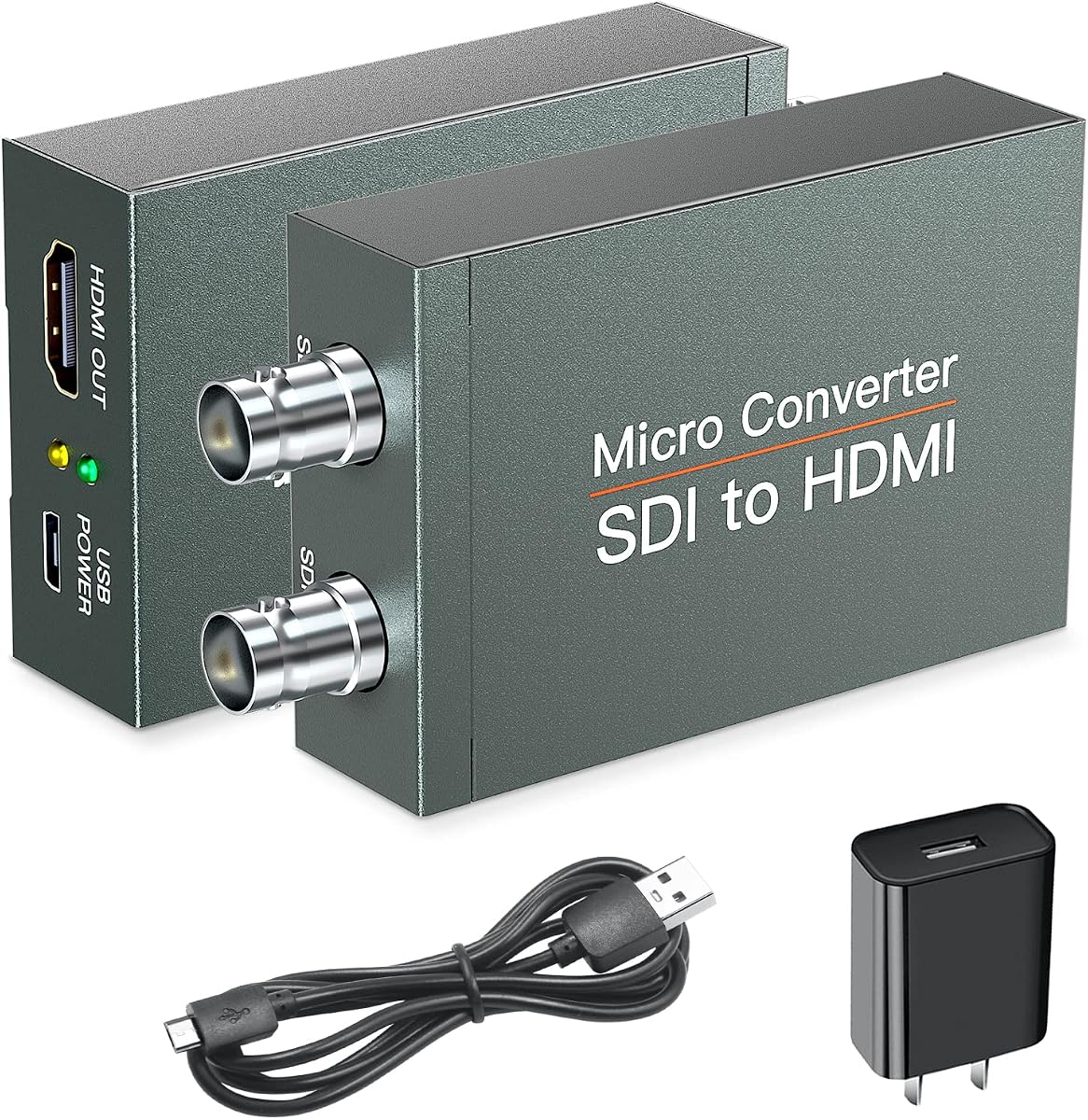
SDI to HDMI Converter with SDI Loop Out
3.9Editor score
Converts three SDI standards
Includes SDI loop output
Supports 1080p video and audio
Our Sdi HDMI Converter guide compares 10 options for bidirectionality, 1080p support, audio, loopout, multi-channel outputs, and setup ease for you.
An Sdi HDMI Converter bridges professional broadcast video and common HDMI equipment, making it easier to connect cameras, capture systems, projectors, and field monitors. The right model depends on signal direction, supported resolutions, audio handling, cable distance, and whether one source or several need simultaneous displays.
This guide compares ten converters supplied with current product information, emphasizing practical differences rather than treating every 1080p model as interchangeable. The list covers dedicated SDI-to-HDMI adapters, bidirectional units, multi-channel converters, models with loopout or scaling, and products aimed at broadcast or industrial installations.
Each review explains the most relevant capabilities and limitations so the final choice reflects your actual signal path. Ratings and specifications can change, and retailer availability varies, so confirm the current product page, connector layout, power requirements, and supported formats before purchasing.
3.9Editor score

4.7Editor score

4.6Editor score
The comparison highlights conversion direction, maximum supported video format, output flexibility, and the features most likely to matter in cameras, live production, broadcast, conferencing, and industrial video systems.


This dedicated SDI-to-HDMI converter is a practical choice for connecting an SD camera, broadcast source, or other professional feed to an HDTV, field monitor, or projector. Its 3.9 rating reflects a generally useful converter, while the defining features are support for SD-SDI, HD-SDI, and 3G-SDI plus simultaneous audio and video transmission.
We may earn a commission when you buy through this link, at no additional cost to you.
The converter reaches a maximum resolution of 1920 by 1080 and is not intended for 4K workflows. Its BNC input and accompanying loop output make it more versatile than a basic one-way adapter, particularly when another piece of SDI equipment must continue receiving the source signal. The metal shell, heat dissipation design, and plug-and-play approach suit temporary rigs as well as permanent installations.
The important limitation is directionality. This model converts SDI to HDMI and cannot send HDMI back into an SDI system. It also does not accept RF, CVBS, AHD, TVI, or CVI signals, so confirming that the source is genuine SDI is essential. Those restrictions make the adapter less flexible than a bidirectional unit, but they are reasonable for a clearly defined SDI-to-display path.
Choose this converter when you need an inexpensive bridge from professional SDI equipment to an HDMI display and value a looped SDI feed. It is especially suitable for camera monitoring, projection, outdoor displays, conference rooms, control centers, and other straightforward applications. Users seeking two-way conversion should instead consider one of the bidirectional models in this guide.
The SDI loop output lets the incoming professional signal continue to another device, which is valuable when the converter must monitor rather than replace the original source.
Confirm that the camera or source produces SDI rather than composite or AHD video, and that the display accepts the converted HDMI output at the desired resolution.
We may earn a commission when you buy through this link, at no additional cost to you.
This HDMI-to-SDI converter is designed for a different task from most entries on the list: adapting HDMI source equipment for two professional SDI displays. It carries a 3.9 rating and supports an extensive HDMI input list, including interlaced and progressive standard-definition formats, 720p, 1080i, and 1080p at multiple frame rates.
We may earn a commission when you buy through this link, at no additional cost to you.
Its two SDI outputs are the defining advantage. One HDMI source can therefore reach two SDI monitors, recording devices, or downstream broadcast equipment without requiring a second converter. Audio embedding is also included, helping a single adapter handle the complete video-and-audio signal path. The stated SDI output distances vary by format, reaching up to 100 meters for 3G-SDI.
As a dedicated HDMI-to-SDI device, it cannot reverse direction and send SDI video to an HDMI display. That makes it a better fit for home theaters, camera workflows, and installations where HDMI is the originating source and SDI is the destination. The metal shell and smart-chip design are useful for sustained operation, although the product is still limited to 1080p-class workflows.
This is a sensible choice when one HDMI source must be distributed to two SDI destinations and a separate adapter would be inconvenient. It is less appropriate for users who need either direction in the same box or want to return an SDI feed to a consumer display. Confirm the input frame rate and connector requirements before integrating it into production equipment.
Dual SDI outputs simplify distribution when two monitors or recorders need the same HDMI feed, reducing the number of separate conversion units in the chain.
Support for numerous standard-definition, 720p, 1080i, and 1080p input modes gives the adapter broader compatibility with varied HDMI sources.
We may earn a commission when you buy through this link, at no additional cost to you.
This bidirectional converter bridges SDI and HDMI in either direction, offering a broader solution than the dedicated adapters. Its 4.0 rating and FPGA-based design indicate a converter aimed at users who need dependable direction switching without separate adapters. It also includes adaptive input resolution, stereo audio de-embedding, clock recovery, and built-in electrostatic discharge protection.
We may earn a commission when you buy through this link, at no additional cost to you.
Video support extends to 1920 by 1080, including smooth 1080p at 60 frames per second through 3G-SDI. Because the converter works with uncompressed data, it suits applications where signal accuracy and consistent transmission matter, including broadcast, medical imaging, and camera monitoring. The stated maximum SDI output distances reach 80 meters for 3G-SDI, 100 meters for HD-SDI, and 120 meters for SD-SDI.
The trade-off is that this remains a single-path converter rather than a distribution matrix. It does not offer the four-input, four-output arrangement of the ACHAVE model, and its maximum resolution is below 4K. As with other professional converters, actual performance still depends on the source format, destination equipment, cable quality, and correct signal configuration.
This is a strong candidate for operators who may need SDI equipment connected to HDMI displays and HDMI sources adapted to professional SDI systems. It is especially useful in broadcasting, outdoor video, conferencing, command centers, traffic systems, and machine-tool environments. Its bidirectional architecture and protective features make it a versatile middle-ground choice.
Bidirectional conversion removes the need to carry separate SDI-to-HDMI and HDMI-to-SDI adapters when temporary signal paths may change.
ESD protection, clock recovery, and a durable metal housing support more reliable use in professional and industrial environments.
We may earn a commission when you buy through this link, at no additional cost to you.
The Anber-Tech converter is a one-way SDI-to-HDMI unit with a 4.1 rating and an unusually clear list of supported formats. Automatic detection covers 3G-SDI, HD-SDI, and SD-SDI, including 1080p at 60, 59.94, and 50Hz; 1080i at 60, 59.94, and 50Hz; 720p at 60, 59.94, and 50Hz; and NTSC or PAL standard-definition modes.
We may earn a commission when you buy through this link, at no additional cost to you.
Long cable support is another distinguishing point. Listed runs reach 300 feet for 3G-SDI, 500 feet for HD-SDI, and 1,000 feet for SD-SDI, while the loop output is listed up to 300 feet. These figures describe the product's stated capabilities rather than guaranteed results in every installation, but they make the unit relevant to broadcast facilities and larger control rooms.
The converter includes one HDMI output, one SDI loop output, and support for up to eight digital audio channels at a 48KHz sampling rate. A power adapter and user manual are included. Its main limitation is equally important: it cannot perform HDMI-to-SDI conversion, so it should not be considered for a reversible signal path.
This model makes sense for operators who want automatic source recognition, a continued SDI feed, and specified digital-audio support. It is suitable for professional monitoring, broadcast infrastructure, and control-room applications. Buyers who require HDMI input, four-channel distribution, or 4K operation will need a different product.
Automatic format detection reduces configuration work when operators may need to accommodate different SDI standards across cameras, playback systems, and installed sources.
Eight-channel 48KHz audio support and a simultaneous SDI loopout make the converter practical for monitoring systems that need more than an isolated HDMI display.
We may earn a commission when you buy through this link, at no additional cost to you.
The Blackmagic Micro Converter BiDirect SDI/HDMI 3G stands out with a 4.7 rating, the highest among the products in this comparison. It is a compact converter designed to move signals in either direction between SDI and HDMI, making it a versatile bridge between professional equipment and ordinary displays or playback systems.
We may earn a commission when you buy through this link, at no additional cost to you.
The supplied information highlights multi-speed support rather than a narrowly defined format list. That makes the converter appropriate for workflows that may involve different SDI generations, although buyers should still verify the exact input and output modes required by their equipment. The black enclosure and AC power supply give it a straightforward, ready-to-install presentation.
The supplied product details are brief, so it would be inappropriate to claim features that are not documented here. No multi-output distribution, scaling, or 4K capability is established by the provided information. Even so, bidirectional conversion and multi-speed support cover the essential reasons many users seek an SDI HDMI converter, while the compact format suits mobile production kits.
This is the strongest overall recommendation in the guide for users who want a reputable bidirectional converter without committing to a larger distribution system. It works particularly well for camera-to-monitor connections, HDMI-to-SDI adaptation in compact rigs, and general bridge requirements. Confirm the exact connector arrangement and operating modes on the current listing before purchase.
The small bidirectional format suits production cases and field kits where every additional adapter and cable can make setup more cumbersome.
Two-way conversion allows the same unit to serve an SDI camera and an HDMI display, or adapt an HDMI source for professional SDI equipment.
We may earn a commission when you buy through this link, at no additional cost to you.
This bidirectional 3G converter is a 4.1-rated alternative for broadcast, live streaming, photography, home theater, and industrial use. It handles both SDI-to-HDMI and HDMI-to-SDI conversion, allowing professional and consumer video equipment to work within the same system.
We may earn a commission when you buy through this link, at no additional cost to you.
Its FPGA-based architecture is designed around high-speed, long-distance transmission, signal stability, and resistance to interference. The converter supports adaptive input up to 1080p and uncompressed 1080p at 60 frames per second. Clock recovery also allows it to be used as a repeater, while built-in ESD protection adds another layer of protection for sensitive electronics.
The durable metal housing is designed for heat dissipation and stable long-term operation, including environments with extreme temperatures. Stated SDI output distances reach 80 meters for 3G-SDI, 100 meters for HD-SDI, and 120 meters for SD-SDI. A power supply is included, although the unit does not provide the multi-channel distribution available from a matrix converter.
This is a compelling option for operators who value industrial construction and stable bidirectional performance. It can connect SDI gear to HDMI displays or bring HDMI sources into professional SDI workflows, including command centers, outdoor display systems, conferencing, traffic intelligence, and machine tools.
The FPGA design, clock recovery, and uncompressed 3G-SDI support are valuable where stable high-speed video matters more than maximum resolution.
Metal construction, thermal management, and extreme-temperature tolerance make the unit more appropriate for permanent or industrial use than a basic travel adapter.
We may earn a commission when you buy through this link, at no additional cost to you.
The Lumantek SDI to HDMI Converter with Display and Scaler stands apart from the basic adapters in this guide. Its 4.6 rating and integrated display and scaler suggest a purpose-built monitoring appliance for users who want to view and convert an SDI source in a single dedicated unit.
We may earn a commission when you buy through this link, at no additional cost to you.
The built-in display removes the need to rely entirely on an external monitor during setup, while the scaler can make incoming video suitable for different display requirements. Together, these features appeal to camera operators, technicians, and installation engineers who want more control than a simple signal box provides. The product remains a dedicated SDI-to-HDMI converter rather than a universal bidirectional adapter.
The supplied product information is limited to the product's name, so specific resolution ceilings, connector counts, audio formats, and power details are not established in the source data. Its premium designation therefore rests on the integrated display and scaler rather than unsupported claims about superior specifications. Confirming those details with the seller is advisable before building a critical workflow around it.
This is the most distinctive choice for a dedicated monitoring station, particularly when a local screen and output scaling are central to the setup. It may be less suitable for a compact field kit, a multi-source distribution system, or a workflow requiring HDMI-to-SDI conversion. For those needs, the bidirectional or multi-channel alternatives provide clearer documented paths.
The integrated display lets an operator check the converted feed locally, which is useful when the converter is the visual focus of a camera or installation setup.
An onboard scaler can make the output easier to match different display environments, though buyers should confirm the supported input and output formats directly.
We may earn a commission when you buy through this link, at no additional cost to you.
The ACHAVE converter is the clear choice in this group for multi-source distribution. It has four SDI inputs and four HDMI outputs, allowing several HD-SDI or 3G-SDI sources to connect simultaneously to HDMI displays. Its 3.6 rating is the lowest among the listed products, but the differentiated four-by-four design addresses a need that the single-path converters cannot.
We may earn a commission when you buy through this link, at no additional cost to you.
The unit supports HD-SDI at 1.485 Gbit/s and 3G-SDI at 2.97 Gbit/s, with output resolution up to 1080p at 60Hz. Built-in cable equalization and clock recovery are intended to support reliable transmission over extended runs. An automatic signal identification system is included to simplify operation across different SDI signal formats.
The package contains the converter, a Type-C power supply cable, and a detailed operation manual. It is a one-way SDI-to-HDMI device, so it does not solve HDMI-to-SDI requirements. The lower rating may reflect user satisfaction or limited long-term information, so buyers should assess the current customer feedback and warranty terms on the listing.
This model is best suited to control rooms, event staging, multi-camera monitoring, or any installation where several SDI sources must reach several HDMI screens. Choose it for connector count and distribution, not as a compact single-camera adapter. If only one source and one display are needed, a less elaborate converter may be easier to deploy.
The four-input, four-output layout reduces the need for a separate adapter for every camera and display pair in a multi-feed monitoring environment.
Cable equalization and clock recovery are designed to stabilize SDI signals across the longer runs commonly encountered in permanent installations.
We may earn a commission when you buy through this link, at no additional cost to you.
This Blackmagic Design Micro Converter combines a 4.7 rating with bidirectional SDI and HDMI conversion. It accepts SD, HD, or 3G-SDI on the professional side and HDMI through a Type A input, allowing it to adapt either common video interface to the other.
We may earn a commission when you buy through this link, at no additional cost to you.
The SDI output automatically matches the SD, HD, or 3G-SDI format associated with the HDMI input. This automatic matching is useful because it reduces the need to reconfigure the converter when the source resolution changes. HDMI connectivity uses familiar Type A connectors, simplifying cable selection in setups where external adapters are already limited.
The included universal positive five-volt power supply comes with international socket adapters, making the product more convenient for productions that travel between regions. Its limitations are the single SDI input, single SDI output, and single HDMI path. It cannot distribute four sources or provide a scaling display like more specialized alternatives.
This converter is well suited to camera crews, mobile production teams, and engineers who need a recognized bidirectional format and internationally adaptable power supply. It is especially attractive for a simple camera-to-monitor or HDMI-to-SDI bridge. Buyers should verify the current connector layout and format details on the product listing.
Automatically matching the SDI output to the incoming HDMI format simplifies operation when compatible sources may deliver signals at different resolutions.
International socket adapters make the included power supply more practical for productions that move between countries or use varied wall outlets.
We may earn a commission when you buy through this link, at no additional cost to you.
The Blackmagic Design Micro Converter HDMI to SDI 3G is a focused solution for adapting an HDMI source into a 3G-SDI workflow. Its 4.7 rating places it among the best-reviewed products in the comparison, and the included power supply makes it a straightforward option for users who do not want to source an adapter separately.
We may earn a commission when you buy through this link, at no additional cost to you.
Because the product has one specified conversion direction, it should be chosen when HDMI is the input and professional SDI equipment is the destination. It can help connect HDMI sources to capture, monitoring, or broadcast systems that lack native HDMI inputs. The compact micro-converter format is appropriate for mobile production and fixed installations where a simple dedicated path is needed.
The supplied details are brief and do not enumerate exact input resolutions, audio channels, connector types, or supported frame rates. It is therefore best not to infer specifications that are not present. The key distinction is clear directionality: users who occasionally need to return SDI video to an HDMI display should choose a bidirectional converter instead.
For a permanent HDMI-to-SDI requirement, this is a strong, highly rated focused adapter. It is less appropriate for users seeking a universal adapter, a four-channel distribution system, an integrated scaler, or a reversible signal path. Confirm the current manufacturer specifications and connector arrangement before connecting specialized equipment.
A dedicated HDMI-to-SDI path can simplify permanent installations where professional capture or broadcast equipment requires an SDI input.
The micro-converter format and included external power supply support a tidy setup in mobile kits and compact installation spaces.
We may earn a commission when you buy through this link, at no additional cost to you.
Choosing an Sdi HDMI Converter starts with the exact signal path, but format support, audio behavior, cable distance, output count, and environmental needs can narrow the field even further.
Begin by identifying which device produces the signal and which device receives it. SDI-to-HDMI converters connect professional cameras, recorders, and switchers to consumer displays or projectors. HDMI-to-SDI converters perform the opposite task, adapting laptops, media players, or consumer sources for professional SDI equipment. A bidirectional converter supports both paths in one enclosure and is most useful when temporary rigs may change direction.
Do not rely on a listing title alone when a product uses both SDI and HDMI terminology. Some descriptions mix one-way and bidirectional models, so check the detailed bullet points and connector direction. A product labeled as bidirectional should clearly state that it supports both SDI to HDMI and HDMI to SDI conversion.
SDI is not a single fixed format. SD-SDI, HD-SDI, and 3G-SDI support different bandwidth levels, resolutions, and frame rates. The most versatile dedicated adapters in this guide automatically detect or explicitly support several of them. The Blackmagic bidirectional model is described as multi-speed, while the Anber-Tech model lists detailed 1080p, 1080i, 720p, NTSC, and PAL combinations.
The common ceiling in this category is 1080p. Several models explicitly exclude 4K, so a 4K source may require downscaling, a different converter, or a signal that the source itself does not output. Verify both the maximum output resolution and the frame rate at that resolution. A converter that accepts 1080p at 60Hz may not accept 1080p at every possible frame rate.
A single HDMI output is sufficient for connecting one camera feed to one monitor. A loop output may be more useful when the SDI source must continue to another professional device. The ACHAVE model goes further with four SDI inputs and four HDMI outputs, allowing multiple sources to be connected to multiple displays and serving fixed monitoring installations.
More outputs do not automatically mean better video processing. Confirm whether outputs operate independently, whether any switching is manual or automatic, and whether the unit only duplicates one source. Users needing one-to-one distribution should avoid a four-by-four matrix and choose a simpler unit. Multi-output models are valuable only when the number of feeds justifies the added complexity and cabling.
Video and audio may follow different paths in cameras, switchers, and broadcast chains. A converter that supports synchronous audio and video can simplify the installation, while an audio embedder or de-embedder adds flexibility for professional equipment. The HDMI-to-dual-SDI model includes audio embedding, and the Anber-Tech converter states support for eight channels of 48KHz digital audio.
Embedded and de-embedded audio are not interchangeable. Embedding places audio into the SDI stream, while de-embedding separates it for HDMI output. Check the direction your workflow requires, along with channel count and sampling rate. If the main priority is video-only monitoring, extra audio functionality may not justify a more specialized or costly converter.
SDI is designed to travel over coaxial cable, but supported distance depends on signal rate, cable construction, connectors, and the environment. Listed maximum distances differ considerably: the Anber-Tech model advertises 300 feet for 3G-SDI, 500 feet for HD-SDI, and 1,000 feet for SD-SDI. Other bidirectional models list metric distances of up to 80 meters for 3G-SDI and 120 meters for SD-SDI.
Use proper BNC coaxial cable and avoid unnecessary adapters, damaged connectors, or unverified passive couplers. Longer runs call for well-made cable and clean connections. These maximum figures are not guarantees for every installation, particularly in areas with heavy electromagnetic interference, so professional integrators should test the complete signal path under expected conditions.
A basic converter normally passes the signal format through, but a converter with a scaler can adapt output to different display requirements. The Lumantek model adds both a display and a scaler, making it particularly relevant to dedicated monitoring stations. It is more specialized than a simple signal adapter, and the supplied information does not establish its exact format list, so buyers should verify compatibility directly.
A local display can simplify setup, camera alignment, and troubleshooting by showing the converted signal without requiring a separate monitor. It is valuable in a control desk or camera station but unnecessary for users who already have a dependable HDMI display. Integrated displays and scalers should therefore be treated as workflow features rather than automatic quality upgrades.
Temporary event work and permanent industrial installation have different mechanical requirements. A metal enclosure with effective heat dissipation is beneficial for extended operation, particularly in command centers, traffic systems, machine-tool environments, and outdoor display systems. Several FPGA-based bidirectional products emphasize temperature tolerance, ESD protection, and stable long-term operation.
Protection features are not substitutes for correct installation. Mount the converter where ventilation is available, keep power connections secure, and protect it from moisture and impact. For a touring kit, size and weight may matter more, while for a fixed rack a durable enclosure and dependable power supply may take priority. Match construction to the actual environment rather than to a generic use case.
The converter is only one component of the path. Include the source's connector and output format, the cables, the converter's power, the destination's accepted input, and any audio routing in the compatibility check. A display that supports HDMI does not necessarily support every embedded audio format, while a recorder may accept SDI but reject the refresh rate or resolution being supplied.
Test with the intended source, destination, and cable lengths before committing the unit to a critical production. Verify both video and audio, watch for synchronization issues, and confirm that the destination recognizes the signal. For complex systems, draw the signal path and label every direction, especially when a bidirectional device or loopout is involved.
Begin with all equipment powered off. Connect the source to the appropriate SDI or HDMI input using shielded BNC coaxial cable for professional SDI links or a suitable HDMI cable for consumer sources. Next, connect the destination to the converter's HDMI or SDI output. If using a loop output, connect that branch to the next SDI device before energizing the system.
Power the converter with its supplied or specified power supply, then power the source and display in a stable order. Confirm that the source format is supported, select any required operating mode, and allow the display and downstream equipment to detect the signal. On a monitor, check the frame rate, resolution, color, embedded audio, and synchronization rather than assuming that the appearance of an image confirms correct operation.
For care, keep the enclosure dry and dust-free, avoid resting heavy objects on connectors, and do not hot-plug connections unless the manual explicitly permits it. Inspect BNC and HDMI plugs regularly, replace strained or damaged cable runs, and keep the power adapter unobstructed. In mobile use, protect the converter in a padded case; in permanent installations, provide ventilation and strain relief so connector stress does not pull against the ports.
Only a converter specifically described as bidirectional supports both SDI-to-HDMI and HDMI-to-SDI conversion. Many inexpensive models are one-way, so their marketing title can be misleading. Check the detailed specifications and confirm that the product you are buying explicitly identifies both operating directions.
Most of the models listed here top out at 1080p, and one explicitly states that 4K is not supported. A source may be described as 4K capable while still outputting a 1080p signal, but that depends on the camera or device. Verify the converter's exact input and output formats rather than relying on the source camera's headline resolution.
An SDI loop output passes the incoming SDI signal onward to another professional device, commonly for monitoring or recording. A second SDI output may instead be a separately distributed SDI feed derived from HDMI. These functions are not interchangeable, so identify whether the destination needs the original SDI stream or a converted HDMI signal.
The supported distance depends on the SDI rate, cable quality, connectors, and interference. Products in this guide list ranges from 80 to 300 feet for 3G-SDI, with longer runs possible at lower SDI standards. Treat these as maximum claims and verify the complete path with the actual cable and equipment.
Standard SDI equipment generally uses BNC connectors and 75-ohm coaxial cable. The supplied guidance for one model specifically notes that it supports coaxial cable with a BNC male connector. Use quality cable with sound connectors and avoid improvised adapters, as they can cause reflections, signal loss, or intermittent images.
That depends on the model. Some descriptions mention synchronous audio and video, audio embedding, stereo de-embedding, or eight-channel digital audio support, while others provide no detailed audio claim. Check the exact function and direction required by your equipment, and verify channel count and sampling rate where professional audio is involved.
The HDMI or SDI path may be correct while the embedded audio format, channel layout, or de-embedding setting is not. Confirm that the converter supports the source's audio format and that the destination is configured to use the available audio input. Separate audio routing, mute settings, and mismatched sampling expectations can also cause the issue.
Not necessarily. If your streaming or recording device accepts the converter's output directly, a one-way adapter can be enough. Bidirectional conversion is useful when the signal path may switch between HDMI and SDI equipment, such as a camera workflow with both a field monitor and a professional recorder. Choose based on the actual routing rather than the broad application label.
The Blackmagic Micro Converter BiDirect SDI/HDMI 3G is the leading all-around choice because it combines a strong rating with bidirectional conversion and multi-speed support. The SDI to HDMI converter with loopout is the most practical budget-oriented option for a one-way camera-to-display path, while the Lumantek model offers the most specialized premium experience through its integrated display and scaler.
Prioritize direction first, then verify SDI standard, maximum resolution, exact frame rate, audio behavior, cable length, and connector count. A simple adapter is often sufficient for one source and one display. Bidirectional hardware becomes valuable when a rig changes direction, and a multi-input converter earns its complexity only when several feeds must reach several screens.
Before buying, check the current listing for the latest specifications, included accessories, ratings, and availability. Product details and retailer terms can change over time, and the supplied information may not cover every operating mode. Confirm compatibility with the complete signal path so the selected converter works reliably in its intended installation.