
Hyte Y40
4.7Editor score
Panoramic tempered-glass design
Included PCIe 4.0 riser
Vertical graphics-card architecture
Explore the best Red PC Case options for 2026, comparing airflow, cooling, motherboard compatibility, cable management, build quality, and visual design.
A red PC case can add a distinctive focal point to a gaming or workstation build, but appearance should complement rather than dictate the decision. The strongest enclosures balance useful airflow, motherboard compatibility, component clearance, cable routing, accessible controls, and a construction that makes installation and maintenance straightforward.
This guide compares ten cases and fan products associated with the red PC case category, including models explicitly offered in red, darker color variants, and neutral cases included for their practical relevance. We examined airflow design, included cooling, radiator options, expansion, front connectivity, materials, and the compromises each builder should understand.
Each review highlights the characteristics that distinguish a model, while the top selections identify the strongest overall, premium, and budget-oriented choices for different needs. Product listings, features, and availability can change, so verify the current colorway, included accessories, dimensions, and component limits before purchasing.
4.7Editor score

4.8Editor score
4.5Editor score
The comparison below covers airflow, cooling provisions, hardware support, and practical design distinctions across the selected red PC cases and related hardware, with ratings serving only as a quick reference rather than the sole buying criterion.



The HYTE X50 Wild Cherry is the strongest all-around choice in this guide, combining a genuinely distinctive red appearance with a chassis designed around practical cooling and tidy installation. Its 4.8 rating reflects strong customer satisfaction, while the supplied details show a case that is not merely a cosmetic shell: airflow, structural support, cable management, and serviceability all receive deliberate attention.
We may earn a commission when you buy through this link, at no additional cost to you.
At the front, a micro-mesh panel acts as a low-resistance, low-pressure intake designed to admit air while helping manage noise and temperature. Louvered blades add rigidity and assist exhaust performance, while a stamped-steel chassis gives the enclosure a more substantial feel than a lightweight decorative enclosure. The curved 4mm laminated acoustic-glass side panel is intended to reduce the fragmentation risk associated with ordinary glass, although it remains important to handle the panel carefully during installation.
The top-mounted power-supply canopy is one of the design's most useful features. It improves the appearance of the interior, creates defined cable-routing space, and provides accessible tie-down points and hook-and-loop straps. Buyers who want additional graphics-card cooling can position as many as three 120mm fans at the bottom. One trade-off is that the red-specific listing does not advertise a riser cable or a substantial fan bundle, so buyers wanting those features may need to budget separately.
This is the most fitting recommendation for a gamer or enthusiast who wants an unmistakably red case without giving up modern airflow and orderly cabling. Confirm that the Wild Cherry color matches the rest of the system, check the dimensions of every planned component, and review the current contents of the package. For a red build that should remain visually bold and thermally focused, the X50 is the most convincing all-purpose match.
The micro-mesh front panel and louvered blade treatment are intended to reduce intake restriction while maintaining chassis rigidity. That makes the X50 a sensible platform for a high-performance system, especially when paired with bottom fans aimed directly toward the graphics card.
The structural power-supply canopy does more than conceal the power supply. Accessible tie-down points and hook-and-loop straps help separate power leads from data cables, improving both the internal appearance and the ease of future maintenance.
We may earn a commission when you buy through this link, at no additional cost to you.
The Hyte Y40 stands apart as the premium red option because it combines a panoramic tempered-glass presentation with an uncommon level of planning for modern graphics cards. Its 4.7 rating indicates broad appeal, and the inclusion of a PCIe 4.0 riser cable makes it particularly attractive to builders who want the vertically mounted, showpiece-style layout rather than a conventional horizontal graphics-card arrangement.
We may earn a commission when you buy through this link, at no additional cost to you.
The supplied riser is designed for current-generation PCIe 4.0 graphics cards, and the power-supply canopy is color-matched to the selected case color. That level of coordination gives the interior a deliberate appearance instead of the improvised look common to cases with an exposed or generic power-supply area. Two 120mm fans are preinstalled, one beneath the power-supply shroud and another at the rear, providing a useful baseline for airflow.
Cable routing is handled through dedicated spaces behind the motherboard tray and inside the power-supply shroud. The side mounting area can accommodate a radiator up to 280mm in size with a combined thickness of up to 120mm, which offers useful flexibility for custom-loop builders using larger radiators. The main compromise is that vertical mounting changes the orientation of the graphics card, so airflow, sag support, riser routing, and cooler clearance all require more care than in a standard layout.
Choose the Y40 when a dramatic red build, panoramic component view, and vertical graphics card are central goals. It is less suitable for a builder who wants the simplest possible installation or who expects to change graphics cards frequently. With compatible components and thoughtful planning, however, it delivers the strongest premium feature set among the red cases reviewed here.
The vertical architecture turns the graphics card into the center of the interior presentation and is supported by an included PCIe 4.0 riser. Builders should verify connector reach, mounting support, and expected airflow because the alternative orientation is not a drop-in swap for every standard build.
Support for a 280mm radiator at up to 120mm combined thickness creates meaningful options for custom-loop planning. The enclosure is therefore more than a visual shell and gives advanced builders room to design a more elaborate cooling arrangement.
We may earn a commission when you buy through this link, at no additional cost to you.
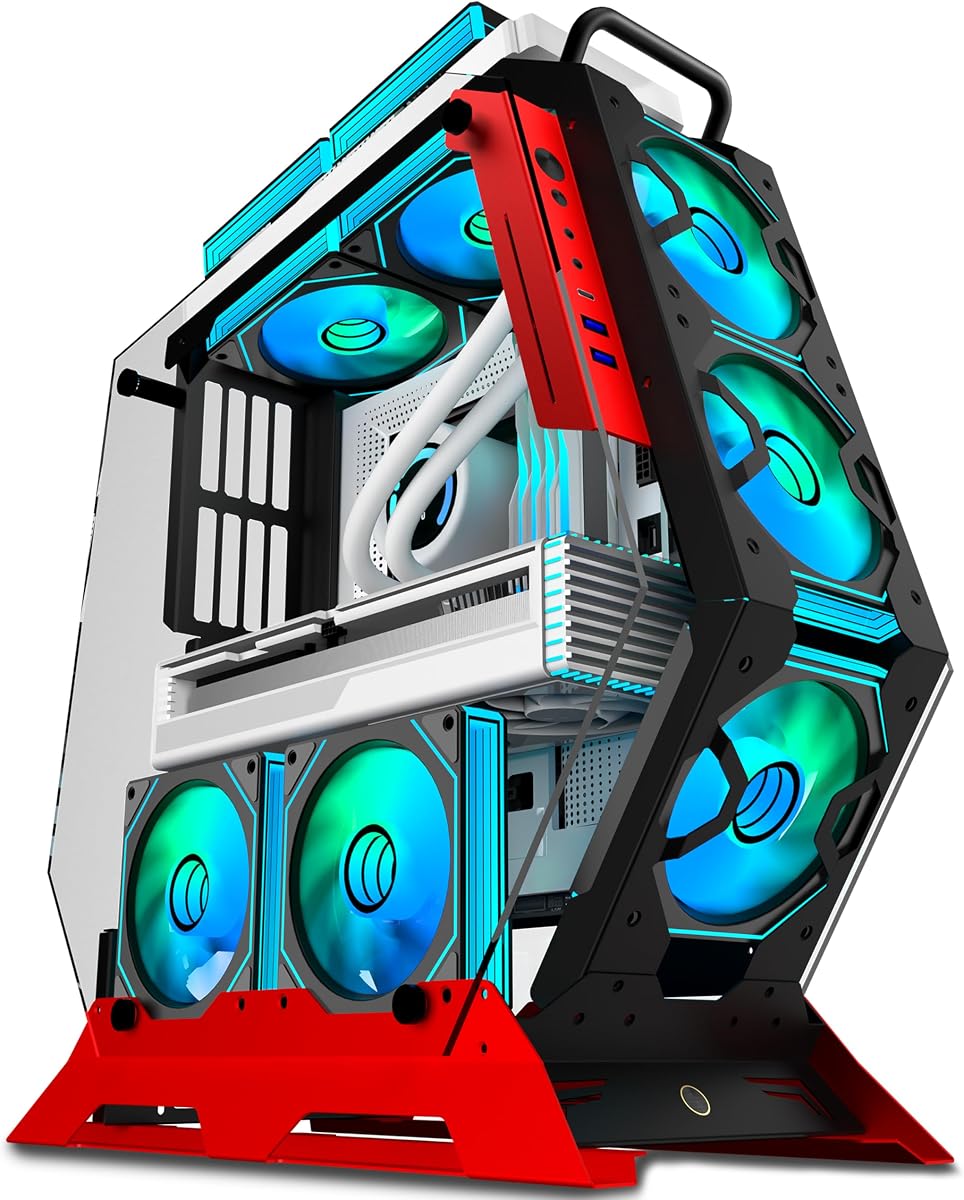
The KEDIERS C570 is the budget pick that makes the strongest visual statement. Its irregular red open-frame construction, thick metal supports, and two tempered-glass panels create a display-oriented enclosure that looks very different from a conventional rectangular mid-tower. The 4.5 rating reflects a favorable balance of appearance, cooling, and hardware support.
We may earn a commission when you buy through this link, at no additional cost to you.
Seven PWM ARGB fans are preinstalled, which is an unusually generous cooling package for a value-focused build. The open design is intended to promote continuous airflow and keep the graphics-card area cooler. Lighting can be controlled through compatible motherboard software via a simple 5V ARGB header, eliminating the need for a separate controller. The two 4mm tempered-glass panels preserve visibility of the internal lighting and components.
Motherboard support extends to ATX, Micro-ATX, and Mini-ITX platforms. The front I/O includes a USB-C port, two USB 3.0 ports, and an HD audio connection, covering the most common accessories without an elaborate panel. The trade-off is the deliberately unconventional structure, which may not appeal to someone who wants a restrained office case or expects the same level of dust isolation as a fully enclosed design.
This model makes sense for a builder who wants an unmistakable red showpiece and already appreciates a large included fan set. Confirm that the irregular frame will not obstruct your components, check the available space around the graphics card, and plan cable routing carefully. For expressive styling at a relatively accessible level, the C570 is the most distinctive choice in the group.
The large preinstalled fan set gives a new system substantial cooling hardware from the start. Builders still need to configure fan curves and ARGB synchronization in software, but they can avoid the slower process of selecting and installing a complete fan package one piece at a time.
The irregular open frame makes airflow and lighting part of the enclosure's visual identity. It is especially effective for a display build, although those same open surfaces make regular dust maintenance more important than in a sealed chassis.
We may earn a commission when you buy through this link, at no additional cost to you.
The NZXT H440 offers a more restrained interpretation of red than the fully red models in this guide. Its matt black and red finish adds warmth to the exterior without overwhelming the design, while the window provides a clear view of the components. The 4.5 rating supports its reputation as a popular, functional mid-tower choice.
We may earn a commission when you buy through this link, at no additional cost to you.
Four NZXT FN V2 fans are included, with three 120mm front fans and one 140mm rear fan. The front intake and top exhaust arrangement gives builders an immediate airflow foundation, while the PWM fan hub centralizes fan-speed control. A more unusual advantage is the case's radiator flexibility: despite its relatively modest dimensions, it supports 240mm, 280mm, or 360mm radiators at the front and top, including two 360mm units out of the box.
The integrated power-supply shroud conceals cables and expands usable cable-management space by as much as 80%. Component clearance is generous for its size, with room for a 428mm graphics card after the hard-drive cage is removed and CPU coolers up to 180mm tall. Its compromise is age-related layout rigidity: it does not offer the same modern connectivity or back-connect motherboard convenience found in newer designs.
The H440 is a good fit for a builder who likes the combination of matte black surfaces and red trim, values a mature fan ecosystem, and wants generous radiator options without a very large footprint. It is less compelling if a fully red exterior or a contemporary USB-C-equipped front panel is essential. Its balanced approach remains attractive for traditional gaming setups.
Support for two 360mm radiators is the standout specification, offering advanced cooling builders options that many larger-looking cases do not provide. Installation planning remains essential, but the vertical and horizontal mounting positions give useful flexibility.
The included FN V2 fans and integrated PWM hub create a straightforward control setup. The power-supply shroud hides power components while its extra routing space helps prevent a crowded cable cavity.
We may earn a commission when you buy through this link, at no additional cost to you.
The HYTE Flow FA12 four-pack is not a PC enclosure, so it does not compete directly with the other ten selections. It is, however, one of the most useful red-themed products for anyone building a HYTE system or adding coordinated cooling to an existing case. Its 4.6 rating indicates a favorable reception for the fan design and four-pack format.
We may earn a commission when you buy through this link, at no additional cost to you.
Each 120mm fan reaches up to 1500 RPM and uses a four-pin PWM connection for variable-speed control. The stated performance figures are 72 CFM of airflow and 1.6 mm-H2O of static pressure, a combination intended to support both general case circulation and resistance to restrictive filters or radiators. A fluid dynamic bearing supports smooth operation, while built-in vibration isolators help reduce unwanted noise transferred into the chassis.
The Wild Cherry color gives the fans a deliberate red appearance that pairs naturally with the HYTE X50 and other coordinated case designs. Braided sleeved cables are easier to manage in a tightly packed interior and provide the physical durability expected from a high-speed PWM installation. The main limitation is obvious: these are accessories, not cases, and they need suitable mounting positions, headers, and a control source.
Choose the FA12 set when you want to replace or supplement case fans without breaking up a red build's visual theme. It is particularly attractive for HYTE owners because the color and design language are already coordinated. Check case dimensions, radiator thickness, connector availability, and controller headers before installation. As a red case-fan bundle, it delivers strong flexibility and visual consistency.
The stated 72 CFM airflow is complemented by 1.6 mm-H2O static pressure, allowing the fans to move air through filters, heatsinks, and radiators while still circulating air through open chassis areas.
Color matching matters in a visible gaming enclosure because mismatched fans can undermine an otherwise deliberate design. The Wild Cherry finish and braided cables make this set a natural companion to compatible red or dark-themed cases.
We may earn a commission when you buy through this link, at no additional cost to you.
The KEDIERS P4 ARGB is a feature-heavy mid-tower that deserves consideration even though the listed version is black rather than red. It targets builders who prioritize a panoramic display, a large collection of illuminated fans, modern connectivity, and broad cooling capacity. Its 4.5 rating reflects a well-rounded feature set and positive customer reception.
We may earn a commission when you buy through this link, at no additional cost to you.
Seven 120mm PWM ARGB fans arrive preinstalled, with three side intake fans, three top exhaust fans, and one rear exhaust fan. Their infinity-mirror design creates a layered lighting effect that is especially noticeable through the fully glass-covered front and side panels. The case can fit as many as nine 120mm case fans and support two simultaneous radiators, making it a flexible base for a heavily air-cooled or liquid-cooled system.
The front I/O includes USB-C with USB 3.2 Gen 2 support, one USB 3.0 port, one USB 2.0 port, and HD audio, along with power, reset, and LED controls. It supports ATX, Micro-ATX, and Mini-ITX motherboards, graphics cards up to 440mm, power supplies up to 220mm, CPU coolers up to 180mm, and 360mm radiators. A back-connect design keeps cables behind compatible motherboards for a cleaner front view.
This is a strong option for a dark build with red or other accent lighting rather than a strictly red case. Its main compromise is complexity: seven installed fans and mirrored lighting create a busy visual effect, and compatibility must be checked for every major component. For a builder who wants a ready-made high-fan-count platform with modern front connections, the P4 ARGB is well equipped.
The preinstalled arrangement covers major intake and exhaust positions and gives the enclosure an immediately active cooling profile. Additional fan positions and radiator support leave room to expand the system as component requirements evolve.
The USB-C front connection and mixture of USB ports cover common peripherals, while power, reset, and LED buttons provide direct control. The back-connect layout further reduces visible cable clutter when paired with a compatible motherboard.
We may earn a commission when you buy through this link, at no additional cost to you.
The NZXT H5 Flow is a compact, clean-lined alternative for buyers who value a straightforward build and good airflow more than a bold red finish. It supports standard ATX components despite its smaller mid-tower format, and its 4.7 rating makes it one of the strongest-rated cases in the comparison. The result is a practical chassis with fewer decorative distractions.
We may earn a commission when you buy through this link, at no additional cost to you.
Ultra-fine mesh on the front, top, and side panels supports airflow while filtering dust. Two 120mm Quiet Airflow fans are preinstalled, one at the front and one at the rear, giving a new system a functional baseline. The perforated power-supply shroud is an important detail because openings on its side and bottom allow two additional 120mm fans to draw air toward the graphics card.
Cooling capacity extends to a 360mm radiator at the front and a 240mm radiator at the top. Wide routing channels, hooks, and straps allow power and data cables to be concealed without complicated custom routing. The trade-off is that this is a black model, and its 360mm radiator position remains unfilled by the included fans. Builders seeking a truly red case should treat the H5 Flow as a functional alternative rather than a direct color match.
The H5 Flow suits someone with limited desk space who still wants a full ATX build, clean exterior, and sensible cooling options. It is particularly attractive for builders who prefer a restrained appearance that can be personalized with red components, lighting, or accessories. Verify radiator thickness and available mounting space, but overall it is a balanced, compact choice with particularly good cable management.
The combination of front 360mm and top 240mm radiator support is useful in a compact enclosure. It allows builders to choose a smaller liquid-cooling loop or a substantial front radiator without moving to a full-size tower.
Fine mesh across the front, top, and side panels helps admit air while limiting the entry of larger dust particles. The design balances openness and enclosure protection better than a fully exposed frame.
We may earn a commission when you buy through this link, at no additional cost to you.
The H3 HYXN uses a dual-cavity design to separate the main hardware area from the power supply and drive region, offering improved organization and a more deliberate internal layout. Its 4.2 rating is the lowest among the listed products, but that figure should be considered alongside the case's substantial feature set rather than used as the only judgment.
We may earn a commission when you buy through this link, at no additional cost to you.
Six infinity-mirror PWM ARGB fans are preinstalled, consisting of five reverse 120mm fans and one forward 120mm fan. High-hardness tempered glass provides a broad view of the illuminated interior. The A/B partition arrangement improves the separation of components, while built-in anchor points make power and data cables easier to secure without improvised ties.
The case supports ATX, Micro-ATX, and ITX motherboards, GPUs up to 400mm, and PSUs up to 200mm. It offers one HDD and two SSD positions, and its front panel includes a high-speed USB-C 3.2 connection, USB 3.0, USB 2.0, microphone and audio connections, restart, and power controls. A 360mm radiator is supported in Micro-ATX B-mode with a dual-fan configuration, so the wording around motherboard and radiator use should be checked before ordering.
The H3 HYXN is worth considering for a display-oriented system that values a divided layout and extensive preinstalled lighting. Its lower rating and more nuanced compatibility language warrant closer verification than the simpler designs in this guide. The enclosure dimensions of 420 by 285 by 370mm also need to be compared with your desk area and planned components. It is a capable option, but one that benefits from careful specification checking.
Separating the power supply and storage area from the main component chamber creates cleaner boundaries within the enclosure. This design can make a complex interior feel less crowded and provides dedicated room for routing cables.
Six infinity-mirror fans provide a substantial lighting foundation, and the case can accommodate a 360mm radiator in its supported configuration. Because the radiator guidance includes motherboard-mode conditions, builders should verify that the chosen board and loop match exactly.
We may earn a commission when you buy through this link, at no additional cost to you.
The Zalman S6 combines a high customer rating with a practical emphasis on airflow and maintenance. Although the listed case is black rather than red, it is one of the strongest functional choices for builders who can introduce red through lighting, components, or coordinated accessories. Its 5.0 rating is the highest listed figure, making it a noteworthy option even though individual reviews can change over time.
We may earn a commission when you buy through this link, at no additional cost to you.
The mesh front panel works with four preinstalled FRGB fans: three 140mm front fans and one 120mm rear fan. The mix of larger front fans gives builders meaningful airflow capacity immediately, while the top control panel provides convenient LED on/off management. Unlike addressable RGB, fixed-color FRGB is simpler to synchronize and does not provide the same independent lighting effects.
The enclosure supports a 360mm front radiator, a 240mm top radiator, graphics cards up to 345mm, and as many as eight 120mm case fans. Magnetic dust filters on the top, front, and bottom can be removed for cleaning, and the tempered-glass side panel uses a tool-free quick-release design. These maintenance-oriented details can make a long ownership cycle easier, although the 345mm graphics-card limit deserves comparison with modern large GPUs.
The Zalman S6 is a strong recommendation for a builder who prioritizes cooling, serviceability, and a broad radiator choice over a red finish. The mesh front, large included fans, and removable filters form a coherent design for a high-airflow system. Confirm GPU clearance, radiator thickness, and drive layout before buying, and confirm the current color and lighting controls if appearance is important.
Three 140mm front fans and one 120mm rear fan provide a strong starting configuration for a thermally demanding system. The mesh panel reduces visual and physical restriction, helping the larger intake fans move useful volumes of air.
Magnetic dust filters and a tool-free tempered-glass panel reduce the friction of routine cleaning and component access. These details are less dramatic than exterior styling but can have a greater effect on long-term usability.
We may earn a commission when you buy through this link, at no additional cost to you.
The CORSAIR 3500X RS ARGB is a panoramic mid-tower designed around component visibility, modern cooling, and clean motherboard presentation. Its 4.6 rating places it among the stronger-rated products, and the supplied details show a case that supports everything from Mini-ITX to EATX while providing a wraparound glass aesthetic.
We may earn a commission when you buy through this link, at no additional cost to you.
Three RS120-R ARGB fans are included and can be controlled through a 5V ARGB motherboard header. The case offers mounting points for as many as ten 120mm fans across the side, roof, and power-supply area, allowing the included set to be expanded for a more elaborate cooling or lighting arrangement. Removable front and side tempered-glass panels make initial assembly and later component access more convenient.
Validated support for ASUS BTF, MSI Project Zero, and Gigabyte Project Stealth motherboards allows cables to connect from the rear of the board, keeping the visible side free of plugged-in leads. The main caveat is that this is a black model, and only three fans are included despite the high total mounting capacity. Buyers should also verify detailed clearance information for their selected graphics card, cooler, and radiator combination.
The 3500X RS ARGB is ideal for a showcase system where a wide glass view, coordinated lighting, and a tidy motherboard area are priorities. It is less appropriate for someone searching specifically for a fully red exterior, but red lighting and matching components can create a personalized accent within the black enclosure. For builders who value presentation and plan to expand the fan set, it remains a versatile premium-style platform.
The wraparound glass provides a broad view of the motherboard, graphics card, and lighting. Removable panels also mean the visual design does not have to compromise the build process or future access.
Support for up to ten 120mm fans gives the case room to grow beyond its three included lights and fans. This makes it suitable for builders who want to customize cooling density after confirming their motherboard and radiator layout.
We may earn a commission when you buy through this link, at no additional cost to you.
The right red PC case depends on more than color. Consider chassis format, cooling direction, component clearance, connectivity, cable routing, maintenance, and whether a distinctive exterior or a coordinated internal layout matters more to the finished build.
Red cases appear in several forms: a fully red shell, a red front accent, a red interior trim, or dark neutral finishes that can be coordinated with red components. The HYTE X50 and KEDIERS C570 are explicitly red, while the Hyte Y40 uses a red version designation and the NZXT H440 combines matte black with red details. Because some cases in this guide are included as functional alternatives, check the actual listing color carefully rather than assuming every enclosure is fully red.
Choose the exact color option that matches your motherboard, graphics card, peripherals, and room decor. Confirm whether the red finish covers the front panel only or extends to the frame, roof, and side panels.
Mid-tower sizing does not guarantee that every ATX build will fit. Review GPU length, CPU-cooler height, power-supply length, motherboard format, and drive arrangement against the case specifications. The H440 accommodates up to 428mm of GPU length without its hard-drive cage, the P4 ARGB supports 440mm, and the HYXN lists 400mm, so even broadly similar cases have meaningful differences.
Measure unusually large graphics cards and tower coolers before buying. Leave enough room for cables, fan thickness, and radiator hardware rather than relying only on headline clearance figures.
A useful case moves air through the chassis rather than merely exposing components to decorative fans. Look for a restrained front intake, a usable rear exhaust, top or bottom exhaust positions, and openings around the power-supply shroud. The X50's micro-mesh intake and bottom graphics-card airflow are especially relevant for powerful systems, while the S6 combines a mesh front with three 140mm intake fans.
Match cooling placement to component heat. Prefer fresh air directed toward the graphics card and processor, with warm air exhausted through the rear or roof. Avoid assuming that a larger number of included fans automatically creates an efficient path.
Radiator support is more useful when paired with information about mounting location, supported length, and combined thickness. The H440 can support two 360mm radiators, the H5 Flow accepts a 360mm front and 240mm top, and the S6 supports 360mm front and 240mm top arrangements. The Y40 offers a 280mm side position with up to 120mm combined thickness, making it particularly interesting for custom loops.
Check the case's fan and radiator limits together. Some models include only two or three fans while offering many additional mounting points, while others arrive with a large fan bundle. Treat the included set as a starting point rather than proof that all recommended cooling positions are filled.
Cable management affects both appearance and serviceability. Look for a power-supply shroud, dedicated routing space behind the motherboard tray, accessible tie-down points, and enough separation between power and data leads. The Y40 includes spaces behind the motherboard shelf and within its shroud, while the H3 HYXN uses an A/B partition and integrated anchor points to organize its dual chambers.
Prefer cases that let you reach connectors without removing the entire motherboard tray. If using a back-connect motherboard, verify the exact board model and whether the case supports the required cable-routing arrangement.
The front I/O panel determines how conveniently you connect everyday accessories. A USB-C port is useful for many modern phones, headsets, cameras, and portable drives, but its underlying data standard varies by model. The C570 and P4 ARGB include Type-C connections, the H5 Flow emphasizes a modern panel, and the HYXN lists a high-speed USB-C 3.2 port. The older H440 listing focuses more heavily on established USB-A connectivity.
Match ports to the accessories you already own. Also check physical button placement, headphone-jack support, and whether the I/O layout suits your desk or floor-mounted installation.
Faster fans and dense infinity-mirror lighting can create a visually exciting system, but lighting control and acoustic tuning matter for daily use. ARGB systems generally allow per-fan or per-zone effects through motherboard software, while fixed-color FRGB is simpler. PWM control allows fan curves to balance cooling and noise, and cases with integrated hubs or motherboard headers make that setup easier.
Check whether the case includes a dedicated controller or relies on motherboard headers. Plan the lighting and fan software before installation, and use a moderate fan curve until the system is assembled and its normal operating temperatures are known.
Open frames and extensive glass can make a build visually striking, but they also change how dust and visibility are handled. The C570's open irregular frame exposes its components directly, while the Y40, P4 ARGB, and 3500X use broad glass viewing areas. Enclosed mesh designs such as the H5 Flow and S6 can offer a more controlled appearance and easier dust-filter maintenance.
Choose the style you will want to maintain, not only the one that looks best in a product photograph. Consider removable panels, magnetic filters, accessible compartments, and the visibility of cable clutter before making your final decision.
Begin by assembling the system in an open, well-lit workspace and reviewing the case manual before removing panels. Install the power supply, motherboard, storage, and cooling hardware in an order that prevents cables from being trapped. Keep protective films on tempered glass until the build is complete, and support glass panels with both hands when removing or reinstalling them.
Connect fans and lighting to the appropriate PWM and ARGB headers, then configure a balanced fan curve in the motherboard software. Avoid running every fan at maximum speed by default. Let the system operate under a realistic load, check temperatures and fan noise, and adjust the curve if airflow becomes excessive or if any area remains warmer than expected.
Clean the case on a schedule that matches the environment. Remove dust filters where provided, use compressed air with short controlled bursts, and hold fan blades so they do not spin from airflow. Wipe glass and metal panels with a soft microfiber cloth, avoid harsh cleaners, and keep liquids away from openings and electrical connections.
The color itself does not affect cleaning, but the enclosure design does. Fully exposed open frames can show and collect more dust, while cases with glass panels, mesh filters, and covered compartments may require more careful wiping but offer better protection to internal parts. Clean removable filters regularly and use a microfiber cloth on glass surfaces.
No. Cooling depends on the airflow path, fan size, fan curve, radiator support, and component position rather than the exterior color. A well-designed case with restrained front intake and correctly directed exhaust can perform well even if it includes fewer fans than a highly illuminated alternative.
Some cases support back-connected boards, but not every design does. The CORSAIR 3500X RS ARGB is specifically validated for ASUS BTF, MSI Project Zero, and Gigabyte Project Stealth boards, while other cases require traditional front-mounted motherboard connectors. Verify the exact motherboard model and the case's routing requirements before ordering.
A compact mid-tower uses a smaller overall envelope while still supporting ATX motherboards in many models. That saves desk or floor space but can reduce graphics-card, cooler, or radiator clearance. Compare exact dimensions and component limits rather than relying on the general size category.
Tempered glass is generally stronger than ordinary glass and is designed to break into less hazardous fragments if damaged. It still requires careful handling, particularly during installation. Support the panel with both hands, remove protective films after the build, and avoid placing heavy tools against the surface.
ARGB offers more detailed lighting control, including colors, gradients, and effects, while fixed-color RGB is simpler and can make coordinated builds easier. The FA12 set uses addressable lighting, the Zalman S6 uses FRGB, and the KEDIERS cases use ARGB. Choose the lighting system that matches your motherboard and preferred software.
There is no universal number because case size, component heat, and cooling design differ. A minimum of one front intake and one rear exhaust is common, while three or more fans can provide a stronger starting configuration. Review radiator positions and included fan sizes rather than judging only by the total fan count.
Most cases in this guide list ATX support, but smaller components still need to fit. GPU length, CPU-cooler height, power-supply dimensions, drive placement, and radiator thickness can still be limiting factors. The HYXN also uses qualified motherboard-mode language for its radiator configuration, so exact specification checking is important.
The HYTE X50 Wild Cherry is the strongest overall pick for a builder who wants an explicitly red enclosure with purposeful airflow, laminated acoustic glass, and a well-organized top power-supply canopy. The Hyte Y40 takes the premium position through its panoramic glass, vertical graphics-card architecture, and included PCIe 4.0 riser, while the KEDIERS C570 delivers the most dramatic budget-oriented red design with seven ARGB fans.
Prioritize airflow direction, exact component clearances, radiator locations, cable access, and front connectivity before finalizing your choice. A red finish should support the rest of the build rather than compensate for poor layout. If you want coordinated red cooling without replacing the enclosure, the HYTE Flow FA12 four-pack is a relevant accessory, and neutral cases can still provide useful functional comparisons.
Check the current listing, selected colorway, package contents, dimensions, and compatibility details before purchasing. Availability and product configurations can change, and a case's included fans, riser cables, filters, or accessories may vary. Current pricing and retailer offers also change frequently, so compare the final configuration against your full system plan before ordering.