
Yottamaster PS500RC3 5-Bay RAID Enclosure
4.5Editor score
Five removable drive trays
Seven flexible RAID modes
Temperature-controlled 80mm fan
RAID enclosures combine multiple SATA drives into one compact external storage system, making them useful for backups, media libraries, surveillance footage, and demanding creative workflows. A useful enclosure balances capacity, redundancy, transfer speed, cooling, drive access, and compatibility rather than simply offering the largest possible bay count.
The products in this guide were compared using their stated specifications, including RAID support, interface speed, maximum drive capacity, physical design, cooling system, operating-system compatibility, and important setup limitations. The list covers two-bay portable options, larger direct-attached storage systems, and a high-speed NVMe enclosure for SSDs.
Each review identifies the strongest use case and trade-offs for its enclosure. The top picks show the most balanced choices for different priorities, while the comparison table provides a quick overview of all ten products. Prices and availability can change, so confirm current details before purchasing.
4.5Editor score

4.7Editor score

3.8Editor score
As an Amazon Associate we earn from qualifying purchases.
This side-by-side comparison covers enclosure size, supported RAID modes, connection speed, cooling, capacity, and notable operating constraints across all ten products.



The CENMATE Aluminum 2 Bay Hard Drive RAID Enclosure is a straightforward two-bay direct-attached storage solution for users who want to combine, mirror, or independently access SATA hard drives and SSDs. Its 3.9 rating reflects a practical design that covers the essentials, but users should pay close attention to the RAID configuration and reset procedure before placing important data inside.
We may earn a commission when you buy through this link, at no additional cost to you.
One of the enclosure's strongest features is its drive flexibility. Both 2.5-inch and 3.5-inch SATA hard drives and SATA SSDs fit into the two bays, allowing the same enclosure to handle compact laptop drives or higher-capacity desktop drives. The stated maximum is 20TB per drive, and the tool-free installation system makes it easier to add or replace storage without reaching for a screwdriver.
The enclosure supports RAID 0, RAID 1, Normal, and JBOD. RAID 0 can combine the drives for a larger, faster volume, while RAID 1 mirrors the same data across both drives for redundancy. Normal and JBOD offer more conventional independent-drive behavior, although the exact presentation of the two disks can depend on the host system and selected mode.
Its 5Gbps interface, USB-A and USB-C cables, and stated compatibility with Windows, Mac, and Linux make it broadly usable. The aluminum-alloy shell and built-in cooling fan help manage heat, but the stated 40–50 decibel fan noise may not suit a silent workspace. It is a sensible choice for a two-drive desktop setup when its interface speed and operating-system limitations meet your needs.
The four available modes cover striped performance, mirrored redundancy, independent access, and a combined storage view. That range is useful for projects that move between fast scratch space and a protected working copy.
The tool-free layout and support for both 2.5-inch and 3.5-inch SATA media make the enclosure practical for users who switch between SSDs and desktop hard drives. The aluminum shell is particularly appropriate for a device intended to sit near a workstation.
We may earn a commission when you buy through this link, at no additional cost to you.
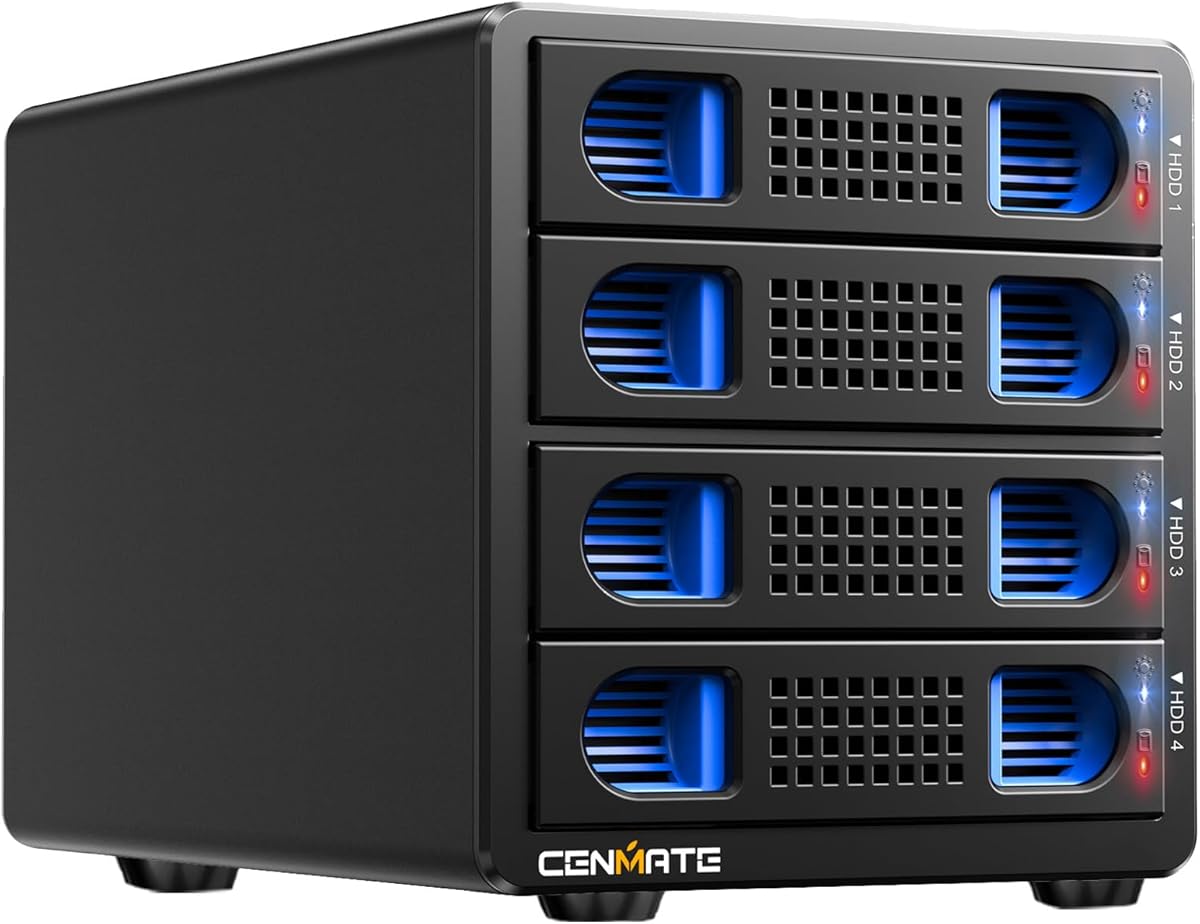
The CENMATE Aluminum 4 Bay Hard Drive RAID Enclosure is aimed at users who need more capacity and a wider range of RAID options than a simple dual-bay unit. It supports up to four 2.5-inch or 3.5-inch SATA drives and offers RAID 0, RAID 1, RAID 3, RAID 5, RAID 10, Clone, Large, and Normal modes, giving it considerable flexibility for direct-attached storage.
We may earn a commission when you buy through this link, at no additional cost to you.
The claimed maximum capacity is 80TB based on four 20TB drives. That makes it relevant to photographers, video editors, and small teams consolidating large working sets, although RAID 5 and RAID 10 reduce the usable capacity relative to the raw total. USB and eSATA connections are both included, and the enclosure uses a JMS567 and JMB393 chip set for its stated 5Gbps transfer speed.
Thermal management is handled by an aluminum-alloy enclosure and two 2-inch fans. The supplied information notes fan noise around 40–50 decibels, which is a meaningful consideration in recording, editing, or quiet office environments. A dedicated 12-volt power adapter supports stable operation, and the removable tool-free design helps with drive installation.
There are important eSATA limitations. The port does not support a computer SATA-to-eSATA adapter, and hot-swapping is not available. The computer's eSATA connection must itself support RAID to expose all four bays; otherwise, only one bay may be accessible. With that limitation understood, this enclosure offers a broad feature set for a four-bay direct-attached system.
RAID 3, RAID 5, and RAID 10 expand the enclosure's usefulness beyond a basic two-drive mirror or stripe. Clone and Large modes add further workflow options, although mode changes involve a reset process and may format the array.
USB 3.0 offers the more convenient connection, while the included eSATA cable can suit compatible systems. Buyers should verify that their computer's eSATA port supports multi-bay RAID access before relying on that route.
We may earn a commission when you buy through this link, at no additional cost to you.
The CENMATE Aluminum 2 Bay Hard Drive RAID Enclosure with ASM1352R chip stands out as the most balanced product in this guide. It pairs a 10Gbps interface with four RAID modes, support for 2.5-inch and 3.5-inch SATA drives, tool-free installation, and a cooling fan. Its 4.7 rating is also the highest among the ten products.
We may earn a commission when you buy through this link, at no additional cost to you.
The ASM1352R controller is a key part of the design, with the product information emphasizing stability and compatibility. The enclosure can accept SATA hard drives or SSDs, with a stated maximum of 20TB per drive. RAID 0 favors performance, RAID 1 creates a mirrored copy, and Normal and JBOD give users direct ways to work with the installed media.
The 10Gbps USB-C connection is a meaningful advantage over the many 5Gbps alternatives here, particularly for large media files and active backup tasks. A cooling fan and aluminum-alloy body address the heat generated by sustained drive activity, although the stated 40–50 decibel fan noise could be distracting in quiet rooms.
This is a compelling choice for a compact workstation, portable editing setup, or two-drive backup system that needs more interface speed than a basic USB 3.0 enclosure. Buyers must remember the warning that Mac systems do not have RAID software for the enclosure and that configuring RAID can result in data loss. Back up important content before changing the array.
The 10Gbps interface gives this compact enclosure an advantage when handling large files. Actual results will depend on the host connection, individual drives, host controller, and selected RAID mode.
Two mirrored drives can provide a straightforward way to maintain duplicate working data in a compact enclosure. The small footprint makes this model easier to place near a workstation than an eight- or ten-bay system.
We may earn a commission when you buy through this link, at no additional cost to you.
The Yottamaster PS500RC3 is the premium, high-capacity choice in this roundup, designed for photographers, video editors, and users who regularly handle large collections. It supports up to five 22TB SATA hard drives, offers a stated 110TB raw capacity, and combines an aluminum enclosure with a temperature-controlled 80mm fan.
We may earn a commission when you buy through this link, at no additional cost to you.
RAID 0, RAID 1, RAID 3, RAID 5, RAID 10, JBOD or SPAN, and Clone give users multiple ways to balance capacity, redundancy, and performance. The enclosure supports hardware RAID for direct setup, while the product information also notes the availability of software RAID management. Five removable trays accept 2.5-inch or 3.5-inch SATA drives, and included screws secure the media to the trays.
The USB 3.1 Type-C connection provides a stated transfer rate of up to 5Gbps. Although that is not the fastest interface among the products reviewed, the enclosure's five-bay scale, 110TB potential, and extensive mode selection make it better suited to high-capacity workflows than a small portable unit. Its fan adjusts speed according to drive temperature, offering a more adaptive cooling approach than fixed-speed designs.
Power is the main consideration. The enclosure supports normal operation with five drives when their combined consumption does not exceed 78W, and Yottamaster recommends additional external power for high-power hard drives. Subject to that requirement, the PS500RC3 is the most complete premium pick for users who need a broad RAID toolbox and serious raw capacity.
Five 22TB drive positions provide substantial room for source footage, project files, and backups. The removable tray system helps when organizing media or replacing a failed drive.
The 80mm fan varies its speed with drive temperature, while seven RAID modes cover everything from performance striping to mirrored redundancy and cloned media. Buyers should still plan the RAID mode around capacity and recovery requirements.
We may earn a commission when you buy through this link, at no additional cost to you.
The CENMATE ASM1156R 2 Bay Hard Drive RAID Enclosure offers a well-rated compact solution for combining or mirroring two SATA drives. It shares the same physical-format image and general feature set as the ASM1352R model, but uses a different controller and a stated 5Gbps interface rather than 10Gbps.
We may earn a commission when you buy through this link, at no additional cost to you.
Its ASM1156R chip is presented as a source of stability and compatibility, while the enclosure supports RAID 0, RAID 1, Normal, and JBOD. Both 2.5-inch and 3.5-inch SATA hard drives and SSDs are supported, with up to 20TB per drive. Tool-free installation makes it convenient to refresh storage or move between portable and desktop media.
For everyday workflows, 5Gbps is a reasonable ceiling and may be adequate when the enclosure is connected through a USB-A 5Gbps port. The included USB-A and USB-C cables improve host compatibility. Aluminum-alloy construction and a built-in fan help dissipate heat, although the supplied noise estimate of 40–50 decibels deserves consideration in a quiet workspace.
This enclosure is best suited to users who value its 4.7 rating, broad drive compatibility, and simple installation more than maximum interface speed. It can serve as a compact mirrored work drive or a two-disk direct-access system. As with the other CENMATE two-bay models, setting up a RAID array can erase data, and Mac users should note the lack of RAID software.
The ASM1156R controller provides the central management component for the four supported modes. That makes this enclosure attractive for users who prefer a basic striped or mirrored setup over advanced multi-bay configurations.
Supporting 2.5-inch and 3.5-inch SATA devices lets the same enclosure serve portable and desktop storage needs. A maximum of 20TB per drive keeps the capacity ceiling generous for a two-bay design.
We may earn a commission when you buy through this link, at no additional cost to you.
The MAIWO 4 Bay RAID Enclosure is aimed at professionals, businesses, and power users who want multiple hard drives in one external chassis. It supports 3.5-inch SATA hard disks, uses a USB A/C 3.1 interface with a stated 5Gbps transfer rate, and provides Normal, RAID 0, RAID 3, RAID 5, RAID 1 or 10, Clone, and Large or JBOD modes.
We may earn a commission when you buy through this link, at no additional cost to you.
The stated maximum is 96TB, based on four 24TB hard drives. This gives it a useful capacity ceiling for backups, media collections, and surveillance or workstation storage. LED indicators make drive status easier to see, and compatibility with SATA I, II, and III hard disks broadens the range of drives that can be used.
Two built-in fans provide active cooling, and a switch allows the user to turn them on or off. This gives some control over noise and operating conditions, although the fixed on-or-off arrangement is less adaptive than the temperature-controlled fan in the Yottamaster model. The RAID flexibility is a notable strength for a four-bay direct-attached enclosure.
The main limitation is that the supplied specifications focus exclusively on 3.5-inch SATA hard drives, so buyers should not assume 2.5-inch SSD compatibility. It is a strong fit for a fixed workstation with several desktop hard disks, provided that the selected host connection, drive power requirements, and RAID capacity trade-offs align with the user's needs.
The mode list includes performance, redundancy, spanned capacity, and direct cloning options. That range makes the enclosure adaptable to evolving storage requirements without moving to a different four-bay design.
Two fans help protect sustained drive performance, while their physical switch lets the user disable them when reduced noise is preferred. Placement away from the drive surface can also improve airflow.
We may earn a commission when you buy through this link, at no additional cost to you.
The Dual Bay RAID SSD Enclosure is the specialist choice for users working with high-speed 2280 NVMe SSDs. Unlike the other products in this guide, it is designed around PCIe NVMe media rather than 2.5-inch or 3.5-inch SATA drives. Its stated 20Gbps interface is the fastest connection among these ten enclosures.
We may earn a commission when you buy through this link, at no additional cost to you.
RAID 0 can combine the two SSDs for performance-oriented storage, RAID 1 provides redundancy, JBOD presents the drives independently, and Clone mode is intended for direct disk duplication. The clone function is particularly relevant to installers, content creators, and IT technicians who need a straightforward way to reproduce drive contents.
Installation is tool-free: the cover opens without tools, making it easier to swap SSDs or prepare a pair for cloning. The compact aluminum body assists heat dissipation and remains suitable for mobile work. An auxiliary USB-C input is included to support stable operation when two high-capacity SSDs, including 8TB and 16TB models, are used together.
This enclosure is not a general-purpose option for SATA hard drives, and its 2280 NVMe requirement is the decisive factor. Users with compatible SSDs and a host that supports the required 20Gbps USB-C connection will benefit from its speed and duplication features. It is a strong pick for SSD-focused workflows rather than a large-capacity hard-disk archive.
A 20Gbps connection and dedicated NVMe support suit systems in which response time matters more than multi-terabyte hard-drive capacity. The host port, cable, SSDs, and workload all influence the result.
Clone mode turns the enclosure into an offline duplicator for compatible NVMe drives. Tool-free access helps reduce the time spent opening, arranging, and replacing the two SSDs.
We may earn a commission when you buy through this link, at no additional cost to you.
The CENMATE Aluminum 10 Bay Hard Drive RAID Enclosure is the largest bay-count option in the guide, intended for users who need to consolidate many SATA drives into one direct-attached storage system. It supports 2.5-inch and 3.5-inch hard drives and SSDs, provides eight RAID modes, and includes both USB and eSATA connections.
We may earn a commission when you buy through this link, at no additional cost to you.
The title states 160TB support, while the detailed product information describes up to 200TB with 20TB drives and adds a compatibility note concerning specific drive brands. It also states that the enclosure is not compatible with WD 20TB hard drives but supports Seagate 20TB drives. Buyers should therefore verify their exact drive model and consult the current listing before configuring a high-capacity array.
Modes include Clone, Large, Large times two, Normal, RAID 0 times two, RAID 5 times two, RAID 50, and RAID 00. The enclosure uses two 2.7-inch cooling fans and a 12-volt power adapter. USB and eSATA cables are included, but mode switching requires disconnecting power, changing a physical mode setting, and holding the reset button during startup.
The ten-bay system has strict population guidance: at least one drive must be installed in the HDD1–HDD5 group and one in HDD6–HDD10, making two drives the minimum. It is best for users with a clear need for many drives and ample physical space. RAID setup can format drives, so complete backups are essential before changing the array.
Ten drive positions allow large collections to be grouped within one enclosure. The multi-group arrangement and minimum population requirement make this more suitable for planned builds than casual drive testing.
The product information recommends testing drives individually to identify a faulty unit. RAID mode changes also involve a physical switch and reset procedure, and creating or replacing an array can erase its contents.
We may earn a commission when you buy through this link, at no additional cost to you.
The CENMATE Aluminum 8 Bay Hard Drive RAID Enclosure provides a middle ground between compact two-drive systems and the maximum ten-bay model. It accepts 2.5-inch and 3.5-inch SATA hard drives and SSDs, offers eight RAID modes, and uses both USB 3.0 and eSATA for connection.
We may earn a commission when you buy through this link, at no additional cost to you.
The enclosure lists a maximum raw capacity of 160TB using eight 20TB drives, with a compatibility note that Seagate 20TB drives are supported while WD 20TB drives are not. The mode selection includes Clone, Large, Large times two, Normal, RAID 0 times two, RAID 5 times two, RAID 50, and RAID 00. These options can support large archives, extended workflows, and selected redundancy arrangements.
Cooling comes from an aluminum-alloy shell, ventilation openings, and two 2.9-inch fans. The supplied information states a fan-noise range of approximately 40–50 decibels, so the enclosure may be better suited to a studio corner or equipment area than a recording booth. A 12-volt, 20-amp power adapter supports the demands of a fully populated array.
Like the ten-bay version, the eight-bay unit requires at least one drive in HDD1–HDD4 and one in HDD5–HDD8. RAID setup and mode changes can format data. This enclosure is best for users who need substantial storage but do not require the full ten-bay capacity; it balances expansion potential with a slightly smaller footprint.
Eight drive positions create a practical high-capacity archive while remaining smaller than the ten-bay alternative. The system can also use smaller SATA SSDs alongside 3.5-inch hard disks.
Two relatively large fans and a 20-amp adapter help an eight-drive configuration operate consistently. Users should maintain airflow around the chassis and expect some audible fan activity during sustained workloads.
We may earn a commission when you buy through this link, at no additional cost to you.
The MAIWO Hard Drive RAID Enclosure Dual Bay is the budget-focused selection in this guide, offering a compact aluminum case for two 2.5-inch SATA hard drives or SSDs. It supports Normal or PM, RAID 0, RAID 1, and Large or JBOD modes, making the usual striping, mirroring, and independent-access options available in a small package.
We may earn a commission when you buy through this link, at no additional cost to you.
Its USB 3.1 Gen 2 interface has a stated 10Gbps maximum transfer rate and includes UASP support. The ASM1352 chip is identified as the controller, and the product information states that RAID 0 can reach the full stated interface speed. The enclosure accepts 7mm and 9.5mm SATA drives, with a total capacity of up to 16TB based on two 8TB drives.
Tool-free installation, hot swapping, and plug-and-play operation make the enclosure convenient for mobile work or frequently changing storage. Its independent power cable is useful for demanding setups, although the drives are not included. The aluminum-alloy case supports heat dissipation while keeping the overall design smaller than desktop multi-bay systems.
This enclosure is limited to 2.5-inch media and therefore cannot offer the raw capacity of a four-, eight-, or ten-bay hard-disk system. Even so, it offers a useful set of features for a portable mirrored backup, a fast scratch volume, or a two-drive workstation. Its lower rating makes it more compelling for value-oriented users than for demanding enterprise applications.
A 10Gbps interface and UASP support give the compact enclosure more speed than many basic USB 3.0 models. Its small size makes it particularly suitable for a laptop or portable editing kit.
RAID 1 gives users a straightforward duplicate of working data, while RAID 0 and JBOD suit users who want combined or independent storage. The included power cable adds flexibility for power-hungry combinations.
We may earn a commission when you buy through this link, at no additional cost to you.
Choosing a RAID enclosure starts with the workload, required capacity, desired level of redundancy, and the devices that will be installed. Interface speed, cooling, bay size, and setup complexity are equally important because they determine how comfortably the system performs in daily use.
RAID 0 can combine drives for one large, fast volume, but it does not provide redundancy; if one member drive fails, the array can be affected. RAID 1 mirrors a copy across two drives and is generally easier for a small personal setup to understand. RAID 3, RAID 5, and RAID 10 appear in larger four- and five-bay devices and offer additional options for balancing capacity, performance, and recovery considerations. Clone, Large, Normal, PM, and JBOD modes are useful for duplication, spanning, or independent access, but they are not all conventional RAID levels.
Raw capacity is the sum of the installed drive capacities, while the usable capacity depends on the selected RAID mode. Two-bay units can hold convenient portable SSDs or compact hard drives, whereas four-, five-, eight-, and ten-bay systems are intended for larger archives. Stated maximums also require careful reading: the 10-bay product's title and detailed information describe different totals, and compatibility notes affect the use of 20TB WD and Seagate drives. Check the exact drive model, thickness, interface, and current manufacturer guidance before building a large array.
A faster enclosure cannot exceed the speed of the slowest part of the connection. The products here range from 5Gbps USB interfaces to the NVMe enclosure's 20Gbps USB-C connection. The host must also provide a compatible port and enough bandwidth for multiple drives. USB 3.0 and USB 3.2 naming can be confusing, and eSATA introduces another variable: the four-bay product specifically states that the computer's eSATA port must support RAID to access multiple bays. For the fastest NVMe option, a host with a full-featured USB-C port and suitable drive support is essential.
A two-bay portable enclosure is most convenient when it accepts both laptop and desktop media. The CENMATE two-bay models support 2.5-inch and 3.5-inch SATA hard drives and SSDs, while the MAIWO budget model is restricted to 2.5-inch drives. The dedicated NVMe product accepts 2280 M2 SSDs rather than SATA media. Consider the chassis size, weight, power requirements, and whether you need to move the system between a studio, office, and client location.
Hard drives and SSDs produce heat during sustained transfers, and a crowded enclosure needs airflow to remain reliable. Most of the larger options in this guide use aluminum bodies and active fans. The Yottamaster model uses an 80mm fan that adjusts with drive temperature, while the MAIWO four-bay enclosure gives the user an on-or-off fan switch. Several CENMATE products state a fan-noise range of approximately 40–50 decibels. A larger fan can move more air, but it is not automatically quiet. Consider both noise sensitivity and whether the enclosure will sit inside a cabinet or directly beside a microphone.
More drives do not automatically mean more power, since each hard-disk model consumes a different amount. The Yottamaster PS500RC3 states that five drives can operate normally when total drive consumption remains within 78W and recommends additional external power for high-power drives. The MAIWO two-bay enclosure also includes a separate power cable. Conversely, some SSD-heavy configurations need less power but may require careful USB-C power delivery, as indicated by the auxiliary input on the NVMe enclosure. Review startup needs, peak consumption, and the included power supply before filling the enclosure.
Changing a RAID mode can format the array and erase its contents, according to the supplied instructions for several products. The two-bay models use a reset button, while the four-, eight-, and ten-bay systems require the power to be disconnected and a physical mode paddle changed before startup. A RAID 0 volume is especially unforgiving because its data is striped across disks. Make a separate verified backup before initial setup, before mode changes, and before replacing a drive. A backup stored only inside the same RAID enclosure may not provide the protection you expect.
The listed compatibility with Windows, Mac, and Linux does not mean every operating system can manage every RAID level. Several CENMATE products explicitly state that Mac systems do not have RAID software for the enclosure. RAID setup may still be possible at the hardware level, but management, mounting, and recovery behavior can differ. Users should also read minimum drive-population requirements for the larger systems and confirm that the enclosure recognizes each installed disk. New drives may need to be formatted and partitioned before a computer can use them, and that step should never be skipped without first protecting existing data.
Before installing drives, back up any data already stored on them and confirm that the intended RAID mode matches the user's needs. Read the enclosure's manual, install compatible SATA or NVMe media, secure removable trays where applicable, and connect the enclosure with the appropriate power and data cables. For a new hard drive, allow the host to format and partition it only after confirming that it contains no important information.
When configuring a multi-bay array, follow the manufacturer's mode-selection procedure exactly. Disconnect power before using a physical mode switch, connect the enclosure as directed, and hold the reset control for the stated interval when required. RAID creation may format the selected drives. After configuration, verify that the expected volume appears, confirm the total usable capacity, and test both read and write operations before transferring irreplaceable files.
For long-term care, keep the enclosure on a stable surface with its ventilation openings unobstructed, use the supplied power adapter, and avoid yanking a tray or cable while the drives are active. Back up important data regularly, monitor drive health where the host provides that capability, and investigate unusual clicking, disconnection, or repeated errors promptly. Before cleaning, disconnect power and use a soft, dry method rather than allowing liquid to enter the chassis.
No. RAID can improve availability, performance, or capacity, but it is not a substitute for a separate backup. A failed drive, controller problem, accidental deletion, or damaged file can affect data inside the array. Keep an additional copy on another device or storage service, especially when using RAID 0 without redundancy.
RAID 1 is usually the easiest choice when the goal is to maintain a duplicate copy of working data. RAID 0 offers higher performance in some situations but does not provide redundancy. Normal, PM, and JBOD are useful when independent access to the two drives is more important than striping or mirroring.
Most of the SATA-based products accept both 2.5-inch SATA SSDs and hard drives, while some also accept 3.5-inch hard drives. The MAIWO four-bay model specifically lists 3.5-inch SATA hard disks, while the dedicated NVMe enclosure accepts 2280 M2 NVMe SSDs. Check drive size, thickness, interface, and capacity before inserting media.
No. The enclosure's stated interface speed is a maximum, and the host port, cable, RAID controller, individual drive speed, and file workload can reduce actual performance. The included NVMe enclosure offers the highest stated interface rate, but compatible hardware and suitable SSDs remain necessary to approach that ceiling.
The supplied instructions for several models warn that creating or changing a RAID array can format the drives and erase data. Mode changes may also require disconnecting power, moving a physical switch, and holding a reset button during startup. Always make a verified backup outside the enclosure first.
The enclosures are listed as compatible with Windows, Mac, and Linux for basic connection, but several CENMATE products explicitly state that Mac systems do not have RAID software for the enclosure. Confirm the specific management method and expected behavior on your Mac model before relying on a hardware RAID mode.
The eight- and ten-bay products state that at least one drive must be present in each half of the enclosure, making two drives the minimum population. Their multi-group RAID arrangements are designed for that structure. The ten-bay model also recommends testing drives one at a time when diagnosing a disk that does not appear.
Leave the ventilation openings clear, place the enclosure on a stable surface, and use the supplied power supply. Multi-drive systems benefit from the included active cooling, while SSD-only setups still need adequate airflow. Keep the enclosure away from enclosed cabinets and avoid operating it in a hot, poorly ventilated space.
The CENMATE ASM1352R 2-Bay is the strongest all-around choice in this guide because it combines a 10Gbps interface, four useful modes, flexible drive sizing, tool-free installation, and the highest product rating. The Yottamaster PS500RC3 is the premium option for large media workflows, while the MAIWO Portable 2-Bay provides the most accessible compact package for users focused on value.
Prioritize the details that match the actual workload. Choose RAID 1 for straightforward two-drive redundancy, RAID 0 only when the absence of redundancy is acceptable, and larger RAID levels after accounting for usable capacity. Also consider the host connection, drive dimensions, power requirements, cooling noise, and how often you expect to change modes or replace media.
Current prices and availability can change, so review the latest listing, documentation, and compatibility notes before buying. In particular, check the maximum drive capacity, exact media brand and model, minimum bay population, RAID-management procedure, and whether the host connection supports every bay. A separate, verified backup remains essential no matter which RAID enclosure you choose.