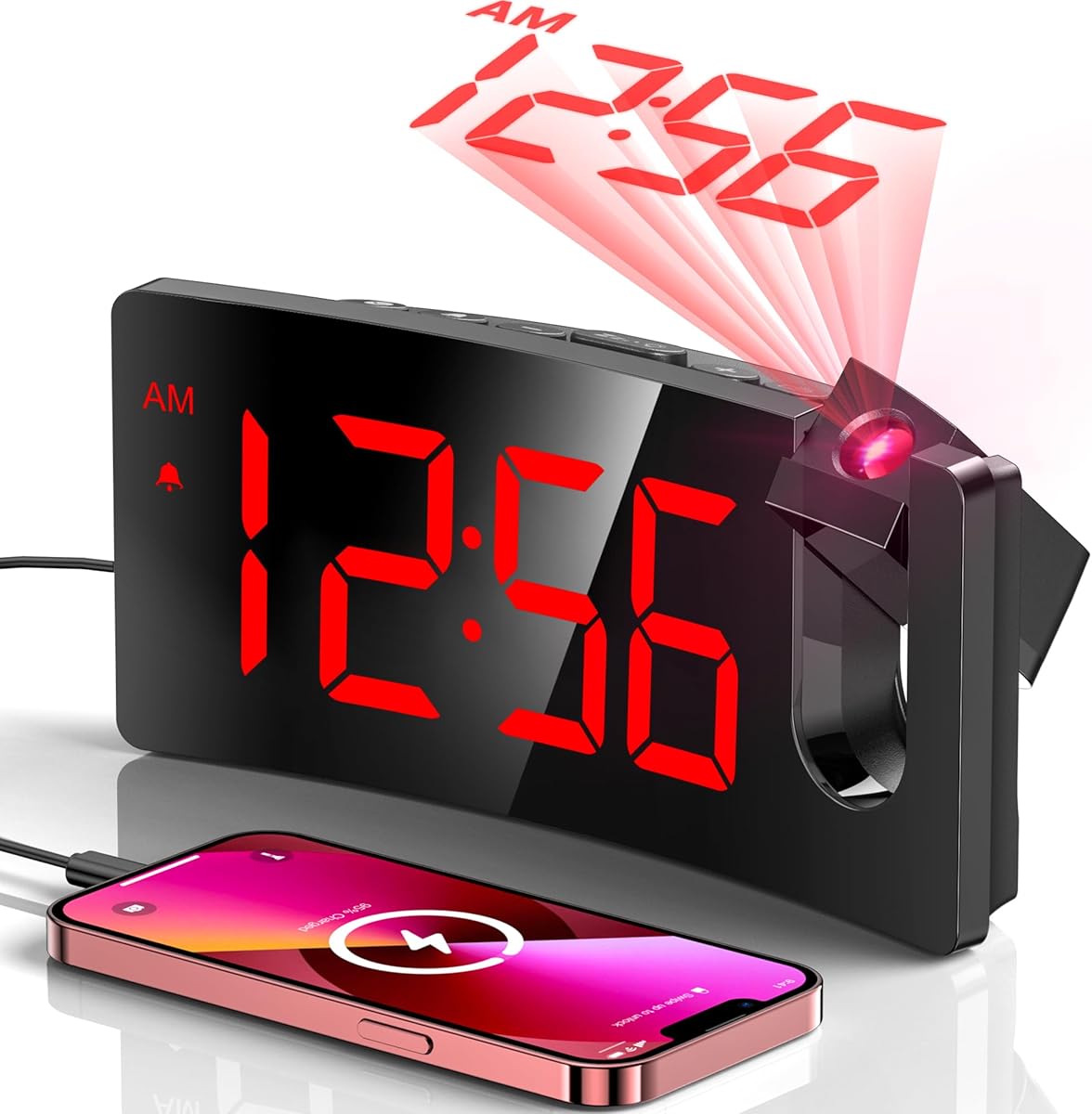
GOLOZA Curved Projection Alarm Clock
4.5Editor score
Separate projection brightness control
Swivel projector reaches 180 degrees
USB charging and backup battery
A projection alarm clock makes the time easier to check without picking up a phone or struggling to read a small display in the dark. The most useful models combine a legible bedside screen, adjustable ceiling or wall projection, dependable alarm controls, and enough dimming to remain comfortable in a shared bedroom.
We compared the ten featured models by examining projection range, display size, brightness controls, alarm flexibility, snooze behavior, charging options, environmental sensors, power backup, and control accessibility. The list covers straightforward digital clocks, mirror-style designs, dual-alarm models, and weather-station options for buyers with different bedside needs.
Each review identifies the feature that distinguishes that model and also explains the compromises involved. Ratings and specifications reflect the supplied product information, while the order reflects overall usefulness within this category. Prices and promotions can change, so compare current product details and availability before making a final purchase.
4.5Editor score

4.5Editor score

4.4Editor score
As an Amazon Associate we earn from qualifying purchases.
The comparison below highlights the major differences among these projection alarm clocks, including their front-facing displays, projection controls, alarm schedules, environmental monitoring, charging capabilities, and backup arrangements.


The Mesqool Dual-Alarm Projection Clock is the strongest all-around option in this guide, combining a rated 4.5 stars with a large, practical feature set. Its defining advantage is the combination of a seven-inch front display and a rotatable projector, allowing the time to be checked both directly and from across the room.
We may earn a commission when you buy through this link, at no additional cost to you.
Projection can be aimed at a wall or ceiling over an optimum range of 1.6 to 9.8 feet. A focus ring helps refine the image, while a dedicated control can flip an upside-down projection. Five brightness levels make it possible to tune the red image for nighttime comfort, and the supplied size examples show how substantially the projected area expands as distance increases.
The clock also serves a household rather than only one user. Two alarms can be enabled separately, and the central snooze control pauses the sound for nine minutes. Its gradual beep includes five adjustable volume levels, while the large display has its own five-level dimmer. A 5V/1A USB output permits phone charging, and AAA backup cells preserve settings during an outage, although the cells are not supplied.
This is a convincing choice for couples, families, light sleepers, and anyone who wants the projected time to remain readable without a glaring display. Its main limitation is dependence on a wall outlet, but the memory backup largely resolves the inconvenience of an interruption. For its balance of visibility, scheduling, and dimming control, it is the most complete general-purpose pick here.
The seven-inch display and large numerals make direct viewing especially useful. You do not need to depend entirely on a ceiling image, which is useful when the projector is being positioned for someone else in the room.
Two independent alarms are more versatile than a single setting for couples or families. The nine-minute snooze and gradual volume control add several ways to wake without repeatedly using the same harsh setting.
We may earn a commission when you buy through this link, at no additional cost to you.
The GOLOZA Curved Projection Clock offers the most restrained design in the group without sacrificing the core purpose of a projection alarm clock. Its 4.5-star rating reflects a well-rounded package featuring a 180-degree swivel projector, clear red numerals, a curved screen, and a nine-minute snooze.
We may earn a commission when you buy through this link, at no additional cost to you.
The integrated projector produces sharp numerals at an appropriate distance of 1.64 to 11.4 feet. Because it does not require a separate focus adjustment, positioning is straightforward. The 3.4-by-1.7-inch display can be read in the dark, and both the face and projection brightness can be controlled separately across three levels.
Its alarm reaches 75dB and grows progressively louder and faster, which is gentler than an immediate burst at maximum volume. A large snooze button is located on top for convenient access. The clock also includes a 5V/1A USB output and a CR2032 backup cell that preserves time and alarm settings when power fails.
The main limitation is that it has one alarm rather than a dual-alarm system. It is best suited to a single user, a guest room, or a household needing one shared waking time. For shoppers seeking an uncomplicated, attractive clock with dependable projection and charging, it provides a particularly persuasive package.
The absence of a focus ring makes this model approachable for first-time projection-clock users. Its swivel arm and 11.4-foot working range provide enough positioning freedom for most bedside walls and ceilings.
The buzzer becomes louder and faster instead of beginning at full intensity. That gradual approach can be easier to tolerate, while the top-positioned snooze button remains easy to find half-awake.
We may earn a commission when you buy through this link, at no additional cost to you.
The GOLOZA Modern Curved Clock is closely related to the second-ranked model and shares its clear projector, 180-degree swivel, curved display, three brightness levels, progressive alarm, USB output, and backup cell. It is another polished option for a single-user bedroom.
We may earn a commission when you buy through this link, at no additional cost to you.
The supplied information highlights a 3.4-by-1.7-inch display with large digits and separate adjustments for the face and projection. The projector works at a distance of 1.64 to 11.4 feet and is designed to deliver sharp numerals without a focus adjustment, reducing the number of setup decisions.
Its progressive 75dB buzzer grows louder and faster, while a large snooze button supplies nine additional minutes. A CR2032 cell retains the time and alarm configuration during a power interruption, although the display and alarm do not operate while mains power is absent.
This clock is appropriate for bedrooms where appearance and simple operation matter. It does not offer a second alarm, weather data, or temperature readings, so buyers who need those functions should examine the SMARTRO or La Crosse options. Within its focused feature set, however, it remains a clear, attractive, and easy-to-use choice.
The gently curved screen presents large, clear numerals in a modern form. Separate brightness controls allow the direct display and projected image to be adjusted for different light conditions.
The internal button cell remembers the time and alarm after an outage. It restores the settings rather than continuing to power the projection, which is worth considering for anyone expecting frequent electrical interruptions.
We may earn a commission when you buy through this link, at no additional cost to you.
The Mesqool Focus-Ring Projection Clock stands out for giving users more direct control over the projected image. It carries a 4.5-star rating and includes a seven-inch display, 180-degree swivel projector, adjustable focus ring, image-flip control, and two separate alarms.
We may earn a commission when you buy through this link, at no additional cost to you.
The projector works over a 1.6-to-9.8-foot optimum range. Rotating the focus ring can sharpen the numerals, and a projection mode button can turn an upside-down image right-side-up. These controls are particularly useful when the clock sits at an unusual angle or the image is projected high onto a ceiling.
The direct display uses large digits with five brightness levels. Alarm sound can also move through five volume levels, and the centered snooze button pauses it for nine minutes. A 5V/1A USB port is included, along with memory backup through two AAA batteries that are not supplied. The clock must remain connected to AC power for its full range of functions.
This model is ideal for buyers who want precise image control or share a room with someone on a different schedule. Its focus adjustment adds a small setup step compared with the fixed GOLOZA projector, but that control can produce a more satisfying result. It is a strong, flexible alternative to the first-ranked Mesqool.
The focus ring is a meaningful advantage when projection distance or alignment is not ideal. The flip function removes a common source of frustration by allowing the displayed numerals to be oriented correctly.
Large buttons, a centered snooze control, dual alarms, and five alarm levels make daily operation approachable. These are useful features for families and for anyone who prefers physical controls over touchscreen menus.
We may earn a commission when you buy through this link, at no additional cost to you.
The SZELAM Mirror Projection Clock combines the highest listed rating in the group, 4.6 stars, with an expansive feature set. Its 7.3-inch mirror-style LED face, four projection brightness levels, six display brightness levels, and dual-alarm scheduling make it especially relevant to shared rooms and family schedules.
We may earn a commission when you buy through this link, at no additional cost to you.
The 180-degree rotating projector can place the time on a wall or ceiling up to 16.4 feet away, although the best stated position is two to three meters. Large digital characters are stated to be visible from at least 20 feet, and the acrylic mirror surface gives the clock a furniture-like appearance.
Two alarms can operate every day, on weekdays, or at weekends. Five volume settings range from 55 to 95dB, and snooze can be set between five and 60 minutes. The clock also provides a date display, 12- or 24-hour formats, and both USB-A and USB-C charging outputs, allowing a phone and another device to be connected at the same time.
The most obvious trade-off is physical size. A 7.3-inch mirror display and a flexible snooze range make this a feature-rich unit, but it may occupy more nightstand space than a compact clock. It is a good fit for buyers who prioritize display visibility, charging flexibility, and scheduling over a minimalist footprint.
The large mirror face serves as both clock and decor. Its six-level dimmer includes a night mode, allowing the display to remain useful without overwhelming a dark bedroom.
Daily, weekday, and weekend alarm modes make the dual alarms practical for people with different routines. The adjustable snooze period also gives users more control than a fixed nine-minute delay.
We may earn a commission when you buy through this link, at no additional cost to you.
The SMARTRO SC91 Weather Station is the most information-rich model in the guide. Its 4.4-star rating reflects a clock that also functions as an indoor and outdoor thermometer, humidity monitor, wireless weather station, and projection alarm.
We may earn a commission when you buy through this link, at no additional cost to you.
Its soft-red projection can display the time, indoor temperature, outdoor temperature, or alternate views on a wall or ceiling. Adjustable angles and brightness reduce the need for exact positioning, while the 180-degree reversal option allows a different orientation depending on the viewer.
The large 4.5-inch LCD shows time, date, weekday, weather patterns, mold alerts, mold risk, barometric pressure trends, temperature trends, and a forecast for the next 12 hours. Up to three wireless remote sensors can be connected across three channels, although only one sensor is included in the package.
Two alarms can repeat from Monday through Friday, Saturday and Sunday, or both periods. Snooze intervals range from five to 60 minutes, and the alarm stops automatically after two minutes. This is a compelling choice for a home office, bedroom, or monitoring area, but buyers seeking a simple clock may find the weather functions excessive.
Temperature, humidity, pressure trends, mold indicators, and a 12-hour forecast provide useful context beyond the time. The projection can also show temperature, making it possible to check conditions without getting out of bed.
Three available channels let one remote sensor monitor another room, a nursery, a warehouse, or another area of interest. Only one sensor is included, so additional locations require separate compatible sensors.
We may earn a commission when you buy through this link, at no additional cost to you.
The La Crosse Technology 616-41667-INT is built around accurate timekeeping and flexible projection. Its 4.3-star rating is the lowest listed among these picks, but it offers distinctive benefits through atomic synchronization, seven selectable time zones, and a 270-degree projection arm.
We may earn a commission when you buy through this link, at no additional cost to you.
The clock can project time, indoor temperature, outdoor temperature, or alternate information onto a wall or ceiling. Brightness can be adjusted to suit the room, and the broad arm rotation makes placement easier in bedrooms where the clock is not directly below the viewing position.
Automatic Daylight Saving Time adjustment is supported, and a manual setting option provides flexibility. The display includes 12- and 24-hour modes, a customizable calendar, indoor and wireless outdoor temperature readings, trend arrows, and a ten-minute snooze alarm. The front backlight offers four levels plus an off setting with automatic dimming.
The clock uses an optional 5-volt adapter and three AAA batteries for power-loss operation, while the temperature sensor uses two AA batteries; none of the batteries are included. It is a strong recommendation for anyone who prioritizes synchronized time, temperature trends, and flexible projection over a phone-charging port.
Atomic synchronization reduces the need to correct the clock manually. Automatic Daylight Saving Time handling and selectable zones are particularly helpful for households that travel or live in regions with changing time rules.
The 270-degree arm provides broad aiming control. This is useful when the clock is placed to one side of a bed or when wall and ceiling viewing positions differ.
We may earn a commission when you buy through this link, at no additional cost to you.
The SZELAM Dual-Port Mirror Clock shares the design strengths of the fifth-ranked SZELAM while offering one of the strongest ratings available, 4.6 stars. It combines a large 7.3-inch mirror display with a 180-degree projector, dual alarms, and extensive brightness and volume controls.
We may earn a commission when you buy through this link, at no additional cost to you.
The projected time can reach 16.4 feet, with the most useful stated range at two to three meters. Four projection brightness levels help optimize the image, while the acrylic mirror face has six display levels for nighttime use. Large digital characters are designed to remain visible from across the room.
Alarm scheduling includes everyday, weekday, and weekend modes, with five volume levels from 55 to 95dB. Snooze can be adjusted from five to 60 minutes. A USB-C output and a USB-A output allow two devices to charge, while the date, 12-hour or 24-hour format, and DST control round out the bedside functions.
Its strongest use is as a charging and scheduling hub for a busy bedroom or teen's desk. The broad physical size and numerous bright components may be less suitable for a minimalist room or an especially light-sensitive sleeper. Otherwise, it offers one of the most complete bedside feature sets in the guide.
USB-C and USB-A ports reduce the need to find a second wall outlet for overnight charging. The clock is best positioned where both cables can reach comfortably without creating clutter around the bed.
Five volume levels and a snooze window that can extend to an hour provide considerable control over waking. The three alarm modes are also useful for people whose schedule changes across the week.
We may earn a commission when you buy through this link, at no additional cost to you.
The Mesqool Large-Display Projection Clock is another well-balanced dual-alarm model, earning a 4.5-star rating and building on the brand's established projector format. Its seven-inch screen, 180-degree swivel, focus ring, and image-flip control make it easy to read from different positions in a bedroom.
We may earn a commission when you buy through this link, at no additional cost to you.
The stated optimum projection range is 1.6 to 9.8 feet. Supplied measurements illustrate the scale: a projection at 3.28 feet measures about 9 by 3.54 inches, while one at 9.84 feet expands to roughly 25.59 by 10.24 inches. This information helps buyers judge whether the image will fit their wall or ceiling.
Both alarms can be activated separately, making the clock well suited to couples or as a backup for a heavy sleeper. A central snooze button provides nine minutes, and the beep volume rises gradually through five selected levels. The direct display also has five dimming levels, offering separate control over near and projected light.
The clock needs AC power for its full functionality, but two AAA backup cells can preserve the time and alarm settings during an interruption. A built-in 5V/1A USB output handles phone charging. It is a strong choice for buyers who value clear projection, large numerals, and family-oriented alarm controls.
The supplied projection dimensions are especially useful before installation. Buyers can estimate the required distance and determine whether the image will remain compact or spread broadly across the wall.
Independent dimming for the display and projection helps prevent the clock from becoming a nighttime distraction. The gradual five-level alarm follows the same principle of delivering stronger stimulation only as needed.
We may earn a commission when you buy through this link, at no additional cost to you.
The SMARTRO Thermometer Projection Clock is a compact environmental and alarm clock rated 4.5 stars. Its 3-inch backlit LCD displays time, date, weekday, indoor temperature, and humidity, while a soft-red projection places the time on a wall or ceiling.
We may earn a commission when you buy through this link, at no additional cost to you.
Projection is suggested at distances from five to 13 feet, and the image can be reversed by 90 degrees. When the clock is connected to its 5-volt adapter, the backlight and projection remain active. With AAA batteries, pressing the top button activates the backlight and projection temporarily, offering limited cordless use.
Two separate alarms can be programmed, and a five-minute snooze provides a short additional rest. The alarm can ring for two minutes and continues on the next day unless disabled, while pressing a key other than the top button stops it. A three-level setting controls the backlight and projection brightness.
Two USB ports allow simultaneous phone charging, and the compact display consolidates several useful functions without taking up much room. The short snooze is the main limitation for buyers who want a longer delay. It is best for people who want a modest bedside footprint, room-condition readings, and flexible cordless projection.
The clock combines indoor readings with the functions users expect from a bedside model. This makes it useful for quickly checking whether a bedroom feels comfortable without reaching for another device.
Continuous adapter power keeps the display and projection running, while battery power offers a brief on-demand view. That arrangement offers flexibility without confusing battery operation for a complete substitute for mains power.
We may earn a commission when you buy through this link, at no additional cost to you.
The right projection alarm clock depends on how you read the time, share your bedroom, use charging outlets, and respond to light and sound. These factors help narrow the field before considering appearance or secondary features.
Projection range determines whether the clock can work at your preferred distance from the wall or ceiling. The featured models vary from maximum stated distances of 9.8 feet to 16.4 feet, with some identifying a narrower optimum range. Consider the bed's position, the clock's outlet location, and the height of the available projection surface.
Also compare swivel range, focus controls, and image orientation. A 180-degree swivel works for many bedside arrangements, while a 270-degree arm offers more positioning freedom. A focus ring can sharpen a distorted image, and a flip or rotation control prevents upside-down numerals when the clock projects onto a ceiling.
The direct display remains important because not everyone wants to read a ceiling image. Front screens range from a compact three-inch LCD to 7.3-inch LED or mirror displays. Large digits are especially helpful for older adults, children, and anyone who prefers checking the clock from across the room.
Pay attention to the stated display dimensions rather than relying only on the screen's physical size. Curved GOLOZA displays emphasize large numerals in a smaller footprint, while the Mesqool and SZELAM models maximize visibility with much broader faces.
A projection clock can become disruptive if the image is too bright, so dimming control is essential. The options in this guide offer three, four, five, or six display brightness levels, and several models separate the front screen from the projection. More levels provide finer adjustment, though the actual appearance also depends on room lighting and projection distance.
Look for a night mode, an off setting, or automatic dimming if you are especially sensitive to light. The SMARTRO SC91 includes an auto-dimming backlight, while the GOLOZA, Mesqool, and SZELAM clocks provide clearly adjustable levels.
The best alarm is one you can hear without being unnecessarily startling. Progressive-volume clocks become louder and faster over time, while models with fixed volume settings let you choose among several levels. The SZELAM offers five levels up to 95dB, and the Mesqool models use five levels of gradual increase.
Snooze duration matters too. Nine-minute snoozes are common, but the SZELAM permits a setting from five to 60 minutes, and the SMARTRO SC91 also offers a broad range. Heavy sleepers should prioritize audible volume, while light sleepers may favor a gentler ramp and easier snooze access.
A single alarm is sufficient for one person with one routine. Dual alarms are valuable for couples, families, employees with different shifts, and anyone who wants a backup. The Mesqool, SZELAM, and SMARTRO models support two alarms, while the GOLOZA models focus on a single progressive alarm.
Scheduling modes also matter. The SZELAM supports daily, weekday, and weekend settings. The SMARTRO SC91 can repeat alarms across Monday-to-Friday, Saturday-to-Sunday, or both periods. Check whether the second alarm can be independently enabled before choosing for a shared room.
A bedside clock that occupies an outlet can become more useful by providing charging ports. The GOLOZA and Mesqool clocks include a 5V/1A USB output. The SMARTRO Thermometer Projection Clock has two USB ports, while the SZELAM Mirror Projection Clock combines USB-A and USB-C outputs for broader device compatibility.
Backup arrangements vary. Some clocks use AAA cells to retain settings after an outage, while the GOLOZA uses a CR2032 cell and the La Crosse clock can operate from optional AAA batteries. Batteries are generally not included, and backup does not necessarily keep the projection running.
Temperature and humidity readings can turn a bedside clock into a useful room monitor. The two SMARTRO models provide indoor environmental information, and the SC91 adds an outdoor wireless sensor, forecast, pressure trends, and mold indicators. The La Crosse clock also tracks indoor and wireless outdoor temperatures with trend arrows.
These features carry more setup than a basic alarm clock. Remote sensors may require separate batteries, and the SC91 package includes only one sensor even though it supports three channels. Choose environmental features when they solve a specific need rather than simply adding complexity.
Physical controls should be easy to identify and reach at night. The GOLOZA models place large, clearly marked buttons along the top, and the Mesqool design uses a central snooze control. The SZELAM also places snooze on top and offers both 12- and 24-hour formats.
Daylight Saving Time support is useful for anyone who does not want to adjust the clock twice a year. Most models provide it, while the La Crosse clock adds automatic atomic synchronization and selectable time zones. Consider these functions alongside screen size, alarm programming, and projection controls rather than treating them as standalone features.
Begin by placing the clock on a stable nightstand and choosing the wall or ceiling that you will view from bed. Connect the correct power adapter, set the current time, and select 12- or 24-hour formatting. Rotate the projector toward the intended surface and use its focus, swivel, flip, or brightness controls until the numerals are sharp and correctly oriented.
Next, set each alarm and test the sound at your intended volume. Assign daily, weekday, or weekend modes when available, and learn the snooze control before going to bed. Test any charging ports with the devices you intend to use, and install the correct backup batteries if you want settings retained during a power interruption.
Keep the lens and housing free of dust, and avoid placing the clock where direct sunlight, moisture, or excessive heat may affect it. Clean the exterior with a soft, dry cloth rather than spraying liquid directly onto the device. Periodically check the alarm, projection, and power connection, especially after moving the clock or changing its position.
They can be, particularly when the projected numerals are placed on a clear wall or ceiling and the display is positioned for a comfortable viewing angle. Their advantage is that you can check the time without reaching for the clock or phone. Actual clarity depends on the projector, focus, room lighting, and viewing distance.
Some models can operate briefly on batteries, while others are designed primarily as plug-in devices with batteries used only for memory backup. The SMARTRO Thermometer Projection Clock can show a temporary projection on battery power, whereas its projection remains on continuously with the adapter. Check the supplied power requirements before choosing a model.
The featured products list different ranges, generally extending from several feet to more than 13 feet depending on the model. The best distance is the one that produces large, sharp numerals without making them difficult to see. Start according to the manufacturer's optimum range, then adjust the swivel, focus, and brightness controls.
Two alarms are helpful for couples, families, different work shifts, or anyone who wants a backup. They allow two times to be enabled independently, and some models can assign weekday and weekend schedules. A single-user buyer with one consistent routine can usually manage with the simpler GOLOZA models.
Yes, because both the front display and projected image can be disruptive in a dark room. The models reviewed provide between three and six display brightness levels, with some also controlling projection brightness independently. A night mode or an off setting is especially helpful for light-sensitive sleepers and shared rooms.
Several models include USB outputs, but their port types and capabilities differ. The GOLOZA and Mesqool clocks provide a 5V/1A output, the SMARTRO Thermometer Projection Clock has two USB ports, and the SZELAM combines USB-A and USB-C. Charging speed and device compatibility can vary, so confirm the specifications before connecting important equipment.
A standard projection clock mainly displays and projects the time, while a weather-station model also gathers environmental data. The SMARTRO SC91 adds humidity, pressure trends, a 12-hour forecast, mold indicators, and support for remote sensors. These features are useful for monitoring a room or home but may be unnecessary for a straightforward bedside clock.
Start by positioning the clock within the manufacturer's recommended range, then rotate the projector toward the viewing surface. Models with a focus ring allow you to sharpen the image, while a flip control can correct orientation. Lowering the brightness in a dark room and reducing competing ambient light can also improve perceived clarity.
The Mesqool Dual-Alarm Projection Clock is the most balanced recommendation because it combines a large display, adjustable projection, two alarms, gradual volume, multiple dimming levels, and a USB port. The GOLOZA Curved Projection Clock is the most economical route to a polished projector, curved face, progressive alarm, and straightforward controls. For expanded monitoring, the SMARTRO SC91 adds temperature, humidity, forecasts, and remote sensors.
Prioritize the features that change your daily routine rather than the longest specification list. Light-sensitive users should look for independent dimming, heavy sleepers should examine audible volume and progressive alarms, couples should verify dual-alarm support, and people who rely on overnight charging should confirm port type and output. Also account for the space required by a large mirror-style display.
Ratings, product details, and availability can change, and current prices and promotions may vary from one shopping session to another. Review the latest listing details, package contents, power requirements, and return terms before purchasing so the chosen projection alarm clock fits your room and routine.