Thermalright Peerless Assassin 120 SE
4.7Editor score
Dual 120mm PWM fans
Six copper heat pipes
Wide platform compatibility
Passive CPU Cooler guide comparing ten fanless, low-profile, and server coolers for AMD and Intel systems with compatibility, design, and feature analysis.
A passive CPU cooler moves heat without a dedicated CPU fan, using a heatsink, chassis airflow, or a combination of both to control processor temperatures. The right choice depends on socket support, enclosure clearance, processor heat output, and whether true fanless operation is necessary for a completely silent workstation or compact server.
This guide compares ten options that fall into three broad groups: fully fanless desktop heatsinks, low-profile or small-form-factor coolers, and passive server cooling assemblies. It also considers conventional air coolers included in the list because they can be useful where silent operation is less strict, while clearly identifying which products do not actually operate without a fan.
The Noctua NH-P1 stands out for genuinely fanless desktop cooling, while the Dynatron A43 and Supermicro SNK-P0048PS target constrained server installations. The remaining choices emphasize low profile, broad socket compatibility, cooling capacity, or quiet fan-assisted operation. Product prices and availability can change, so check the current listing before purchasing.
4.7Editor score

4.6Editor score

4.7Editor score
The comparison below separates true fanless designs from fan-assisted alternatives, highlights supported platforms, and identifies the most important physical constraints for desktop, small-form-factor, and server systems.


The Noctua NH-P1 is the clearest choice for users who specifically want a passive CPU cooler rather than a conventional air cooler with a quiet fan. It has a 4.6 rating and uses natural convection as its primary cooling method. Unlike many products marketed with passive wording, the NH-P1 can genuinely operate without a fan, making it appropriate for recording, laboratory, office, and HTPC systems where fan noise is unacceptable.
We may earn a commission when you buy through this link, at no additional cost to you.
Its major advantage is broad platform support combined with unrestricted RAM clearance. The Torx-based SecuFirm2+ mounting system covers Intel LGA1851, LGA1700, LGA1200, LGA115x, and AMD AM5 and AM4 platforms. The product can also be paired with an optional NF-A12x25 LS-PWM fan for a semi-passive configuration, but the fan is not required for basic operation. Improved second-generation NT-H2 thermal compound supports heat transfer between the processor and heatsink.
The key limitation is processor output. Noctua recommends the NH-P1 for CPUs with low to moderate heat dissipation, including examples such as the Intel 285K, 265K, and 245K or the AMD Ryzen 7900, 7700, and 7600. Its passive design cannot independently dissipate the sustained heat of an unrestricted flagship processor. Case airflow also matters because surrounding fans may need to remove the heat eventually, even though the CPU cooler itself has no moving parts.
This is the strongest general recommendation for a desktop user who wants true fanless cooling, especially when memory clearance and broad socket support are priorities. It is less appropriate for compact 1U or 2U systems, which require chassis-specific server heatsinks. For a suitable processor, quiet enclosure, and normal desktop case, however, the NH-P1 offers the most convincing blend of silence, flexibility, and build quality.
The NH-P1 relies on a substantial passive heatsink and natural convection, so processor choice is critical. Confirm that the CPU is on Noctua's compatibility guidance and that the enclosure can move warmed air away from the heatsink.
Support for current Intel and AMD sockets, unrestricted RAM access, and the option to add a PWM fan make the heatsink adaptable to both completely silent and semi-passive builds.
We may earn a commission when you buy through this link, at no additional cost to you.
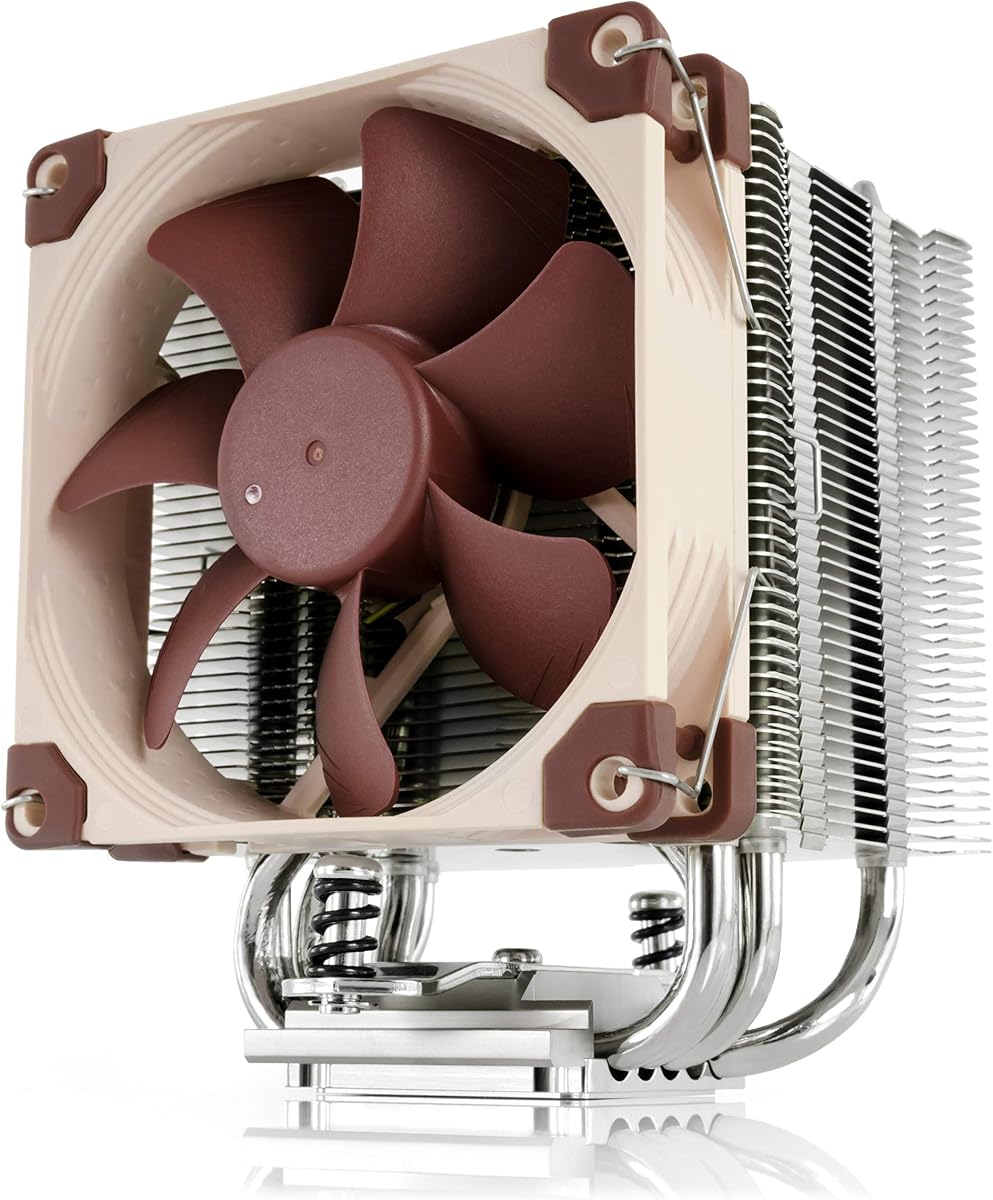
The Thermalright Peerless Assassin 120 SE is not truly passive, but it is an excellent value for builders who interpret the category as a cooler with a strong emphasis on quiet, controlled airflow. It holds a 4.7 rating and combines a dual-tower aluminum heatsink with two 120mm PWM fans. That arrangement gives it much more thermal headroom than a basic single-fan design.
We may earn a commission when you buy through this link, at no additional cost to you.
Six 6mm pure-copper heat pipes use AGHP technology to improve the transfer of heat through the heatsink. The two TL-C12C fans operate at 1550 RPM plus or minus 10 percent, provide up to 66.17 CFM of airflow, use a four-pin power connection, and are listed at no more than 25.6 dB(A). The heatsink leaves room for memory chips, helping avoid the installation restrictions common with large dual-tower designs.
Compatibility covers Intel LGA115X, LGA1200, LGA1700, and newer 17XX platforms, along with AMD AM4 and AM5. AMD installation requires the motherboard's original built-in backplate, which is not included. The cooler measures 125 by 135 by 155 millimeters, so buyers should verify both case clearance and memory position before ordering. It is a substantial tower rather than a discreet desktop heatsink.
The Peerless Assassin 120 SE is a strong recommendation for mainstream and performance-oriented systems where quiet cooling matters more than literal fanlessness. It is particularly compelling for builders who want dual-fan cooling without paying for a premium brand. It should not be chosen for a fanless workstation, a 1U server, or any enclosure without room for a 155mm-high dual tower.
Two PWM-controlled 120mm fans and a six-heat-pipe tower create substantial cooling capacity. Smart fan control can reduce noise when the processor load is light, although the fans still make this an audible conventional air cooler.
Most listed platforms use the supplied mounting hardware, but AMD AM4 and AM5 builders need the original motherboard backplate. Checking the accessory list before assembly avoids a delayed installation.
We may earn a commission when you buy through this link, at no additional cost to you.
The 1U Passive CPU Heat Sink is designed specifically for LGA 2011 systems and is intended to transfer CPU heat without a local fan. It does not carry a published customer rating, so buyers must make their decision from platform compatibility and physical requirements rather than social proof. Its defining advantage is the ability to fit a passive thermal solution into a 1U server format.
We may earn a commission when you buy through this link, at no additional cost to you.
The product description emphasizes effective heat dissipation, practical installation, and the movement of heat from the processor into the surrounding structure. As a passive cooler, it depends on the server chassis for the final removal of heat. That is normal in data-center and workstation designs, where multiple chassis fans create controlled airflow across the heatsink and motherboard.
Its LGA 2011 restriction is substantial for contemporary desktop builders. It does not provide a list of modern Intel or AMD socket support, and it is not presented as a general-purpose desktop cooler. Server purchasers also need to confirm the exact socket layout, mounting pattern, airflow direction, and dimensional requirements of the enclosure before ordering. The limited published detail makes careful system matching essential.
This cooler is best suited to someone rebuilding or maintaining a compatible LGA 2011 1U server and seeking a fanless CPU heatsink. It is a poor choice for a normal desktop, a modern gaming system, or a build requiring broad socket support. Its value lies in a specialized environment where chassis-level airflow is already engineered around a passive server heatsink.
The low-profile form is intended to fit a 1U server chassis, where a conventional tower cooler would be impossible. Installation should be planned around the server's existing airflow and retention system.
Because the stated target is LGA 2011 and no broader compatibility is provided, check the processor socket, board layout, and server manual before purchase. Compatibility errors in server hardware can be costly.
We may earn a commission when you buy through this link, at no additional cost to you.
The Thermalright Assassin X120 Refined SE is a conventional single-tower CPU air cooler, but its relatively restrained dimensions make it useful for compact builds that cannot accept a full dual tower. It has a 4.7 rating and uses four 6mm heat pipes with an aluminum heatsink cover. A single TL-C12C PWM fan supplies adjustable airflow and allows the system to remain quiet when the CPU load is light.
We may earn a commission when you buy through this link, at no additional cost to you.
The fan reaches 1550 RPM plus or minus 10 percent, moves up to 66.17 CFM, and is listed at no more than 25.6 dB(A). The assembler's S-FDB bearing design is rated for up to 20,000 hours of service. The AGHP heat-pipe treatment is intended to reduce the inverse-gravity effect, while the overall cooler measures 125 by 71 by 148 millimeters.
Socket support is extensive for an air cooler, covering Intel LGA1150, LGA1151, LGA1155, LGA1156, LGA1200, LGA1700, newer 17XX platforms, and LGA1851, plus AMD AM4 and AM5. Mounting hardware for the listed platforms is included. Despite its smaller footprint, the 148mm height still requires more clearance than the Noctua NH-L12S or Thermaltake UX150.
This is a compelling option for a mid-size or compact case that can accommodate a 148mm tower but not a 155mm dual-tower. It is also a strong general-purpose cooler for mainstream processors. It should not be selected when the system must be completely fanless, because its cooling performance depends on the included PWM fan and suitable case airflow.
The single-tower layout is easier to accommodate than a large dual-tower cooler while still using four heat pipes. It offers a practical middle ground for builders balancing thermal capacity and chassis clearance.
Support spans several generations of Intel and both current AMD desktop platforms. Reviewing the included mounting parts before ordering is still recommended, especially on an older motherboard.
We may earn a commission when you buy through this link, at no additional cost to you.
The Dynatron A43 is a passive heatsink designed for 2U server enclosures and modern AMD platforms. It has a 3.2 rating, the lowest among the products with published ratings, but that figure should be considered alongside its specialized purpose. It is not a conventional desktop cooler, and the number does not by itself establish whether it will meet a particular server's thermal requirements.
We may earn a commission when you buy through this link, at no additional cost to you.
Its primary specifications are concise and useful. The A43 supports AMD Ryzen Socket AM4 or AM5, handles up to 120 watts of heat dissipation, and uses stacked aluminum fins with heat pipes. It measures 4.13 by 2.91 by 2.48 inches. Shin-Etsu 7762 thermal paste is pre-applied, reducing the need to disassemble the heatsink and apply compound during installation.
As a passive 2U component, the A43 still requires the server chassis to move heat away from the fins. Its 120-watt rating is a maximum specified dissipation figure, not a guarantee that every processor can run indefinitely at that output. Ambient temperature, fan wall configuration, airflow direction, processor power limits, and neighboring components all influence actual cooling performance.
The Dynatron A43 is best for a technician or enthusiast building a compatible 2U AMD system where a passive server heatsink is required. The pre-applied paste and current AM4 and AM5 support are convenient. Buyers should confirm the 2U socket layout and retention hardware, and should not choose it for a standard desktop or a system requiring a compact tower cooler.
The A43 is shaped and specified for 2U server use rather than desktop towers. Its passive operation depends on a properly designed server airflow path and compatible mounting arrangement.
Factory-applied Shin-Etsu 7762 thermal paste simplifies installation. It also reduces the risk of applying compound unevenly, although the heatsink should still be mounted according to the platform's retention procedure.
We may earn a commission when you buy through this link, at no additional cost to you.
The Noctua NH-L12S is a premium low-profile cooler for compact ITX and HTPC systems. It has a 4.7 rating and stands only 70mm tall, making it far easier to fit inside shallow enclosures than a conventional tower. It remains fan-assisted, so buyers seeking literal fanless operation should choose the NH-P1 or a server heatsink instead.
We may earn a commission when you buy through this link, at no additional cost to you.
Cooling is provided by a highly optimized NF-A12x15 120mm fan with PWM support and a Low-Noise Adaptor for automatic speed control. The fan's 120mm diameter takes advantage of the limited vertical space, while the total package remains low enough for many compact cases. NT-H1 thermal paste and Noctua's SecuFirm2 mounting system are included.
The mounting system supports Intel LGA1851, LGA1700, LGA1200, LGA115x, and AMD AM5 and AM4. An offset mounting option is available for improved efficiency on AMD platforms. Noctua backs the cooler with a six-year manufacturer warranty, which adds confidence to the premium purchase. The listed processor examples include Intel Core Ultra 290K, 270K, and 250K models and several high-end AMD Ryzen chips.
The NH-L12S is the most refined low-profile choice in this group, particularly for a small system where noise and fit are priorities. Its limitation is that low-profile construction leaves less heatsink surface than a tower, so it is better suited to efficient processors and moderate power limits than unrestricted high-end workloads. Also check graphics-card clearance in the chosen enclosure before installation.
A total height of 70mm makes the NH-L12S appropriate for compact cases and HTPC-style systems. Measure the case's actual CPU clearance rather than relying on a general small-form-factor classification.
PWM control and the included Low-Noise Adaptor allow the fan to respond to processor demand. The six-year warranty and broad socket list make it a long-term option for systems that may be upgraded.
We may earn a commission when you buy through this link, at no additional cost to you.
The Noctua NH-U9S combines a conventional single-tower heatsink with unusually compact dimensions, earning a 4.8 rating—the highest published score among the ten products. At 125mm tall, it suits HTPC, ITX, and small-form-factor systems that have room for a tower but not a full-size 150mm or 155mm model.
We may earn a commission when you buy through this link, at no additional cost to you.
Its NF-A9 92mm fan uses PWM control and includes a Low-Noise Adaptor for automatic speed adjustment. Although smaller than the 120mm fans used by many competing coolers, the NH-U9S avoids overhanging the RAM and PCIe slots on most current motherboards. That clearance can be more valuable than maximum fan size in a densely packed compact build.
The SecuFirm2 mounting system supports Intel LGA1851, LGA1700, LGA1200, LGA115x, AMD AM5, and AM4, with an offset mounting option for best efficiency. NT-H1 thermal paste is included. The product is backed by a six-year manufacturer warranty, and Noctua lists it as suitable for recent Intel Core, Intel Core Ultra, and AMD Ryzen processors.
The NH-U9S is an excellent general-purpose cooler for compact systems that require better thermal performance than the very lowest-profile designs can provide. It is not passively cooled, and it may still be too tall for the shallowest cases. For owners of a small enclosure that can accept 125mm, it provides an unusually attractive balance of quiet operation, socket support, warranty coverage, and unobstructed component access.
The 125mm height preserves a vertical heatsink layout while remaining manageable in smaller enclosures. It provides a useful middle ground between a low-profile cooler and a full dual tower.
The design generally avoids covering RAM and PCIe slots, making component access and memory upgrades easier. Check the motherboard layout and graphics-card position, as unusual cases can still create conflicts.
We may earn a commission when you buy through this link, at no additional cost to you.
The Cooler Master Hyper 212 Black is a recognizable single-tower air cooler with a 4.7 rating. It uses four heat pipes and a copper base for cooling, making it a conventional option for users seeking dependable performance rather than true fanless operation. Its visual design is restrained, while the included SickleFlow 120 Edge fan uses dynamic PWM control.
We may earn a commission when you buy through this link, at no additional cost to you.
The fan operates from 690 to 2500 RPM, giving the system a broad range of cooling and noise behavior. The listed target processors include AMD R7 and Intel i7 classes, although the actual result depends on the exact chip, case, and fan curve. Thermal paste is included, and redesigned brackets simplify installation on AM5 and LGA1851 and LGA1700 platforms.
At 152mm tall, the cooler is narrower than many dual-tower designs but still too tall for many compact cases. It may also crowd tall memory modules, so the installed motherboard layout and RAM height deserve attention. The mounting system's support for current platforms is helpful, but older socket compatibility should be verified directly against the product instructions.
This is a sensible general-purpose cooler for a full-size or mid-size ATX case, particularly for users who recognize the Hyper 212 design or want a straightforward upgrade over a stock cooler. It is not the right answer when silence must be absolute, when a slim enclosure is involved, or when every millimeter of CPU clearance matters. In a standard case with moderate-to-high processor loads, it remains a proven general option.
The 690 to 2500 RPM range supports both quiet low-load operation and stronger cooling under load. An appropriate motherboard or fan-controller curve is important for getting the intended balance.
Revised brackets simplify fitting the cooler to AM5 and LGA1851, LGA1700, and other supported platforms. Included paste and accessible hardware make the installation process more straightforward.
We may earn a commission when you buy through this link, at no additional cost to you.
The Supermicro SNK-P0048PS is a passive server heatsink intended for 2U and larger systems using specific X9 UP, DP, and MP platforms. It has a 4.0 rating and targets the LGA2011 socket with Intel Xeon E5-2600 and E5-4600 series processors. That narrow platform focus makes it a maintenance and rebuild option rather than a general CPU cooler.
We may earn a commission when you buy through this link, at no additional cost to you.
The heatsink combines a copper-and-aluminum base, aluminum fins, and heat pipes. Mounting uses screws and springs, which is common in rack-mounted server designs where secure retention and consistent pressure are important. Its passive construction eliminates a local CPU fan, but it does not eliminate the need for airflow elsewhere in the chassis.
Compatibility is the defining concern. The listed processor generation and X9 board types are no longer the broad focus of new desktop platforms, and the product should not be assumed to fit an arbitrary LGA2011 motherboard. The server manufacturer or board documentation should be used to confirm the required part number, socket arrangement, orientation, and mounting method before purchase.
The SNK-P0048PS is most appropriate for maintaining or upgrading a compatible Supermicro-class server. Buyers should search for the exact system requirements and compare the supplied part number with the existing chassis documentation. It is unsuitable for a standard desktop, and its passive label should not be interpreted as a completely sealed, fanless computer.
This heatsink is specified for particular X9 UP, DP, and MP server systems rather than being a universal LGA2011 accessory. Verify the platform manual and exact part requirements before ordering.
Screws and springs provide the mechanical retention expected in rack-mounted equipment. The mounting hardware must match the server's socket layout and heatsink orientation.
We may earn a commission when you buy through this link, at no additional cost to you.
The Thermaltake UX150 ARGB combines a low-profile 72mm design with a relatively large 130mm PWM fan. Its 4.2 rating places it below the leading desktop air coolers in the list, but the product serves a distinct aesthetic and compact-build niche. It is designed for Intel platforms and includes illuminated styling rather than truly fanless operation.
We may earn a commission when you buy through this link, at no additional cost to you.
Cooling is based on a copper base and aluminum fins. The 130mm fan operates between 500 and 2400 RPM and uses a hydraulic bearing, which the manufacturer describes as reliable, comparatively quiet, and thermally efficient. The cooler is rated for up to 130W of processor dissipation, although real results still depend on the CPU, case, and sustained workload.
Socket support covers Intel LGA1851, LGA1700, LGA1200, LGA1156, LGA1155, LGA1151, and LGA1150. AMD support is not listed, so the product is not suitable for common AM4 or AM5 platforms without an independently verified compatible solution. A non-interference design prevents overlap with memory modules, and the 72mm height reduces the chance of conflict with a graphics card.
The UX150 ARGB is best for an Intel compact gaming or office build that values visual lighting and a 72mm cooler. It is not appropriate for AMD systems, and users seeking complete silence should consider the NH-P1 or a passive server model. Its infinity-mirror lighting is the distinguishing feature, while its broad fan-speed range provides the usual balance between quiet running and active cooling.
The 72mm height makes the UX150 suitable for many compact Intel cases, while the 130mm fan can move a useful volume of air within the limited height. Confirm the enclosure's CPU cooler allowance.
The infinity-mirror fan hub provides RGB styling, but the listed sockets are exclusively Intel. AMD builders should choose a cooler that explicitly supports AM4 or AM5.
We may earn a commission when you buy through this link, at no additional cost to you.
Choosing a passive or near-silent CPU cooler begins with defining whether fanless operation is mandatory. Socket support, processor output, chassis dimensions, and server airflow are equally important because a physically attractive heatsink may be unusable in the intended system.
Choose genuine fanless operation when silence is non-negotiable. Choose a low-noise fan-assisted cooler when strong cooling and easier heat removal matter more than absolute silence.
Match the exact socket and mounting kit. Do not assume LGA1700, LGA1851, LGA2011, AM4, and AM5 are interchangeable.
Match cooling capacity to processor power and workload. Do not assume a passive desktop heatsink can sustain an unrestricted flagship CPU.
Measure from the motherboard mounting surface to the case limit. Then verify RAM, graphics card, and fan clearance.
A passive CPU heatsink still needs a planned airflow path. Confirm that the case or server chassis removes the warmed air.
If complete silence is unnecessary, a well-controlled PWM fan may provide better thermal headroom. Set a gradual fan curve rather than running the fan continuously at maximum speed.
Check the physical overlap between heatsink, RAM, and graphics card. Socket compatibility alone does not guarantee a clean fit.
Use the server documentation to confirm the part number, mounting method, and airflow path. Never substitute a server heatsink based on socket appearance alone.
Begin by confirming the processor socket, included mounting hardware, heatsink orientation, and chassis clearance. Assemble the motherboard without applying additional thermal compound if the product already has paste pre-applied. If compound must be applied, use a thin, even layer and avoid spreading it beyond the contact area. Fit the retention system according to the cooler or server manual rather than improvising pressure with arbitrary screws.
Install the CPU and cooler according to the platform instructions, then confirm that the processor can be removed without forcing it against the heatsink. This is a simple check that helps identify incorrect mounting pressure. Connect any PWM fan to the appropriate motherboard header, arrange case fans to create a consistent airflow path, and review thermal readings after enabling the processor for a normal workload.
For maintenance, keep dust away from exposed fins and ensure that case or server fans continue moving air across the heatsink. Do not apply compressed air forcefully in a way that could spin a fan uncontrollably or damage a bearing. A passive desktop heatsink needs no motor lubrication, while a fan-assisted cooler benefits from a sensible speed curve. Recheck temperatures after a major processor, BIOS, or case-airflow change, and follow the manufacturer's instructions for cleaning or repasting.
A passive CPU cooler has no dedicated fan and moves heat through conduction and natural convection, usually assisted by case or server airflow. A quiet air cooler still uses a PWM fan, but it can be controlled to run slowly during light workloads. Products such as the NH-L12S, NH-U9S, and Hyper 212 Black are quiet fan-assisted coolers, while the NH-P1, Dynatron A43, and listed server heatsinks are genuinely passive.
It depends on the exact processor, workload, and chassis. The NH-P1 is recommended for CPUs with low to moderate heat dissipation, so it can be appropriate for efficient Ryzen 7000-series examples when power limits and case airflow are sensible. An unrestricted flagship processor usually demands a larger heatsink or active fan. Check the cooler's compatibility list and the processor's maximum power behavior before choosing.
Most do, because the CPU heatsink still needs a path for heat to leave the chassis. A desktop case needs enough intake and exhaust airflow to create convection around the heatsink. A 2U server also needs its designed front-to-back fan wall or equivalent airflow. A fanless CPU heatsink can eliminate one noise source, but it does not guarantee that the completed computer is silent.
The NH-P1 is the strongest true fanless desktop option in this group because it has broad socket support and unrestricted RAM clearance. The NH-L12S is the quieter option when fan-assisted cooling is acceptable, while its 70mm height suits shallow cases. The Dynatron A43 is intended for 2U server enclosures rather than a standard ITX desktop, so its form factor should not be judged by desktop-case conventions.
Not automatically. Desktop low-profile coolers and server heatsinks are designed around different airflow, mounting, and reliability requirements. A 1U or 2U system needs a cooler validated for its chassis, socket, processor generation, and fan arrangement. The listed 1U LGA2011 model, Dynatron A43, and Supermicro SNK-P0048PS are more appropriate starting points for those specialized systems.
Usually not. The Dynatron A43 specifically includes pre-applied Shin-Etsu 7762 thermal paste, while the Noctua products include separate high-quality compound. Do not place a second layer over factory-applied paste unless the manufacturer instructs you to do so. If a separate paste is supplied, follow its instructions and apply a thin, even layer when mounting the cooler.
Several do, including the Noctua NH-P1, NH-L12S, and NH-U9S, plus the Thermalright Peerless Assassin 120 SE and Assassin X120 Refined SE. The Dynatron A43 supports AMD AM4 and AM5, the server-oriented LGA2011 products are Intel-specific, and the Thermaltake UX150 lists Intel sockets only. Always verify the exact socket and mounting hardware rather than relying on the brand.
Measure the maximum CPU cooler height listed by the case manufacturer and compare it with the product's official height. Then check graphics-card clearance, the side-panel position, RAM module height, fan locations, and motherboard socket area. Low-profile desktop coolers can still conflict with large graphics cards, while full towers need enough depth and width for both the heatsink and its fans.
The Noctua NH-P1 is the leading recommendation for a truly fanless desktop because it combines silent natural-convection cooling, broad Intel and AMD socket support, unrestricted RAM clearance, and a flexible optional-fan arrangement. The Dynatron A43 and the two LGA2011 server heatsinks serve specialized passive installations rather than ordinary desktop builds. For compact systems where a fan is acceptable, the Noctua NH-L12S and NH-U9S provide the most refined low-profile options.
Prioritize exact platform support, processor output, and chassis clearance before aesthetics or fan size. A passive cooler is most successful when the processor remains within its thermal envelope and the case or server provides a deliberate airflow path. Fan-assisted alternatives are easier to cool, but they should be controlled properly if low noise is the goal. For Intel systems with a preference for lighting, the Thermaltake UX150 ARGB offers a distinctive 72mm design.
Ratings, availability, and prices can change, and compatibility details should always be checked against the current manufacturer documentation and listing. Compare the final product page with your processor, motherboard, case, memory, and graphics card before purchasing. That final compatibility check is especially important for server heatsinks, whose mounting and airflow requirements are much less interchangeable than those of desktop air coolers.