
MSI PRO B760-P WiFi DDR4
4.6Editor score
DDR4 dual-channel memory
PCIe 4.0 expansion support
Wi-Fi 6E and 2.5Gb LAN
Six-layer thickened-copper PCB
Our motherboard for CAD workstation guide compares ten models for expandability, memory capacity, networking, graphics support, and professional reliability in
A motherboard for CAD workstation should provide dependable power, flexible graphics support, fast storage, and enough connectivity for demanding engineering software. The best choice depends on processor platform, CAD application, memory needs, number of monitors, and whether the system must handle specialized accelerators or remote administration.
We compared all ten boards by examining processor support, expansion slots, M.2 and SlimSAS storage, memory capacity, networking, power delivery, cooling, and workstation-oriented management features. The list includes consumer, creator, and enterprise platforms, helping buyers match different budgets without overlooking important professional capabilities.
Each recommendation highlights the strongest reason to consider that board, along with practical limitations. The top picks show where value, balanced workstation capability, and maximum expandability matter most. Product availability and pricing can change, so confirm the current listing and full hardware compatibility before purchasing.
4.6Editor score

4.3Editor score

5.0Editor score
This side-by-side comparison covers CPU platforms, memory types, expansion potential, storage, networking, and remote-management features to help identify the most suitable board for a particular CAD workstation.


The MSI PRO B760-P WiFi DDR4 is a practical entry point for a CAD workstation built around an affordable mainstream Intel processor. Its 4.6 rating reflects a generally favorable user response, while support for 12th, 13th, and 14th Gen Core processors gives buyers flexibility when choosing a CPU. The board focuses on useful connectivity and a sturdy power foundation rather than specialized remote administration.
We may earn a commission when you buy through this link, at no additional cost to you.
Its 12+1 Duet Rail power system uses eight-pin and four-pin CPU power connectors, extended VRM cooling, thermal pads, and memory boost features. The six-layer PCB is made with two-ounce thickened copper and server-grade material, which is reassuring for sustained productivity workloads. Dual-channel DDR4 can support 5333 MHz or higher in overclocked configurations, while PCIe 4.0 and M.2 storage provide a modern baseline for CAD projects and scratch disks.
Networking is unusually convenient because the board includes 2.5Gb LAN, Wi-Fi 6E, and Bluetooth 5.3. USB 3.2 Gen2 and HDMI or DisplayPort outputs help complete a flexible creator or engineering build. The compromises are inherent to its more conventional position: DDR4 limits future memory headroom, and there is no onboard server-grade IPMI controller for remote monitoring.
This is the best motherboard for CAD workstation buyers who want dependable value without paying for enterprise management. It suits single-workstation offices, students, and designers using mainstream CAD applications. Pair it with a supported processor, adequately provisioned memory, and a graphics card selected for the CAD software. Buyers needing multi-GPU support, ECC memory, or remote administration should move to a Pro WS model.
Supporting three generations of Intel Core processors makes this board useful when upgrading an existing build. It can accommodate mainstream desktop CPUs that are appropriate for CAD, rendering, and general engineering workloads without requiring a workstation-specific platform.
The combination of 2.5Gb Ethernet, Wi-Fi 6E, Bluetooth 5.3, and USB 3.2 Gen2 covers common office and accessory needs. Integrated display outputs are also useful for basic setup tasks, although dedicated CAD graphics performance still depends on the selected graphics card.
We may earn a commission when you buy through this link, at no additional cost to you.
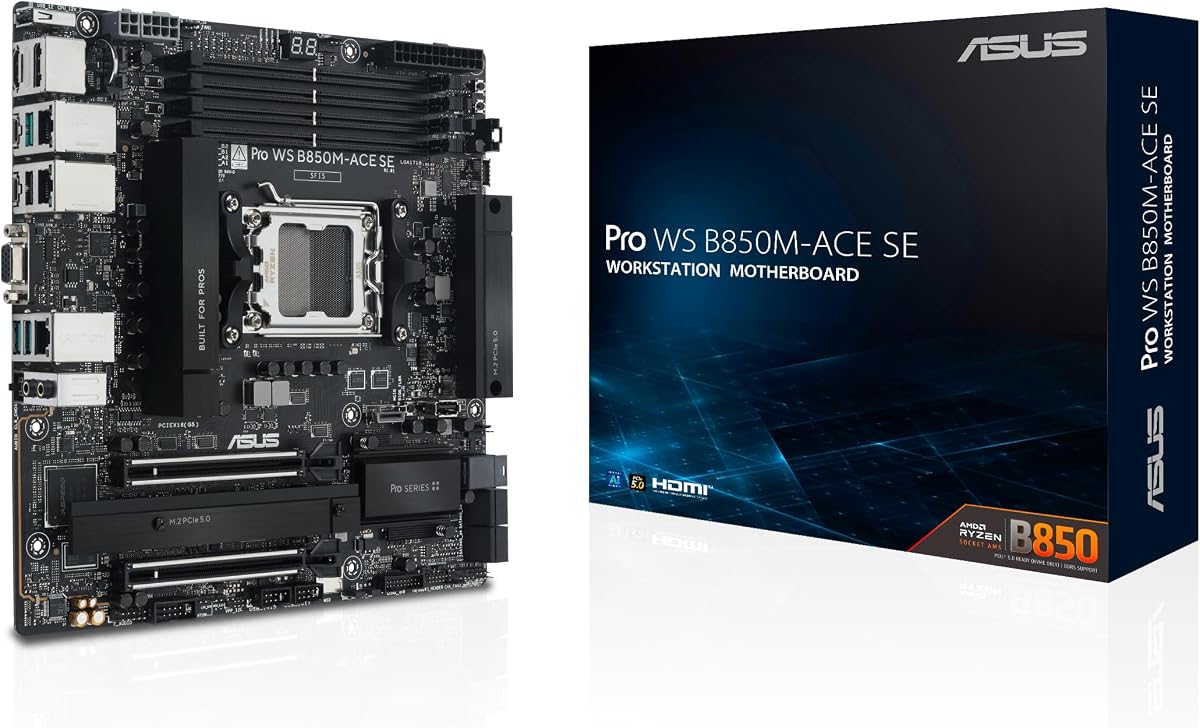
The ASUS Pro WS B850M-ACE SE combines AMD AM5 performance with features normally associated with larger business motherboards. Its 4.3 rating indicates positive but not perfect user sentiment. For buyers who want local workstation speed and enterprise-style oversight, this compact board offers an unusually coherent combination of modern expansion, high-speed networking, and remote management.
We may earn a commission when you buy through this link, at no additional cost to you.
Support extends to Ryzen 9000, 8000, and 7000 series processors and AMD EPYC 4005 series chips. It includes two PCIe 5.0 or 4.0 x16 slots, although one operates at x4, two PCIe 5.0 x4 M.2 connectors, MCIO NVMe support, U.2 connectivity, and a front USB 20Gbps Type-C header. The dual 10Gb and 2.5Gb LAN configuration is excellent for large project transfers, network rendering, and virtualized environments.
Remote administration is a major differentiator. The onboard AST2600 BMC and ASUS Control Center Express provide hardware-level management and real-time monitoring without requiring a separate processor. That makes the board well suited to managed studios, engineering departments, and distributed teams. The trade-off is its MicroATX size, which limits room for several cards and abundant storage compared with full ATX or CEB workstation boards.
This is the best motherboard for CAD workstation builders seeking a balanced, manageable system rather than maximum physical expansion. It works particularly well for compact professional workstations running mainstream CAD, visualization, and compute tasks. Choose it when remote monitoring, AM5 processor options, and fast networking outweigh the need for numerous PCIe slots.
The integrated AST2600 BMC enables remote monitoring and management through dedicated workstation software. This can simplify support for machines located in studios, offices, or other locations where hands-on access is inconvenient.
Two PCIe 5.0 x4 M.2 slots, MCIO, and U.2 support create a flexible storage foundation. Paired 10Gb and 2.5Gb Ethernet ports are particularly valuable for accessing shared libraries, simulations, and large CAD datasets across a studio network.
We may earn a commission when you buy through this link, at no additional cost to you.
The ASUS Pro WS W680-ACE is aimed at professional users who need workstation-class integrity rather than a general-purpose desktop design. Its 4.4 rating shows solid customer reception, and the supplied specifications position it for demanding CAD, simulation, and compute environments. The board supports 13th Gen and 12th Gen Intel Core processors, Pentium Gold, and Celeron processors on LGA 1700.
We may earn a commission when you buy through this link, at no additional cost to you.
ECC memory support is the key attraction for work where data integrity matters. The board also offers dual PCIe 5.0 Safeslots, dual PCIe 3.0 slots, three PCIe 4.0 M.2 connectors, SlimSAS, and dual Intel 2.5Gb Ethernet. A front-panel USB 3.2 Gen2x2 Type-C header and Thunderbolt 4 header support modern peripherals. DrMOS power delivery, alloy chokes, durable capacitors, and extensive VRM and M.2 cooling support sustained operation.
Management features include a BMC header, an included IPMI expansion card, and ASUS Control Center Express controls for USB ports, software blacklisting, and registry settings. These capabilities allow an IT team to monitor and restrict a workstation more effectively than a typical consumer board. As expected at this level, the platform demands a substantial budget and a compatible processor, memory, case, and operating system.
The W680-ACE is best for organizations that need ECC memory and professional management without moving to the Xeon-based or Threadripper extremes of the list. It is a strong choice for engineering workstations handling critical models and simulations. For most users, the extra resilience may not justify the cost; for professional fleets, it offers a meaningful operational advantage.
ECC memory can detect and correct certain memory errors before they undermine long-running simulations or valuable design data. This makes the platform more relevant to engineering organizations than a typical consumer motherboard with the same processor socket.
The bundled IPMI expansion card and ASUS Control Center Express support centralized monitoring plus USB and registry controls. These tools help standardize workstation behavior and reduce the need for repeated physical intervention.
We may earn a commission when you buy through this link, at no additional cost to you.
The ASUS ProArt Z890-CREATOR WIFI is designed for creators who often use CAD alongside rendering, animation, video, and asset creation. Its 4.4 rating indicates a favorable reception, while the expansive connectivity makes it appealing to workstations that serve as both engineering and media systems. It supports Intel Core Ultra Series 2 9, 7, and 5 desktop processors on LGA 1851.
We may earn a commission when you buy through this link, at no additional cost to you.
The board uses 16+2+1+2 teamed power stages, ProCool II connectors, alloy chokes, and durable capacitors. Its most impressive feature set includes dual Thunderbolt 5 and Thunderbolt 4 ports, 10Gb and 2.5Gb Ethernet, Wi-Fi 7, two PCIe 5.0 slots, one PCIe 5.0 M.2 connector, four PCIe 4.0 M.2 connectors, and a front USB 20Gbps header. Five M.2 positions offer unusually broad solid-state storage flexibility for large project libraries.
Creator-oriented software and design are central to the product. ProArt Creator Hub includes color-management features that work with Pantone utilities, while AI Overclocking, AI Cooling II, AI Networking II, AI Advisor, and NPU boost provide platform-specific tools. Installation conveniences include PCIe Slot Q-Release Slim, SafeSlot, M.2 Q-Release, M.2 Q-Slide, M.2 Q-Latch, Q-Antenna, BIOS FlashBack, and Q-Connector.
This motherboard is best for individual designers and creative studios that value fast peripherals, abundant storage, and a refined workstation experience. It lacks the server-grade IPMI features found on several ASUS Pro WS alternatives, so managed enterprise deployments should account for that difference. Otherwise, it offers an excellent balance of performance, networking, and creator-focused functionality.
Thunderbolt 5 and Thunderbolt 4 provide high-bandwidth options for displays, storage, docks, and compatible peripherals. This broad selection is especially useful for creators moving high-resolution assets among a workstation and external devices.
Five M.2 slots allow several NVMe drives to be installed directly, which can separate applications, active projects, caches, and archives. The mix of PCIe 5.0 and PCIe 4.0 positions supports both leading-edge and cost-conscious storage configurations.
We may earn a commission when you buy through this link, at no additional cost to you.
The ASUS ROG Strix B550-F Gaming WiFi II remains a compelling foundation for a value-focused CAD workstation using an established AMD platform. It carries a 4.6 rating, making it one of the stronger-rated products in the group. Compatibility with Ryzen 3000 and 5000 desktop processors, plus supported 5000 and 4000 G-series processors, gives users access to mature and widely available CPUs.
We may earn a commission when you buy through this link, at no additional cost to you.
The platform includes PCIe 4.0 support, dual M.2 slots, USB 3.2 Gen2 Type-C, HDMI 2.1, and DisplayPort 1.2. Intel 2.5Gb Ethernet with ASUS LANGuard handles large transfers and local collaboration data. A 12+2 teamed power design, ProCool connector, alloy chokes, durable capacitors, and BIOS FlashBack add practical resilience and convenience for a working system.
The central limitation is generational. AM4 remains capable for mainstream CAD and many accelerated workloads, but it does not offer the forward path of AM5. DDR4 also means buyers cannot move into newer DDR5 memory ecosystems without replacing the motherboard. The board's gaming-oriented styling and Aura Sync features are harmless in a professional case, though they add little to CAD performance.
Choose this model when an affordable, proven AM4 build can meet the application's requirements and the workstation is expected to remain on its current platform. It is particularly sensible for home offices, students, and small design teams reusing compatible components. New installations with long upgrade horizons are better served by one of the AM5 boards in this guide.
The board can reuse a supported Ryzen processor and existing DDR4 memory, reducing the cost of assembling a capable workstation. This makes it useful for builders who already own compatible parts or want a proven platform without committing to the newest socket.
PCIe 4.0, dual M.2 storage, and 2.5Gb Ethernet provide a balanced foundation for CAD applications and large project libraries. BIOS FlashBack also allows firmware recovery without a fully configured operating system.
We may earn a commission when you buy through this link, at no additional cost to you.
The ASUS Pro WS W890E-SAGE SE is the most expansive and professionally managed board in this roundup. Its 5.0 rating is the highest listed, although that figure should not be interpreted as evidence of independent testing. Designed for Intel Xeon 600 processors on LGA 4710-2, it targets engineering organizations with demanding compute, simulation, and visualization infrastructure.
We may earn a commission when you buy through this link, at no additional cost to you.
Seven PCIe 5.0 x16 slots provide exceptional room for multiple professional graphics cards, accelerator cards, and high-speed I/O. Storage includes four M.2 connectors, MCIO, and two SlimSAS positions. Dual Intel E610-XAT2 10Gb LAN ports support high-bandwidth studio networking. NitroPath DRAM technology is paired with ECC R-DIMM DDR5 support, while 16+(2+2)+1+2 power stages and multiple CPU and PCIe connectors support robust power delivery.
Remote administration is separated through a dedicated LAN link to the AST2600 BMC controller, with ASUS Control Center Express providing monitoring and management. Active cooling is applied to the VRM, chipset, M.2, and memory areas. Dual-PSU operation is another attraction for organizations designing redundancy into critical workstations. The board is validated for broad compatibility and 24/7 operation.
This motherboard is the best motherboard for CAD workstation projects involving multiple accelerators, very large datasets, enterprise networks, or managed deployments. Its EEB form factor and extensive cooling also demand careful chassis and airflow planning. For ordinary single-GPU design work, the capability is excessive, but for specialized infrastructure it can eliminate the compromises imposed by smaller platforms.
Seven PCIe 5.0 x16 slots make it possible to combine professional graphics, GPU acceleration, high-speed network cards, and storage controllers in one system. This is valuable for simulation, rendering farms, and engineering workflows that exceed a single-card architecture.
A dedicated BMC connection provides direct remote administration separate from the primary network interfaces. Multiple power connectors and dual-PSU support further align with the board's emphasis on continuous operation and infrastructure-class reliability.
We may earn a commission when you buy through this link, at no additional cost to you.
The ASUS Pro WS TRX50-SAGE WiFi A is a highly specialized AMD workstation platform for users who need extreme processing and graphics capacity. Its 4.0 rating is the lowest numerical score among the reviewed products, but that does not make it unsuitable for its intended market. The sTR5 socket supports high-core-count Ryzen Threadripper PRO and Ryzen Threadripper processor families.
We may earn a commission when you buy through this link, at no additional cost to you.
The board can accommodate up to 1TB of ECC R-DIMM DDR5 memory in a single-DPC configuration, an important advantage for large models, simulation datasets, and memory-intensive visualization. Three PCIe 5.0 x16 and one PCIe 4.0 x16 slot provide multiple graphics paths. Four M.2 positions, SlimSAS, two USB4 ports, and 10Gb plus 2.5Gb networking complete a high-bandwidth platform.
A 20-stage power design, two eight-pin CPU connectors, large VRM cooling, chipset and M.2 heatsinks, and an M.2 thermal pad support sustained high-power processors. ASUS Control Center Express and IPMI expansion-card support add remote management. The CEB form factor also means the case must accommodate a substantially larger board than standard ATX or MicroATX, and the overall platform cost is exceptionally high.
Choose this board for large engineering teams that need multi-GPU rendering, CPU-heavy simulation, or high-capacity ECC memory on AMD hardware. It is not a sensible default for AutoCAD, Revit, or similar applications running on a single professional graphics card. The additional capability justifies the platform only when the software can use multiple accelerators or when memory density is a primary constraint.
Threadripper support opens the door to processors with many cores for parallel simulation and rendering. Up to 1TB of ECC R-DIMM support removes the memory ceiling that can constrain large assemblies and professional data sets.
Multiple full-length PCIe slots and explicit multi-GPU support make this platform suitable for rendering, compute, and visualization systems that distribute work across professional accelerators. Matching graphics cards and supported software workflows remain essential for a successful configuration.
We may earn a commission when you buy through this link, at no additional cost to you.
The MSI B850 GAMING PLUS WIFI Bundle is a convenient starting point for a new AM5 workstation because it includes both the motherboard and a 16GB DDR5 memory module. Its 4.6 rating places it among the better-rated options, although the bundle is more approachable than the specialist ASUS Pro WS boards. Ryzen 9000 through 7000 processors are supported.
We may earn a commission when you buy through this link, at no additional cost to you.
The included TEAMGROUP T-Force Delta DDR5 module runs at 6000 MHz with CL38 timings when its profile is enabled in BIOS through AMD EXPO. One open memory slot remains available for an additional module, although buyers should verify supported dual-module configurations and memory organization. The board offers PCIe 5.0 x16 and PCIe 4.0 x16 expansion, M.2 Gen5 storage, Wi-Fi 7, and 5Gb LAN.
This bundle is particularly useful for a straightforward initial build. It reduces the need to purchase memory separately, and enabling the advertised speed is presented as a straightforward BIOS operation. The limitation is capacity: 16GB is modest for large CAD assemblies, rendering, simulation, or heavy multitasking, so most users will need to add memory before serious production work.
This motherboard is best for builders creating an affordable AM5 workstation or learning to assemble a system. It is a sensible option when a ready-to-boot bundle has more value than enterprise management or a workstation-qualified power design. For professional fleets or memory-heavy applications, spend the additional budget on higher-capacity ECC memory or a board explicitly designed for sustained workstation workloads.
Including a DDR5 module gives first-time builders a compatible memory option in the same package. The open slot supports an upgrade, but the ideal approach is to verify the board's qualified memory list before mixing modules.
The primary PCIe 5.0 x16 slot supports current high-bandwidth graphics hardware, while a PCIe 4.0 x16 slot adds expansion flexibility. Wi-Fi 7 and 5Gb Ethernet provide modern wired and wireless networking for a flexible office environment.
We may earn a commission when you buy through this link, at no additional cost to you.
The ASUS Pro WS W890-SAGE is a large Intel Xeon workstation platform distinguished by extensive expansion and two-DPC ECC memory support. It has no available numerical rating in the supplied data, so the absence of customer feedback should be considered when assessing market confidence. It supports Intel Xeon 600 workstation processors on LGA 4710-2.
We may earn a commission when you buy through this link, at no additional cost to you.
Seven PCIe 5.0 x16 slots permit extensive use of professional graphics and accelerator hardware. Four M.2 connectors, two SlimSAS positions, USB4, and USB 20Gbps Type-C provide broad storage and peripheral options. Realtek 10Gb LAN and Intel 2.5Gb LAN allow a workstation to remain connected over both high-speed and standard network infrastructure.
NitroPath DRAM technology is designed to improve ECC R-DIMM performance in a two-DPC configuration. The board also supports IPMI expansion cards and ASUS Control Center Express, though management requires the appropriate expansion hardware rather than a dedicated onboard BMC link. A 12+(2+2)+1+2 power design, multiple CPU and PCIe connectors, and active cooling for the VRM, chipset, and M.2 support sustained operation.
This is the best motherboard for CAD workstation builders who prefer the Intel ecosystem and need more memory flexibility than a single-DPC platform. Its seven graphics slots, SlimSAS storage, and enterprise networking make it suitable for complex engineering and visualization systems. The main drawbacks are its physical size, high platform cost, and the extra planning required for Xeon, ECC memory, case, and cooling compatibility.
Two-DPC support gives the system more ways to organize ECC R-DIMM memory than a single-DPC board. This can be useful where memory capacity, bandwidth, or a specific validated configuration is important.
Seven PCIe 5.0 x16 slots, four M.2 connectors, and two SlimSAS headers provide a flexible foundation for specialized workstations. The large CEB board demands careful attention to chassis dimensions, airflow, and power distribution.
We may earn a commission when you buy through this link, at no additional cost to you.
The ASUS Pro WS TRX50-SAGE WIFI is a high-capacity AMD workstation board for Threadripper PRO 7000 WX and Ryzen Threadripper 7000 users. Its 3.6 rating is the lowest among the ten products and warrants careful evaluation. It remains a technically capable option for large simulations and multi-GPU systems because its supporting features include up to 1TB of ECC R-DIMM memory and three PCIe 5.0 x16 slots.
We may earn a commission when you buy through this link, at no additional cost to you.
A 36-stage power design with two eight-pin CPU connectors, substantial VRM cooling, chipset and M.2 heatsinks, and an M.2 thermal pad support high-power processors. Storage includes three M.2 slots and SlimSAS NVMe support. Wi-Fi 7, 10Gb and 2.5Gb Ethernet, front and rear USB 20Gbps Type-C, and multi-GPU support cover modern connectivity requirements.
IPMI expansion-card support and ASUS Control Center Express add professional management options. Broad compatibility testing and a large power design make this a credible platform for render farms and engineering compute. The main drawback is that sTR5 has moved toward newer Threadripper generations, so this particular board may offer less long-term platform longevity than the newer TRX50-SAGE WiFi A model.
Buy this motherboard when Threadripper PRO capability and large ECC memory are priorities but the newest platform is not essential. It can be a more attainable route into high-core-count workstation computing than the newest alternatives, although the complete cost still includes a costly processor, memory, cooling, and CEB-capable case. Confirm software support and accelerator compatibility before finalizing a multi-GPU build.
Support for up to 1TB of ECC R-DIMM DDR5 provides substantial headroom for large assemblies, simulation data, and professional workloads. That capacity is most valuable when software can exploit many CPU cores and a substantial working set.
The 36-stage design and extensive cooling provide a strong foundation for sustained Threadripper power. Dual high-speed Ethernet ports, Wi-Fi 7, multi-GPU support, and IPMI expansion options cover advanced workstation networking and management needs.
We may earn a commission when you buy through this link, at no additional cost to you.
The right workstation motherboard must balance CPU support, graphics expansion, memory capacity, storage, networking, management, and mechanical fit. Start with the software and hardware workload rather than treating socket generation as the only decision point.
Begin with the CPU your CAD software supports and the features your models require. Mainstream Intel and AMD desktop platforms can handle many common design tasks, while Threadripper and Xeon boards become relevant when rendering, simulation, large datasets, or many compute threads dominate the workload. Also verify the board supports the exact processor family, BIOS revision, memory type, and any chipset-specific functions required by your software.
Choose a processor platform with compatible professional software support and enough performance headroom for the most complex projects.
CAD workstations often need a certified professional graphics card, and some workflows benefit from additional GPUs or accelerators. Check the number and physical width of PCIe slots, their electrical lane configuration, and whether the board can physically support the cards, coolers, power cables, and displays you need. A second x16-length slot that operates only at x4 may be acceptable for a capture card but not for a second bandwidth-heavy accelerator.
Match physical slot count, lane speed, and power delivery to the number and type of graphics or compute cards in the final system.
Memory requirements depend on model complexity, rendering resolution, simulation datasets, and whether multiple applications remain open simultaneously. DDR5 platforms provide a newer ecosystem, while DDR4 can reduce upgrade costs. ECC RDIMM and ECC memory offer error detection or correction for professional systems, particularly when uptime and data integrity are priorities. Confirm supported module organization, capacity per channel, DIMM count, and validated memory configurations.
Choose the memory type and capacity based on workload, and treat ECC support as a professional reliability feature rather than a substitute for a fully validated platform.
Fast M.2 storage keeps active projects responsive, but large CAD studios may need additional drives, shared storage, or RAID. PCIe 5.0 M.2 slots provide leading-edge bandwidth, while PCIe 4.0 drives can offer a more balanced cost-to-capacity balance. Boards with U.2, MCIO, or SlimSAS give more options for dense enterprise storage and cable-routed server drives, although each requires matching enclosure and controller support.
Plan storage around active project size, archival needs, drive-sharing methods, and the number of internal connectors available in the chosen case.
Large assemblies, simulation datasets, and shared libraries can saturate ordinary office networks. A 2.5Gb connection is a useful baseline, while 5Gb, 10Gb, dual network ports, and Wi-Fi 6E or 7 improve flexibility. Workstations deployed in studios or server rooms may also need IPMI, a dedicated BMC connection, remote power control, sensor monitoring, and operating-system restrictions for efficient IT support.
Select faster networking for local collaboration and IPMI-style management for systems that must be maintained remotely.
High-core-count CPUs and multiple accelerators can create demanding sustained power loads. Look for robust power stages, reputable components, multiple CPU power connectors, and VRM heatsinks large enough for the selected processor. M.2 and chipset cooling matter as much as CPU cooling in data-heavy workstations. Check thermal design, fan headers, case airflow, and the physical clearance around large graphics cards before finalizing the platform.
Size power delivery and cooling for the processor and accelerator combination rather than relying on a generic wattage estimate.
ATX offers a broad case ecosystem, MicroATX can produce a compact workstation, and CEB or EEB boards provide the space required by dense enterprise designs. Verify not only the board dimensions but also slot spacing, rear-panel clearance, SATA orientation, connector positions, and the case's support for large coolers and multi-slot graphics cards. Large boards may require proprietary cases or coordinated power and cooling layouts.
Confirm mechanical and airflow compatibility before buying a large professional board, since connector placement can matter as much as nominal dimensions.
CAD engineers may also use high-resolution displays, calibrated color, tablets, scanners, external storage, capture devices, or Thunderbolt peripherals. Thunderbolt 5 and 4, USB4, front USB Type-C, multiple display outputs, and fast wireless connectivity can simplify a mixed design workflow. The ASUS ProArt Z890-CREATOR WIFI is particularly relevant for users whose CAD work overlaps with rendering, video, photography, or color-sensitive creation.
Choose ports that match your displays and peripherals instead of paying for unused high-speed connectivity.
Before assembly, compare the processor socket, memory type, case form factor, power connectors, and graphics-card dimensions with the motherboard specifications. Install the CPU and memory according to the board manual, update the BIOS when appropriate, and save the board's qualified memory and processor lists for reference. If the system uses ECC, NitroPath, or a multi-DIMM configuration, verify the intended module organization before populating all slots.
After the first boot, update the firmware and chipset drivers from the board or processor vendor, then install the approved graphics driver for the professional CAD card. Configure the network speed manually if required, check that all storage devices appear correctly, and validate the full memory capacity in the operating system. Enable appropriate remote-management settings only after securing the BMC or expansion interface with strong credentials.
Maintain the workstation by keeping dust away from heatsinks, checking fan operation, and ensuring intake and exhaust paths remain unobstructed. Periodically review storage health, firmware notices, and memory or temperature logs. Back up active design files, and do not use remote power or management functions during a critical save until the setup has been tested and secured.
For basic AutoCAD, Revit, or similar work, a well-chosen mainstream motherboard can be sufficient when paired with an appropriate professional graphics card. A workstation motherboard becomes more useful when the system needs ECC memory, server-grade management, validated 24/7 operation, specialized I/O, or support for multiple accelerators. The software's processor, graphics, and networking requirements should guide the decision.
ECC memory is most valuable in systems where long operating hours and critical project data make memory errors costly. It can detect and correct certain errors that ordinary memory may pass silently. It is not mandatory for every CAD user, but it is a meaningful reliability feature for simulation, engineering fleets, and workstations that operate continuously.
Most CAD projects need only one professional graphics card, although additional cards may be required for rendering, GPU compute, video capture, or specialized accelerators. A single full-length graphics card leaves room for a capture card or high-speed NIC on most ATX boards. Multi-GPU simulation and rendering systems should count both physical slots and the electrical x16 or x4 lane configuration of each slot.
Both platforms can support CAD applications, and the better choice depends on processor performance, memory, graphics support, software validation, and budget. AM5 provides a broad range of modern Ryzen processors and DDR5 support, while Intel offers several desktop and workstation alternatives across different generations. Confirm accelerator certification and application compatibility before choosing the platform.
Wi-Fi 7 can be convenient for general connectivity, portable devices, and areas where wired access is inconvenient. For large model libraries, sustained transfers, virtualized workloads, and shared project storage, wired 2.5Gb, 5Gb, or 10Gb Ethernet is usually preferable. The boards with both high-speed wired and wireless networking offer the greatest flexibility.
IPMI provides dedicated hardware-level monitoring and remote management, often including sensor readings, power controls, and operating-system access. This can reduce service time for computers located in studios, remote offices, or inaccessible areas. It is particularly useful for managed enterprise fleets, while a personal workstation may not need the associated complexity or cost.
No, unless the system requires its additional PCIe slots, memory capacity, power connectors, or enterprise I/O. Standard ATX and MicroATX boards can serve many CAD workloads with a single professional graphics card. CEB and EEB designs become relevant for multiple accelerators, server-class memory, extensive storage, and highly managed engineering systems.
PCIe 5.0 storage offers the highest bandwidth and can improve load times for very large active projects, caches, and scratch files. Everyday CAD performance is also affected by the CPU, graphics card, storage responsiveness, and system memory, so a fast PCIe 4.0 drive may still provide a balanced result. Use the available M.2, U.2, MCIO, or SlimSAS connectors according to your storage plan.
The MSI PRO B760-P WiFi DDR4 stands out as the value-oriented choice for a mainstream Intel workstation, while the ASUS Pro WS B850M-ACE SE provides the most balanced package of AM5 performance, compactness, fast networking, and remote management. For expansive enterprise-class engineering, the ASUS Pro WS W890E-SAGE SE offers unmatched PCIe expansion and dedicated BMC management.
Prioritize the processor and memory platform first, then ensure the board has the graphics slots, storage connectors, networking, and remote-management features your workload actually requires. Mainstream CAD users should resist overspending on unnecessary enterprise capabilities, while rendering farms, simulation laboratories, and managed fleets may find those features essential to long-term reliability.
Finally, check the current product listing, CPU support list, memory qualification information, case compatibility, and accessory requirements before ordering. Motherboard inventories and pricing change, and a workstation platform is a major purchase. Aligning the board with the complete system plan helps prevent expensive incompatibilities later.

