
Cooler Master Q300L V1
4.5Editor score
Supports Micro-ATX motherboards
Accommodates 360mm graphics cards
Accepts 240mm liquid coolers
Explore the best Matx Case options, comparing airflow, dimensions, cooling support, front I/O, aesthetics, GPU clearance, and build flexibility.
A Micro-ATX case offers a practical balance between footprint, component compatibility, and cooling flexibility, making it one of the most versatile choices for modern PC builds. The right enclosure should accommodate your motherboard and graphics card while giving cables, fans, radiators, and everyday peripherals adequate room.
We compared these Matx Case options using their stated motherboard support, enclosure dimensions, GPU and CPU cooler clearances, included fans, radiator compatibility, airflow design, front I/O, cable management, and visual construction. The list covers compact models, airflow-focused designs, panoramic glass cases, and wood-accented enclosures for different build priorities.
Each review highlights the product's strongest capabilities and practical trade-offs, helping you identify whether it suits a small gaming system, a quiet air-cooled build, a compact workstation, or a showpiece desktop. Product availability and prices can change, so confirm current specifications and compare current offers before purchasing.
4.5Editor score

4.8Editor score

4.8Editor score
The table below compares all ten Matx Case candidates by size, cooling capability, hardware clearance, and practical features, making it easier to narrow the field before a full build.


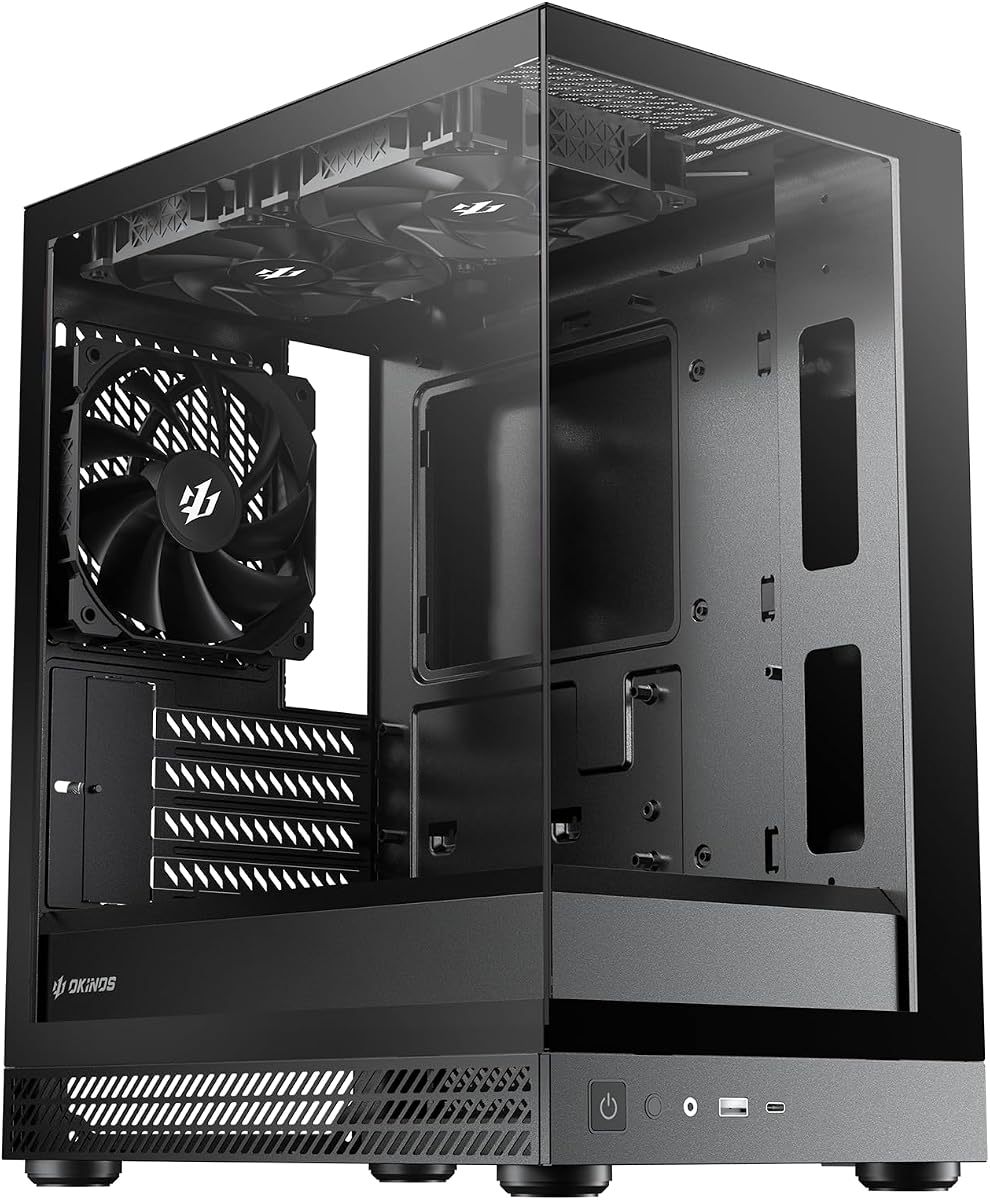


The Cooler Master Q300L V1 is a practical Micro-ATX enclosure with a 4.5 rating and a useful balance of airflow, component clearance, and visual appeal. Its open, perforated design supports a cooling-focused build, while the transparent side panel lets internal components remain visible. The enclosure is especially appealing for builders who want useful hardware support without a highly elaborate exterior treatment.
We may earn a commission when you buy through this link, at no additional cost to you.
Its greatest strength is the room available inside. The case supports Micro-ATX and Mini-ITX motherboards, graphics cards up to 360mm, CPU coolers up to 159mm, and power supplies up to 160mm. Cooling is flexible, with support for a 240mm liquid cooler and up to five fans. The modular I/O panel can be positioned at the front, top, or bottom on either side, making it easier to adapt the case to different desk arrangements and cable routes.
Thermal performance is supported by perforated panels on all sides and magnetic dust filters that add both maintenance convenience and visual character. The main compromises are that this is a Micro-ATX design rather than a universal enclosure, and its appearance is more functional than the sculpted wood or panoramic-glass designs found elsewhere in this list. The positioning of the I/O panel can also require some planning before the motherboard is installed.
This is a strong recommendation for a budget-conscious builder assembling a gaming or general-purpose PC with a moderately powerful graphics card. It is especially useful when you value component clearance, fan options, and a transparent display panel over a very small footprint. Confirm the dimensions of your power supply, graphics card, and CPU cooler, then choose it if the open layout and flexible I/O placement suit your preferred build style.
Perforated side, front, top, and rear sections promote a more open thermal path than a largely sealed display case. The enclosure can also accommodate five fans and a 240mm liquid cooler, giving builders several sensible cooling configurations.
Moving the I/O panel to different positions can make USB access more convenient in a tower, desktop, or mounted arrangement. This flexibility is a meaningful advantage for builds where orientation may change after installation.
We may earn a commission when you buy through this link, at no additional cost to you.
The Lian Li A3-mATX combines a 26.3-liter footprint with unusually generous hardware support and earns a 4.8 rating. It accepts Micro-ATX and Mini-ITX motherboards, graphics cards up to 415mm, a 360mm radiator, and as many as ten 120mm fans. That combination makes it one of the most versatile compact cases in the roundup.
We may earn a commission when you buy through this link, at no additional cost to you.
The case is designed around steel mesh side and top panels, allowing air to move freely through the enclosure. It supports a 360mm radiator and numerous 120mm fans, while a four-slot expansion layout keeps the hardware arrangement straightforward. Its power supply section is equally adaptable, accepting ATX, SFX, SFX-L, and LIAN LI EDGE power supplies, with front or side orientation options that can improve clearance and simplify cable management.
The walnut-style front panel gives the A3-mATX a more refined appearance than a conventional steel utility box. The tradeoff is that the decorative wood treatment will not appeal equally to everyone, particularly builders who prefer a fully black or industrial enclosure. Its four expansion slots are also more restrictive than layouts offering additional slots, although they are sufficient for many Micro-ATX gaming builds.
Choose this enclosure if you want a compact case without giving up long graphics cards or large radiators. It is a particularly compelling option for a powerful small-form-factor gaming system, though prospective buyers should verify the external dimensions against the available desk or cabinet space. For broad hardware compatibility, efficient cooling, and distinctive styling, it is an excellent overall recommendation.
Supporting a 415mm graphics card inside a 26.3-liter chassis is the A3-mATX's standout feature. It gives builders more freedom when selecting modern GPUs without moving to a much larger full-tower enclosure.
Support for a 360mm radiator, numerous 120mm fans, and several PSU formats makes the case adaptable to different cooling and power-supply strategies. Front or side PSU positioning can also help builders make better use of limited internal volume.
We may earn a commission when you buy through this link, at no additional cost to you.
The Okinos Cypress 3 Wood is a Micro-ATX case designed for builders who want natural wood accents, a tempered-glass side panel, and a substantial set of preinstalled fans. Its 4.6 rating reflects a distinctive package that can make an ordinary compact build feel more intentionally designed.
We may earn a commission when you buy through this link, at no additional cost to you.
Four 120mm three-pin non-PWM, non-ARGB fans are already installed, and a one-to-three fan splitter is included for cable management. CPU air coolers may measure up to 164mm. Graphics card clearance depends on fan placement, extending to 320mm when the front-positioned fan is moved and 285mm when a fan remains at the rear of the front panel. This distinction should be checked carefully against the dimensions of the intended GPU.
Airflow is supported by three-sided mesh intake, 1.7mm mesh on the front, and 2mm mesh on the lower-left side. The front I/O includes a USB Type-C 3.2 Gen 2 port rated at 10Gbps, two USB 3.0 ports, audio jacks, a power switch, and a reset button. The main limitation is that the supplied fans use a basic three-pin non-PWM connection, so buyers seeking addressable lighting or finer speed control will need to account for different hardware or controller requirements.
The Cypress 3 Wood is well suited to a decorative home-office or entertainment system where appearance and preinstalled airflow hardware matter. It may be less attractive for a gaming build centered on ARGB lighting because the included fans do not provide it. As long as the GPU fits its conditional clearance and the builder accepts non-ARGB fans, it is a distinctive and practical choice.
Preinstalling four 120mm fans means a new builder can establish airflow without sourcing the entire fan set separately. The included splitter also reduces the need for extra fan-heading connections.
Walnut decoration on both sides of the front panel gives the enclosure a warmer look than most mesh-and-glass alternatives. It is particularly effective in a living room, studio, or office where the computer remains visible.
We may earn a commission when you buy through this link, at no additional cost to you.
The Okinos Aqua 3 is built for visual builds, combining fully glass-covered front and side panels with a 270-degree viewing angle. It carries a 4.7 rating and includes three 120mm three-pin ARGB fans arranged for vertical airflow, with two mounted at the top and one at the rear.
We may earn a commission when you buy through this link, at no additional cost to you.
Its dimensions are listed as 350mm deep, 210mm wide, and 392mm high, and it supports Micro-ATX and Mini-ITX motherboards. The interior accommodates graphics cards up to 320mm and CPU coolers up to 164mm. A built-in four-port ARGB controller provides a convenient way to manage the included lighting, while the front I/O panel includes two USB 3.0 ports, audio connections, controls, and a USB Type-C 3.2 Gen 2 port rated at 10Gbps.
The 1.2mm steel mesh is finer than the 3.0mm mesh used in many cases and supports both airflow and dust resistance. Magnetic filters at the top and bottom simplify periodic cleaning, and a rivet-mounted quick-release design allows the front glass to be removed without screws. The trade-off is that a large glass display is more vulnerable to fingerprints and requires more care during installation, while the three-pin ARGB fans may offer less control than PWM-capable alternatives.
The Aqua 3 is best for a showcase build where visible components, coordinated lighting, and an accessible front panel matter. It is a sensible choice for a Micro-ATX gaming system using a graphics card within the stated 320mm limit. Builders who prioritize serviceability should take advantage of the tool-free front-panel release, and anyone installing tempered glass should retain protective films until the build is complete.
Glass front and side panels reveal more of the motherboard, graphics card, and cooling hardware than a conventional solid-sided case. Diamond-cut viewing angles further emphasize the internal presentation.
The integrated four-port ARGB controller lets the included lighting effects be managed without buying a separate controller. The result is a cleaner initial build and fewer devices occupying internal headers or power connections.
We may earn a commission when you buy through this link, at no additional cost to you.
The Zalman CUBIX is a 17.1-liter Micro-ATX and Mini-ITX case built for users who prioritize a small footprint over expansive hardware support. It earns a 4.5 rating and uses sturdy 0.8mm steel construction, giving the compact shell a more substantial feel than lightweight decorative alternatives.
We may earn a commission when you buy through this link, at no additional cost to you.
The case supports standard ATX power supplies, graphics cards up to 260mm, and CPU air coolers up to 137mm. A perforated front panel and preinstalled 80mm fan promote basic airflow, while the front I/O provides one USB 3.0 port, one USB 2.0 port, and a 3.5mm stereo audio connection. This is a straightforward feature set aimed at functional builds rather than elaborate presentation systems.
The 137mm CPU cooler limit is the most important constraint for builders because many popular tower coolers exceed that height. The 260mm GPU allowance is also narrower than the 320mm to 415mm ranges offered by several competitors. Although the compact 17.1-liter body is attractive, it leaves less room for a large power supply, long graphics card, extensive cable management, and extra cooling hardware simultaneously.
The CUBIX is a good match for a compact office, classroom, or media PC using a low-profile CPU cooler and a moderately sized graphics card. It is less suitable as the home for a high-end gaming system with a large GPU unless the builder is willing to change components. Buyers should measure both the case and the selected cooler, then confirm that their PSU and accelerator fit within the available clearances.
At 17.1 liters, the CUBIX can reclaim significant desk or cabinet space compared with conventional mid-tower cases. It is useful for compact installations where every dimension matters.
A perforated front intake and included 80mm fan provide a straightforward cooling foundation. The design is best suited to efficient components and restrained power targets rather than a heavily loaded enthusiast configuration.
We may earn a commission when you buy through this link, at no additional cost to you.
The TGDGAMER MATX Micro ATX Case is a slim, entry-oriented enclosure with a 4.0 rating. It supports Micro-ATX and Mini-ITX motherboards and includes an 80mm fan, offering a basic platform for a compact desktop that does not require extensive cooling or extensive connectivity.
We may earn a commission when you buy through this link, at no additional cost to you.
The interior can fit up to two 120mm fans and one 80mm fan, along with radiators up to 135mm in height. It also accepts a normal-size ATX power supply, and the front I/O includes one USB 3.0 port and one USB 2.0 port. These specifications provide a workable foundation for basic office, home, or light gaming builds.
Graphics card clearance is the main limitation. A card up to 250mm fits when no chassis fan occupies the front position, but that maximum falls to 225mm with a front fan installed. The case also lacks the more refined I/O selection, fan controls, and dust-filter features found in higher-rated options. As a result, the exact layout of the selected GPU and cooling hardware needs to be checked before ordering.
The TGDGAMER is most appropriate for a straightforward, compact build with modest components and a limited feature checklist. It can be a practical choice when the primary goals are a small enclosure, standard motherboard support, and a simple cooling arrangement. For a powerful gaming PC, however, the reduced GPU clearance may outweigh the case's appeal, so the buyer should compare it carefully with roomier alternatives.
Support for two 120mm fans, one 80mm fan, and radiators up to 135mm high provides more options than the smallest cases. The included 80mm fan gives a basic airflow foundation from the start.
Adding a fan to the front reduces the maximum supported graphics card length. Checking the intended cooler position in advance can prevent a larger-than-expected card from blocking the intake.
We may earn a commission when you buy through this link, at no additional cost to you.
The Okinos Aqua UNO is a focused air-cooled Micro-ATX case with a 4.7 rating. Rather than attempting to support every cooling style, it clearly prioritizes compatible CPU air coolers, preinstalled airflow, quick-release glass panels, and straightforward maintenance.
We may earn a commission when you buy through this link, at no additional cost to you.
Three 120mm non-PWM fans are included, while CPU air coolers can be up to 165mm high. Graphics cards up to 309mm are supported. The front I/O includes a USB Type-C port rated at 5Gbps, one USB 3.0 port, and an LED control button. The lack of radiator support is the defining restriction, so this model is intended for builders who prefer a simple air-cooled configuration.
Dust filters are removable from the top, side, and bottom, helping reduce debris accumulation. The tool-free stud-mount system allows the panoramic tempered-glass front and side panels to be removed without screws, which reduces the risk of accidental panel damage during routine work. Cable management is another strength, with 32mm of front clearance, 24mm at the rear, dedicated paths for major cables, and included Velcro straps.
The Aqua UNO is a good recommendation for a compact gaming or productivity system built around a conventional tower CPU cooler and no liquid cooling. It also suits builders who value panel access and cable organization. Prospective buyers should confirm that they do not want a radiator, then measure the CPU cooler and graphics card before installation to ensure the stated clearances work with their specific components.
By concentrating on air-cooled hardware, the case avoids a compromise-driven radiator layout. Support for a 165mm CPU cooler provides room for many common tower designs while keeping the build straightforward.
Tool-free tempered-glass panels can be removed with less risk than screw-fastened glass. Removable filters across three positions make periodic cleaning more convenient and help preserve airflow.
We may earn a commission when you buy through this link, at no additional cost to you.
The LIAN LI Vector V100 MINI is a premium panoramic Micro-ATX enclosure rated 4.8. It combines a 270-degree tempered-glass presentation, abundant cooling hardware, and generous component support, making it especially attractive for a high-end compact gaming build.
We may earn a commission when you buy through this link, at no additional cost to you.
This model includes four 120mm ARGB PWM side intake fans and one 120mm rear exhaust fan, for five fans in total. It supports up to nine fans and can accept a 360mm or 240mm top-mounted radiator. Graphics cards up to 415mm, CPU coolers up to 163.5mm, and ATX power supplies up to 200mm are supported. An adjustable horizontal GPU anti-sag bracket is included for managing a long or heavy graphics card.
The case measures 436 by 221.5 by 443.9mm, and the word MINI refers to its compact Micro-ATX platform rather than an ultra-small SFF format. Full-size ATX motherboards are not supported, so the label should not be mistaken for universal compatibility. Although the fan and lighting bundle is extensive, radiator options and other add-on components referenced in the product information are not necessarily included.
The V100 MINI is an excellent choice for a builder who wants a visually dramatic system with premium cooling hardware already supplied. Its long GPU allowance and anti-sag support are particularly useful for modern gaming hardware, while the top radiator position expands the possibilities for liquid cooling. Verify the room available for this relatively tall chassis and confirm motherboard format before purchasing, but for a premium Micro-ATX showcase build, the feature set is exceptionally strong.
Five ARGB PWM fans provide a substantial airflow foundation and synchronized illumination without requiring the buyer to assemble the complete fan set. PWM control also allows more nuanced fan-speed management than basic three-pin models.
A 415mm graphics card limit gives builders access to large modern accelerators. The included horizontal anti-sag bracket adds physical support and can help reduce stress on the card's connector.
We may earn a commission when you buy through this link, at no additional cost to you.
The Okinos Mirage 4 is a well-rounded Micro-ATX case with a 4.8 rating, offering a rare five-slot PCIe layout, 240mm top-radiator support, and generous cable-management space. It is a strong option for builders who want practical internal room without moving to a full-size ATX tower.
We may earn a commission when you buy through this link, at no additional cost to you.
The case supports up to five fans and uses a bottom-to-top airflow arrangement. It comes with two 120mm H12R ARGB three-pin fans at the bottom and one 120mm H12 ARGB three-pin fan at the rear, along with a four-port controller and a one-to-three three-pin splitter. The 1.2mm mesh on the right panel promotes airflow, while the top and bottom magnetic dust filters simplify maintenance.
Cable management is unusually generous, with 95mm of space on the right and 45mm on the left, plus a cable grommet for a tidy finish. The five PCIe slots improve GPU compatibility and cooling space, while support for a 160mm power supply adds flexibility. The main limitation is that top radiator support tops out at 240mm, and the included ARGB fans use three-pin non-PWM connections rather than PWM-capable four-pin versions.
The Mirage 4 is well matched to a Micro-ATX gaming PC with a relatively long graphics card, multiple storage devices, or numerous power and data cables. It is also a good fit when a cleaner interior matters because the side routing space can keep cables behind the motherboard tray. It is less suitable for a build requiring a 360mm top radiator, but for many single-radiator systems it offers an excellent balance of features.
The uncommon five-slot layout creates additional room for a long graphics card and can improve spacing around expansion cards. It also provides useful flexibility for compact multi-component systems.
Deep routing areas on both sides of the motherboard tray help keep bulky cables away from airflow paths and internal components. A grommet further tidies the visible side of the build.
We may earn a commission when you buy through this link, at no additional cost to you.
The Lian Li B4-mATX combines a compact 21.3-liter footprint with a real wood finish and flexible installation options. Its 4.5 rating reflects an attractive design aimed at builders who want a small system that can sit horizontally on a desk or vertically in a narrow cabinet.
We may earn a commission when you buy through this link, at no additional cost to you.
The enclosure supports Micro-ATX motherboards, graphics cards up to 358mm, and CPU coolers up to 165mm. Two slim 120mm non-RGB fans are preinstalled for immediate airflow, while the case can also be configured for a 360mm AIO. The precise cooling possibilities depend partly on the chosen power supply, so the power-supply dimensions and orientation need to be considered before planning radiator placement.
The biggest advantage is its ability to work in two orientations. Horizontal placement can integrate neatly with a desktop arrangement, while vertical installation can save shelf or cabinet depth. The wood finish, offered in black walnut or white beech styles according to the product information, gives the enclosure a more natural appearance than a standard all-metal or all-plastic chassis. The included fans are slim and non-RGB, so lighting-focused builders may need a different approach.
The B4-mATX is a strong fit for a compact workstation, elegant home PC, or space-conscious entertainment system. It is particularly appealing if you want wood styling without giving up long graphics card support or flexible AIO cooling. Confirm the case's external dimensions, select a power supply that leaves adequate room, and verify the radiator and fan arrangement against the manufacturer's placement guidance before purchasing.
Horizontal placement can create a clean desktop presentation, while vertical orientation helps conserve shelf or cabinet space. This flexibility makes the enclosure useful across different room layouts.
Two slim 120mm fans provide immediate airflow in a space-efficient package. Additional cooling and 360mm AIO possibilities are available, although the final configuration depends on the installed power supply and required clearances.
We may earn a commission when you buy through this link, at no additional cost to you.
Choosing a Matx Case means balancing motherboard format, available space, cooling method, graphics card length, power-supply size, cable routing, and the amount of visual detail you want. Start with the hardware you already own or have selected, then choose the enclosure that accommodates it without creating a cramped or poorly ventilated build.
A Micro-ATX case is designed around the smaller motherboard format, usually identified as mATX. Most models in this guide also accept Mini-ITX boards, while the LIAN LI Vector V100 MINI additionally lists support for back-connect mATX motherboards. The Lian Li A3-mATX, Okinos Cypress 3 Wood, Okinos Aqua 3, Okinos Aqua UNO, and Lian Li B4-mATX list Micro-ATX and Mini-ITX compatibility. The Cooler Master Q300L V1 and TGDGAMER model support Micro-ATX and Mini-ITX, while the Zalman CUBIX also supports Mini-ITX. Always confirm the exact board dimensions and connector arrangement rather than relying only on the case category.
Graphics cards vary greatly in length, and compact cases often place the hardest limit on this component. The A3-mATX and Vector V100 MINI support cards up to 415mm, the B4-mATX supports 358mm, the Mirage 4 provides a five-slot layout with improved GPU cooling space, and the Aqua 3 and Cypress 3 Wood reach 320mm. The Aqua UNO supports 309mm, the CUBIX supports 260mm, and the TGDGAMER case allows up to 250mm without a front chassis fan or 225mm with one. Measure the actual card from the rear bracket to its furthest point, including the power connector and any oversized cooler.
Air cooling and liquid cooling have different case requirements. The Aqua UNO is explicitly designed for air cooling and does not support radiators, while several alternatives accept liquid-cooling hardware: the Q300L V1 supports a 240mm liquid cooler, the A3-mATX and Vector V100 MINI support 360mm radiators, the Mirage 4 supports a 240mm top radiator, and the B4-mATX lists 360mm AIO compatibility. The TGDGAMER case lists radiator support up to 135mm high. Beyond the radiator size, check the required mounting position, fan thickness, GPU clearance, and any power-supply interference.
Internal volume is only one part of the footprint equation. The CUBIX is the smallest model listed at 17.1 liters, followed by the B4-mATX at 21.3 liters and the A3-mATX at 26.3 liters. The Vector V100 MINI measures 436 by 221.5 by 443.9mm and is not an ultra-small SFF chassis. The Okinos Aqua 3 measures 350 by 210 by 392mm. Before ordering, measure the intended shelf, cabinet, under-desk area, or wall placement, leaving enough room for front I/O access, cables, and airflow.
Power supplies vary in length and shape, and their placement can affect graphics card and cooling options. The A3-mATX is especially flexible, accepting ATX, SFX, SFX-L, and LIAN LI EDGE power supplies with front or side orientation. The Q300L V1 accepts PSUs up to 160mm, the Mirage 4 supports a 160mm PSU, the Vector V100 MINI accepts ATX power supplies up to 200mm, and the CUBIX and TGDGAMER case accept normal-size ATX power supplies. Always verify the exact PSU model, including its cable bulge and fan orientation, rather than relying only on the stated length.
Front I/O determines how conveniently you connect peripherals and move files. The Cypress 3 Wood and Aqua 3 provide USB Type-C 3.2 Gen 2 at 10Gbps, while the Mirage 4 is also described as Type-C. The Aqua UNO includes a 5Gbps Type-C port. Other models emphasize USB-A connections, such as one USB 3.0 and one USB 2.0 on the CUBIX and TGDGAMER case, while the Q300L V1 offers a repositionable modular I/O panel. Consider the number of devices, controller support, and whether the Type-C port matches your devices and motherboard connections.
Good airflow depends on open intake paths, capable exhaust, and a cooling layout that does not obstruct the motherboard or graphics card. The A3-mATX uses steel mesh side and top panels, the Cypress 3 Wood uses three-sided mesh intake, and the Aqua 3 uses fine 1.2mm mesh. Fan counts also vary: the A3-mATX can house up to ten 120mm fans, the Vector V100 MINI includes five ARGB PWM fans and supports up to nine, and the Mirage 4 includes three ARGB fans. Removable magnetic or tool-free dust filters make long-term maintenance easier.
A case becomes part of the room as well as the computer. The Cypress 3 Wood and B4-mATX emphasize natural wood, the A3-mATX combines a wood front with steel mesh, and the Aqua 3, Aqua UNO, and Vector V100 MINI use panoramic tempered glass. Quick-release panels on the two Okinos glass models reduce the need to remove screws during initial assembly or later maintenance. Consider glare, fingerprints, dust visibility, and whether a decorative exterior suits your desk or cabinet before making the aesthetic decision.
Begin by confirming that the motherboard form factor, graphics card length, CPU cooler height, power supply dimensions, and cooling hardware all match the case specifications. Install the standoffs for the correct board position, secure the motherboard, and route the main power cables behind the motherboard tray before attaching large components. Leaving extra clearance around the rear I/O cutout and expansion slots helps prevent alignment problems.
Use the case's intended airflow pattern when mounting fans. Position intake fans where they can draw cool air through the front, side, or bottom mesh, and direct exhaust toward the rear or upper vents. Connect included fan splitters and ARGB controllers carefully, following the relevant motherboard header instructions. Route cables through the provided grommets and keep the graphics card, power supply, and intake areas clear of loose cables.
Maintain the enclosure by cleaning removable dust filters and mesh surfaces every few months, or more often in dusty environments. Power down and disconnect the system before opening the case, and use a dry or lightly powered method of cleaning rather than allowing moisture to enter. Remove tempered-glass panels carefully, keep protective films in place until the build is finished, and check the screws, filter attachment points, and cable ties during routine inspections.
No, a Micro-ATX case can be ideal for a gaming PC when its graphics card and cooler clearances match the components you choose. Models in this guide support graphics cards ranging from 225mm to 415mm and CPU coolers up to 164mm or 165mm in many cases. Always measure the actual card and cooler before ordering, especially if a front fan or radiator affects usable GPU space.
Most Micro-ATX cases do not support full-size ATX motherboards, and the LIAN LI Vector V100 MINI explicitly excludes them. The cases listed are intended for Micro-ATX, Mini-ITX, or compatible back-connect mATX boards. Check the exact motherboard dimensions and I/O connector arrangement against the manufacturer's support list before purchasing.
Look for the total physical length of the graphics card, including its cooler, power connector, and any protruding cable. The A3-mATX and Vector V100 MINI support up to 415mm, while smaller models may support only 225mm to 260mm. GPU length can also vary slightly by manufacturer, so measure the specific model rather than relying on a chipset name.
It depends on the model. The A3-mATX and Vector V100 MINI support 360mm radiators, the Q300L V1 supports a 240mm liquid cooler, the Mirage 4 supports a 240mm top radiator, and the B4-mATX lists 360mm AIO compatibility. The Aqua UNO is air-cooling only, while the remaining cases have more limited or differently specified cooling options.
A Micro-ATX case is designed primarily for the larger Micro-ATX motherboard format and often accommodates Mini-ITX boards as well. A Mini-ITX case is optimized for the smaller Mini-ITX format and may offer a more compact footprint. The model name alone does not reveal every clearance, so check the specifications for GPU length, cooler height, power supply, and radiator support.
Removable filters make routine maintenance easier because dust can be removed from a separate surface instead of being deeply embedded in narrow mesh. Models with magnetic or tool-free filters make this task faster, which can help preserve airflow as a system ages. Filter maintenance becomes especially important in rooms with pets, carpet, open windows, or other sources of airborne dust.
ARGB is worthwhile if synchronized lighting is central to the finished appearance. The Aqua 3, Mirage 4, and Vector V100 MINI include ARGB lighting, while the Cypress 3 Wood and Aqua UNO use basic non-ARGB fans. Confirm the controller and motherboard-header compatibility, and remember that a case with plain fans can still accept illuminated components elsewhere.
Leave enough room to access the front I/O, remove panels, clean filters, and route cables without forcing them. The case's external dimensions are only part of the requirement, and a wall, cabinet door, or under-desk shelf may reduce the usable space further. Measure the actual installation area and compare it with the chassis dimensions before completing an order.
The Cooler Master Q300L V1 stands out as a budget-minded option with open airflow, a transparent panel, flexible I/O placement, and useful hardware clearance. The Lian Li A3-mATX is the strongest all-around recommendation for buyers who want a compact enclosure, 415mm GPU room, 360mm radiator support, and a distinctive wood-and-mesh design. The LIAN LI Vector V100 MINI takes the premium route with panoramic glass, five ARGB PWM fans, extensive GPU support, and an anti-sag bracket.
Prioritize fit before appearance. Confirm the motherboard form factor, full graphics card length, CPU cooler height, power supply dimensions, radiator position, and front I/O requirements. If space is especially tight, the Okinos Aqua UNO and Zalman CUBIX are worth examining, while builders seeking long GPU clearance and modern cooling should focus more closely on the A3-mATX, Mirage 4, or Vector V100 MINI.
Finally, check current listings and product details before purchasing, because configurations, included accessories, and availability can change. Comparing the final enclosure dimensions against your available space and the exact hardware specifications against your parts list will prevent the most common Matx Case buying mistakes.