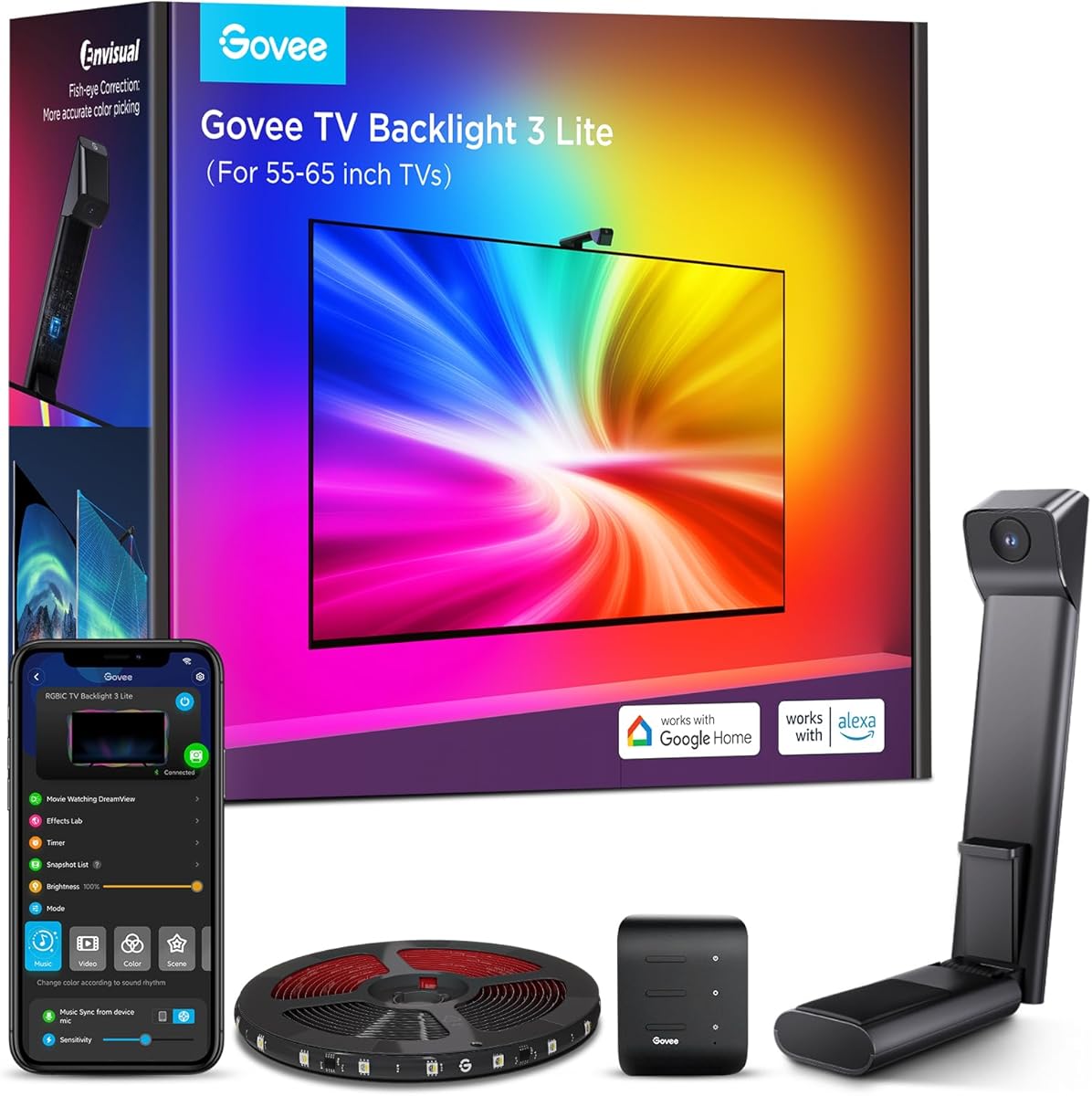
Govee TV Backlight 3 Lite
4.5Editor score
Camera-based color matching
Works with 55-65 inch TVs
App and voice controls
An LED sync box for TV backlighting can turn ordinary streaming, gaming, and movie nights into a more immersive experience by extending on-screen colors onto the wall behind the television. A strong system combines responsive signal processing, smooth LED transitions, flexible installation, and dependable app controls rather than relying on a single impressive specification.
The products in this guide were compared using their stated synchronization methods, supported resolutions, frame rates, lighting features, TV-size compatibility, smart-home functions, and installation requirements. The list covers both true HDMI signal-based systems and camera-based alternatives, while clearly identifying which products require an external streaming device, console, set-top box, or other source.
Each selection highlights a different reason to buy, including strong value, advanced gaming support, broad screen coverage, music-responsive effects, or polished smart-home integration. Ratings and product details reflect the supplied information, availability can change, and prices vary by retailer, bundle, promotion, and time, so readers should confirm current listings before purchasing.
4.5Editor score

4.3Editor score

4.4Editor score
As an Amazon Associate we earn from qualifying purchases.
The comparison below covers every product in the guide, highlighting synchronization approach, display capabilities, lighting hardware, smart controls, and practical compatibility constraints.


The PHILIPS Smart Lighting HDMI Sync Box is a Connected by WiZ system rated 3.7, offering direct signal-based color matching for 55- to 65-inch televisions. Its standout quality is the combination of RGBIC backlighting, app-based personalization, voice control, music response, and compatibility with other color-changing WiZ lights. It is designed for viewers who want an organized smart-lighting setup rather than an isolated strip.
We may earn a commission when you buy through this link, at no additional cost to you.
The sync box receives the video signal directly from an external HDMI device, allowing colors to follow movies, shows, and games with low latency. It supports 4K at 60Hz, HDR10+, and Dolby Vision, while the WiZ app lets users tune saturation and intensity for different preset modes. Compatibility with additional Connected by WiZ products also means the television lighting can become part of a larger wall or room arrangement.
There are important limitations. Synchronization requires a streaming device, game console, cable box, or another external source, and it will not work with applications running directly on a smart television. The product is also incompatible with Philips Hue products, which may disappoint shoppers already invested in that ecosystem. Its stated 55- to 65-inch focus and 4K-at-60Hz ceiling are perfectly suitable for everyday use, but not ideal for high-end 144Hz gaming displays.
This is a good choice for households that use WiZ products or want a simple signal-based alternative to camera-based systems. It offers a good balance of synchronization, smart controls, and expansion potential, although the relatively modest rating suggests buyers should carefully review recent customer feedback and confirm compatibility before ordering.
Reading the source signal directly removes the need to place a camera over the screen and can make color matching less dependent on room lighting. It also means the system must be connected through an external HDMI source rather than relying on a television's built-in applications.
The sync box can work with additional color-changing Wi-Fi and Bluetooth WiZ lights, allowing a television strip to be joined by compatible wall or room lighting. This makes the system more useful for cohesive entertainment scenes than a standalone backlight.
We may earn a commission when you buy through this link, at no additional cost to you.
The Fancyleds 3 Port 2.1 is a premium HDMI 2.1 backlighting system rated 4.4. It is built around three modern inputs, high-refresh gaming features, and an included 96-LED-per-meter RGBW strip intended for 70- to 95-inch televisions. It is one of the strongest choices here for users who prioritize signal bandwidth, multiple source devices, and smooth gaming-oriented illumination.
We may earn a commission when you buy through this link, at no additional cost to you.
Its three HDMI 2.1 inputs support 4K at 120Hz and 144Hz, as well as 8K at 60Hz. HDR, Dolby Vision, ARC, ALLM, and VRR support make it particularly relevant to current gaming consoles and high-end displays. The high-density strip uses a dedicated white diode alongside RGB elements to create saturated colors and cleaner white tones, while the system's fast reaction is designed to keep lighting aligned with fast action.
The product includes a universal power adapter for US, EU, AU, and UK sockets, which is helpful for travelers or international installations. The trade-offs are that its included strip is intended for quite large televisions, and using a PC as the source is explicitly not recommended. It also cannot synchronize applications that run natively on a smart TV, meaning an external streaming device, console, or set-top box remains necessary.
Choose this model when your entertainment setup includes multiple HDMI 2.1 sources, a large television, and demanding games. It is less convenient for a smaller screen or a viewer who insists on direct smart-TV app synchronization, but its combination of ports, bandwidth, and included lighting hardware makes it a compelling premium package.
Support for 4K at 144Hz, 8K at 60Hz, VRR, and ALLM helps the lighting system keep pace with high-end consoles and capable televisions. These capabilities make the box particularly attractive to gamers who want their backlight to respond cleanly during rapid motion.
Three HDMI 2.1 ports reduce the need for a separate switcher when connecting a streaming device, game console, or set-top box. It is a practical advantage over one-input alternatives, although buyers should still verify that every source device supports the desired resolution and refresh combination.
We may earn a commission when you buy through this link, at no additional cost to you.
The AIYATO HDMI 2.0 Kit is a 16.4-foot RGBIC television lighting package aimed at 75- to 85-inch screens. It combines an HDMI 2.0 sync box, Wi-Fi control, music response, scene synchronization, and compatibility with Alexa and Google Assistant. Because no customer rating was supplied, its value proposition is best judged from its stated feature set and installation design.
We may earn a commission when you buy through this link, at no additional cost to you.
The system is intended to reproduce colors from the edges of displayed content and react to surrounding sound through its microphone. It connects over 2.4GHz Wi-Fi and supports automatic timing for turning lights on or off. Installation is straightforward: the strip uses adhesive backing and is positioned on a clean, dry surface behind or around the television.
The critical limitation is the external-source requirement. A television's HDMI port is normally an input rather than a video output, so the kit cannot capture the picture from a television's built-in movies, broadcast channels, or native applications. A set-top box, streaming device, or console must provide the HDMI signal. This is not necessarily a problem for modern homes, but it should be understood before installation.
This kit is best suited to buyers with a very large television who want long-strip coverage, flexible app control, and music-reactive scenes without a camera mounted above the display. It is a less certain recommendation than a well-reviewed alternative because of limited rating information, but its stated coverage and control options make it worth comparing against similarly sized HDMI 2.0 systems.
A 16.4-foot strip gives buyers more material than many standard bundles, making the package more practical for 75- to 85-inch televisions. The exact visual result still depends on the television's dimensions, wall clearance, and how evenly the strip is placed.
The built-in microphone can make the lighting respond to the volume and rhythm of nearby music. That adds atmosphere during parties or casual listening, although the external HDMI path remains necessary for synchronized on-screen visuals.
We may earn a commission when you buy through this link, at no additional cost to you.
The Govee HDMI 2.1 AI Sync Box 2 is rated 4.3 and combines direct HDMI color synchronization with AI-assisted lighting behavior. Designed for 55- to 65-inch televisions, it supports 8K at 60Hz and 4K at 144Hz, while its RGBWIC strip adds a dedicated white channel for cleaner tones. It is especially relevant to gamers and viewers with compatible high-refresh equipment.
We may earn a commission when you buy through this link, at no additional cost to you.
CogniGlow technology is used to recognize images and text and determine suitable trigger conditions for lighting effects. The box also supports VRR and ALLM, while DreamView can synchronize colors across multiple compatible Govee lights. Matter support adds value for smart-home users, although the stated support is limited to lighting-related functions rather than full device control.
Automatic signal switching is not supported when multiple sources are connected, so buyers must change inputs manually. The product information also notes that HDR, HDR10+, and Dolby Vision can reduce light saturation because of how those formats operate. Users can compensate with the app, but it is worth setting expectations that intense HDR content may not produce the same vividness as standard-range video.
This is a strong recommendation for a gaming-centered living room that uses a console, streaming box, or other external HDMI source. It combines high bandwidth, responsive effects, smart-home support, and multi-light expansion. Those who need effortless source switching should look for an alternative with that feature, and users should test the app's saturation controls with their favorite HDR content.
The system attempts to distinguish images and text before selecting lighting behavior, which can reduce the need for extensive manual tuning. Users can still create more tailored results through the app, but the automated layer is useful for mixed streaming and gaming sessions.
RGBWIC lighting separates red, green, blue, white, and independent color control into a more granular system. The dedicated white element helps produce purer neutral tones while retaining saturated effects, and the included high-density strip is specified at 75 LEDs per meter and 450 lumens per meter.
We may earn a commission when you buy through this link, at no additional cost to you.
The WiZ Connected HDMI Sync Box is rated 3.6 and provides a direct, uncomplicated route to HDMI-synchronized TV lighting for 55- to 65-inch screens. It includes an RGBIC strip and supports 4K at 60Hz, HDR10+, and Dolby Vision. Its principal appeal is the absence of a camera and the ability to join compatible WiZ lights for a wider ambient effect.
We may earn a commission when you buy through this link, at no additional cost to you.
The box reads colors directly from the source, which can simplify installation and avoid calibration problems associated with camera-based products. The app offers preset synchronization modes and controls for saturation and intensity, helping users tune the effect for movies, games, or television. Additional Wi-Fi and Bluetooth WiZ lights can be linked so the same on-screen palette extends beyond the television.
Its limitations are meaningful for some setups. There is only one HDMI input, so users with multiple source devices will need an external HDMI switcher, which is not included. Native smart-TV applications cannot be synchronized because an external streaming device, cable box, console, or similar source is required. The 4K-at-60Hz specification is also less future-facing than the HDMI 2.1 choices in this guide.
This product suits a straightforward living room centered on a 55- to 65-inch television and one primary source device. It may also suit WiZ users who want the strip and other compatible lights to behave as one system. Buyers with several game consoles or a high-refresh television should consider a multi-port HDMI 2.1 model instead.
Because the box obtains its color data from the HDMI signal, it does not need a camera positioned above the television. The result is a cleaner installation with fewer potential alignment issues and less sensitivity to ambient room light.
Users can add compatible WiZ lighting and have it react alongside the television strip. This turns a basic backlight into a broader ambient-lighting arrangement for gaming, film viewing, or music playback.
We may earn a commission when you buy through this link, at no additional cost to you.
The Govee TV Backlight 3 is rated 4.3 and stands out for its dual 4MP optical system, 24 independently controlled color zones, and high-density RGBWIC lighting. It is designed for 55- to 65-inch televisions and combines detailed screen capture with a slim camera that can fit above ultra-thin displays.
We may earn a commission when you buy through this link, at no additional cost to you.
Its hybrid lens structure is intended to reduce color dispersion and produce sharper edges. An AI color-mapping algorithm divides the display into 24 zones, while a separate AI filter can recognize film styles and choose a suitable lighting theme. The lighting strip uses 60 LEDs per meter with four-in-one beads, including a dedicated white channel, and is stated to be 20 percent brighter than the previous generation.
Processing is advertised at millisecond response, and the dual-chip design is claimed to improve speed by 132 percent. DreamView can synchronize as many as 10 compatible devices, while Matter, app control, and voice control broaden the smart-home feature set. As a camera-based product, however, it must be positioned to view the screen, and ambient light, reflections, and placement can affect color accuracy.
This is the most well-rounded recommendation for viewers who want fine spatial color mapping rather than a simple edge-following effect. It is especially useful for mixed content, where a single dominant color would look less convincing than multiple independently mapped zones. It suits 55- to 65-inch screens and users who are comfortable mounting and aligning a slim camera above the display.
Dividing the image into 24 zones allows different parts of the television to influence the surrounding light. That produces a more dimensional halo than systems that treat the whole screen as one color, particularly during scenes with multiple bright colors.
The 90-millimeter gravity-fit camera is designed to sit discreetly above the screen while accommodating thin televisions. Adhesive support helps stabilize it, and the stated heat-resistant, residue-free adhesive is intended to simplify mounting and later removal.
We may earn a commission when you buy through this link, at no additional cost to you.
The Fancyleds 2.1 Sync Box is rated 4.1 and offers HDMI 2.1 performance with a 96-LED-per-meter RGBW strip for 56- to 65-inch televisions. It supports high-resolution and high-refresh video while including the features modern consoles and streaming devices are likely to need. It is a strong option for users who want signal-based synchronization without the complexity of a camera system.
We may earn a commission when you buy through this link, at no additional cost to you.
Its stated capabilities include 4K at 120Hz and 144Hz, 8K at 60Hz, HDR, Dolby Vision, ARC, ALLM, and VRR. The dense RGBW strip is designed for smooth transitions, even coverage, and clean whites, while high-speed color reaction is intended to keep the lighting aligned with action. A universal power adapter covering US, EU, AU, and UK outlets adds installation convenience.
As with other HDMI-based products in the guide, the box cannot capture content from built-in smart-TV applications. Streaming services and games must run through a connected HDMI source, and the product information does not recommend using a PC. The included strip is sized for the stated television range, so buyers with a larger screen should confirm whether the strip can physically cover the perimeter.
This model is a convincing middle ground between basic HDMI 2.0 kits and the three-port premium Fancyleds system. It makes the most sense for a 56- to 65-inch television used with a game console or streaming device, especially when high refresh rates and gaming-oriented features matter.
VRR and ALLM support make the box relevant to modern consoles, while the stated 144Hz ceiling gives high-performance gaming setups more headroom. The actual output depends on the television, source device, cable, and selected format working together correctly.
At 96 RGBW LEDs per meter, the included strip is intended to minimize dark gaps and produce smooth color transitions. The dedicated white diode also helps the system maintain both saturated color and more accurate neutral tones.
We may earn a commission when you buy through this link, at no additional cost to you.
The Govee TV Backlight 3 Lite is rated 4.5, making it one of the strongest-rated products in the guide. It is a camera-based 11.8-foot RGBICW strip for 55- to 65-inch televisions. Its main value is accessibility: it can capture colors from built-in television content without requiring a separate HDMI source or a dedicated sync box.
We may earn a commission when you buy through this link, at no additional cost to you.
The upgraded Envisual chip includes fish-eye correction intended to improve color matching near screen edges. An additional warm-white chip in the four-in-one LED bead improves white tone and overall color purity. Its gravitational hanging camera design is made for thin televisions, while adhesive can be used to keep the camera steady and reduce wobble.
Govee DreamView can add up to seven sub-devices to the synchronized lighting effect. The app provides black-bar elimination, blank-screen detection, more than 99 preset effects, and controls for the lighting, while Alexa and Google Assistant add hands-free operation. The main compromise is that the camera must see the screen, and its placement can affect how accurately colors are reproduced.
This is the best budget pick for viewers whose television apps do not output through an HDMI source, as well as households that want immediate setup without rearranging streaming hardware. It is particularly useful for everyday watching, gaming, and online video. Users seeking the most advanced signal processing may prefer a premium HDMI 2.1 kit, but this model offers a remarkably complete feature set.
Because the system reads the displayed image with a camera, it can react to native television applications, streaming menus, and other content shown directly on the screen. This avoids the external-source limitation that affects most HDMI-based systems in the guide.
The fish-eye correction function expands the effective capture area and is intended to keep colors more accurate near the television's edges. Correct mounting and a clear line of sight remain essential for the most consistent result.
We may earn a commission when you buy through this link, at no additional cost to you.
The Linkind AI Sync TV Backlight Kit is rated 3.6 and pairs a 20-foot strip with an HDMI 2.0 sync box for televisions from 55 to 90 inches. Its standout feature is unusually broad physical coverage, while the direct HDMI method promises more accurate matching than a camera-based alternative when the source and connection are configured correctly.
We may earn a commission when you buy through this link, at no additional cost to you.
The ET6 captures colors from an HDMI source without camera calibration, which can also make it less affected by room lighting. It includes dynamic RGB effects and four music-sync modes for parties, gaming, and general viewing. The AiDot app provides control over colors, brightness, effects, and scenes, and Alexa plus Google Assistant support add hands-free convenience.
The central limitation is video throughput: the stated specification is up to 4K HDR at 30 frames per second. That is fine for many streaming applications but falls behind newer boxes that support 60Hz or high-refresh gaming. Built-in smart-TV applications are also unsupported, and the lighting can only follow content arriving through an external HDMI device.
This kit is best for owners of very large televisions who need a long, trimmable strip and want direct signal-based ambient lighting. Its wide stated fit makes it versatile across many screen sizes, but buyers should choose it primarily for room coverage and convenience rather than for advanced high-frame-rate gaming.
The 20-foot length can be trimmed and routed around televisions from 55 to 90 inches. This makes the kit useful for large displays and allows buyers to shape the installation around a media cabinet or wall rather than accepting a fixed short strip.
Four music-sync modes and broad RGB customization make the kit useful beyond precise video matching. Users can switch between screen-driven effects and more rhythmic ambient scenes for gatherings or casual listening.
We may earn a commission when you buy through this link, at no additional cost to you.
The HDMI Sync Box with TV Backlight is rated 4.5 and is designed for 75- to 85-inch televisions. It offers a direct, uncomplicated way to add synchronized ambient lighting, with multi-zone control, an integrated trimmable strip, and support for many common streaming and gaming sources.
We may earn a commission when you buy through this link, at no additional cost to you.
The box analyzes the incoming HDMI signal in real time and creates responsive color matching with what the source information describes as ultra-low latency. Independent multi-zone control produces smoother transitions around the screen, while the trimmable strip is intended to reduce dark corners and create a continuous edge-to-edge glow.
Control is available through the Tuya or Smart Life app, which offers 12 scene modes and four music-sync modes, along with adjustments for color, brightness, and effects. Alexa and Google Assistant support enable hands-free changes. The stated device compatibility includes PS5, Xbox, Apple TV, Fire TV, Roku, Blu-ray players, and PCs, although a television's own applications are not synchronized.
This system is a good choice for a large television with an external source device and a preference for a simple app-based setup. It is especially attractive for buyers who do not want a camera above the display. The 75- to 85-inch focus limits flexibility for smaller sets, and the absence of detailed resolution specifications makes it wise to confirm current source support before buying.
Independent zone control helps the strip produce a varied halo instead of forcing the entire perimeter to display one solid color. That can make fast scenes and bright on-screen objects appear more naturally represented around the television.
The listed support for major streaming platforms, game consoles, Blu-ray players, and PCs makes the box practical for mixed entertainment systems. The core rule remains simple: whatever content should drive the lighting must pass through the HDMI source.
We may earn a commission when you buy through this link, at no additional cost to you.
The right television backlighting system depends on how you watch, which devices you use, the size of your screen, and whether you prefer direct HDMI analysis or camera-based color capture. These factors determine synchronization accuracy, installation complexity, gaming suitability, and long-term convenience.
HDMI-based systems read the video signal before it reaches the television, usually producing a more exact match with less sensitivity to room lighting. They generally require an external streaming device, game console, set-top box, or other source, and they cannot follow applications running natively on a smart television. Camera-based systems can respond to virtually anything shown on the screen, including built-in apps, but their accuracy depends on camera angle, reflections, ambient light, and correct placement. Buyers should choose based on their entertainment hardware rather than treating either method as universally superior.
A strip should be long enough to extend around the desired edges or across the back of the television without leaving large dark gaps. Products in this guide range from an 11.8-foot strip for 55- to 65-inch screens to a 20-foot trimmable strip covering larger sizes. Also consider television thickness, wall distance, corners, media furniture, and whether the light should sit directly behind the panel or extend onto the wall. A longer strip offers more placement flexibility, while a shorter one may be easier to conceal.
Basic HDMI 2.0 boxes commonly support 4K at 60Hz, which is suitable for many streaming setups. HDMI 2.1 models can offer 4K at 120Hz or 144Hz and 8K at 60Hz, along with VRR and ALLM for modern consoles. Source device, television, cable, and sync box must all support the selected format. The highest stated bandwidth is most valuable for competitive gaming, while viewers focused on films and ordinary streaming may not need every feature.
A single-input box is simplest when one streaming device handles all viewing, while several HDMI inputs reduce switcher complexity. Some advanced boxes still do not automatically change inputs when a source is selected, so check that detail carefully. Buyers with multiple consoles, a Blu-ray player, and a cable box should consider whether manual switching is acceptable. A separate HDMI switcher can work with one-input models, but it adds another component and may affect the desired high-refresh and feature compatibility.
Higher LED density can create smoother transitions, more even coverage, and fewer visible dark spaces between individual diodes. RGBW and RGBWIC arrangements add a dedicated white element, which can improve neutral tones while preserving saturated color. Brightness figures are not directly comparable across brands because strip length, viewing distance, and room conditions affect the result. The most useful evidence is the LED count per meter, the number of independently controlled zones, and the inclusion of a white channel.
App control is essential for adjusting brightness, color saturation, effect speed, scene modes, and scheduling. Voice control adds convenience once the ecosystem is configured, while Matter support can simplify integration with compatible smart-home platforms. Check whether the brand's application supports the features you care about and whether the lighting can synchronize with other products from the same ecosystem. Compatibility with popular assistants is useful, but it does not always mean every light function is exposed through voice commands.
Many backlighting systems include microphone-driven music modes, ambient presets, timers, and color effects. These can make a system useful for parties, gaming, and everyday ambience even when no video is playing. Microphone response can be affected by room acoustics and nearby sound, so the exact result depends on placement. Users who want precise video matching should prioritize HDMI or camera latency and color accuracy, while those who value party lighting should compare the number of scene and music modes.
HDMI systems generally require cables between the source, sync box, and television, plus a clean surface for the strip. Camera systems require a secure, unobstructed position above or near the display. Measure the television and plan cable routing before removing adhesive backing, and check the room's power and network requirements. For long-term care, clean the strip with a soft, dry cloth, avoid moisture around the sync box, and keep cables strained-free.
Begin by deciding whether the system will use direct HDMI synchronization or camera capture. For HDMI, connect the streaming device, console, or set-top box to the sync box, then connect the box to the television's compatible HDMI input and connect the LED strip. Turn everything on, open the manufacturer's app, select the appropriate input, and begin with moderate brightness until the color mapping is stable. For a camera system, center the camera above the screen, connect the camera to the control hub, and adjust its angle until the full display is visible without obstruction.
After the basic connection works, create separate scenes for common activities. Use lower brightness for general viewing, stronger saturation for gaming, and a music-responsive mode for parties. Adjust color saturation and intensity in the app rather than continually changing the television itself. If several source devices are used, label each input and establish a consistent switching routine, especially when the chosen sync box lacks automatic source detection.
Care for the installation by keeping the strip on a clean, dry surface and avoiding repeated folding or stretching of the LEDs. Wipe the camera lens and housing with a soft dry cloth, and check that vents and connectors remain free of dust. If colors become inconsistent, first confirm the source and input selection, then clean the camera or reseat the HDMI connections before changing software settings. Periodically verify that the adhesive remains secure and that cables have not been pulled tight.
Usually, an HDMI-based sync box cannot because most smart TVs do not output their own screen content through an HDMI port. You will typically need to run the app on an external streaming device, game console, or set-top box and route that device through the sync box. Camera-based backlights are more flexible because they capture whatever is visibly displayed, including built-in television applications.
It depends on the number of source devices and the sync box's inputs. A one-input model needs a switcher if you regularly use more than one source, while a multi-input model may be able to connect them directly. Check whether input switching is automatic, because some multi-port products still require manual selection. A separate switcher also adds cost and another potential compatibility point for high-refresh formats.
Direct HDMI analysis is usually more precise because it reads the source colors before they are altered by television processing. Camera-based systems can be surprisingly effective, but results depend on camera angle, screen reflections, ambient light, and calibration. A well-mounted camera is easier to use with built-in TV apps, while an HDMI system is often preferable when an external source is already part of the setup.
For modern high-end gaming, an HDMI 2.1 model supporting 4K at 120Hz or 144Hz offers the greatest flexibility. VRR and ALLM support can also improve the experience with compatible consoles and displays. A 4K-at-60Hz box is sufficient for many mainstream setups, but every component must support the chosen format, including the television, source device, and cable.
Many models include microphone-driven music modes that pulse or change color with nearby sound. The Linkind kit lists four music modes, while other systems provide similar rhythm-responsive effects. These modes work best in a room with clear sound and can be adjusted through the app. Music response is separate from HDMI video matching, so an external source is still needed for synchronized on-screen colors.
The required length depends on whether the strip runs directly behind the panel, around all four edges, or across a wider portion of the wall. A strip slightly longer than the intended route gives room for trimming and corner turns. Products sized for 55- to 65-inch televisions may not cover larger screens evenly, while the 20-foot Linkind option is intended to offer more flexibility across larger television sizes.
They generally work when the service is available through an external streaming device or set-top box and the content is not blocked by digital rights management. The source must pass through the sync box, and the service must be able to output the desired resolution and frame rate. Built-in television applications are the main exception, because they do not normally provide an output signal for a separate box to analyze.
Start with a strip that has a high LED density and enough length for the chosen route. Clean the mounting surface, position each segment evenly, and trim only at designated cut points. Mount the strip farther behind the television if light needs to spread across a larger wall area. High-density RGBW strips can also reduce visible spacing between individual diodes, especially on larger screens.
The Govee TV Backlight 3 Lite is the best budget and most approachable option because it avoids the external-source requirement and offers app, voice, and multi-device features. The Govee TV Backlight 3 takes overall visual refinement further with dual 4MP optics and 24-zone mapping, while the Fancyleds 3 Port 2.1 is the premium option for users who want three HDMI 2.1 inputs and high-refresh gaming support.
Before buying, prioritize the system that matches your actual viewing habits. Choose a camera-based product if most content runs through built-in television applications. Choose HDMI if you already use an external streamer or console and value direct signal accuracy. Then consider strip length, television dimensions, high-refresh support, input count, lighting density, and the usefulness of app, voice, music, and multi-device controls.
Finally, confirm the current specification, included accessories, compatibility notes, and customer feedback before ordering. Product configurations, bundles, firmware, apps, and promotional offers can change, and prices fluctuate across retailers. Checking the current listing is the best way to ensure that the selected LED sync box and television backlight still fit the intended display and source-device arrangement.