
Epson Workforce Pro WF-7840
3.9Editor score
Up to 13-by-19-inch printing
Print, copy, scan, and fax
Built-in dual-band Wi-Fi
500-sheet paper capacity
Large format printers for Mac can transform how designers, architects, photographers, and small offices handle posters, floor plans, wide spreadsheets, photo prints, and technical drawings. A useful model should combine the right paper width, dependable wireless access, manageable ink or toner costs, and software that fits a Mac-based creative or technical workflow.
This guide compares ten large format and wide-format options based on maximum media size, all-in-one functions, connectivity, print speed, color capabilities, paper handling, and specialized features. It covers everything from 13-by-19-inch office inkjets to 24- and 36-inch plotters for CAD drawings, while distinguishing general-purpose printers from photo, office, and technical-production models.
Each review explains where a printer stands out, where practical compromises remain, and which Mac user is most likely to benefit. Ratings and specifications reflect the supplied product information, but availability, operating costs, ink systems, software compatibility, and prices can change, so verify current details before purchasing.
3.9Editor score

3.8Editor score
4.0Editor score
As an Amazon Associate we earn from qualifying purchases.
The comparison below separates the ten selections by maximum media width, core functions, connectivity, and specialist purpose, making it easier to match a printer to a Mac-based office, photography, design, or CAD workflow.


The Epson Workforce Pro WF-7840 is a wide-format wireless all-in-one designed to handle 13-by-19-inch documents while combining printing, copying, scanning, and faxing. Its 3.9 rating reflects a practical balance of office features and accessible paper handling, making it a sensible value-oriented option for Mac users who need more than a conventional desktop printer.
We may earn a commission when you buy through this link, at no additional cost to you.
Its strongest attraction is versatility. The 500-sheet capacity supports sustained office workloads, while built-in 802.11a/b/g/n/ac wireless connectivity makes it convenient to place away from a Mac or share it across a small team. Epson Connect Solutions, Apple AirPrint, Android printing, and Mopria Print Service provide several ways to submit work remotely, while DURABrite Ultra ink is designed to dry quickly for more smudge-resistant results.
The compromises are important to recognize. This is an inkjet rather than a large-format plotter, and its maximum output is smaller than the 24- and 36-inch models in the list. The product information also does not explicitly identify native macOS driver support, so Mac users should verify compatibility with their chosen macOS release and preferred design or office applications before ordering. Its cartridge-based supply system may also be less economical for heavy photo volumes than an EcoTank model.
Despite those limitations, the WF-7840 is a compelling recommendation for real estate offices, education teams, architects working with smaller plots, and home businesses that regularly print presentations, wide spreadsheets, posters, or scanned documents. It offers the most versatile combination of useful office functions, Wi-Fi, and 13-by-19-inch output in this group.
Built-in Wi-Fi, AirPrint, Epson mobile apps, and cloud-oriented printing options make it easier to output documents from a Mac without a permanent USB connection. A 4.3-inch touchscreen is not listed for this model, so setup and control may involve the physical buttons and Epson software.
The 13-by-19-inch maximum expands beyond ordinary letter paper, while the 500-sheet capacity reduces the need for frequent refills. That combination suits offices producing batches of wide spreadsheets, plans, and presentation materials.
We may earn a commission when you buy through this link, at no additional cost to you.
The HP OfficeJet Pro 9730 combines wide-format color inkjet output with printing, scanning, copying, and faxing in an office-oriented design. Its 3.8 rating does not lead the group, but the supplied specifications reveal a well-rounded machine for teams that value speed, paper handling, and an approachable interface over the very large roll media found in dedicated plotters.
We may earn a commission when you buy through this link, at no additional cost to you.
The printer reaches speeds of up to 22 pages per minute in black and 18 pages per minute in color, a useful advantage for documents such as floor plans, mood boards, and spreadsheets. Two 250-sheet input trays support a total of 500 sheets, while automatic duplex printing and a single-pass duplex ADF make mixed office workflows more efficient. The large 4.3-inch color touchscreen gives users phone-like control, and dual-band Wi-Fi is designed to detect and resolve connection issues.
Its 11-by-17-inch maximum is narrower than the Epson WF-7840, and it is not a CAD plotter with roll-feed capability. The P3 color-gamut feature and AI-assisted page formatting are valuable for screen-oriented color work, but specialized technical users may need the line-quality output and media flexibility of a DesignJet. The included Instant Ink trial also introduces a subscription choice that should be evaluated carefully rather than treated as automatically economical.
This model is a strong fit for small offices, real-estate teams, agencies, and collaborative Mac workspaces that regularly print wide color documents and need scanning and copying in the same device. It is the most balanced pick here for general office productivity, combining fast output, wireless access, expandable paper capacity, and a clear touchscreen workflow.
Fast black and color speeds, duplex printing, a duplex ADF, and two full-size paper trays cover the common needs of a busy team. The result is a more office-focused package than a single-function photo printer or CAD plotter.
Support for a wider P3 color gamut and a 4.3-inch touchscreen make this a practical option for mood boards, plans, and presentation graphics. Mac users can print or manage jobs through the HP app, subject to current software support.
We may earn a commission when you buy through this link, at no additional cost to you.
The Canon imagePROGRAF TC-21M is a 24-inch large-format multifunction printer with a 4.4 rating, tying for the highest score among the ten products. Its combination of a relatively compact large-format footprint, tiltable 2.7-inch touchscreen, direct USB flash access, and cloud printing and scanning functions makes it especially interesting to design studios and small production offices.
We may earn a commission when you buy through this link, at no additional cost to you.
The automatic sheet feeder can handle up to 100 sheets of letter-size paper or 50 sheets of 11-by-17-inch stock, giving users flexibility across standard and wide documents. A dedicated enlargement-copy function can scale smaller originals from the letter flatbed scanner, which is useful for reproducing sketches, references, and small designs. Direct cloud workflows also help users move between locally stored content and online project files.
The supplied information does not describe roll media support, exact resolution, ink technology, or the full range of driver and editing applications. Those omissions make it especially important for Mac users to confirm their specific production requirements. This is also a large-format multifunction model, so buyers focused exclusively on CAD line drawings may prefer a plotter with documented HP-GL/2 support and roll-feed media handling.
Despite the missing specifications, the TC-21M earns attention for its strong rating, manageable 24-inch format, and approachable file-transfer options. It is a compelling choice for architects, educators, small engineering offices, and design professionals who want a multifunction large-format device without moving immediately to a much larger 36-inch production plotter.
The built-in USB flash drive port and cloud printing and scanning functions make the TC-21M useful when designers need to move files without relying entirely on a workstation connection. The 2.7-inch tilting screen keeps local operation straightforward.
The sheet feeder accommodates both letter paper and 11-by-17-inch media, which broadens the range of documents that can be produced. Enlarging from the flatbed adds a useful prepress-like function for independent studios.
We may earn a commission when you buy through this link, at no additional cost to you.
The Epson EcoTank ET-15000 is a wireless wide-format all-in-one built around refillable ink tanks rather than conventional cartridges. Its 4.2 rating, 33,000-page monthly duty cycle, and stated print speeds indicate a machine intended for sustained document production, giving it particular appeal to Mac-based offices that print large batches of reports, forms, and wide spreadsheets.
We may earn a commission when you buy through this link, at no additional cost to you.
It handles printing, copying, scanning, and faxing, with USB 2.0, LAN, and Wi-Fi providing several connection paths. The supplied resolution reaches 4800 by 2400 dpi, which offers strong detail for text and graphics, while black output is listed at 17 pages per minute and color output at 9 pages per minute. Its duty-cycle figure is particularly important for users who view the printer as shared equipment rather than an occasional specialty machine.
The principal uncertainty is maximum media size, because the supplied product data identifies this as a wide-format printer without explicitly listing sheet dimensions. It also lacks the detailed paper-handling and specialty-media information provided for several photo and office models. Mac buyers should therefore check the exact paper-width limits, supported borderless sizes, driver compatibility, and current macOS support before ordering. As with any inkjet, heavy saturation work can demand more ink than routine office documents.
The ET-15000 is best recommended for high-volume offices, educational institutions, and administrative teams that prioritize continuous output and reduced cartridge replacement over photo-specialist features. It combines refillable ink, broad connectivity, respectable speed, and multifunction capability in a package well suited to everyday wide-format Mac workflows.
A monthly duty cycle of up to 33,000 pages distinguishes this model from lighter-duty home printers. It is a better fit for a shared office producing frequent wide reports than for occasional image printing.
The EcoTank design centers on ink bottles, reducing dependence on small cartridge replacements. That makes supply planning easier for busy teams, although actual running cost depends on print coverage and the colors used.
We may earn a commission when you buy through this link, at no additional cost to you.
The Epson EcoTank Photo ET-8550 is a wireless wide-format all-in-one designed for photographers, illustrators, educators, and creative studios that regularly produce color images, graphics, and text. Its 4.0 rating reflects a capable specialist printer, while the six-color Claria ET Premium ink system is the defining feature for anyone who wants a separate color engine for creative work.
We may earn a commission when you buy through this link, at no additional cost to you.
The printer, scanner, and copier can produce as many as 6,200 color pages according to the supplied data. Epson emphasizes vibrant color, sharp text, and high-accuracy printheads, supported by a cartridge-free tank system that is refilled with ink bottles. The all-in-One design also supports scanning and copying, allowing a creative studio to consolidate equipment rather than maintaining separate devices for output and basic reproduction.
Because the supplied data does not state the exact maximum sheet dimensions, borderless sizes, or supported specialty media, users should verify those details for their intended print dimensions. The ET-8550 is a photo-oriented model rather than a technical line plotter, so it is less obviously suited to CAD line quality. Refillable ink can make high-volume color use more practical, yet ink-intensive projects can still consume supplies quickly, and actual output costs vary with coverage.
This is a strong recommendation for a Mac-based photography workflow, art-print business, classroom, or design studio. It is especially useful when colorful wide-format output matters more than automatic roll handling or CAD-specific workflows, while its all-in-one construction adds convenience for scanning reference prints and producing copies.
Claria ET Premium six-color inks expand the palette beyond standard process colors, which can help photographs and graphic designs reproduce smoother transitions. The high-accuracy printhead supports both sharp lettering and detailed imagery.
Using refillable bottles rather than conventional cartridges can simplify restocking for a productive studio. The listed 6,200-color-page capability gives buyers a useful benchmark for comparing workload and refill frequency.
We may earn a commission when you buy through this link, at no additional cost to you.
The Epson Expression Photo HD XP-15000 is a wireless wide-format inkjet built for photographers and creative users who want professional photo and borderless output on a Mac. Its 3.9 rating, 13-by-19-inch maximum, and six-color Claria Photo HD ink system position it as a focused alternative to the larger multifunction and tank-based Epson models.
We may earn a commission when you buy through this link, at no additional cost to you.
Individual red and gray inks broaden the color gamut and improve black-and-white photography, while the printer supports borderless sizes ranging from 4-by-6 inches to 13-by-19 inches. A 50-sheet rear tray accepts specialty media such as cardstock, and a 200-sheet front tray supports automatic two-sided document printing. Epson describes the unit as 30 percent smaller than its predecessor, an important consideration for a home studio or compact creative office.
Unlike several other picks, the XP-15000 focuses on printing rather than scanning and copying. It also uses genuine Claria Photo HD cartridges, and the supplied data states that the printing system is designed for Epson Genuine Cartridges. That requirement may matter to buyers comparing long-term ink expense with the EcoTank models. Although wireless printing is included, the product details do not explicitly state native Mac software support, so current driver availability should be verified.
The XP-15000 is an excellent fit for photographers, educators, and designers who regularly produce 13-by-19-inch images but do not need a full office all-in-one. Its strongest combination is six-color photo quality, borderless capability, compact dimensions, and separate paper handling for documents and specialty media.
Red and gray inks create a wider tonal range for both color images and monochrome photography. The relatively compact chassis makes the XP-15000 easier to accommodate than many office-oriented wide-format models.
The front tray supports routine documents and duplex printing, while the rear tray is reserved for up to 50 sheets of specialty media. That separation is useful for photographers who alternate between borderless prints and heavier project stock.
We may earn a commission when you buy through this link, at no additional cost to you.
The Brother INKvestment MFC-J6960DW is a fast 11-by-17-inch color all-in-one aimed at small businesses and busy teams. Its 4.2 rating reflects a strong productivity package, with printing, copying, scanning, and faxing, a 3.5-inch color touchscreen, and unusually high stated speeds of up to 31 pages per minute in black and 30 pages per minute in color.
We may earn a commission when you buy through this link, at no additional cost to you.
Two paper trays provide 500 sheets of capacity, and a 100-sheet multipurpose tray expands support for specialist media. The 50-page single-pass duplex ADF can copy and scan both sides in one pass, while automatic duplex printing extends to 11-by-17-inch pages. Connectivity includes wireless networking, Ethernet, and USB, and Wi-Fi Direct can operate without an external network. Cloud access through services such as Google Drive, Dropbox, Box, and OneDrive adds flexibility for distributed teams.
The main consideration is the INKvestment cartridge model. Included cartridges have stated yields of 1,800 pages for black and 750 pages for each color, but the economics of ongoing use depend on coverage and page complexity. The product also includes a Refresh subscription trial, so Mac users should understand the trial terms and whether a cartridge purchase model better matches their habits. Native macOS application support is not expressly detailed in the supplied data and should be confirmed.
For a small agency, property office, or design consultancy with several people producing wide documents, the MFC-J6960DW offers one of the strongest productivity combinations in the list. It is particularly attractive when fast color output, duplex document handling, direct Wi-Fi printing, and cloud workflows matter more than photo-specialist color inks or roll media.
The 31-page-per-minute black speed and 30-page-per-minute color speed are among the highest stated figures here. A 50-page single-pass duplex ADF further reduces manual work when scanning multi-sided documents.
Wi-Fi, Ethernet, USB, and Wi-Fi Direct allow the printer to fit different network configurations. Cloud-service access through the touchscreen makes it convenient to retrieve files without sending every job through a desktop application.
We may earn a commission when you buy through this link, at no additional cost to you.
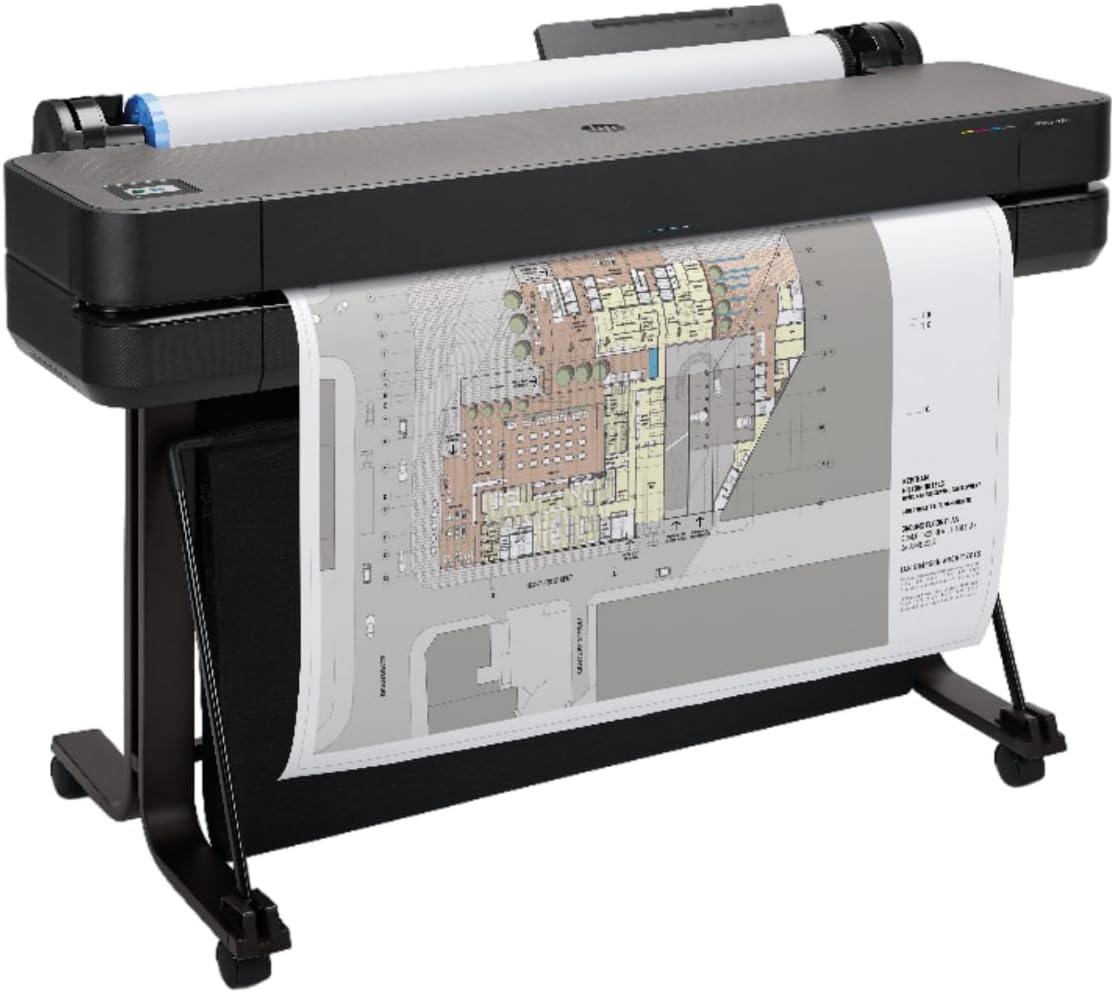
The HP DesignJet T210 is a 24-inch plotter designed for technical line drawings, crisp text, posters, maps, and sewing patterns. Its 4.4 rating ties for the highest in this roundup, and the combination of roll-feed capability, familiar HP-GL/2 support, and a relatively compact 24-inch format makes it a practical entry point for Mac users working with CAD or design software.
We may earn a commission when you buy through this link, at no additional cost to you.
The printer can handle rolls up to 24 inches wide and sheets up to 13 by 19 inches when the optional automatic sheet feeder is added. It includes sheet feed, roll feed, and an automatic horizontal cutter, allowing users to switch between project types without manually reconfiguring the media source. Connectivity includes Gigabit Ethernet, Hi-Speed USB 2.0, and Wi-Fi, while 500MB of memory provides a reasonable foundation for common technical files.
Its primary limitation is that the sheet feeder is optional, so buyers who expect frequent 13-by-19-inch sheet output must account for that accessory. The T210 is print-focused rather than a scanning and copying all-in-one, and it cannot match the 36-inch media width of the T630 and T650. Although HP Click supports PDF, JPEG, TIFF, DWF, HP-GL/2, and PNG files, Mac users should still verify the exact application and driver workflow they depend on.
The T210 is a strong recommendation for small engineering practices, architecture studios, technical educators, and makers who need more accurate line output than an office inkjet offers. It is also a sensible stepping-stone model for users who want 24-inch roll capability without moving to a full 36-inch production plotter.
Line drawings, maps, posters, renders, and sewing patterns benefit from a plotter designed around precise technical output. HP-GL/2 support and direct printing from design and CAD applications streamline professional file preparation.
HP Click offers PDF error checking, alerts, automatic nesting, and saved print settings. These tools can reduce wasted media and make repeated jobs more consistent when the optional sheet feeder is not required.
We may earn a commission when you buy through this link, at no additional cost to you.
The HP DesignJet T650 is a 36-inch large-format plotter intended for demanding technical and design-production environments. Its 4.1 rating reflects a feature-rich professional package, including an automatic sheet feeder, automatic sheet-and-roll switching, a media bin, an automatic horizontal cutter, and a two-year onsite warranty through an included HP Care Pack.
We may earn a commission when you buy through this link, at no additional cost to you.
The printer supports media rolls up to 36 inches wide and sheets up to 13 by 19 inches. Its automatic sheet and roll switch reduces the need for manual intervention when workflows alternate between CAD plots and presentation-sized pages. Speed is listed at up to 25 seconds per A1/D page and 82 A1/D-size prints per hour, while 1GB of memory offers more headroom for complex files than smaller DesignJet configurations.
Gigabit Ethernet, Hi-Speed USB 2.0, and Wi-Fi provide robust connection choices, while HP Click brings file checking, alerts, automatic nesting, saved settings, and direct output from common CAD and design applications. This is still a substantial professional purchase, and the included warranty does not remove the need to plan for suitable installation space, appropriate media, and compatible Mac drivers. It is also more specialized than an office all-in-one, with no scanning or copying functions listed.
The T650 is most appropriate for architecture and engineering firms, mapping organizations, production studios, and design departments that regularly need 36-inch output and value onsite support. For users who produce wide color documents but not technical rolls, a faster office all-in-one will generally be more economical and easier to manage.
The T650 is built for large-format work that exceeds standard wide sheets. Its listed throughput and automatic media switching reduce bottlenecks in architecture, engineering, and print-production environments.
The included two-year HP Care Pack adds onsite assistance to an already capable configuration. That can be especially valuable when machine downtime would interrupt a project schedule or delay a professional delivery.
We may earn a commission when you buy through this link, at no additional cost to you.
The HP DesignJet T630 is a 36-inch plotter package built for architects, engineers, construction professionals, and other users who need large technical output with comprehensive media handling. Its 4.0 rating reflects a capable professional system, and the included automatic sheet feeder, media bin, and stand create a more complete installation than a printer supplied with only the core plotter.
We may earn a commission when you buy through this link, at no additional cost to you.
It accepts media rolls up to 36 inches wide and sheets up to 13 by 19 inches. Automatic sheet and roll switching makes it easier to alternate between CAD drawings and presentation sheets, while the media bin collects output and the horizontal cutter separates roll jobs cleanly. Gigabit Ethernet, Hi-Speed USB 2.0, and Wi-Fi support dependable connections from a Mac workstation or across a design network.
The product information does not list print speed, memory, or the content of the included onsite support package, so those details should be verified when comparing it with the T650. It is a dedicated plotter rather than an all-in-one, and it is overkill for users who only need 13-by-19-inch documents. Media cost, storage, and setup also require advance planning because large rolls and mounted paper can be impractical in a small home office.
The T630 is a strong recommendation for professional teams that want 36-inch output, roll handling, sheet feeding, and finished-media collection in one configuration. It is particularly suitable for technical plans, maps, posters, and large architectural drawings, and the included stand improves the practicality of operating a full-size plotter.
The included sheet feeder, media bin, and stand reduce the need to source and install several accessories separately. This makes the T630 attractive for a new professional plotter setup.
Automatic sheet and roll switching helps users alternate between CAD output and sheet-fed projects with less setup time. The horizontal cutter also supports cleaner handling of roll-fed work.
We may earn a commission when you buy through this link, at no additional cost to you.
The right Mac-compatible large-format printer depends on output width, workflow, media type, and the balance between office convenience and professional production. Use the following factors to narrow the field before making a final decision.
Begin with the largest finished output your work actually requires. The office-oriented models in this guide reach 11 by 17 inches or 13 by 19 inches, which is useful for spreadsheets, posters, photographs, and presentation boards. The Canon TC-21M and HP DesignJet T210 work with 24-inch media, while the T630 and T650 support 36-inch rolls. A larger maximum does not automatically make a printer better, but it determines which project sizes are possible without stitching, scaling, or sending files to another service.
Office all-in-one inkjets emphasize documents, color graphics, copying, scanning, and faxing. Photo models add richer ink configurations, broader media support, or borderless output. Plotters are designed for technical line work, maps, renderings, posters, and CAD, and they generally emphasize roll media, cutters, file handling, and application compatibility. Choose an all-in-one when office functions are routine; choose a photo printer when image quality is the priority; choose a plotter when precise lines and large roll-fed jobs justify the specialized investment.
Confirm that the printer supports your current macOS version and the applications you use. The supplied information mentions AirPrint, Epson apps, the HP app, HP Click, Brother Mobile Connect, cloud services, and direct support for common CAD and design file formats, but it does not provide complete macOS compatibility details for every model. Check whether the required driver is built in, downloaded, or supplied through a vendor utility, and confirm that features such as roll selection, custom media sizes, borderless printing, or CAD palettes remain available through the Mac interface.
Wireless connectivity is essential for most modern Mac workspaces, but the number and quality of options matter. The Epson WF-7840 supports 802.11a/b/g/n/ac, the HP OfficeJet Pro 9730 uses dual-band Wi-Fi, and several plotters include both Wi-Fi and Gigabit Ethernet. USB remains useful for direct setup or stable local transfers, while Wi-Fi Direct on the Brother MFC-J6960DW can provide a route when no existing wireless network is available. Consider router placement, network band support, and the number of users who need shared access.
A large printer is only as useful as its ability to accept the media your projects require. The WF-7840 and Brother MFC-J6960DW offer 500-sheet capacities, while the OfficeJet Pro 9730 uses two 250-sheet trays. The XP-15000 separates routine document media from a 50-sheet specialty rear tray. Canon’s TC-21M includes a feeder for letter and 11-by-17-inch sheets, while the DesignJet models support rolls, automatic switching, cutters, and in some cases a media bin. Check paper weight, sheet dimensions, borderless support, roll lengths, and specialty-stock compatibility before choosing.
Speed matters when a printer serves multiple people or handles batches rather than occasional artwork. The Brother MFC-J6960DW lists up to 31 black and 30 color pages per minute, while the HP OfficeJet Pro 9730 reaches 22 black and 18 color pages per minute. The ET-15000 offers 17 black and 9 color pages per minute and a 33,000-page monthly duty cycle. For CAD plotters, consider stated output rates such as A1/D pages per hour. The right comparison accounts for paper type, color coverage, file complexity, and whether the machine is continuously loaded.
Creative users should distinguish general color capability from specialist photo or technical color needs. The OfficeJet Pro 9730 supports a wider P3 gamut for screen-oriented output, while the ET-8550 and XP-15000 use six-color ink systems with red and gray inks for photographs and nuanced monochrome images. The ET-15000 prioritizes refillable tanks and document volume. Cartridge-based models require planned replacement purchases, while tank systems use bottles and may be more practical for frequent color work. Actual cost depends on coverage, ink type, and print volume rather than cartridge price alone.
All-in-one models can reduce the number of devices required for a busy office. The WF-7840, OfficeJet Pro 9730, ET-15000, ET-8550, and Brother MFC-J6960DW provide scanning and copying, and the listed office models also support faxing. The Brother includes a 50-page single-pass duplex ADF, while the HP OfficeJet Pro 9730 has a single-pass duplex ADF. Dedicated plotters such as the T210, T630, and T650 are print-focused and should be paired with separate scanning equipment if document reproduction is required.
Begin by confirming the printer’s current macOS driver, firmware, and application compatibility before moving paper or installing inks. Connect through Ethernet or Wi-Fi, install the vendor’s recommended setup utility, and perform a test page that includes text, line art, a color block, and the intended media type. For plotters, create a custom paper profile and confirm the roll or sheet size before sending a production file.
Always load media within the manufacturer’s stated limits and select the matching setting in the print dialog. Clean the printhead or platen as directed, use approved ink, and avoid leaving paper exposed to humidity, direct sunlight, or excessive dust. Wide inkjet formats are sensitive to alignment and smudging, so allow suitable drying time before handling, stacking, laminating, or transporting finished work.
Keep a simple maintenance record that includes print volume, supplies used, cleaning performed, and driver updates. Inspect cutters and automatic feeders regularly, keep firmware current, and use a properly configured drying and storage workflow for photographs. Before a large deadline, run a representative test rather than assuming a new paper stock will behave like the previous one.
Wide format generally refers to inkjet office printers that print up to widths such as 11 by 17 inches or 13 by 19 inches. Large format is often used for dedicated plotters with roll media, such as 24- or 36-inch models. The terms can overlap in casual usage, so compare exact media dimensions rather than labels alone.
Mac compatibility depends on the printer’s current driver and utility support, not merely its wireless capability. Verify compatibility with your exact macOS version, the applications you use, and features such as custom paper sizes, roll selection, borderless output, or CAD printing. AirPrint can handle basic jobs on some models, while professional roll workflows usually require vendor software.
A dedicated large-format plotter is generally the most appropriate choice because these models are designed for technical line drawings, maps, crisp text, and roll media. The HP DesignJet T210 covers 24-inch work, while the T630 and T650 support 36-inch rolls. Confirm the file formats, driver, and line-weight settings required by your CAD application.
An all-in-one is usually better when printing, scanning, copying, and faxing are routine office needs. A photo-focused model is preferable for borderless images, specialty media, and richer six-color output. Choose according to your most frequent jobs rather than the widest possible color specification.
Refillable tank systems can make frequent printing more convenient because supplies are replenished with larger ink bottles instead of individual cartridges. They are particularly attractive for offices producing many pages or substantial color coverage. Actual results still depend on the media, color intensity, and size of each job, so compare documented yields and workflow needs.
It depends on the finished poster dimensions. A 13-by-19-inch model suits smaller photo prints and display boards, a 24-inch plotter supports medium posters and technical drawings, and a 36-inch model is useful for architectural plans, maps, and large-format signage. Measure the finished piece and account for borders or trimming before selecting media width.
Check the available floor or desk space, supported media dimensions and weights, network coverage, and a nearby suitable connection. For plotters, also consider roll storage, output collection, cutter access, and whether the included stand is adequate. Confirm driver support and test a small representative file before moving a large project to the machine.
Wi-Fi can be sufficient for many creative and office documents, especially on a stable modern network. Very large files, continuous CAD runs, or busy shared environments may benefit from Gigabit Ethernet. Users can also choose models with USB or Wi-Fi Direct, but the best connection depends on file size, network stability, and the printer's supported interfaces.
The Epson Workforce Pro WF-7840 stands out as a value-focused office all-in-one with 13-by-19-inch output and useful wireless functions. The HP OfficeJet Pro 9730 offers the most balanced general-office configuration, combining fast output, duplex handling, a touchscreen, and two paper trays. For professional roll-format work, the HP DesignJet T630 provides a complete 36-inch package with an automatic feeder, media bin, and stand.
Mac users should prioritize the output dimensions and workflow they genuinely need, then verify current driver support. Office teams should examine duplex ADF capacity, paper capacity, wireless stability, and refillable ink; photographers should focus on six-color systems, borderless sizes, and specialty media; technical users should prioritize CAD file support, line quality, roll handling, and cutters rather than basic scanning functions.
Product availability, supply costs, software updates, and prices can change over time, so review the current listing and manufacturer support information before buying. The right large-format printer should make the intended projects easier to complete while remaining practical to operate, supply, and maintain from a Mac-based workspace.