
15.6-Inch AMD Numpad Laptop
4.5Editor score
Dedicated numeric keypad
Expandable solid-state storage
Full HD 15.6-inch display
Hardware camera privacy switch
USB-C and USB 3.0
Laptops with numpad combine the portability of a compact computer with a dedicated number pad for faster data entry. They are especially useful for accountants, bookkeepers, analysts, students, and office workers who regularly work with spreadsheets, invoices, inventory records, or numerical reports.
We compared the supplied models by examining their processors, memory, storage, displays, keyboard layouts, connectivity, portability, and stated productivity features. The list covers business laptops, general-purpose systems, and budget-oriented options, while giving close attention to the specifications that distinguish each configuration.
Each pick highlights a different balance of capabilities, from ample memory and large displays to compact construction and extensive port selection. Amazon listings and configurations can change, so readers should verify the current keyboard layout, specifications, warranty terms, and included software before purchasing.
4.5Editor score

4.2Editor score

4.2Editor score
As an Amazon Associate we earn from qualifying purchases.
The comparison below places all ten models side by side, focusing on processor class, memory and storage capacity, display size, and the presence or verification of a dedicated numeric keypad.




The Lenovo V-Series V15 stands out as the most complete productivity-oriented option in this roundup, carrying a 4.2 rating and a configuration built around demanding office workflows. Its Ryzen 7 5825U processor provides eight cores and 16 threads, while 40GB of RAM and a 1TB PCIe NVMe drive create generous headroom for spreadsheets, browser sessions, business software, and heavy multitasking.
We may earn a commission when you buy through this link, at no additional cost to you.
The numeric keypad is explicitly identified, which is central to the appeal of this model. It gives accountants, administrators, and analysts a direct way to enter figures without relying on the top-row number row. The rest of the feature set supports professional use: a 15.6-inch Full HD display, Windows 11 Pro, a webcam, Wi-Fi, Bluetooth, HDMI, RJ45 Ethernet, USB-C, and three USB Type-A connections.
The main compromise is that this is not a minimalist specification sheet. Some buyers may find 40GB of memory more than they need, and the port list includes only one faster USB Type-A port alongside one USB 2.0 Type-A connection. However, the abundant memory and storage compensate for those limitations when an owner routinely keeps many applications and documents open.
This is the strongest all-around recommendation for someone who specifically wants a numeric keypad without sacrificing modern business connectivity. It suits small offices, accounting workflows, remote employees, and students who want a full-size number pad, strong multitasking capacity, Ethernet, and Windows 11 Pro in one conventional 15.6-inch business laptop.
The dedicated numeric keypad makes this V15 particularly useful for entering long totals, percentages, dates, and identifiers. Users who regularly operate spreadsheets or accounting software can keep number entry separated from the main typing area, improving workflow familiarity without requiring an external keyboard.
The unusual 40GB memory allocation gives the system considerable flexibility. Combined with the eight-core Ryzen 7 processor and 1TB NVMe storage, it is well suited to numerous browser tabs, office applications, cloud platforms, and concurrent communication tools.
We may earn a commission when you buy through this link, at no additional cost to you.
This 15.6-inch AMD laptop earns the Best Budget badge because it combines an explicit numeric keypad, a Full HD display, and a 4.5 rating in a straightforward portable design. The supplied configuration includes an AMD processor rated up to 3.2GHz, integrated Radeon R5 graphics, 8GB of RAM, and a 256GB SSD that can be expanded to 1TB.
We may earn a commission when you buy through this link, at no additional cost to you.
Several practical details make it appealing for students, travelers, and everyday office users. The 10000mAh battery is designed for extended use, the 3.3-pound weight remains portable, and the keyboard includes a dedicated number pad for data entry. A physical sliding switch disables the camera, while USB 3.0, USB Type-C, an audio jack, and a TF card slot cover common accessory needs.
Its limitations are most noticeable in the memory and wireless specifications. Starting with 8GB of RAM places it below the more spacious business configurations in this list, while Wi-Fi 5 and Bluetooth 4.2 are older standards than the Wi-Fi 6 and Bluetooth 5.x options found on several alternatives. The integrated graphics configuration is also more modest.
It remains a sensible choice for users whose priority is a physical numeric keypad, a sharp 1080p screen, and strong battery-oriented design at the entry level. Buyers should choose it when portability and essential number entry matter more than heavy creative workloads or large-scale multitasking, and verify that 8GB is sufficient for their software.
The camera's sliding hardware switch provides a direct way to block capture without relying only on software settings. That is reassuring for students, remote workers, and anyone who handles sensitive material in shared or public spaces.
At 3.3 pounds and with a 10000mAh battery, the system is designed for easy carrying and extended use away from a wall outlet. The Full HD display and narrow bezels also make it more pleasant for documents and media than a smaller low-resolution work screen.
We may earn a commission when you buy through this link, at no additional cost to you.
The HP 255 G10 Ryzen 7 is a conventional business laptop with an explicit numeric keypad and a balanced set of everyday specifications. Its 4.1 rating reflects a practical rather than extravagant proposition: eight cores, 16 threads, 16GB of RAM, and a 512GB PCIe M.2 solid-state drive are enough for serious office multitasking.
We may earn a commission when you buy through this link, at no additional cost to you.
Its 15.6-inch Full HD IPS anti-glare display uses a micro-edge design, which makes the panel practical for shared offices and long document sessions. The 250-nit rating is modest, however, so it may be less compelling in brightly lit rooms or for users who regularly view media. A webcam, Wi-Fi 6, Bluetooth, HDMI, two USB Type-A ports, one USB Type-C port, and a headset connection cover the basics.
Windows 11 Pro is a meaningful addition for managed work environments because the supplied description points to single sign-on, remote desktop, enhanced management tools, and additional business features. The trade-off is that the system provides only 512GB of storage and a more limited port inventory than the Lenovo V-Series V15 reviewed earlier.
This model fits buyers who want a familiar HP business design, reliable office specifications, a numeric keypad, and Windows 11 Pro without an oversized chassis. It is a strong choice for everyday bookkeeping, spreadsheets, remote work, and study, provided the anti-glare display and moderate brightness meet your viewing environment.
The Ryzen 7 7730U offers eight cores and 16 threads with boost capability up to 4.50GHz. That makes the HP 255 G10 suitably responsive for business applications, extensive browser use, video meetings, and mixed productivity workloads.
Windows 11 Pro expands the laptop's appeal for organizations using centralized identity, remote access, and management tools. It also remains fully suitable for a home office or student environment where ordinary productivity and compatibility matter most.
We may earn a commission when you buy through this link, at no additional cost to you.
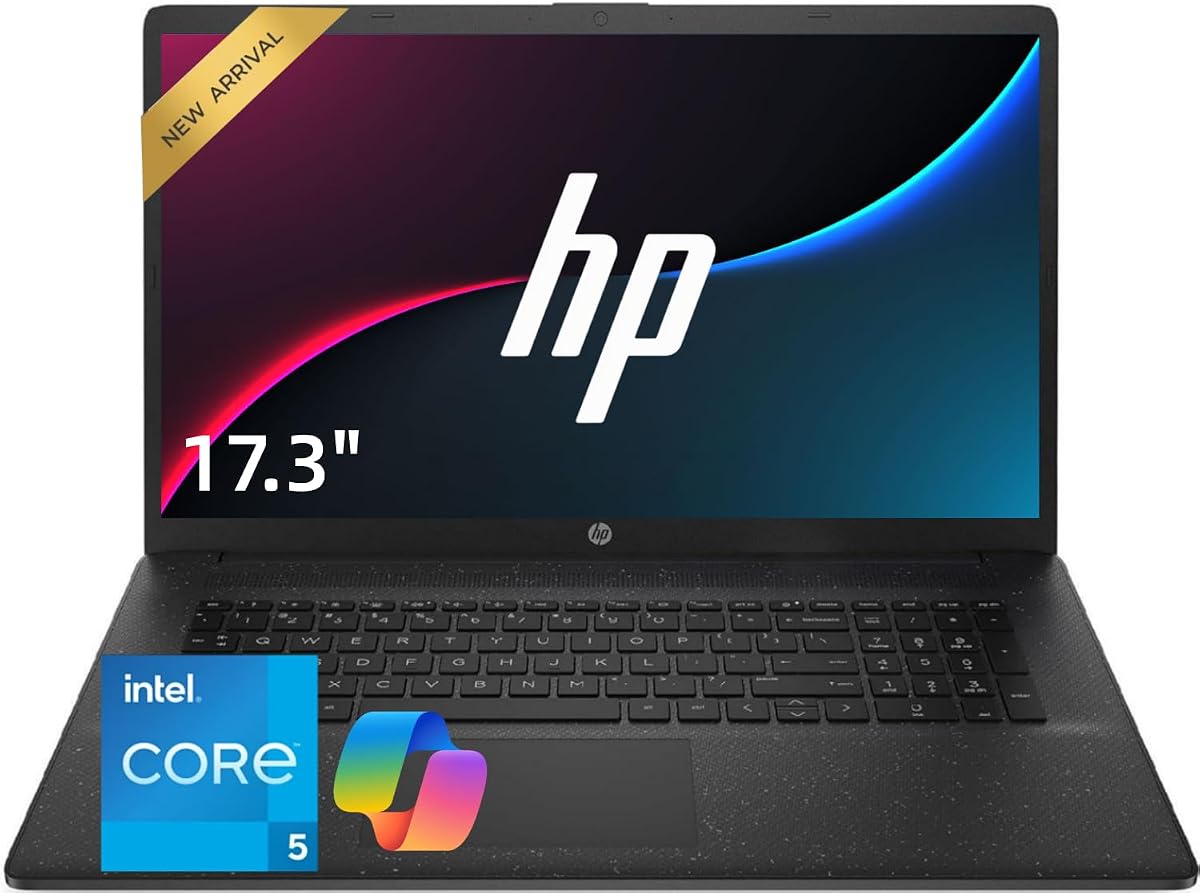
The HP 17.3-Inch Core 5 is designed specifically around number-heavy productivity, with a full-size keyboard, dedicated numeric keypad, and expansive display. Its supplied listing does not include a customer rating, but the core configuration is clearly documented: a ten-core Intel Core 5 120U processor, 32GB of RAM, and a 1TB solid-state drive.
We may earn a commission when you buy through this link, at no additional cost to you.
At 17.3 inches, the screen offers considerable room for spreadsheets, reports, browser pages, and side-by-side work. That makes it attractive for accounting, bookkeeping, home-office use, and students who prefer seeing more rows and columns without constantly scrolling. Solid-state storage supports quick startup and file access, while Wi-Fi 6 and the stated HDMI and USB connectivity simplify everyday peripheral use.
The obvious trade-off is physical footprint. A large-screen laptop is less convenient to carry than a 15.6-inch model, and no rating or detailed battery information is supplied. The listing also provides a general productivity description rather than a complete breakdown of every port and display characteristic, so buyers should inspect the final specifications closely.
It is best for users who spend most of their work at a desk and regularly handle numbers. If your priority is the easiest possible entry into long tables of figures, the full-size keypad and large panel can outweigh the reduced portability of smaller alternatives.
The 17.3-inch panel reduces the need for frequent vertical scrolling and makes detailed spreadsheets easier to inspect. Paired with the dedicated number pad, it creates a practical workspace for financial records, reports, inventories, and administrative forms.
With a ten-core processor, 32GB of memory, and 1TB of storage, the configuration offers comfortable capacity for office software, remote meetings, browser-heavy sessions, and multiple open work projects.
We may earn a commission when you buy through this link, at no additional cost to you.
The Lenovo 16-Inch DDR5 stands out for combining a numeric keypad with a more refined display and modern memory. It carries a 4.2 rating and uses a Core i5-13420H processor with eight cores and 12 threads, 24GB of DDR5 RAM, and 1TB of PCIe solid-state storage.
We may earn a commission when you buy through this link, at no additional cost to you.
Its 16-inch WUXGA anti-glare display operates at 1920 by 1200 and is listed at 300 nits, providing more vertical workspace than a conventional 1080p panel. That extra height is useful for spreadsheets and documents, while the numeric keypad supports rapid numeric entry. A 720p webcam with a physical privacy shutter adds practical protection during meetings and classes.
Connectivity is unusually varied for a portable model. The laptop includes two USB-A ports, a USB-C port with power delivery and DisplayPort, HDMI 1.4, an SD card reader, and a headphone jack, along with Wi-Fi 6 and Bluetooth 5.2. It weighs 3.70 pounds and supports fast charging, though the absence of a listed Ethernet port may matter in some offices.
This is the premium pick for someone who wants more than a routine numeric keypad. It is best suited to mobile professionals, students, and small-business owners who value DDR5 memory, a taller display, modern ports, and privacy features in a relatively portable 16-inch chassis.
The 1920 by 1200 resolution provides 11% more vertical space than 1080p according to the supplied description. That difference is meaningful when viewing long documents, financial tables, or several application windows without reducing the width of the text.
DDR5 memory, USB-C power delivery and video output, DisplayPort support, HDMI, and an SD card reader provide a flexible setup for commuting professionals. The result suits users who alternate between the laptop and external accessories.
We may earn a commission when you buy through this link, at no additional cost to you.
This HP 17.3-Inch Core 5 combines a large workspace, 32GB of memory, and a dedicated numeric keypad with a camera privacy shutter. The listing describes a ten-core Intel Core 5 120U processor capable of boosting up to 5.0GHz, 32GB of DDR4 RAM, and a 1TB PCIe NVMe solid-state drive.
We may earn a commission when you buy through this link, at no additional cost to you.
Its large display is clearly oriented toward business work, with room for spreadsheets, reports, office applications, and multiple windows. The numeric keypad supports data entry, while the privacy shutter gives the camera an added layer of control. Upgrade-oriented memory and storage are positioned for extensive browser use, large files, accounting programs, and long-term professional workloads.
The port list includes USB 3.0 Type-C, USB 3.0 Type-A, an AC smart-pin connection, HDMI, a headphone and microphone combination jack, Wi-Fi 6, and Bluetooth 5.4. This is a good modern selection, although an Ethernet connector is not listed. As with the other 17.3-inch HP model, no customer rating is provided, so the technical configuration is the clearest basis for comparison.
Choose this laptop if your desk-based work involves numerical documents and you value the privacy shutter. It may appeal especially to accounting, administration, and home-office users who want abundant memory and storage without requiring a small chassis.
Thirty-two gigabytes of DDR4 memory gives the system comfortable capacity for concurrent applications, heavy browser sessions, accounting software, and large working documents. The 1TB NVMe drive complements it with room for business files and fast access.
The physical shutter prevents the camera from being used when the user needs assurance that it is covered. It is a straightforward addition for offices, shared workspaces, and virtual meeting environments.
We may earn a commission when you buy through this link, at no additional cost to you.
The HP 17.3-Inch Ryzen 5 offers a large-screen, number-friendly package with a 4.5 rating. It is listed with an AMD Ryzen 5 processor, 16GB of RAM, 512GB of SSD storage, a 17.3-inch Full HD anti-glare display, and a full-size keyboard with a 10-key numeric keypad.
We may earn a commission when you buy through this link, at no additional cost to you.
The anti-glare panel and broad workspace suit office tasks, study, spreadsheets, and entertainment. A Wide Vision 720p camera and digital microphones support video communication, while HP Fast Charge and stated long battery life make the large form factor more manageable for a full day away from a desk. The slim bezel, silver finish, and relatively portable design soften the visual bulk.
Windows 11 is preloaded with built-in AI Copilot features described as helping organize tasks, summarize information, and create content. Office 365 for the web supports browser-based documents, presentations, and spreadsheets. The trade-offs are the 512GB storage capacity, which is modest for users accumulating large files, and the reduced portability inherent to a 17.3-inch computer.
This is an appealing large-display choice for students, home-office workers, and general business users who want a full number pad without moving up to the higher-memory configurations. It is especially suitable for users who value the stated battery life, familiar HP styling, and easy access to web-based office tools.
The 10-key pad provides a dedicated area for digits and arithmetic keys. On a 17.3-inch chassis it has room to sit comfortably rather than feeling compressed, making the layout more useful for sustained spreadsheet and data-entry work.
A 720p Wide Vision camera and digital microphones form a practical setup for online meetings and classes. The Full HD anti-glare display provides enough room for a document or call while remaining usable in typical office lighting.
We may earn a commission when you buy through this link, at no additional cost to you.
The HP 15.6 Flagship carries the highest listed rating among these picks at 4.7. Its core configuration combines a four-core Intel Core i3-1215U processor capable of reaching 4.4GHz with upgraded 32GB RAM and a 1TB NVMe solid-state drive, giving the system more memory and storage than many similarly compact business laptops.
We may earn a commission when you buy through this link, at no additional cost to you.
The 15.6-inch Full HD format makes it a practical middle ground between a small ultraportable and a large desktop replacement. A dedicated numpad satisfies users who work with numbers, while Fast Charge support helps reduce time spent connected to power. Bluetooth, Wi-Fi, HDMI, Windows 11, and an included GM accessory round out the stated package.
The processor's four-core arrangement is the main qualification. It is less elaborate than the eight- and ten-core Ryzen 7, Ryzen 5, and Core 5 alternatives, and the supplied information does not detail display brightness, weight, ports, or battery capacity. Those omissions make the 32GB memory, NVMe drive, numeric keypad, and strong user rating especially important factors in the decision.
This laptop is best for a buyer who wants a familiar 15.6-inch business format, ample memory, generous storage, and a numeric pad without moving to a 17.3-inch footprint. It is a sensible choice for everyday office productivity, spreadsheets, remote work, and number-heavy routines where storage capacity matters more than maximum core count.
The combination of 32GB RAM and a 1TB NVMe drive gives this model room for many open applications and a substantial collection of business files. Solid-state storage also supports responsive startup and file access.
The 15.6-inch size preserves a relatively manageable footprint while providing a full keyboard and numeric pad. It is a more portable alternative to the 17.3-inch models when desk space and carrying convenience both matter.
We may earn a commission when you buy through this link, at no additional cost to you.
The HP 255 G10 Quad-Core combines the highest numerical rating in the list with a notably portable design. It weighs 3.4 pounds, measures 0.73 inch thick, and includes a 15.6-inch Full HD IPS anti-glare display, 16GB of upgraded RAM, and a 512GB SSD for a compact everyday business configuration.
We may earn a commission when you buy through this link, at no additional cost to you.
Its Ryzen 3 7330U processor provides four cores and eight threads with boost capability up to 4.3GHz. Connectivity includes two USB Type-A ports, one USB Type-C port, HDMI 1.4b, a headset connection, Wi-Fi 6, and Bluetooth 5.3. A wide dynamic range HD camera, dual-array microphones, and AI-based noise reduction make it suitable for virtual meetings, while Windows 11 Pro and Microsoft Copilot support daily workflows.
The important caveat is that the supplied product title and feature description do not explicitly confirm a numeric keypad. Because that feature is central to this roundup, buyers should verify the keyboard photograph or manufacturer layout before assuming this configuration qualifies. The 41Wh battery and entry-level Ryzen 3 processor also make it less compelling for sustained heavy workloads than the Ryzen 7 alternatives.
For someone who does not need a number pad, the 255 G10 remains an attractive lightweight office laptop with a sharp anti-glare screen, modern connectivity, and strong user feedback. It should be considered within this list only after confirming that the exact keyboard includes the required numeric keypad.
The 3.4-pound weight and 0.73-inch profile make this one of the more portable business laptops here. Its slim construction is easier to carry than the 17.3-inch alternatives while still providing a conventional 15.6-inch work area.
The wide dynamic range camera, dual-array microphones, and AI-based noise reduction support clearer virtual collaboration. Wi-Fi 6 and Bluetooth 5.3 also provide a contemporary wireless foundation for daily office use.
We may earn a commission when you buy through this link, at no additional cost to you.
The Laptop S7HI is a lightweight 15-inch system intended for travel, school, work, and general computing. It has a 4.4 rating and weighs 3.6 pounds, with the supplied specifications emphasizing portability, a preinstalled genuine Windows 11 system, and an approachable everyday configuration.
We may earn a commission when you buy through this link, at no additional cost to you.
Its Intel 5205U processor has a 1.9GHz base frequency and works with 6GB of RAM and 128GB of internal storage. An additional expansion slot offers 512GB of capacity. Connectivity includes USB Type-C, HDMI, an SD card reader, dual-band Wi-Fi, and Bluetooth 4.2, while the slim enclosure surrounds a 15-inch HD IPS display.
The most important limitation for this guide is that neither the product title nor the supplied feature description confirms a dedicated numeric keypad. That should be verified directly with the seller before purchase. The 6GB memory and 128GB base storage are also considerably more constrained than the 24GB, 32GB, and 40GB configurations elsewhere in the roundup.
This model makes the most sense for users who prioritize portability, Windows 11, and basic office or study tasks rather than demanding specifications. Its 4.4 rating is encouraging, but the keypad requirement is not clearly met in the available information, so it should be treated as a conditional selection until the exact layout is confirmed.
At 3.6 pounds, the Laptop S7HI is designed to move comfortably between classes, offices, and home environments. Its slim profile and 15-inch IPS display provide a practical balance of screen space and portability.
The 128GB internal drive is supported by an expansion slot offering 512GB, allowing users to add capacity as documents and media accumulate. USB Type-C, HDMI, and the SD card reader add further ways to move and connect data.
We may earn a commission when you buy through this link, at no additional cost to you.
Choosing among laptops with numpad means balancing keyboard usefulness with processor performance, memory, display quality, portability, connectivity, and the way your work consumes data. The most important first step is confirming that the exact model includes a dedicated numeric keypad rather than assuming every 15.6-inch laptop has one.
A numeric keypad can substantially improve entry speed for spreadsheets, invoices, accounting records, and database fields. It also separates number entry from the primary typing area and provides dedicated arithmetic keys. However, some compact laptops omit the pad or compress it into the keyboard, so buyers should examine the product photograph, full layout, and model specifications before ordering.
The models range from a four-core Ryzen 3 and i3 to eight-core Ryzen 7 and Core i5 processors and a ten-core Core 5 configuration. General browsing, document editing, and video meetings place less demand on processing power, while many browser tabs, large spreadsheets, virtual meetings, and business applications benefit from additional cores and threads.
Memory capacity affects how comfortably a laptop can hold multiple applications and browser tabs. The list includes 6GB, 8GB, 16GB, 24GB, 32GB, and 40GB configurations. Larger allocations are useful for extensive office use, cloud platforms, and accounting software, while lighter configurations are more appropriate for writing, learning, and basic browsing.
Solid-state storage provides fast startup and file access, but capacity determines how many applications and documents you can retain locally. The choices here range from 128GB and 256GB to 512GB and 1TB. Some budget systems include an expansion slot, allowing users to add storage later rather than relying only on the original capacity.
A 15.6-inch Full HD display offers a familiar balance of screen space and portability, while 16-inch and 17.3-inch models provide more room for spreadsheets and side-by-side work. Larger displays often reduce 1080p resolution unless the model offers a higher-resolution panel, as seen with the Lenovo's WUXGA screen. Consider both working space and how often the computer must be carried.
USB-A, USB-C, HDMI, headphone connections, card readers, and Ethernet support determine how easily you can connect monitors, storage, peripherals, and networking. Wi-Fi 6 is present on several models, while some budget choices use Wi-Fi 5. Physical camera switches or shutters add useful privacy control for meetings and public workspaces.
The lightest listed models weigh about 3.3 to 3.6 pounds, making them convenient for commuting and travel. Large-screen options are better for stationary work, where the extra display area matters more. Weight alone does not describe every dimension, but comparing the stated figures helps identify whether the laptop is primarily a mobile companion or a desk-based productivity tool.
Windows 11 Pro adds management, identity, and remote-access features, while standard Windows 11 supports general personal and office use. One model also includes Office 365 for the web, and another notes that its seal was opened for memory and storage upgrades. Warranty coverage should be checked for both upgraded and original components before purchase.
Begin by configuring your account, system updates, privacy controls, and preferred security settings. If the keypad is new to you, practice entering numbers with the Num Lock key active and confirm that the indicator light reflects the correct mode. This avoids accidentally entering navigation commands when the numeric overlay is enabled.
Use the keypad for extended numerical work while retaining the main keyboard for text. Keeping frequently used functions in familiar positions will reduce errors, and external pointing devices such as a mouse can make spreadsheet navigation more efficient. For sensitive information, use the webcam shutter or physical camera switch whenever it is not actively needed.
Keep the system in a cool, ventilated environment and avoid blocking its air passages. Solid-state drives benefit from regular operating-system updates and avoiding abrupt shutdowns, while memory and storage upgrades should be performed using compatible components. Preserve the original packaging and documentation, and retain the supplied warranty information for future support needs.
A built-in keypad is more convenient because it does not require another device or a free USB port. It is especially useful for sustained number entry, although the keys may be smaller and the layout may shift the main keyboard toward the left. An external numeric keypad can still be preferable for users who want a full-size calculator layout.
A 15.6-inch model generally offers the strongest balance between keypad space and portability. A 16-inch display adds room for documents, while a 17.3-inch model is better suited to desk-based spreadsheet work. If you commute frequently, the smaller footprint and lower weight of a 15.6-inch option may be more valuable than extra screen space.
No. Several compact laptops omit the keypad or place it in a compressed layout. The supplied details for the HP 255 G10 Quad-Core and Laptop S7HI do not explicitly confirm one, so buyers should check the keyboard image and detailed layout for the exact configuration before ordering.
Sixteen gigabytes is a sensible starting point for regular spreadsheet work, while 24GB or more provides additional comfort for many browser tabs, reporting tools, and concurrent business applications. Memory needs also depend on the software and number of open workloads, so users should consider the programs they routinely use.
It is particularly useful when entering totals, percentages, dates, product codes, and identifiers. For primarily narrative tasks it may add little, but a separate numeric area can prevent accidental number entry and allow faster work in software with large tables.
The choice depends on configuration rather than brand alone. The Lenovo V15 stands out for 40GB of memory, while the Lenovo 16-inch model offers DDR5 memory and a taller WUXGA display. HP options range from a lightweight 15.6-inch design to larger 17.3-inch models with privacy shutters and business-oriented connectivity.
Confirm the exact keyboard layout, screen size, memory, storage, processor, operating system, port selection, and warranty terms. Also check whether the machine has an Ethernet connection, camera privacy control, and expansion options if those features matter. Seller configurations can change, so the current listing is the final point of reference.
That depends on the seller and the component changed. The HP 255 G10 Quad-Core description states that upgraded RAM and SSD receive one year of coverage from PCOnline US while other components retain the original one-year manufacturer coverage. Keep receipts and confirm the terms directly before opening or modifying any system.
The Lenovo V-Series V15 is the strongest all-around choice because it combines an explicitly identified numeric keypad, a Ryzen 7 processor, 40GB of memory, 1TB NVMe storage, and business connectivity including RJ45. The 15.6-Inch AMD Numpad Laptop is the budget-focused alternative, while the Lenovo 16-Inch DDR5 model stands out with modern memory, a taller anti-glare display, and extensive ports.
For users who work primarily at a desk, the 17.3-inch HP models offer more screen area and comfortable full-size keypads. Those who need strong storage in a smaller enclosure may prefer the HP 15.6 Flagship, while the HP 255 G10 Ryzen 7 provides a conventional business balance. Always verify the numeric keypad in the exact listing, especially for models whose supplied descriptions do not explicitly confirm it.
Before placing an order, check the current Amazon listing for the processor, memory, storage, display, ports, operating system, privacy features, warranty, and included accessories. Listings can change over time, so the live product page is the final authority on the configuration you will receive.