
Dell Precision 7680 RTX 1000 Ada
4.3Editor score
RTX 1000 Ada 6GB graphics
Intel i5-13600HX processor
32GB DDR5 CAMM memory
Four external display support
Choosing a laptop for CAD work requires more than a fast processor. Detailed models, realistic rendering, large assemblies, and multiple engineering applications all place demanding requirements on graphics memory, system memory, cooling, storage, and display quality. The strongest candidates balance workstation-class hardware with the portability and battery life needed for professional work.
We compared the featured laptops by processor capability, dedicated graphics memory, RAM, storage, screen size and resolution, external-display support, connectivity, operating system, portability, and professional certifications or workstation features. The list covers flagship Dell Precision models, HP and Lenovo mobile workstations, a more portable Precision 3490, and a renewed Precision 3581 configuration.
Each review highlights the hardware that distinguishes the model within a CAD workflow rather than treating every workstation as interchangeable. The top choices are the Dell Precision 7680 with an i9 and RTX 2000 Ada, the Dell Precision 7680 with an RTX 1000 Ada, and the Dell Precision 7780 with an RTX 4000 Ada. Product availability, configurations, and prices can change, so verify current listings before purchasing.
4.3Editor score

3.9Editor score

5.0Editor score
As an Amazon Associate we earn from qualifying purchases.
The comparison below highlights the major processor, graphics, memory, and storage differences among the ten featured CAD laptops, helping you identify the configuration that best matches your model complexity and working environment.




The Dell Precision 7680 i9 combines the flagship Precision 7000 design with an Intel Core i9-13950HX vPro processor capable of reaching 5.5GHz. It carries a 4.4 rating and is particularly compelling for CAD users whose workloads depend on fast single-threaded performance, such as manipulating complex drawings, rebuilding large assemblies, or responding to detailed 3D navigation. Its 32GB of DDR5 CAMM memory and 1TB PCIe NVMe SSD also provide a strong foundation for professional multitasking.
We may earn a commission when you buy through this link, at no additional cost to you.
This configuration is built around the 7680's high-end workstation design, which is intended to offer greater performance and expandability than Dell's 3000- and 5000-series Precision families. The processor includes Intel vPro capabilities, while the system provides Windows 11 Pro, enterprise security features, ISV certifications, and MIL-STD-810H testing. For architecture, engineering, photography, software development, and advanced technical work, these workstation characteristics can be more relevant than raw gaming-oriented specifications.
The main limitation is that the listed GPU is integrated Intel UHD Graphics rather than a dedicated NVIDIA workstation card. That makes this model less suitable than the RTX-equipped 7680 configurations when shader-heavy visualization, GPU rendering, ray tracing, or professional graphics performance is central to the work. The 1TB SSD is generous for many CAD files, although users handling large libraries, simulation datasets, or multiple project revisions may want additional storage. The 16-inch FHD+ anti-glare display is useful, though a higher-resolution panel may be preferable for detailed drafting.
Despite those trade-offs, this i9 model is a strong choice for users who value CPU speed and professional manageability more than GPU rendering. It can serve architects, engineers, data analysts, developers, and technical users running demanding office applications alongside CAD. Users creating intensive 3D visualizations should move to one of the RTX 2000 Ada or RTX 4000 Ada variants, while those focused on CPU-heavy drafting and modeling will find this configuration especially compelling.
The i9-13950HX's high clock speeds and workstation-oriented vPro platform make this model well suited to compute-intensive design tasks and applications that benefit from strong processor responsiveness. It also leaves GPU resources uncommitted for users whose software primarily relies on CPU rendering or standard professional graphics pipelines.
Windows 11 Pro, ISV certifications, Ethernet, Wi-Fi 6E, Bluetooth, Thunderbolt 4, HDMI, USB-A, and USB-C create a practical environment for networked design teams. The webcam privacy shutter and support for three 4K external monitors also improve everyday office and meeting workflows.
We may earn a commission when you buy through this link, at no additional cost to you.
The Dell Precision 7680 RTX 1000 Ada is the top budget selection in this guide because it combines a dedicated NVIDIA professional GPU with 32GB of DDR5 memory in a capable flagship workstation chassis. Its 4.3 rating reflects a configuration that is well matched to mainstream CAD, BIM, architecture, and visualization work. The Intel Core i5-13600HX processor reaches up to 4.8GHz, while the RTX 1000 Ada GPU provides 6GB of dedicated memory for graphically intensive applications.
We may earn a commission when you buy through this link, at no additional cost to you.
Unlike the first Precision 7680 in the list, this model includes an NVIDIA RTX 1000 Ada GPU. That distinction is important for AutoCAD, SolidWorks, Revit, and other programs that benefit from hardware acceleration, viewport performance, and professional graphics drivers. It also supports up to four external 4K monitors at 60Hz without a docking station, which is valuable for users who need model views, reference drawings, specification documents, and communication windows open simultaneously.
The trade-off is that the RTX 1000 Ada's 6GB of VRAM can become restrictive for exceptionally large assemblies, dense point clouds, heavy photogrammetry, or professional ray-traced rendering. The i5 processor is also a step below the i9 and i7 alternatives, although its performance is substantial for many CAD workflows. Storage is limited to a listed 1TB PCIe NVMe SSD, and the 16-inch FHD+ display is functional but not especially expansive for fine-detail work.
This is the most balanced pick for a professional who needs dedicated graphics without stepping up to a higher-tier GPU. It should suit architects, engineers, photographers, developers, and other technical users who want Windows 11 Pro, ISV compatibility, vPro features, and flexible connectivity. For extremely large models or GPU rendering, move up to the RTX 2000 Ada configuration; for lighter CAD, the i9 option may provide faster CPU response.
The RTX 1000 Ada GPU adds dedicated graphics memory and professional driver support, making this a safer choice for viewport-heavy CAD than a system relying only on integrated graphics. It offers a practical middle ground for design visualization, rendering, and engineering applications.
Support for four external 4K displays is one of the system's standout practical features. Engineers and architects can distribute CAD windows, web references, and collaboration tools across several screens without relying on a separate display for basic operation.
We may earn a commission when you buy through this link, at no additional cost to you.
The HP ZBook 8 G1i stands out as a polished mobile workstation with a 16-inch touchscreen, 64GB of DDR5 memory, a 2TB SSD, and broad professional application certification. Its 4.1 rating reflects a capable overall package, and the Intel Core Ultra 7 255H processor provides 16 cores, 16 threads, up to 5.1GHz, and a 24MB L3 cache. It is particularly attractive for users who need generous memory and storage in a relatively portable workstation design.
We may earn a commission when you buy through this link, at no additional cost to you.
The NVIDIA RTX 500 Ada GPU has 4GB of dedicated GDDR6 memory and is intended for rendering, simulation, AI development, and graphics-intensive professional work. HP lists certifications for applications including SolidWorks, AutoCAD, ANSYS, Revit, and MATLAB, giving this model particular appeal for engineering and design users. The 16-inch WUXGA touchscreen has 1920-by-1200 resolution, 300-nit brightness, and anti-glare treatment, while native multi-display support extends to 8K at 60Hz through Thunderbolt 4.
The 4GB graphics memory is the clearest constraint. While it can support mainstream CAD and visualization, it is less comfortable for large assemblies, high-resolution rendering, or datasets that place heavy demands on VRAM. The 300-nit touchscreen is usable but does not match the 500-nit panel offered by the premium Precision 7780. Users who need a color-critical panel may also find other mobile workstations more appropriate. On the positive side, 64GB of RAM and 2TB of storage provide outstanding capacity for simulations, large project libraries, and extensive multitasking.
The ZBook 8 G1i is best for engineers and designers who prioritize memory, storage, connectivity, and mobile workstation features. Wi-Fi 7, Bluetooth 5.4, a fingerprint reader, Windows 11 Pro, and three-year workstation support make it ready for corporate or collaborative environments. It is a particularly strong option when you need more RAM than a mainstream mobile workstation provides but do not require the 8GB or 12GB graphics memory found in the higher-end Dell configurations.
The 64GB memory configuration is a major advantage for large assemblies, simulation tools, background rendering, and users who keep several professional applications open. It also provides room to use virtualization or specialized engineering software alongside core CAD tools.
Wi-Fi 7, a 5MP privacy-shutter camera, fingerprint reader, Windows 11 Pro, and a touchscreen create a complete mobile work environment. Native support for very high-resolution external displays is useful for users who need expansive reference workspaces.
We may earn a commission when you buy through this link, at no additional cost to you.
The renewed Dell Precision 3581 is a practical entry into the Precision 3000 series, combining an Intel Core i7-13800H processor with 32GB of DDR5 memory, 1TB of NVMe storage, and a dedicated NVIDIA RTX A500 GPU. Its 15.6-inch Full HD non-touch display makes it smaller and potentially easier to carry than the flagship 16- and 17.3-inch models. No customer rating is supplied, so performance should be evaluated from the listed specifications and condition.
We may earn a commission when you buy through this link, at no additional cost to you.
The 14-core i7 processor can reach 5.2GHz, giving this laptop strong responsiveness for CAD drafting, model manipulation, and multitasking. The RTX A500 provides 4GB of dedicated GDDR6 memory and can accelerate professional design and visualization workflows. DDR5 memory running at 4800MHz supports demanding application combinations, while the 1TB PCIe NVMe drive provides fast startup and file access. The listed two-year on-site Next Business Day service adds an important support advantage for professional buyers.
Because this is a renewed configuration, cosmetic condition, battery health, warranty documentation, and included accessories should be checked carefully. Windows 11 Home is suitable for many individual users, but organizations may need Pro or enterprise features that are not included as listed. The 4GB graphics memory and 15.6-inch FHD screen also place it below larger RTX-equipped models for heavy visualization and spacious drafting, respectively.
It makes the most sense for students, junior designers, cost-conscious engineers, and small firms that need dedicated workstation graphics in a compact form. It can handle mainstream CAD, BIM, technical drawing, and general 3D work, though demanding renders or very large assemblies may strain its GPU. Buyers who want maximum confidence in a new-system warranty and larger storage may prefer a factory-configured model, while those comfortable with renewed purchases can gain substantial value.
The 15.6-inch chassis and lightweight professional design are easier to transport than larger flagship workstations. It still provides 32GB of memory and dedicated graphics, making it a credible option for mobile CAD users who do not need a large internal canvas.
The stated on-site Next Business Day service and warranty coverage are meaningful for business use. Still, renewed hardware should be evaluated carefully, and buyers using managed company systems should confirm that the listed Windows edition and service terms meet their requirements.
We may earn a commission when you buy through this link, at no additional cost to you.
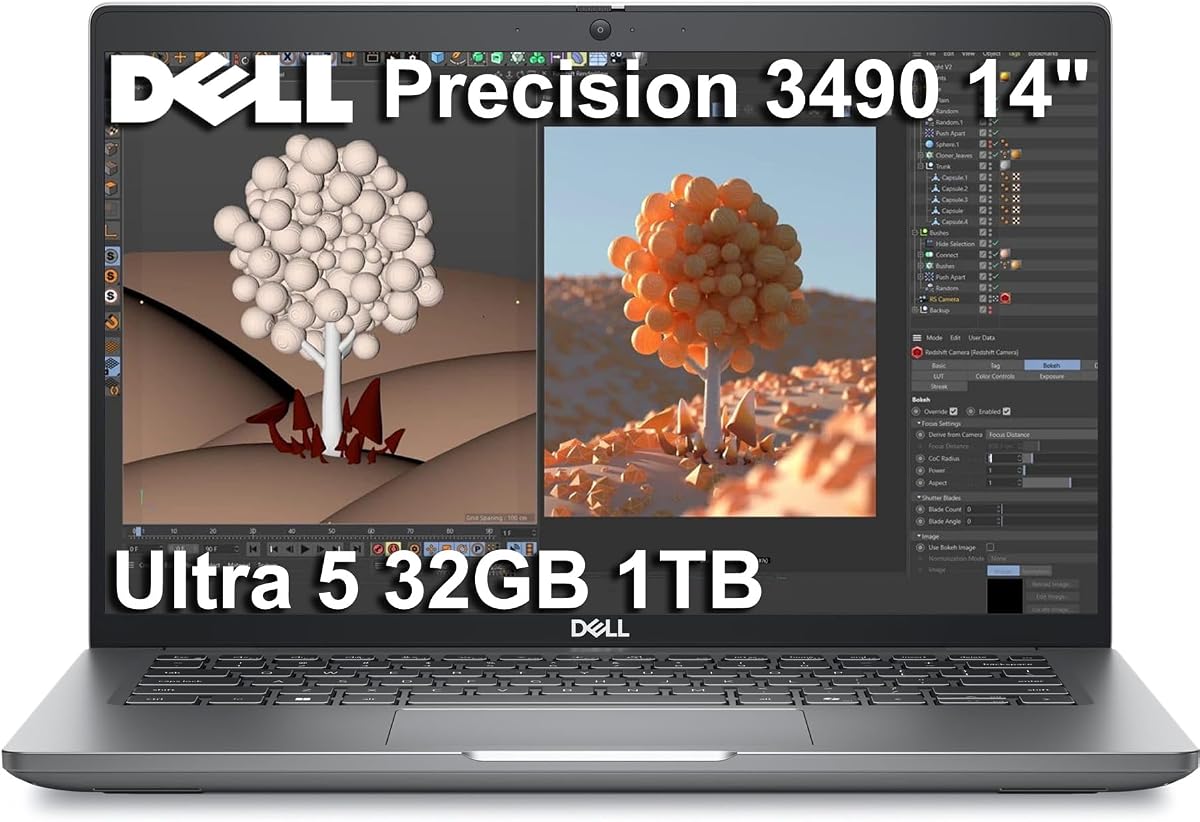
The Dell Precision 3490 prioritizes mobility in a way the larger Precision 7000 models do not. Its listed weight is just 3.09 pounds, yet it retains 32GB of DDR5 memory, a 1TB SSD, an Intel Core Ultra 5 135H processor with 14 cores, and Windows 11 Pro. With a 5.0 rating, it is one of the strongest choices for architects and engineers who regularly move between job sites, studios, client offices, and meetings.
We may earn a commission when you buy through this link, at no additional cost to you.
The processor reaches up to 4.6GHz and is designed for efficient multitasking and AI-assisted productivity. The laptop supports up to three external 4K monitors through HDMI and Thunderbolt without requiring a docking station for display output. Its full complement of two Thunderbolt 4 ports, two USB-A ports, HDMI, Ethernet, Wi-Fi 6, and Bluetooth makes it practical for a wide range of peripherals, while a 1080p HDR RGB webcam and privacy shutter support secure collaboration.
The major compromise is integrated Intel graphics. This laptop is better suited to conventional 2D drafting, technical documentation, floor plans, less demanding BIM viewing, and engineering applications than GPU-intensive visualization. The 14-inch FHD panel offers less workspace than the 16-inch and 17.3-inch alternatives, and its 1920-by-1080 resolution may reveal fine lines less clearly than a higher-resolution display. It also lacks the dedicated graphics memory that can make complex 3D scenes feel responsive.
Despite those limitations, the Precision 3490 delivers an appealing combination of light weight, professional durability, memory, and connectivity. It is a good choice for site visits, travel, and hybrid work where mobility matters more than maximum rendering performance. Users who regularly build massive assemblies or conduct GPU-heavy simulation should choose a dedicated RTX configuration, while lighter CAD users gain a capable, durable machine that is easier to carry.
A 3.09-pound listed weight makes this model notably easier to transport than a full-size mobile workstation. The 32GB memory configuration ensures that portability does not come at the expense of basic professional multitasking capacity.
Windows 11 Pro, a webcam privacy shutter, Ethernet, Wi-Fi 6, and three-display support create a practical corporate workspace. ISV certifications and MIL-STD-810H testing add reassurance for users who depend on their laptop in offices, studios, and field environments.
We may earn a commission when you buy through this link, at no additional cost to you.
The Dell Precision 7780 with RTX 4000 Ada is the premium choice in this guide, combining a 12GB dedicated NVIDIA GPU with the Intel Core i9-13950HX processor. Its 5.0 rating and flagship 17.3-inch display make it the strongest option here for high-end CAD, BIM, rendering, simulation, and complex engineering visualization. It is designed for users who need workstation graphics rather than merely a fast general-purpose laptop.
We may earn a commission when you buy through this link, at no additional cost to you.
The RTX 4000 Ada's 12GB of dedicated memory provides substantially more headroom than the 4GB and 6GB alternatives in the list. That advantage is useful for large assemblies, dense point clouds, high-resolution textures, detailed architectural visualization, and ray-traced rendering. The i9 processor reaches up to 5.5GHz, while 32GB of DDR5 CAMM memory and a 2TB PCIe NVMe SSD provide a capable platform for CPU rendering, simulation, and extensive project storage.
The display is one of the standout features. Its 17.3-inch Full HD IPS panel offers 99% DCI-P3 color coverage and 500-nit brightness, producing a more vivid and color-capable workspace than the other listed screens. The system supports up to four external 4K monitors, and its port selection includes dual Thunderbolt 4, USB-C, USB-A, HDMI, and Ethernet. Windows 11 Pro, ISV certifications, and MIL-STD-810H testing reinforce its professional positioning.
The trade-off is size and cost. A 17.3-inch mobile workstation is bulkier to carry than the 14-inch Precision 3490 or 15.6-inch Precision 3581, and the RTX 4000 configuration represents a major step up in expense. Even so, this model is the most convincing option for architects, engineers, photographers, simulation users, and technical professionals who need dedicated VRAM and a color-rich display. It is the sensible premium recommendation for heavy models and serious visualization.
The 12GB of dedicated VRAM gives the RTX 4000 Ada configuration considerably more room for textures, geometry, and rendering tasks than the lower-memory GPUs in the roundup. It is the key reason to consider this model for large assemblies and advanced visualization.
The 99% DCI-P3 panel and 500-nit brightness offer a clear advantage for visual design, photography, rendering review, and detailed professional viewing. The large dimensions also reduce the need to constantly switch between model windows and reference material.
We may earn a commission when you buy through this link, at no additional cost to you.
The Dell Precision 7680 RTX 2000 Ada is the most balanced configuration in the guide. It combines an Intel Core i7-13850HX vPro processor, an NVIDIA RTX 2000 Ada GPU with 8GB of dedicated memory, 32GB of DDR5 CAMM RAM, and a 2TB PCIe NVMe SSD. These components address the main demands of professional CAD without pushing into the size and expense of the top 17.3-inch flagship, although its supplied 3.9 rating is the lowest among the rated picks.
We may earn a commission when you buy through this link, at no additional cost to you.
The 8GB GPU serves as the central feature. It offers a useful middle ground between entry-level 4GB graphics and the RTX 4000 Ada's 12GB, giving users more room for detailed scenes, textures, and GPU-accelerated visualization. The i7 processor provides strong workstation-class response, while 2TB of storage accommodates substantial CAD libraries, project files, and software. Four external 4K monitor connections make the system particularly effective as the center of a multi-screen design desk.
The 16-inch FHD+ anti-glare display is the most significant compromise. Its stated 45% NTSC coverage is less expansive than the 99% DCI-P3 color gamut on the Precision 7780, so it may not satisfy users doing precise color-critical work. The 3.9 rating is not exceptionally strong, and purchasers should interpret it alongside the supplied configuration rather than as a measure of the entire Precision 7680 family. Nevertheless, the hardware mix itself is highly compelling for 3D CAD.
This configuration is an excellent recommendation for architects, engineers, video editors, and other professionals who need a capable GPU, generous storage, and a powerful processor in one balanced 16-inch system. It is particularly suitable for teams that work between AutoCAD, Revit, SolidWorks, Adobe tools, and visualization applications. Users who need maximum color accuracy should choose the 7780, while those working primarily with 2D plans can move down to a less graphics-focused configuration.
Eight gigabytes of dedicated graphics memory is a versatile capacity for professional models, real-time visualization, and moderate rendering. Combined with the i7 processor, it gives CAD users a balanced platform without requiring the very largest workstation chassis.
The 2TB NVMe drive offers useful capacity and rapid file access, while support for four external 4K monitors supports command-center-style workflows. Dual Thunderbolt 4, HDMI, Ethernet, and USB-A preserve flexibility for common CAD peripherals.
We may earn a commission when you buy through this link, at no additional cost to you.
The 128GB Dell Precision 7780 is built for CAD professionals whose work places unusual demands on system memory. It combines 128GB of non-ECC DDR5 CAMM memory, a 24-core Intel Core i9-13950HX processor reaching 5.5GHz, 12GB of RTX 4000 Ada graphics memory, and Windows 11 Pro. With a 5.0 rating, it is one of the most technically ambitious configurations listed, especially for large simulations and multi-application workflows.
We may earn a commission when you buy through this link, at no additional cost to you.
The 128GB memory pool is the defining feature. It allows very large assemblies, extensive BIM environments, simulation data, virtualized tools, and multiple simultaneous applications to coexist without the memory pressure that can constrain ordinary laptops. The processor's 36MB cache, vPro support, and 55W power configuration add strong compute capability. Meanwhile, the RTX 4000 Ada GPU with 12GB of GDDR6 memory is well suited to professional graphics, rendering, and visualization.
Its 17-inch Full HD display includes 99% DCI-P3 color coverage, 500-nit brightness, anti-glare treatment, a 60Hz refresh rate, and ComfortView Plus low-blue-light features. Other professional details include a 93Wh battery, an IR camera with shutter, ExpressSign-In, a smart-card reader, and a backlit keyboard. These features make the system feel more like a complete corporate workstation than a general-purpose large laptop.
The notable limitation is storage: only 512GB is listed, which may be consumed quickly by CAD libraries, texture packs, simulation results, and revision archives. The large chassis also reduces portability compared with the 14-inch and 15.6-inch alternatives. This model is best for engineers, simulation specialists, technical studios, and advanced design teams that specifically need enormous RAM. It is less compelling for users whose work is lighter or who prioritize local storage capacity over memory headroom.
With 128GB of RAM, this configuration can handle unusually large project datasets and software combinations. It is particularly valuable for users who repeatedly encounter memory limits when moving between CAD, simulation, rendering, and browser-based tools.
The RTX 4000 Ada's 12GB of VRAM complements the generous system memory, while the 500-nit DCI-P3 display supports high-quality visual review. The result is well aligned with architecture, engineering visualization, and professional content workflows.
We may earn a commission when you buy through this link, at no additional cost to you.
This Dell Precision 7680 configuration expands the standard RTX 2000 Ada model with 64GB of DDR5 CAMM memory while retaining the Intel Core i7-13850HX processor, 8GB dedicated graphics, and 2TB PCIe NVMe SSD. Its 5.0 rating makes it one of the strongest balanced picks for CAD professionals who want ample memory without moving to the 17.3-inch Precision 7780.
We may earn a commission when you buy through this link, at no additional cost to you.
Compared with the 32GB 7680, the additional memory is especially valuable for large assemblies, BIM models, simulation tools, and users who run many applications simultaneously. The 8GB RTX 2000 Ada GPU provides enough dedicated memory for moderately complex visualization and professional GPU workflows. Storage remains generous at 2TB, and the system supports up to four external 4K monitors, making it easy to create a multi-display CAD environment.
Its limitations mirror those of the related 7680. The 16-inch FHD+ anti-glare display has stated 45% NTSC coverage, so it is not the best option for color-critical visualization. The workstation design is bulkier than compact mobile models, and the i7 processor is slightly below the flagship i9 in the lineup. For users who need more graphics memory or a superior internal display, the Precision 7780 is the logical step up.
This model is a strong recommendation for engineering teams, architectural practices, and technical consultants who work with expansive files or several demanding applications. It also suits software developers and analysts who need professional graphics alongside high memory capacity. Buyers should choose it when 64GB is a practical requirement, while the 32GB version may be more efficient for standard drafting and design work.
The 64GB configuration provides a comfortable margin for large documents, simulation tools, and parallel application use. It is a meaningful upgrade when a system is shared between CAD, browser research, communications, and data analysis.
The RTX 2000 Ada provides a useful 8GB graphics buffer while retaining the more manageable 16-inch 7680 format. That combination can be attractive to users who want professional visual performance but do not need the 7780's larger, brighter display.
We may earn a commission when you buy through this link, at no additional cost to you.
The Lenovo ThinkPad P16s Gen 4 is a balanced large-screen workstation for CAD users who value portability, familiar ThinkPad design, and a professional display more than dedicated graphics. It includes an Intel Core Ultra 7 255H processor reaching 5.1GHz, 32GB of DDR5 memory, a 1TB PCIe SSD, and a 16-inch WUXGA display. Its 4.0 rating reflects a versatile platform with some limitations for GPU-intensive 3D work.
We may earn a commission when you buy through this link, at no additional cost to you.
The 16-inch display has 1920-by-1200 resolution, narrow bezels, 400-nit brightness, and anti-glare treatment, making it comfortable for extended drafting and document work. Support for three external 4K monitors improves flexibility when a larger workspace is needed. Connectivity includes two Thunderbolt 4 ports, two USB-A ports, HDMI 2.1, Ethernet, Wi-Fi 7, and Bluetooth 5.4, while a fingerprint reader and backlit keyboard support everyday professional use.
Integrated Intel Graphics is the decisive limitation. The system is better suited to 2D drafting, technical plans, lighter 3D models, and engineering software that does not require a dedicated workstation GPU. It is also less appropriate for intensive rendering, large textured scenes, or professional visualization workflows. The 1TB SSD may be adequate for active projects, but users with extensive archives may need external storage or a larger internal configuration.
The ThinkPad P16s is most appropriate for architects, engineers, software developers, and business professionals who need a large, durable workstation that can travel more comfortably than a full-size 17-inch system. Windows 11 Pro includes BitLocker, Remote Desktop, Hyper-V, and Group Policy management, while ISV certifications and MIL-STD-810H testing support professional reliability. It is a compelling productivity-first CAD laptop, but a dedicated RTX model is the safer choice for advanced 3D work.
The 16-inch WUXGA panel offers a useful balance of workspace and portability. Its 400-nit brightness and anti-glare coating make the screen suitable for long design sessions in bright offices, studios, and field environments.
Windows 11 Pro, a fingerprint reader, Wi-Fi 7, Ethernet, and three-external-monitor support create a secure and connected productivity setup. The configuration is especially attractive for architects and engineers who split time between office applications, CAD, documentation, and meetings.
We may earn a commission when you buy through this link, at no additional cost to you.
CAD laptops range from portable machines for conventional drafting to high-end mobile workstations with dedicated graphics and large memory pools. The right choice depends on model complexity, rendering demands, screen needs, and how often the computer must travel.
The processor affects model loading, viewport updates, calculations, and the responsiveness of commands in CAD software. Intel Core i7 and i9 HX-class processors, as well as the Core Ultra 7 255H, provide substantial performance for demanding applications. Users should consider both core count and clock speed: high clocks assist interactive tasks, while many cores can accelerate parallel simulation, rendering, and background work. A modern workstation-class processor is preferable to relying on a lower-power general-purpose chip.
Integrated graphics can handle conventional 2D drafting, but dedicated NVIDIA workstation graphics provide a major advantage in 3D modeling, realistic visualization, and GPU-accelerated rendering. The available configurations range from 4GB on the RTX A500 and RTX 500 Ada to 6GB, 8GB, and 12GB. Graphics memory determines how much geometry, texture, and scene data can be handled comfortably. Large assemblies, photogrammetry, and detailed rendered environments benefit from 8GB or 12GB.
CAD applications can consume substantial RAM when working with large assemblies, linked Revit files, simulation data, and multiple engineering utilities. The featured systems range from 32GB to 128GB. A 32GB configuration is a sensible baseline for many users, while 64GB provides comfortable headroom for heavy multitasking and oversized models. The 128GB option is intended for specialized workflows that genuinely exceed lower memory capacities.
NVMe storage reduces application launch, project open, and file-transfer delays, but capacity still matters because CAD libraries, textures, render outputs, and archived revisions accumulate quickly. The list includes 512GB, 1TB, and 2TB options. A 2TB drive is more comfortable for active libraries, while 512GB may require disciplined file management or external storage. Confirm the drive type and available expansion options for the exact configuration.
Screen size affects the amount of drawing space available, while resolution influences line clarity and the ability to inspect small details. The featured internal displays range from 14 inches at 1920-by-1080 to 17.3 inches at 1920-by-1080. The Precision 7780 stands out with 99% DCI-P3 color and 500 nits, which benefits visualization and color-sensitive work. Many CAD users also rely on external monitors, making HDMI and Thunderbolt display support important.
A powerful workstation is less useful if it is impractical to carry. The Precision 3490 weighs just 3.09 pounds and is the lightest listed option, while the 15.6-inch Precision 3581 offers another compact alternative. The 16- and 17.3-inch models trade size for larger screens and stronger cooling. Users who travel frequently should balance graphics, memory, and screen dimensions against the need to work from client sites, job locations, and remote offices.
Windows 11 Pro provides enterprise management, security, virtualization, and remote-access capabilities that are useful for professional teams. ISV certifications can improve confidence in application compatibility for tools such as AutoCAD, Revit, SolidWorks, ANSYS, and MATLAB. Warranty length, on-site service, and support terms also matter. The renewed Precision 3581 requires particular attention to condition, included coverage, and operating-system edition.
Professional CAD work often benefits from multiple screens: one for the active model, another for drawings or references, and another for collaboration tools. The featured systems support between three and four external monitors, while the HP ZBook also lists native high-resolution output through Thunderbolt 4. USB-C, Thunderbolt 4, HDMI, and DisplayPort-capable docking options determine which monitors and adapters can be used without relying on a full docking station.
Begin by installing the current graphics drivers, operating-system updates, and licensed versions of your CAD, BIM, simulation, and rendering applications. Connect your preferred peripherals and configure displays before opening a large project. Use the laptop's native resolution for detailed drafting, and verify the scaling of toolbars, text, and command prompts on any external monitor. For demanding work, enable appropriate hardware acceleration in the application's graphics settings and close unnecessary applications before starting a large model.
Maintain a sensible thermal environment by keeping intake and exhaust vents clear and using a hard, level surface. Avoid placing files or soft materials beneath the chassis, and let the system reduce load naturally during heavy renders instead of repeatedly interrupting it. Store important projects in organized directories and maintain at least one separate backup. For transport, use a padded case that protects the corners, avoid leaving the computer in a hot vehicle, and let it return to room temperature before powering it on after a major temperature change.
Periodically check storage capacity, memory use, and application performance so that slowdowns can be traced to the correct resource. Update the system and applications regularly, retain activation records, and confirm backup integrity. If the system is shared, use Windows security, device encryption, strong account credentials, and separate accounts where appropriate. For warranty-sensitive or renewed systems, document the original condition and keep purchase, service, and coverage information in an accessible location.
It depends on the type of CAD you perform. Integrated graphics can be sufficient for many 2D drafting, technical-drawing, and lighter BIM tasks. Dedicated NVIDIA graphics is preferable for dense 3D models, photogrammetry, realistic rendering, large assemblies, and GPU-accelerated viewport performance. Matching the GPU's VRAM to the complexity of your projects is more important than choosing a high-end card that the rest of the system cannot support effectively.
32GB is a practical starting point for many architects and engineers, especially when working with 2D drawings and standard 3D models. Large assemblies, simulation, rendering, virtualization, and numerous simultaneous applications can benefit from 64GB. A 128GB configuration is most relevant to specialized workflows that repeatedly exceed lower capacities. Matching RAM to actual project behavior is more useful than assuming every CAD file requires the maximum available.
A 17.3-inch screen provides more visible workspace and can reduce the need to switch between model panels, drawings, and reference material. However, it is usually heavier and less convenient to carry. The Precision 7780 combines that larger format with a bright 99% DCI-P3 display and an RTX 4000 Ada GPU. Users who travel often may prefer the 14-inch Precision 3490 or 15.6-inch Precision 3581 instead.
Four external 4K monitors are useful when you want separate spaces for the CAD viewport, technical documentation, browser-based references, and communications. They are not mandatory for every user, but they can improve workflow clarity and reduce window switching. Check the laptop's HDMI and Thunderbolt capabilities, the maximum display configuration, and whether a dock or adapter is required for your preferred arrangement.
They can be a practical way to obtain workstation hardware at a lower cost, but condition and coverage should be checked carefully. Examine cosmetic wear, battery health, display quality, included accessories, warranty terms, and the operating-system edition. The renewed Precision 3581 provides a dedicated RTX A500 GPU, 32GB of memory, and on-site service, which makes it potentially useful for mainstream CAD if its individual condition meets your standards.
Windows 11 Pro is generally the better fit for professional and managed work environments because it provides more administration, security, networking, and virtualization capabilities. Windows 11 Home can be adequate for an individual student or designer whose applications run without those business features. Confirm your employer's requirements and the licenses for your required engineering, rendering, and collaboration software before choosing an operating-system edition.
The requirement depends on whether you keep active projects locally or rely on network and cloud storage. A 1TB NVMe drive is a reasonable baseline, while 2TB is more comfortable for extensive libraries, textures, versions, and render outputs. The 512GB configuration can work for users with disciplined file management, but large render archives may require external storage. Fast NVMe performance also reduces delays when opening projects and transferring assets.
The most important factors are the software you use, the complexity of your models, and whether your workflow includes intensive rendering or simulation. Dedicated graphics, adequate VRAM, processor speed, and RAM usually matter more than gaming-specific features. Display clarity, external-monitor support, portability, warranty, and application certification then determine how comfortably the machine fits your daily working environment.
The Dell Precision 7680 RTX 2000 Ada is the strongest all-around recommendation because it balances an i7 processor, 8GB dedicated graphics, 32GB of fast memory, 2TB storage, and four-external-monitor support. The RTX 1000 Ada 7680 is the value-focused alternative, while the Precision 7780 RTX 4000 Ada is the premium selection for users who need more VRAM and a superior color-capable display.
Prioritize the component your software actually uses: graphics memory for demanding 3D scenes, processor speed for responsive modeling, RAM for large assemblies, and storage for project libraries. Consider portability and external displays at the same time, because a technically fast laptop still needs to fit your desk, travel routine, and daily workflow. Professional certifications, warranty coverage, and the operating-system edition are especially important for managed business environments.
Finally, verify the current listing because seller configurations, component availability, warranty information, and prices can change. Use the comparison table to narrow the field, then check the exact processor, GPU, memory, storage, display, and support package before buying. That final verification helps ensure the selected laptop remains suitable for your CAD software and workload.