
Redragon K512 RGB Membrane Gaming Keyboard
4.5Editor score
Six onboard programmable macro keys
Driver-free macro recording workflow
Detachable magnetic wrist rest
Our expert guide compares the best keyboards with macro keys, including switch type, programmability, wireless options, RGB lighting, and comfort.
Keyboards with macro keys put frequently used commands, shortcuts, and complex sequences within easy reach. A useful macro can launch applications, execute a game combo, control media, or automate a repetitive workflow. The strongest models combine dedicated keys with dependable construction, comfortable typing, and software that makes customization understandable rather than overwhelming.
We compared the ten featured keyboards by examining macro capacity, onboard control, switch technology, connectivity, lighting, comfort, and practical extras. The list includes membrane, low-profile mechanical, and full-size mechanical boards, plus models with wired, wireless, and multi-device operation. It also highlights differences between simple onboard recording and deeper software-based configuration.
Each review shows what a product brings to a particular use case, whether that is low-profile portability, tactile gaming response, compact macro storage, or an integrated control deck. Product availability and pricing can change, so shoppers should confirm current specifications and compare the latest listing before purchasing.
4.5Editor score

4.4Editor score
4.3Editor score
This side-by-side overview compares the featured keyboards across macro capacity, connection style, switch design, lighting, and comfort, making it easier to identify the model that fits a particular gaming or productivity setup.


The VSD K1 Pro is a full-featured 87-key mechanical keyboard that treats macro keys as the center of its design. It combines a programmable standard key layout with a built-in TFT display, six display-equipped control keys, and three multifunction knobs. Its 4.1 rating reflects a capable package, although buyers who want a simple plug-and-play membrane board may find the feature set more involved than necessary.
We may earn a commission when you buy through this link, at no additional cost to you.
Its standout quality is the integrated streaming deck. VSD Craf software supports switchable pages, and each page can place six LCD keys and three knobs on the active workspace. Individual controls can display JPG, PNG, or GIF images, while the TFT screen can also show system information such as volume, date, time, backlighting, and connection status. Every standard key is programmable, with onboard macro recording and software-assisted editing for shortcuts, sequences, and multistep workflows.
The K1 Pro is also a serious mechanical keyboard rather than a basic macro pad. A hot-swappable PCB accepts 3-pin and 5-pin switches without soldering, and the package includes a puller for changing switches and keycaps. Gasket mounting, PCB slotting, integrated silicone pads, and a five-layer dampening structure are designed to reduce cavity noise and produce a softer, more resilient feel. Adjustable stands offer 3-degree, 6-degree, and 13-degree positions.
This is the strongest recommendation for a buyer who wants macro keys, visual controls, and a mechanical typing experience in one product. It is particularly useful for streamers, content creators, and power users who can take advantage of the TFT display and page-based control system. Its wired requirement and reliance on VSD Craf for advanced display features are the main compromises, but the overall versatility justifies those limitations.
The switchable LCD-key pages set the K1 Pro apart from ordinary gaming keyboards. It can function as a conventional input device while also presenting visual commands, animated labels, and application controls when the board is connected to a compatible Windows or macOS system.
Hot-swappable 3-pin and 5-pin sockets make switch changes straightforward. The gasket mount, slotted PCB, dampening layers, and included puller also make this board appealing to users who want to tune both feel and sound.
We may earn a commission when you buy through this link, at no additional cost to you.
The Redragon K512 RGB delivers the most approachable form of dedicated macro control in this group. Six G1-through-G6 keys can be recorded and reassigned directly on the keyboard, so the core feature works without drivers or a complicated first-time setup. Its 4.5 rating is especially notable for a budget-oriented gaming board that also provides a media wheel, anti-ghosting, and true RGB lighting.
We may earn a commission when you buy through this link, at no additional cost to you.
The 26-key anti-ghosting matrix is intended to support several simultaneous inputs without conflicts, which is useful during fast-paced games or while combining movement, abilities, and communication shortcuts. Dedicated media controls let users play, pause, or skip tracks without leaving the current application. The lighting system provides seven presets, six customizable slots, adjustable brightness, and the ability to switch effects off completely.
Comfort receives attention through a magnetic detachable wrist rest and double-shot injection-molded keycaps designed to resist fading. The membrane construction makes the board a straightforward choice for users who prefer a softer, less physically demanding feel than many mechanical keyboards provide. It is not a switch enthusiast model, and it does not offer the customization depth of a hot-swappable board.
Companion software is available for custom backlight effects and deeper macro configuration, but it is not required for everyday use. The K512 is best for a gamer or productivity user who wants dedicated macro keys, a comfortable full-size layout, and dependable basic controls without spending heavily. It is also a sensible first macro keyboard because its onboard workflow reduces the barrier to entry.
Recording G1 through G6 directly on the board makes the K512 convenient for recurring commands. Users can get the main benefit immediately, then open the optional software only when advanced lighting or more detailed profiles become useful.
The magnetic wrist rest supports long typing and gaming sessions, while the media wheel and playback keys keep everyday controls within reach. The keycaps are molded to resist wear and fading during regular use.
We may earn a commission when you buy through this link, at no additional cost to you.
The Corsair K55 RGB PRO is a straightforward full-size gaming keyboard with six dedicated macro keys and a polished mix of everyday features. The keys can activate functions, shortcuts, or keypress sequences through CORSAIR iCUE software, and the board also supports instant streaming commands through Elgato Stream Deck software. Its 4.4 rating reflects a well-balanced package for gamers who want dependable macro access without a complicated specialty layout.
We may earn a commission when you buy through this link, at no additional cost to you.
Lighting is a major strength. Six onboard effects are available, each of five lighting zones can receive an assigned color, and custom effects can be programmed through iCUE. Dedicated media and volume keys provide quick control over playback and system level. The membrane switches make the board less demanding to press, while the full-size layout preserves familiar placement for the arrow cluster, function row, and numeric keypad.
Durability and comfort are handled more seriously than on many entry-level keyboards. IP42 protection helps guard against dust and accidental spills, reducing the chance that a small incident ends a session. A detachable rubber palm rest has a textured surface designed to limit slipping and reduce hand stress, which is useful during extended play and everyday productivity work.
The K55 RGB PRO suits a gamer who wants six clear macro keys, familiar Corsair software, and Stream Deck compatibility without moving into a mechanical or premium model. It does not offer wireless operation, a screen, hot-swappable switches, or a large macro bank. Even so, the combination of software support, spill resistance, lighting, and a comfortable rest makes it one of the most balanced choices in the roundup.
Six dedicated keys are easier to identify and manage than remapped combinations. CORSAIR iCUE provides the configuration path, while Elgato Stream Deck support adds value for streamers who already use that ecosystem.
IP42 protection adds useful resistance to dust and spills. The detachable palm rest improves comfort without permanently attaching a large accessory to the keyboard.
We may earn a commission when you buy through this link, at no additional cost to you.
The Redragon K580 combines five onboard macro keys with a conventional 104-key mechanical layout, making it a practical middle ground for gamers who want customizable switches without a premium or overly elaborate board. The 4.5 rating is supported by useful features such as driver-free macro recording, hot-swappable sockets, full anti-ghosting, and dedicated media controls.
We may earn a commission when you buy through this link, at no additional cost to you.
Macro keys G1 through G5 can save complex combinations or shortcuts directly on the keyboard, allowing important commands to be triggered without opening software during play. Companion software remains available for advanced RGB effects and deeper macro profiles, but the basic experience does not depend on it. This balance makes the board approachable for new macro users and practical for experienced players who still value quick onboard control.
The stock Brown switches offer a noticeable tactile bump and are described as quieter than clicky alternatives. Their hot-swappable sockets accept almost any switch, giving users an easy route to different sound or feel characteristics without soldering. Full anti-ghosting covers all 104 keys, an important consideration in games where several inputs may overlap. Double-shot keycaps are rated for resistance to fading, and the board is built for 50 million keystrokes.
The K580 is a strong fit for a gamer who wants a familiar full-size mechanical layout, five dependable macro keys, and the ability to change switches later. It is less suited to someone who prioritizes a large macro bank, wireless freedom, or a visible control display. Even with those limitations, its broad feature set, quiet tactile defaults, and straightforward macro workflow make it a well-rounded recommendation.
The upgraded socket gives users freedom to replace the included Brown switches with alternatives that better match their sound or tactile preferences. This makes the board approachable even for users who are new to mechanical switch customization.
The G1-through-G5 bank is smaller than the largest macro zones in the roundup, but it places commonly used sequences close to the home position. Direct recording avoids unnecessary software steps during routine setup.
We may earn a commission when you buy through this link, at no additional cost to you.
The Redragon K550 RGB stands out for offering twelve dedicated G1-through-G12 macro keys, the largest explicit macro bank in this roundup. They are programmable and editable directly on the board, allowing gamers and power users to keep many commands accessible. Its 4.1 rating reflects a feature-rich design whose custom clicky switches, wired construction, and substantial macro section may not appeal equally to every buyer.
We may earn a commission when you buy through this link, at no additional cost to you.
The onboard macro controls work without additional software, and supported software can expand the experience with custom modes, effects, and different keybindings or shortcuts. Dedicated media buttons and a top-right scroll control for system volume add further convenience. A built-in USB pass-through port lets the user connect a mouse, wireless receiver, or another peripheral without reaching behind the computer for another USB port.
Its brushed aluminum top plate gives the keyboard a sturdy, stable appearance and helps keep it steady on the desk. The custom Purple switches have a 55g actuation force and 1.1mm pretravel distance, creating a clear tactile event and a pronounced clicky sound. Those characteristics may satisfy users who want a decisive keystroke, although they can be less attractive in shared offices or quiet environments.
The K550 is best for someone who values macro capacity above all else. Twelve dedicated keys make it easy to separate abilities, work actions, media commands, and application shortcuts without relying on keyboard layers. Its clicky acoustics, fixed switch design, and wired-only format are the main trade-offs. For buyers who routinely use many commands, however, the direct access is more useful than a smaller bank.
The large macro section reduces the need to hide frequently used commands in secondary layers. Onboard editing makes it possible to revise a sequence without making software a recurring requirement.
The aluminum top plate adds weight and rigidity, while the custom Purple switches deliver a pronounced 55g tactile bump. Gamers who prefer quieter linear or tactile mechanical switches may need to account for the audible click.
We may earn a commission when you buy through this link, at no additional cost to you.
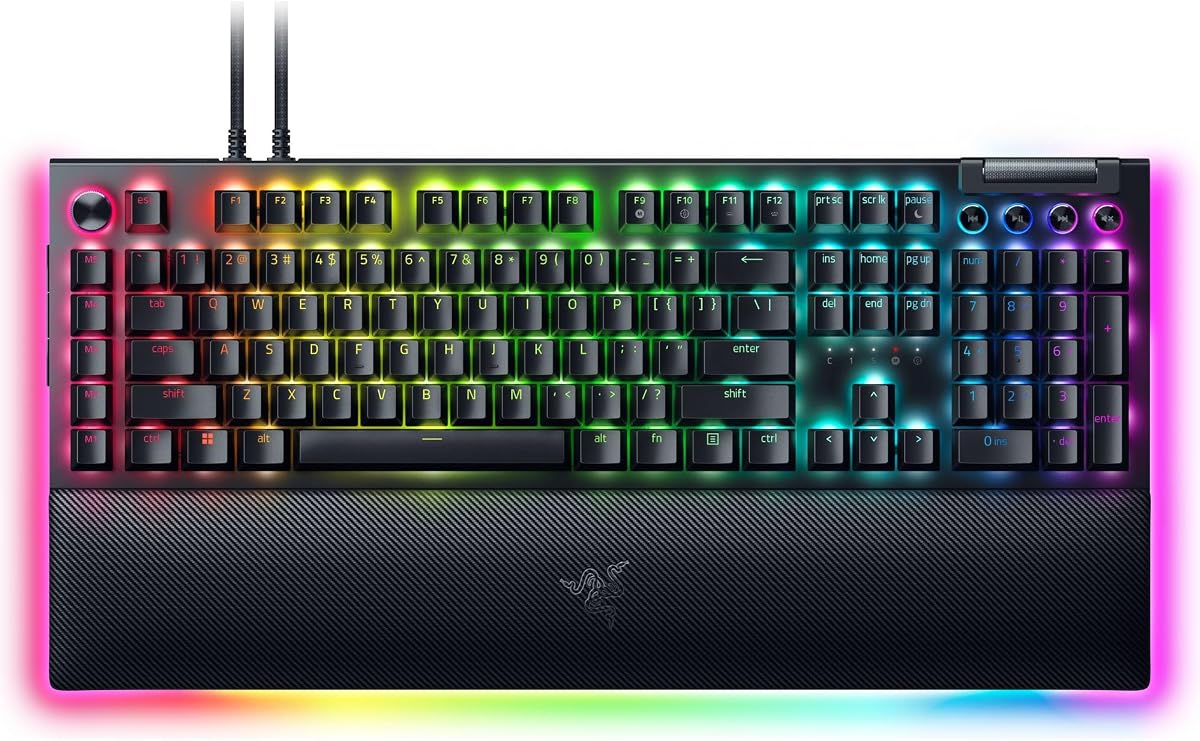
The Razer BlackWidow V4 X delivers the core BlackWidow experience with six dedicated macro keys, a multifunction roller, media controls, and Razer Chroma lighting. It skips some of the premium V4 Pro features, including the command dial and illuminated wrist rest, but retains a strong gaming foundation. Its 4.5 rating reflects a competitive balance of responsive switches, familiar software integration, and visual customization.
We may earn a commission when you buy through this link, at no additional cost to you.
The Yellow mechanical linear switches have a 1.2mm actuation point, zero additional pre-travel distance, and a 45g force requirement. That low activation force supports quick, repeated inputs, while built-in sound dampeners help moderate the noise produced by the switches. The keyboard also uses foam beneath the circuit board and lubricated stabilizers to improve the overall acoustic profile.
Six macro keys provide direct access to programmable playstyle commands. The multifunction roller and secondary media keys control playback, volume, and lighting adjustments without requiring users to leave the game. Chroma RGB extends to individual keys, with more than 16.8 million colors and effects available, including dynamic options for supported games. The switch construction is designed to produce brighter, more even illumination.
This model is a strong recommendation for a gamer who wants fast linear switches, polished RGB, and a straightforward macro bank without paying for a premium accessory package. The wired format and lack of a command dial distinguish it from the V4 Pro and BlackWidow V4. For users focused on speed, lighting, and six programmable commands, it delivers the essential features with less visual complexity.
The 45g linear switches actuate after 1.2mm without an additional bump before the trigger point. Their low force and dampeners make them suitable for rapid commands and extended gaming sessions.
Per-key Chroma RGB provides detailed effects, while the multifunction roller and media keys handle common system adjustments. The result is a gaming-focused board with fewer unnecessary controls than the Pro model.
We may earn a commission when you buy through this link, at no additional cost to you.
The Razer BlackWidow V4 Pro is the most premium-focused option in the roundup, combining eight dedicated macro keys, a programmable command dial, tactile mechanical switches, extensive lighting, and a magnetic wrist rest. Its 4.3 rating reflects a high-end feature set rather than a simplified board, with the wrist rest and command dial giving it greater everyday versatility.
We may earn a commission when you buy through this link, at no additional cost to you.
The Green mechanical switches provide precise tactile feedback, which can help users confirm an input without looking directly at the key. For macro users, the larger bank of eight keys provides enough space to divide commands by function, such as movement, communication, editing, and application control. The command dial can be assigned a custom function, expanding the available controls beyond the fixed macro section.
Lighting is one of the V4 Pro's defining features. Per-key illumination and three-side underglow create a more dimensional appearance than a standard top-lit keyboard. The magnetic plush leatherette wrist rest includes Chroma RGB lighting, so the lower edge of the setup glows along with the keys. That integrated lighting makes the board particularly suitable for a coordinated battlestation.
Doubleshot ABS keycaps use a molding process intended to keep the labels from wearing away, while their extra-thick walls are designed to withstand prolonged use. Buyers should choose the V4 Pro when a tactile feel, refined control layout, and integrated lighting justify a premium design. Those who mainly need fast linear switches or a larger macro count may find another model more efficient.
The programmable dial adds another layer of programmable control without taking away a standard key position. It can be assigned to suit a particular application, making the board more adaptable across work and play.
The magnetic leatherette wrist rest supports the palms and includes its own RGB illumination. Matching it with the keyboard's per-key lighting and three-side underglow creates a cohesive visual setup.
We may earn a commission when you buy through this link, at no additional cost to you.
The Redragon K618 PRO combines a 20-key macro zone with a low-profile wireless design, making it the most portable product featured. Its 4.1 rating reflects a distinctive combination of features: twenty onboard macros, tri-mode connectivity, short-travel switches, and quick Windows-to-Mac switching in a compact body.
We may earn a commission when you buy through this link, at no additional cost to you.
The four-by-five macro area is unusual for such a slim board and places a large number of controls in a concentrated space. Users can record combinations or adjust volume and media actions directly on the keyboard without installing anything first. Companion software supports remapping any key, creating extensive keybinding combinations, and designing custom lighting effects with a broad color range.
Connectivity includes USB-C, Bluetooth, and 2.4GHz wireless. The ability to move between a desktop, laptop, or tablet without re-pairing makes the K618 PRO convenient for flexible workspaces. Low-profile switches and keycaps reduce travel by 30 percent, creating a lighter typing experience and faster actuation. A one-touch control changes between Windows and Mac operation, while the stock Red switches provide smooth linear feedback.
This is the ideal choice for a user who prioritizes portability, a large macro bank, and wireless freedom over a full-size layout. The compact format omits a dedicated number pad, and people who prefer greater key travel may find the low-profile design less satisfying for extended typing. Even with those limitations, the combination of twenty macros and three connection modes is difficult to find elsewhere.
The concentrated macro grid preserves extensive command access despite the compact layout. Direct recording handles frequent assignments, while optional software supports deeper remapping and lighting customization.
USB-C, Bluetooth, and 2.4GHz modes cover wired desktop use, pairing with mobile devices, and low-latency wireless gaming. Device switching makes one keyboard practical across several parts of a mobile work or gaming setup.
We may earn a commission when you buy through this link, at no additional cost to you.
The Logitech G213 Prodigy differs from most competitors by offering macro programming through Logitech G HUB rather than a row of dedicated macro keys. Its 4.2 rating reflects a mature, approachable package built around full-size gaming fundamentals, software-based customization, five lighting zones, media controls, and an integrated palm rest.
We may earn a commission when you buy through this link, at no additional cost to you.
Macro users can assign commands and key sequences through G HUB, which also handles lighting, game mode, and device-level customization. This is a good fit for someone who prefers remapping ordinary keys over using a conspicuous macro bank. It also allows a single software suite to manage lighting and macros, simplifying the setup for users already familiar with the Logitech G ecosystem.
The G213 is built for both gaming and productivity. Its membrane keys are tuned for quick, responsive feedback, and the anti-ghosting matrix is designed to maintain control during rapid inputs. Durable construction helps repel liquids, crumbs, and dirt, making cleanup easier. Five lighting zones can display more than 16.8 million colors and synchronize with other supported Logitech G devices.
Dedicated media keys cover play, pause, mute, volume adjustment, and track skipping. An integrated palm rest and adjustable keyboard feet support long sessions, while the full-size layout preserves a numeric keypad and familiar key spacing. The G213 is best for a buyer who values software-based macros, clean full-size design, and understated gaming features. Those wanting immediate physical macro keys should look elsewhere.
G HUB combines macro programming, game mode, and RGB controls in one interface. This approach offers flexibility without dedicated macro keys, although setup is less immediate than onboard recording.
The numeric keypad, dedicated media controls, adjustable feet, and integrated palm rest make the G213 suitable for mixed gaming and productivity work. Its membrane design also avoids the need for switch maintenance.
We may earn a commission when you buy through this link, at no additional cost to you.
The Razer BlackWidow V4 is a polished full-size mechanical keyboard with six dedicated macro keys, fast Yellow linear switches, per-key Chroma RGB, underglow, a multifunction roller, and a magnetic wrist rest. Its 4.2 rating reflects a balanced premium design that covers the major needs of a gaming keyboard without the more specialized command dial found on the V4 Pro.
We may earn a commission when you buy through this link, at no additional cost to you.
The Yellow switches actuate at 1.2mm with a 45g force and no distance between the actuation and reset points, supporting rapid repeated inputs. Built-in sound dampeners help keep the mechanical noise controlled. A layer of foam beneath the circuit board and lubricated stabilizers further improve the acoustic character, particularly on larger keys where case and switch movement can otherwise create extra sound.
Six macro keys can be programmed to match a preferred playstyle, while the multifunction roller and four media keys provide quick access to playback, brightness, and volume. Chroma RGB extends to every key, and two-side underglow highlights the board from additional angles. The effect can be synchronized with many supported games and the wider Razer lighting ecosystem.
A magnetic plush leatherette wrist rest snaps securely to the keyboard and provides cushioning for long sessions. Doubleshot ABS keycaps are molded with extra-thick walls to resist label wear and withstand frequent use. The BlackWidow V4 is best for a gamer who values a familiar full-size layout, fast switches, elegant lighting, and a manageable number of dedicated macros. Its main limits are the smaller macro bank and wired-only design.
The low-force linear switches support quick actuation, and the multifunction roller adds useful control without taking the keyboard in a specialist stream-deck direction. Six macro keys remain available for game-specific commands.
Per-key Chroma RGB and two-side underglow give the keyboard a more dimensional appearance. The included magnetic wrist rest adds both comfort and a stable connection point for the desktop setup.
We may earn a commission when you buy through this link, at no additional cost to you.
Choosing the right macro keyboard means balancing command capacity, software, switch feel, connectivity, and comfort. These factors determine whether a board fits a gaming profile, a productivity workflow, or a portable multi-device setup.
Dedicated macro keys provide visible, repeatable buttons for common actions, while software-based macros can be assigned to ordinary keys. Dedicated banks are useful for commands that must be triggered quickly during play or work. Software approaches offer greater freedom because users can remap many keys and create more complex profiles, but they depend on a compatible application and correct configuration. Onboard recording provides the fastest path to a working macro, whereas optional software is better for advanced lighting, multiple profiles, and detailed keybinding options. The Redragon K512, K580, K550, and K618 PRO support direct onboard recording, while the Corsair K55 RGB PRO, Razer models, and Logitech G213 use their respective software ecosystems.
In short, choose dedicated keys for quick access and software macros for deeper customization.
Macro count is only one part of usability. The K618 PRO provides twenty dedicated macro positions, the K550 provides twelve, the Razer V4 Pro provides eight, and several other models offer six. A larger bank can separate abilities, editing commands, media controls, and application shortcuts, but it also occupies more space and may make the layout feel busier. A smaller bank may be ideal for a small group of recurring sequences. Users should think about how many actions they realistically repeat rather than choosing the largest bank automatically. Placement matters too: a compact macro grid can save desk space, while a row of macro keys is easier to scan and associate with specific functions.
Prioritize a bank that matches your actual workflow, not simply the highest number.
Mechanical switches offer a more pronounced tactile or linear response and a wider customization market, while membrane switches usually feel softer and require less maintenance. The featured mechanical options use hot-swappable sockets, Brown switches, tactile Green switches, linear Yellow switches, low-profile Red switches, or fixed clicky Purple switches. Hot-swap support is particularly useful because it allows sound and feel adjustments without soldering. Membrane models can be a sensible choice for shared spaces or users who prioritize immediate comfort. The decision ultimately comes down to preference, since a mechanical keyboard does not automatically suit every gamer or typing style.
Choose mechanical switches for customization and membrane switches for a softer, simpler feel.
Wired keyboards provide a consistent connection and reduce the need to manage batteries or wireless pairing. Most full-size gaming boards in the list, including the VSD K1 Pro, Corsair K55 RGB PRO, Redragon K550, both Razer BlackWidow V4 models, and the Logitech G213, use a wired design. The Redragon K618 PRO stands apart with USB-C, Bluetooth, and 2.4GHz modes, making it useful for switching between desktop, laptop, and tablet. Wireless freedom comes with additional considerations such as connection stability, charging requirements, and device-switching behavior. A wireless model is best for flexible workspaces, while a wired board is usually easier to position consistently at a gaming desk.
Pick wireless for portability and wired operation for a simple, stable desktop setup.
A display can make macro commands easier to recognize and can provide status information without opening another application. The VSD K1 Pro is the only model in this roundup with an integrated TFT color screen, six display-equipped keys, three knobs, and switchable pages. It can show custom images and animations and provide access to volume, time, backlighting, and connection settings. These features add significant utility for streamers and creators, but they also create a larger learning curve and tie advanced screen functions to a wired connection with compatible software. More conventional macro keyboards keep controls physical and rely on lighting or key labels rather than a visual interface.
Choose a screen when visual control matters; favor simple keys for straightforward macro use.
Lighting should complement the desk setup rather than distract from the function of the macro keys. Per-key lighting offers the most detailed control, while multiple lighting zones make broad color effects easier to create. The Razer BlackWidow models offer Chroma RGB, and the VSD K1 Pro includes extensive dynamic effects across more than 16.8 million colors. The Corsair K55 RGB PRO and Logitech G213 use five lighting zones, while the Redragon boards provide preset and customizable RGB options. Users should also consider whether the board can turn lighting off completely and how the chosen effect appears across keycaps, media controls, and underglow.
Prioritize the lighting granularity and off switch that best match your setup.
A keyboard may be used for far more than gaming, so the layout and support features deserve attention. Full-size boards include a number pad and dedicated media controls, while the K618 PRO uses a compact 60-percent-style format to save space. Detachable or magnetic wrist rests can improve comfort during long sessions, and adjustable feet let the user change the typing angle. Low-profile switches reduce travel and may lessen wrist strain for some people, although they provide a different feel from full-height models. The best layout is the one that fits the desk, leaves room for mouse movement, and supports the user's usual mix of typing, commands, and navigation.
Choose the layout and support that remain comfortable across your normal daily workload.
Quality indicators include switch longevity, keycap construction, stabilizers, frame materials, cable design, and resistance to everyday spills or dust. The K550 uses an aluminum top plate, while the VSD K1 Pro uses a sturdy ABS case and a five-layer dampening structure. The Corsair K55 RGB PRO has IP42 protection, and the Logitech G213 is designed to repel liquids, crumbs, and dirt. Extra USB pass-through, media rollers, included pullers, and multi-device switching are also useful, though they should support rather than define the purchase. Checking the included cable and package contents can prevent avoidable setup friction.
Match build quality and extras to your workspace, without overlooking basic daily reliability.
Begin by identifying the commands you use most often and assigning each one to a dedicated macro or remapped key. Create a short sequence, test it in the target application, and adjust delays until it behaves as intended. Games and productivity software can interpret keystrokes differently, so a macro that works in one program may need different timing in another. If the keyboard supports onboard recording, use the included instructions to assign and test the first macro before opening optional configuration software.
Install the relevant software only when you need advanced profiles, lighting effects, multimedia commands, or deeper remapping. Keep the application updated, save important profiles, and avoid changing several mappings at once. A written list of assigned functions can make troubleshooting easier, especially when several keys perform similar actions. Users of the VSD K1 Pro should use a wired connection and compatible Windows or macOS software when configuring display images, animations, date, or time.
For care, disconnect the keyboard before removing keys, switches, or accessories. Use the supplied puller rather than forcing components, and keep liquids away from the sockets and controls. Clean keycaps and the exterior with a soft, dry or lightly damp cloth, avoiding excessive moisture around switches, USB ports, and displays. Store wireless models in a dry place, recharge them according to the manufacturer's guidance, and replace worn switch caps or stabilizing parts before they affect normal use.
Macro keys put recurring commands in a consistent, easy-to-reach location. A single press can run a game sequence, open an application, type a phrase, or trigger a productivity workflow. Dedicated buttons are especially useful when a sequence is difficult to perform manually during fast play or repeated office work.
Macro keys can automate keyboard-based commands, but they do not reproduce every mouse action. Their value depends on whether the task can be completed with keys, shortcuts, or application commands. A mouse remains necessary for direct pointing, clicking, aiming, and navigation in many games and creative applications.
No. The Redragon K512, K580, K550, and K618 PRO support direct onboard macro recording, while software can add deeper profiles and lighting options. The Corsair K55 RGB PRO, Razer models, and Logitech G213 rely more heavily on their respective software suites for macro configuration.
They are not automatically better. Mechanical switches offer more varied feel and sound and some models support hot-swappable replacement, while membrane boards can provide a softer experience with fewer mechanical-style adjustments. The best choice depends on switch preference, responsiveness, desk setup, and budget priorities.
The main difference is how many commands can be assigned to visible dedicated positions. Six keys may be sufficient for a focused set of abilities or shortcuts, while twenty can organize many more functions without requiring additional layers. More keys also take up more space and may make the layout feel busier.
They are useful if you may want to change sound, feel, or actuation characteristics later. Hot-swappable sockets allow compatible switches to be removed and replaced without soldering, making experimentation more accessible. Users should still check switch compatibility and follow the included removal instructions.
Yes, when it automates repetitive and predictable actions. Useful examples include launching applications, entering standard text, switching among application controls, or running a fixed series of editing commands. Productivity benefits are greatest when assignments are clear, tested, and designed around tasks performed regularly.
Wireless is useful for portability, flexible device switching, and cleaner desks. The Redragon K618 PRO supports USB-C, Bluetooth, and 2.4GHz connections, making it attractive for multi-device use. Wired boards are generally simpler for a fixed gaming station, so choose based on connection needs rather than wireless alone.
The Redragon K512 RGB is a strong budget choice because six dedicated macro keys, onboard recording, RGB lighting, and a detachable wrist rest cover the essentials without requiring software for basic use. The Corsair K55 RGB PRO is the more balanced everyday option, with iCUE configuration, Stream Deck support, spill resistance, and comfortable controls. For buyers seeking a premium command ecosystem, the Razer BlackWidow V4 Pro adds eight macro keys, a programmable dial, tactile switches, and an illuminated wrist rest.
The right keyboard for your needs also depends on less obvious factors. A large onboard macro bank may matter if you maintain many separate commands, while a visual streaming deck is valuable if recognition and page-based control are central to your workflow. Mechanical switch feel, wireless portability, compact layout, and everyday comfort should all be weighed alongside the number of macro keys.
Before purchasing, verify the latest listing, included accessories, software compatibility, and connection requirements. Features and package contents can change, and current prices vary between sellers. By focusing on the macros you will actually use and the way you work, shoppers can select a keyboard that remains useful long after the initial setup is complete.