
5.25-Inch USB A/C 3.0 Drive Enclosure
4.4Editor score
Accepts drives up to 171mm
Provides USB-A and USB-C
Uses aluminum alloy housing
An external optical drive enclosure lets you reuse an internal CD, DVD, or Blu-ray drive as a convenient USB device. The right enclosure must match your drive’s thickness, SATA interface, connector layout, and power requirements while providing a stable connection for reading, writing, archiving, or playing discs.
We compared the 10 products in this guide by examining supported drive sizes, USB interfaces, power arrangements, installation methods, portability, material, and operating-system support. The list covers both full-size 5.25-inch desktop housings and slim enclosures designed for optical drives removed from laptops.
Each review identifies the product’s strongest use case and important limitations. Ratings reflect the supplied marketplace feedback, while unrated products are evaluated from their stated specifications. Availability and prices change over time, so confirm the enclosure and drive requirements before ordering.
4.4Editor score
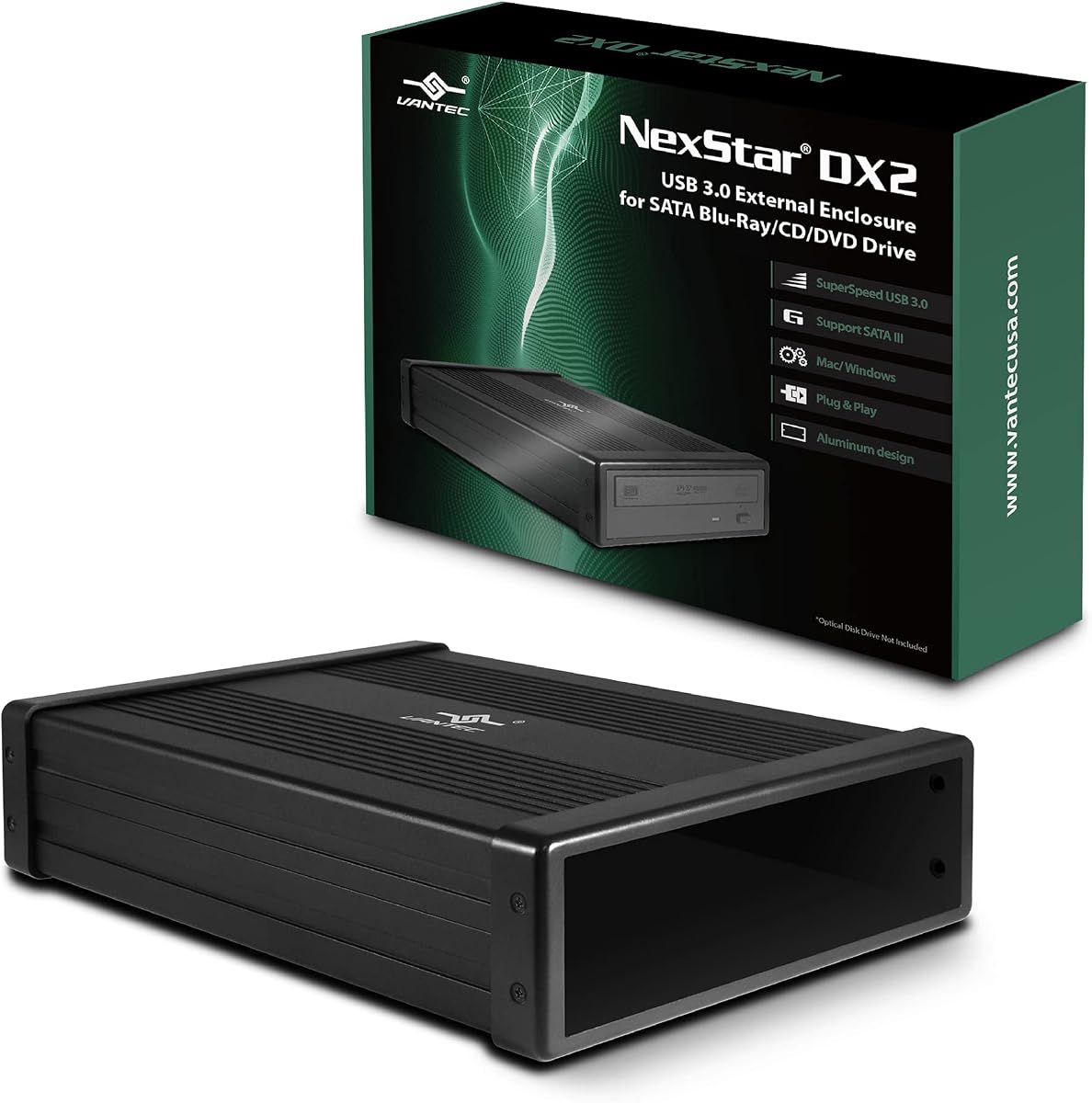
4.6Editor score

As an Amazon Associate we earn from qualifying purchases.
The table below highlights the major differences among all 10 enclosures, including their intended drive size, connection method, power requirements, and key compatibility considerations.


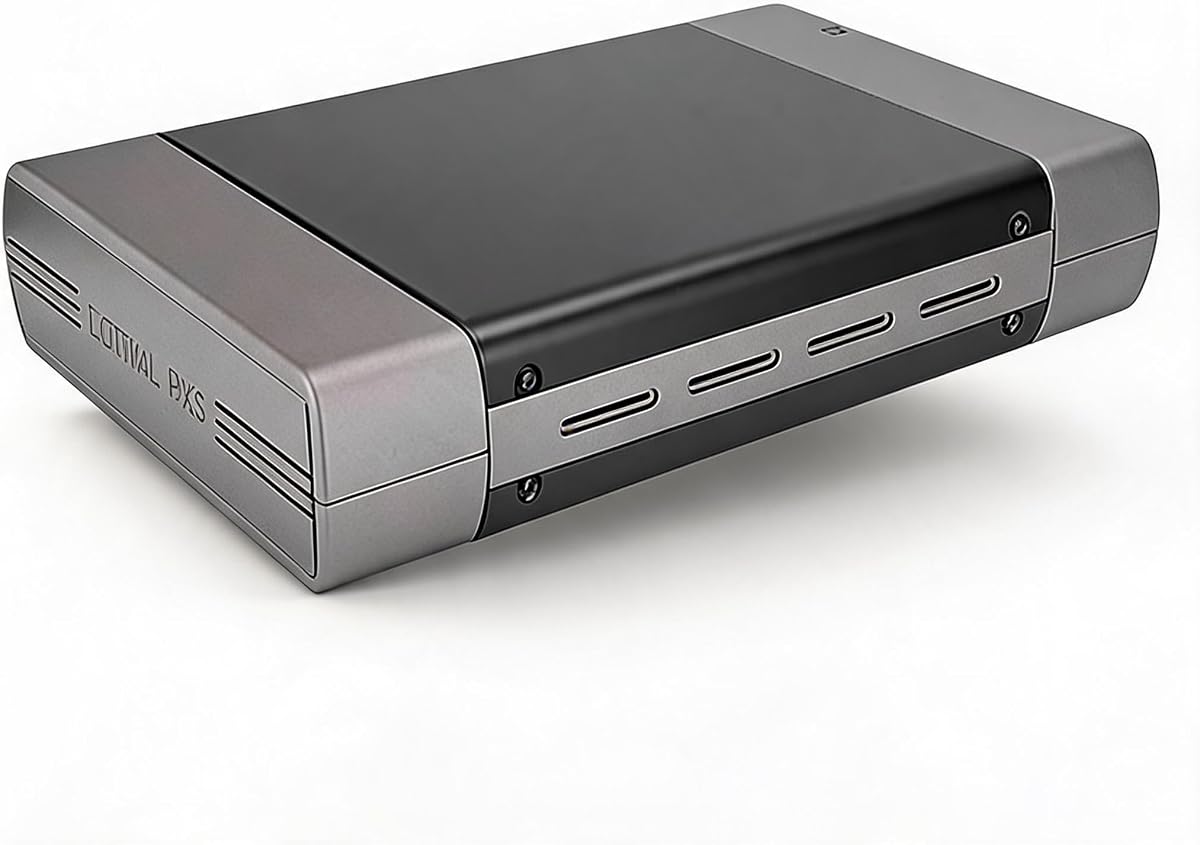


The NexStar DX2 is a full-size 5.25-inch external enclosure for SATA optical drives, earning a 4.6 rating among the products in this guide. Its most impressive feature is the ability to accommodate optical drives up to 185mm deep, reducing the risk that a drive will physically fit the case but not the internal connector arrangement.
We may earn a commission when you buy through this link, at no additional cost to you.
USB 3.0 provides a theoretical connection speed of 5Gbps, while the included 12V, 3A AC adapter supplies the stable external power that a desktop optical drive may require. The aluminum alloy housing is intended to reduce noise and vibration, and the design supports hot swapping on systems equipped with a suitable USB port. A flexible internal SATA cable also improves positioning flexibility during installation.
The enclosure is not limited to optical discs. With the optional 5.25-inch mounting bracket, it can accept SATA 3.5-inch or 2.5-inch hard drives and solid-state drives, broadening its usefulness as a general storage enclosure. The trade-off is its desktop-style size, additional power connection, and greater complexity compared with slim laptop-drive cases.
This is the strongest all-around recommendation for users converting a desktop CD, DVD, or Blu-ray drive. It is particularly suitable when drive depth is uncertain, stable external power matters, or you want one enclosure to handle both optical and conventional SATA storage devices. Confirm that the replacement drive uses SATA rather than the older IDE interface and verify the included adapter is appropriate for your setup.
Optical drives sold over the years can differ significantly in depth and connector placement. Supporting drives up to 185mm gives this enclosure more room than many standard 5.25-inch cases, while the flexible internal SATA cable helps accommodate different mounting positions.
The bundled 12V, 3A adapter is an important advantage over relying solely on USB power. Desktop optical drives, particularly older DVD writers and Blu-ray mechanisms, may need more current than a laptop or basic USB port can safely provide.
We may earn a commission when you buy through this link, at no additional cost to you.
This 5.25-inch enclosure combines a desktop optical-drive format with USB-A and USB-C connectivity, and its 4.4 rating reflects generally favorable buyer feedback. It accepts SATA Blu-ray, CD, and DVD drives up to 171mm deep, making it a practical option for many standard desktop mechanisms.
We may earn a commission when you buy through this link, at no additional cost to you.
The dual-interface design is a meaningful convenience for modern computers. USB-A supports legacy and current desktop or laptop ports, while USB-C fits newer slim systems that may lack a full-size USB connector. The enclosure works without additional drivers, and its aluminum alloy casing is designed to limit heat, noise, and vibration during disc access.
Installation may take more care than a tool-free slim case because users must align the drive with the mounting positions. Drives without side screw holes can still be used, which is helpful when reusing an unusual mechanism. Hot-swapping support adds flexibility, although the enclosure does not include an optical drive and cannot serve a user who has not already obtained one.
Choose this model for a full-size desktop optical drive when USB-C convenience and a substantial aluminum housing matter. It is a strong fit for users with one of the many 171mm-or-shorter SATA drives, but not for exceptionally deep mechanisms. Make sure the drive has a SATA interface, since IDE-compatible drives are outside the stated support.
Providing both connector styles avoids dependence on an adapter for one of your computers. The USB 3.0 interface is listed at up to 5Gbps and is positioned for fast file access, disc-image transfers, and conventional optical media operations.
An aluminum alloy shell is more than an appearance upgrade for a mechanism containing moving parts. It helps dissipate heat and damp vibration, which can support steadier operation during extended disc reading or writing sessions.
We may earn a commission when you buy through this link, at no additional cost to you.
The Zunate enclosure is built for 9mm ultra-slim SATA optical drives commonly found in laptops. It has no marketplace rating in the supplied data, so its appeal rests on a clearly defined design: convert a thin internal drive into a portable USB peripheral without requiring a separate power adapter.
We may earn a commission when you buy through this link, at no additional cost to you.
The enclosure includes both USB 3.0 and Type-C connectivity, with an integrated cable that folds into the housing for storage. Its brushed finish gives it a compact, travel-oriented appearance, while the woven data cable is intended to reduce interference and signal loss. Plug-and-play operation means the computer should detect the installed drive without additional drivers.
Compatibility is limited to the important but specific combination of a 9mm drive and a SATA interface. It will not accept thicker 12.7mm mechanisms, full-size 5.25-inch desktop drives, or IDE-interface equipment. The stated operating-system coverage includes supported Windows versions and OS X, and an eject feature is included to help prevent discs from becoming stuck.
This is the most travel-conscious enclosure in the list and the sensible choice for a user with a compatible 9mm laptop drive. It also works well for creating a low-cost external drive for occasional installation discs, archived media, or legacy software. Verify the drive thickness and interface, and expect a simpler installation than a full-size aluminum desktop enclosure.
Slim optical mechanisms generally draw little enough power to operate from a USB port, eliminating the need to remain near an outlet. The integrated cable then provides a straightforward way to carry the enclosure between a home desktop, office laptop, and other compatible systems.
The USB 3.0 and Type-C connectors cover more host computers than a single fixed interface. Folding the cable into the case also reduces tangling and keeps the enclosure compact when it is stored in a laptop bag or desk drawer.
We may earn a commission when you buy through this link, at no additional cost to you.
The JOTEC enclosure combines a 12.7mm slim-drive format with an aluminum alloy body, dual data cables, and broad compatibility claims. It does not have a supplied marketplace rating, but its specification list is particularly detailed for buyers comparing slim enclosures by physical size and connection method.
We may earn a commission when you buy through this link, at no additional cost to you.
The case fits 12.7mm-thick SATA DVD-RW drives and supports SATA-I and SATA-II standards. A built-in INIC1618 solution includes a power-saving sleep mode, while four nonslip feet and ventilation openings help maintain stable, cooler operation. The enclosure supports a broad range of CD and DVD formats and is listed for Windows, Linux, and Mac OS systems.
The included USB 3.0 and Type-C cables make the enclosure adaptable to different computers, and the driver-free design simplifies setup. Its list also mentions USB 2.0 backward compatibility, USB-Micro, and a 3.5mm power port, although the stated drive-fit warning is specific: it applies only to 9.5mm optical drives using a SATA interface.
This is a good fit for a 9.5mm drive that benefits from a stiffer aluminum case and multiple physical connection choices. It may suit users who want one enclosure to operate across several operating systems and disc formats. The lack of a marketplace rating calls for extra attention to the seller’s details, and buyers should confirm the drive thickness before purchasing.
Heat management matters because optical drives combine electronics with moving components. The aluminum shell, ventilation, and nonslip feet collectively support a stable working position and help maintain airflow during extended reading or writing tasks.
The listed support for numerous CD and DVD formats, together with compatibility across Windows, Linux, and Mac OS, makes the enclosure versatile. The broad operating-system claim does not replace checking the requirements of your specific disc-burning or playback software.
We may earn a commission when you buy through this link, at no additional cost to you.
The Tbest enclosure stands out because it is designed to accept both 12.7mm and 9.5mm SATA DVD-RW drives. Its 3.4 rating is the lowest numerical score among the rated products in this guide, so the flexible fit should be weighed carefully against its comparatively limited feedback.
We may earn a commission when you buy through this link, at no additional cost to you.
USB-A and Type-C connections provide convenient access to contemporary and older host ports. The enclosure supports 1.5Gbps SATA I and 3.0Gbps SATA II standards, while its USB 3.0 interface is listed at up to 5Gbps and remains backward compatible with USB 2.0. An INIC3609 chipset provides an automatic sleep mode for energy efficiency.
The stated operating-system support covers several Windows releases, Linux, and OS X, which broadens its potential audience. It is a compact alternative for reusing a slim optical mechanism, but the enclosure does not address 5.25-inch desktop drives, 9mm ultra-thin mechanisms, or legacy IDE interfaces. Actual performance also depends on the host USB controller and the installed drive.
Choose this model if you own either a 12.7mm or 9.5mm SATA optical drive and want one enclosure to cover either thickness. The two connector options and sleep-mode support are useful features, but the 3.4 rating suggests checking recent customer feedback carefully. Ensure that your drive matches the stated SATA and thickness requirements.
Supporting both 12.7mm and 9.5mm drives gives the enclosure more flexibility than a model fixed to one slim-drive size. This can be valuable when you are unsure which laptop mechanism you will recover or replace in the future.
USB 3.0 performance is available through both Type-A and Type-C connections, while backward compatibility allows use with USB 2.0 systems. This makes the enclosure usable across a wider mix of desktop and laptop ports.
We may earn a commission when you buy through this link, at no additional cost to you.
The Vantec CB-ST00U3 is a USB-to-SATA adapter rather than a conventional full-size enclosure, and it carries a 4.6 rating. Its compact form is designed for SATA optical drives as well as SATA hard drives and solid-state drives, giving it more flexibility than an enclosure limited to one optical-drive form factor.
We may earn a commission when you buy through this link, at no additional cost to you.
The adapter supports SATA I, II, and III devices, provides USB 3.0 connectivity, and includes UASP support for efficient command handling. A 12VDC, 2A AC adapter is included, which can supply dedicated power to mechanisms that need more than the host USB connection offers. The antislip mat helps dampen noise and protect the drive from movement.
Its most important limitation is that the SATA-to-USB bridge may restrict some commands issued to the attached device. It is therefore better suited to standard file access and disc operations than to applications requiring unusual pass-through or advanced drive-management commands. Some optical drives require a more powerful adapter than the included 12V, 2A unit.
This is a strong option for users who want a small, flexible way to connect SATA devices rather than a permanently housed desktop-style box. It is particularly attractive when the goal is to connect an optical drive temporarily. Confirm command compatibility for specialist software, and upgrade the power supply if the drive fails to start or repeatedly disconnects.
The USB-to-SATA bridge can also accept compatible hard drives and solid-state drives. That versatility makes the adapter useful for recovery, temporary storage access, or giving an older SATA drive a modern external connection.
Dedicated 12V power and UASP support address two important requirements in a SATA-to-USB adapter. Power is especially relevant for older optical mechanisms, while UASP can improve command efficiency on compatible host systems.
We may earn a commission when you buy through this link, at no additional cost to you.
This 5.25-inch USB 2.0 enclosure offers a straightforward way to reuse a desktop optical drive, and it has a 4.5 rating. It is designed for standard Blu-ray, DVD, and CD mechanisms rather than slim laptop drives, making physical fit the central consideration.
We may earn a commission when you buy through this link, at no additional cost to you.
External AC power is included because desktop optical drives generally require dependable power for reading, writing, software installation, backup, and movie playback. The package includes the enclosure, manual, four screws, USB cable, adapter, and power cable, providing the basic components needed for installation. Its aluminum housing is intended to protect the drive from bumps and scratches.
USB 2.0 is the principal drawback. It remains useful for many disc-based tasks, but file transfers will be substantially slower than with a USB 3.0 enclosure. The stated compatibility also includes 3.5-inch hard drives, yet slim laptop optical mechanisms are explicitly excluded. Buyers should therefore identify the drive’s physical size and interface before ordering.
This model makes the most sense for a user with a standard desktop optical mechanism who values a complete kit and stable external power more than maximum transfer speed. It is also a practical option for older computers that lack USB 3.0. If you regularly work with large disc images, choose a faster USB 3.0 enclosure instead.
The included screws, cables, manual, and power components reduce uncertainty when setting up the enclosure. The mounting process is conventional, and the external power arrangement avoids relying on a host port to operate a full-size optical mechanism.
This enclosure is explicitly built for 5.25-inch drives and is not compatible with slim laptop mechanisms. Check the drive depth, mounting holes, and SATA interface before installation to avoid discovering a mismatch after delivery.
We may earn a commission when you buy through this link, at no additional cost to you.
The Bewinner enclosure targets 9.5mm ultra-thin CD, DVD, and Blu-ray drives, providing a portable way to convert an internal laptop mechanism into an external unit. It does not have a supplied marketplace rating, so users should judge it primarily by its stated 9.5mm compatibility and installation method.
We may earn a commission when you buy through this link, at no additional cost to you.
Installation is described as replacing the original panel, inserting the drive, and sliding it into the enclosure. It requires no additional drivers, while the integrated USB 3.0 and Type-C cable folds away for storage. The brushed ABS body is lightweight and positioned to resist visible scratches, making the enclosure suitable for travel or a compact workspace.
A woven cable is intended to minimize interference and signal loss during transfers at speeds up to 5Gbps. The enclosure supports several Windows versions and macOS X, and its eject key can help avoid discs becoming trapped. Its limitations are just as important: only 9.5mm SATA drives are targeted, and older IDE-interface mechanisms are not supported.
Choose the Bewinner for a compatible ultra-thin drive that you want to use as a compact external accessory. The cable storage and simple conversion process are particularly convenient for frequently changing between computers. Confirm the exact drive thickness and interface, and verify that your chosen playback or burning software supports the reused mechanism.
The enclosure turns a removed internal optical drive into a functioning external unit without requiring a complex tool-based assembly. A replaceable front panel and sliding internal design simplify the conversion process for common laptop mechanisms.
The integrated cable includes both USB 3.0 and Type-C connectors and folds into the housing. Avoiding a loose cable makes the enclosure easier to organize in a bag and reduces the chance of connector strain during transport.
We may earn a commission when you buy through this link, at no additional cost to you.
This enclosure is designed for 9mm ultra-slim SATA CD, DVD, and Blu-ray drives found in many laptops. It has no supplied marketplace rating, but its core proposition is clear: transform a compatible internal mechanism into a plug-and-play external drive without requiring a separate power supply.
We may earn a commission when you buy through this link, at no additional cost to you.
The front panel facilitates swapping and securely positions the old drive inside the case. A detachable cable provides USB 3.0 and USB-C connectors and folds into the bottom for storage. The interface is listed at up to 5Gbps, remains backward compatible with USB 2.0, and uses a woven cable intended to limit interference and signal loss.
The enclosure supports a number of Windows releases and OS X, and an eject feature is included to help prevent disc jamming. Its physical scope is limited to 9mm SATA mechanisms, meaning it will not fit 9.5mm, 12.7mm, or 5.25-inch drives. Careful measurement is therefore essential before purchase.
This is a focused option for users who have identified a 9mm laptop optical drive and want a compact external conversion. The detachable cable is convenient when the enclosure is shared among systems with different ports, while the included panel makes installation approachable. It is less versatile than dual-size models, but its size and travel convenience compensate when compatibility is exact.
The enclosure targets the 9mm SATA drives found in many ultraportable laptops. Its low-profile construction preserves portability, but buyers should measure the mechanism because nearby thickness categories are not interchangeable with this case.
A removable dual-interface cable makes it easier to connect to both modern and older host ports. Its fold-away storage prevents tangling, and USB 2.0 backward compatibility extends usability on systems without high-speed USB connectivity.
We may earn a commission when you buy through this link, at no additional cost to you.
The tool-free enclosure is designed to make internal-drive conversion as simple as possible. It accepts standard 12.7mm Serial ATA optical drives, and its detachable front panel allows the drive to slide into place and be covered without screws or specialized tools.
We may earn a commission when you buy through this link, at no additional cost to you.
USB 3.0 Type-A and Type-C connections are provided through an integrated fold-away cable. The stated interface speed reaches 5Gbps and remains backward compatible with USB 2.0. The enclosure needs no separate external power adapter, which keeps the setup simple for compatible slim drives and allows use with laptops and desktops.
The brushed ABS construction is designed to resist scratches and fingerprints, while a dedicated eject key supports smoother disc release. A manual and necessary mounting accessories are included. The product does not have a supplied marketplace rating, and its narrow drive-size support means it should not be selected for 9mm, 9.5mm, or desktop mechanisms.
This is a useful option for anyone with a 12.7mm SATA drive who prioritizes installation simplicity. It suits travelers and users who want to convert a spare laptop mechanism without handling screws. Confirm the drive thickness and interface, then verify that the desired disc-reading or burning software works with the reused hardware.
The detachable front panel is the defining feature. A drive can slide into the enclosure and be secured with the cover, avoiding the small screws used by many competing slim optical-drive cases.
The integrated cable folds away to reduce desk clutter and travel bulk. Offering both Type-A and Type-C connectors allows the same enclosure to work across a broader range of current and older computers.
We may earn a commission when you buy through this link, at no additional cost to you.
Choosing an external optical drive enclosure starts with the drive you already own. Its thickness, interface, power requirements, and connector arrangement determine which housings will work, while portability and connection speed determine which compatible option fits your setup best.
Optical drives are not interchangeable merely because they perform the same task. Full-size desktop mechanisms usually use the 5.25-inch format, while laptop drives may measure 9mm, 9.5mm, or 12.7mm depending on their design. The enclosure’s stated thickness is a strict physical limit, so measure the drive or check its model specifications before buying. Some slim cases also distinguish between drives with mounting holes and those without them.
Most optical drives sold in recent years use Serial ATA, but older mechanisms may use IDE. Nearly every enclosure in this guide is limited to SATA-compatible hardware. A connector that appears physically similar can still have a different data interface, and attempting to force an incompatible drive into a case may damage pins or leave the drive unrecognized. The interface requirement is especially important for 9mm and 9.5mm laptop mechanisms recovered from older systems.
Slim laptop optical drives generally operate from USB power, making them convenient for portable use. Full-size desktop drives can require a dedicated external supply, especially older writers, DVD mechanisms, and Blu-ray drives. Products that include an AC adapter are more convenient and safer for high-current devices, but you should still verify the adapter’s voltage and current rating against the drive’s requirements. A drive that starts and disconnects repeatedly may need more power than the supplied source provides.
USB 3.0 is the practical baseline for a modern enclosure because it supports much faster transfers than USB 2.0 and remains backward compatible with older ports. USB-C adds convenience on newer laptops and desktops, while USB-A offers broader compatibility with existing systems. Dual-interface products can serve both categories, though you may need to confirm whether the cable is fixed, detachable, or supplied separately. The host port should also support the stated transfer standard for the advertised speed to be attainable.
Slim enclosures are easy to carry and suit 9mm, 9.5mm, and 12.7mm drives, but their lightweight shells offer less physical protection than desktop-style aluminum cases. A 5.25-inch enclosure is larger and usually requires external power, but it provides more room, stronger cooling, and a sturdier home for a desktop mechanism. Consider where the enclosure will live: a laptop bag favors a compact model, while a permanent desk installation can accommodate a full-size housing.
Some slim enclosures use a sliding front panel, while others require you to align screw holes and secure the mechanism. Tool-free designs are more approachable, but users should still check that the drive is seated correctly and that its interface aligns with the enclosure connector. Full-size cases often include the required mounting hardware. Whichever format you choose, avoid forcing a drive, tighten screws gradually, and keep fingers and tools away from exposed electronics.
A USB enclosure can make a physical drive operational, but it cannot make every disc format or burning application compatible with every operating system. The listed compatibility ranges differ among these products, with some explicitly covering Linux, Windows, and Mac OS and others naming selected Windows versions and OS X. If your goal is to create discs, use software known to support the reused drive and the target format. For playback, confirm that your computer and installed media application recognize the disc type.
A SATA-to-USB bridge should be treated as a compatibility layer between the drive and the computer. UASP support can improve command efficiency on suitable systems, while some bridge controllers may restrict less common drive commands. Standard disc reading and writing generally presents fewer concerns, but specialist drive-management, imaging, or recovery software may require more than a basic file-transfer interface. The Vantec adapter’s stated command limitation is worth considering for advanced workflows.
Before installation, identify the drive’s thickness, interface, and power requirements, then compare them with the enclosure’s specifications. Disconnect the computer’s power before handling an internal mechanism, remove the drive carefully, and preserve any mounting brackets or screws that may be useful for the new enclosure. Inspect the SATA connector and enclosure socket for bent pins or debris.
Install the drive in the orientation prescribed by the enclosure maker. Slide tool-free mechanisms into position until they seat fully, or align the mounting holes and secure the drive without overtightening the screws. Connect the appropriate data cable, attach external power if the product includes or requires it, and then start the computer. The system should detect the converted drive without additional driver installation.
Use the operating system’s normal eject function and the enclosure’s physical eject control before removing a disc. Hold the enclosure securely when pressing eject, and never pull a disc out while the mechanism is still reading or writing. Keep the case away from moisture, excessive heat, impact, and long periods of direct sunlight, and inspect the cable and connector for damage before each use.
Yes, if the drive uses a supported interface and fits the enclosure’s specified dimensions. Most of the slim products support SATA drives in the 9mm, 9.5mm, or 12.7mm categories. Measure the drive and confirm its interface before purchasing, then install it according to the enclosure instructions. Your operating system and disc software must also support the reused mechanism.
It depends on the drive. Slim laptop mechanisms are commonly designed to run from USB power, while many 5.25-inch desktop optical drives need dedicated external power. Enclosures for desktop drives often include an AC adapter. If a drive fails to start, repeatedly disconnects, or sounds strained, check the power requirements before assuming the enclosure is defective.
For ordinary disc reading, writing, and accessing files, USB 3.0 is generally more than adequate. It is especially useful when transferring disc images or larger file collections because it provides much more bandwidth than USB 2.0. Actual speed still depends on the optical mechanism, media type, computer, and storage device receiving the files.
Not unless the manufacturer explicitly states that the case supports that size. A 5.25-inch enclosure is intended for full-size desktop drives and is too large and differently arranged for common slim mechanisms. The slim products in this guide are designed for particular laptop-drive thicknesses, so verify dimensions rather than relying on the shared SATA connector.
The difference is the physical host connector, not the optical drive format. USB-A works with the rectangular ports found on many computers, while USB-C works with newer compact ports. Dual-interface enclosures can be more convenient if you use different devices, but a USB-C port alone does not guarantee faster transfer than a proper USB 3.0 connection.
No. The enclosure must support the writer’s physical thickness and SATA interface, and it must provide adequate power for the mechanism. A desktop Blu-ray writer is best housed in a compatible 5.25-inch case with the specified external power supply. Also check that your computer and playback or authoring software support the Blu-ray format.
The listed products are described as plug-and-play or driver-free, relying on standard USB mass-storage behavior. In practice, a computer may still need to install its normal operating-system drivers for the USB-to-SATA bridge, but users generally do not need to locate a separate enclosure driver. Device recognition can also depend on the reused drive, its firmware, and the host system.
Always use the operating system’s software-eject command and wait for the activity indicator to stop before touching the drive. Many of the slim enclosures also include a physical eject button, which can help release a disc. Never force a disc, open the enclosure while a disc is spinning, or pull the USB cable abruptly during a transfer.
The NexStar DX2 is the strongest all-around option because it accommodates unusually deep 5.25-inch optical drives, includes a substantial power adapter, and uses USB 3.0. The dual-connector 5.25-inch model is an appealing alternative for a modern desktop setup, while the compact Zunate case serves travelers with compatible 9mm laptop mechanisms.
Before buying any enclosure, prioritize exact physical and electrical compatibility over connector style or appearance. Confirm the drive thickness, SATA interface, mounting style, and power needs, then select USB 3.0 if transfer speed matters. Tool-free and dual-interface designs are useful for frequent use, while aluminum desktop cases provide greater cooling and protection.
Marketplace availability and prices can change, and sellers may update product pages or configurations. Review the latest listing, customer feedback, included accessories, and drive requirements before making a final purchase. That final check helps ensure the enclosure you choose is compatible with the optical drive you already own or intend to use.