
GE BigEZ OneTouch
4.3Editor score
Backlit oversized button layout
Five preset TV brands
Controls one additional device
This guide compares the best easy to use TV remote for seniors, including setup, button size, visibility, compatibility, and control options.
An easy to use TV remote for seniors should make watching television feel independent rather than complicated. Large buttons, clear labeling, useful lighting, and uncomplicated controls can reduce mistakes while preserving access to favorite programs, volume adjustments, and basic channel changes.
The products in this guide were compared using the information supplied for each listing, including rating, supported devices, programming method, button layout, lighting, physical design, and included accessories. The list includes general universal remotes, simplified four-button models, backlit replacements, and remotes designed for specific TV brands.
Each review highlights the features that distinguish one model from another and identifies the households most likely to benefit from it. Ratings reflect the supplied product data, while availability and prices can change, so readers should confirm current details and compatibility before buying.
4.3Editor score
4.2Editor score

4.0Editor score
This side-by-side comparison focuses on the details that matter most to older adults and caregivers: programming effort, button visibility, supported equipment, navigation ability, lighting, and the number of everyday functions.


The EZclicker Big Button Universal TV Remote is a practical, accessible option for seniors who only need conventional television control. Its supplied rating is 4.2, and its defining features include extra-large controls, tactile feedback, and a layout intended to help users with limited vision or dexterity. It offers a straightforward alternative to a crowded original remote.
We may earn a commission when you buy through this link, at no additional cost to you.
Programming follows a simple sequence: turn on the television, point the EZclicker toward it, then hold the Mute and Volume Up buttons together for up to 60 seconds. When the television's volume changes, the user releases the buttons. This method avoids entering model codes or navigating dense setup menus, which can be important for a user who wants independent operation.
The main limitation is compatibility. This remote is designed for televisions rather than cable boxes, Firestick, Roku Stick, or streaming platforms. Its compact seven-inch body is easy to hold and store, and it uses two AAA batteries, which are not included. The restricted device support is acceptable for households that rely primarily on over-the-air television and a conventional TV.
This is a sensible recommendation for a senior who watches regular television broadcasts, dislikes complicated remotes, and wants a lightweight replacement with generous button sizes. Buyers should first verify that the remote appears in the listing's compatibility chart and confirm whether the television uses infrared technology. For cable or streaming use, a more specialized model will be a better fit.
The extra-large controls and tactile feedback make the important functions easier to distinguish by touch. That can reduce errors for users with low vision, arthritic hands, or limited fine motor control.
The hold-and-release setup method replaces code entry with a direct signal exchange. It is a useful option for users who may struggle with small on-screen keyboards and complicated remote menus.
We may earn a commission when you buy through this link, at no additional cost to you.
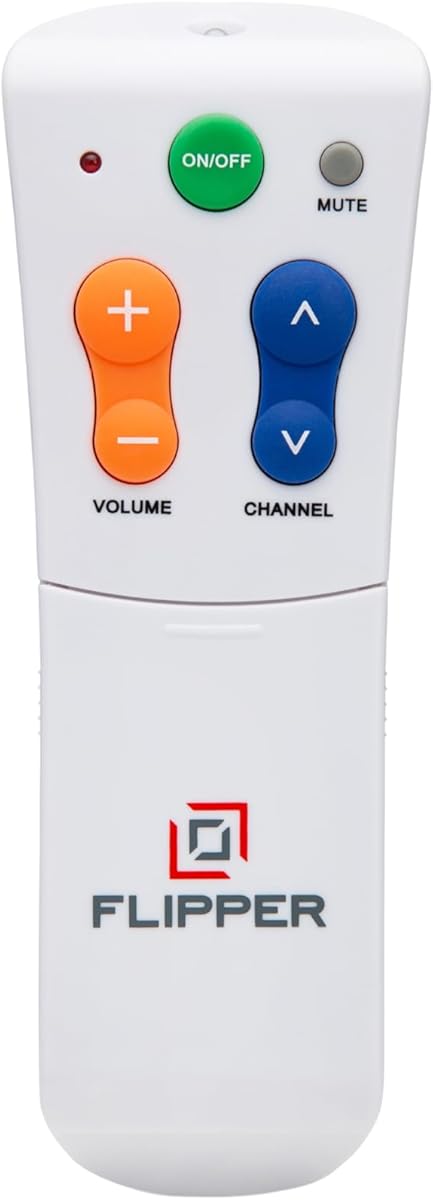
The Flipper Big Button TV Remote is the most deliberately simplified model in this guide. Its 4.2 rating reflects a product created specifically for seniors, including people with dementia or Alzheimer's and users with low or impaired vision. The defining advantage is its four-button face, which reduces the number of choices presented during normal viewing.
We may earn a commission when you buy through this link, at no additional cost to you.
Green identifies On/Off, orange identifies Volume Up and Down, blue identifies Channel Up and Down, and gray identifies Mute. Every visible button is oversized and tactile. Additional controls slide out for customization, allowing the household to organize favorite channels without restoring a complicated interface to the front of the remote.
Flipper can handle basic functions on major television brands and can also work with cable, satellite, and other provider boxes. It can be programmed with up to 25 favorite channels, letting the user move directly to preferred choices instead of scrolling through long channel lists. Its meaningful limitation is that it has no navigation controls for streaming applications such as Netflix, YouTube, Prime Video, Hulu, Roku, Google TV, Apple TV, or Fire TV.
This remote is best for households where the primary viewing experience is broadcast, cable, or satellite television and the goal is to reduce confusion. It may be particularly helpful for someone with dementia who benefits from a stable visual map. Families that depend on streaming interfaces should retain a more conventional remote or use a separate dedicated streamer control.
Consistent colors help users remember which button controls power, sound, channels, or mute. A compact, repeatable layout is often easier to navigate than a remote containing many similar-looking keys.
Programming as many as 25 favorite channels removes the need to memorize numbers or scroll through hundreds of options. Caregivers can prepare the list once, making everyday viewing more predictable.
We may earn a commission when you buy through this link, at no additional cost to you.
The GE BigEZ OneTouch combines large, backlit buttons with enough control options to manage a television and one other device. Its supplied rating of 4.3 is the highest among the five-star, four-button remotes in the roundup, while its design specifically targets seniors and visually impaired users.
We may earn a commission when you buy through this link, at no additional cost to you.
Preset device buttons support Samsung, LG, Vizio, Sony, and Roku televisions. Setup involves adding two AA batteries, pressing the television's brand button, and then pressing Power. The remote can also operate one auxiliary device such as a Blu-ray player, set-top box, cable or satellite receiver, streaming media player, or soundbar. Its directional pad offers a useful middle ground between a four-button remote and a full-featured model.
Visibility features include a white body, fully backlit keys, a blue volume button, and an orange channel button. The contrasting colors are described as colorblind-friendly, and the white housing is intended to be easier to locate in a living room. The trade-off is that it presents more controls than Flipper and therefore may be less suitable for someone who needs the absolute minimum interface.
This is a strong budget recommendation for a senior who wants visible controls, straightforward programming, and limited navigation without paying for a specialized model. It is especially useful when the television belongs to one of the five listed brands or can be programmed through the supplied setup process. Buyers should also consider the auxiliary feature if a cable box or soundbar is part of the setup.
The fully illuminated keypad makes functions easier to locate without turning on an overhead light. This is useful for evening viewing and for anyone who experiences reduced contrast.
Selecting a preset brand button avoids code entry. The process stays approachable while the directional pad provides a route to menus when the television and connected device support it.
We may earn a commission when you buy through this link, at no additional cost to you.
The EZclicker TV Remote for Seniors is a compact version of a simplified universal design. It carries a supplied rating of 4.2 and emphasizes large buttons, tactile feedback, and uncomplicated programming. Those attributes make it relevant to seniors and users who have difficulty distinguishing small controls.
We may earn a commission when you buy through this link, at no additional cost to you.
The programming method is especially approachable. After inserting two AAA batteries, the user turns on the television, points the remote toward it, and holds the Mute and Volume Up buttons together for up to 60 seconds. Releasing those buttons as the television volume changes completes the pairing process. No model-code entry is required according to the supplied description.
The trade-offs are similar to those of the first EZclicker model. It is intended only for televisions and explicitly does not support cable boxes, Firestick, Roku Stick, or streaming services. Its six-inch length makes it smaller than many universal remotes, which can help with storage but may place several large buttons closer together than users prefer.
This product is a worthwhile option for a senior who wants a smaller traditional remote, has a television-only setup, and benefits from a straightforward signal-transfer process. The compatibility list should be checked carefully before purchase, especially if the household currently uses a set-top box. A separate remote for streaming services may still be necessary.
At six inches long, the remote is easy to hold and store. The smaller footprint may be especially attractive for users who find full-size universal remotes too bulky.
Large controls and a simple setup method reduce the number of actions needed for ordinary television use. That can make the remote feel less technical to a new or overwhelmed user.
We may earn a commission when you buy through this link, at no additional cost to you.
The Big Button Universal Remote is a strong all-around choice for a senior who primarily operates a television rather than a streaming box. Its supplied rating of 4.4 is the highest in this roundup, and the product combines a simple physical layout with compatibility across many major television brands.
We may earn a commission when you buy through this link, at no additional cost to you.
The remote supports Samsung, LG, Vizio, Sony, Hisense, Philips, Panasonic, Sharp, and additional television brands. Samsung owners can insert batteries and begin using it without pairing or programming, while other supported brands may require a compatible setup process. The extra-large Enter key, enlarged universal controls, and tactile feedback are designed to reduce visual and dexterity challenges.
Its main boundary is device support. The listing explicitly excludes streaming devices, cable boxes, and unrelated television platforms, so it is not a replacement for a full universal remote in a modern entertainment center. It also does not provide a voice function, which some users may find limiting but others may prefer because there are fewer features to understand.
This model is recommended for a household with a compatible television and a preference for minimal setup, especially a Samsung household. Its high supplied rating, broad brand list, and oversized targets make it an attractive general option. Buyers should not choose it on the assumption that it will operate every device connected to the television.
The no-programming Samsung experience is a meaningful convenience. Users can begin with the essential controls after installing batteries, without searching for a code or navigating setup screens.
An extra-large Enter button and enlarged universal controls improve visibility and reduce accidental presses. Tactile feedback adds another way for users to confirm that a command has registered.
We may earn a commission when you buy through this link, at no additional cost to you.
The Large Button TV Remote Control is built around clarity, a straightforward traditional layout, and a lightweight ergonomic body. It has a supplied rating of 4.4 and is aimed at elderly users and people with low vision who benefit from extra-large, clearly marked buttons.
We may earn a commission when you buy through this link, at no additional cost to you.
Its uncomplicated arrangement is the product's main strength. Volume and channel adjustments use prominent targets, while the broad face helps users identify functions without first learning where a manufacturer placed them. The ergonomic housing is designed for a comfortable grip, and the listing describes the construction as sturdy for routine home entertainment use.
Compatibility is centered on traditional televisions from most major brands. It is not intended for DVD players, cable boxes, niche television brands, or voice-control functions. That limitation keeps the design focused, but it also means buyers with set-top boxes should plan to retain the provider remote or choose another model.
This remote is a good recommendation for a senior who wants a conventional replacement with exceptionally visible controls and no complicated feature set. It is also a reasonable second remote for caregivers who want a spare in another room. For a household centered on cable or streaming, verify those requirements first or consider GE BigEZ OneTouch instead.
Large labels and buttons make this remote intuitive without requiring illumination or complex controls. The design is most useful when the priority is immediate recognition rather than menu navigation.
The lightweight, ergonomic body is intended to reduce hand strain during ordinary viewing. A comfortable shape is valuable when a user must locate and press controls confidently every day.
We may earn a commission when you buy through this link, at no additional cost to you.
The Philips BigEZ OneTouch offers a black, backlit alternative to the white GE BigEZ model. Its supplied rating is 3.8, the second-lowest among the ten products, but its feature set remains focused on accessibility: a large body, illuminated keys, high-contrast color coding, and a straightforward setup process.
We may earn a commission when you buy through this link, at no additional cost to you.
Preset device buttons cover Samsung, LG, Sony, Vizio, and Roku televisions. After adding two AA batteries, the user selects the appropriate brand and completes the simple programming sequence. The AUX button starts with Roku assigned but can be reset for another set-top box, cable or satellite receiver, streaming player, soundbar, or similar device.
The directional pad includes play, pause, fast-forward, and rewind capability for smart televisions and streaming devices. That makes this model more capable than a strict four-button remote, although it may also feel busier to a senior who wants only a few obvious functions. The lower rating should be considered alongside the supplied feature details rather than treated as a definitive performance test.
This remote fits a household with one of the five supported television brands, a need for night visibility, and occasional use of media navigation. It is less suited to someone overwhelmed by dense layouts. Caregivers may appreciate the balance between simple brand setup and the ability to control one connected device.
The full keypad lighting supports button recognition in dim rooms. This can make late-night channel changes less frustrating without requiring a separate light source.
Playback and directional controls extend beyond basic power, volume, and channel functions. The result is useful for supported smart televisions while retaining a visibly large, senior-oriented layout.
We may earn a commission when you buy through this link, at no additional cost to you.
The Big Button Universal for Seniors has a supplied rating of 3.0, the lowest in the guide. Its listed strengths are nevertheless relevant to the category: extra-large buttons, clear markings, tactile feedback, and a simplified layout intended for elderly users and people with low vision.
We may earn a commission when you buy through this link, at no additional cost to you.
The remote is designed for traditional television operation and is stated to work with most major brands. Volume and channel buttons are enlarged to improve visibility and reduce accidental presses. The straightforward face gives users a recognizable set of controls without requiring advanced navigation for everyday tasks.
Its limitations are substantial. It does not support DVD players, cable boxes, Firestick, Roku Stick, streaming applications, or voice control. The product description also repeats the large-button benefit, which may indicate a less developed feature set than some competing listings. That combination explains why it remains a secondary option despite its senior-focused design.
This remote may suit a simple television-only household that values visible buttons above all else. It is less attractive when evaluating the breadth of independent user feedback, represented here by a 3.0 rating, or when the household needs device switching and streaming navigation. Check the compatibility list and consider a higher-rated alternative if the budget allows.
Oversized channel and volume buttons help reduce the visual search required for common changes. Clear labeling supports quick recognition in a familiar living-room environment.
This is a television-only replacement rather than a complete entertainment controller. Households using external receivers or streaming applications should avoid assuming that a universal label covers every device.
We may earn a commission when you buy through this link, at no additional cost to you.
The Backlit Samsung Big Button Remote is a focused replacement for Samsung smart televisions. Its supplied rating is 4.4, and the product distinguishes itself through no-setup operation, oversized backlit buttons, a protective silicone cover, and an included wall hook for keeping the remote within reach.
We may earn a commission when you buy through this link, at no additional cost to you.
The lighting stays on for 30 seconds, providing time to locate the controls in a dark room. The listing describes the keys as large-print and oversized, while the soft silicone cover is intended to protect against cracks and spills. The hook keeps the remote from being lost between sofa cushions and makes it easier for a senior or caregiver to retrieve.
Compatibility is specific: the remote is designed for Samsung LCD, LED, HDTV, UHD, OLED, 3D, and 4K smart televisions. It does not support cable boxes, streaming devices, or other television brands. It uses no pairing or programming, but it cannot substitute for a multi-device universal controller.
This is a strong recommendation for a Samsung household that wants dependable basic control without setup complexity, particularly when visibility, spill protection, and a dedicated home for the remote are priorities. It is less appropriate for mixed-brand homes. Buyers should confirm that the television is functional and uses compatible infrared control before purchasing.
The included hook gives the remote a dedicated location instead of leaving it buried in furniture. This simple storage solution can reduce daily searching and caregiver interruptions.
The soft silicone cover adds grip and helps guard the remote against cracks and spills. Ergonomic shaping and textured surfaces are designed to improve handling for stiff or less precise fingers.
We may earn a commission when you buy through this link, at no additional cost to you.
The Anderic RR1004 stands apart with glow-in-the-dark keys and an infrared learning function. Its supplied rating is 4.0, while its premium case rests on a distinctive combination of low-light visibility, essential-only controls, and the ability to copy certain commands from an existing infrared remote.
We may earn a commission when you buy through this link, at no additional cost to you.
The oversized keys can be located without switching on a light, making the remote useful in dim bedrooms, assisted-living spaces, and evening viewing environments. The face retains only Power, Volume, Channel, Mute, and Closed Captioning. This minimalist design reduces the number of choices available during normal use and supports a calmer user experience.
Infrared learning can add commands such as Input or a streaming shortcut from a compatible original remote. It cannot learn from RF or Bluetooth devices, and line of sight plus adequate signal strength is necessary. The remote is preprogrammed for LG televisions, includes instructions for other supported brands, and may require assistance during initial setup.
The Anderic is a strong premium pick for a household that values a minimal interface and wants the unusual flexibility of infrared learning. It suits standard infrared televisions from LG, Samsung, Sony, and many other brands, but it does not work with Roku, Fire TV, Jubilee, or Xfinity systems based on RF or Bluetooth. Confirm the original remote's technology before buying.
Glow-in-the-dark keys are easy to find after the remote has been exposed to light. They offer a dependable visual cue without adding another light source or complicated display.
Infrared learning can reproduce selected functions from a compatible original remote. This adds flexibility while preserving the senior-friendly face, though it does not extend compatibility to wireless streaming remotes.
We may earn a commission when you buy through this link, at no additional cost to you.
The best senior-friendly remote is the one that matches the user's vision, dexterity, cognitive needs, and entertainment setup. Compatibility and setup complexity matter as much as button size, so buyers should evaluate the whole system before choosing.
Start by listing every device the remote must operate, including the television, cable or satellite box, soundbar, Blu-ray player, and streaming platform. Several products in this guide are television-only, while Flipper can handle basic television and provider-box functions. The GE and Philips BigEZ models also offer a programmable auxiliary button for a second device. Check whether the television and receiver use infrared, RF, or Bluetooth rather than assuming all remotes are interchangeable.
Large keys are only useful if users can identify them quickly. Look for generous spacing, clear labels, strong contrast, and tactile feedback. The GE and Philips remotes use blue volume and orange channel controls, while Flipper assigns an entire color to each function. A white housing may be easier to locate in a dim room, whereas a black body can suit a preference for a less conspicuous device. The best layout is the one that matches the user's established habits and visual needs.
Backlighting can make a major difference for a senior with low vision, particularly during late-night viewing. GE BigEZ OneTouch and Philips BigEZ OneTouch feature fully backlit keypads, while the Samsung replacement illuminates its oversized buttons for 30 seconds. The Anderic RR1004 uses glow-in-the-dark keys instead. Backlit controls are easier to identify immediately, while glow-in-the-dark keys may be less conspicuous but can remain visible without activating a stronger illuminated keypad.
A remote can be easy to use because its controls are large, or because there are very few of them. Flipper reduces the everyday face to four buttons, and Anderic retains five essential functions. These designs may better serve users with dementia or limited vision. GE BigEZ, Philips BigEZ, and the broader universal options provide more navigation functions, which can be beneficial for users who still manage smart-TV menus but may feel overwhelming to someone who wants only power, volume, and channel changes.
Easy-to-press hardware is less helpful if setup remains technically demanding. The GE and Philips BigEZ models use one-touch brand selection, the EZclicker remotes use a hold-and-release signal method, and the Big Button Universal Remote works without programming for Samsung televisions. Flipper requires a more involved setup to configure television, provider, and favorite channels, although that preparation is performed once. Anderic is preprogrammed for LG and can learn compatible infrared commands, although initial configuration may require assistance.
Users with arthritis, tremors, Parkinson's disease, or reduced hand strength benefit from buttons that are large, separated, and easy to distinguish by touch. Several EZclicker models emphasize tactile feedback, and Flipper uses oversized tactile keys with distinct colors. The Samsung replacement adds a textured body and soft silicone cover, while the Anderic uses substantial glow-in-the-dark keys. A remote that feels secure in one hand and does not require a firm pinch is often more usable than one with technically attractive but small controls.
Battery requirements vary across the list. Both EZclicker models use two AAA batteries, Flipper and the BigEZ remotes use two AA batteries, and the remaining listings do not provide equivalent battery details in the supplied data. Batteries are generally not included. Choose a model that accepts commonly available batteries and keep a spare set nearby. A dedicated storage hook or consistent remote location can also make it easier for a user to remember to replace batteries before the television controls become unresponsive.
A remote intended for a family home may need different features from one used in assisted living, healthcare, or hospitality. Glow-in-the-dark keys and minimal layouts suit shared or dim spaces, while silicone covers can improve durability. Flipper's favorite-channel programming can give residents predictable access to preferred stations. Caregivers should also consider how frequently buttons will be pressed by multiple people, how easily batteries can be changed, and whether infrared line-of-sight requirements fit the room.
Begin by identifying the remote's technology and the equipment it supports. Install the correct battery type, keeping the polarity consistent with the markings inside the compartment. Turn on the television and follow the specific programming method: select a preset brand, hold the Mute and Volume Up buttons, complete the remote's learning process, or use the included setup guide. Infrared remotes generally need a clear path to the television's sensor.
Teach the user the essential controls in a calm, practical setting. Show how to power the television, raise and lower the volume, change channels, and mute sound. For a favorite-channel remote, program the list before handing it over and write the color or button mapping nearby as a temporary reference. If a cable or streaming device is involved, clearly explain which remote or button controls that device so expectations remain consistent.
Keep the remote clean, dry, and easy to find. Remove batteries for long periods of nonuse, wipe the surface with a dry cloth, and avoid liquids that could enter the casing. Use the included hook or another fixed location for models that provide one. Replace batteries promptly when commands become weak, and periodically confirm that the preset device, favorite channels, and auxiliary assignments still operate as intended.
Flipper is the strongest option in this guide for minimizing confusion because its everyday face contains only four large, color-coded buttons. Its favorite-channel programming also removes the need to scroll through long channel lists. It is important to remember that Flipper cannot navigate streaming applications, so a household centered on Netflix, YouTube, Prime Video, Hulu, Roku, Google TV, Apple TV, or Fire TV will need another control method.
It depends on the model and the streaming device. Several large-button remotes in this guide expressly exclude streaming platforms, Firestick, and Roku Stick. Flipper can operate basic television and provider-box functions but lacks app-navigation buttons. The GE and Philips BigEZ remotes include an auxiliary button and directional controls for some connected devices, so buyers should check the exact product description and device compatibility before ordering.
Infrared remotes send a line-of-sight signal to the television, while RF and Bluetooth remotes generally communicate without pointing directly at the device. The traditional remotes reviewed here are primarily infrared products, so they will not necessarily replace a Roku, Fire TV, or other Bluetooth remote. The Anderic RR1004 can learn commands only from an infrared original remote, not from RF or Bluetooth equipment.
Backlighting can make large buttons easier to locate, particularly at night or in a dim room. The GE and Philips BigEZ models have fully backlit keypads, and the Samsung replacement illuminates its oversized buttons for 30 seconds. Lighting is not a substitute for good contrast or large labels, so shoppers should evaluate all three features rather than choosing a model on illumination alone.
Flipper is specifically described as able to control a television and cable or satellite box for basic functions. The EZclicker models, the general Big Button Universal remotes, and the Samsung replacement are television-only. The GE and Philips BigEZ remotes can control one additional device through their AUX function. Always verify the provider and programming requirements because simultaneous control is not guaranteed for every setup.
Only Flipper in this roundup explicitly supports up to 25 programmed favorite channels. The process should be handled by a caregiver or knowledgeable family member before the remote is handed to the intended user. Other remotes may allow channel changes but will not necessarily let the user jump to a short personalized list. Avoid programming unfamiliar functions immediately before giving the remote to someone with cognitive impairment.
Batteries are not included with the models for which the listing supplies that detail. The EZclicker Big Button Universal and EZclicker Extra Simple each require two AAA batteries, while Flipper and both BigEZ remotes require two AA batteries. Keep an appropriate spare set in the same drawer or storage area as the remote, and replace batteries when the response becomes inconsistent.
Choose a four-button model when simplicity, predictable colors, and minimal decision-making are the main goals. Choose a fuller universal remote when the user still navigates menus, controls more than one device, or needs directional and playback functions. The best choice is the one that meets current needs without introducing controls the senior cannot comfortably identify or understand.
GE BigEZ OneTouch stands out as the best budget option because it combines a backlit keypad, large controls, one-touch brand setup, and room for one auxiliary device. Flipper is the editor's choice for households seeking the simplest daily interface, while the Anderic RR1004 earns the premium designation through its glow-in-the-dark keys, minimal control set, and infrared learning function.
Compatibility should take priority over any promise of universal control. A senior-friendly remote that operates only the television may be ideal for over-the-air viewing, but it will not solve a complicated cable or streaming setup. Buyers should assess device technology, visible contrast, tactile feedback, programming demands, favorite-channel support, and the user's ability to manage menus before choosing.
Prices, availability, and product details can change, so review the current listing before purchasing. Confirm that the remote appears in the relevant compatibility chart, check whether batteries or accessories are included, and compare the final button layout with the user's specific vision, dexterity, and cognitive needs.