
CENMATE 4-Bay Hard Drive Enclosure
4.3Editor score
Four hot-swappable SATA bays
USB 3.0 interface up to 5Gbps
Aluminum housing with cooling fan
Direct Attached Storage provides a practical way to expand a computer's capacity while keeping every drive under direct control. Unlike network storage, a DAS connects through USB and can offer greater transfer speed, broader drive compatibility, and a simpler setup for local editing, backups, archives, and other demanding workflows.
We compared ten multi-bay DAS enclosures across important considerations such as bay count, interface speed, RAID support, drive capacity, cooling, hot swapping, operating-system compatibility, and management features. The list includes conventional hard-drive docks, all-SATA designs, hybrid HDD and NVMe models, and units designed for both independent disks and NAS expansion.
Each review identifies the product's strongest use case and any limitations visible in its specifications. Ratings and configurations can change over time, while promotions and availability also fluctuate, so buyers should verify the current listing and confirm their computer's interface before purchasing.
4.3Editor score

4.2Editor score

5.0Editor score
As an Amazon Associate we earn from qualifying purchases.
The comparison highlights each enclosure's bay layout, connection speed, RAID approach, and cooling features to show how the ten options differ for local storage, backups, archives, and high-speed NVMe workflows.




The TERRAMASTER D4-320 is a four-bay direct attached storage enclosure built for people who want generous capacity and a fast USB connection without adding network complexity. It holds up to four 3.5-inch or 2.5-inch SATA hard drives and SATA SSDs, and the enclosure is supplied without disks. Its stated 10Gbps interface and four-drive configuration make it a versatile option for local backups, media libraries, project archives, and high-capacity working folders.
We may earn a commission when you buy through this link, at no additional cost to you.
Its strongest feature is the balance between throughput and everyday usability. TERRAMASTER states that four SATA III hard drives can achieve a combined read and write speed of up to 1,016 MB/s, while a single SATA III SSD can reach 510 MB/s. Hot-swappable, tool-free trays simplify drive replacement, and the Push-lock design helps keep each disk seated. Compatibility extends to Windows, macOS, and Linux, while USB Type-C connectivity supports several generations of USB and Thunderbolt interfaces.
Cooling is handled through an intelligent temperature-controlled fan, sound-absorbing panels, and vibration damping. The enclosure also supports up to 30TB per hard drive, with a stated maximum total of 120TB. The trade-off is that it has no hardware RAID, so users who require striped or mirrored arrangements must manage them with third-party software or use a different enclosure. It is a DAS rather than a NAS and should not be mistaken for a networked product.
This is an excellent choice for users who prioritize fast USB bandwidth, flexible drive selection, quiet operation, and straightforward cross-platform use. It is especially suitable for a creative workstation, home archive, or small business that wants locally attached storage and occasionally changes disks. Choose the D4-320 when independent volumes and convenient hot swapping matter more than built-in RAID.
The 10Gbps USB interface gives the D4-320 enough headroom for large media files, backups, and active project libraries. Actual results depend on the installed drives, host interface, file sizes, and operating system, but the specification makes it a strong match for SSD-assisted workflows.
Tool-free hot swapping reduces the inconvenience of replacing a disk, while the temperature-controlled fan and vibration-damping measures help protect both drive performance and the surrounding workspace.
We may earn a commission when you buy through this link, at no additional cost to you.
The QNAP TR-004 is a four-bay USB Type-C DAS that brings more choice than a basic drive dock. It supports hardware RAID 0, RAID 1, RAID 5, JBOD, and individual disks, allowing the same enclosure to serve as fast striped storage, a mirrored working set, or a capacity-oriented JBOD device. The enclosure comes without hard drives and includes a USB Type-C to Type-A cable.
We may earn a commission when you buy through this link, at no additional cost to you.
Its strongest distinguishing feature is QNAP integration. It can be used as external storage, as a NAS backup target, or to expand the capacity of a compatible QNAP NAS. The hardware RAID controller handles supported configurations locally, which can be convenient for users who want straightforward disk management without setting up software-based arrays on every workstation.
There are important limits to the NAS role. The TR-004 cannot be combined into the connected NAS's storage pool or volume, QNAP applications cannot be installed on it, and moved drives may not be recognized by a NAS or another device. Certain older QNAP models are also unsupported. It connects to Windows, macOS, and Linux computers, but users wanting shared network access still need a separate NAS.
The TR-004 best suits a QNAP owner who values hardware RAID options and wants one enclosure to alternate between local expansion and NAS backup duties. Its four 3.5-inch bay design may be less suitable for compact installations or those who want to combine 2.5-inch SATA SSDs with NVMe drives. For those who want simpler QNAP integration without DAS complexity, the smaller TR-002 offers the same general connection style with two bays.
RAID 0, 1, 5, JBOD, and individual-disk modes make the TR-004 adaptable to different priorities, from performance and redundancy to maximum usable capacity. The included cable supports a direct connection to the host computer.
The ability to back up a compatible QNAP NAS or add external capacity is valuable, although the TR-004 remains an independent pool or volume and cannot merge directly with the connected NAS.
We may earn a commission when you buy through this link, at no additional cost to you.
The TERRAMASTER D8 Hybrid is an eight-slot enclosure that accepts four SATA HDDs or SSDs and four M.2 2280 NVMe SSDs. That mixed layout is unusually flexible because users can place high-capacity hard drives in the SATA bays while reserving NVMe positions for frequently accessed files. The stated combined maximum is 152TB when the enclosure is populated with the largest supported drives.
We may earn a commission when you buy through this link, at no additional cost to you.
Its principal advantage is the separation of hot and cold data. Mechanical drives can provide economical archive capacity, while NVMe SSDs deliver much lower latency for projects, caches, and working sets. TERRAMASTER lists SSD speeds up to 521 MB/s and NVMe speeds up to 980 MB/s over the USB 3.2 Gen2 interface. TPC Backupper is included for scheduling backups, adding a useful management layer for important collections.
The enclosure also provides tool-free hot-swappable SATA trays, a Push-Lock retention mechanism, a temperature-controlled low-noise fan, and power-on recovery. It does not provide built-in RAID, so the drives remain independent unless suitable third-party software is used. Users should also recognize that a multi-drive array, background maintenance, or host limitations can keep real-world transfers below the advertised figures.
The D8 Hybrid is a compelling choice for editors and advanced users who want both deep capacity and fast NVMe scratch space in one enclosure. It can also serve as a mixed hot-and-cold archive, although the lower listed rating warrants checking recent customer feedback carefully. It is less appropriate for buyers seeking only mechanical storage or a simple, quiet desktop accessory.
Keeping active projects on NVMe media while archiving older material on hard drives can improve responsiveness without forcing every file onto the same type of storage.
The mixed bay arrangement simplifies expansion by accommodating both high-capacity SATA devices and high-speed M.2 NVMe drives through one USB-connected unit.
We may earn a commission when you buy through this link, at no additional cost to you.
The CENMATE 4-Bay Enclosure is a straightforward way to add several SATA drives to a computer without investing in a NAS. It supports both 3.5-inch and 2.5-inch HDDs and SSDs, with a stated maximum of 20TB per drive and 80TB across all four positions. It is explicitly a DAS with no RAID or NAS functionality, so each disk can be used as a separate volume.
We may earn a commission when you buy through this link, at no additional cost to you.
The enclosure uses USB 3.0 with a stated maximum bandwidth of 5Gbps and includes USB A and USB Type-C cables. Plug-and-play operation is supported on Windows, Mac, and Linux, and the supplied 12-volt power adapter is intended to provide stable power for high-speed transfers. Its aluminum-alloy shell helps conduct heat away from the drives, while an integrated two-inch fan supports active cooling.
The chief trade-off is acoustic. CENMATE states that fan noise is around 40 to 50 decibels, which may be noticeable in a quiet room or during calls. There is also no built-in RAID, meaning anyone who needs mirroring or striping must use suitable software and accept the associated configuration responsibility. These limitations keep the design focused on basic, independent storage.
This enclosure is well suited to home users, students, and small offices that want a compact way to pool several disks for backups or file storage. Its combination of flexible drive sizes, hot swapping, broad compatibility, and a five-gigabit interface makes it a practical entry point into multi-bay DAS ownership. It is less suited to noise-sensitive rooms or users who require turnkey hardware RAID.
Four independently mounted SATA drives make it easy to separate family media, work files, and backups into distinct volumes without configuring a hardware RAID array.
The aluminum shell and two-inch fan help dissipate heat during extended transfers, although buyers sensitive to fan noise should account for the stated operating level.
We may earn a commission when you buy through this link, at no additional cost to you.
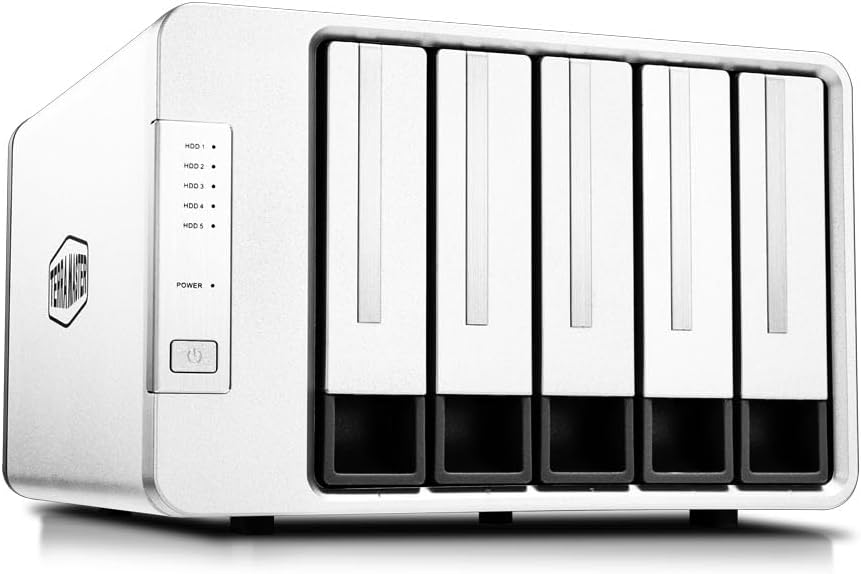
The SABRENT DS-SC5B is a five-bay USB-C DAS built around independent access to each disk. It holds up to five 3.5-inch SATA HDDs or SSDs and connects through one 10Gbps USB Type-C port. The drives are presented individually in a JBOD-style arrangement rather than through hardware RAID, making the enclosure useful for separating projects, media, and backup sets.
We may earn a commission when you buy through this link, at no additional cost to you.
A dedicated ASMedia ASM1351 controller for each bay is a notable design detail. It gives each drive its own connection path, while the included USB-C to USB-C cable provides the strongest recommended link. Tool-free insertion, per-bay power switches, activity indicators, a locking key, and a Kensington slot make the enclosure suitable for shared workspaces or installations where physical security matters.
The rear USB-C port can connect a peripheral or daisy-chain another dock. An internal auto-switching power supply removes the need for an external power brick, simplifying placement. A 120mm PWM fan ramps according to drive temperature, providing quieter cooling during light work. The limitation is that the enclosure accepts only 3.5-inch SATA devices, not 2.5-inch drives or M.2 NVMe modules.
The DS-SC5B is a strong fit for offices and studios that need five independent desktop volumes and value physical controls. It is less suitable for users requiring hardware RAID, compact 2.5-inch SSD support, or NVMe performance. Windows, macOS, and Linux compatibility broadens its appeal, while the one-year warranty can be extended to two years through registration.
Dedicated bay controllers, individual power switches, and activity lights make it possible to manage five disks as separate volumes without relying on a RAID controller.
The locking key, Kensington slot, sturdy housing, and front controls help protect the enclosure and make drive status easier to monitor around an active desk.
We may earn a commission when you buy through this link, at no additional cost to you.
The TERRAMASTER D8 Hybrid 2 combines four SATA bays with four M.2 2280 NVMe positions in a single direct attached storage enclosure. It supports the same broad capacity concept as the earlier D8 Hybrid, but adds a more refined power-management system and a stated NVMe read speed of up to 1,020 MB/s. The enclosure is diskless and is designed for users who want both bulk storage and fast scratch performance.
We may earn a commission when you buy through this link, at no additional cost to you.
All eight drives operate independently, and third-party RAID software can be used if needed. This makes the enclosure flexible for creative workflows: SATA hard drives can hold large archives, SATA SSDs can serve as secondary working storage, and NVMe drives can handle active projects. TPC Backupper is included for scheduling backups, and the USB Type-C connection supports USB 3.0 through USB 4.0 along with Thunderbolt 3, 4, and 5.
TerraMaster Power Management adds Power Save and Active modes, letting the user balance lower energy use against faster drive response. Plug-and-play operation works across macOS, Windows, Linux, and compatible NAS environments. As with any USB storage array, advertised speeds represent an upper limit that depends on the NVMe drive, host controller, operating system, file pattern, and whether several devices are active simultaneously.
This is the most premium-oriented unit in the group and a compelling choice for editors, photographers, developers, and power users who can benefit from NVMe scratch space. It is less appropriate for buyers who only need a few simple hard-drive bays. The absence of built-in RAID may also disappoint users expecting a turnkey striped array, though the independent-drive approach offers more granular control.
NVMe bays can accelerate active files, while SATA hard drives expand capacity for archives, making the enclosure useful for both everyday storage and demanding creative workflows.
Power Save mode favors lower energy use, while Active mode is intended to improve wake-up response and support always-on workflows when speed matters more.
We may earn a commission when you buy through this link, at no additional cost to you.
The TERRAMASTER D5-310 is a five-bay DAS focused on making hardware RAID easy to configure. A dedicated knob on the rear lets users select RAID 5, RAID 0, RAID 1, RAID 10, or Single mode without navigating through host software. It supports 3.5-inch and 2.5-inch SATA hard drives and SSDs, with a stated capacity of up to 24TB per drive and 120TB overall.
We may earn a commission when you buy through this link, at no additional cost to you.
RAID flexibility is the enclosure's defining strength. RAID 0 prioritizes performance and capacity, RAID 1 provides mirroring, RAID 5 balances redundancy and usable space, and RAID 10 combines mirroring with striping across four drives. A hot spare feature is available in RAID 1, 5, and 10 configurations, allowing a standby disk to take over after a failure and reducing downtime.
The USB 3.1 Gen1 interface provides 5Gbps of theoretical bandwidth, with a stated actual read and write speed of 220 MB/s. That is suitable for many backup and archive tasks but will not exploit the full potential of premium NVMe or high-performance SATA SSDs. TPC Backupper supports scheduled, incremental, and differential backups on Windows, and temperature-controlled fans, drive sleep, and power-on recovery add useful management features.
The D5-310 is a good option for users who specifically need an approachable hardware RAID controller in a DAS rather than a network appliance. It works on Windows, macOS, and Linux and can also be used with servers, televisions, and set-top boxes that accept USB storage. Buyers should carefully check drive compatibility and backup procedures before rebuilding an array, especially because RAID is not itself a substitute for backups.
A physical RAID knob removes much of the setup friction, allowing the enclosure to be reconfigured for performance, redundancy, capacity, or independent disks with less software dependency.
RAID 1, 5, and 10 modes and hot spare support give administrators several ways to protect array availability, although separate backups remain essential.
We may earn a commission when you buy through this link, at no additional cost to you.
The WAVLINK 4-Bay Dock combines direct attached storage with display and peripheral connectivity. Four SATA 6Gbit/s bays accept 2.5-inch or 3.5-inch hard drives and SSDs, while a USB 3.2 Type-C connection provides up to 10Gbps of storage bandwidth. Its unusual HDMI output can support a display as large as 4K at 60Hz under DisplayPort 1.4 conditions.
We may earn a commission when you buy through this link, at no additional cost to you.
That display feature makes the enclosure more like a docking station than a basic hard-drive dock. It includes an additional USB-C port for peripherals or daisy-chaining, along with the main storage connection. The host must support USB-C video output, and the USB-C-to-C cable must be used for the stated resolution. These conditions should be verified before purchase if the display function is central to the intended setup.
Cooling is handled by two built-in fans that activate automatically at 48°C. The aluminum shell supports heat dissipation and structural rigidity, while each bay has an independent on/off switch for hot-swapping flexibility. Stated capacity reaches 88TB using four 22TB drives. Buyers using 2.5-inch drives must provide additional 2.5-to-3.5-inch mounting brackets, which are not included.
This dock is a compelling choice for a workstation that needs both local storage and a cleaner connection to a monitor. It is also useful for users who want to expand storage without adding a full docking station. It is less suitable for NAS-specific tasks, compact installations without room for a four-bay chassis, or anyone who cannot use a USB-C host with video output.
Combining storage with 4K display output can reduce the number of separate connections around a desk, particularly when a compatible USB-C host and monitor are already in use.
Two fans activate at a stated 48°C, and individual bay switches let users manage drives separately while the aluminum housing helps dissipate heat.
We may earn a commission when you buy through this link, at no additional cost to you.
The ORICO 5-Bay Enclosure provides five SATA drive positions in a relatively conventional desktop format. It accepts 2.5-inch and 3.5-inch HDDs and SSDs, with the stated total capacity of 110TB based on five 22TB drives. Magnetic chips on the cover allow tool-free installation, and the enclosure is designed for quick plug-and-play recognition on common desktop systems.
We may earn a commission when you buy through this link, at no additional cost to you.
Connection is through USB 3.1 Gen1 Type-C, offering a maximum stated transfer rate of 5Gbps. It is compatible with Windows XP, Vista, 7, and 8 as listed, Mac OS X 10.2 and later, and Linux. One notable software limitation is that, in Linux, multi-hard-drive enclosures expose only one hard drive for reading at a time, which can significantly restrict workflows involving multiple simultaneous volumes.
A 60mm double-ball-bearing fan provides active cooling, while honeycomb ventilation holes in the rear panel encourage airflow. The enclosure also includes protection against overvoltage, overcurrent, overheating, short circuits, and leakage. Four indicator lights show drive status. There is no hardware RAID, so the five disks are intended to work as independent volumes or through software supported by the host.
The ORICO is most appropriate for users who value bay count, flexible drive sizes, and simple installation over NVMe speed or hardware RAID. It can be particularly useful for family media collections, local backups, and general desktop expansion. Buyers who regularly use Linux, maintain several mounted volumes at once, or expect redundant storage should account for these limitations before choosing it.
Magnetic mounting points make drive insertion and removal more convenient, while support for both drive sizes lets users mix existing storage with compact SATA SSDs.
The fan, rear ventilation pattern, and electrical protection features help maintain safe operating conditions during extended storage sessions.
We may earn a commission when you buy through this link, at no additional cost to you.
The QNAP TR-002 is a compact two-bay DAS for users who need a modest amount of additional storage rather than a large multi-drive archive. It supports 2.5-inch and 3.5-inch SATA drives through USB Type-C and offers hardware RAID 0, RAID 1, JBOD, and individual-disk modes. A USB Type-C to USB 3.0 cable is included, and the drive bays can be locked.
We may earn a commission when you buy through this link, at no additional cost to you.
Its main appeal is compatibility with the wider QNAP ecosystem. It can function as external storage or expansion storage for a compatible QNAP NAS, while also connecting directly to Windows, macOS, and Linux computers. This makes it a practical bridge for users who want a two-disk local or NAS-adjacent volume without moving to a larger four-bay model.
The enclosure's limitations are mainly related to scale and interface generation. Two drive positions are enough for mirroring, a striped pair, or separate volumes, but they do not offer the flexibility of five-bay or mixed HDD-and-NVMe designs. The stated connection is five gigabits per second, which remains usable for common storage tasks but is slower than the ten-gigabit models in this guide.
The TR-002 is best for a QNAP owner who needs a compact two-bay unit or a desktop user who values hardware RAID options in a small footprint. It is less appropriate for large media archives, intensive multi-drive editing, or buyers who expect NVMe support. The included locking bays are a useful touch for offices and shared spaces where physical access may be limited.
RAID 0, RAID 1, JBOD, and individual-disk modes provide useful flexibility despite the enclosure's limited two-drive capacity.
Use as external desktop storage or compatible NAS expansion storage, with lockable bays adding physical protection for a home or office installation.
We may earn a commission when you buy through this link, at no additional cost to you.
A useful DAS purchase starts with the workflow, host computer, storage mix, and management requirements. Comparing bay count, bandwidth, drive support, cooling, and RAID features prevents buyers from paying for capabilities the enclosure cannot deliver.
Choose a DAS when one computer owns the data and local speed is the priority. Choose a NAS when many users need simultaneous network access.
Match bay count to realistic capacity growth, not merely the number of drives you can afford to install today.
Verify both the enclosure interface and the computer port before expecting high transfer speeds.
Choose RAID for predictable hardware-managed behavior; choose independent disks for flexible volumes and easier per-drive recovery.
Prioritize active thermal control, but balance cooling performance against the noise appropriate for your workspace.
Frequent maintenance favors tool-free hot swapping, status lights, and individual bay controls.
Check per-bay, aggregate, and operating-system limits instead of relying only on the largest advertised capacity.
Choose management tools that match your skills and keep a separate backup plan even if RAID is configured.
Begin by grounding yourself in antistatic procedures and confirming that every drive is compatible with the enclosure's bay size and interface. Install each disk in its tray or mounting position, secure the tray fully, and connect the enclosure to the host with the specified cable. Power on the enclosure after the drives are seated, then allow the operating system to recognize the new volumes before moving important files.
Format each drive using the tools provided by your operating system and select a RAID mode only after understanding its capacity and recovery implications. If the enclosure supports individual disks, using separate volumes can simplify backups and reduce the impact of a single failure. When a RAID array is created, save the recovery information, verify that every member is present, and run a test backup before relying on the array for critical data.
For routine care, keep the enclosure's ventilation openings clear and avoid placing it in a closed or poorly ventilated area. Remove volumes through the operating system before hot-swapping a drive, and always follow the manufacturer's procedure for power state. Periodic backup verification is essential because a healthy enclosure and healthy drives do not guarantee that every file can be recovered.
DAS can be faster because it connects directly to the computer over USB instead of routing data through a network. The actual difference depends on the NAS hardware, network speed, enclosure interface, installed drives, and the workload. A multi-gigabit network may narrow the gap, while SSD-backed DAS and NAS systems on fast networks can produce similar results.
A NAS is generally better when several computers or users need shared access, centralized management, or continuous network availability. A DAS is often more appropriate when one computer needs direct access, the data must move at high local speeds, or an offline archive is desired. Some enclosures also support selected QNAP NAS functions, but their compatibility rules still apply.
Only if the enclosure includes a RAID controller. Models such as the QNAP TR-004, QNAP TR-002, and TERRAMASTER D5-310 provide specific hardware RAID modes. Other enclosures present each drive independently and may rely on operating-system or third-party software. Confirm the supported modes before adding disks because changing an array layout can require a rebuild or reinitialization.
No. RAID can reduce the impact of certain drive failures and may provide useful redundancy, but it does not protect against accidental deletion, malware, enclosure failure, theft, or loss of the entire system. Important data should be copied to an independent backup location, and backup integrity should be checked regularly.
No. USB 3.2 covers multiple generations and connection configurations, while the enclosure's advertised bandwidth may be a theoretical interface maximum. Drive type, RAID mode, host controller, file sizes, background processes, and operating-system behavior all influence real throughput. A 10Gbps enclosure paired with a slower host port will not achieve its full potential.
Some enclosures support hot swapping, but the operating system must also be able to unmount and replace the affected volume safely. Even with a hot-swappable bay, use the operating system's eject or unmount function first and follow the manufacturer's power guidance. Arrays require the correct recovery procedure after a member drive is changed.
No. Several products accept only 3.5-inch SATA drives, while others support both 2.5-inch HDDs and SATA SSDs. The WAVLINK dock also requires separate 2.5-to-3.5-inch mounting brackets, which are not included. Check both physical dimensions and SATA interface support before purchasing.
A conventional external hard drive usually contains one disk and presents it as a single volume. A multi-bay DAS houses several drives and may expose them independently, combine them through hardware RAID, or provide both operating modes. A DAS also offers broader drive selection and maintenance features, but it requires separate drives to be installed by the buyer.
The strongest general-purpose choice in this guide is the TERRAMASTER D4-320 because it combines a 10Gbps interface, four hot-swappable SATA bays, broad operating-system support, quiet thermal management, and roomy capacity without adding RAID complexity. The QNAP TR-004 stands out for hardware RAID and selective NAS expansion, while the TERRAMASTER D8 Hybrid 2 delivers the most advanced mixed HDD-and-NVMe configuration for demanding creative and development workflows.
For buyers who want a simpler route into local multi-drive storage, the CENMATE enclosure is the best-value-oriented option in the group. The SABRENT DS-SC5B is more appropriate when five independent bays and physical security matter, while the compact QNAP TR-002 fits users who only need two disks. Prioritize the interface, drive form factor, RAID model, cooling, and operating-system compatibility before considering capacity alone.
Current pricing, availability, ratings, and detailed listings may change, so review the latest product details before buying. Confirm that your computer has the required USB port, that every intended drive is supported, and that you have a dependable backup plan. Those checks can prevent an otherwise capable direct attached storage enclosure from becoming a frustrating addition to the workflow.