
Esydon Upgraded Calipers 6 inch
4.6Editor score
Four measurement modes
Six-inch measuring range
Includes protective case
A digital caliper makes 3D print troubleshooting faster by revealing dimensions that a printer estimate cannot. The right tool should provide repeatable external and internal measurements, dependable zeroing, readable digits, and enough precision to identify undersized holes, oversized openings, layer shifts, or parts that differ from the intended design.
This guide compares ten digital calipers for 3D print measuring using their listed specifications, construction, measurement modes, display features, power systems, and maker-focused functions. The list covers plastic and stainless steel bodies, button-powered and rechargeable models, and options with large, backlit, orange, or standard LCD screens.
Each review explains where a caliper is most useful in a 3D-printing workflow, along with the trade-offs that may matter to different makers. Ratings and availability can change, and current prices fluctuate, so compare the complete specifications and revisit the linked listings before purchasing.
4.6Editor score

4.8Editor score

4.6Editor score
As an Amazon Associate we earn from qualifying purchases.
The comparison below places all ten options side by side, emphasizing the specifications most relevant to measuring printed parts: range, stated accuracy, resolution, body material, display, power source, and measurement versatility.


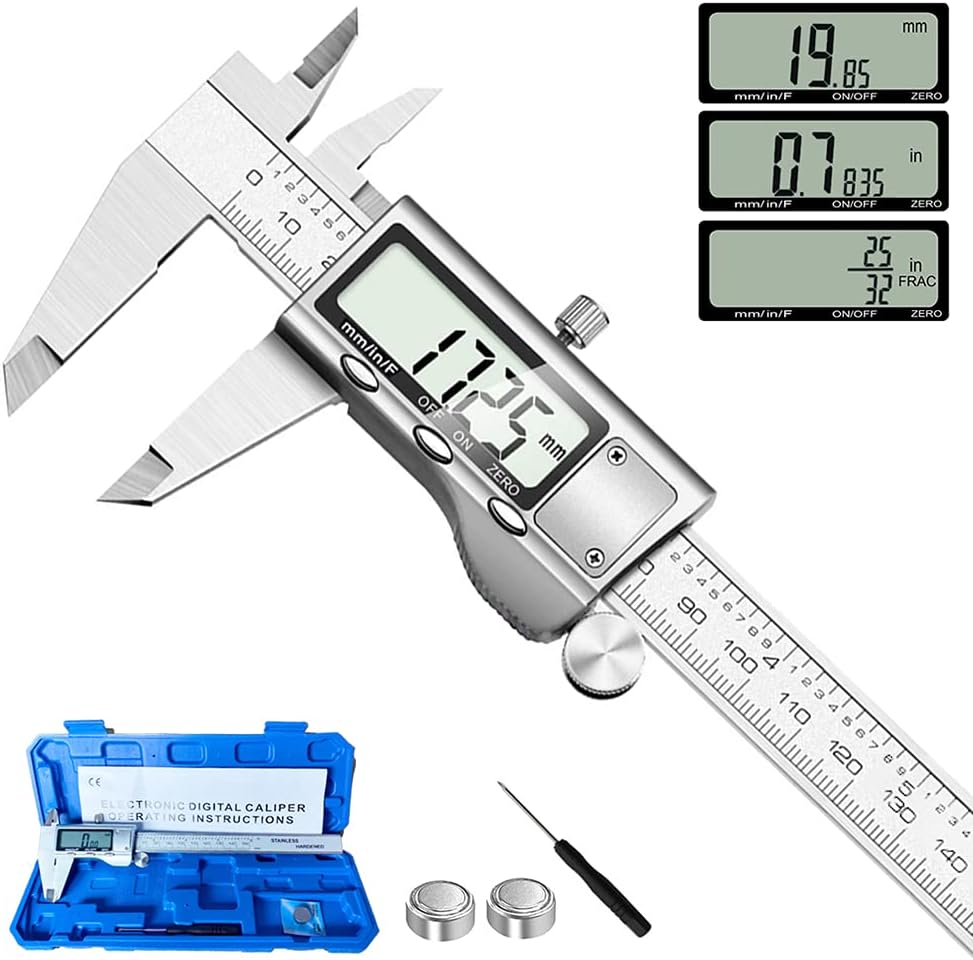


The Esydon Upgraded Calipers 6 inch is a cost-conscious digital measuring tool with a 4.6 rating and a feature set aimed at practical DIY work. Its 0–6 inch range covers common printed brackets, enclosures, spacers, shafts, and fit-check parts, while the large LCD, inch-to-millimeter conversion, and automatic shutdown keep operation straightforward. It is one of the most approachable choices for a maker building a first measurement kit.
We may earn a commission when you buy through this link, at no additional cost to you.
Four measurement modes are genuinely useful around a 3D printer. The external jaws handle printed widths, diameters, and wall positions; the internal jaws can check bores; the depth rod covers recess depth; and the step function helps with shoulders and offsets. The stated accuracy of ±0.2 mm, or 0.01 inch, and 0.01-inch resolution are more than adequate for troubleshooting common fit, clearance, and scaling issues, particularly when filament shrinkage and printer variation are already present.
The body uses extra-strong carbon fiber composite rather than stainless steel. That is the main distinction from higher-ranked models, and it may feel less rigid in demanding workshop conditions. The supplied plastic case helps protect the tool during storage, and three LR44 batteries are included, with one preinstalled. Its stated battery-conscious design can support extended measuring intervals, while the automatic power-off reduces waste when the caliper is left on a cluttered workbench.
Choose this model if you want broad measurement capability without paying for a rechargeable steel instrument. It is especially attractive to new 3D-printing hobbyists who need external, internal, depth, and step measurements in one tool. For critical-tolerance work, a finer-resolution stainless steel caliper may be preferable, but for everyday print QA, household projects, and basic dimensional checks, this is a well-rounded budget recommendation.
The combination of external and internal jaws makes it easy to compare a finished part with its target dimensions. The depth and step functions extend that value to recessed features and stepped geometries without requiring several separate tools.
Automatic shutdown, replaceable button batteries, and an included protective case make this a low-maintenance choice. It can be kept near a printer and returned to its case without needing a charging cable.
We may earn a commission when you buy through this link, at no additional cost to you.
The HARDELL Digital Caliper 6 Inch is a premium-oriented, rechargeable caliper with a 4.6 rating. Its all-metal body, stated accuracy of ±0.001 inch, and 0.0005-inch resolution place it among the strongest specifications in this guide. It is well suited to makers who regularly compare printed parts, inspect small clearances, or work in a shared workshop where a rigid instrument feels more dependable.
We may earn a commission when you buy through this link, at no additional cost to you.
The backlit LCD is a practical feature for a printer enclosure, dim workbench, or late-evening session. Readings can switch among inch, millimeter, and fraction formats, so users do not need to stop and calculate every result. External, internal, depth, and step modes cover most dimensional checks, while the polished edges and thumb roller are designed to support smooth positioning and reduced hand strain during repetitive inspection.
Its rechargeable battery is the main convenience. The stated charging behavior is that two minutes provide brief use, while a 20-minute charge supports up to four months of continuous use. That makes it attractive for frequent users who dislike carrying spare button cells. Charging requires a 5V adapter and compatible USB-C cable; the manufacturer specifically advises against adapters above 7V and dual USB-C-to-USB-C cables, so cable compatibility deserves attention before ordering.
This caliper is a strong choice for dedicated makers, educators, and small workshops that value metal construction, fine resolution, and a backlit display. The premium features are most useful when the caliper is used daily rather than occasionally. If a rechargeable system is not important and replaceable batteries better suit your workflow, one of the stainless steel button-powered alternatives offers a simpler maintenance model.
The stated 0.0005-inch resolution and ±0.001-inch accuracy are useful when checking small printed holes, slots, pins, and mating parts. These figures describe the product specification, while real-world results can also depend on technique, jaw alignment, and the printing process.
A backlit screen improves readability in low-light spaces, and the metal body feels suited to frequent bench use. The locking screw helps hold a reading steady while the user transfers a dimension to a slicer or design file.
We may earn a commission when you buy through this link, at no additional cost to you.
The Adoric Calipers 0–6 Inch is a straightforward digital caliper with a 4.5 rating. It offers the measurements most 3D-printing hobbyists need in a familiar format: 0–6 inches or 0–150 millimeters, a large LCD, and one-button switching between inch and millimeter. The 0.01-inch resolution and ±0.01-inch accuracy are suitable for general dimensional verification rather than metrology-grade inspection.
We may earn a commission when you buy through this link, at no additional cost to you.
Its four modes cover outside diameter, inside diameter, depth, and step measurement. That versatility is useful for checking whether a printed cylinder fits a bore, whether a recessed pocket reaches the intended depth, or whether a stepped part matches its design. The zero-setting function lets the user begin a new measurement from a reference point, which can make comparative checks more convenient.
The product information notes that the caliper uses carbon fiber composite buttons and should be checked after unpacking. Users are instructed to remove the white insulation film from the battery compartment before use and to slide the LCD toward zero if readings appear inaccurate. Automatic shutdown occurs after five minutes of inactivity, helping preserve the replaceable battery.
Adoric is most suitable for makers who want a simple inch-and-millimeter instrument and do not require fraction display or a rechargeable battery. Its large screen and uncomplicated controls make it a solid general-purpose choice for home printers, desk-scale projects, and basic fit checks. The lack of fraction output and composite controls prevent it from matching the more specialized premium models, but the core measurement functions are well aligned with regular 3D-printing work.
The zero function is useful for comparing a printed part directly against a known reference or another dimension. Resetting to zero creates a convenient baseline without forcing the user to subtract readings manually each time.
The large LCD presents values clearly, and one-button unit conversion helps when a slicer displays millimeters while a design is dimensioned in inches. Five-minute auto-off is also appropriate for an intermittently used bench tool.
We may earn a commission when you buy through this link, at no additional cost to you.
This Stainless Steel Electronic Micrometer combines a 4.6 rating with a rigid stainless steel frame and fine stated resolution. Its 0.01 mm, or 0.0005-inch, resolution and ±0.02 mm accuracy make it a credible choice for detailed checks on printed plugs, pins, apertures, and replacement parts. The measurement range of 0–150 mm or 0–6 inches fits most desktop and hobby-scale printer projects.
We may earn a commission when you buy through this link, at no additional cost to you.
The large LCD is paired with a thumb roller and locking screw for controlled positioning. That arrangement is particularly helpful when a printed part needs to be measured repeatedly or when a dimension must remain fixed while the user records the result. The caliper supports internal, external, height, and depth measurements, covering the main dimensions encountered in enclosure and mechanism projects.
Stainless steel is described as waterproof, stain-proof, and oil-proof, which is advantageous in a workshop where tools may contact coolants, oils, or accumulated dust. The automatic shutdown occurs after four minutes of inactivity. As with many conventional digital calipers, reliable use depends on keeping the measuring surfaces clean and the jaws free of debris.
This is a balanced option for makers who want steel durability and fine resolution without paying for a rechargeable or backlit design. It is well matched to workshops, repair benches, and users who already prefer replaceable button cells. The standard display is less useful in darkness, but the overall specification set supports dependable measurement across a broad range of 3D-printing tasks.
The steel construction resists bending, staining, and corrosion better than a composite housing. That makes it a natural fit for shared benches where the caliper may be handled frequently and exposed to workshop residue.
The thumb roller supports smooth adjustments, while the locking screw can secure a dimension during inspection. This is useful when checking tight fits or transferring the same measurement across several printed components.
We may earn a commission when you buy through this link, at no additional cost to you.
The HARDELL Stainless Steel Caliper is a well-equipped measuring tool with a 4.5 rating. Its 0–6 inch range, ±0.02 mm accuracy, and 0.01 mm resolution align well with typical dimensional checks on printed parts. More importantly for new makers, the package includes the caliper, a sturdy case, batteries, a mini screwdriver, and a stainless steel ruler in a ready-to-use kit.
We may earn a commission when you buy through this link, at no additional cost to you.
Its four measurement modes cover internal diameter, external diameter, depth, and step. The ability to zero the caliper at any position supports quick comparative checks, though the product guidance recommends closing and re-zeroing before each use for consistency. The large LCD, wide viewing angle, and one-click conversion between millimeters and inches help keep readings quick and legible at a printer bench.
The stainless steel body is designed to resist rust, wear, and corrosion, and the smooth thumb roller and locking screw help avoid accidental movement. Auto-off after five minutes of inactivity reduces battery consumption. A standard LCD without a backlight remains readable in a well-lit workspace but offers less support for dark enclosures or nighttime maintenance.
This model is a strong fit for makers who want more than the caliper itself. The case protects the instrument, the mini screwdriver assists with adjustments, and the ruler provides a second reference for simple layout or checking. It suits hobbyists, students, and workshop users who value a complete accessory set and sturdy construction over rechargeable convenience.
The included case, spare battery, mini screwdriver, and steel ruler remove the need to source basic accessories separately. That makes this an attractive kit for a new 3D-printing workspace that is still being assembled.
The rigid steel frame, smooth roller, and locking screw support repeatable positioning. These physical features matter when measuring multiple copies of a part and checking whether their dimensions remain consistent.
We may earn a commission when you buy through this link, at no additional cost to you.
The Kynup Digital Caliper is a 4.6-rated stainless steel micrometer designed for users who need flexible unit selection. It switches among inch, metric, and fraction readings, making it especially useful when working from a mix of 3D model dimensions, printer logs, and online part references. Its 0–6 inch range and stated ±0.001-inch accuracy provide a solid baseline for detailed inspection.
We may earn a commission when you buy through this link, at no additional cost to you.
The caliper handles external, internal, depth, and step measurements. Its oversized LCD is designed for easy viewing, while the forged and polished stainless steel body offers a substantial feel and resistance to the warping associated with flimsier plastic tools. The stated zeroing advice is straightforward: clean the jaws and press zero before measuring to reduce the chance of reading drift.
Automatic shutdown after five minutes protects the button batteries. The ready-to-use package includes three button cells, two of which are replacements, a mini screwdriver, and a custom hard-plastic case. That combination provides storage and maintenance essentials, although it does not offer the cable-free convenience of a rechargeable model.
Kynup is a good match for experienced makers who appreciate fractions as a native display option and want a sturdy tool with a complete accessory package. It is particularly suitable for comparing printed parts with legacy dimensions or shop drawings. Users seeking illumination for dark workspaces may prefer the backlit rechargeable alternatives, but the standard screen remains appropriate in a bright maker area.
Native fraction output is the defining convenience here. It reduces mental conversion when a design uses fractional inches, while metric and inch modes remain available for common printer workflows.
The forged stainless steel construction is a meaningful advantage over lightweight composite tools. It is better suited to frequent handling, storage, and repeated dimensional comparisons around a busy printer.
We may earn a commission when you buy through this link, at no additional cost to you.
The Stainless Steel Vernier Micrometer is a 4.5-rated model offering inch, fraction, and millimeter switching on a large LCD. Its 0–6 inch range, ±0.001-inch accuracy, and 0.0005-inch resolution make it well matched to detailed hobby measurements. The broad unit support is especially convenient for makers moving between metric slicer settings and inch-based design references.
We may earn a commission when you buy through this link, at no additional cost to you.
Internal, external, depth, and step measurement modes make it more than a simple outside ruler. The zero-anywhere design allows a measurement to start from a selected reference point, which can be useful for comparative work. The product information also describes the high-strength stainless steel body as waterproof and dirt-proof, useful qualities around a workshop where residue and dust are unavoidable.
The large display is intended to remain readable even in strong sunlight, and the caliper shuts off after five minutes without use. It relies on a conventional button-cell power source rather than a rechargeable battery. This is not a drawback for many users, since it removes charging compatibility from the equation and allows the instrument to remain ready between projects.
This option serves general DIY users, machinists, woodworkers, jewelers, and hobbyists who want a versatile, rugged measuring tool. For 3D printing, it can verify external dimensions, bore sizes, pocket depths, and step measurements without requiring separate instruments. Its main limitations are the lack of a backlight and recharge capability, but those omissions are modest for users working in normal lighting.
Four measurement modes cover the geometry that appears most often in printed brackets, frames, housings, and mechanical mockups. This versatility keeps a maker from searching for another gauge when an internal or recessed feature needs checking.
Switching among inches, fractions, and millimeters minimizes conversion errors. The large LCD is also intended to remain legible in bright workshop conditions, where small digits can otherwise become difficult to interpret.
We may earn a commission when you buy through this link, at no additional cost to you.
The HARDELL Upgraded Digital Caliper is a 4.5-rated steel model distinguished by its orange, nonbacklit LCD. Rather than relying on illumination, it uses a high-contrast display intended to produce clear digits without the eye strain that can accompany a backlit screen. That design choice may appeal to makers who spend long periods checking parts in a bright workshop.
We may earn a commission when you buy through this link, at no additional cost to you.
The caliper measures 0–6 inches with stated accuracy of ±0.001 inch and resolution of 0.01 mm. Precision-ground jaws and a glass scale system support repeatable contact, while the stainless steel body, smooth thumb roller, and locking screw make it suitable for regular bench work. It supports inch, millimeter, and fraction output along with internal, external, depth, and step modes.
USB-C charging is another central feature. The stated charging time is 20 minutes for up to three months of use, and an LED indicator displays red while charging and green when full. Auto-off also reduces power consumption. The advanced charging chip is intended to improve current control and battery protection, although periodic recharging is advised during extended storage.
Choose this model for its distinctive screen, rechargeable convenience, and steel construction rather than for illumination. It is best suited to bright workspaces and users who prefer a nonbacklit display. Makers working regularly in a dark printer enclosure may favor a conventional backlit LCD, while those who value charging simplicity will appreciate the USB-C system.
The orange display is designed around contrast rather than illumination. In a well-lit workshop, that can provide clear readings without requiring the user to activate a light or repeatedly drain the battery.
USB-C charging, an LED status indicator, and automatic shutdown simplify daily use. The stated three-month operating period and periodic charging guidance make this a practical alternative to carrying spare button cells.
We may earn a commission when you buy through this link, at no additional cost to you.
The Rechargeable Backlight Caliper 6 Inch holds the highest listed rating in this guide at 4.8. It combines a stainless steel body, a large backlit LCD, and a rechargeable Type-C power system with a stated accuracy of ±0.001 inch and resolution of 0.0005 inch. Those features make it a strong all-around choice for a maker who measures often and needs clear readings in varied lighting.
We may earn a commission when you buy through this link, at no additional cost to you.
Its four modes cover inner diameter, outer diameter, depth, and step measurements, while the display switches among inches, millimeters, and fractions. The backlight is useful in a dark garage, dim workshop, or enclosed printer area, and the large screen helps prevent transcription errors. A five-minute auto-off function protects battery life, while the rechargeable battery is stated to last up to three months after a 20-minute charge.
The high-precision glass grating is designed for wear resistance and longer service life than ordinary scale materials. Stainless steel construction provides a rigid frame, and the ergonomic thumb roller is intended to reduce fatigue during repeated inspection of prototypes. The package adds a steel ruler and feeler gauge, extending the tool set beyond the caliper itself and supporting additional fit checks.
This is the best general recommendation for dedicated 3D-printing hobbyists, educators, and workshop users who want fine resolution, illumination, and rechargeable convenience in one instrument. The main trade-offs are the need to recharge periodically and the potential for cable protocol incompatibility. Verify that a suitable Type-C charging cable is available, but for most users the feature balance is compelling.
The backlit large LCD supports quick reading in dim rooms and bright outdoor conditions. It is particularly useful for checking multiple dimensions quickly without repeatedly repositioning the tool to find the best viewing angle.
The included steel ruler and feeler gauge add capabilities beyond the four built-in measurement modes. That makes the package more useful for a growing maker bench where several types of fit and clearance checks are common.
We may earn a commission when you buy through this link, at no additional cost to you.
The NEIKO 01407A Electronic Digital Caliper is a stainless steel measuring tool with a 4.4 rating and an emphasis on a large, readable display. Its 0–6 inch range, 0.0005-inch resolution, and ±0.001-inch accuracy are appropriate for checking precise printed holes, shafts, slots, housings, and fit-up components. The extra-large LCD makes it especially approachable for frequent use.
We may earn a commission when you buy through this link, at no additional cost to you.
A quick-change button switches among inch, fraction, and millimeter units. The caliper measures internal diameter, external diameter, depth, and step dimensions using two jaw sets and a depth probe. This is a complete general-purpose configuration for 3D-printing quality control, particularly when the user needs to move among different feature types while troubleshooting a design.
The polished stainless steel body, knurled thumb roller, and locking screw support smooth sliding and stable positioning. The tool is described as splash- and dust-resistant, which is useful in a maker environment. A gray portable case provides pressure and shock protection, making storage between projects straightforward.
The NEIKO is a solid choice for users who value a classic button-powered design, a large display, and native fraction support. It lacks the rechargeable convenience and backlighting found among the leading picks, and it has the lowest listed rating of the ten, but the underlying specification set remains capable for ordinary 3D-print measurement. It is a practical choice for home workshops and users who prefer uncomplicated controls.
The extra-large display is designed to support faster, more confident readings. That is valuable for beginners learning dimensional inspection and for experienced users checking numerous parts in succession.
Polished stainless steel, a knurled roller, a locking screw, and a protective case provide a durable traditional package. The simple button-powered design avoids charging cables and daily charging routines.
We may earn a commission when you buy through this link, at no additional cost to you.
Choose a digital caliper by balancing the precision your printed parts require with the materials, display, power system, and measurement modes that suit your workspace. For most 3D-printing tasks, external jaws, clean zeroing, and easy-to-read millimeter output matter more than specialized features.
In short, match resolution to feature size and choose accuracy that comfortably exceeds your actual tolerance needs.
In short, six inches covers most 3D-printing tasks, but check jaw geometry and part size before committing.
In short, choose stainless steel for heavy daily use and a composite body for a lighter, budget-oriented setup.
In short, prioritize large digits and unit formats, adding a backlight only when low-light readability is a genuine need.
In short, prioritize external and internal jaws, dependable zeroing, and simple controls for the feature types you actually inspect.
In short, choose replaceable cells for simplicity or USB-C charging for frequent use, while considering cable compatibility and maintenance.
In short, prioritize a secure case and correct battery supply, then treat rulers, feeler gauges, and screwdrivers as useful extras.
In short, clean the jaws, zero before measuring, avoid impact, and store the caliper in a protective case.
Begin by preparing the caliper and the printed part. Remove any battery tab, fully charge a rechargeable model if required, and check the display. Close the jaws gently, confirm that the readout returns to zero, and use the zero control if it does not. Clean both measuring surfaces with a soft, lint-free cloth. For dimensional comparison, measure the same feature in the same location on every specimen, and avoid squeezing a delicate printed part between the jaws.
Choose the correct measurement mode. Use the external jaws for width, thickness, and outside diameter; the internal jaws for a bore or opening; the depth rod for a recess; and the step measurement for a shoulder or offset. Close the jaws until they contact the feature without compressing it. Read the display in the unit that matches your design, and use the locking screw when you need to preserve the value while recording it. For comparative work, re-zero at a known reference and keep the same technique for each part.
After the session, switch off or allow the auto-off function to engage, then wipe the jaws and body before returning the tool to its case. Remove button batteries if storing the caliper for a long period, and follow the charging guidance for rechargeable models. Inspect the jaws and storage case periodically for damage, and never attempt to correct a malfunctioning display by pressing the buttons forcefully. Return a tool that no longer returns reliably to zero to the seller for guidance or replacement.
For general print inspection, a caliper with 0.01-inch or 0.01 mm resolution is usually adequate for checking overall dimensions and common fit problems. Close-tolerance parts may benefit from 0.0005-inch resolution and a stated accuracy of ±0.001 inch. Printer scale, shrinkage, and dimensional variation must also be accounted for, so a highly precise caliper cannot correct a miscalibrated print.
Millimeters are the easiest choice when the printer, slicer, and CAD model use metric dimensions. Inches are useful for legacy hardware and household projects, while fractions can help when working from fractional-inch drawings. Several calipers support all three formats, allowing the user to switch without manually calculating a conversion.
Use the smaller internal jaws and select the inside-diameter mode if the caliper requires it. Insert the jaws into the hole, expand them until they contact opposite walls, and read the display without forcing the jaws. Clean the tips first because dust or burrs can affect the contact point and produce an inaccurate diameter.
Residue, a partially closed jaw, or a shifted zero can create a nonzero reading. Slide the jaws fully closed, clean the surfaces, and press the zero control while they are closed. The product guidance for certain models also recommends checking that the display is positioned at zero. If the reading persists, contact the seller rather than attempting to calibrate the mechanism yourself.
It is helpful if you work inside a dark enclosure, garage, or poorly lit room, but it is not essential in a bright workspace. A large standard LCD may be easier to read at certain angles, while the orange nonbacklit display in this guide prioritizes contrast. Choose illumination based on your normal lighting rather than assuming it improves every environment.
Rechargeable models are convenient for frequent users because they can be recharged over USB-C and are advertised with long operating periods. Battery-powered models remain simpler and do not depend on cable compatibility, but users need spare cells. The best option depends on measuring frequency, charging habits, and whether a compatible cable is already available.
Yes, provided the part is fully cleaned and cured and the caliper jaws are free of abrasive residue. Resin prints can be delicate, so close the jaws gently to avoid marking or deforming the surface. Clean the tool immediately afterward because uncured resin or gritty particles can contaminate the jaws and impair future measurements.
Use the supplied case or another rigid enclosure that prevents the jaws from being knocked or bent. Keep it away from excessive heat, direct sunlight, liquids, filament dust, and abrasive particles. Clean the surfaces before storage, remove loose batteries during extended storage, and recharge rechargeable models periodically according to the manufacturer's guidance.
The Esydon Upgraded Calipers 6 inch is the best budget selection, offering four measurement modes, a large display, and a protective case without the expense of a premium instrument. The Rechargeable Backlight Caliper 6 Inch is the strongest all-around option, combining a 4.8 rating, fine stated resolution, stainless steel construction, a backlit display, and useful accessories. For users who want a rigid body and a more premium power system, the HARDELL Rechargeable All Metal model is especially compelling.
Prioritize the specifications that affect your actual workflow. Choose a steel body for frequent workshop use, a backlight for low-light work, a large standard LCD for bright rooms, and replaceable batteries if simplicity matters most. For 3D-printing tasks, reliable zeroing, clean jaws, internal and external jaws, and millimeter output are the essentials. A finer resolution is valuable for small holes, pins, slots, and close-fitting components, but no digital caliper can compensate for inconsistent printer calibration or material shrinkage.
Before purchasing, recheck the current listing, rating, included accessories, battery requirements, and charging instructions. Product specifications and availability can change, and prices fluctuate over time. The linked listings should provide the most current details, allowing you to select the caliper that best matches your printer, parts, and measurement habits.