
Gwolves Skoll Mini
4.4Editor score
Compact 50g mini design
16,000 DPI optical sensor
Detachable PTFE skate cable
Our Claw Grip Gaming Mouse for Small Hands guide compares shape, weight, sensors, switches, grip comfort, and wireless performance across ten options.
A claw grip gaming mouse for small hands needs to feel controlled rather than cramped. The most useful models combine a compact footprint, gently arched buttons, a narrow waist, and enough support for the fingertips without forcing the palm into an unnatural position. Weight, sensor performance, switch response, and grip style also shape the experience.
This guide compares ten gaming mice using their published specifications, dimensions-related descriptions, grip compatibility, connectivity, sensor ratings, switch types, and stated features. The selection covers wired and wireless models, symmetrical and ergonomic shells, standard and left-handed layouts, and options aimed at fingertip, claw, palm-claw, and aggressive claw grip styles.
Each review explains the product's strongest qualities, relevant trade-offs, and likely buyer profile. Ratings and product details reflect the supplied listings and can change over time. Marketplace pricing and availability also fluctuate, so readers should verify current listings, warranty terms, compatibility, and included accessories before purchasing.
4.4Editor score

4.6Editor score

4.3Editor score
The table below compares the ten shortlisted mice by weight, grip approach, sensor, switching technology, and connection style, making it easier to identify the model that aligns with a compact claw grip.


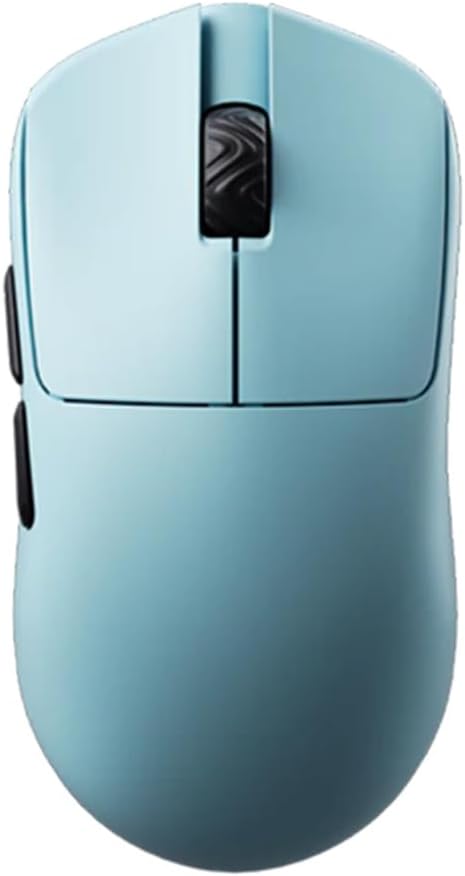

The Gwolves Skoll Mini SK-S is a compact 50g gaming mouse designed around the needs of players who want a small shell without the weight of a full-size desktop model. Its honeycomb design, small format, 16,000 DPI sensor, PTFE skates, and detachable cable make it a focused choice for claw-grip gaming. The supplied rating is 4.4, reflecting a generally favorable buyer response.
We may earn a commission when you buy through this link, at no additional cost to you.
The strongest feature is the combination of size and low mass. At 50g, the mouse should be easier to move through quick corrections than many conventional gaming mice, while the small designation is particularly relevant for hands that struggle to fit around a larger body. The 3389 sensor provides adjustable sensitivity up to 16,000 DPI, which is more than enough for most competitive shooters and everyday precision tasks.
The detachable cable is another practical detail. It allows the mouse to be moved without leaving a permanently attached cord pulling against the front edge of a mousepad. PTFE skates can also reduce friction and help the lightweight shell glide cleanly, although actual glide quality will depend on the skates, mousepad surface, and maintenance routine. The trade-off is that this is a wired design, so it cannot provide the freedom of a wireless setup.
This is a strong recommendation for buyers prioritizing a small footprint, low weight, and uncomplicated wired operation. It is particularly appealing for claw grip users who want direct movement without paying for the advanced wireless electronics found in premium competition mice. Those who need cable-free movement, programmable side controls, or very high sensor specifications should look farther down the list, but the Skoll Mini remains a practical compact option.
The 50g construction and small ergonomic shape can reduce the effort required to accelerate, stop, and redirect the pointer. That makes the Skoll Mini appealing for sensitivity-sensitive games where fast hand movement is common.
The detachable cable and PTFE skates create a straightforward desktop setup. There is no wireless pairing process or charging routine, while the 16,000 DPI sensor covers a broad range of sensitivity preferences.
We may earn a commission when you buy through this link, at no additional cost to you.
The Lamzu Atlantis Mini Champion Edition is a 51g symmetrical wireless gaming mouse built for fast movement and claw-grip control. Its rating of 4.6 is the highest among the listed products. The hourglass shape, broad curved back, optical switches, PAW 3950 sensor, and support for 8K polling give it a strong feature set for a compact mouse.
We may earn a commission when you buy through this link, at no additional cost to you.
Its symmetrical shape is particularly useful for small hands because it avoids forcing one hand orientation. The broad back and curved top are intended to prevent finger cramps and support claw players, while the 51g weight limits fatigue during extended sessions. The PAW 3950 sensor supports up to 30,000 DPI and 750 IPS, combining high sensitivity with fast tracking capability.
Wireless response is another major strength. The listed specifications support 8K polling when used with the appropriate 8K dongle, while the Nordic 52840 platform is positioned around fast response, accurate motion detection, and efficient wireless operation. Optical switches offer quick, consistent actuation, and the dustproof encoder is designed to maintain smooth wheel rotation over time.
The Atlantis Mini is the most balanced recommendation for a buyer who wants a small claw grip mouse without giving up high-end sensor specifications or wireless operation. It suits competitive shooters and other fast-paced games in which movement efficiency matters. The main compromises are the premium cost and the need to ensure the required wireless hardware is available and compatible with the user's computer.
The balanced hourglass shell allows a small hand to settle into the mouse without committing to a right- or left-handed layout. Its broad rear and curved top support the arch formed by the fingers during a claw grip.
The PAW 3950 sensor, optical switches, Nordic processor, and optional 8K polling create a low-latency package. Buyers who do not need 8K can still use the mouse for its lightweight shape and strong sensor performance.
We may earn a commission when you buy through this link, at no additional cost to you.
The Bloody V7 is an ergonomic claw-grip gaming mouse with a rubberized black coating, eight programmable buttons, and a 3200 DPI optical sensor. Its supplied 4.4 rating suggests broad appeal, particularly among players who want dedicated control buttons and configuration options rather than the absolute minimum functions of a minimalist mouse.
We may earn a commission when you buy through this link, at no additional cost to you.
The V7 is built around a claw-oriented form, making it more specialized than a symmetrical mini model. Its raised button area is intended to support the fingers during arched, separated placement. The rubberized finish adds texture around the shell, while the eight programmable buttons can handle macros, scripts, automation, and frequently used commands through Bloody software.
Sensitivity can be adjusted from 100 to 12,000 CPI according to the supplied feature information, even though the product title identifies the sensor as 3200 DPI. Report rate can be set among 125, 250, 500, and 1000 Hz. Compatibility is listed across Windows, Linux, and Mac systems, making it a versatile option for mixed gaming or productivity environments.
The V7 is best for a small-handed player who values button layout, software control, and an explicitly ergonomic claw shape over extreme lightness or 8K wireless polling. Its limitations are the modest headline sensor specification and the absence of a stated ultralight weight. Even so, the combination of programmable controls and adjustable response makes it a functional choice for games requiring quick access to secondary actions.
Eight programmable buttons distinguish the V7 from lightweight minimalist mice. Mapped commands can reduce keyboard switching during games or streamline repetitive actions, subject to compatibility with the title being played.
Bloody 6 software provides CPI and report-rate options across several supported operating systems. This gives the mouse broader utility for gaming, desktop work, and portable systems.
We may earn a commission when you buy through this link, at no additional cost to you.
The Pulsar Gaming Gears X3 LHD Crazylight is a 43g mini mouse created specifically for left-handed players. Its rating is 4.3, and its defining attraction is the rare combination of a left-handed layout, a hybrid palm-claw shape, and extreme low weight. The RelaxClaw design blends palm support with claw-grip control.
We may earn a commission when you buy through this link, at no additional cost to you.
The symmetrical button height provides a consistent top surface, while the asymmetric shell contours to the left hand. This arrangement may be especially useful for players who want a more aggressive claw posture but still appreciate some palm support. The XS-1 sensor delivers up to 32,000 DPI, 750 IPS tracking speed, and 50g acceleration, giving the mouse considerable range for sensitivity and movement settings.
Optical switches are designed to minimize unintended double-clicks and produce swift, consistent actuation. The included 16-piece set of 6.6mm Pulsar Dot Skates is intended to create smooth, low-friction movement on glass and hard pads. The package also includes the TTC Golden dustproof encoder, which adds a defined tactile sensation to wheel rotation.
This is the clear premium choice for a left-handed player with small hands, especially one who prefers a hybrid palm-claw posture. The 43g weight and compact body may feel unusually light, while the high-resolution sensor and refined controls target competitive use. It is less relevant to right-handed buyers or those who want a simple symmetrical shape, but for its intended audience it offers a notably specialized feature set.
The shell is contoured for the left hand rather than merely offering symmetrical controls. This can provide a more natural and stable position for players who have found conventional right-handed mice uncomfortable.
At 43g, the X3 LHD is among the lightest mice in the comparison. The XS-1 sensor and low-friction skates complement that low mass by supporting rapid, controlled movement across hard surfaces.
We may earn a commission when you buy through this link, at no additional cost to you.
The Pulsar Gaming Gears X2H mini is a renewed 52g wireless mouse with a symmetrical profile, an elevated rear hump, and a narrower waist. Its 4.1 rating is the second-lowest in the group, but the listed design details target players who want a more stable, aggressive claw grip in a mini wireless body.
We may earn a commission when you buy through this link, at no additional cost to you.
The higher hump gives the palm a defined resting point, while the narrow waist leaves more room for the fingers to separate and arch. That makes the X2H mini relevant to claw players who still want some palm contact. Upgraded internal construction is intended to preserve shell rigidity and deliver consistent clicks, while indirect wheel clicks are designed to provide smoother rotation with less rattling.
The PAW3395 sensor supports programmable sensitivity up to 26,000 DPI, 650 IPS tracking speed, 50g acceleration, and Motion-Sync technology. Wireless operation is listed at 1000 Hz and 1 ms, with additional 4K polling readiness. Optical switches reduce the likelihood of unintended double-clicks, and the Nordic microcontroller is associated with efficient processing, accurate battery reporting, and up to 100 hours of use.
The X2H mini is a good fit for a player who prefers a small wireless mouse with a slightly more aggressive claw posture than a completely flat symmetrical design. Its renewed status is the main point of caution, so buyers should inspect the condition and confirm the available warranty. Otherwise, the shape, sensor, switches, and battery specification make it a capable compact option.
The elevated rear hump and slender waist offer a middle ground between fingertip and palm grips. Small hands can use the hump as a stable anchor while keeping finger separation for controlled clicks.
A 1000 Hz baseline polling rate, 1 ms response, 4K readiness, and stated 100-hour battery life balance performance with convenience. Actual endurance will vary with polling, sensor, lighting, and usage.
We may earn a commission when you buy through this link, at no additional cost to you.
The Corsair IRONCLAW Wireless SE is an asymmetric, right-handed wireless mouse explicitly designed for larger hands and palm-grip players. Its supplied rating of 3.9 is the lowest among these ten options, and its larger-hand orientation makes it less directly aligned with the keyword than a compact claw-oriented model.
We may earn a commission when you buy through this link, at no additional cost to you.
The mouse's primary strengths are versatility and customization. Ten programmable buttons can handle macros, alternate key binds, and productivity commands through iCUE software. The 26,000 DPI CORSAIR MARKSMAN sensor includes surface calibration, allowing users to adjust tracking to different setups, while RGB lighting can be customized around the scroll wheel, logo, and front grill.
Battery endurance is another major feature. The listing states up to 285 hours over 2.4GHz and up to 532 hours using Bluetooth, making flexible connectivity one of the product's most attractive characteristics. Three-stage indicators provide visible cues for DPI and profile status, which is useful when switching configurations during a session.
This is not the most suitable choice for a buyer whose primary requirement is a claw grip for small hands. Its size, palm-oriented shape, and right-handed design work against that brief. It remains worth considering for a right-handed player with larger hands who values many programmable buttons, extensive iCUE customization, and long battery life more than a compact competitive shell.
Ten programmable inputs provide far more control than a minimalist esports mouse. They can support game commands, media controls, and work functions, making the mouse practical for players who alternate between gaming and productivity.
The listed shape is designed for larger hands using a palm grip. Buyers with small hands and a preferred claw grip should prioritize a mini or explicitly claw-compatible model instead.
We may earn a commission when you buy through this link, at no additional cost to you.
The Scyrox V8 is a symmetrical 36g mouse created for claw and fingertip players. It carries a 4.5 rating and pairs its extremely light shell with a PAW 3950 sensor, Kailh optical switches, a Nordic 52840 processor, and an included 8K dongle. That combination places it among the most technically ambitious compact options in the guide.
We may earn a commission when you buy through this link, at no additional cost to you.
The stated 36g plus or minus 3g weight can make rapid cursor movement feel effortless, especially for competitive shooters where frequent corrections are needed. The symmetrical shell supports multiple finger-led grip styles and broad hand-size compatibility, while the concave or clearly defined button area helps the fingers remain positioned during quick clicks.
The PAW3950 delivers accurate, low-latency tracking with a maximum listed resolution of 30,000 DPI. Kailh optical switches are designed for fast actuation, near-zero debounce delay, consistent clicks, and improved durability compared with conventional mechanical switches. A web-based driver lets users adjust settings without installing a traditional desktop application, and the included 8K dongle supports the model's higher polling option.
The V8 is an excellent recommendation for a small-handed player who wants the lightest possible shell and prefers a claw or fingertip posture. Its symmetrical layout also makes it less restrictive than a right-handed ergonomic design. The potential drawback is that a body this light may feel less planted than a heavier mouse, so players who need more palm resistance should test their preference when possible.
The 36g target weight reduces the inertia of the mouse during rapid directional changes. This can be especially helpful in games that demand quick flicks and precise target acquisition.
The web-based driver removes the need for a conventional local installation, while the included 8K dongle provides access to high polling performance. The PAW3950 and optical switches keep the control chain responsive.
We may earn a commission when you buy through this link, at no additional cost to you.
The Pulsar X2H Wireless Mini is a compact wireless mouse with a higher rear hump, narrower waist, and symmetrical controls. Its 4.2 rating reflects a favorable but less emphatic response than several ultra-light alternatives. It is aimed particularly at players who want a more aggressive claw grip while retaining some palm support.
We may earn a commission when you buy through this link, at no additional cost to you.
Its elevated rear section helps stabilize the hand, and the slim waist creates more separation between the index and ring fingers than a broad conventional shell. The upgraded internal structure is designed to improve rigidity and click consistency, while indirect wheel clicks are intended to create smoother rotations with minimal rattling.
The supplied specifications identify a PAW3395 sensor with Motion-Sync technology, 650 IPS tracking speed, 50g acceleration, and programmable sensitivity up to 26,000 DPI. Wireless polling operates at 1000 Hz and 1 ms, with 4K polling readiness. Optical switches reduce unintended double-clicks, while the Nordic microcontroller supports efficient operation, accurate battery readings, and up to 100 hours of stated battery life.
The X2H Wireless Mini is a convincing choice for small hands that need a compact wireless mouse with a more purposeful claw structure. It is less minimalist than the V8 or V6 and may appeal to buyers who want a defined rear support area without moving into a much larger ergonomic shell. Its premium positioning makes it best justified by players who value its shape, switches, sensor, and wireless refinements.
The mini format keeps the mouse appropriately scaled for smaller hands, while the raised rear hump provides a stable palm contact point. The narrow waist preserves room for an arched claw position.
A sturdier internal structure supports consistent clicks, and the dustproof optical switch and encoder combination targets durable operation. The wireless platform adds fast polling and strong stated battery endurance.
We may earn a commission when you buy through this link, at no additional cost to you.
The Scyrox V6 is a 40g symmetrical gaming mouse intended for claw and palm players. It shares the highest supplied rating in the comparison at 4.6 and combines a PAW 3950 sensor, concave main buttons, a web-based driver, and an included 8K dongle. It is a versatile lightweight option rather than a narrowly specialized claw shell.
We may earn a commission when you buy through this link, at no additional cost to you.
The symmetrical shape makes it easy to adopt with either hand and adaptable to different hand sizes. Concave main buttons are the key ergonomic detail: their inward curve helps locate the index and middle fingers, which can improve click consistency during rapid or repeated inputs. The 40g body remains light enough for quick movement while offering slightly more mass than the 36g V8.
The PixArt PAW3950 sensor provides stable, low-latency tracking with a listed maximum of 30,000 DPI. The web-based driver allows users to adjust configuration through a browser, reducing setup friction, while the included 8K dongle supports high polling. The 2.4GHz connection is designed for responsive, lag-free performance in gaming and everyday use.
The V6 is a strong recommendation for a buyer seeking one compact mouse that can transition between claw and palm positioning. It works especially well for players who value a featherweight body, clear finger placement, and modern wireless specifications without needing a specialized left-handed or aggressively sculpted shape. The main consideration is that a symmetrical shell may not provide as much palm support as a full ergonomic model.
The inward-curved button surfaces help the index and middle fingers settle into repeatable positions. This can reduce the chance of missed or uneven clicks when the mouse is moved aggressively.
Its symmetrical design supports both claw and palm approaches and accommodates a broader range of hand sizes. That flexibility makes the V6 useful for players who experiment with grip styles or alternate between games.
We may earn a commission when you buy through this link, at no additional cost to you.
The BenQ Zowie S2-C is a small symmetrical gaming mouse built for competitive FPS play and users who prefer palm or claw grip. Its rating is 4.3. The streamlined approach relies on a 3360 optical sensor, four adjustable DPI levels, selectable polling rates, and a driverless configuration rather than extensive software customization.
We may earn a commission when you buy through this link, at no additional cost to you.
The shortened S-C shape is intended to be lighter and more compact than larger Zowie models. Its symmetrical profile accommodates either hand, while the stated support for palm and claw grip makes it relevant to small-handed players who want a stable competition mouse without an aggressive ergonomic sculpt.
The paracord cable is designed to minimize drag and pull while the pointer travels across a surface. Four DPI settings—400, 800, 1600, and 3200—cover common sensitivity ranges, and polling can be adjusted among 125, 500, and 1000 Hz. Since configuration is driverless, the mouse avoids unnecessary setup steps, which can be attractive in competitive environments where simplicity matters.
The S2-C is a strong choice for a buyer who values a proven small shape, predictable controls, and a straightforward wired setup. It lacks wireless convenience, programmable side buttons, and the very high sensor resolution found on newer competition models. Nevertheless, its dedicated small size, claw-compatible form, low-friction cable, and simple controls align closely with the core needs of the keyword.
The S-C series was shortened to offer a compact alternative to larger mice. Its symmetrical design and palm-claw compatibility allow small hands to use the mouse without adapting to an oversized shell.
Four DPI levels and selectable polling rates provide the essential performance controls without requiring a driver. This keeps the setup simple and makes the mouse convenient for PCs with limited software restrictions.
We may earn a commission when you buy through this link, at no additional cost to you.
The right claw-grip mouse depends on hand scale, preferred finger posture, weight tolerance, and the controls required by your games. Reviewing these factors before comparing sensor specifications can prevent a technically impressive mouse from feeling awkward in daily use.
Choose a model explicitly offered in a small size or as a mini, then compare its grip description with your own grip. The BenQ S2-C, Lamzu Atlantis Mini, and Gwolves Skoll Mini are the clearest small or mini choices in this group.
Prioritize a shape described as claw, fingertip, palm-claw, or mini. Avoid relying on weight and sensor specifications alone, because an unsuitable shape can undermine comfort even when the electronics are strong.
For a small-hand claw grip, prioritize a genuinely low mass and compact body. Choose the lightest option if your style is fingertip-led, and consider a slightly heavier model if you want a more substantial feel.
Do not chase the largest number if your games use moderate sensitivity. Ensure the mouse supports the sensitivity you need and that the sensor can track reliably on your preferred mousepad surface.
Verify the required receiver or dongle, computer compatibility, and battery expectations. A higher polling option is useful in competitive settings, but a reliable lower polling rate can still deliver an excellent experience for most games.
Optical switches are a sensible starting point for fast competitive clicking. If macros, extra commands, or broad operating system support matter more, evaluate the V7's eight programmable buttons before making a final choice.
Choose simple hardware if you want a clean setup and immediate use. Choose programmable controls when game-specific shortcuts, profiles, or productivity features justify the extra buttons and software.
Check whether replacement feet are included, whether the stated skates suit your pad, and whether cable management matters. Accessories are most valuable when they match your exact surface and setup.
Begin by setting the mouse beside the rear edge of your mousepad with the cable or wireless receiver arranged so neither interferes with your movement. For a claw grip, place the index and middle fingers on the primary buttons, keep the ring and little fingers near the edges without forcing them flat, and use the rear of the mouse as a light stabilizing point. Adjust the hand position gradually rather than forcing a textbook posture immediately.
Configure the sensor and controls before entering a match. Choose a sensitivity that permits short, controlled movements rather than exaggerated arm motions, and use the available DPI buttons or profile shortcuts to create a separate configuration for different games. For wireless models, keep the receiver close and unobstructed, confirm the charge level before a session, and avoid switching between high polling or performance modes when battery conservation is more important.
Clean the mouse and skates regularly by disconnecting power or turning the mouse off. Remove loose dust with compressed air or a soft brush, wipe the shell with a lightly damp cloth, and keep moisture away from openings and buttons. Replace worn feet with compatible skates, inspect the cable for damage, and use the manufacturer's cleaning and replacement guidance. A clean sensor and smooth feet preserve the tracking consistency expected from a responsive claw-grip mouse.
Claw or fingertip grip is often more natural for small hands because it limits full-palm contact and allows the fingers to control the buttons. A palm-claw hybrid can work when the rear hump provides useful support without crowding the fingers. The best choice depends on finger length, hand width, and personal comfort rather than grip name alone.
Both features matter, but they solve different problems. Mini proportions make it easier to surround and operate the mouse, while low weight reduces the effort needed for fast movement. A compact but heavy mouse can still feel awkward, so it is best to prioritize the overall fit, shape, and comfortable finger spacing rather than either specification in isolation.
Yes, especially for fingertip-led players who alternate hands or want a broad choice of finger placement. Symmetrical models such as the Lamzu Atlantis Mini, Scyrox V8, and Scyrox V6 can support claw or palm-claw positioning. Some players still prefer an asymmetric shape because its side contours can create more natural support.
No. Higher polling can reduce the interval between motion reports, but overall performance also depends on sensor tracking, wireless stability, switch response, and the quality of the connection. For most players, a stable lower rate is sufficient, while competitive users may value the lower latency offered by 4K or 8K options.
Modern wireless mice can be suitable when their sensor, polling rate, and connection remain stable. Several options in this guide specify 1000 Hz, 4K readiness, or 8K support, but actual latency also depends on the receiver, USB port, interference, and power management. A wired mouse is still the simpler option when absolute predictability and zero charging are the priorities.
Look for separated, clearly defined primary buttons that let the index and middle fingers arch without squeezing the entire shell. Concave buttons, such as those on the Scyrox V6, can help locate the fingers, while a narrow waist provides additional separation. The best button shape is one that supports quick clicks without causing strain or accidental presses.
Skates should be replaced when they become visibly worn, torn, uneven, or noisy, because that can introduce resistance and reduce tracking consistency. The X3 LHD includes a set of 16 UHMW-PE Dot Skates, while the Zowie S2-C includes additional feet. Use only replacements that match the mouse's shape and intended surface.
A left-handed model can be worthwhile because the button and side-button layout is mirrored to match the hand naturally. The Pulsar X3 LHD Crazylight is the dedicated left-handed option in this guide. Right-handed players who use a symmetrical mouse can position it with either hand, while those who require left-side controls may need to look for a mirrored layout.
The Lamzu Atlantis Mini stands out as the strongest all-around recommendation because it combines a 51g symmetrical shell, claw-friendly contours, a 30,000 DPI PAW3950 sensor, optical switches, and 8K wireless support. The Gwolves Skoll Mini is a more direct and economical compact option, while the Pulsar X3 LHD Crazylight is the specialized premium pick for left-handed players.
Prioritize fit before every other specification. A small footprint, narrow waist, separated button area, and light weight are more likely to produce a comfortable claw grip than sensor resolution alone. Add wireless polling, optical switches, or programmable buttons only when they serve your games and preferred setup. The Scyrox V6, V8, and Pulsar X2H models are also strong alternatives when different combinations of grip support and weight are preferred.
Finally, verify the current listing, included accessories, computer compatibility, warranty, and marketplace availability before purchasing. Product configurations and marketplace pricing can change, and a listing's stated specifications may not answer every fit question. When possible, compare hand position, mouse width, and finger reach with a similar model you already know feels comfortable.