
ASRock DeskMeet X300
4.8Editor score
Broad AM4 processor support
Four DDR4 memory slots
PCIe 3.0 x16 expansion
Dual 2.5G networking
Our Barebone Pcs with Amd guide compares 10 AMD mini PC barebones, covering processors, upgradeability, displays, networking, storage, and ideal use cases.
Barebone PCs with AMD processors offer a flexible way to build compact desktop systems around the components you actually need. A good example should balance processor performance, upgradeability, connectivity, thermal design, and display support while remaining small enough for a desk, media cabinet, or home lab.
We compared 10 AMD-based barebone mini PCs across CPU platform, memory and storage options, networking, ports, external GPU support, cooling, dimensions, and intended workloads. The list covers modern Ryzen 7 systems, adaptable AM4 platforms, and storage-focused mini NAS designs for home and small-office use.
Each review identifies the product's strongest qualities and practical limitations, helping you match a system to gaming, content creation, office productivity, networking, or home-server needs. Product configurations and prices can change, so verify current specifications, accessory requirements, and CPU compatibility before purchasing.
4.8Editor score

4.5Editor score

3.1Editor score
The table below compares all 10 systems by processor platform, core configuration, key connectivity, and expansion potential. Ratings reflect the supplied customer feedback, while products without a numerical rating are shown without one.





The AOOSTAR MACO combines an AMD Ryzen 7 PRO 8845HS processor, Radeon 780M graphics, and an unusually broad selection of high-speed connectivity in a compact barebone enclosure. Its supplied rating is 4.0, reflecting a generally capable platform with a few trade-offs that come with buying a system without memory, storage, or an operating system.
We may earn a commission when you buy through this link, at no additional cost to you.
The processor provides 8 cores and 16 threads, with a listed base clock of 3.8GHz and maximum boost of 5.1GHz. Two DDR5 SO-DIMM slots support dual-channel configurations and up to 128GB of memory, while two PCIe 4.0 x4 M.2 positions provide substantial internal storage expansion. A dedicated OCuLink port can connect an external GPU without occupying either M.2 slot, which is particularly useful for graphics-intensive work or gaming.
Connectivity is another major strength. Two USB4 ports support high-speed data transfer, display output, and reverse power delivery, while dual Intel I226-V 2.5G LAN ports support fast wired networking and redundant arrangements. Wi-Fi 6 and Bluetooth 5.2 are included. The main limitation is that a complete system still requires compatible RAM, SSDs, and an operating system, making the total ownership cost more involved than buying a finished mini PC.
This is a strong recommendation for a builder who wants a compact workstation, gaming mini PC, or expandable home computer with serious external GPU potential. It is best suited to buyers who understand PC component compatibility and want a flexible foundation rather than an immediately ready-to-use system.
The dedicated 64Gbps OCuLink connection gives the MACO more bandwidth than a typical USB4 graphics path. That makes it appealing when you want to add a desktop graphics card for gaming, rendering, AI workloads, or other accelerated applications.
Dual 2.5G Ethernet, Wi-Fi 6, and Bluetooth 5.2 provide a strong networking foundation. The two wired ports can also simplify a small server, lab, or multi-network setup without immediately requiring a larger desktop chassis.
We may earn a commission when you buy through this link, at no additional cost to you.
The AOOSTAR GEM12+ is one of the most balanced models in this guide, pairing the Ryzen 7 PRO 8845HS and Radeon 780M with a dedicated OCuLink port, extensive display support, and flexible memory and storage options. Its supplied rating of 4.5 is the strongest numerical score among the selected Ryzen 7 PRO systems.
We may earn a commission when you buy through this link, at no additional cost to you.
The 8-core, 16-thread processor can boost to 5.1GHz and includes 16MB of L3 cache. Two DDR5 5600MHz SO-DIMM slots support up to 128GB, and dual M.2 2280 positions support PCIe 3.0 or 4.0 storage. A BIOS control offers Silent, Balanced, and Performance modes, ranging from quieter everyday operation to higher sustained output.
The dedicated OCuLink interface operates independently of the M.2 slots, allowing an external GPU to benefit from PCIe bandwidth without sacrificing internal storage expansion. Four-screen 4K output is supported through the combination of HDMI 2.1, DisplayPort 1.4, and two USB4 connections. Intel I226-V-based 2.5G LAN, Wi-Fi 6, and Bluetooth 5.2 round out the connectivity.
The GEM12+ is an excellent choice for a compact productivity machine, developer workstation, light gaming system, or eGPU-centered build. Its limitations are the cost and effort of supplying components and the fact that the OCuLink connection should not be hot-swapped. For buyers seeking a broad feature set without choosing a specialized NAS chassis, it is among the most compelling options here.
Silent, Balanced, and Performance BIOS profiles make it easier to tune the system around acoustics, efficiency, or sustained workloads. This flexibility is valuable when the same mini PC alternates between office use, media playback, and processor-heavy applications.
HDMI 2.1, DisplayPort 1.4, and two USB4 outputs support a four-display 4K arrangement. That makes the GEM12+ well suited to financial dashboards, creative workspaces, monitoring stations, and productivity-focused multi-screen offices.
We may earn a commission when you buy through this link, at no additional cost to you.
The AOOSTAR GEM12+ PRO builds on the strengths of the standard GEM12+ by adding a built-in fingerprint reader and a customizable information display. It uses the same AMD Ryzen 7 PRO 8845HS platform and Radeon 780M graphics, earning a supplied customer rating of 4.1.
We may earn a commission when you buy through this link, at no additional cost to you.
Its memory and storage provisions are generous for a barebone system. Dual DDR5 5600MHz slots support up to 128GB, while two M.2 2280 PCIe slots accommodate up to 8TB of combined storage. The dedicated 64Gbps OCuLink port remains independent of the M.2 positions, giving buyers a way to add an external GPU while retaining internal expansion.
The fingerprint reader improves everyday convenience and can complement operating-system security settings. Its integrated display can show real-time processor, graphics, and memory information or a personalized background. Dual USB4, HDMI 2.1, DisplayPort 1.4, two 2.5G Intel LAN ports, Wi-Fi 6, and Bluetooth 5.2 provide broad connectivity, including support for four simultaneous 4K screens.
This model is a good fit for a shared office computer, secure home workstation, developer desk, or enthusiast who values both eGPU expansion and convenient local authentication. The principal compromises are the need to purchase all core components and the extra complexity of managing a small status screen. Its feature set makes it especially attractive for builders who want more than a generic office box.
Fingerprint recognition offers a faster and more convenient login method than repeatedly entering a complex password. It is particularly useful for compact systems positioned in frequently accessed workspaces.
The built-in screen can display CPU, GPU, and memory activity, making it easy to check system load without opening monitoring software. Customizable backgrounds also help the enclosure feel more integrated with a desk setup.
We may earn a commission when you buy through this link, at no additional cost to you.
The ASRock DeskMeet X300 stands out for its unusually open AM4 platform, four-memory configuration, and full PCIe expansion slot. It has a supplied rating of 4.8, the highest numerical score in this guide, although the barebone format means the processor, memory, storage, and operating system still need to be supplied.
We may earn a commission when you buy through this link, at no additional cost to you.
It supports AMD Ryzen 2000, 3000, 4000 G-Series, 5000, and 5000 G-Series desktop processors up to 65W. Four DDR4-3200MHz DIMM slots can hold up to 128GB, offering more flexibility than the common two-SO-DIMM layout. Storage and expansion include one PCIe 3.0 x16 slot, two SATA connectors, and an Ultra M.2 position using PCIe Gen3 x4.
Display outputs cover DisplayPort, HDMI, and D-Sub, while the port selection includes USB 3.2 Gen1 Type-C, four USB 3.2 Gen1 Type-A ports, and four USB 2.0 ports. A 500W 80 Plus Bronze power supply is included, and the chassis occupies only eight liters. This is closer to a compact traditional desktop than a sealed mini PC.
The DeskMeet X300 is a strong choice for builders who already own compatible AM4 components or can obtain them at a favorable cost. It also works well for a compact home-theater PC, office machine, or general desktop with a dedicated graphics card. The tradeoff is that AM4 and DDR4 represent an established rather than bleeding-edge platform, so future processor upgrades are more limited.
Supporting several Ryzen generations gives this barebone unusual reuse potential. A buyer can select a processor according to budget and needs while retaining the 8-liter chassis, storage options, and familiar desktop connectivity.
The PCIe 3.0 x16 slot allows a desktop graphics card, capture card, or other full-size PCIe device. This makes the DeskMeet X300 more flexible than compact systems limited to an M.2 GPU or external enclosure.
We may earn a commission when you buy through this link, at no additional cost to you.
The MINISFORUM X1 Lite-255 combines a Ryzen 7 255 processor, Radeon 780M graphics, and extensive connectivity in a compact barebone design. Its supplied rating is 3.9, and the system is aimed at general productivity, image editing, media, and lighter gaming rather than specialized server use.
We may earn a commission when you buy through this link, at no additional cost to you.
The 8-core, 16-thread Zen 4 processor has a 16MB L3 cache and can boost to 4.9GHz. Two DDR5 SO-DIMM slots support up to 128GB and speeds up to 5600MHz. Two PCIe 4.0 x4 M.2 positions allow high-speed storage, with each drive position supporting substantial capacity.
HDMI 2.1, USB4, and DisplayPort 1.4 provide three independent display outputs with high-resolution and high-refresh support. The full USB4 port transfers data at up to 40Gbps and supports host power input, while 2.5G Ethernet, Wi-Fi 6e, and Bluetooth 5.2 cover wired and wireless networking. OCuLink provides PCIe 4.0 x4 bandwidth for an external GPU, although the stated requirements indicate that it uses one M.2 position and requires the included adapter plate.
The X1 Lite-255 suits buyers who want a small, modern desktop with no proprietary memory and can accept the OCuLink trade-off. It is particularly useful for a portable-looking office system, a three-monitor workstation, or a compact PC later expanded with an external GPU. The main drawback is that using OCuLink reduces internal storage flexibility.
Ryzen 7 255, DDR5 memory, and fast M.2 storage create a modern foundation without requiring a full-size tower. The result is well suited to users who want contemporary performance and displays in a small footprint.
HDMI 2.1, DisplayPort 1.4, and USB4 each provide useful high-resolution output, allowing the system to drive three independent displays. That makes it practical for analysis work, creative applications, and productivity-focused control rooms.
We may earn a commission when you buy through this link, at no additional cost to you.
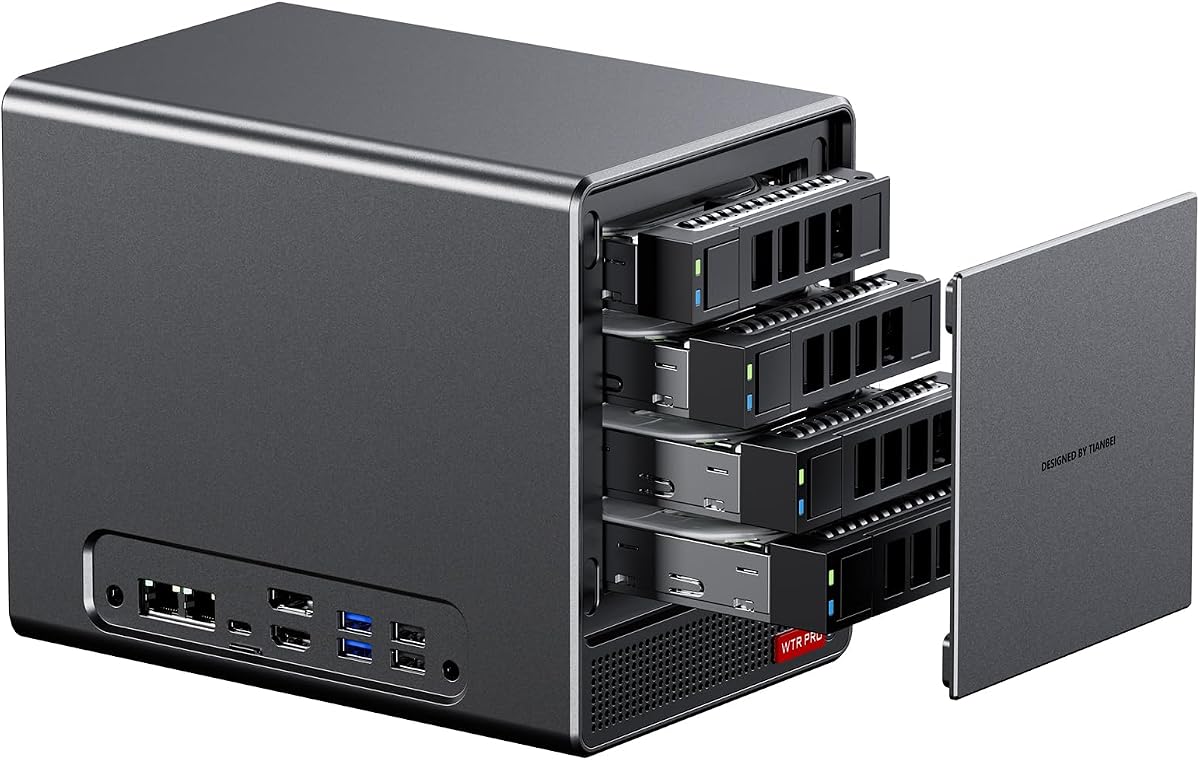
The AOOSTAR WTR PRO is designed around storage rather than gaming or workstation expansion. It combines a Ryzen 7 5825U processor with four 3.5-inch SATA bays and two M.2 2280 NVMe positions, making it a compact base for a home NAS, soft router, or always-on home server.
We may earn a commission when you buy through this link, at no additional cost to you.
The processor has 8 cores and 16 threads on a Zen 3 design, with a 2.0GHz base clock, 4.5GHz maximum boost, and Radeon Vega graphics running at 2000MHz. Two DDR4 memory slots support dual-channel 3200MHz configurations and up to 64GB. The four SATA bays can each accommodate a large 3.5-inch drive, while the NVMe positions provide fast cache, apps, or active data storage.
Networking includes two 2.5G LAN ports, useful for aggregation, separation of networks, or a more complex small-office topology. Display connectivity supports up to three 4K screens through DisplayPort, HDMI, and Type-C. A 12-centimeter fan, through-the-wall airflow, and intelligent fan control are designed to manage heat while maintaining quiet operation during extended workloads.
The WTR PRO is a good recommendation for someone building a compact network-attached storage system with several hard drives. It can also serve as a router, download machine, or lightweight server. The main limitation is that the enclosure does not include RAM or drives, and a numerical customer rating was not supplied, so buyers should pay particular attention to storage compatibility and operating-system support.
Four 3.5-inch SATA bays make the WTR PRO substantially more practical for bulk storage than a conventional mini PC. Adding fast NVMe drives alongside mechanical hard disks creates a flexible mix of capacity and responsiveness.
The stated low power range and controlled cooling architecture suit systems intended to remain online. A larger fan and through-the-wall ventilation can move substantial heat while keeping acoustic output manageable in a living room or office.
We may earn a commission when you buy through this link, at no additional cost to you.
The ASRock DeskMini X300 2.5G Series is built for buyers who prioritize a very small footprint. Its 1.92-liter enclosure still offers an AMD AM4 processor platform, dual DDR4 SO-DIMM slots, multiple storage options, triple display support, and 2.5G Ethernet, giving it a useful balance of features in a tiny case.
We may earn a commission when you buy through this link, at no additional cost to you.
Compatible processors include AMD Ryzen 5000, 4000, 3000, and 2000 series parts up to 65W. Two DDR4 SO-DIMM positions support up to 128GB at speeds up to 3200MHz when paired with a compatible processor. Two Ultra M.2 positions support NVMe drives using PCIe Gen3 x4 or x2, and two 2.5-inch bays accept SATA storage with RAID 0 or 1 support.
The system can drive three displays through HDMI, DisplayPort, and D-Sub. A Dragon RTL8125BG controller provides 2.5G Ethernet, while a dedicated M.2 Key-E slot allows a Wi-Fi and Bluetooth module to be installed. Front Type-C and multiple USB ports provide everyday peripheral connectivity, and a 120W adapter is included.
The DeskMini X300 is best for a discreet office computer, reception desk, light-duty home server, or multi-monitor station where every liter matters. It lacks a full-size PCIe slot, so it is less appropriate for a high-end discrete graphics card or extensive expansion. As with other barebones, the processor, memory, storage, and operating system must be added separately.
The 1.92-liter volume keeps the DeskMini X300 far smaller than conventional tower desktops while retaining a familiar AM4 ecosystem. That combination makes it attractive for discrete deployments where a full-size chassis would be inconvenient.
Two Ultra M.2 slots and two 2.5-inch drive bays allow fast system storage to be paired with larger-capacity drives. RAID 0 and RAID 1 support also gives buyers options for performance or redundancy, depending on their storage priorities.
We may earn a commission when you buy through this link, at no additional cost to you.
The ASUS ExpertCenter PN54 is the premium and most specialized option in this guide. It supports AMD Ryzen AI 300 Series processors with XDNA2 neural processing, Radeon 800M graphics, and an exceptionally compact 0.6-liter chassis. Its supplied rating of 3.1 is the lowest numerical score listed, so buyers should balance its advanced platform against early customer feedback.
We may earn a commission when you buy through this link, at no additional cost to you.
The Ryzen AI 300 Series platform provides six CPU cores and an NPU capable of up to 50 TOPS of AI performance. Radeon 800M graphics can drive up to four 4K displays, making the PN54 relevant to AI-assisted software, compact creative workstations, and multi-screen professional setups. The processor, memory, storage, and operating system remain the buyer's responsibility because this is a barebone system.
Connectivity is a major strength. Wi-Fi 7, Bluetooth 5.4, six USB ports, dual 2.5G LAN ports, and dual DisplayPort outputs support demanding office and network environments. The tool-free design is intended to make component access and upgrades easier, while the thin metal chassis is built for reliable 24/7 operation. ASUS also includes a three-year warranty.
The PN54 is a compelling premium recommendation for buyers who specifically want the newest AMD AI features in the smallest possible desktop. It may be less suitable for those prioritizing gaming, storage bays, or an established upgrade path, because the platform is specialized and its customer rating remains modest. It is best treated as a forward-looking productivity and compact AI platform.
The XDNA2 NPU is designed to handle AI workloads separately from the main CPU and integrated graphics. Its practical value depends on your software, but it gives the platform a clear advantage for supported local AI applications and future-oriented workflows.
The tool-free chassis design simplifies access to internal components during setup and maintenance. Paired with the 0.6-liter volume, it offers a distinctive combination of compactness and user-serviceable construction.
We may earn a commission when you buy through this link, at no additional cost to you.
The AOOSTAR WTR PRO 4+2 expands the traditional NAS concept with four SATA drive positions and two M.2 NVMe slots. It uses a Ryzen 7 5825U processor and has a supplied rating of 3.7. The design is aimed at home servers, soft routers, and small offices that need more storage than a conventional mini PC can provide.
We may earn a commission when you buy through this link, at no additional cost to you.
The 8-core, 16-thread Zen 3 processor runs at a 2.0GHz base clock and boosts to 4.5GHz, with Radeon Vega graphics at 2000MHz. Dual DDR4 slots support up to 64GB. The four SATA bays and two NVMe positions can accommodate a maximum of 96TB according to the supplied product information, with multiple RAID options for performance, redundancy, or storage management.
Dual 2.5G Intel I226-V LAN ports enable advanced network arrangements, and the system can operate with Windows 10 or 11, Ubuntu, OpenWrt, OPNsense, and other mainstream software. Virtualization support adds flexibility for a home lab. A full-metal shell, large 12-centimeter fan, intelligent fan control, and a stated 15W to 25W power range support continuous operation.
One important Linux consideration is the documented possibility of SATA link power-management effects causing slowdowns or CRC errors on some bays. The supplied information says a udev rule can lock the drives to full 6Gbps performance, so Linux administrators should read the setup guidance carefully. Despite that caveat, this is a strong choice for a compact, high-capacity storage server.
The mix of four SATA bays and two NVMe slots supports a practical tiered-storage arrangement. Mechanical disks can provide capacity while NVMe drives handle applications, databases, hot files, or write-intensive workloads.
Support for Windows, Ubuntu, OpenWrt, and OPNsense broadens the potential uses of the system. Combined with dual 2.5G networking and virtualization capabilities, it can serve as a home lab, router, backup server, or compact business infrastructure node.
We may earn a commission when you buy through this link, at no additional cost to you.
The ASUS ExpertCenter PN54-S1 is a slim barebone kit designed around AMD Ryzen 200 Series processors and Radeon 740M graphics. It supports up to four 4K displays and places Wi-Fi 7, Bluetooth 5.4, dual 2.5G LAN, and several USB ports in a chassis only 34 millimeters thick. No numerical customer rating was supplied for this listing.
We may earn a commission when you buy through this link, at no additional cost to you.
Its emphasis is on a contemporary office, productivity, and multi-monitor platform rather than gaming or storage-heavy operation. Radeon 740M integrated graphics should provide capable visuals for general business applications, media, and lighter creative workloads. The processor, memory, storage, and operating system must be purchased separately, so the final configuration depends heavily on the compatible parts selected.
Dual 2.5G Ethernet offers a choice of high-speed wired connections, while Wi-Fi 7 and Bluetooth 5.4 provide modern wireless capabilities. Six USB ports and dual DisplayPort connections create a broad peripheral and display foundation. The tool-free design makes internal component access more convenient, and ASUS states that the chassis is designed for 24/7 reliability.
The PN54-S1 is best for a slim professional workstation, reception environment, trading desk, or compact four-monitor installation. It is less appropriate for users who need multiple hard drive bays, a full-size expansion slot, or the higher AI capabilities of the standard PN54 with Ryzen AI 300 Series processors. Its appeal lies in combining refined industrial design with useful business connectivity.
Support for up to four 4K displays is central to the PN54-S1's productivity focus. It is a natural fit for financial analysis, operations centers, design review, and other workflows that benefit from keeping several applications visible at once.
The 34mm chassis can fit behind displays, beneath desks, or inside cabinetry where a conventional mini tower would be intrusive. Tool-free access helps preserve those advantages when components eventually need maintenance or replacement.
We may earn a commission when you buy through this link, at no additional cost to you.
The right AMD barebone mini PC depends less on the processor badge alone and more on the complete build you intend to create. Memory, storage, graphics expansion, displays, networking, cooling, and operating-system requirements should all be considered before choosing a chassis.
Start with the processor platform rather than treating every Ryzen 7 system as interchangeable. The AOOSTAR MACO, GEM12+, GEM12+ PRO, and MINISFORUM X1 Lite-255 use modern Ryzen 7 3000- or 4000-class offerings with integrated Radeon 780M-class graphics, while the ASRock models use the older AM4 socket and allow a broad choice of compatible desktop processors. The ASUS PN54 uses Ryzen AI 300 Series, whereas the PN54-S1 is tied to Ryzen 200 Series processors. The AOOSTAR WTR PRO models use the lower-power, 15W to 25W Ryzen 7 5825U for always-on server roles. Confirm the exact supported processor list, thermal design power, cooler limits, and graphics compatibility before buying a CPU.
In short, select the platform around your workload and future plans rather than relying only on core count. Newer platforms generally offer stronger integrated graphics and efficiency, while AM4 may be attractive when compatible components are already available.
Every product reviewed here is a barebone kit, with some listing language more explicit than others. A barebone generally includes the chassis, motherboard, power supply, and selected accessories, but not the processor, memory, storage drives, or operating system. You must budget for all missing components and confirm that the seller includes the power adapter, mounting hardware, and any required internal connector or bracket. This approach offers control over component quality and capacity, but it also demands assembly and compatibility knowledge.
If you want a turnkey product, this category is not the right starting point. If you want to select faster memory, a larger SSD, or a processor matched to your software, barebone systems can deliver a better final configuration.
Memory support varies considerably. DDR5 SO-DIMM systems generally offer two slots and up to 128GB, while the ASRock DeskMeet X300 has four DDR4 DIMM positions and the DeskMini X300 uses two DDR4 SO-DIMM slots. The AOOSTAR NAS systems provide two DDR4 slots with a maximum of 64GB. For heavy browser loads, large media libraries, virtual machines, and professional applications, 32GB is a practical starting point, while 64GB or more provides more headroom. Matching modules can also help dual-channel bandwidth operate as intended.
Choose enough memory for your heaviest workload without overspending unnecessarily. Also check whether the listed maximum depends on processor, firmware, or module configuration, and verify the supported speed before purchasing memory.
Storage needs determine whether a standard mini PC or a NAS-oriented enclosure is appropriate. Most office and gaming-oriented systems provide two M.2 2280 slots for NVMe SSDs, with the AOOSTAR MACO listed as supporting up to 16TB total and the GEM12 models as supporting up to 8TB. The ASRock DeskMini X300 also includes two 2.5-inch bays, while the WTR PRO models add multiple 3.5-inch SATA positions for hard disks. The DeskMeet X300 includes SATA connectors and a full-size PCIe slot. Consider boot speed, usable capacity, redundancy, and whether you need hard-disk bays rather than only fast flash storage.
Match the drive layout to your data, not merely your operating system. Fast NVMe storage benefits daily responsiveness, while multiple SATA bays are essential for large backups, media libraries, and network storage.
Integrated Radeon graphics can handle office work, video playback, photo editing, and some games, but heavier 3D workloads may require a discrete GPU. OCuLink is the most capable external graphics option in this list because it provides dedicated PCIe bandwidth, unlike the overhead associated with a display-only USB4 connection. The AOOSTAR MACO and GEM12+ models keep OCuLink independent of their M.2 slots, while the MINISFORUM X1 Lite-255 states that OCuLink uses one M.2 position and needs an included adapter plate. OCuLink is not hot-swappable, so the system should be shut down before connecting or disconnecting a graphics device.
For gaming or professional graphics, verify the enclosure dimensions, power supply capacity, and supported GPU size. Traditional PCIe expansion remains simpler and more versatile, making the DeskMeet X300 attractive for a permanently installed card.
Display needs can dictate your shortlist. The GEM12+, GEM12+ PRO, and ASUS ExpertCenter models support four-screen 4K arrangements, while the MINISFORUM X1 Lite-255 supports three independent displays. The ASRock systems use HDMI and DisplayPort with legacy D-Sub on the DeskMeet and DeskMini. For data-heavy setups, USB4 is useful for peripherals, storage, and some display outputs. For networking, dual 2.5G LAN ports add flexibility for file transfer, aggregation, service separation, or redundant paths, while Wi-Fi 6 or 6e gives convenient wireless access.
List the monitors, docks, network services, and peripherals you intend to connect before purchasing. The best barebone is one whose ports fit your setup without requiring unnecessary adapters.
Compact processors generate substantial heat, particularly during sustained compilation, rendering, gaming, or virtual-machine workloads. The AOOSTAR GEM12+ and GEM12+ PRO use a vapor chamber and CPU fan, the MACO combines a vapor chamber with additional thermal elements, and the MINISFORUM X1 Lite-255 relies on side and bottom ventilation plus a phase-change CPU fan. The AOOSTAR NAS systems emphasize larger fans, dust protection, and intelligent speed control for continuous operation. Check room placement, ventilation clearance, noise expectations, and any manufacturer guidance concerning sustained loads.
Good cooling matters because throttling can undermine otherwise capable hardware. Keep intake and exhaust paths unobstructed, and use a BIOS power mode that matches the noise and performance level you need.
If you intend to operate a home server, operating-system support and drive behavior matter as much as desktop performance. The AOOSTAR WTR PRO models can run mainstream Windows and Linux environments, including Ubuntu, OpenWrt, and OPNsense, and support virtualization functions. The 4+2 model includes guidance for a Linux udev rule intended to maintain full SATA link performance under sustained heavy load. Review the full configuration instructions before populating the chassis. Also consider backup strategy, RAID level, power-loss behavior, and whether a dedicated UPS is appropriate for data protection.
Choose a server chassis because of its bays, networking, and operating-system capabilities, not simply its processor. Confirm application support and prepare a recovery plan before migrating important data.
Begin by reading the product's compatibility list and unboxing it on a static-resistant surface. Install the approved CPU, memory, and storage in the order recommended by the manufacturer, observe the specified CPU-cooler height, and confirm that memory modules are seated and latched. Connect the display, keyboard, mouse, and network before installing an operating system.
After assembling the system, enter the BIOS or UEFI, confirm that all installed components are recognized, and update the firmware if appropriate. Install the operating system of your choice, then add drivers, security software, and your applications. Configure network services, storage pools, displays, and any eGPU connection only after the base system is stable. For OCuLink equipment, power down completely before connecting or removing the adapter.
For long-term care, leave clear space around the case, clean dust from vents periodically, and listen for unusual fan or drive sounds. Use a properly grounded surge protector where appropriate, particularly for NAS systems with multiple hard disks. Monitor storage health, back up important data separately, and avoid operating the computer with storage access doors open or during unexpected power loss. For long-running servers, a UPS and an orderly shutdown policy are strongly advised.
A barebone mini PC generally includes the case, motherboard, cooling hardware, and power supply, but it does not include the processor, memory, storage drives, or operating system. Some kits include cables, mounting hardware, or adapters, so check the package list carefully. You generally need to install the core components yourself or purchase them separately.
The process is similar to assembling a small desktop computer and is manageable for someone comfortable with PC hardware. The main challenges are selecting mutually compatible components and following the manufacturer's CPU-cooler and storage instructions. If you are unfamiliar with static precautions, cable routing, or memory installation, consult a qualified local technician.
OCuLink is generally the better choice for external graphics because it provides dedicated PCIe bandwidth with less protocol overhead than a typical USB4 graphics connection. The GEM12+ and MACO keep OCuLink independent of their M.2 slots, while the MINISFORUM X1 Lite-255 states that one M.2 position is required. OCuLink connections are not hot-swappable, so shut down the mini PC before changing hardware.
The AOOSTAR WTR PRO 4+2 is the most storage-oriented option, with four SATA bays and two NVMe positions. The smaller AOOSTAR WTR PRO offers four hard-drive bays for a more compact build. For a NAS, also consider RAID support, network speed, operating-system familiarity, power-loss protection, backup practices, and the cost of the drives you will need.
They can handle mainstream games with capable integrated Radeon graphics, especially at common desktop resolutions, but game performance depends on the exact processor, memory configuration, cooling, and settings. The AOOSTAR systems with Radeon 780M and OCuLink provide a stronger route for gaming because you can add a discrete GPU. Check GPU dimensions, enclosure clearance, and power requirements before purchasing an external graphics solution.
Not always. Modern Ryzen processors with integrated Radeon 780M graphics can manage many editing tasks, particularly with hardware-accelerated codecs and AV1 support. Complex effects, 4K timelines, color grading, and GPU-only effects may benefit from a discrete card. The OCuLink-equipped AOOSTAR models are good candidates if you want to preserve the option to add graphics performance later.
They can be, especially if you already own a compatible Ryzen CPU and DDR4 memory. The ASRock DeskMeet X300 supports a broad range of AM4 processors up to 65W and includes a full-size PCIe slot, offering more expansion than many sealed modern alternatives. The tradeoff is that AM4 and DDR4 have a more limited future upgrade path than current DDR5 platforms.
For basic browsing, office applications, and video calls, 16GB is generally workable, though 32GB provides a better balance for heavy browsing and multitasking. Creative applications, large datasets, and virtual machines benefit from 64GB or more. Use matched memory modules where possible and verify the chassis's maximum capacity, supported speed, and memory format before buying.
The best overall balance in this guide is the AOOSTAR GEM12+, with modern Ryzen 7 PRO performance, a dedicated OCuLink port, flexible DDR5 and M.2 expansion, adjustable performance modes, and four-display support. The ASRock DeskMeet X300 is the strongest budget-oriented desktop builder for buyers with compatible AM4 parts, while the ASUS ExpertCenter PN54 is the premium choice for compact AMD AI computing and an exceptionally small chassis.
Prioritize the platform that matches your actual build. Choose the AOOSTAR MACO, GEM12+, or MINISFORUM for modern integrated graphics and possible external GPU use; choose an ASRock AM4 model for familiar component compatibility and deeper expansion; choose the ASUS systems for ultra-slim professional use; and choose an AOOSTAR WTR PRO when hard-drive bays, continuous operation, and network services are the main priorities.
Remember that a barebone purchase is only the beginning of the build. Include the processor, compatible memory, storage, operating system, and any mounting hardware in your total planning. Before ordering, check current product specifications, compatibility lists, included accessories, and prices, since hardware configurations and market conditions can change.