
YoloCam S3
4.6Editor score
Large 1/1.3-inch sensor
AI-enhanced 4K imaging
Professional color controls
Four-times digital zoom
An AI Powered Webcam can automate framing, follow movement, and refine the image while you focus on presenting, teaching, gaming, or collaborating. The most useful model is not necessarily the one with the longest feature list, but the one whose tracking, resolution, microphone system, and controls suit your room and the way you work.
This guide compares ten webcams based on the supplied specifications, including sensor size, maximum resolution, frame rates, autofocus technology, AI tracking, directional movement, audio arrays, mounting options, and platform compatibility. It covers portable models, conventional desk cameras, compact PTZ systems, and a conference-room unit designed for groups.
Each entry highlights the strongest use case and the practical trade-offs visible in the product information. The top picks demonstrate how the same AI-powered category can serve different needs, from high-frame-rate streaming to small-room collaboration. Prices and availability can change, so confirm current details before purchasing.
4.6Editor score

4.4Editor score

4.4Editor score
As an Amazon Associate we earn from qualifying purchases.
The table below compares the core imaging, tracking, audio, and smart-control features of all ten webcams, making it easier to match a model to a focused desk setup, active presentation, livestream, or group meeting.




The OBSBOT Tiny 2 Lite is a 4K PTZ streaming camera with a 4.3 rating and a broad collection of automated tools for presentations, lessons, meetings, and live content. It combines a 1/2-inch CMOS sensor with AI tracking that can follow upper-body movement, hands, and customized tracking areas. That combination makes it one of the more adaptable choices in this guide for users who cannot remain perfectly centered.
We may earn a commission when you buy through this link, at no additional cost to you.
Its most useful strength is granular tracking control. The camera can establish custom tracking and non-tracking areas, while multiple preset positions can each carry separate parameter and tracking-mode settings. This is valuable when switching between a seated presenter, a shared screen, and a wider room view. Dynamic gesture control adds another layer of convenience: an open palm can lock the portrait target, while an upward-pointing gesture can adjust zoom without reaching for the device.
The hardware also supports horizontal, portrait, and upside-down shooting, allowing the same camera to fit different monitor arrangements and streaming platforms. It can be used immediately for basic operation, while SDK, OSC, Stream Deck, and global hotkey support gives experienced creators more ways to customize the workflow. These features are more involved than a simple fixed-frame webcam, but they create meaningful flexibility for professional setups.
The trade-off is that some of its most advanced capabilities require compatible software and deliberate configuration. It also does not claim the same large sensor found in the YoloCam S3 or OBSBOT Tiny 3, nor the higher maximum frame rates of several alternatives. Even so, the Tiny 2 Lite balances tracking behavior, PTZ movement, and accessible controls particularly well. It is a strong choice for teachers, remote presenters, and streamers who need the camera to follow them.
Custom tracking regions, non-tracking areas, upper-body detection, and hand tracking make this more useful than a camera with a single automatic framing mode. Preset-specific tracking settings also reduce the need to rebuild the composition whenever the scene changes.
Portrait, landscape, and inverted operation broaden its usefulness across laptops, side-mounted monitors, and vertical platforms. Basic users can start with plug-and-play operation, while advanced users can add keyboard, Stream Deck, SDK, or OSC control.
We may earn a commission when you buy through this link, at no additional cost to you.
The EMEET PIXY is a 4K dual-camera PTZ webcam rated 4.3, designed for situations in which the presenter moves, demonstrates a product, teaches fitness, or participates in a meeting from different areas of a room. A 4K main camera handles the image, while a separate auxiliary AI camera detects the face position to support autofocus and exposure decisions.
We may earn a commission when you buy through this link, at no additional cost to you.
The claimed autofocus response of 0.2 seconds is one of its standout specifications. Its three-chip arrangement separates imaging, AI prediction, and PTZ movement, allowing the camera to frame a moving person more smoothly than a basic one-chip design. The mechanical range covers 310 degrees of pan and 180 degrees of tilt, and an open-palm gesture held near the center for two seconds activates gesture control. These characteristics suit demonstrations, online lessons, and livestreams in which static framing would be restrictive.
EMEET STUDIO adds preset positions, field-of-view controls, whiteboard mode, privacy controls, and AI-generated shot lists and camera movements. The triple-microphone array can switch among live noise filtering, broader noise cancellation, and original-sound capture. That makes the camera unusually versatile for podcasts and courses as well as calls, although the original-audio mode will be more appropriate when environmental sound is part of the production.
Some of the physical ecosystem is sold separately. The included clip makes the camera usable at a monitor, but a tripod is optional, and the listed remote is not included. The product also offers compatibility with a broad set of streaming and meeting platforms, including OBS, Twitch, YouTube, Switch 2 Camera, and Xbox. PIXY is best for users who need mechanical movement and fast subject response rather than a conventional fixed webcam.
The auxiliary camera supports the main sensor by locating the face and helping the system refine focus and exposure. That design is particularly useful when a presenter moves toward or away from the camera during a demonstration.
Live Mode targets steady background noise, Noise Canceling Mode handles both continuous hum and sudden sounds, and Original Sound Mode retains the full acoustic character of music or singing. This gives one camera a wider production role.
We may earn a commission when you buy through this link, at no additional cost to you.
The OBSBOT Tiny 3 Lite carries a 4.3 rating and packages 4K recording, AI tracking, spatial audio, and advanced software into a body that is 48 percent smaller and 34 percent lighter than its predecessor. Its 1/2-inch sensor supports 4K at 30 FPS or 1080P at 120 FPS, making it suitable for both polished live video and fast-motion streaming.
We may earn a commission when you buy through this link, at no additional cost to you.
AI Tracking 2.0 can lock onto a person, a group, or more than 200 object categories. That broad recognition capability, combined with selectable tracking modes, makes the camera useful for demonstrations, lessons, and streams in which the important subject may change. Voice commands and gestures can wake the camera, select tracking, change zoom, and switch presets without physical interaction.
The upgraded audio array combines an omnidirectional microphone with two directional MEMS microphones. Five audio modes help adapt the recording to different environments, while the imaging system adds HDR, a wide ISO domain, and intelligent PDAF focus switching. OBSBOT Center supplies beauty, background blur, teleprompter, exposure gamma, white-balance offset, and NVIDIA Maxine Eye Contact options.
The main limitation is that the supplied information does not spell out the exact host and operating-system requirements. It also warns that voice or gesture control should be disabled if the gimbal behaves erratically or wakes and sleeps abnormally. Despite those caveats, the Tiny 3 Lite is a compelling option for creators who want a discreet camera that can follow changing subjects and handle a demanding software workflow.
Tracking more than 200 object types separates this model from webcams limited to basic human detection. It can lock onto an individual, a group, or specific objects, which broadens its value for demonstrations and educational content.
The three-microphone arrangement combines broad scene pickup with directional voice detection. Five processing modes make it possible to balance clarity against the amount of natural environmental sound retained.
We may earn a commission when you buy through this link, at no additional cost to you.
The OBSBOT Tiny 3 is the strongest all-around option in this roundup, combining a 4.4 rating with a large 1/1.28-inch CMOS sensor, 4K recording, AI Tracking 2.0, a triple spatial-audio array, and extensive creative controls. Despite being 48 percent smaller and 34 percent lighter than its predecessor, it targets users who want serious image quality in a compact PTZ format.
We may earn a commission when you buy through this link, at no additional cost to you.
Its imaging specifications distinguish it from most fixed-frame alternatives. Dual all-pixel PDAF switches focus modes intelligently, while the stated ISO range of 0 to 12800 and DCG HDR support cleaner, more balanced results in difficult light. The camera can record 4K at 30 FPS or 1080P at 120 FPS, giving creators a useful choice between fine detail and high-frame-rate motion.
Tracking is equally capable, with support for individuals, groups, and more than 200 object types. Desk and whiteboard modes, one-touch presets, composition lines, and zone tracking make it easier to compose a professional frame before the meeting begins. Voice and gesture controls can handle activation, tracking, zoom, and preset changes, while OBSBOT Center adds beauty tools, a teleprompter, exposure curves, white-balance offsets, and NVIDIA Maxine Eye Contact.
This is not a zero-configuration device for every user. Its large feature set benefits from calibration and sensible software setup, and the manufacturer advises disabling voice or gesture control if gimbal behavior becomes erratic. It is also more capable and more complex than a basic meeting webcam. Even so, its imaging hardware, tracking breadth, audio design, and flexible controls justify its position as the most complete general-purpose choice here.
The 1/1.28-inch sensor provides a meaningful foundation for 4K detail, low-light performance, and background separation. Dual all-pixel PDAF and DCG HDR further strengthen the camera's ability to maintain focus and usable dynamic range.
OBSBOT Center includes framing aids, creative filters, a teleprompter, and manual calibration. Features such as exposure gamma curves, white-balance offsets, and Maxine Eye Contact allow the camera to be adapted to a particular presentation or broadcast style.
We may earn a commission when you buy through this link, at no additional cost to you.
The OBSBOT Meet 2 is a compact 4K webcam with a 4.4 rating, a 1/2-inch sensor, AI framing, autofocus, and a body weighing only 40.5 grams. It is designed for people who need a capable image without the larger footprint of a PTZ camera, making it especially relevant to mobile workers, hybrid employees, and anyone who regularly moves between meeting spaces.
We may earn a commission when you buy through this link, at no additional cost to you.
AI framing changes composition according to the people on screen, whether the user is alone or meeting with a group. Phase detection autofocus keeps the image sharp as subjects shift, and the larger sensor improves light sensitivity. Gesture control adds practical autonomy: an open palm toggles AI framing, while an upward-pointing gesture changes zoom. This removes the need to touch the webcam during a live call.
The single USB-C connection supports straightforward setup, and OBSBOT Center provides deeper control when the automatic behavior is not enough. Two omnidirectional noise-canceling microphones capture speech while offering adjustable reduction for wind, keyboard typing, and other ambient sound. The camera is also offered in multiple colors, making it easier to coordinate with a laptop or desktop arrangement.
It is a fixed-position camera, so it cannot physically follow a person who walks far outside the frame. OBSBOT also notes that the Meet 2 may become warm during use, although the manufacturer says this is normal and does not damage its functions. For users who want portability, 4K clarity, and intelligent group framing without a bulky PTZ housing, the Meet 2 is a particularly balanced selection.
At 40.5 grams, the camera is easy to carry between a home office, shared workspace, or meeting location. Despite the small body, the 1/2-inch sensor and 4K output provide a meaningful step up from basic laptop cameras.
AI framing adjusts when one person or a group is present, reducing the need to reposition the camera. The gesture controls add a quick way to enable framing or adjust zoom without interrupting the meeting.
We may earn a commission when you buy through this link, at no additional cost to you.
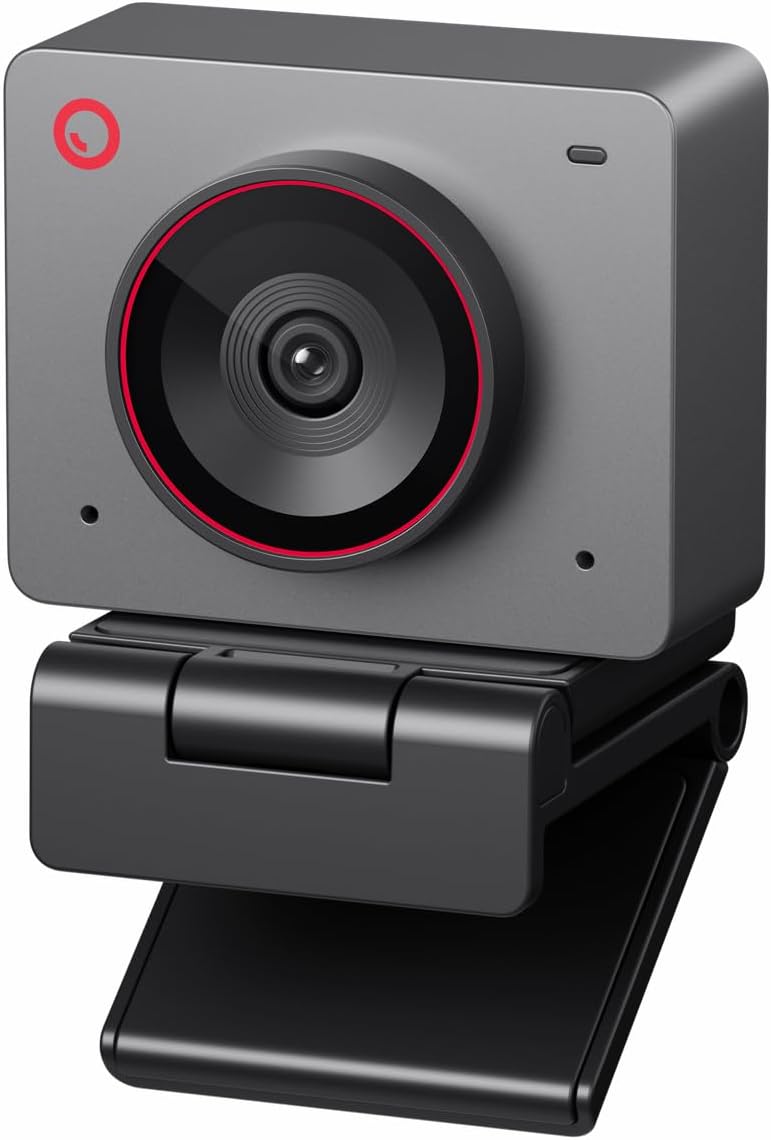
The YoloCam S3 has the highest rating among the ten products at 4.6 and is built around a large 1/1.3-inch sensor. It records uncompressed 4K at 30 FPS or 1080P at 60 FPS, and its sensor size, 82-degree field of view, and AI-enhanced imaging make it a strong fit for creators who prioritize image quality over autonomous camera movement.
We may earn a commission when you buy through this link, at no additional cost to you.
Fast PDAF autofocus is designed to keep close-ups sharp without visible lag, while AI automatically tunes exposure, white balance, and HDR. The stated low-light improvements focus on clearer faces and finer details, which is particularly useful when the streamer is lit only by a monitor or a modest key light. The camera also provides four-times digital zoom at 1080P while retaining a crisp output at that resolution.
For advanced users, the software provides manual control over contrast, sharpness, saturation, exposure, white balance, autofocus, and color grading. Picasso Resolve adds a focused grading workflow, although the supplied information says it is currently available only on Windows and is expected on Mac later. The foldable magnetic mount offers flexible placement, and an integrated 1/4-inch-20 thread supports most tripods.
The all-aluminum body is described as an effective heat sink for stable long-duration streaming, though a warm surface during operation indicates active heat dissipation. There is no motorized tracking or autonomous reframing in the supplied specifications, so users who move around extensively may find a PTZ model more appropriate. For a fixed streaming position with exceptional sensor ambition, however, the YoloCam S3 is the premium image-quality leader.
The 1/1.3-inch sensor is the main reason to consider this camera when fine detail, face clarity, and low-light performance matter. It gives the 4K mode a stronger imaging foundation than many smaller-sensor alternatives.
Manual exposure, focus, white-balance, and color controls are backed by the Picasso Resolve grading tool. The approach favors creators who want to shape the image rather than rely entirely on automatic processing.
We may earn a commission when you buy through this link, at no additional cost to you.
The Insta360 Link 2C is a 4.5-rated 4K webcam that combines a 1/2-inch sensor, HDR, PDAF autofocus, AI auto framing, and an AI noise-canceling microphone. It targets a broad mix of streaming, gaming, video calls, and creative work, making the emphasis on image treatment and flexible control especially noticeable.
We may earn a commission when you buy through this link, at no additional cost to you.
HDR and the larger sensor support brighter, more natural-looking video in varied lighting, while phase detection autofocus reacts quickly when the subject moves toward or away from the camera. A natural bokeh effect available through Link Controller adds background separation similar to a dedicated camera with a shallow depth of field. AI auto framing automatically zooms and adjusts to keep a single participant or a group in view.
Control options extend beyond gestures. The webcam can be operated from a smartphone, while hand gestures start AI tracking, activate auto framing, adjust zoom, and switch to whiteboard mode. DeskView and Whiteboard modes address two common presentation needs, and the free Link Controller software provides access to advanced settings. A physical privacy switch provides a clear way to block the lens when the camera is not in use.
Compatibility is broad across major conferencing and streaming applications, including Microsoft Teams, Zoom, and Twitch. There are two important hardware exclusions, however: ARM-based Windows systems and Windows Hello Face Recognition are not supported. Users within the supported PC and Mac environment will find a polished combination of automated framing, 4K detail, background treatment, and audio filtering.
HDR, a 1/2-inch sensor, and PDAF work together to improve detail, focus, and tonal range. The natural bokeh option provides an additional way to separate the subject without changing the basic framing.
Smartphone control, gesture operation, DeskView, and whiteboard mode make it easier to change views during a live presentation. Link Controller supplies the detailed menu for users who want to adjust the camera manually.
We may earn a commission when you buy through this link, at no additional cost to you.
The OBSBOT Meet Flip is a 4.5-rated foldable 4K webcam designed for people who work across locations. At 37.7 grams, it is one of the lightest products in the guide, and its integrated stand lets the user open it, position it above a laptop, and begin a meeting without assembling a separate mount.
We may earn a commission when you buy through this link, at no additional cost to you.
A 1/2-inch CMOS sensor and HDR deliver the main image improvements, producing brighter and more detailed video across changing light conditions. AI auto framing composes solo speakers and groups, while PDAF maintains sharp focus. Gesture control lets users activate framing and adjust zoom by facing the camera and using a palm or upward-pointing gesture.
The meeting-oriented AI tools add a different kind of value. Real-time transcription, smart highlights, meeting summaries, and a teleprompter are included to help capture and deliver presentations. The dual-microphone system combines omnidirectional and directional pickup, with four audio modes for adjusting how voices and surrounding sound are treated.
Folding the webcam triggers sleep mode, which also provides immediate physical privacy because the lens is no longer exposed. This design is excellent for travel and shared workspaces. Its limitation is the lack of motorized movement: AI framing can adjust the digital composition, but it cannot physically pan or tilt after installation. For a fixed laptop-based position, the result is a convenient and unusually complete meeting companion.
The folding body and integrated stand remove the need for a separate clip in many laptop arrangements. Its 37.7-gram weight makes it easy to carry, while the folding action also closes the camera for privacy.
Transcription, highlights, summaries, teleprompter support, and automatic composition go beyond basic framing. These features are particularly relevant to consultants, educators, and hybrid teams that need their calls to remain organized and presentable.
We may earn a commission when you buy through this link, at no additional cost to you.
The 4K AI-Powered Conference Webcam is a room-oriented solution for small meeting spaces rather than a personal desk webcam. Its 4.1 rating reflects a more specialized feature set, including group auto framing, presenter tracking, a 120-degree field of view, dual AI noise-canceling microphones, speakers, and a physical lens cover.
We may earn a commission when you buy through this link, at no additional cost to you.
The camera can detect and frame attendees, while presenter tracking follows the active speaker during training sessions, client presentations, and interactive meetings. Its 120-degree lens is intended to cover much of a small room without requiring participants to crowd together. This is a meaningful difference from a typical laptop webcam, whose narrow field of view works best for one person at a desk.
Audio is designed to carry voices across a table, with the supplied specifications indicating pickup as far as five meters. AI noise cancellation reduces distracting background sound, while the included speakers support a more complete conference-room setup. Plug-and-play USB connection is compatible with Zoom, Teams, and Webex, reducing the need for specialist installation.
The physical lens cover is a strong feature for a shared office because it provides visible privacy without relying only on software. One limitation is that the specifications mention speakers without providing detailed technical information about their output. Users should also verify that their preferred platform and hardware configuration are covered by the stated Zoom certification. For small-group rooms, this is more appropriate than a personal AI tracking webcam.
Group auto framing and a 120-degree field of view are designed for small meeting spaces where attendees are spread across a table. Presenter tracking adds movement awareness for training and collaborative discussions.
The dual microphones are specified to capture voices across up to five meters, with AI noise cancellation helping isolate speech. A physical lens cover provides straightforward visual privacy in shared environments.
We may earn a commission when you buy through this link, at no additional cost to you.
The OBSBOT Meet SE is a 4.4-rated 1080P webcam that prioritizes frame rate, compact practicality, and intelligent framing. It supports 1080P at 100 FPS, 1080P at 60 FPS, and 720P at 150 FPS, making it a strong choice for fast-motion streams, gaming, and presentations where smoother movement matters more than 4K resolution.
We may earn a commission when you buy through this link, at no additional cost to you.
Its 1/2.8-inch stacked CMOS uses 2.9-micrometer pixels, Dual Native ISO, Staggered HDR, and a 12-bit dynamic color range to improve low-light performance. AI framing recognizes either individuals or groups and adjusts composition and focus in real time. Open-palm and upward-pointing gestures toggle framing and zoom, allowing the camera to respond without manual interruption.
The webcam is designed for straightforward USB-C use, while OBSBOT Center adds beauty controls and detailed video adjustments. SDK, OSC, Stream Deck, and global hotkey support also allow advanced users to integrate the camera into a more complete streaming setup. A note in the specifications says 100 FPS recording requires enabling More Output Options in the software, so users should complete that configuration before a production session.
The obvious limitation is that the Meet SE is not specified for 4K, so it will not satisfy users who require the finest detail of a 4K capture. Its appeal lies instead in high-frame-rate 1080P, strong low-light specifications, and a useful set of automated controls at a comparatively accessible tier. It is an excellent entry point for streamers and meeting users who want AI features without moving to a larger PTZ system.
The combination of 1080P at 100 FPS and 720P at 150 FPS gives creators meaningful options for gaming and motion-heavy content. It is a practical alternative to focusing exclusively on 4K resolution.
Dual Native ISO, Staggered HDR, large pixels, and 12-bit color range indicate careful attention to difficult lighting. These features support clearer video when a dedicated studio light is not available.
We may earn a commission when you buy through this link, at no additional cost to you.
The right AI Powered Webcam depends on how much you move, how much control you want, what software you use, and whether your priority is smooth motion, fine 4K detail, group coverage, or simple portability.
Sensor size is one of the most useful indicators of a webcam's imaging potential because a larger sensor can gather more light and preserve more detail. The YoloCam S3 uses a 1/1.3-inch sensor, the OBSBOT Tiny 3 uses 1/1.28 inches, and the Tiny 2 Lite, Tiny 3 Lite, Meet 2, Link 2C, and Meet Flip use 1/2-inch sensors. The EMEET PIXY has a 1/2.55-inch main sensor, while the Meet SE uses a 1/2.8-inch stacked CMOS. These differences are most visible in demanding light, close-up streams, and scenes that benefit from background separation.
A 4K camera provides the highest spatial detail, but frame rate determines how fluid movement appears. Most of the 4K options in this guide record at 30 FPS, while the YoloCam S3 also offers 1080P at 60 FPS and the OBSBOT Tiny 3 and Tiny 3 Lite support 1080P at 120 FPS. The Meet SE prioritizes speed with 1080P at 100 FPS and 720P at 150 FPS. Choose 4K for detail-heavy presentations and general production, or favor a higher frame rate for gaming, demonstrations, and rapid movement.
AI features range from basic group framing to detailed person, hand, group, and object recognition. The OBSBOT Tiny 3 and Tiny 3 Lite can identify more than 200 object types, while the Tiny 2 Lite supports customizable tracking regions and non-tracking areas. The Link 2C automatically zooms and adjusts for one person or a group, the EMEET PIXY physically pans and tilts, and the conference model follows an active presenter. Check whether the tracking behavior matches your room rather than assuming every AI camera performs the same way.
PDAF is used across most of the stronger models in the guide, including the YoloCam S3, OBSBOT Tiny 3, Tiny 3 Lite, Link 2C, and Meet Flip. EMEET highlights a claimed 0.2-second autofocus response for its dual-camera system. Fast phase-detection focusing is valuable when a presenter approaches the camera, leans forward to demonstrate a product, or changes position during a meeting. AI tracking can keep the frame composed, but it does not replace the importance of accurate focus.
Built-in microphones are convenient, but their usefulness depends on the array and processing modes. The OBSBOT Tiny 3 family uses a triple array combining directional and omnidirectional pickup, while the EMEET PIXY provides Live, Noise Canceling, and Original Sound modes. The Link 2C and Meet 2 emphasize AI noise cancellation, and the conference camera is designed for voice pickup across a table. A specialized microphone may still be preferable for a polished podcast or large room, but integrated audio can handle routine calls effectively.
A webcam that looks good in specifications can still be awkward if it is too large, difficult to mount, or unsuitable for your working position. The Meet Flip is 37.7 grams with an integrated stand, and the Meet 2 weighs 40.5 grams, making both highly portable. PTZ models occupy more space but can follow movement. The YoloCam S3 offers a magnetic mount and a tripod interface, while the EMEET PIXY includes a clip and supports a separately sold tripod. Evaluate desk space, laptop thickness, mounting hardware, and cable reach together.
AI tracking depends on software support, so examine both the camera and the host environment. OBSBOT Center includes framing, composition, calibration, teleprompter, and creative utilities, while EMEET STUDIO handles presets, privacy, whiteboard mode, and camera movements. Link Controller provides manual and creative controls, and YoloLiv's software adds detailed image settings and color grading. Confirm operating-system support, platform compatibility, and whether a feature works on your particular computer.
AI cameras recognize people and objects, so privacy deserves attention. Some models provide gesture controls, electronic privacy modes, phone remotes, or physical lens covers. The Link 2C includes an easy-access physical privacy switch, the conference webcam has a physical lens cover, and the Meet Flip enters sleep mode when folded. For a shared office, consider how the lens is protected, where the camera is positioned, and whether the meeting platform needs additional privacy controls.
Begin by positioning the camera at eye level, approximately the same distance from your face as a monitor would be, and use a stable clip, stand, or tripod. For a PTZ model, leave enough clearance for the mechanism to pan and tilt without approaching a shelf or wall. Connect the supplied cable, open the required camera software, and confirm that the intended resolution, frame rate, and microphone appear in the operating system's device settings.
Next, configure the AI behavior for your actual room. Enable person or group framing, select a suitable tracking region, and test it while you walk through the space you normally use. Create presets for close, medium, and wide views if the camera supports them. Adjust exposure, white balance, and focus manually when the image changes between daylight and artificial light, and test gesture or voice commands before relying on them during a live presentation.
For care, treat the lens as an optical component: clean it gently with a soft microfiber cloth and avoid sprays or abrasive materials. Keep the camera away from direct heat, moisture, and dust, and do not force the PTZ mechanism when it is obstructed. Folding or using the privacy control when the camera is not active reduces accidental capture, while periodic software updates can help maintain compatibility and improve automated features.
The main benefit is automated composition without constant manual adjustment. Depending on the model, AI can recognize people or groups, adjust framing, track an active presenter, alter focus, or physically pan and tilt the camera. The benefit is greatest in rooms where the subject moves or when a fixed webcam would otherwise need frequent repositioning.
It depends on how the video is used and how close the camera sits to the subject. 4K provides more detail and can support flexible cropping, but it also requires more processing bandwidth and a strong connection for live transmission. A well-lit 1080P camera with good autofocus and audio can still look excellent for routine meetings and streaming.
Choose PTZ when you move around a room, present beside a whiteboard, teach a demonstration, or need automated physical tracking. A fixed camera is usually simpler, more compact, and often less visually intrusive for a stationary desk setup. Digital auto framing can work well in a fixed position, but it cannot physically follow a subject who leaves the frame.
Several models in this guide explicitly support group framing. The OBSBOT Meet 2, Meet SE, Link 2C, Meet Flip, Tiny 3 family, and conference webcam can recognize or frame multiple people, while the EMEET PIXY is designed to keep a moving body centered. Results still depend on lighting, distance, camera placement, and the selected tracking mode.
They can be sufficient for calls and casual streams, especially when the camera includes directional microphones and AI noise cancellation. A dedicated microphone generally offers more control over voice isolation, tonal quality, and placement for podcasts or narrated content. Review the camera's microphone modes before deciding whether its onboard audio meets your production standard.
A higher frame rate is often more useful than 4K when the subject or game moves quickly. The OBSBOT Meet SE offers 1080P at 100 FPS and 720P at 150 FPS, while the Tiny 3 family supports 1080P at 120 FPS and the YoloCam S3 offers 1080P at 60 FPS. Choose a mode your computer and platform can support consistently.
They are convenient when the camera is out of arm's reach or the user is presenting with both hands occupied. They are not essential for every setup, and the supplied information for some OBSBOT models recommends disabling them if the gimbal behaves erratically. Test them in normal lighting and keep manual controls available as a fallback.
Position the camera so it captures only the intended area and use the available privacy controls. The Link 2C offers a physical switch, the conference webcam includes a physical lens cover, and the Meet Flip enters sleep mode when folded. You can also use a physical cover or place the camera in a less exposed location when the lens does not need to be active.
The OBSBOT Tiny 3 stands out as the most complete general-purpose pick because it combines a large sensor, 4K and high-frame-rate recording, advanced AI tracking, a spatial-audio array, and a deep software toolset. The YoloCam S3 is the premium choice for fixed-position image quality and manual creative control, while the OBSBOT Meet SE offers an efficient way to enter the category with high-frame-rate 1080P and automatic framing.
Your priority should determine which features matter most. Choose a PTZ model when physical tracking is essential, a large sensor for close-ups and low-light work, a high-frame-rate mode for fast action, a conference system for a small room, or a folding design for travel. Built-in audio can be sufficient for many users, but a dedicated microphone is still valuable for demanding voice content.
Finally, check the current product details, platform compatibility, software requirements, and availability before purchasing. AI features, firmware behavior, and bundled accessories can change, and prices fluctuate over time. Reviewing the latest listing and your own room layout will help ensure that the chosen camera remains the right fit for meetings, teaching, gaming, or streaming.


