
31.6 Inch Steel Extra Tall Monitor Pole
4.2Editor score
31.6 inch steel pole
Supports approximately 44 pounds
C-clamp or grommet installation
Integrated cable management
A monitor arm pole extension mount can transform an awkward workstation by adding height, reach, and flexible positioning to a display. The right model should match your pole diameter, screen weight, VESA pattern, and desk setup while providing smooth adjustment and dependable cable control.
This guide compares ten options ranging from complete extra-tall monitor arms to pole-only extension systems and add-on mounting brackets. We evaluated supported screen sizes, weight capacities, pole compatibility, extension reach, articulation, installation methods, cable management, and how thoroughly each product addresses common ergonomic needs.
Each review identifies the configuration best suited to a particular workstation, from compact desks to ultrawide displays and sit-stand setups. Product availability, configurations, and current selling prices can change, so confirm the latest specifications and listing details before making a purchase.
4.2Editor score

5.0Editor score

5.0Editor score
As an Amazon Associate we earn from qualifying purchases.
The comparison below highlights the major differences among complete pole-mounted monitor arms, extension poles, and add-on brackets. Screen compatibility, supported weight, pole fit, mounting style, and adjustment range help distinguish which option suits a particular desk and display.


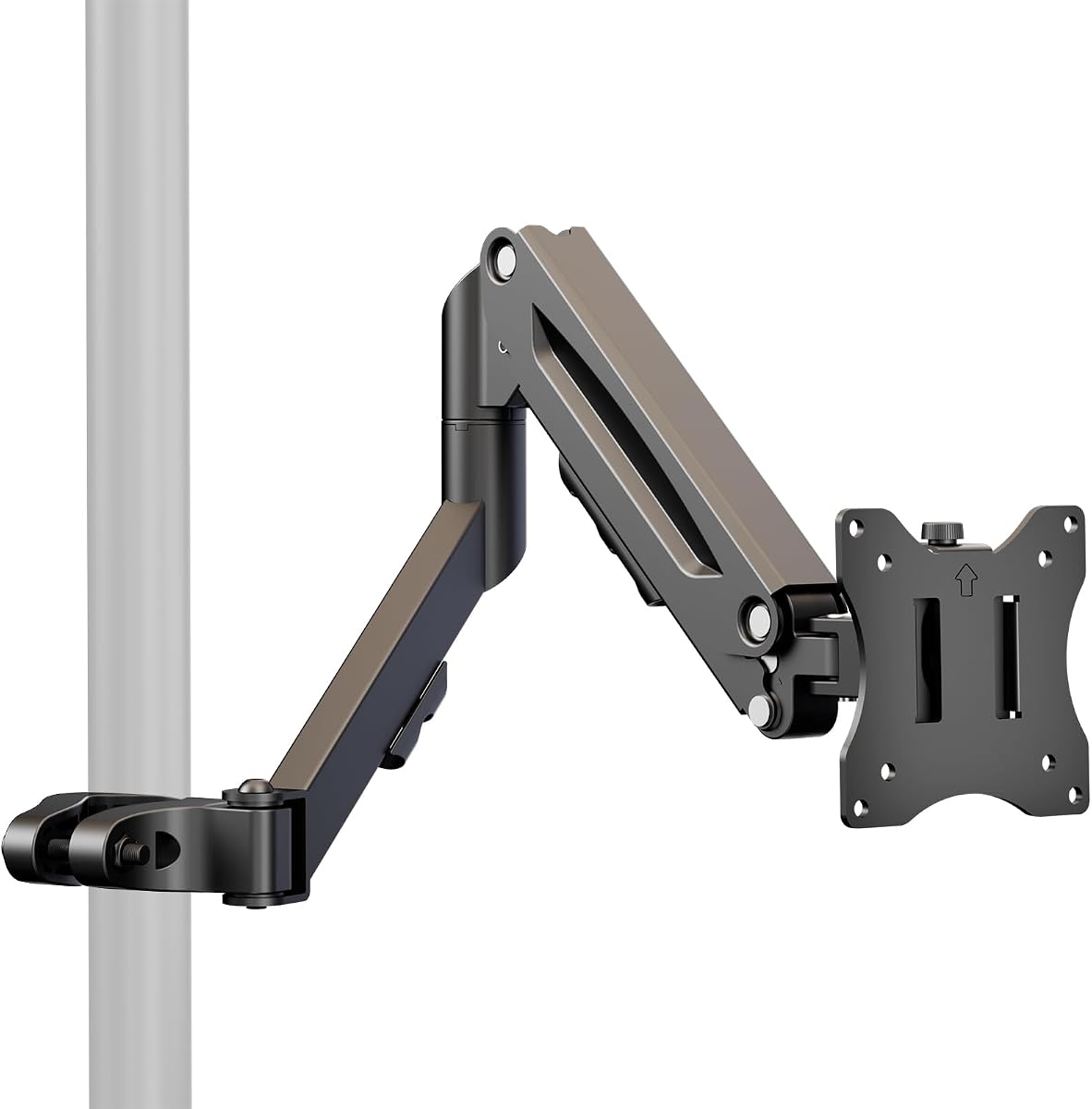


The VIVO Black Long Pole Mount Monitor Arm earns a 5.0 rating and stands out as the most balanced option in this guide. It combines a long 26.8-inch reach with broad pole compatibility, conventional VESA support, and a substantial adjustment range. It is designed for 17- to 32-inch monitors and TVs weighing as much as 22 pounds.
We may earn a commission when you buy through this link, at no additional cost to you.
Its mounting bracket supports tilt from plus 30 to minus 30 degrees, swivel from plus 90 to minus 90 degrees, and 180-degree rotation. The pole clamp can also rotate completely around the pole, which is particularly useful when sharing a screen, repositioning a display, or changing between sitting and standing work.
The main limitation is that the compatible pole is not included. Buyers need to confirm both pole diameter and mounting-hole layout before ordering. The screen must also use a supported 75x75mm or 100x100mm VESA pattern and remain within the stated weight limit, but within those boundaries the product offers notably broad flexibility.
This is the strongest general recommendation for someone who already owns or plans to add a compatible pole and wants extensive reach, multi-axis movement, and tidy cable routing. It works especially well for shared desks, compact workstations, and displays that need to move between users.
The 26.8-inch extension gives a monitor more freedom to move forward, backward, and away from the desktop. Combined with generous swivel, tilt, and rotation, it makes the arm useful for collaborative work and for bringing a large display closer without rearranging the entire desk.
Cable clips help keep power and display cords organized along the arm, while the removable VESA plate makes screen attachment more manageable. Hardware and instructions are included, allowing the pole clamp, arm, and display plate to be assembled in a logical order.
We may earn a commission when you buy through this link, at no additional cost to you.
The MOUNT PRO Single Long Monitor Arm has a 4.5 rating and emphasizes reach, elevation, and desktop recovery. It is built for 13- to 32-inch flat or curved LCD and LED displays with standard 75x75mm or 100x100mm VESA mounting patterns, supporting displays from 4.4 to 19.8 pounds.
We may earn a commission when you buy through this link, at no additional cost to you.
Its extended arm reaches up to 27.76 inches and can position a screen as high as 28.5 inches above the desktop. That extra height is valuable for taller users or anyone who wants a display near eye level. Adjustment includes plus or minus 90-degree swivel, plus 85 to minus 45-degree tilt, and 360-degree rotation.
Curved displays with 1000R, 1500R, or 1800R curvature are explicitly excluded, so buyers should verify the exact screen type before buying. The 19.8-pound limit is also lower than the 22-pound figure offered by several other products, making weight and curvature two important compatibility checks.
This model is a strong option for a deep desk where reclaiming surface area matters. It also offers both a clamp for thicker desks and a grommet option, making it more versatile than a single-base design, provided the chosen display falls within its stated limits.
The tall column offers a broader useful height range than conventional monitor arms, allowing the display to sit closer to eye level. This can reduce the need to tilt the neck downward while still leaving room below the screen for a laptop, keyboard, or paperwork.
The clamp accommodates desktop thicknesses from 0.39 to 3.15 inches, while the grommet configuration supports 0.39- to 1.97-inch desktops with a suitable mounting hole. Having both options makes it easier to preserve the original desk configuration.
We may earn a commission when you buy through this link, at no additional cost to you.
The VIVO MOUNT-POLE01A carries a 4.6 rating and stands out for its generous 1.1- to 2.4-inch pole compatibility. It supports 17- to 32-inch monitors and TVs with 75x75mm or 100x100mm VESA patterns, making it one of the more flexible add-on arms for an existing pole system.
We may earn a commission when you buy through this link, at no additional cost to you.
The bracket offers plus or minus 30-degree tilt, 180-degree swivel, and 360-degree rotation. More importantly, the pole clamp itself rotates completely around the pole. That extra movement helps when a screen must face a neighboring workstation, pivot for a presentation, or return to a fixed position without dismantling the setup.
The 17.6-pound capacity is the main constraint for buyers. It remains sufficient for many mainstream monitors, but heavier displays, televisions, and some ultrawide models may exceed its limit. Since the pole is not included, compatibility should be checked against both the diameter and the hardware already in the workstation.
Choose this model when the priority is adapting to an existing pole rather than building an entire monitor arm. Its wide clamp range, rotating design, and straightforward VESA plate make it especially useful in collaborative or reconfigurable setups.
The broad 1.1- to 2.4-inch fit range allows the mount to work with more pole systems than several competing products. This is helpful when the pole is already part of a desk riser, custom workstation, or shared presentation station.
A fully rotating pole clamp adds freedom beyond the bracket’s 360-degree rotation. It can make a single display more accessible to people on different sides of a desk, which is useful in team rooms and flexible offices.
We may earn a commission when you buy through this link, at no additional cost to you.
The 31.6-inch Steel Extra Tall Monitor Arm Pole is a pole-only solution with a 4.2 rating. It is designed for users who already own a compatible monitor arm and want to raise that arm into a higher working position. The two-section steel pole reaches approximately 31.6 inches in height.
We may earn a commission when you buy through this link, at no additional cost to you.
Its diameter is approximately 1.4 inches, and the stated load capacity is approximately 44 pounds. These figures make it a practical extension for a desk-mounted arm, provided the attached monitor arm accepts that pole diameter and the combined load remains within the relevant limits.
The biggest trade-off is that this listing contains the pole and mounting base rather than a complete monitor arm. Buyers must already have, or separately purchase, a compatible arm, head, and VESA plate. Installation can use a C-clamp for desks approximately 0.4-3.3 inches thick or a grommet method for desks approximately 0.4-1.6 inches thick.
It is best for a cost-conscious upgrade of an existing monitor-arm setup. The included cable-management components help keep the raised system neater, while the long pole and dual installation options make it versatile across a broad range of desk sizes.
The two-section design creates a tall mounting point without requiring a complete replacement stand. This makes it possible to improve the eye-level relationship of a familiar arm while retaining the arm the user already prefers.
Both a C-clamp and a grommet base are supported, giving users a path for thicker desks and one for desks with a suitable cable-management hole. Cable-management parts help prevent the added height from creating a tangle of loose cords.
We may earn a commission when you buy through this link, at no additional cost to you.
The SUPTEK Single Monitor Arm has a 5.0 rating and distinguishes itself with a three-tier, telescoping structure. It is designed to fit a 1.375-inch pole, supports a display up to 32 inches, and handles up to 22 pounds with 75x75mm through 100x100mm VESA mounting holes.
We may earn a commission when you buy through this link, at no additional cost to you.
Maximum reach from pole to the center of the panel is listed at 27.56 inches. The three arm sections measure 7.48, 8.07, and 8.07 inches, providing several positional combinations. Adjustment includes plus or minus 90-degree swivel, plus or minus 90-degree tilt, and plate rotation for portrait or landscape use.
The fixed 1.375-inch pole requirement is more restrictive than the broader clamps offered by some VIVO models. The pole is also excluded, so this product is best viewed as a sophisticated add-on arm rather than a standalone monitor stand. Buyers should confirm that their existing pole has the exact required diameter.
For someone with a matching pole who wants multiple extension levels, this is a flexible and polished solution. The removable VESA plate, included hardware, and detachable cable clips make installation and everyday organization straightforward.
The tiered construction lets the user choose among different extension combinations instead of relying on a single fixed length. This provides a practical way to alternate between a close viewing position and a more open, collaborative arrangement.
Swivel, tilt, and plate rotation work together to support different viewing positions. A screen can move between landscape and portrait configurations, which is useful for coding, document review, and vertically oriented content.
We may earn a commission when you buy through this link, at no additional cost to you.
The Steel Extra Tall 32 Inch 2-Section Monitor Stand Pole carries a 4.5 rating and is built around strength. Its steel tubing measures 35mm, or approximately 1.38 inches, in diameter, reaches 32 inches in height, and has a stated load capacity of 40kg, or 88 pounds.
We may earn a commission when you buy through this link, at no additional cost to you.
That high capacity makes it relevant to large gaming monitors, ultrawide screens, and displays such as Dell UltraSharp, Samsung Odyssey, or LG UltraGear models. The dual-joint structure is intended to provide stability, while the matte black powder-coated finish resists fingerprints and blends with common office and gaming equipment.
As with other pole-focused products, it can be used to raise an existing monitor arm, but the listing is centered on the pole and mounting base. A compatible arm, mount head, and VESA interface still need to match both the pole diameter and the display’s mounting pattern.
The base can use a C-clamp for desktops approximately 0.39-3.35 inches thick or a grommet configuration for a suitable hole in a desktop approximately 0.39-1.97 inches thick. It is a strong choice for a heavy display or custom gaming station that needs substantial vertical support.
The stated 88-pound capacity gives this pole a clear advantage when supporting a large, heavy monitor. Buyers should still consider the stability of the complete system, including the base, arm, fasteners, and the screen’s own construction.
The matte black coating gives the pole a restrained appearance and helps limit visible fingerprints. That makes it easier to integrate into a professional workstation or a clean gaming desk without adding visually distracting hardware.
We may earn a commission when you buy through this link, at no additional cost to you.
The Height Adjustable Pole Mount Monitor Arm with Gas Spring has a 4.4 rating and focuses on smooth, tool-free height movement. It supports 17- to 32-inch screens up to 19.8 pounds and uses the common 75x75mm and 100x100mm VESA mounting patterns.
We may earn a commission when you buy through this link, at no additional cost to you.
Its internal mechanical spring allows the arm height to vary from approximately 5.98 to 17 inches. The arm can extend 19.8 inches and supports plus or minus 55-degree tilt, plus or minus 90-degree swivel, and 180-degree rotation. This combination allows a display to move closer, change orientation, or turn toward another person.
The supplied information does not give a precise compatible pole-diameter range, so buyers should verify the clamp against the pole they intend to use. Its maximum extension is also shorter than the 26- to 28-inch reach available from several longer models, making it less suitable for unusually deep desks.
The gas-spring-style mechanism is the defining feature, offering convenient height repositioning for users who frequently change posture or viewing distance. It is best for standard-sized displays and existing pole installations where quick, controlled movement is more important than maximum reach.
The internal spring assists the arm as it moves through its approximate 5.98- to 17-inch height range. That makes frequent height changes more convenient and helps a user find a comfortable screen position while alternating between sitting and standing.
Wide tilt, swivel, and rotation ranges let the screen move with the user instead of remaining fixed. These adjustments are valuable for shared desks, compact rooms, and displays that need to alternate between focused and collaborative viewing.
We may earn a commission when you buy through this link, at no additional cost to you.
The VIVO Extra Tall Single Monitor Desk Mount is a complete 39-inch pole system with a 4.5 rating. It supports most 13- to 32-inch screens and ultrawide monitors up to 38 inches, provided the display weighs no more than 22 pounds and has 75x75mm or 100x100mm VESA holes.
We may earn a commission when you buy through this link, at no additional cost to you.
Its height-adjustable center pole supports movement between sitting and standing positions. The arm adds plus or minus 90-degree tilt, 360-degree swivel, and 360-degree rotation, allowing the display to move into portrait or landscape orientation. Cable clips along both the arm and pole help maintain a clean appearance.
A full 39-inch center pole needs careful planning around desks, walls, lighting, and other equipment. The stated 22-pound limit also excludes some very heavy professional monitors. These constraints are understandable for a tall articulated system but should be checked before installation.
This is an excellent complete solution when the user wants a pole, arm, screen plate, and desk attachment in one coordinated package. It is particularly suitable for sit-stand desks, shared workstations, and users who want to raise a large display well above a conventional monitor arm.
The long center pole allows the screen to move between lower seated and higher standing positions. This expands the usable desk area and allows the same workstation to accommodate different users or different working postures.
Support for standard screens and ultrawide models up to 38 inches makes the platform more versatile than a basic single-purpose mount. The detachable VESA plate and included installation manual simplify attaching a compatible display.
We may earn a commission when you buy through this link, at no additional cost to you.
The VIVO Black Long Pole Mount Monitor Arm for larger screens earns a 5.0 rating and offers the broadest display compatibility in the group. It fits 23- to 43-inch monitors and TVs, accepts VESA patterns from 75x75mm up to 200x200mm, and supports weights up to 22 pounds.
We may earn a commission when you buy through this link, at no additional cost to you.
Its 27-inch total extension and fully rotating pole clamp provide substantial positioning freedom. The mounting bracket includes plus or minus 30-degree tilt, plus or minus 90-degree swivel, and 180-degree rotation. These controls suit large displays that need to move between users, face different parts of a room, or change orientation.
A pole is not included, and the product’s defining strength is display flexibility rather than exceptional load capacity. A monitor close to 43 inches may still weigh more than 22 pounds, so physical dimensions are not the only compatibility criterion. The rear mounting pattern and actual weight must both be verified.
This is the premium pick for users who want a long articulated arm and a larger display rather than a conventional 24- to 32-inch office monitor. Its expanded VESA range is particularly valuable for 27-inch models and larger screens with mounting holes above the standard 100x100mm pattern.
Support up to 200x200mm distinguishes this model from many standard monitor arms limited to 75x75mm or 100x100mm. It offers more options for large monitors, although the included specifications should still be checked against the exact display.
A 27-inch extension gives a large panel room to move toward the user or away from the work surface. Combined with swivel and a rotating clamp, it can adapt to shared workspaces without requiring a second display.
We may earn a commission when you buy through this link, at no additional cost to you.
The HUANUO Single Monitor Arm with 39-inch Extra-Tall Pole has a 4.6 rating and combines a complete arm, tall pole, and two desk attachment methods. It supports most 13- to 32-inch screens and ultrawide displays up to 38 inches, with a maximum listed weight of 22 pounds.
We may earn a commission when you buy through this link, at no additional cost to you.
Height adjustment along the 39-inch center pole supports sitting and standing work. The arm offers 180-degree tilt, 180-degree swivel, and 360-degree rotation, giving it a good level of movement for switching orientation or sharing a view. Detachable mounting plates support 75x75mm and 100x100mm VESA patterns.
The C-clamp accommodates desk thickness up to 3.93 inches, while the included grommet option supports desks up to 2.75 inches thick. Buyers should check these limits carefully, especially because the product is intended to support a tall assembly. The VESA range is also narrower than the 200x200mm support offered by the larger-screen VIVO model.
This is a versatile all-in-one option for users who want an extra-tall system with multiple mounting choices and integrated cable management. It is a strong fit for ergonomic sit-stand desks and shared environments where display movement matters.
Including both a C-clamp and a grommet base gives users more freedom to select an installation method. The C-clamp is useful for thicker desktops, while the grommet option can integrate with a desk designed around cable routing.
Cable management is built into the tall structure, reducing the chance of loose cords spreading across the desk. Combined with 360-degree rotation and height adjustment, it supports a display that must serve both focused work and shared viewing.
We may earn a commission when you buy through this link, at no additional cost to you.
A useful pole extension mount must match the display, the pole, the mounting interface, and the desk. Reach, height, articulation, and installation method then determine how comfortably the finished setup supports daily work.
Begin with the exact dimensions and weight of the monitor rather than relying on a broad size category. Several products support standard 17- to 32-inch screens, while specialized models extend from 13 inches to 38 inches, accommodate ultrawide displays, or target larger 23- to 43-inch panels. The stated weight range is equally important because a large screen can still be relatively light. Match both measurements to the manufacturer’s limits before considering articulation or reach.
VESA describes the square pattern of mounting holes on the back of a display. The most common patterns in this selection are 75x75mm and 100x100mm, but the premium large-screen VIVO model also accepts patterns up to 200x200mm. A mount can only attach when its plate matches the display’s hole spacing. Users should also check whether a removable plate or adapter is included and whether any curvature or display design could interfere with the mount.
Some products are complete stands with a pole, while others are add-on arms that require a separate pole. The VIVO long arm accepts 1.1- to 2.0-inch poles, the MOUNT-POLE01A expands that range to 2.4 inches, and SUPTEK requires a specific 1.375-inch pole. Pole-only products have their own fixed diameter. Measure the existing pole and confirm whether the listing includes the pole before ordering.
Extension determines how far the display can move away from its base, while pole height determines how high it can sit. Long options extend approximately 26- to 28 inches, and complete extra-tall systems use poles measuring 31.6, 32, or 39 inches. A compact gas-spring arm reaches 19.8 inches but offers a useful internal height-adjustment range. Select reach based on desk depth rather than choosing the longest option available.
Tilt, swivel, and rotation make it possible to align a screen with a user, window, or neighboring workstation. Wider ranges provide more ways to reposition the display, while a rotating pole clamp adds mobility at the base. The 39-inch complete systems emphasize height adjustment, and the gas-spring model focuses on assisted vertical movement. Consider how often the monitor will move between individuals or orientations before choosing the simplest design.
C-clamp installation preserves the desktop and works well with many desk thicknesses, while grommet mounting integrates the system with a desk opening and can support cleaner cable routing. The available ranges differ considerably, from roughly 0.39 to more than 3 inches for clamps and around 2 to 2.75 inches for grommet methods. Measure the desk before choosing a base, and ensure the chosen method actually suits the desktop construction.
A tall pole creates additional opportunities for loose display and power cables to hang around the desk. Clips, detachable holders, and integrated routing paths help keep cords close to the arm. Complete systems often include management components as part of the main structure, while the 31.6-inch pole includes separate cable-management parts. Consider how many cables must be carried and whether the monitor includes an attached power brick that also needs space.
Steel construction, joint strength, and the rated load all contribute to stability. The heavier pole products in this group claim approximate capacities of 44 and 88 pounds, while complete monitor-arm systems usually cap screen weight between 17.6 and 22 pounds. A high pole rating does not automatically make every display stable, so the base, arm, fasteners, and monitor weight should all be considered. For large screens, a complete coordinated system is usually preferable.
Before assembly, remove the display from its original stand, identify the VESA holes, and compare them with the removable plate. Confirm that the pole diameter, arm clamp, base method, and desktop thickness all meet the product requirements. Assemble the pole and base before attaching the arm so the main structure can be tested and leveled without the monitor attached.
Fit the arm to the pole and attach the VESA plate to the back of the display using the supplied fasteners. Keep fingers and loose clothing away from joints while moving the arm, especially if it uses a spring or a long extension. Route power and video cables through the provided clips after the screen is secure, leaving enough slack for full movement without pulling connectors.
For daily care, wipe steel surfaces with a soft, dry or lightly damp cloth and avoid abrasive cleaners that could damage the powder coating. Check mounting screws and joints periodically, particularly after moving the display into a new height or position. Do not exceed the stated screen-weight limit, and recheck the base and pole alignment if the display develops visible sag or unwanted movement.
No. The VIVO and SUPTEK add-on arms in this guide do not include a pole, while complete systems such as the VIVO and HUANUO 39-inch mounts do. The two pole-focused products include a tall pole and base but still require a compatible monitor arm. Check the package contents carefully before purchasing so you do not end up with an unusable partial setup.
Measure the distance between the centers of the four mounting holes on the back of the display. Common patterns include 75x75mm and 100x100mm, while some larger monitors use patterns up to 200x200mm. The distance between holes can also be checked in the monitor manual, and an adapter should only be used if it is specifically designed for both the mount and display.
Several options support ultrawide displays, but the size and weight limits still apply. The VIVO and HUANUO 39-inch systems list support for screens up to 38 inches, while the gas-spring model and several standard pole arms are primarily intended for conventional 17- to 32-inch displays. Measure the screen and confirm the weight and VESA pattern before ordering.
A C-clamp is usually easier to install because it attaches to the rear edge of a desk without drilling or using a prepared hole. A grommet base can look cleaner and may support a more integrated cable route, but it requires a suitable opening in the desktop. Compare the desk thickness with the limits published for the specific base, because ranges differ among products.
Measure the outside diameter of the pole where the arm clamp will sit, not the diameter of a separate post or a different section of the workstation. Some arms accept a broad 1.1- to 2.4-inch range, while others require a specific 1.375- or 1.4-inch pole. Accurate measurement prevents an otherwise compatible arm from failing to fit the existing stand.
They can be, provided the selected base is compatible with the desktop and the complete pole-and-arm system fits the desk’s movement range. A tall pole adds height and may require more clearance than a conventional monitor arm. The product must also have sufficient stability, and the attached display must remain within the arm’s weight rating.
Measure the distance from the intended pole location to where the screen needs to sit. Arms around 26- to 28 inches provide substantial freedom on deeper desks, while a 19.8-inch extension may be sufficient for a compact workstation. Longer reach is useful for repositioning, but it also requires stable clearance and can move the display farther from the desk edge.
Yes. Height adjustment, tilt, swivel, and rotation let the display move closer to eye level and align with the user’s viewing position. This is especially helpful on tall desks, shared workstations, and setups where the original monitor stand cannot be adjusted. The improvement will be greatest when the mount is installed at the correct distance and firmly secured.
The VIVO Black Long Pole Mount Monitor Arm is the strongest all-around recommendation for standard displays because it combines long reach, broad articulation, cable clips, and familiar VESA support. The 31.6-inch steel pole is the budget-oriented choice for upgrading an existing arm, while the premium VIVO large-screen arm stands out with support for larger panels and VESA patterns up to 200x200mm.
Prioritize compatibility before features. Verify the display’s size, weight, and VESA holes, then confirm whether the product includes a pole, what pole diameter it accepts, and whether the desk can use the supplied clamp or grommet base. After those checks, choose the amount of extension, height, and articulation that matches the actual workstation rather than simply choosing the largest configuration.
Specifications and configurations can change as manufacturers update listings, so review the current product page before purchasing. Compare the included components, weight rating, installation instructions, and current listing details carefully, and confirm that the complete mount will work with the display and desk already in place.