
Delid Tool V3
4.6Editor score
PlayStation 3 CPU compatible
Replaceable sharp flexible blade
Purpose-built console delidding design
Explore the best delidding kits for CPUs, PlayStation 3 consoles, GPUs, and circuit boards, compared for compatibility, precision, safety, and ease of use.
Delidding kits help technicians remove integrated heatspreaders, lids, adhesive, or other thermal hardware from processors, graphics chips, game consoles, and circuit boards. A good kit balances controlled cutting force, component-specific fit, stable handling, and the ability to reach tight areas without damaging nearby surfaces.
The products in this guide were compared using their stated compatibility, materials, included components, intended repair applications, ratings, and design features. The list covers desktop CPU delidding tools, PlayStation 3 GPU tools, precision scrapers, circuit-board repair kits, and an adhesive-heating tool that can support broader electronics work.
Each review explains where a kit is strongest, where its limitations matter, and which type of technician it suits best. The top selections highlight different priorities, including affordability, integrated design, and processor-specific precision. Product availability and prices can change, so confirm the current listing and compatibility before buying.
4.6Editor score

4.5Editor score

4.1Editor score
The comparison below organizes every product by its primary repair application, supported hardware, construction, and practical feature set, helping readers distinguish purpose-built delidding tools from general-purpose electronics repair kits.


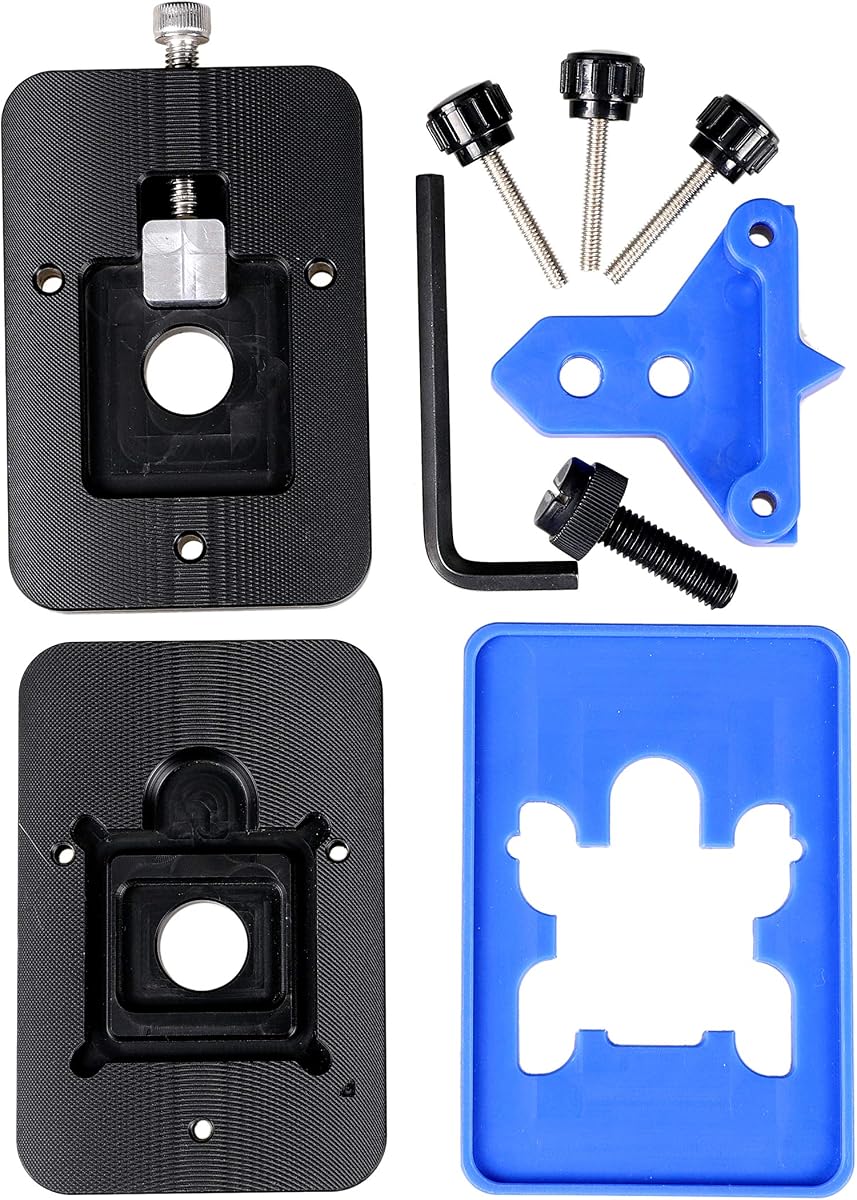


The Delid Tool V3 is a purpose-built option for opening a PlayStation 3 CPU lid, and it earns a 4.6 rating for its focused design, replaceable cutting edge, and inclusion of three blades. Rather than asking technicians to adapt a general-purpose knife, it presents a dedicated tool intended specifically for compatible PlayStation 3 systems. That narrow scope makes it particularly attractive to console repair technicians who regularly encounter thermal paste, lid, or overheating-related service work.
We may earn a commission when you buy through this link, at no additional cost to you.
Its strongest feature is the thin, durable blade. A purpose-built mechanism can make the cutting action more consistent than an improvised blade or a tool intended for another part. The third version is described as having a sharper, more flexible blade, which may improve control along the lid edge and reduce the need for repeated passes. The replaceable blade also supports longer-term use because a worn edge can be changed without discarding the entire tool.
The main limitation is equally important: this is not a universal desktop CPU delidding kit. Its compatibility is stated for PlayStation 3, and it includes three blades rather than a broad collection of precision implements for phones, motherboards, and other chips. The tool also reduces risk rather than eliminating it. Integrated heatspreaders and console boards can still be damaged if a tool is misaligned, forced, or used without adequate care.
This is an appealing choice for a PlayStation 3-focused repair bench, especially for a technician who values a dedicated blade and spare edges over a general repair bundle. It may be less sensible for someone whose main goal is direct-die cooling on a modern desktop processor. Confirm the console revision, work on a protected surface, and review the manufacturer’s orientation instructions before beginning.
A dedicated tool gives the operator a more consistent reference point when entering the seam around a console CPU lid. The supplied blades are designed for that narrow cutting task, which can be preferable to forcing a general craft blade into a tight gap.
Having three included blades provides a practical replacement path when an edge becomes dull or damaged. Because the blade is replaceable, the core tool can remain in service rather than being replaced with every blade change.
We may earn a commission when you buy through this link, at no additional cost to you.
The der8auer Delid-Die-Mate X is an integrated heatspreader removal tool for Intel Skylake-X and Kaby Lake-X processors using socket 2066. Its 4.1 rating reflects a specialized product that offers a clear mechanical advantage over improvised removal methods, although compatibility is narrow and delidding carries real risk. The listing describes a tool built from aluminum and stainless steel in an anodized black finish.
We may earn a commission when you buy through this link, at no additional cost to you.
Its defining advantage is the integrated approach. A processor-specific mechanism offers a repeatable way to apply force around the heatspreader while reducing the chance that a sharp implement will contact the fragile silicon core. The product was developed in response to the danger posed by mounting desktop coolers on processors that lacked protective integrated heatspreaders, a hazard associated especially with early Athlon XP-era chips.
There is an unavoidable caveat: removing an integrated heatspreader permanently invalidates the manufacturer’s guarantee and warranty. It can also change cooler height. The listing specifically notes that fixed-height coolers may no longer mount after the metal lid is removed, so anyone using this tool should verify that the intended cooler has enough adjustment to accommodate the lower mounting position.
This is a strong recommendation for a technician or advanced enthusiast who specifically works with socket 2066 processors and understands the consequences of opening a processor. It is not a sensible general-purpose delidding kit, nor should it be selected merely because the processor is an Intel chip. Confirm the exact model and socket, check the cooler’s mounting range, and use appropriate protective procedures.
The integrated mechanism is designed to remove the heatspreader as a controlled operation rather than relying on a knife, pry bar, or hammer. That distinction can be valuable where minimizing contact with the die is the priority.
The lower profile created by a removed heatspreader can matter more than the opening itself. Check whether the selected cooler supports adjustable mounting height before disassembling the processor or planning a direct-die cooling arrangement.
We may earn a commission when you buy through this link, at no additional cost to you.
The Knife Repair Kit is a compact electronics-repair solution for removing chips, cutting adhesive, and working around BGA components. It carries a 3.6 rating, lower than the other purpose-built choices here, but its detailed design still appeals to technicians who need a thin cutting profile for work around densely populated circuit boards. It is particularly relevant to power-supply repair, motherboard servicing, and integrated-circuit maintenance.
We may earn a commission when you buy through this link, at no additional cost to you.
The defining specification is the ultra-thin 0.38mm, or 0.015-inch, blade. The listed use is movement between chips and baseplates where a thicker blade could interfere with nearby components. The kit also includes a burr-resistant or burr-easy blade concept and a proof-drop-style ergonomic handle intended to provide secure control. Alcohol wipes are included for cleaning, which is important when residue affects tool movement or inspection of the work area.
The blades are described as SK5 steel with a heat tolerance of 550°F, or 287°C, and enhanced oxidation resistance. That specification does not mean the tool should be exposed to unlimited heat, but it indicates that the blade material was selected for repair work involving warm components. Its dual-function design lets the operator use different edges for chip removal, adhesive cutting, and other tasks without changing the whole handle system.
This kit is most appropriate for mobile and board-level repair technicians who already understand how to work close to dense components. It is less attractive for someone seeking a turnkey CPU-lid opener because it does not provide a processor-specific jig. The lower rating also warrants more caution, so users should inspect the blade, handle, and included pieces carefully before delicate work and replace any damaged component immediately.
A 0.38mm profile can enter a narrow gap without requiring as much lateral room as a conventional craft blade. That makes the kit useful when removing small integrated circuits or cutting adhesive around densely packed board components.
Residue can make a fine blade drag or obscure the edge. The included alcohol wipes support routine cleaning between operations, helping the operator inspect both the tool and the surface being worked.
We may earn a commission when you buy through this link, at no additional cost to you.
The Thermal Grizzly Delid-Die-Mate is a processor-specific delidding tool developed by Roman der8auer Hartung for compatible 12th and 13th generation Intel Core processors. With a 4.5 rating and a stated origin of Germany, it combines focused compatibility with an anodized black-and-red aluminum design. The central objective is to remove the heatspreader so the processor can be used in a direct-die cooling configuration.
We may earn a commission when you buy through this link, at no additional cost to you.
Compared with a generic knife, a fitted removal tool can make the geometry of the operation more repeatable. It is intended to facilitate the separation of the lid from the processor package while reducing reliance on improvised techniques. The listing emphasizes straightforward installation and operation, which makes the tool accessible to experienced DIY enthusiasts as well as repair professionals already familiar with CPU modification.
Direct-die cooling is not automatically an improvement in every installation. It can improve heat transfer by eliminating the metal lid as part of the thermal path, and the product claims temperature reductions of 10–20°C under suitable direct-die conditions. However, actual results depend on the cooling hardware, mounting arrangement, thermal material, ambient conditions, and workload. The exposed die also requires careful handling and planning for long-term reliability.
This is the most balanced modern desktop CPU choice in the group for someone whose processor is explicitly supported. It is not a general console or smartphone kit, and it should not be forced onto an incompatible chipset. Buyers should verify the exact processor generation, prepare a proper direct-die cooling solution, and treat the tool as a modification aid rather than a routine maintenance item.
The tool is designed around the dimensions and layout of supported 12th and 13th generation Intel Core processors. That specificity can be more reassuring than adapting a general blade, provided the target processor is actually covered.
Removing the lid exposes surfaces that require careful cleaning and suitable thermal material. A good delidding tool is only one part of the process; the cooling system and mounting method determine whether the modification delivers its intended thermal benefit.
We may earn a commission when you buy through this link, at no additional cost to you.
The Thermal Grizzly TG Scraper is a three-pack of acrylic precision scrapers built for removing silicone adhesive and indium solder residue from delidded processors. It has a 4.8 rating, the highest numerical rating among the products in this guide. Although it is not a complete delidding kit, it addresses a critical follow-up task: cleaning the processor package and die after the lid has been removed.
We may earn a commission when you buy through this link, at no additional cost to you.
The narrow tip is the product’s most important feature. Delidding leaves material around the package and exposed surfaces, and a broad scraper is not always convenient in those confined areas. The pointed design allows the operator to work methodically along edges and lift residue with more localized control. The acrylic construction is also presented as safe for delicate CPU components when used carefully, reducing the likelihood of scratching compared with a hard metal implement.
Ergonomics deserve attention too. A comfortable grip can help the user maintain steady control while working around a tiny die or package edge. The three-pack format also provides a practical reserve: one scraper can be dedicated to adhesive, another to solder residue, and a third can remain clean for inspection or delicate cleanup. Keeping tools separated reduces the chance of carrying contamination from one stage to another.
This is the right purchase for a technician who already has a working opener and needs a controlled way to clean the exposed processor. It will not cut a heatspreader, lift a console lid, or replace a processor-specific jig. The phrase designed to reduce risk should also be understood in context: acrylic can still scratch if dragged carelessly, so light pressure, a clean surface, and deliberate strokes remain important.
A fine tip makes it easier to follow the boundary of a package and remove residue in a controlled line. It is particularly helpful after a lid has been opened and the larger surfaces still need careful preparation.
The three-pack format provides spare implements for different residues or separate stages of a job. Dedicated tools can help keep solder, adhesive, and packaging debris from being transferred across the repair area.
We may earn a commission when you buy through this link, at no additional cost to you.
The EG Starts Kaby Intel CPU Delid and Relid tool is designed to open and reassemble supported Intel processors, with its listing calling out compatibility across several LGA 775, 1150, 1151, and 1155 families as well as named Kaby Lake and Coffee Lake processors. It earns a 4.6 rating for its straightforward, processor-focused approach and a mechanical design that can be more consistent than a loose blade-and-pry approach.
We may earn a commission when you buy through this link, at no additional cost to you.
A significant advantage is the relid function. Many general-purpose openers help separate the lid but leave the technician without a dedicated way to position it again. A combined opener and cap tool can help maintain alignment during reassembly, which matters when the processor is going back into a system. The listed compatible models span popular enthusiast processors, including several i7, i9, E3, and K-series chips.
Orientation is the product’s most important warning. The square aluminum block must sit below the plastic plane, according to the listing, or the CPU board may be damaged. That instruction underlines that a delidding tool is still a forceful mechanical device. Forcing the block into the wrong position, using excessive pressure, or continuing after a binding point can turn a clean removal into substrate damage.
This is a good fit for an enthusiast who wants both opening and reassembly capability for a processor covered by the stated compatibility list. It is less useful for modern unlocked desktop chips requiring a different modification method or for console work. Users should match the exact processor model, study the tool’s orientation, and ensure the work area is stable before beginning.
The included cap function makes this more useful than a one-direction opener for a technician who expects to return the processor to service. Reassembly tools help keep the lid aligned with the package rather than relying only on hand placement.
The listing’s warning about the square aluminum block is essential. Check the tool against the processor layout before applying force, and stop if the components do not seat as expected rather than forcing the mechanism.
We may earn a commission when you buy through this link, at no additional cost to you.
The QianLi ToolPlus 009 is a 12-in-1 handle metal craft knife set built for detailed electronics work, including iPhone CPU refurbishment, BGA maintenance, adhesive removal, solder-pad cleaning, and general circuit-board repair. It has no numerical customer rating in the supplied data, so its appeal must be assessed from its specification rather than a rating. The set focuses on versatility and interchangeable cutting profiles.
We may earn a commission when you buy through this link, at no additional cost to you.
The blade assortment is the main attraction. Fine-point tips support detailed scraping, while angled edges can cut or pry through tougher glue. A shared handle lets the operator change tools without moving to an entirely separate instrument for every stage. The listing specifically describes a sturdy metal handle with a non-slip design, intended to provide balance and control while reducing hand fatigue during intricate tasks.
Its versatility makes the kit useful for technicians who service multiple categories of electronics. A mobile CPU job may require lifting a chip and removing adhesive, while a motherboard job may need a broader edge for glue. The set is positioned for advanced microsoldering work, and the ultra-thin steel blades are intended to slide beneath components without cutting the underlying board. That is a demanding goal in dense areas, so careful technique remains essential.
This is a worthwhile general bench tool for advanced repair professionals, especially those moving between phone, BGA, and motherboard work. It is not a fitted CPU-lid opener and offers no dedicated heatspreader-removal mechanism. Because it lacks a numerical rating, buyers should inspect the included blades, handle fit, and blade-retention quality, and keep the cutting edges clean and protected when not in use.
A fine point, angled edge, and other included profiles can be assigned to separate stages of a repair. Matching the blade shape to the task can reduce the need to force an unsuitable edge into a confined area.
The handle is described as sturdy, balanced, and non-slip. Those qualities help an operator maintain a consistent angle and pressure, which is especially important when the blade tip is only a fraction of a millimeter from another component.
We may earn a commission when you buy through this link, at no additional cost to you.
The RSX GPU Delid Tool is purpose-built for the RSX graphics processor in Fat and Slim PlayStation 3 models. It has no numerical customer rating in the supplied data, but the product’s narrow compatibility and clearly defined purpose make it easy to place. It is designed to remove the RSX integrated heatspreader so technicians can reach the thermal interface material for paste replacement.
We may earn a commission when you buy through this link, at no additional cost to you.
The tool’s defining safety-oriented feature is its effort to reduce board contact. Its working edge is designed to remain positioned away from the main board during delidding, which can help protect nearby components. That matters because a console graphics board is crowded, and an uncontrolled knife stroke can damage a trace, capacitor, or other part before the lid is even released.
Compatibility boundaries are especially clear. The tool works with PS3 Fat and Slim models that have an RSX chip beneath an integrated heatspreader. It is not compatible with PS3 Super Slim systems because those models do not use an RSX lid. It also does not remove the CELL/CPU integrated heatspreader, so a technician expecting a complete console CPU delidding tool should look elsewhere.
This is a strong specialty choice for a repairer working on RSX-equipped Fat or Slim consoles, especially when thermal-paste replacement is the objective. It is not appropriate for Super Slim systems or CPU-lid work. Because the listing explicitly warns that delidding can damage the chip or console, the tool should be used with a stable work surface, deliberate force, and a repair procedure appropriate for the console.
The explicit Fat and Slim limitation and exclusion of Super Slim models help buyers identify whether the tool matches the console on the bench. Checking the RSX and CPU distinctions before ordering avoids buying the wrong specialty tool.
Keeping the working edge away from the main board is a meaningful design goal on a densely populated console. It supports controlled removal, although the process still requires care and should not be treated as risk-free.
We may earn a commission when you buy through this link, at no additional cost to you.
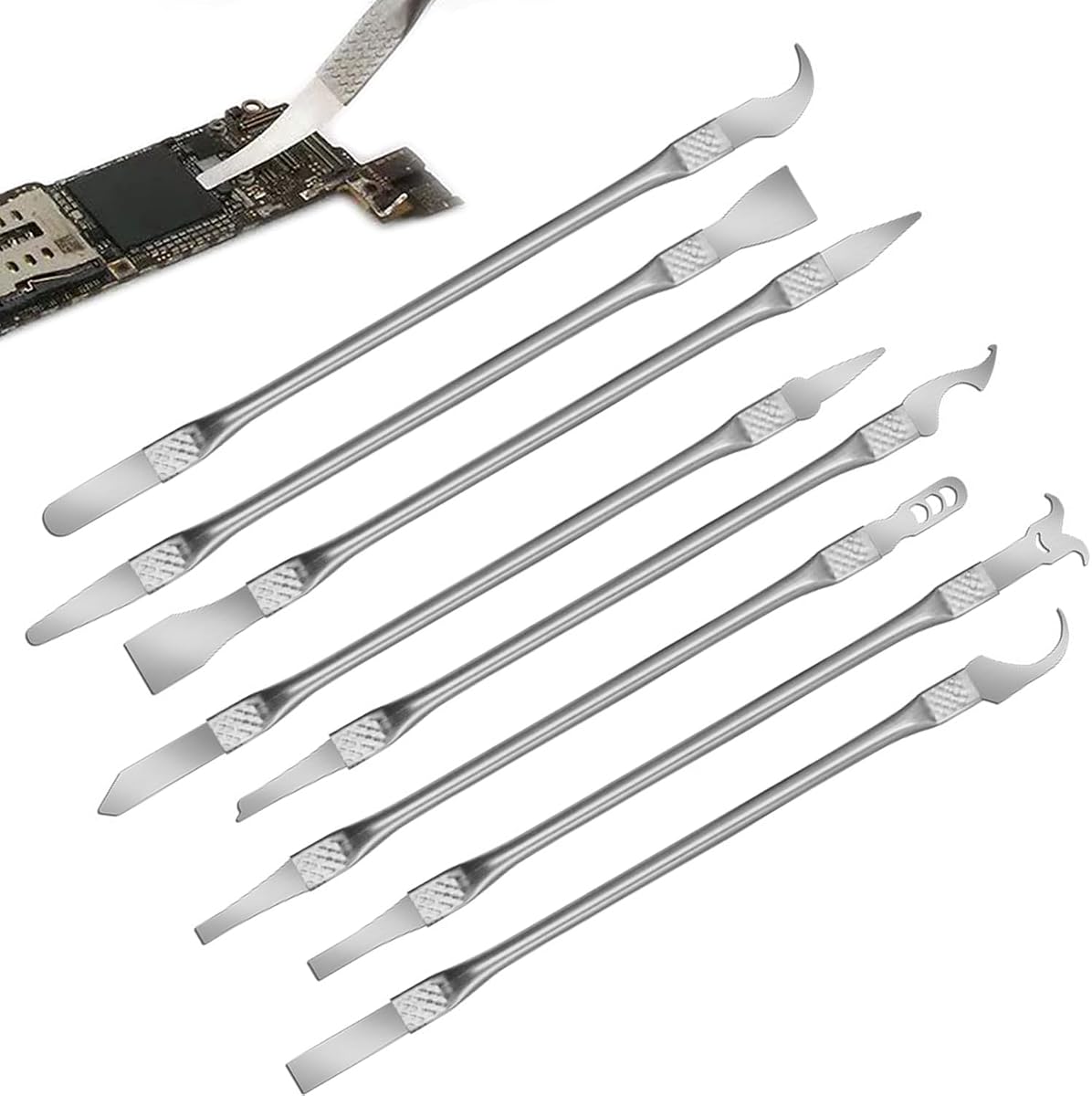
The Multi-Function CPU Removal Tool Set is an eight-piece collection designed for removing BGA chips, processors, and small components from smartphones and computer motherboards. Its 4.0 rating places it in the middle of this group, while its broad utility and integrated construction make it a practical entry point for general electronics repair. The listed tools use ultra-thin profiles intended to maneuver between chips and boards.
We may earn a commission when you buy through this link, at no additional cost to you.
Alloy construction is another notable feature. The set is described as resistant to corrosion and bending, which are useful qualities for thin implements that may be subjected to twisting or repeated contact with solder residue. The integrated blade-and-handle arrangement removes the need to assemble separate pieces before use, while the ergonomic shape is intended to reduce fatigue during extended repair sessions.
The main drawback is that versatility can blur the line between purpose-built and general-purpose equipment. An eight-piece set can cover several common tasks, but it does not necessarily provide the processor-specific alignment of a fitted delidding jig or the same focused access as a console tool. Ultra-thin is also a relative term: the width of a BGA package, the depth of surrounding components, and the type of adhesive all affect whether a given implement can be used safely.
This kit is best for a hobbyist, repair technician, or electronics learner who wants basic chip and adhesive removal capability without purchasing several specialized instruments. It can also serve as a portable companion for field repairs. Users should select the appropriate tip for each job, keep the implements clean, and avoid applying enough lateral force to slip sideways beneath a component.
The set covers several common needs, including BGA removal, processor work, and smartphone board maintenance. That makes it convenient for technicians who do not yet know which specialized tips their work will require.
The blade-and-handle design avoids assembly before use. It also reduces the chance of leaving a loose implement behind during a mobile repair, where keeping a complete tool organized is important.
We may earn a commission when you buy through this link, at no additional cost to you.
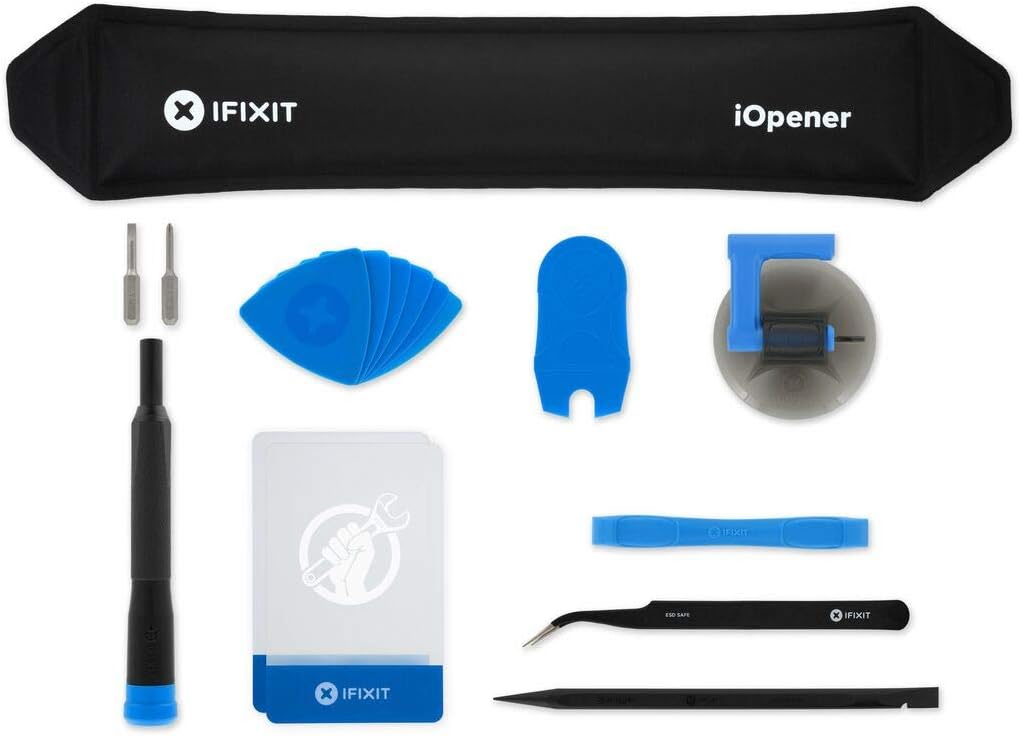
The iFixit iOpener is an adhesive-heating tool for opening screens and separating heat-sensitive parts in tablets, phones, Android devices, laptops, and other electronics. With a 4.5 rating, it stands apart from the cutting and scraping tools in this guide. It does not delid a CPU in the conventional sense, but it can be an important companion when adhesive must be softened before a repair can begin.
We may earn a commission when you buy through this link, at no additional cost to you.
Its core advantage is even, direct heat application. The design is intended to distribute warmth across a screen rather than heating one small point with a conventional heat gun. Even heating can soften adhesive more consistently, helping a thin opening tool move through a bonded edge without requiring as much force. The listing says the iOpener was originally made for iPad but can also work with many other electronics.
The package includes tools commonly used in repairs involving the opener, reducing the need to assemble a separate opening station. It is described as easy to use, non-toxic, and food-safe, although those material qualities do not remove the need for sensible heat management. The user should still control the warming process, avoid overheating, and keep the opening pressure gradual so internal components are not pulled or twisted.
This is the best fit for broad consumer-electronics disassembly rather than CPU heatspreader removal. A technician working on a modern phone, tablet, or laptop may find it indispensable for clearing display adhesive before reaching board-level components. It should be seen as a complementary tool, and operators should follow device-specific guidance about where heat may be applied and which nearby parts need protection.
Distributing heat across an adhesive bond can make the material more consistent to work with. The result is often a lower-force opening process, which is valuable when the display assembly is delicate.
Although designed initially for iPad repair, the iOpener can support work on many tablets, phones, Android devices, and laptops. That flexibility makes it a useful shared bench tool for electronics repair.
We may earn a commission when you buy through this link, at no additional cost to you.
The right delidding kit depends on the component being opened, the required precision, and the technician’s experience. Start with exact hardware compatibility, then compare the tool geometry, included implements, construction, and intended repair stage before making a selection.
Choose only when the manufacturer’s stated compatibility matches the target hardware.
Select a kit that covers your actual task, not merely the word delidding.
Prefer a defined edge geometry that suits the component without forcing it.
Prioritize stable alignment and comfortable handling over raw cutting power.
Look for useful spare edges, but verify core task compatibility first.
Choose a material and maintenance routine that suit the surfaces involved.
Treat delidding as a modification with real consequences, not a risk-free upgrade.
Verify the full cooling plan before the irreversible opening step.
Begin by identifying the exact component and confirming that the tool or blade geometry matches its layout. Review the product instructions, disconnect power, remove any required console or computer covers, and place the board on a stable, nonconductive work surface. Good lighting and magnification help the operator see the intended cutting line, nearby components, and any gap between the lid and package. Never rely on a general compatibility label when the product provides a specific model list.
Use controlled, progressive force. Start with the tool in its intended position, keep the working edge away from fragile surfaces, and stop if the mechanism binds or does not seat correctly. A deliberate approach is more important than speed. For scraping, work along the package edge with light pressure and change tools when residue dulls the edge. When heat is involved, warm the adhesive gradually and use a separate opening implement so the heated tool is not also acting as a lever against the display.
After use, disconnect any heat source and allow the area to cool. Remove adhesive and solder residue from reusable blades using the appropriate cleaning method, then dry and inspect the edge or tip for bending, chipping, and loss of sharpness. Store precision tools with protective caps or in a case that prevents contact with other implements. Replace damaged blades rather than sharpening them without a reliable method, and keep processor-specific tools away from solvents or finishes that may attack their materials.
A delidding kit is used to remove an integrated heatspreader, chip lid, or related cover from a processor, graphics chip, game console, or other compact electronic assembly. It may also include blades and scrapers for cutting adhesive and cleaning residue. The correct tool depends on the device, the material securing the lid, and the repair technique being planned.
No. Processor-specific tools are designed for defined packages, sockets, and chip dimensions, while console tools are similarly limited. A tool that fits one Intel generation may not support another, and the PS3 RSX tool does not fit Super Slim models or remove the console’s CPU lid. Always verify the exact model and all stated exclusions before ordering.
No. Removing the heatspreader can enable a direct-die cooling configuration, but the final result depends on the cooler, mounting method, thermal material, workload, and ambient conditions. A suitable tool opens the package, yet it cannot compensate for a poorly planned cooling setup. The exposed die also requires more care and appropriate replacement thermal materials.
It can be safe when the task is researched, the correct tool is used, and the operator understands the force and direction involved. Beginners should first practice on lower-value hardware, work slowly, and use appropriate lighting. If a tool binds, the package shifts, or the intended edge is unclear, the correct response is to stop and reassess rather than apply more force.
It can. The der8auer Delid-Die-Mate X listing explicitly states that removing the heatspreader invalidates the manufacturer’s guarantee and warranty. Coverage rules vary by company and product, but any modification that changes the processor or console should be checked against the relevant terms before work begins.
A dedicated precision scraper can help remove silicone adhesive or indium solder residue from exposed processor surfaces. The Thermal Grizzly TG Scraper is designed for this type of cleanup, while the Knife Repair Kit includes alcohol wipes for maintenance. Use a clean implement, light pressure, and material-compatible cleaning methods to avoid scratching the package or die.
No. The iOpener applies heat to loosen adhesive during device disassembly, such as when opening a tablet, phone, or laptop screen. It is a complementary electronics-repair tool rather than a CPU-lid opener. It can help reach board-level work after adhesive has been released, but it does not cut or release an integrated heatspreader.
The correct thermal interface should be confirmed for the exact console and RSX assembly before disassembly. Opening the lid exposes thermal interface material that may need replacement or renewal to restore proper contact. Use a material suitable for the specific chip and thermal-paste requirements, and follow the applicable console service procedure.
The Delid Tool V3 stands out as a focused, economical choice for compatible PlayStation 3 CPU work, while the Thermal Grizzly Delid-Die-Mate is the strongest all-around option for supported 12th and 13th generation Intel processors. For socket 2066 processors, the der8auer Delid-Die-Mate X offers a more specialized and integrated approach. Each serves a clearly defined hardware category rather than pretending to be universal.
The right priority is compatibility before features. A thin blade, strong handle, or long blade list cannot compensate for a tool that does not match the package. For broader work, the TG Scraper handles post-delid cleanup, the QianLi and multi-function kits support circuit-board tasks, and the iOpener specializes in adhesive removal. Buying a primary tool and a small set of complementary implements often creates a more functional bench than purchasing an oversized kit for every possible task.
Before ordering, check the exact processor or console model, review the exclusions, understand the warranty implications, and plan the full repair or cooling process. Product listings and prices can change, so confirm current availability and specifications at the time of purchase. Most importantly, approach the opening step slowly: stable alignment and controlled force are more valuable than speed, and a pause is always preferable to a damaged package.
