
AJAZZ AK029
4.5Editor score
Magnetic rapid-trigger switches
Eight-kilohertz polling rate
Twenty-nine-key compact layout
Discover the best left handed gaming keyboards, comparing layouts, switches, polling, connectivity, macros, ergonomics, customization, and features for
Left handed gaming keyboards are designed to place movement keys, modifiers, or a numeric keypad where a left-handed player can reach them naturally. The best options balance fast input, comfortable hand positioning, useful remapping, and enough control to support demanding games without forcing awkward movements.
This guide compares ten left handed and one-handed gaming keyboards across layout, switch technology, polling rate, actuation control, macro support, connectivity, lighting, and build characteristics. It covers full-size southpaw models, compact magnetic-switch keypads, programmable analog controllers, and ergonomic business keyboards.
The selections reveal which products suit competitive shooters, content creation, and extended play, as well as where a simpler keyboard may be enough. Ratings reflect the supplied customer feedback, while features and availability can change. Always verify the current configuration and listing before purchasing.
4.5Editor score

4.6Editor score

4.6Editor score
The comparison below covers full-size southpaw keyboards, single-handed keypads, magnetic-switch gaming boards, and programmable analog controllers. Each entry highlights the most important distinctions in layout, input technology, customization, and connectivity.



The RK ROYAL KLUDGE L98 is a full-size-style mechanical keyboard built around a left-handed southpaw arrangement. Its 4.6 rating reflects a favorable balance of layout, build, connectivity, and sound control. Unlike a single-handed keypad, it preserves familiar typing, navigation, and number entry while relocating the numeric keypad to the left.
We may earn a commission when you buy through this link, at no additional cost to you.
Its defining advantage is the 98-key southpaw format, which moves the numpad away from the mouse hand and creates more room on the right for wide aiming motions. The gasket-mounted structure, PBT Cherry-profile keycaps, and five layers of internal padding are intended to reduce vibration, hollow sound, and cavity noise. Hot-swappable sockets support both three-pin and five-pin switches, giving buyers room to change the feel later.
Connectivity is unusually flexible for a left-handed mechanical keyboard. It works through 2.4GHz wireless, Bluetooth 5.0, or USB-C wired mode, and supports multi-device use. South-facing RGB lighting is present, although the supplied battery figures show the tradeoff: up to 310 hours with the lighting off and 51 hours with RGB on. The 8000mAh battery is still substantial for a keyboard of this size.
This is the strongest all-around recommendation for a player who wants a complete keyboard rather than a tiny controller. It is particularly suitable for left-handed mouse users who also need number entry, function keys, and conventional typing. The trade-off is desk space and a larger footprint than a compact gaming keypad, but the flexibility and familiar full-size workflow outweigh that limitation for many buyers.
The relocated numpad is the central benefit. A left-handed user can reach numbers with the left hand while keeping the right hand on the mouse, and the open right side accommodates large flicks without repeatedly colliding with a conventional numpad.
Tri-mode connectivity makes the L98 useful across gaming, work, and travel setups. Hot-swappable sockets add further flexibility by allowing compatible mechanical switches to be changed according to sound, feel, or gameplay preferences.
We may earn a commission when you buy through this link, at no additional cost to you.
The RedThunder One Handed Gaming Keyboard is a compact 35-key gaming keypad with a 4.4 rating. It is aimed at players who want dedicated gaming commands under one hand while the other hand controls the mouse. Its small body, broad anti-ghosting support, RGB lighting, and plug-and-play operation make it a straightforward option for space-conscious setups.
We may earn a commission when you buy through this link, at no additional cost to you.
The built-in game controller includes a stated three-millisecond response time and anti-ghosting across all 35 keys. Two macro recording keys use a simple FN-based procedure: enter recording mode, perform the sequence, save it to FN+F1 or FN+F2, and recall it with the corresponding key. That approach is useful for repeatable actions without navigating a more advanced configuration utility.
The keypad includes a large wrist rest and portable form factor, so it can be moved between sessions or used when desk space is limited. RGB lighting offers seven colors with breathing and static modes. Compatibility extends across Windows, Mac, Linux, IBM, and several older Windows versions, and no driver installation is required. These conveniences make setup straightforward.
It is best for a gamer who values a simple, portable command pad more than analog movement or per-key magnetic actuation. It cannot match the AZERON products for analog control or the magnetic keypads for adjustable actuation. Even so, its macro support, anti-ghosting coverage, and low-friction setup make it a practical left-hand companion for a mouse-and-keyboard gaming arrangement.
Dedicated FN+F1 and FN+F2 recording keys put macro creation directly on the device. This is less granular than a full remapping suite, but it offers a quick way to automate repetitive command sequences and play them during a match.
The 35-key footprint is easy to position beside a mouse pad and less demanding than a full-size keyboard. Its broad platform support and driver-free operation also make it approachable for users who do not want to manage specialized gaming software.
We may earn a commission when you buy through this link, at no additional cost to you.
The AZERON Cyborg II is a programmable one-handed controller designed to be used with the left hand while the mouse remains on the right. Its 4.3 rating reflects a specialized feature set centered on analog movement, extensive remapping, and an adjustable, hand-shaped form. It is not a conventional replacement for a full typing keyboard.
We may earn a commission when you buy through this link, at no additional cost to you.
Its Hall Effect thumbstick provides true analog control and is designed to eliminate stick drift. In compatible games, it can reproduce WASD-style movement or 360-degree analog input. Users can adjust dead zones, sensitivity, cone angles, eight directional zones, and analog smoothing. The thumbstick can also function as a mouse and includes calibration and a mid-click function.
All 30 inputs are individually wired rather than connected through a matrix, allowing keyboard, controller, mouse, or macro assignments. Up to six control layouts can be stored directly on the keypad, while the Azeron software provides deeper RGB, profile, diagonal-bind, and analog controls. The redesigned board is also intended to support future software updates and modular enhancements.
This product makes the most sense for FPS, MOBA, and RPG players who want analog movement in games that support it and accept a controller-style command layout. Its right-hand mouse arrangement is precisely what allows the keypad to occupy the left side. The medium size is listed for hand lengths from 6.3 to 7.5 inches, so users outside that range should consider fit carefully before buying.
The Hall Effect thumbstick supports analog acceleration and directional behavior that a conventional keyboard cannot reproduce. Dead-zone, sensitivity, cone-angle, smoothing, and directional-zone settings let players tune the controller to their preferred movement style.
Because every button has its own connection, advanced players can assign different input types without matrix conflicts. Six onboard profiles make it easier to switch between games or roles without recreating a layout every time.
We may earn a commission when you buy through this link, at no additional cost to you.
The AZERON Keyzen is the most premium-oriented programmable keypad in this guide, combining 32 fully mappable keys with a 360-degree Hall Effect joystick. Its 4.6 rating places it among the highest-rated selections. The product is designed for left-hand control while the player retains a conventional mouse in the right hand.
We may earn a commission when you buy through this link, at no additional cost to you.
The joystick uses a magnetic Hall Effect sensor for drift-free true analog movement. Keys can be assigned to keyboard, mouse, or controller inputs, and the package includes Cherry MX Red switches in the featured configuration, with Brown and Blue also listed as choices. DSA-profile keycaps create a uniform surface, while N-key rollover helps the board register multiple commands during demanding inputs.
Ergonomics receive unusually detailed attention. The hand-shaped chassis includes two palm rests, adjustable finger angles, and swappable keycaps. The stated recommended wrist-to-fingertip length is 20 to 21 centimeters, or 7.9 to 8.3 inches, or more. Six onboard RGB profiles are included, with additional profiles available through software and modular replaceable components for long-term upkeep.
The Keyzen is best suited to a gamer who wants more deliberate, premium ergonomics and analog movement without the very high key count of a full keyboard. Its size requirement may make it less comfortable for smaller hands, and games must support controller-style input. For users who fit the recommended dimensions and value a polished, highly programmable left-hand controller, it is an excellent choice.
Two palm rests, adjustable finger angles, and swappable keycaps give the Keyzen more support for long sessions. The hand-shaped layout and recommended reach range are important because even a sophisticated controller can become uncomfortable if its proportions do not match the user.
Cherry MX switch options provide a familiar mechanical feel, while the 32 keys can carry keyboard, mouse, controller, and macro actions. This combination serves both conventional gaming and specialized workflows such as editing or application control.
We may earn a commission when you buy through this link, at no additional cost to you.
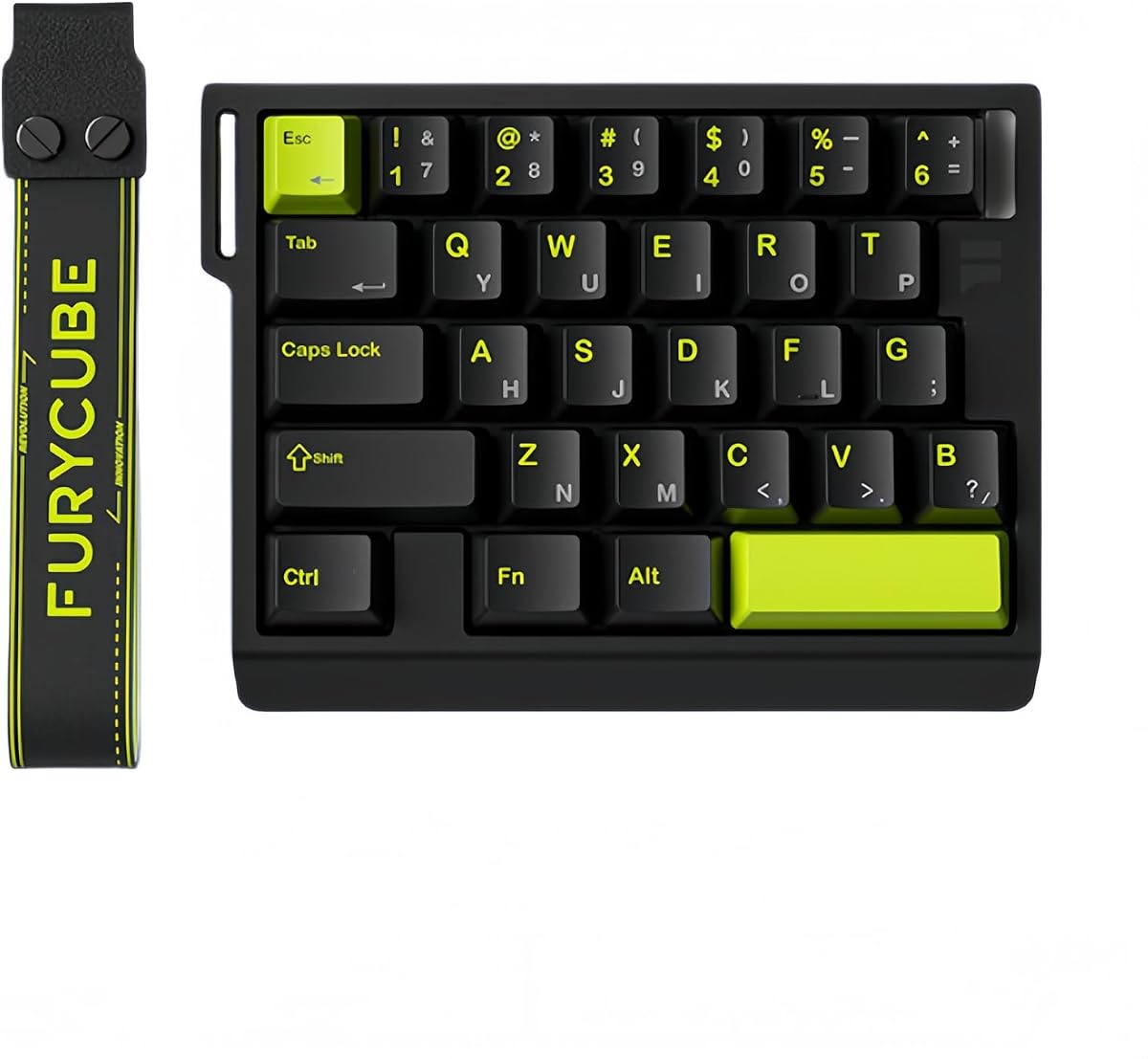
The AJAZZ AK029 is a compact one-handed magnetic-switch gaming keypad with a 4.5 rating. It combines 29 keys, an 8KHz polling rate, and Hall Effect rapid-trigger technology in a small package. The layout is positioned for left-hand command input, leaving space on the right for mouse movement.
We may earn a commission when you buy through this link, at no additional cost to you.
The magnetic switches provide stated actuation precision down to 0.01 millimeters and eliminate a fixed bottom dead zone. Rapid Trigger allows a key to reset as soon as it travels back far enough, supporting quick double-taps and smooth directional changes. Snap Key, or SOCD, and Dynamic Key Switch, or DKS, allow several actions to be assigned to one input for advanced movement combinations.
The wired design includes a stated 128KHz full-key scanning rate and response latency as low as 0.125 milliseconds. Its five-layer acoustic structure combines PO cotton, IXPE switch pads, PET pads, EPDM bottom cotton, and silicone around an aluminum alloy plate. A shaped wrist rest, RGB lighting, and 20 lighting effects are included for both comfort and visual customization.
The AK029 is a strong pick for FPS, MOBA, and fast-paced players who want modern magnetic controls without moving to a premium analog controller. It is particularly attractive for its mix of precise actuation, high polling, and compact footprint. The main limitation is its specialized wired setup, but that is common for competitive gaming boards and keeps the focus on consistent low-latency input.
Rapid Trigger changes how quickly a key becomes ready for another press. By detecting travel in real time, the AK029 can reset keys without waiting for a full return, helping players execute rapid taps and counter-movements.
The 29-key arrangement occupies less desk area than a conventional keyboard. That additional space is meaningful for a left-handed player because the right hand remains free for large, unobstructed mouse flicks and broad lateral movement.
We may earn a commission when you buy through this link, at no additional cost to you.
The Natural_A Left Handed Keyboard is a full-style ergonomic keyboard designed primarily for business, accounting, and numeric work. It has a 4.4 rating and takes a different approach from gaming keypads: instead of emphasizing rapid triggers or analog input, it focuses on a familiar layout, a numeric keypad on the left, and dedicated multimedia keys.
We may earn a commission when you buy through this link, at no additional cost to you.
The patented natural_A key structure and laser-inscribed keys are intended to support a more natural hand position. The left-handed numeric keypad lets a user enter figures with the left hand while keeping the right hand free for a mouse. Eight multimedia hotkeys provide quick access to common controls, while specialized software manages the keyboard's multifunction hotkeys.
Compatibility includes Windows XP, Windows 7, Windows 8, Windows 10, and Mac OS X. Availability in PS/2 and USB configurations adds flexibility for older and newer systems. The stated dimensions are 18.72 by 8.1 by 0.98 inches, giving buyers a basic idea of the full-size footprint before ordering.
This keyboard is not a competitive gaming board and lacks mechanical switch choices, analog movement, or high polling specifications. It is nevertheless relevant to left-handed gamers who spend considerable time in account management, spreadsheets, purchasing systems, or other numeric software. For that hybrid gaming-and-office role, its left-side numpad and straightforward layout are more useful than esports-specific features.
Many players also handle inventories, spreadsheets, communications, and marketplace transactions. A left-side numeric keypad can make those tasks more natural while preserving mouse control, giving this keyboard a practical niche beyond gaming.
Unlike a compact controller-style keypad, the Natural_A provides standard typing and navigation in a conventional shell. That makes it easier to move between work, school, and gaming without learning a limited command layout.
We may earn a commission when you buy through this link, at no additional cost to you.
The Keychron C0 HE 8K is a wired one-handed gaming keypad built around Hall Effect magnetic switches and a browser-based configurator. Its 4.2 rating makes it one of the more approachable options in the guide, particularly for users who want deep configuration without installing a dedicated desktop utility.
We may earn a commission when you buy through this link, at no additional cost to you.
The keypad has 35 programmable keys and an 8KHz polling rate. Magnetic sensing detects key travel continuously, allowing activation points to be adjusted with stated 0.01 millimeter precision. Rapid Trigger is supported, giving players the option to reset keys earlier and perform quick repeated inputs. Per-key RGB lighting provides a separate visual setup for every button.
Its web-based configurator handles key mapping, actuation settings, and lighting without a local software installation. Compatibility with both Windows and macOS is useful for systems that switch between operating systems. The product is marketed not only toward competitive shooters such as Valorant and CS2, but also toward MMO, MOBA, streaming, and editing workflows.
This is a good match for a left-handed player who wants a conventional gaming keypad with modern magnetic switches and simple cross-platform setup. It does not offer the analog thumbstick found in the AZERON controllers, and the wired connection limits portability. Even so, its 35-key arrangement, rapid-trigger capability, and browser-based setup form a versatile and approachable package.
The browser-based approach reduces setup friction because mappings, actuation, and lighting can be adjusted in a web interface. It is particularly convenient for users who move between Windows and macOS or prefer not to maintain a separate gaming utility.
The 35-key layout can control OBS scenes, push-to-talk functions, streaming shortcuts, and editing commands. This makes the keypad a broader productivity accessory for creators who want a dedicated left-hand control surface.
We may earn a commission when you buy through this link, at no additional cost to you.
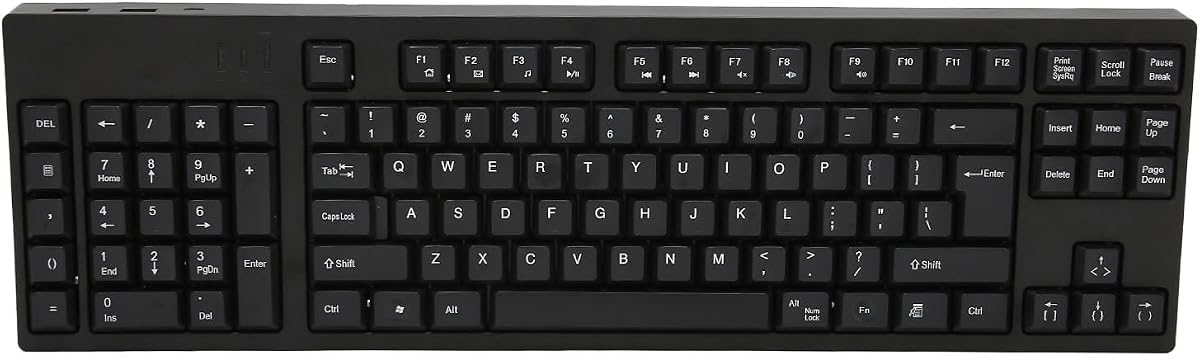
The 109-Key Left Handed Keyboard is a conventional full-size option with a numeric keypad on the left. It carries a 5.0 rating, the highest supplied customer score among the listed products. Its appeal lies in delivering a familiar keyboard arrangement without requiring gamers to adapt to a small command pad or specialized controller.
We may earn a commission when you buy through this link, at no additional cost to you.
The ergonomic layout places the numpad where the left hand can reach it and leaves the right side open for mouse use. All 109 keys are included, making it suitable for typing, navigation, data entry, and general computer work. The stated ABS construction provides a stable shell, while laser-style practical features and familiar key placement avoid a steep learning curve.
Connection is handled through Micro-USB, and the keyboard also provides two additional USB interfaces for peripherals. Its plug-and-play design means no separate drivers or complicated setup steps are required. That simplicity is particularly helpful for users who want a left-handed layout but do not need the configuration suite, analog control, or magnetic switches offered by specialized gaming products.
The principal trade-off is that this is not built around competitive features such as rapid trigger, adjustable actuation, high polling, or per-key macro lighting. It also uses an older connection style. Nevertheless, for a left-handed gamer who alternates between games and detailed computer tasks, the complete keyset, added ports, and simple installation make it a practical and highly rated recommendation.
The 109-key format provides every conventional typing, navigation, and number function. Moving the numpad left allows numerical work to coexist with mouse use, which can help in games, spreadsheets, and business applications.
Plug-and-play operation reduces setup time, while two additional USB ports offer convenient peripheral access. The Micro-USB connection should be checked against the player's available ports and cable preferences.
We may earn a commission when you buy through this link, at no additional cost to you.
The FKZ M30HE is a 30-key, wired magnetic gaming keypad designed for one-handed command entry. Its 4.0 rating is the lowest among the products in this guide, but the feature set remains focused and capable. It combines an 8KHz polling rate, rapid-trigger behavior, adjustable actuation, and hot-swappable magnetic switches.
We may earn a commission when you buy through this link, at no additional cost to you.
Switch actuation can be adjusted across a stated 0.1 to 3.4 millimeter travel range, with sensitivity configurable down to 0.01 millimeter. Rapid Trigger enables early key resets, while Dynamic Keystrokes lets one key trigger four different operations. The layout retains 30 useful gaming keys in a single area, and the product is explicitly described as a left-handed half keyboard.
RGB lighting includes customizable effects and individual button illumination, with north-facing LEDs intended to improve visibility. A programmable web driver provides remapping, macros, hotkeys, lighting modes, and actuation adjustment. The hot-swappable format gives the board added serviceability, although the supplied information does not specify which alternative magnetic switch models are compatible.
This keypad is worth considering for competitive players who want extensive magnetic-switch control and customization on a compact one-handed board. Its 4.0 rating suggests it may not be the most universally satisfying option, and the wired design is not ideal for a flexible desktop arrangement. Even so, the combination of rapid trigger, dynamic keystrokes, and web-based controls is attractive for dedicated shooters.
The broad 0.1 to 3.4 millimeter travel range allows players to choose between very short initial movement and a longer deliberate press. This makes the board adaptable to different games and individual response preferences.
The web driver combines remapping, macros, hotkeys, and lighting controls in one interface. Players can place frequently used commands within a compact 30-key arrangement and then refine their behavior for individual titles.
We may earn a commission when you buy through this link, at no additional cost to you.
The A4tech KBS-29BLK is a wired USB keyboard built for left-handed business, accounting, and general computer use. Its 4.3 rating reflects a steady user reception, while the ergonomic model name emphasizes a design intended to reduce strain and improve posture. It offers a less gaming-specific alternative within this guide.
We may earn a commission when you buy through this link, at no additional cost to you.
The supplied information identifies the KBS-29BLK as a left-handed keyboard with eight multimedia hotkeys and a patented ergonomic approach intended to reduce back and shoulder strain. Its wired USB connection avoids batteries, wireless pairing, and charging routines, making it dependable for a fixed desk where the left side must remain available for number entry.
The clearest use case is a player who spends substantial time in account management, spreadsheets, purchasing tools, or other numerical applications. A left-side numpad allows data entry without forcing the mouse to share the right side, while multimedia controls provide quick access to common system functions during ordinary computer work.
It is not the right choice for someone searching for rapid trigger, analog movement, high polling, or mechanical switch customization. Those players should examine the AJAZZ, Keychron, FKZ, or AZERON options. For the narrower role of an ergonomic left-handed workstation keyboard, however, the A4tech provides a simple, focused design with practical media shortcuts.
The design is optimized for keeping numerical work away from the right-hand mouse area. That makes it useful for accounting-heavy routines, game-related account management, and other workflows where a standard right-side numpad is inconvenient.
A USB connection provides a straightforward setup for a permanent desk. There are no batteries to maintain and no wireless synchronization steps, though the fixed cable may offer less freedom than a tri-mode keyboard.
We may earn a commission when you buy through this link, at no additional cost to you.
The most useful left handed gaming keyboard is the one that matches your dominant hand, game controls, and tolerance for configuration. Consider layout, input technology, comfort, connectivity, and software before choosing.
Southpaw keyboards move the full numeric keypad to the left, while one-handed gaming keypads collect essential game commands into a smaller cluster. A southpaw layout is better when you need a full typing area and frequent number entry. A one-handed keypad is better when the priority is a clean mouse area, fast access to movement commands, and a compact desk footprint. Consider the AZERON controllers and the AJAZZ, Keychron, or FKZ keypads in this second category.
Magnetic Hall Effect switches measure travel continuously, allowing activation points and reset behavior to be adjusted. Conventional mechanical switches provide a fixed action based on physical contact. Products such as the AJAZZ AK029, Keychron C0 HE 8K, and FKZ M30HE support adjustable actuation and rapid trigger, which can benefit games built around repeated taps and counter-movement. The AZERON products use Hall Effect sensing in their thumbsticks rather than relying only on key actuation.
Polling rate describes how frequently the keyboard reports its state to the computer, while scan rate refers to how frequently it checks the keys. Higher values can reduce the interval between a physical action and its digital report. The AK029, C0 HE 8K, and M30HE list an 8KHz polling rate, while the AK029 also states a 128KHz full-key scanning rate. These figures are useful for comparing competitive designs, although they should be considered alongside software quality and the rest of the system.
A left-handed keypad should place the actions you use most within easy reach. Remapping software can assign keyboard, mouse, controller, or macro actions to individual inputs, while onboard profiles make it easier to switch between games. The RedThunder uses two straightforward macro-recording keys, whereas the AZERON products offer extensive per-input assignment and onboard layouts. The Keychron uses a browser-based tool, and the FKZ provides a programmable web driver for mappings, macros, hotkeys, lighting, and actuation.
A compact keypad is not automatically comfortable for every person. Check the palm support, key angles, footprint, and recommended hand dimensions. The AJAZZ includes a shaped wrist rest, while the AZERON Keyzen provides two palm rests, adjustable finger angles, and a stated minimum wrist-to-fingertip reach. Full-size ergonomic boards from Natural_A and A4tech may appeal more to users who need conventional typing, navigation, and numeric workflows.
Wireless freedom is useful for a flexible desk, but most competitive magnetic keypads are wired to maintain a stable low-latency connection. The RK L98 offers the broadest connectivity with 2.4GHz wireless, Bluetooth 5.0, and USB-C wired mode. The RedThunder, Natural_A, Keychron, FKZ, and A4tech options are described as wired or plug-and-play. A4tech and the 109-key model use USB, while the latter specifies a Micro-USB connection.
RGB is common across modern gaming boards, but the level of control varies. The RedThunder provides seven colors and two lighting modes, the FKZ supports individually illuminated buttons, and the Keychron offers per-key RGB through its web configurator. For sound and build refinement, the RK L98 uses a gasket structure and five internal damping layers, while the AJAZZ combines an aluminum alloy plate with a five-layer acoustic structure.
Analog thumbsticks require compatible games, while conventional keyboard controls may need a game to support remapped mouse or controller actions. The AZERON controllers are specifically suited to FPS, MOBA, and RPG experiences that can use their input methods. The Keychron lists Windows and macOS support, the RedThunder covers a wide range of operating systems, and the Natural_A includes Windows and Mac compatibility. Always verify the game's input options and your computer platform before buying.
Begin by placing the keypad where the left hand can rest naturally without reaching across the desk. Keep the mouse area clear, position the keyboard at a comfortable angle, and adjust the wrist support so the hand is relaxed rather than sharply bent. For a southpaw model, move the numeric keypad into the left-hand zone and bring the mouse closer to the center of the working area.
Install the required configurator for the chosen product and begin with a basic layout rather than remapping everything immediately. Assign movement, action, communication, and editing commands to the most accessible keys. If the keyboard supports multiple onboard profiles, create a separate profile for each game or task. Test actuation settings, dead zones, rapid trigger, and analog sensitivity in a practice environment before using them in competitive play.
For maintenance, disconnect the cable or power down the keyboard before cleaning it. Use a soft, dry microfiber cloth for the case, keycaps, and palm rest, and avoid spilling liquids over the switches. Magnetic-switch boards can generally have their switch sockets accessed for hot swapping, but follow the manufacturer's instructions and compatible-switch requirements. Keep firmware and configuration software current, periodically verify key assignments, and replace worn cables or damaged switches before they interrupt play.
A left-handed keyboard usually contains a conventional typing area and relocates the numeric keypad to the left. A one-handed gaming keypad is much smaller and concentrates movement or action commands for one hand. Choose the first for full productivity and number entry, and the second for a large mouse area and dedicated game bindings.
A southpaw keyboard can be especially useful to a left-handed mouse user because it removes the numpad from the right side. That creates more space for mouse movement and makes numeric entry easier with the left hand. The RK L98 is the clearest full-style southpaw option in this guide.
Many do, but the game must support the selected input method. Standard remapped keys work in a broad range of games, while analog thumbsticks require titles with suitable controller or analog support. The AZERON devices are intended for FPS, MOBA, and RPG games, while the magnetic keypads target rapid shooter inputs.
Rapid Trigger lets a key reset before it returns to its full starting position, making it ready for another press sooner. It is especially useful for quick repeated taps, quick direction changes, and counter-movement. The AJAZZ AK029, Keychron C0 HE 8K, and FKZ M30HE list rapid-trigger functionality.
Magnetic switches provide adjustable actuation and early reset behavior, which can favor competitive shooters and personalized response settings. Conventional mechanical switches deliver fixed feedback and may suit players who prefer a familiar feel or want a full-size typing layout. The choice depends more on game needs and preferred mechanics than on latency alone.
Yes. Their programmable keys can control functions such as OBS scene changes, push-to-talk, audio controls, and editing shortcuts. The Keychron C0 HE 8K and both AZERON controllers are particularly relevant because they offer extensive remapping and profile support.
Check the recommended hand dimensions, palm support, key angles, and overall chassis shape before choosing. The AZERON Keyzen lists a recommended wrist-to-fingertip length of 20 to 21 centimeters or more, while the Cyborg II is described as a medium fit for 6.3 to 7.5-inch hands. Comfort can vary, so dimensions are a useful starting point rather than a guarantee.
It depends on the model. The RedThunder provides onboard macro recording and works without a driver, while the Keychron uses a browser-based configurator. The AZERON, AJAZZ, and FKZ products offer more extensive software-based configuration, including remapping, profiles, lighting, and actuation where supported.
The RK ROYAL KLUDGE L98 is the most versatile overall choice because it combines a proper southpaw layout with mechanical customization, tri-mode connectivity, and a large battery. The AJAZZ AK029 stands out as the best budget competition option, offering magnetic switches, rapid trigger, high polling, and a compact one-handed design. For premium analog control and deeper customization, the AZERON Keyzen is the leading option.
Your priorities should determine the rest of the list. Choose the AJAZZ, Keychron C0 HE 8K, or FKZ M30HE for adjustable magnetic actuation in shooters. Choose an AZERON controller for analog movement and extensive input mapping. Choose the RedThunder for simple macros and portability, or choose a full-size left-handed model from Natural_A, A4tech, or the 109-key keyboard when typing and numeric work matter as much as gaming.
Before purchasing, confirm the layout fits your hand, the software supports your operating system and games, and the connection method suits your desk. Product configurations, customer ratings, and availability can change, so check the current listing carefully. The right left-handed gaming keyboard should improve access, preserve mouse space, and make your favorite commands easier to execute.