
N64 RCA to HDMI Adapter for Nintendo 64, GameCube, Super Nintendo AV Cable
5.0Editor score
Complete cable and power kit
RCA and HDMI display support
Native-resolution HDMI output
Our N64 GameCube HDMI Converter guide compares ten adapters for Nintendo consoles, comparing video quality, aspect ratio, power needs, setup, and compatibility.
An N64 GameCube HDMI Converter gives classic Nintendo systems a practical way to connect to modern televisions, monitors, and projectors. The best unit preserves the consoles’ analog character while improving clarity, provides straightforward aspect-ratio control, and avoids unnecessary installation work.
We compared all ten products by examining console support, signal paths, output resolution, aspect-ratio options, power requirements, included accessories, and ease of setup. The list covers direct Multi-Out adapters, RCA-based converters, and three-in-one designs compatible with Nintendo 64, GameCube, SNES, and SFC systems.
Each pick reveals a different balance of image processing, convenience, and connectivity. Some prioritize a clean one-cable setup, while others bundle the cables and power needed for immediate use. Product ratings and availability can change, and current prices should always be checked before purchasing.
5.0Editor score

4.4Editor score

3.8Editor score
The comparison below highlights each converter’s console compatibility, connection method, image-quality approach, aspect-ratio support, and setup requirements. The short specifications make it easier to identify whether you need a direct Multi-Out adapter, an RCA converter, or a bundled all-in-one kit.


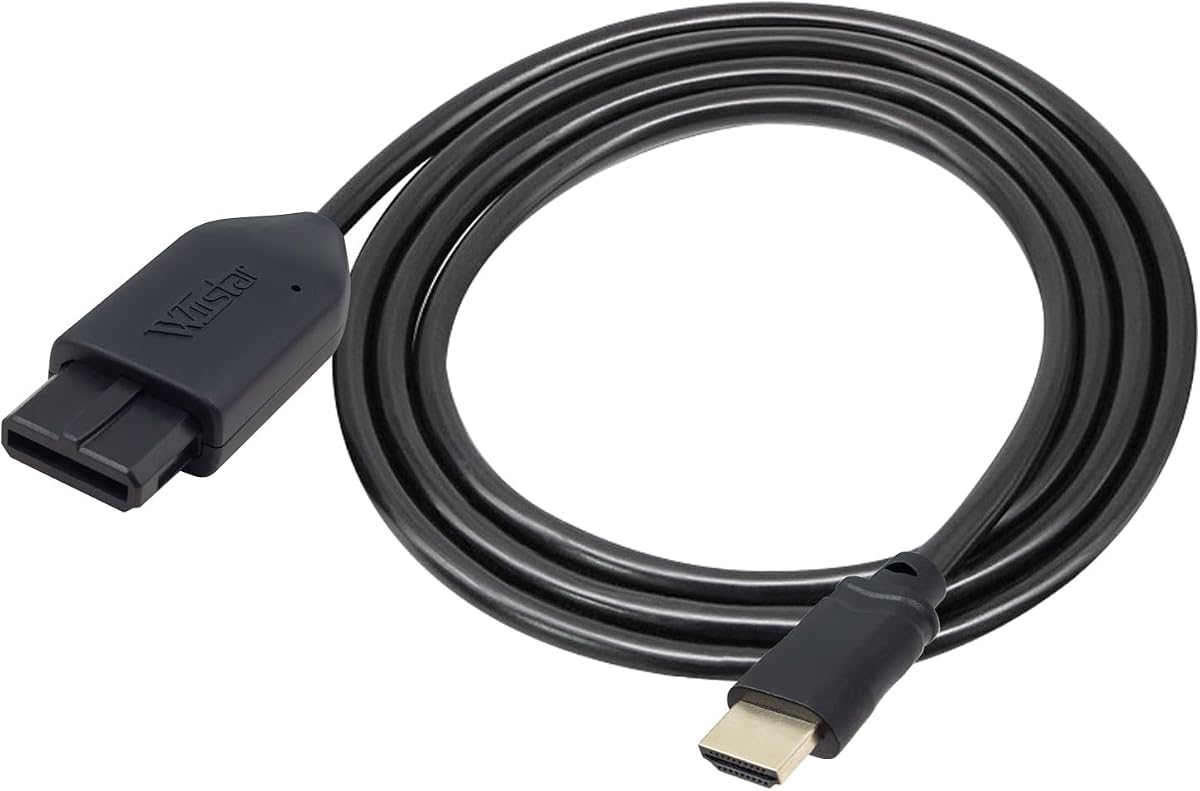


This three-in-one HDMI cable is the strongest all-around choice for players who want one adapter to cover several classic Nintendo consoles. It has a 4.4 rating and directly addresses the most common frustrations with analog Nintendo hardware: connecting to modern displays, selecting a suitable image shape, and keeping the connection simple. Its Multi-Out approach is designed for N64, GameCube, and SNES systems, while the detachable HDMI side gives the setup useful flexibility around a television cabinet or entertainment center.
We may earn a commission when you buy through this link, at no additional cost to you.
The main technical benefit is the use of the analog S-Video signal rather than relying on basic composite video. That signal path is converted to digital HDMI for a modern television, monitor, or projector. The product also includes a toggle for 4:3 and 16:9 output, allowing users to preserve a more traditional frame or fill more of a widescreen display. Its description specifically highlights low latency, which is especially valuable for action-oriented games where even a modest delay can affect input response.
There are some practical limitations to consider. Because this is a three-in-one solution with console-specific wiring, it is less flexible than a dedicated N64 adapter, and it cannot be attached to several systems at once. The detachable design is helpful, but you still need a suitable HDMI cable if the included length does not reach your display. The product information also does not promise a particular output resolution, so buyers should view it as a signal converter and upscaler rather than assume native high-definition output.
This converter is best for Nintendo collectors who own more than one supported system and want a single approach to HDMI connections. It is also a good fit for anyone who values aspect-ratio switching and low latency more than a permanently fixed cable. The 365-day replacement offer and stated customer-service support add further confidence. Overall, the combination of broad compatibility, useful controls, and straightforward operation makes it the most balanced option in this guide.
The shared Multi-Out design is the defining advantage for multi-console owners. N64, GameCube, and SNES users can share one conversion approach without buying separate adapters, although only one console can be connected at a time.
The physical 4:3 and 16:9 switch is more useful than leaving aspect ratio to the television. It lets players choose a period-correct shape or a fuller widescreen presentation while the converter is designed to keep added lag unnoticeable.
We may earn a commission when you buy through this link, at no additional cost to you.
This HDMI adapter is a practical choice for players seeking a straightforward digital connection for an N64, GameCube, or SNES. Its 4.2 rating reflects a generally solid product proposition, and the most attractive feature is the combination of broad console support, 720p and 1080p conversion, and an included HDMI cable. Unlike designs that demand a specific additional cable, it provides a more complete package for a first-time HDMI setup.
We may earn a commission when you buy through this link, at no additional cost to you.
The adapter is described as a plug-and-play solution for modern HD televisions. It converts the classic consoles’ analog video into digital HDMI output, with no visible screen lag stated in the product information. That makes it appealing for action games and multiplayer sessions in which predictable input response matters. The inclusion of 720p and 1080p output modes also gives the user some flexibility when matching the result to different television settings.
External power is the main trade-off. The product information clearly notes that a power supply is required, so buyers need to account for an additional cable and a nearby outlet or powered USB source. That requirement makes the arrangement less tidy than a self-powered direct adapter. The description also warns that a blue screen or missing sound can indicate an unsuccessful connection, emphasizing the importance of checking every cable and selecting the correct television input.
This adapter is a good recommendation for someone who wants one relatively complete solution across three Nintendo consoles and does not mind supplying external power. It may be especially suitable for living-room setups where stable power is nearby and an included HDMI cable simplifies the initial connection. For users seeking the fewest cables and a completely self-powered design, one of the direct Multi-Out alternatives is more convenient.
Support for 720p and 1080p provides practical output choices on contemporary televisions. The product is still converting an analog source, so these labels should be understood as converter output modes rather than native detail captured by the original console.
The included HDMI cable reduces the chance of an incomplete first setup. Adding the required power connection is still necessary, but buyers do not also need to source a basic display cable before they can begin.
We may earn a commission when you buy through this link, at no additional cost to you.
This N64 to HDMI converter combines an appealing compatibility list with a useful aspect-ratio switch. It is designed for Nintendo 64, NGC, SNES, and SFC consoles and converts analog RGB signals into digital HDMI for modern smart televisions, monitors, and projectors. Its 4.2 rating indicates a balanced option, while the support for both 16:9 and 4:3 gives it an advantage for displays with different image preferences.
We may earn a commission when you buy through this link, at no additional cost to you.
A particularly appealing claim is that the upgraded version does not require extra power. That keeps the installation simpler and reduces cable clutter, making this converter a natural fit for a retro gaming area where convenience matters. The product is also presented as a plug-and-play link, so there is no mention of software, driver installation, or complicated menu configuration. Connect the console and display, select the appropriate television input, and begin using the system.
The product information points to analog RGB as the input source, which is a promising foundation for a cleaner digital conversion. However, it does not name a specific output resolution, so buyers should check their display and console setup before expecting a particular format. The warning about blue screens and missing sound also suggests that correct input selection and secure connections are essential. A blue screen is described as a no-video-input indication rather than necessarily a defective unit.
This converter is recommended for owners who want broad classic Nintendo support, a selectable aspect ratio, and a self-powered installation. It is less suitable for someone who needs a stated native-resolution target or wants a product description that explicitly guarantees a particular upscaling mode. Even so, the combination of plug-and-play operation and no-extra-power construction makes it a strong candidate for a tidy, versatile retro display setup.
The stated RGB input path is a key reason to consider this adapter when image clarity matters. It translates the consoles’ analog RGB signal to HDMI for use with current smart TVs, monitors, and projectors.
Hardware support for 16:9 and 4:3 is convenient because it can be changed at the adapter. Players can compare the two presentations without navigating operating-system menus or relying on television-specific controls.
We may earn a commission when you buy through this link, at no additional cost to you.
This converter is built around a specific and technically understandable idea: extract S-Video from the Nintendo Multi-Out port and convert it to HDMI for a modern display. It supports N64, SNES, SFC, and GameCube systems and earns a 3.8 rating. That rating is lower than those of several alternatives, but the product’s clearly defined signal path and tidy installation explain why it remains worth considering for informed buyers.
We may earn a commission when you buy through this link, at no additional cost to you.
Its defining advantage is the use of S-Video rather than standard RCA composite. The Multi-Out port carries both, and this adapter selects the cleaner S-Video path. The result should be more defined than a composite connection, which is a meaningful improvement for classic Nintendo games displayed on a larger modern screen. The product information is also refreshingly precise about resolution: it outputs the original console resolution and does not upscale to HD, allowing buyers to understand exactly what they are receiving.
The converter includes a 1.5-meter HDMI cable with nickel-plated connectors and uses a detachable design, so a longer cable can be substituted if needed. No external power is required during normal use. A Micro-USB port is present only as optional backup power for rare instability or no-signal situations, and no Micro-USB cable is included because the console normally supplies adequate power through Multi-Out. That approach keeps normal operation simple without pretending the backup option never exists.
This is the best pick for buyers who prioritize the source signal, a direct Multi-Out connection, and a minimal normal-use setup. It is less attractive for someone who specifically wants advertised HD upscaling, because the lack of scaling may disappoint viewers expecting 1080p. The lower rating and detailed troubleshooting notes also warrant careful purchase review. Within its stated objective, however, it remains a focused and useful way to obtain a clean digital connection.
S-Video separates color information from luminance, while basic composite combines them into one lower-quality signal. Selecting S-Video from Multi-Out is therefore a meaningful step toward a clearer image on a modern display.
The adapter draws sufficient power from the console’s Multi-Out connection in ordinary setups. The Micro-USB port remains available as an optional backup rather than a requirement, and the included HDMI cable makes the standard connection complete.
We may earn a commission when you buy through this link, at no additional cost to you.
The All-in-One N64 HDMI Link is built for people who want the least complicated physical setup. It has a 4.0 rating and combines the console-specific connection and an HDMI male plug in a single 1.5-meter assembly. That means the adapter is already part of the cable rather than a small box sitting between the console and television, reducing both visual clutter and the number of pieces that can work loose.
We may earn a commission when you buy through this link, at no additional cost to you.
Product information identifies analog RGB as the input and describes the output as brighter and sharper with improved colors and resolution. It is compatible with Nintendo 64, GameCube, SNES, and SFC systems, making it broader than a strictly N64-only product. The upgraded design also works without a separate power supply, which preserves the convenience of the one-cable approach. A user can move the system close to the display, connect the assembly, select the proper HDMI input, and play.
The most important limitation is the output format. The product explicitly supports 1080p60 but does not support 720p60. That is not a major problem for many modern displays, yet it can matter for users who need a specific 720p mode, encounter compatibility limitations, or prefer the converter to match an older television. The fixed one-piece design also means the cable cannot easily be replaced if it is too short, damaged, or routed awkwardly around furniture.
This adapter is ideal for a compact N64 or multi-Nintendo setup where minimizing loose cables is the priority. It is less appropriate when you require a detachable HDMI lead or need 720p60 output. The 4.0 rating suggests a capable but specialized product, and its strongest value is the combination of integrated construction, broad console compatibility, and no-extra-power operation.
The built-in N64-side connector and HDMI male plug make this one of the tidiest choices in the guide. It avoids the separate converter box and loose coupling found in some competing designs.
The adapter is restricted to 1080p60 and expressly does not support 720p60. That limitation is easy to overlook but important if a particular television or projector requires a specific refresh-rate combination.
We may earn a commission when you buy through this link, at no additional cost to you.
This N64 HDMI Adapter offers a sensible middle ground between basic compatibility and a feature-rich converter. It has a 4.2 rating, supports N64, GameCube, and SNES systems, and includes an HDMI cable. The product is also designed for plug-and-play use without an additional power supply. For a player moving from standard analog cables to HDMI, those are the most immediately useful qualities.
We may earn a commission when you buy through this link, at no additional cost to you.
Its main display feature is 16:9 conversion, allowing classic material to fill more of a modern widescreen television. The description promises clear and smooth picture quality and no screen lag, although it does not quote a specific output resolution. That makes the product easier to set up but less transparent about exact technical output than adapters that explicitly identify 720p, 1080p, or native-resolution modes.
The installation should be straightforward, but the troubleshooting notes remind buyers that a blue screen or lack of audio can occur when the connection is not established correctly. Selecting the right television input and fully seating each connector are essential. The support policy described on the listing includes a 30-day return and refund option and a one-year replacement period, which offers some reassurance for a product whose specification summary is relatively brief.
This is a good recommendation for anyone who wants a simple, self-powered adapter with a cable included and compatibility across three classic Nintendo consoles. It is less differentiated for users who need both 4:3 and 16:9 choices, a detailed signal-path specification, or a guaranteed output refresh rate. Within those limits, the combination of ease of use, broad compatibility, and stated service support makes it a dependable general-purpose choice.
With an HDMI cable included and no additional power supply required, the adapter removes two common obstacles to moving a classic console onto a modern television.
The stated 16:9 conversion can reduce unused space on a modern display. It provides a simpler alternative to adapters with a physical aspect-ratio switch, although it gives users fewer shape options.
We may earn a commission when you buy through this link, at no additional cost to you.
This RCA to HDMI kit is the most complete package in the comparison, and its 5.0 rating makes it an appealing budget recommendation for shoppers who want the necessary cables and power accessories in one place. It supports Nintendo 64, SNES, GameCube, and SFC consoles through RCA composite video, then outputs 720p or 1080p at 60Hz over HDMI for an HD television or monitor.
We may earn a commission when you buy through this link, at no additional cost to you.
The package includes a six-foot N64 AV cable, a 4.9-foot HDMI cable, the AV-to-HDMI converter, a 5V 1A power adapter, and a longer USB cable. It also supports PAL and NTSC input standards, making it relevant to collectors with consoles or games from different regions. The included HDMI cable is described as supporting 4K at 60Hz and remaining backward compatible with HDMI 1.4 and 2.0, although the converter’s own stated output remains 720p or 1080p.
The central trade-off is that the converter accepts RCA composite rather than extracting S-Video or RGB from Multi-Out. Composite is the least detailed common analog video format, so this route may not deliver the same source clarity as a well-implemented S-Video or RGB adapter. A note also says the output shows the console’s native resolution, which sits awkwardly beside the listed 720p and 1080p modes. Buyers should therefore interpret the package as a convenient converter and focus on the supplied specification rather than expecting modern hardware to create missing source detail.
This kit is best for someone building a retro station from scratch, using an older television with RCA inputs, or wanting a package that can also connect to a modern HDMI display. It is less appropriate for purists chasing the cleanest possible Nintendo signal. Even with that caveat, the extensive bundle, regional format support, and 5.0 rating make it an excellent budget choice for convenient setup.
The converter, console AV cable, HDMI lead, wall adapter, and USB cable cover the main connections in one package. This is particularly helpful for buyers who do not want to assemble the necessary accessories individually.
PAL and NTSC compatibility broadens its appeal to international collections. Users should still verify their console region and selected television settings before beginning a game.
We may earn a commission when you buy through this link, at no additional cost to you.
The ZUZONG N64 HDMI Adapter is a strong choice when preserving the feel of classic games matters. It has a 4.4 rating and provides a physical switch for 4:3 and 16:9 output, giving players the ability to choose a traditional frame or a more expansive widescreen presentation. The product supports Nintendo 64, NGC, SNES, and SFC systems, covering the main classic Nintendo platforms that use a proprietary analog connection.
We may earn a commission when you buy through this link, at no additional cost to you.
Its plug-and-play design is straightforward. No drivers or additional software need to be installed, so the adapter can be used with a compatible television without creating a computer-like configuration process. The listing says the HD link cable supports only SNES, NGC, N64, and SFC, which is important because consumers should not interpret the product as a universal converter for every retro console. Staying within the documented compatibility list reduces the likelihood of a mismatched connection.
The product information does not specify an exact output resolution or describe the internal upscaling process in detail. That makes it less technically detailed than some competing adapters, but it does not diminish the value of the selectable aspect ratio. Buyers who value screen shape and simple operation over a precise refresh-rate specification will find the feature set easy to understand. The listing also states that the product passed rigorous testing before leaving the factory and provides contact information for damaged or unusable items.
This adapter is a good recommendation for players who want a period-correct 4:3 option as well as 16:9, particularly when using older Nintendo hardware on a modern display. It is not suited to someone seeking compatibility beyond the four listed Nintendo systems or a converter with a clearly stated output resolution. Its 4.4 rating, aspect-ratio flexibility, and driver-free setup place it comfortably among the stronger options in this guide.
The 4:3 setting is valuable for avoiding stretched or cropped images, while 16:9 can make the picture feel more integrated into a modern television. A hardware switch also makes the choice visible at a glance.
The product requires no drivers or software, which keeps the process focused on physical connections and television input selection. That simplicity is valuable in a living-room or game-room environment.
We may earn a commission when you buy through this link, at no additional cost to you.
The Kaico N64 HDMI Adapter is a clean, straightforward option for Nintendo 64, Super Nintendo, and GameCube owners. Its 4.2 rating and simple proposition center on connecting the proprietary analog ports of those systems to modern HDMI displays. The product supports both S-Video and composite output paths and does not need additional power to operate, reducing both setup time and cable complexity.
We may earn a commission when you buy through this link, at no additional cost to you.
Compatibility is handled through the consoles’ proprietary analog connection, allowing the same adapter to cover three major Nintendo systems. The listing also mentions Super Famicom compatibility in its all-in-one description. Because it is presented as a plug-and-play adapter, there is no need to install software, download drivers, or add another power supply. Players connect the appropriate console-side plug, attach the HDMI connection, select the matching television input, and use the console normally.
One detail not specified in the available product information is a physical 4:3 or 16:9 aspect-ratio switch. Some users may be able to choose the desired shape through television settings, but buyers who require a converter-level control should not assume it is present. Another minor consideration is that packaging may vary, which can be inconvenient for collectors who care about matching box art or accessories. The product’s 12-month support, repair, and replacement warranty is a more meaningful ownership benefit.
This Kaico adapter is best for someone who owns several compatible Nintendo consoles and wants one uncomplicated, self-powered solution. It is less attractive for buyers seeking detailed resolution specifications or confirmed aspect-ratio switching. The support for S-Video and composite is encouraging, and the stated warranty adds useful coverage. As a general-purpose converter, it balances convenience, compatibility, and ownership support effectively.
N64, SNES, and GameCube support makes the adapter useful to collectors who move between systems. The proprietary console-side connection is the unifying element, so separate display adapters are unnecessary.
The stated 12-month support, repair, and replacement warranty provides a clearer ownership commitment than several listings in the category. It does not change the need to match the correct input and connector.
We may earn a commission when you buy through this link, at no additional cost to you.
The Portable Three-in-One HD Link combines broad console support with the useful ability to switch between 4:3 and 16:9. It has a 4.4 rating and is designed for GameCube, N64, and SNES systems. The adapter takes their analog S-Video signals, converts and upscales them to digital HDMI, and sends the result to a modern HD television, monitor, or projector.
We may earn a commission when you buy through this link, at no additional cost to you.
Its detachable cable design gives users some freedom over the final installation. A longer or higher-quality HDMI cable can be used if the included arrangement does not reach the display, which is especially helpful when the console is on a shelf and the television is several feet away. The product information also states that it has no radio-frequency emission, a point that can matter in setups where unwanted interference or stray signals would be unwelcome.
The product highlights upscaled signal processing with improved colors, resolution, and detail, but it does not provide a precise output-resolution specification. It also describes latency as unnoticeable rather than giving a measured figure. These descriptions position the adapter as a convenient modern-display solution, but they should not be mistaken for laboratory measurements. In practice, buyers should compare the converter’s image and responsiveness with their own television and preferred game types.
This HD Link is a good recommendation for Nintendo collectors who want one compact adapter for three systems and appreciate the option to alternate between traditional and widescreen framing. It is less relevant to owners of SFC hardware or unusual retro systems because the listed compatibility is narrower. The one-year warranty and detachable arrangement make it a well-rounded final option, especially for users who value display-shape control.
The 4:3 and 16:9 toggle lets players evaluate both display styles without navigating complicated menus. It is a small feature with a large practical effect on how classic games occupy a widescreen panel.
A detachable HDMI side means the converter can remain near the console while the display cable reaches the television. That flexibility makes the unit easier to arrange around furniture and in compact retro-gaming spaces.
We may earn a commission when you buy through this link, at no additional cost to you.
The right converter depends on console compatibility, source signal quality, display capabilities, and how much setup complexity you accept. These factors help distinguish a direct Multi-Out adapter from a composite-based kit and clarify which features have the greatest effect on the final image.
Start by identifying every console you intend to connect and the output it actually provides. Nintendo 64, GameCube, SNES, and SFC use different proprietary console-side arrangements or compatible Multi-Out connections, while some products are explicitly limited to a smaller set. A converter cannot compensate for a connector it does not have. Read the supported-system list carefully, especially if you own SFC hardware, because products that mention SNES do not always include every regional variant.
RGB and S-Video generally provide a better starting point than RCA composite because they preserve more visual information. Several products in this guide extract S-Video from Multi-Out, while others accept the yellow, white, and red RCA connection. The best results normally come from using the highest-quality compatible source the converter supports. Do not assume that an advertised 1080p output creates high-definition detail that the original console and selected signal path never captured.
Output resolution and source resolution are different concepts. A converter may label its output as 720p or 1080p, output at the console’s native resolution, or upscale an analog picture. Some listings disclose all three aspects, while others leave the format unspecified. Check your television’s supported refresh rates as well as its resolution, especially for products that support only 1080p60 and not 720p60. The goal is a stable image that fits naturally on the display.
Classic Nintendo games were designed for 4:3 television presentations, but many current displays are widescreen. A converter with a 4:3 and 16:9 switch gives you immediate control and is useful for avoiding stretched images or excessive side borders. If the adapter has only one mode, the television may offer alternatives, though menus vary by brand. A physical switch remains the most convenient and consistent method for rapid comparison.
Some adapters draw enough power from the console’s Multi-Out port for normal operation, while others require a USB connection or included power adapter. Self-powered designs are usually cleaner and easier to move between a game room and television. Externally powered converters can still be perfectly suitable when an outlet is nearby, but you should account for the additional cable and the possibility of a more involved setup.
A complete kit can save time and prevent missing-part frustration, but it may include cables you do not need. Look for an HDMI lead of sufficient length, the correct proprietary console connector, and any required USB or power cable. A detachable HDMI design gives more routing flexibility than a permanently integrated lead. Conversely, an all-in-one cable is ideal when minimizing loose components is more important than future replacement options.
Most products in this category are advertised as plug-and-play and require no drivers. Still, you may need to select the proper HDMI input, choose a compatible aspect ratio, and adjust television game or overscan settings. Reading the troubleshooting notes can prevent a mistaken conclusion that a converter is faulty. Securely seat every connector and verify the selected input before changing settings or exchanging hardware.
Low latency is valuable for fast-paced games, although many product descriptions use qualitative terms rather than measured results. Gaming on a large television may also introduce more delay than a nearby monitor. If responsiveness is a priority, compare the converter in menus and action games and use the lowest available television processing options. The supplied data does not provide independent latency measurements, so realistic user feedback remains valuable.
Begin with the console and display switched off or idle. Connect the converter using the appropriate Nintendo console-side plug or supported RCA cable, then attach the HDMI lead to the television, monitor, or projector. If the model requires external power, connect its USB cable or power adapter before selecting the matching HDMI input. Once the picture appears, use the converter’s aspect-ratio switch or television settings to choose the preferred shape.
For the best match, change the television’s picture mode to a game-oriented or standard setting and avoid unnecessary image effects. Some displays provide scaling, sharpening, overscan, or lag-reduction controls that can improve or impair the analog-derived picture. Test both 4:3 and 16:9 modes with a familiar game. If there is no signal, confirm the selected input, reseat the HDMI cable, and verify that the converter is fully connected to the console.
Handle the converter and proprietary console plug by their housings rather than pulling them from the cable. Keep the connection away from moisture, direct heat, and excessive bending, and do not move the console while the adapter is under strain. When the system is not in use, unplug the converter if the manufacturer’s instructions recommend it. Periodically inspect the cable ends and clean them gently with a dry, soft material.
Yes, if the converter includes the appropriate proprietary connector for both consoles. Many three-in-one products support N64, GameCube, and SNES through compatible Multi-Out arrangements. Check the compatibility list carefully, because some adapters are limited to one console or to a specific set of regional hardware.
Audio support varies by model. Some listings mention missing sound as a connection troubleshooting issue, while others provide RCA audio inputs or a separate way to carry sound to the display or speaker system. Review the product details and planned speaker setup before purchasing rather than assuming every converter handles audio.
Yes. S-Video separates color and brightness information, while composite combines them into a lower-detail signal. An adapter that extracts S-Video from Multi-Out generally has a better source path than one relying on the yellow RCA composite connector, although converter processing and display settings also influence the final image.
No. Several products draw power from the console’s Multi-Out port and work without an external supply during normal use. Others require USB power, so confirm the listing before installation. A converter that includes a Micro-USB backup port may still work normally without that cable attached.
The N64 originally targeted 4:3 televisions, so that setting can preserve the intended proportions and prevent stretched characters or images. A 16:9 mode can fill more of a modern screen, but its best appearance depends on the converter, television, and personal preference. A physical aspect-ratio switch makes comparison easy.
Not in the same way a native high-definition source would. A converter can improve clarity and upscale the analog image, but it cannot restore detail that the original console and selected signal path never contained. The product’s source signal, processing, output mode, television settings, and screen size all influence the result.
First make sure the television is set to the HDMI input connected to the converter. Reseat the console-side and HDMI connectors, confirm that the console is powered on, and verify any required USB power connection. Product documentation often describes a blue screen as a no-video-input condition, so input selection should be checked before the unit is considered faulty.
Yes, provided the display has a compatible HDMI input and supports the converter’s output resolution and refresh rate. Projectors and monitors may offer different scaling or image controls than televisions, so buyers should check those specifications and use the converter’s 4:3 or 16:9 mode to obtain the preferred shape.
The three-in-one HDMI cable is the best overall pick because it combines N64, GameCube, and SNES support with S-Video conversion, selectable aspect ratios, low-lag operation, and a detachable HDMI connection. The complete RCA adapter kit stands out as the best budget option, while the dedicated S-Video-to-HDMI converter is a focused choice for buyers who prioritize a clean source signal and no external power during normal use.
When choosing among the remaining products, prioritize the signal path and supported output modes. RGB and S-Video are preferable to composite, but every converter still has limitations involving resolution, aspect ratio, audio, and refresh rate. Also consider cable routing, included accessories, and whether the console’s Multi-Out port can supply enough power for a self-contained installation.
Ratings, product listings, and current prices can change, so check the latest listing details before buying. Confirm console compatibility, output specifications, power requirements, and what is included in the box, then select the converter that best matches your display and playing habits rather than relying on resolution labels alone.