
ASUS ProArt Z890-CREATOR WIFI
4.4Editor score
Dual Thunderbolt 5 ports
Thunderbolt 4 connectivity
Five M.2 storage slots
Discover the best motherboards with Thunderbolt, comparing bandwidth, processor support, storage, networking, expansion, and everyday performance.
Motherboards with Thunderbolt combine a high-speed USB-C interface with a broad range of connectivity, storage, networking, and expansion options. A good board should fit your processor and case while providing the Thunderbolt implementation, display support, and PCIe configuration required by your devices.
This guide compares ten Thunderbolt-equipped options across Intel LGA 1700, Intel LGA 1851, and AMD AM5 platforms, plus one expansion card for compatible Intel systems. We considered socket support, power stages, memory, M.2 storage, networking, cooling, USB Type-C, and the availability of rear ports or headers.
Each selection highlights a distinct use case, from a feature-rich creator motherboard to a compact Mini-ITX option and an upgrade card. Ratings reflect the supplied customer feedback, while specifications can vary by CPU, memory kit, firmware, and configuration, and marketplace listings may change over time.
4.4Editor score
4.5Editor score

4.5Editor score
The comparison below covers platform, processor generation, Thunderbolt implementation, storage expansion, and network features. It also distinguishes between native rear Thunderbolt ports and boards that provide a Thunderbolt or USB4 header for an add-in card.


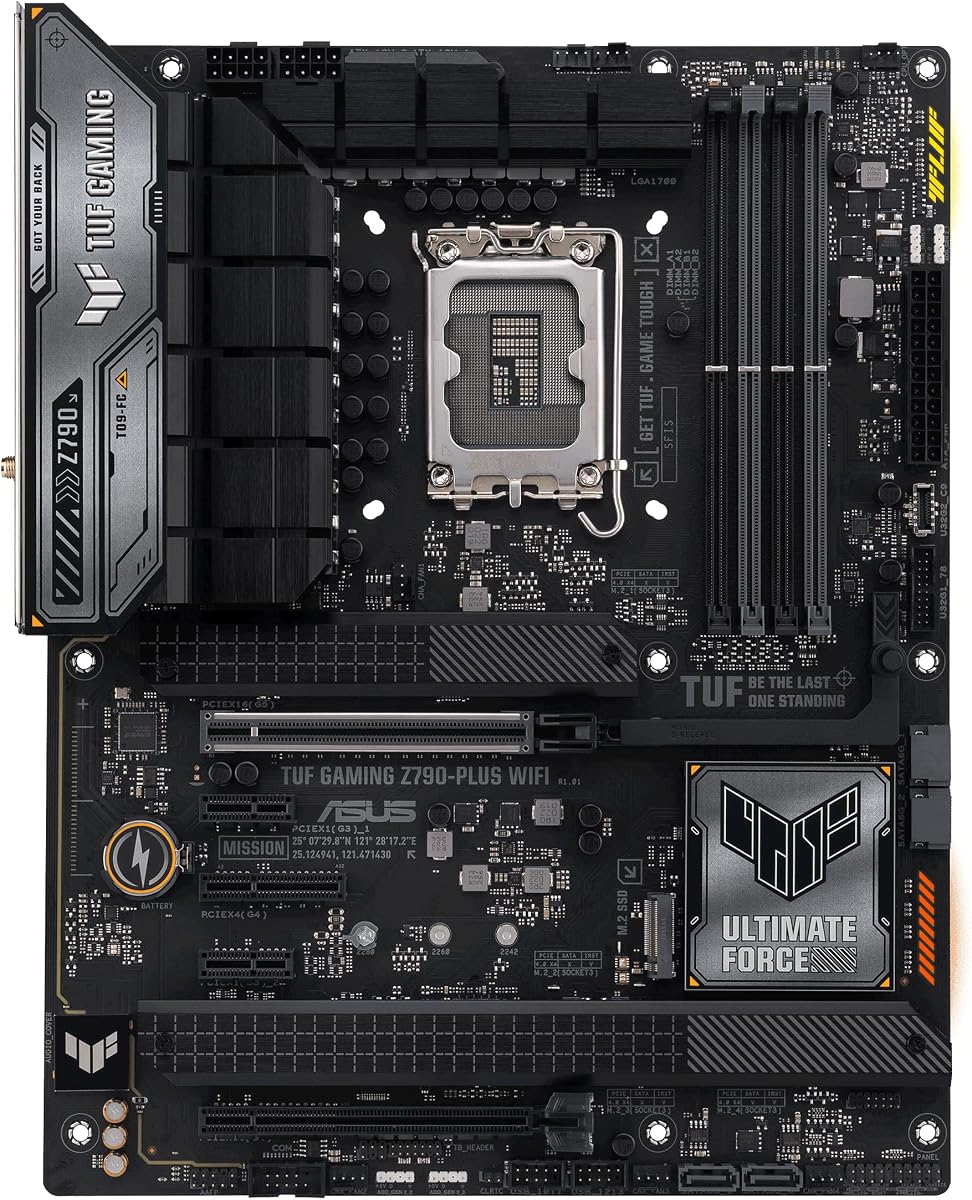
The ASUS TUF Gaming Z790-Plus WiFi is a well-rounded ATX motherboard for builders who want a mature LGA 1700 platform with flexible high-speed connectivity. Its supplied rating is 4.5, and the specification mix combines a 16+1 DrMOS power system, four M.2 slots, PCIe 5.0 support, DDR5 memory, WiFi 6, 2.5Gb LAN, and a front USB Type-C header. The headline Thunderbolt feature is a Thunderbolt 4 USB4 header rather than a clearly identified rear Thunderbolt socket.
We may earn a commission when you buy through this link, at no additional cost to you.
Its main strength is the balance between gaming hardware and practical expansion. The board supports 12th, 13th, and 14th generation Intel Core processors, while four M.2 positions provide room for multiple NVMe drives. VRM, chipset, and M.2 heatsinks are paired with hybrid fan headers and Fan Xpert 4, giving system builders a reasonably comprehensive cooling foundation. For network performance, Intel WiFi 6 and an Intel I225-V 2.5Gb LAN controller are both useful for a modern desktop.
The important qualification concerns Thunderbolt. Because the supplied specifications identify a Thunderbolt 4 USB4 header, buyers should expect to install a compatible Thunderbolt expansion card and route its cable to the internal header. This is not necessarily a drawback: it can provide a tidier result in cases with limited rear space, but it also makes case planning and accessory compatibility more important than it would be with a native rear port. The front USB 3.2 Gen 2 Type-C header adds another convenient connection point.
This motherboard is best suited to a gaming or performance build that already uses LGA 1700 and wants strong storage, networking, and power delivery without moving to the newest socket. It is also a sensible choice for creators who need a Thunderbolt header but prefer to select their own add-in card. For buyers who want the simplest possible rear-panel connection, however, a board with a built-in Thunderbolt port may be more convenient.
The internal Thunderbolt 4 USB4 header allows the builder to choose when and how the high-speed interface is exposed. Compatible add-in cards can also provide additional rear USB-C ports, although the correct card and internal cable must be selected for the motherboard.
Four M.2 slots, PCIe 5.0 support, and a 16+1 DrMOS power design make this board well suited to a system combining a powerful graphics card with several fast NVMe drives.
We may earn a commission when you buy through this link, at no additional cost to you.
The ASUS ROG Strix Z890-E Gaming WiFi is an elaborate LGA 1851 motherboard aimed at enthusiasts who want extensive storage and premium platform features. It carries a supplied rating of 4.4. The title identifies Thunderbolt 4 support, seven M.2 slots, WiFi 7, DDR5 memory, USB Type-C, and AI-oriented motherboard utilities, making it one of the most expansive options in this comparison.
We may earn a commission when you buy through this link, at no additional cost to you.
Its power system is the defining specification for high-end CPUs and sustained workloads. The board uses 18+2+1+2 stages, ProCool II connectors, MicroFine alloy chokes, and premium metallic capacitors. ASUS also provides DIMM Fit, DIMM Flex, and AEMP III memory technologies, while NPU Boost, AI Advisor, AI Overclocking, AI Cooling II, and AI Networking II support system configuration. These features are especially relevant to the board's stated focus on advanced AI PCs and demanding applications.
Seven M.2 positions provide more internal storage flexibility than almost every motherboard here, while the LGA 1851 socket supports Intel Core Ultra Series 2 processors. That combination makes the board attractive to enthusiasts assembling a modern workstation or high-end gaming system with numerous NVMe drives. The downside is obvious: this level of hardware is excessive for a basic office PC, and buyers should be certain that their CPU, cooling system, case, and expansion demands justify the platform.
For a builder seeking more storage and refinement than a mainstream board can offer, this ROG model is a compelling match. Its supplied rating of 4.4 reflects a strong customer response, while the specification set gives experienced users plenty of room to expand. Those wanting a more restrained board should compare it with the similarly modern ASUS TUF Gaming Z890-PLUS WiFi.
The unusually large M.2 count supports demanding storage configurations, from a multi-drive game library to separate high-speed drives for projects, scratch disks, and an operating system.
NPU Boost, AI Advisor, AI Overclocking, AI Cooling II, and AI Networking II form a broader software and tuning layer designed to simplify configuration for supported Intel Core Ultra Series 2 systems.
We may earn a commission when you buy through this link, at no additional cost to you.
The ASUS ProArt Z890-CREATOR WIFI stands out as the premium connectivity choice in this guide. Its supplied rating is 4.4, and it combines dual Thunderbolt 5 Type-C ports with a Thunderbolt 4 port, 10Gb and 2.5Gb Ethernet, WiFi 7, and five M.2 slots. For content creators, photographers, video professionals, and developers who regularly move data between high-speed peripherals, the native port selection is especially attractive.
We may earn a commission when you buy through this link, at no additional cost to you.
The motherboard supports Intel Core Ultra Series 2 processors on LGA 1851 and uses a 16+2+1+2 teamed power-stage design. ProCool II connectors, high-quality alloy chokes, and durable capacitors support stable power delivery. Storage and expansion are similarly serious: two PCIe 5.0 slots are listed with full next-generation GPU support, along with one additional PCIe 5.0 slot, four PCIe 4.0 M.2 positions, and a USB 20Gbps front-panel header.
Its creator-oriented features extend beyond the hardware. ProArt Creator Hub includes color-management functions designed to work with Pantone utilities, while ASUS Control Center Express offers USB port management, software blacklisting, and Registry Editor controls. DIY conveniences include PCIe Slot Q-Release Slim, SafeSlot, M.2 Q-Release, M.2 Q-Slide, M.2 Q-Latch, Q-Antenna, BIOS FlashBack, and Q-Connector, reducing the practical friction of assembling the board.
This is the most complete choice for a buyer who specifically wants Thunderbolt 5 rather than merely the presence of a Thunderbolt label. It also makes sense for creators who value 10Gb networking and extensive storage. The trade-off is platform cost and complexity, but for a premium workstation or a carefully planned enthusiast system, the ProArt's connectivity and workflow features are difficult to overlook.
Native dual Thunderbolt 5 Type-C connections provide a high-bandwidth route for compatible displays, storage, and creative peripherals. The additional Thunderbolt 4 port expands options for equipment that has not yet moved to the newest interface.
The combination of 10Gb and 2.5Gb Ethernet, WiFi 7, five M.2 slots, and USB front-panel support is particularly useful for creators moving large media libraries and working with several fast storage devices.
We may earn a commission when you buy through this link, at no additional cost to you.
The ASUS TUF Gaming B760-PLUS WIFI is the value-focused recommendation for a gaming system that needs a Thunderbolt 4 header without moving to a more elaborate motherboard. It has a supplied rating of 4.5, matching the ASUS TUF Z790-Plus WiFi for the highest listed score in the group. Supporting 12th and 13th generation Intel Core processors, it also pairs that platform with DDR5, PCIe 5.0, and three M.2 positions.
We may earn a commission when you buy through this link, at no additional cost to you.
Its 12+1+1 DrMOS power stages, six-layer PCB, 8+4 ProCool sockets, alloy chokes, and durable capacitors provide a sound foundation for mainstream gaming and productivity configurations. Cooling includes enlarged VRM heatsinks, M.2 heatsinks, a chipset heatsink, hybrid fan headers, and Fan Xpert 4. Connectivity includes Intel WiFi 6, Realtek 2.5Gb Ethernet, TUF LANGuard, rear USB 3.2 Gen 2×2 Type-C, a front Type-C header, and Thunderbolt 4 USB4 header support.
The board's two-way AI Noise-Cancelation feature can reduce background noise from microphone and audio output, making it relevant to streaming, remote meetings, and everyday online communication. As with the higher-tier TUF Z790 model, however, Thunderbolt 4 is provided through a header. Buyers need a compatible expansion card and the appropriate internal connection, and must confirm that the chosen card fits the case and aligns with the planned layout.
The B760-PLUS WIFI is best for builders who want a familiar LGA 1700 platform, modern gaming connectivity, and room for three NVMe drives. It also represents a more restrained alternative to the Z790 boards in this guide, with fewer power stages and less expansion. For users seeking native rear Thunderbolt, the MSI MAG Z890 Tomahawk WiFi II and several LGA 1851 boards are simpler choices.
The board combines a PCIe 5.0 slot, three PCIe 4.0 M.2 positions, DDR5 support, and 2.5Gb Ethernet with a moderate 12+1+1 power design, making it appropriate for mainstream gaming and productivity builds.
Thunderbolt 4 header support offers flexibility, but the final connection depends on a compatible add-in card. Checking the card, internal cable, and case clearance before purchasing avoids surprises.
We may earn a commission when you buy through this link, at no additional cost to you.
The ASUS Z790-AYW WiFi W II is a conventional ATX LGA 1700 board with a 4.3 supplied rating. It supports Intel Core processors from the 12th, 13th, and 14th generations, along with Pentium Gold and Celeron processors. Its headline feature is Thunderbolt and USB4 header support, while the broader connectivity package includes WiFi 6, 2.5Gb LAN, HDMI, PCIe 5.0, DDR5, and several 10Gbps Type-C connections.
We may earn a commission when you buy through this link, at no additional cost to you.
Storage consists of three PCIe 4.0 M.2 slots rather than a larger array. The power design uses 12+1 DrMOS stages, a six-layer PCB, ProCool connectors, alloy chokes, and durable capacitors. Cooling provisions include large VRM heatsinks, M.2 heatsinks, a chipset heatsink, hybrid fan headers, and Fan Xpert 4 with AI Cooling II. This creates a versatile foundation for a gaming PC, a general-purpose workstation, or a compact productivity system inside a larger ATX case.
One of the more notable details is the emphasis on USB Type-C. The specifications identify rear 10Gbps Type-C and Type-A ports, a front 10Gbps Type-C header, and Thunderbolt or USB4 header support. That makes the board useful for users who want modern peripheral connections even if they do not immediately add Thunderbolt hardware. The header also allows a builder to delay the add-in-card decision or choose a card that matches their case and port requirements.
The board is best recommended to LGA 1700 owners who value broad CPU support and flexible Type-C connectivity. Its lower supplied rating than the two higher-rated TUF options does not erase the strong feature set, but potential buyers should assess the exact role of the board in their build. If two or more NVMe drives and one rear Thunderbolt port are enough, it remains a practical choice.
Rear and front 10Gbps Type-C connections, together with Thunderbolt and USB4 header support, make the board adaptable to current USB accessories and future high-speed peripherals.
Support for 12th through 14th generation Intel Core processors gives builders several CPU options on LGA 1700, including compatible Pentium Gold and Celeron models.
We may earn a commission when you buy through this link, at no additional cost to you.
The MSI MAG Z890 Tomahawk WiFi II is notable for providing a rear Thunderbolt 4 Type-C port with display output. That native connection makes it easier to use than the header-equipped ASUS models in this guide. It supports Intel Core Ultra Series 2 processors on LGA 1851 and has a supplied rating of 4.1. The board also includes 5Gb LAN, WiFi 7, Bluetooth 5.4, and four M.2 positions.
We may earn a commission when you buy through this link, at no additional cost to you.
Its expansion layout includes one PCIe 5.0 x16 graphics slot with Steel Armor II, one M.2 Gen5 x4 slot operating at 128Gbps, and three M.2 Gen4 x4 slots operating at 64Gbps. The four-DIMM DDR5 configuration supports memory overclocking up to the supplied 9200+ MT/s OC specification when paired with suitable memory and platform conditions. A 16-stage Duet Rail Power System and MSI Core Boost technology form the power foundation.
Cooling is a major strength. The board includes 7W/mK MOSFET thermal pads, extra choke thermal pads, an extended heatsink, a chipset heatsink, double-sided EZ M.2 Shield Frozr II, and a combo fan header rated for 3A. A pump and system fan can therefore be managed through the same header, reducing cable clutter in builds that use liquid cooling.
The MAG Tomahawk is a good match for a modern LGA 1851 gaming system that needs native Thunderbolt 4 and several fast drives. Its one listed PCIe 5.0 x16 slot simplifies the intended graphics-card configuration, though it offers less graphical expansion than some competing boards. Buyers should also consider that its 4.1 supplied rating is the lowest among the motherboards listed, even though the core specification set is strong.
The rear Thunderbolt 4 Type-C port includes display output, simplifying direct connections to compatible displays and reducing reliance on separate graphics outputs for some tasks.
One M.2 Gen5 x4 and three M.2 Gen4 x4 slots allow a mix of the newest high-bandwidth drive with established PCIe 4.0 storage.
We may earn a commission when you buy through this link, at no additional cost to you.
The ASUS TUF Gaming Z890-PLUS WiFi is a more restrained LGA 1851 option with a supplied rating of 4.2. It supports Intel Core Ultra Series 2 processors and provides a native Thunderbolt 4 Type-C connection, making it a straightforward option for users who want a rear high-speed port without adding an expansion card. DDR5, PCIe 5.0, four M.2 slots, WiFi 7, and 2.5Gb networking round out its broad feature set.
We may earn a commission when you buy through this link, at no additional cost to you.
Power comes from 16+1+2+1 80A DrMOS stages, ProCool connectors, an eight-layer PCB, alloy chokes, and durable capacitors. This is a robust arrangement for the latest platform, although it is less elaborate than the 18+2+1+2 configuration in the ROG Strix Z890-E. Thermal support includes large VRM heatsinks, M.2 and chipset heatsinks, hybrid fan headers, and Fan Xpert 4 with AI Cooling II.
The board's AI features are more limited than those of the ROG model. AI Cooling II and AI Networking II remain useful parts of the platform, but the broader collection of AI Advisor, NPU Boost, AI Overclocking, and other advanced tools is not emphasized in the supplied specifications. That makes this a sensible middle ground for users who prioritize the newer socket, native Thunderbolt, and conventional TUF styling rather than extensive enthusiast utilities.
Among the LGA 1851 choices, this board is especially useful for a builder comparing ASUS's ROG, ProArt, and TUF tiers. It provides the same current socket generation and a rear Thunderbolt 4 port while avoiding the most specialized creator or gaming feature bundles. The lower supplied rating should be considered alongside those strengths rather than treated as a complete measure of the board's capabilities.
LGA 1851 support, DDR5, PCIe 5.0, and native Thunderbolt 4 deliver a modern foundation without requiring the specialized Pantone workflow and extensive creator utilities found on the ProArt model.
The 16+1+2+1 80A stages, eight-layer PCB, large VRM heatsink, and dedicated M.2 and chipset cooling provide a modern platform for mainstream and enthusiast Intel Core Ultra systems.
We may earn a commission when you buy through this link, at no additional cost to you.
The ASUS TUF Gaming B850-PLUS WiFi is the only AMD AM5 motherboard in the group, giving it an important role for builders committed to Ryzen 7000, 8000, or 9000 series desktop processors. Its supplied rating is 4.4. The board combines a 14+2+1 80A DrMOS power design, DDR5, PCIe 5.0, three M.2 positions, WiFi 7, and Realtek 2.5Gb Ethernet with Thunderbolt USB4 header support.
We may earn a commission when you buy through this link, at no additional cost to you.
Its storage configuration includes one onboard PCIe 5.0 M.2 slot and two PCIe 4.0 M.2 slots, with heatsinks supplied for the M.2 positions. A PCIe 5.0 x16 slot supports a modern graphics card, while DisplayPort and HDMI provide integrated display outputs. USB connectivity includes a rear 20Gbps Type-C port and a front 10Gbps Type-C connector, giving USB-focused builders a good foundation even before Thunderbolt is added.
Thunderbolt support takes the form of a USB4 header rather than a listed rear Thunderbolt Type-C port. Buyers will therefore need to add a compatible expansion card and route the appropriate connection. This is the decisive practical limitation, especially for creators who want a convenient rear port. In return, the platform preserves AMD AM5 processor support and delivers modern wireless, wired, and USB networking.
The board is recommended for an AMD-based build that needs one additional high-speed interface and values the TUF feature set. Its 14+2+1 power stages, eight-layer PCB, 8+8 ProCool connectors, and complete M.2 heatsinking are appropriate for a modern Ryzen system. Buyers who require native Thunderbolt should choose a board with a built-in port; everyone else should confirm the expansion-card and case-cable plan before committing.
The USB4 header gives AM5 builders a route to Thunderbolt expansion. Compatibility depends on selecting the right add-in card, internal cable, and any required controller support.
One PCIe 5.0 M.2 slot and two PCIe 4.0 slots provide a flexible mix for a high-speed system drive, project storage, and additional NVMe media.
We may earn a commission when you buy through this link, at no additional cost to you.
The ASRock Phantom Gaming B860I Lightning WiFi 6E is the compact motherboard option, using the Mini ITX form factor for builders with a smaller case. Its supplied rating is 3.7, the lowest among the nine motherboards in this guide. Even so, the core specification offers a native rear Thunderbolt 4 Type-C port, Intel Core Ultra Series 2 support, and a PCIe 5.0 x16 slot in a compact ATX-class platform.
We may earn a commission when you buy through this link, at no additional cost to you.
The board includes a 10+1+1+1+1 power phase with a 110A SPS for VCore, GT, and SA. Two DDR5 DIMM slots support dual-channel memory up to 9333+ MT/s in overclocked configurations, with a stated maximum capacity of 128GB. Storage consists of one Blazing M.2 position using PCIe Gen5 x4 and one Hyper M.2 position using PCIe Gen4 x4. There are also three SATA3 connectors for conventional drives.
The rear includes HDMI, a Thunderbolt 4 Type-C port, and Realtek ALC1220 7.1-channel HD audio with Nahimic Audio. Networking uses Realtek 2.5Gb LAN and 802.11ax WiFi 6E with Bluetooth. Front connectivity includes a USB 3.2 Gen 2 Type-C header, two USB 3.2 Gen 2 Type-A ports, and two USB 2.0 ports. BIOS Flashback and Memory OC Shield are also listed.
This motherboard is best for a compact LGA 1851 system that prioritizes a rear Thunderbolt 4 port, modern networking, and a small footprint. Its limitations are the two-DIMM arrangement, two M.2 slots, and smaller supplied rating. The listing also warns that it is not compatible with every built-in computer or system, so chassis and system integration should be confirmed carefully before purchase.
A native rear Thunderbolt 4 Type-C port is unusual in this compact form factor and can simplify connections to compatible displays, docks, and storage in a small enclosure.
Mini ITX space limits expansion, and this board provides only two M.2 positions and two memory DIMMs. Builders should plan storage and memory capacity before choosing the system layout.
We may earn a commission when you buy through this link, at no additional cost to you.
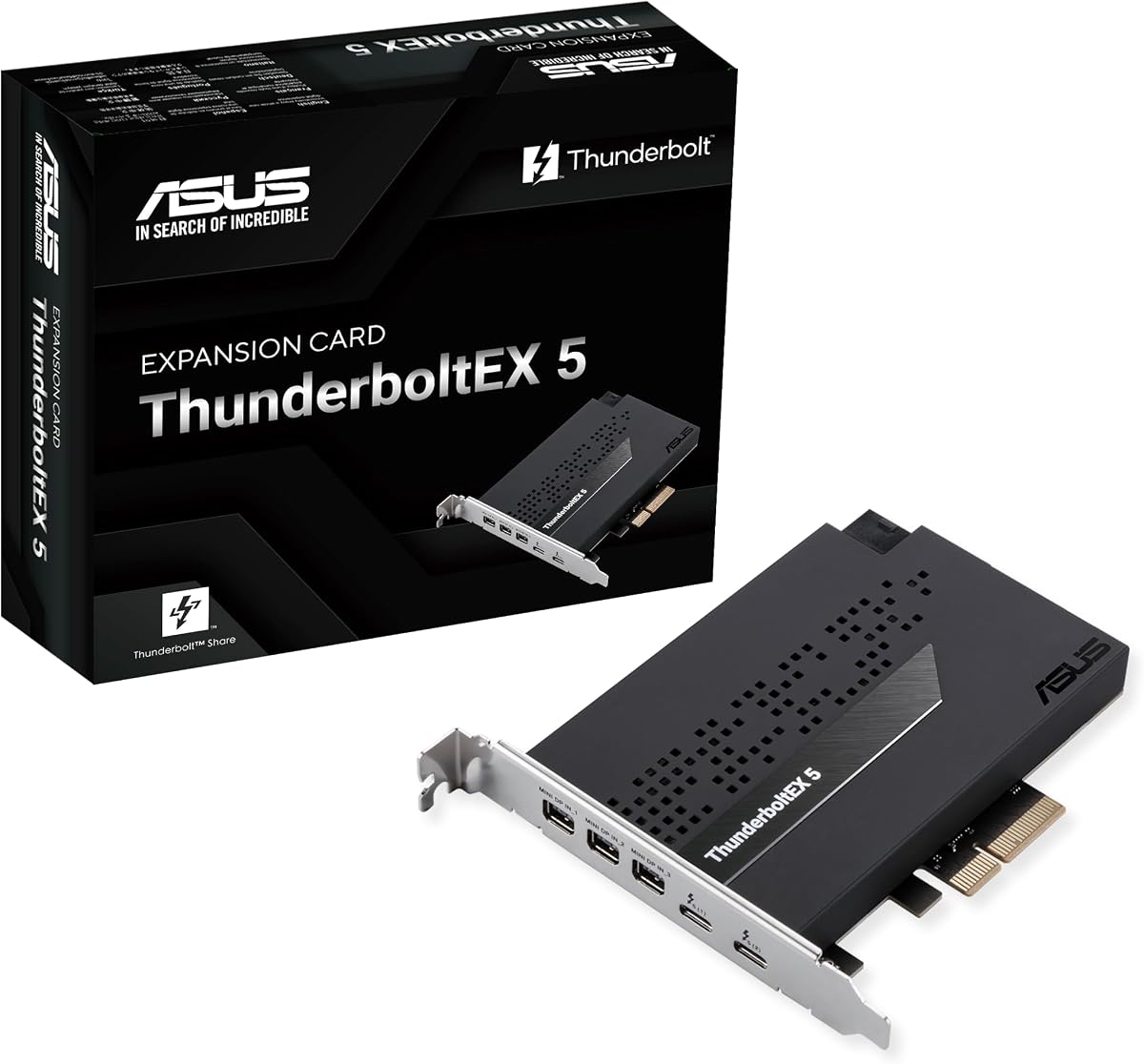
The ASUS ThunderboltEX 5 is not a motherboard, but it is relevant to anyone searching for Thunderbolt 5 on an existing compatible Intel 800 series platform. Its supplied rating is 3.2. The card provides dual Thunderbolt 5 USB-C ports, DisplayPort 2.1 output, a PCIe 4.0 x4 interface, and up to 120Gbps of bandwidth for compatible data transfers and video output.
We may earn a commission when you buy through this link, at no additional cost to you.
The card's two USB-C ports support up to 130 watts of combined fast charging, with up to 96W available for one device. Up to five Thunderbolt devices can be daisy-chained according to the supplied specifications. DisplayPort 2.1 can support up to three 8K 60Hz displays with DSC, making the card interesting for specialized multi-display and high-bandwidth workflows.
Its main benefit is compatibility with an existing system rather than requiring a complete motherboard replacement. A compatible Intel 800 series motherboard must provide the necessary header, cable, BIOS support, and available PCIe slot. The card also occupies physical expansion space, and using it in a compact case may require careful clearance planning. It should therefore be treated as an upgrade component rather than a conventional motherboard recommendation.
This is the right choice for a compatible enthusiast who specifically needs Thunderbolt 5 but does not want to replace a capable motherboard. It is less suitable for a new build because motherboard vendors may offer more integrated choices, and compatibility details are easy to overlook. Before ordering, verify the motherboard's support list, the required internal cable, physical dimensions, and whether a rear slot position is available.
The stated 120Gbps bandwidth, DisplayPort 2.1, and dual USB-C interfaces support demanding compatible displays and storage while also providing substantial charging capability.
The card is designed for compatible Intel 800 series motherboards. Confirming the required header, internal cable, PCIe availability, physical fit, and firmware support is essential.
We may earn a commission when you buy through this link, at no additional cost to you.
Selecting a motherboard with Thunderbolt requires matching the interface to your peripherals, ensuring processor and case compatibility, and balancing expansion, networking, and storage. The most important distinction is whether you need a native rear port or can use an internal header with a compatible add-in card.
A native rear Thunderbolt port is the simplest option because the connection is available immediately after installation. It is particularly attractive for laptops, compact systems, and displays connected directly through USB-C. An internal Thunderbolt or USB4 header offers a different kind of flexibility: the builder chooses the add-in card, determines which ports appear at the rear, and can sometimes place them more conveniently for a particular case. The trade-off is that the motherboard and expansion card must be compatible, and an internal cable must connect them.
Choose a native port when convenience, cable routing, and a clean rear-panel layout matter most. Choose a header when you want control over the add-in card, are comfortable confirming compatibility, or already own a suitable card. Do not treat the words Thunderbolt and USB4 as interchangeable without checking the board documentation and accessory requirements.
Thunderbolt 4 and Thunderbolt 5 serve different segments, and the highest generation is not automatically required for every user. Thunderbolt 4 is widely suited to high-speed storage, docks, networking, and display workflows. Thunderbolt 5 adds greater bandwidth and is especially relevant to advanced storage arrays, demanding displays, and other compatible high-throughput devices. The actual transfer rate also depends on connected equipment, the cable, host support, and whether data is shared across multiple devices.
Match the generation to your peripherals. A Thunderbolt 4 device works on a Thunderbolt 5 host, but it will continue to operate within its own capabilities. If your equipment is limited to conventional USB-C accessories, a high-speed header may still be useful for future upgrades, but native port selection should be based on actual device requirements rather than the newest number alone.
Every motherboard in this guide supports a specific Intel or AMD platform. The LGA 1700 models work with compatible 12th, 13th, and 14th generation Intel processors, while several LGA 1851 options support Intel Core Ultra Series 2. The AMD TUF B850-PLUS WiFi uses AM5 and supports compatible Ryzen 7000, 8000, and 9000 series processors. Socket choice determines the CPU, firmware, memory support, and potential upgrade path.
Check the CPU support list, supported memory generations, and desired memory capacity before buying. Compact Mini ITX boards often have only two DIMM slots, while full ATX boards provide more. High advertised memory speeds are overclocked figures that depend on the CPU, memory kit, BIOS, and system configuration.
Thunderbolt is only one part of a complete expansion plan. Multi-graphics-card workstations may need multiple physical x16 slots, while creators and high-end gamers often want several M.2 drives for operating systems, games, caches, and project media. The boards here range from two M.2 slots on the Mini ITX ASRock model to seven on the ROG Strix Z890-E. PCIe 5.0 support can accommodate the newest graphics cards and high-bandwidth SSDs, while PCIe 4.0 remains useful for additional drives.
Count not only drive positions but also M.2 heatsinks, lane sharing, case mounting points, and the number of physical expansion slots available. If you plan to add a Thunderbolt card, reserve a PCIe slot as well. A balanced system should support the intended GPU, storage, capture cards, and accessories without obstructing large coolers or airflow.
Power stages, PCB layers, connectors, chokes, and capacitors work together to support the CPU and attached equipment. The listed boards range from 12+1+1 designs to the ROG Strix Z890-E's 18+2+1+2 arrangement. More stages are not automatically required for every processor, but they become more relevant with high-power CPUs, sustained creator workloads, overclocking, and demanding graphics hardware.
Cooling must cover the VRM, chipset, and M.2 drives as well as the processor. Look for substantial heatsinks, thermal pads, M.2 shielding, and controllable fan headers. MSI's combo fan header, ASUS Fan Xpert 4, and AI Cooling II features can help simplify tuning, but the case's airflow and the CPU cooler remain equally important. Always use the CPU and memory specifications supported by the motherboard.
Modern motherboards combine several network paths. WiFi 6 or WiFi 7 provides convenient wireless access, while 2.5Gb Ethernet is useful for everyday local transfers. The ProArt board goes further with 10Gb and 2.5Gb Ethernet, and the MSI MAG Z890 Tomahawk WiFi II includes 5Gb LAN. These speeds can matter when moving large files between a workstation and a network, though every device on the network must support the same standard.
USB Type-C is equally important. Look for the required front or rear header, not merely a Type-C-shaped port, because data rates and power delivery can differ. A 20Gbps Type-C port may serve high-speed external storage, while a 10Gbps port may be sufficient for common docks and accessories. Confirm the location of each connector in the board layout and case.
ATX provides more expansion and mounting options, while Mini ITX can produce a smaller system but demands careful component selection. The ASRock B860I Lightning WiFi offers a compact route to native Thunderbolt 4, but it has two DIMM slots and two M.2 positions. Full-size ATX boards support more drives, slots, and headers but require a case with an ATX mounting pattern and adequate clearance.
Before ordering, compare the board's dimensions with the case, including GPU length, CPU-cooler height, rear-panel options, and Thunderbolt card clearance. Header-equipped boards also require space for an internal cable and potentially a rear add-in card. Confirm that the case can accommodate the desired number of storage drives and that airflow can reach the VRM and M.2 heatsinks.
BIOS FlashBack, Q-Flash-style update utilities, memory optimization tools, fan controls, and AI-assisted networking can make installation and ongoing maintenance easier. ProArt Creator Hub adds color-management tools designed for Pantone workflows, while ASUS Control Center Express provides USB and software management. ROG boards emphasize overclocking and AI technologies, and MSI includes EZ M.2 Shield Frozr II and EZ M.2 Clip II for storage installation.
Choose software features only when they solve a problem for you. Confirm operating-system support, update methods, and any software required for display output, networking, or RGB lighting. It is also sensible to update the BIOS and review the board support pages before installing demanding memory or high-power components.
Before installation, read the motherboard manual, identify the processor socket, memory slots, M.2 positions, fan headers, and Thunderbolt connection, and verify that every selected component fits the case. Install the processor, cooler, memory, and storage according to the manual's sequence. If using a Thunderbolt header, connect the correct internal cable between the motherboard and the expansion card before the card is secured in a slot.
After assembling the system, enter the BIOS and confirm that the CPU, memory, and storage devices are recognized. Update the firmware if advised by the manufacturer, set the memory profile appropriate for the installed kit, and verify that the operating system sees the Thunderbolt controller. Connect one compatible device first, test data transfer and display output where applicable, and only then add additional devices to a daisy chain.
For ongoing care, keep airflow clear around the VRM, chipset, and M.2 heatsinks, and monitor temperatures under sustained workloads. Update motherboard software and firmware through official channels, use surge protection for valuable systems, and inspect cables for secure seating. If a Thunderbolt device is not detected, verify the controller, cable, port, BIOS setting, and device compatibility before changing other components.
Thunderbolt and USB4 can share a USB-C connector, but they are not always the same implementation. Thunderbolt 4 and Thunderbolt 5 controllers provide protocol-specific capabilities, while USB4 support depends on the controller and platform. A USB4 header may work with a compatible Thunderbolt expansion card, but the motherboard and card must be matched correctly. Always verify the manual and the card's compatibility list.
It depends on the board. Models with a native rear Thunderbolt Type-C port do not require an add-in card for basic use. Boards that list only a Thunderbolt or USB4 header need a compatible expansion card and the appropriate internal cable. Some cards may also require a separate controller or particular motherboard support. Check the full platform requirements before finalizing the parts list.
Thunderbolt display output depends on the specific motherboard, processor, firmware, and connected display. The MSI MAG Z890 Tomahawk WiFi II explicitly lists a rear Thunderbolt 4 Type-C with display output, while the ASUS ThunderboltEX 5 includes DisplayPort 2.1. Other models may support data only or rely on integrated graphics features. Confirm the port's documented display capabilities before planning to use it.
They are different Intel processor sockets with different CPU support and platform features. The LGA 1700 boards listed here support compatible 12th through 14th generation Intel Core processors. The LGA 1851 models support Intel Core Ultra Series 2 processors. A motherboard and processor are not interchangeable across these sockets, and each platform has its own BIOS, chipset, and memory requirements.
Thunderbolt is not limited to Intel processors, but implementation details matter. The ASUS TUF Gaming B850-PLUS WiFi in this guide supports AMD AM5 processors and provides Thunderbolt USB4 header support. The builder would still need a compatible expansion card, internal connection, and any required controller support. Compatibility should be confirmed for the exact board and card rather than assumed from the USB4 label.
Mini ITX can reduce the size of a desktop, but it also limits expansion and often reduces memory slots and storage positions. The ASRock Phantom Gaming B860I Lightning WiFi offers native Thunderbolt 4 in Mini ITX form, yet it has two DIMM slots and two M.2 positions. Choose it when compact size and a rear Thunderbolt port matter more than extensive expansion.
The number depends on the Thunderbolt controller, device bandwidth requirements, the connection method, and whether the devices are daisy-chained. The ASUS ThunderboltEX 5 states that up to five Thunderbolt devices can be daisy-chained, but shared bandwidth can reduce individual transfer rates. For consistent performance with several demanding devices, separate high-speed connections and a compatible dock may be preferable.
Thunderbolt 4 and Thunderbolt 5 do not require a PCIe 5.0 motherboard in every configuration. A compatible PCIe slot, controller, internal header or cable, and supported CPU may be enough for the intended devices. PCIe 5.0 is still valuable for modern graphics cards and M.2 SSDs. Select the motherboard for its complete platform, but do not assume every modern feature is dependent on PCIe 5.0.
The ASUS TUF Gaming Z790-Plus WiFi is the most balanced general recommendation in this guide, combining a strong supplied rating, a 16+1 DrMOS power design, four M.2 slots, modern networking, and a Thunderbolt 4 USB4 header. The ASUS ProArt Z890-CREATOR WIFI takes the premium position with dual Thunderbolt 5, a Thunderbolt 4 port, 10Gb Ethernet, and creator-focused tools, while the ASUS TUF Gaming B760-PLUS WIFI offers the most restrained value route.
The most important decision is not simply which board has the newest Thunderbolt generation. Start with the processor platform and case, then decide whether you need a native rear port or can use a header with an add-in card. Next, count the M.2 drives, memory modules, graphics slots, network standards, and display connections you actually need. Native Thunderbolt 4 models such as the MSI MAG Z890 Tomahawk WiFi II and ASRock B860I may be especially convenient when simple access matters.
Finally, verify every current compatibility detail on the manufacturer's support pages, especially for Thunderbolt controllers, internal cables, CPUs, memory, and display output. Marketplace listings and technical configurations can change, so check the exact board revision and latest documentation before purchasing. That final compatibility check is often more valuable than choosing a marginally newer specification on paper.