
DTECH DB9 Female to RJ45 Female Adapter
4.5Editor score
Passive DB9 female adapter
Supports 65-foot extensions
Secure thumbscrew connection
This guide compares 10 RS232 to RJ45 Converter options for serial extension, active conversion, Ethernet gateways, wiring, distance, and device compatibility.
An RS232 to RJ45 converter bridges the gap between traditional serial equipment and the familiar eight-position network cables found in offices, workshops, and industrial installations. The right adapter depends on whether you need a simple passive extension, active signal conversion, or genuine Ethernet communication.
This guide compares ten converters based on connector configuration, supported data functions, usable distance, power requirements, surge protection, and suitability for common serial devices. It covers simple DB9-to-RJ45 couplers as well as powered RS232-to-RS485, RS422, and Ethernet gateways for more demanding installations.
Each selection highlights a different practical advantage, from compact passive extension to bidirectional conversion and remote monitoring. Product ratings, connector types, and stated capabilities are included to simplify comparison, while current prices and availability should be checked with the retailer before purchase.
4.5Editor score
4.7Editor score

4.0Editor score
The comparison covers passive couplers, active serial converters, Ethernet gateways, and a device-specific USB serial cable, with particular attention to connector gender, signal type, supported distance, and practical hardware features.



This DTECH adapter is a straightforward female DB9-to-female RJ45 coupler for extending RS232 serial signals across Cat5 or Cat6 cable. Its 4.5 rating reflects a generally practical design, with the strongest qualities coming from its simple construction, one-to-one pin mapping, and lack of external power requirements. It is intended for serial data rather than VGA video or network conversion.
We may earn a commission when you buy through this link, at no additional cost to you.
The adapter maps the first eight DB9 contacts directly to the corresponding RJ45 contacts, with the ninth DB9 contact unused. Thumb screws on the DB9 shell help secure the connection to a compatible device, which is useful in retail, workshop, and industrial environments where loose plugs could interrupt communication. A second, compatible coupler at the remote end can extend the serial path by as much as 65 feet.
Its main limitation is that it does not translate RS232 into Ethernet data. The RJ45 connector only provides a convenient path for the serial signals through twisted-pair wiring. Users must therefore arrange the correct adapter combination at both ends, and the cable itself must preserve the intended pin assignments. Despite that limitation, the passive approach is effective when the objective is simply to replace a bulky DB9 extension cable.
This is a strong choice for users extending a printer, scanner, POS terminal, router, modem, or another standard nine-pin serial device. It is particularly suitable for a straightforward point-to-point installation where no network addressing, protocol conversion, or electrical isolation is needed. For most basic RS232 extension tasks, it offers an uncomplicated solution with fewer components than an active gateway.
The main benefit is cable flexibility. Rather than searching for another lengthy DB9 cable, the adapter can use existing Cat5 or Cat6 runs. Its stated 65-foot limit makes it useful for moving a serial endpoint across a room, workbench, or nearby equipment rack.
Because it needs no external power, installation is limited to connecting the adapter, cable, and remote coupler. The thumbscrews provide a more secure mechanical fit than an unsecured DB9 shell, which is advantageous in high-use or vibration-prone settings.
We may earn a commission when you buy through this link, at no additional cost to you.
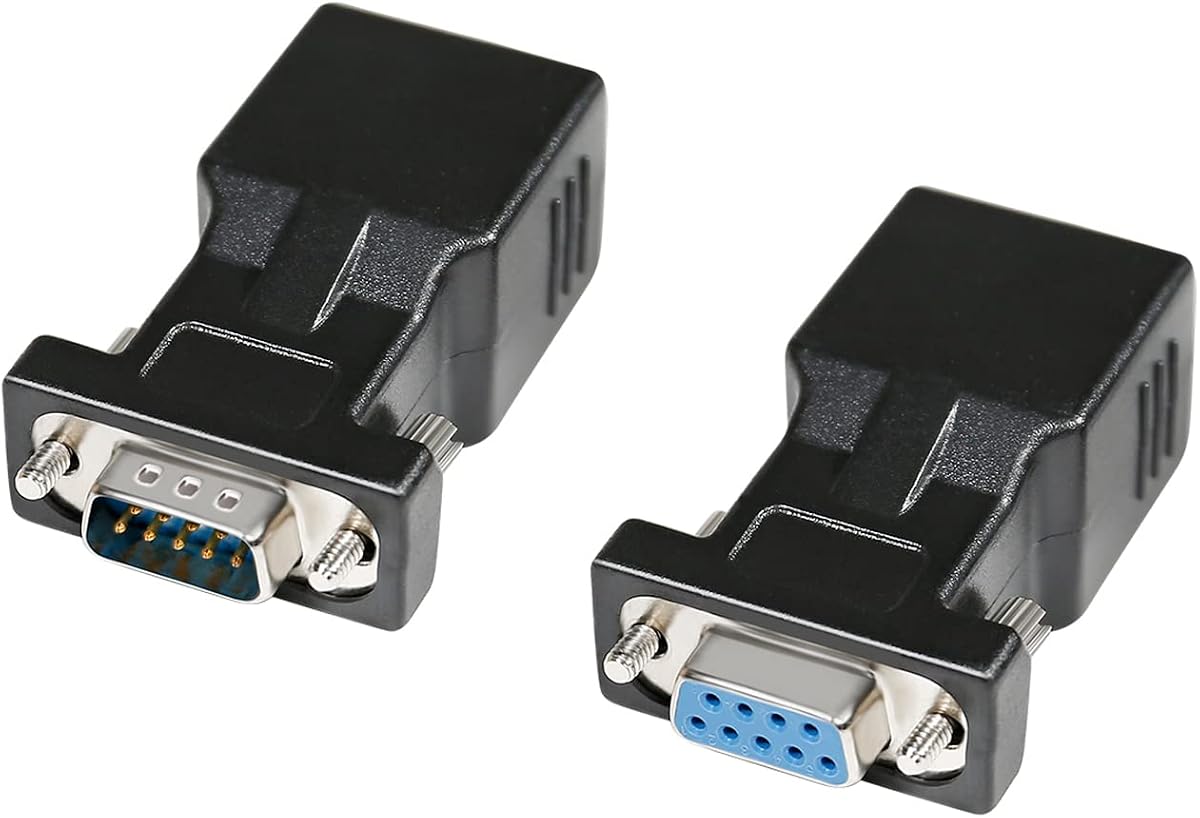
This two-piece DTECH set includes one DB9 male-to-RJ45 female adapter and one DB9 female-to-RJ45 female adapter. That combination solves the common problem of deciding which coupler belongs at each end of an extension. The 4.7 rating and plug-and-play approach make it one of the most attractive choices for a standard point-to-point RS232 extension.
We may earn a commission when you buy through this link, at no additional cost to you.
The set carries serial signals bidirectionally over Cat5 or Cat6 cable for distances up to 65 feet. Thumb screws help hold the DB9 connections firmly in place, and the adapters are compatible with a broad selection of nine-pin serial equipment, including computers, terminals, CNC machines, PDAs, POS terminals, barcode scanners, printers, modems, scales, and routers. The inclusion of both genders also reduces the likelihood of buying an incompatible combination.
The important distinction is that this is a serial extension kit, not an Ethernet converter. It does not assign an IP address, route traffic through a network, or let a modern Ethernet port communicate directly with an RS232 device without additional software or equipment. Users should also avoid confusing the DB9 connector with a 15-pin VGA connection. The product is designed specifically for standard nine-pin D-sub serial devices.
It is best suited to installers, technicians, and office users who want to bridge two serial endpoints using an existing network cable. The matched set is more convenient than purchasing separate adapters and reduces uncertainty about orientation. For applications that require real network conversion, surge protection, or RS485 and RS422 support, one of the active gateway options in this guide will be more appropriate.
The male and female components are designed to sit at opposite ends of the twisted-pair run. This is a significant convenience over single adapters and helps create a consistent, understandable extension layout.
Because the path supports both transmission and reception, the setup can carry a complete RS232 serial conversation rather than only a one-way data flow. The passive design needs no configuration or power connection.
We may earn a commission when you buy through this link, at no additional cost to you.
This DB9-to-RJ45 extender package provides male and female adapter arrangements for carrying RS232 data over twisted-pair cable. Its 4.6 rating indicates strong general appeal, particularly for technicians who need several connection options or who want a product that can be used singly as well as in matched pairs. The adapters require no external power and support common desktop and industrial serial devices.
We may earn a commission when you buy through this link, at no additional cost to you.
The product is described as supporting bidirectional transparent transmission over UTP Cat5 or Cat6. Compatible equipment includes desktop computers, digital machine tools, PDAs, barcode devices, and other standard nine-pin serial peripherals. The male-to-RJ45 configuration makes it useful when the host computer has a male DB9 output and the target device uses a female port, while the female-to-female arrangement covers the inverse configuration.
Published distance details are not perfectly consistent: the description mentions a maximum of 66 feet, recommends use from roughly 1 to 15 meters, and also states that UTP can bridge longer runs. That variation makes it important to treat the cable, interference conditions, baud rate, and local testing as the deciding factors. The product should not be confused with an IP-to-serial gateway merely because the description mentions network interfaces.
This extender is a practical choice for workshops, laboratories, point-of-sale installations, and legacy equipment where DB9 leads are inconvenient. It can be especially useful for users who need more than one connector-gender arrangement. Confirm the pin mapping of both devices and perform a basic loopback or communication test before deploying the adapters across a permanent cable route.
The package covers female-to-female, male-to-female, and male-to-male use cases, depending on the supplied configuration and the devices being connected. This makes it easier to assemble an extension without a separate return trip for a different DB9 arrangement.
The adapter carries serial data across the twisted-pair path without adding a separately powered translation layer. The connection remains most reliable when the cable run, grounding, and baud rate suit the distance and equipment.
We may earn a commission when you buy through this link, at no additional cost to you.
This DTECH unit converts a DB9 male connection into an RJ45 female connection through a straight-through passive pin map. Its 4.2 rating places it among the more highly reviewed options, while its simple installation makes it appropriate for routine serial extensions. It is built for nine-pin RS232 equipment and should not be mistaken for a VGA connector.
We may earn a commission when you buy through this link, at no additional cost to you.
A useful characteristic is the direct mapping of contacts one through eight, with the ninth DB9 contact left unused. The adapter can form part of a pair that carries serial signals over inexpensive Cat5 or Cat6 cable for up to 65 feet. Thumbscrews help keep the male DB9 connection secure, and the absence of external power reduces installation complexity.
As a passive adapter, it offers no electrical isolation, surge protection, automatic baud-rate detection, or protocol translation. The RJ45 connector is being used as a convenient serial pathway, not as a true network interface. A matching adapter at the opposite end is generally required, and correct pin continuity must be present throughout the installed cable.
Buyers with a male DB9 host port will find this adapter particularly convenient for reaching a remote serial peripheral. It can serve printers, barcode scanners, modems, POS systems, routers, and industrial machine tools where a conventional DB9 extension is inconvenient. Choose it for uncomplicated serial extension; choose an active gateway instead when the device must appear on an IP network.
The one-to-one pin assignment removes the need for configuration after installation. Provided the opposite adapter and cable use the same wiring arrangement, serial data can pass across the network cable in both directions.
This adapter fills a very specific connector gap. It is particularly useful where the computer or controller has a male serial port and the equipment to be reached is too far away for a conventional RS232 extension cable.
We may earn a commission when you buy through this link, at no additional cost to you.
This ten-piece set consists of female DB9-to-female RJ45 adapters for carrying RS232 signals over Cat5, Cat5E, and Cat5 network cable. Its 4.8 rating is the highest among the products reviewed, making it appealing for technicians who need several matching couplers or prefer to keep spare units close at hand. The stated reach extends to 100 feet.
We may earn a commission when you buy through this link, at no additional cost to you.
One practical strength is its clearly documented wiring. The RJ45 color assignments and nine DB9 signal definitions are listed, including carrier detect, received data, transmitted data, data terminal ready, ground, data set ready, request to send, clear to send, and ring indicator. This documentation makes it easier to compare the adapter with the wiring of a specific installation rather than relying on guesswork.
The adapters use alloy transmission contacts to reduce impedance and interference, while the molded ABS body is designed for wear resistance. They remain passive components, however, and their advertised 100-foot capability is a stated maximum rather than a guarantee for every baud rate, cable quality, grounding arrangement, and electromagnetic environment.
The ten-unit format is useful for facility managers, repair technicians, and installers who service multiple serial endpoints. It can also serve as a stock of spares in a maintenance kit. Because the supplied connectors are female on both ends, users should verify that their equipment arrangement can be completed with a suitable male-side counterpart. This set is a passive serial extender, not a network protocol converter.
Ten identical adapters reduce the need to source individual replacements during equipment servicing. Keeping a few on hand is helpful when legacy serial endpoints are spread across a workshop, warehouse, or retail installation.
Documented pin assignments allow an installer to check wire continuity against the equipment manual. This is especially valuable in longer cable runs where a poor connection or incorrect mapping is difficult to diagnose.
We may earn a commission when you buy through this link, at no additional cost to you.
The USR-TCP232-302 is a dedicated serial-to-Ethernet server rather than a passive adapter. Its 4.0 rating reflects a capable device with a steeper learning curve than a simple DB9 coupler. It performs bidirectional transparent transmission between RS232 and Ethernet, allowing legacy serial equipment to communicate across a LAN or, where appropriate, an external network.
We may earn a commission when you buy through this link, at no additional cost to you.
The compact module includes a 10/100Mbps auto-MDI/MDIX RJ45 port and supports serial rates from 600 bps to 230.4Kbps. It offers TCP Server, TCP Client, UDP Client, UDP Server, and HTTPD Client modes. DHCP support can simplify address assignment, while DNS, webpage-based configuration, and network firmware upgrades make the unit more manageable than a bare protocol converter.
For reliability, the product supports a heartbeat package mechanism, custom registration packages, and virtual serial port software. TCP Server mode can accommodate between one and 16 clients, with four as the default. These functions go well beyond the basic purpose of a passive adapter, but they also mean the user must understand ports, network addressing, serial settings, and the communication model required by the attached equipment.
This is the best choice in the guide when the objective is to make an RS232 device available to software on an IP network. It suits industrial controls, monitoring systems, and legacy equipment that cannot be moved close to the host computer. It is not the simplest solution for a short serial extension, and network exposure should be considered carefully when configuring remote access.
Unlike a coupler that merely carries RS232 voltage levels through an RJ45 cable, this module handles the network side of the connection. A connected device can communicate through TCP or UDP according to the selected operating mode.
Multiple client and server modes let the unit fit central software, individual device connections, or request-response arrangements. Virtual serial port support also provides a route for locally installed applications that expect a conventional serial port.
We may earn a commission when you buy through this link, at no additional cost to you.
This DTECH active converter changes bi-directional RS232 signals into RS485 or RS422. Its 4.7 rating places it among the strongest products in the guide, and the combination of signal conversion, protection, status indicators, and a 115200-bps maximum rate makes it much more capable than a passive DB9 coupler. It is designed for long-haul serial data communication.
We may earn a commission when you buy through this link, at no additional cost to you.
The converter supports two-wire half-duplex RS485 and four-wire full-duplex RS422, including point-to-point and point-to-multipoint arrangements with up to 32 protocol devices. Built-in collision protection improves data handling, while automatic baud-rate detection and adjustment reduce configuration effort. The DB9 side connects to RS232 equipment, and the other side can terminate at either a Phoenix terminal block or RJ45 network port.
Protection is a major reason to consider this product. The RS485 or RS422 link is listed with 600W lightning surge protection, while the RS232 side includes 15KV static protection. A 110/240V AC-to-9V DC power supply is included, and TX, RX, and power LEDs give a quick visual indication of operation. Since the unit is active, it requires power and introduces more configuration considerations than a passive adapter.
It is well suited to industrial equipment, long cable runs, and systems that need to bridge older RS232 controllers with modern RS485 or RS422 infrastructure. The choice between half-duplex and full-duplex modes must match the target network, and the included power supply should be installed according to local electrical requirements. This is a conversion tool, not an IP gateway.
Surge and static protection provide added confidence in installations where long cables may encounter electrical transients. These protections are particularly relevant when RS232 equipment communicates with distributed RS485 or RS422 devices.
Dedicated TX, RX, and power indicators make basic troubleshooting faster. Technicians can immediately see whether the unit is powered and whether communication activity is being sent or received.
We may earn a commission when you buy through this link, at no additional cost to you.
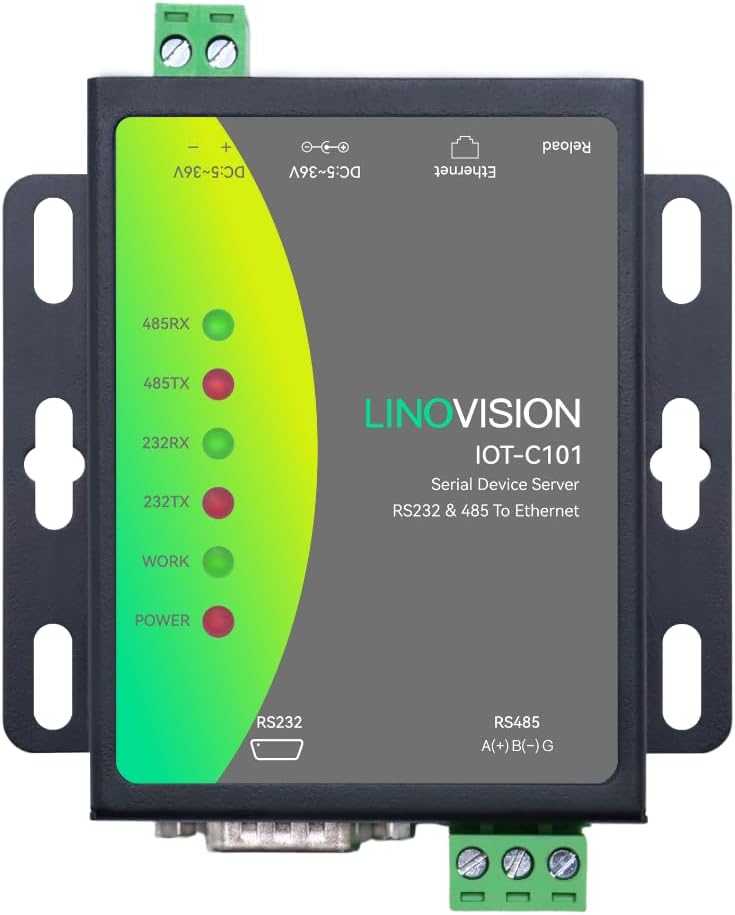
The LINOVISION dual-port gateway combines RS232 and RS485 connectivity with Ethernet-based monitoring and control. Its 4.1 rating makes it a credible choice for industrial and commercial networks, especially where a Modbus RTU/TCP translation layer is needed. Unlike a passive cable adapter, it actively integrates serial devices with a network infrastructure.
We may earn a commission when you buy through this link, at no additional cost to you.
The gateway supports Modbus RTU/TCP conversion, allowing serial and network Modbus systems to exchange data transparently. Multi-host polling accommodates as many as 16 hosts, which is useful for centralized software that must query several field devices. Typical application areas include POS equipment, agricultural sensors, PLCs, and medical devices used for remote monitoring and control.
Its industrial enclosure has an IP30 protection rating and a wide stated operating range from -40°F to 185°F. Both wall and rail mounting are supported, making it practical for control cabinets and equipment rooms. The free Linovision AIoT RemoteMonit service covers up to 30 managed devices, while larger fleets or customized functions require further arrangements.
This gateway is most appropriate for users who need protocol conversion and remote visibility rather than a simple serial extension. Configuration should be checked against the Modbus implementation used by the attached equipment, particularly for device addressing, polling, and serial parameters. Buyers seeking a general-purpose RS232 adapter will find the additional functionality unnecessary, but facility operators with distributed serial devices gain a more complete network bridge.
Having both RS232 and RS485 in one unit can simplify a control cabinet that contains different device types. The gateway allows those systems to participate in a common Modbus-based network workflow.
Rail or wall mounting and a wide temperature range suit installations away from a comfortable office environment. These physical features matter when the gateway is positioned near industrial or outdoor-adjacent equipment.
We may earn a commission when you buy through this link, at no additional cost to you.
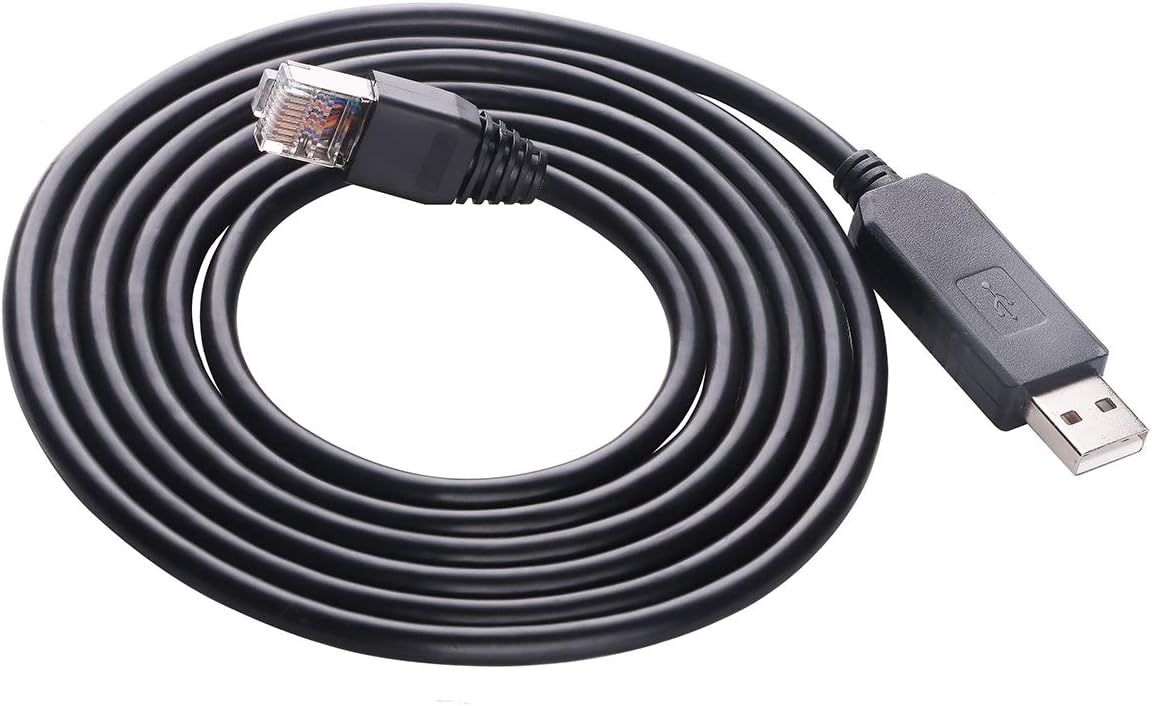
This six-foot USB-to-RJ45 RS232 cable is designed primarily for Voltronic EG4 6000EX and 6500EX equipment, with the listing also referencing compatible applications such as Axpert, Kodak, Mecer, Solar Phocos, and RCT devices. Its 4.6 rating reflects a well-regarded solution for users who need to connect one of the supported systems to a modern computer.
We may earn a commission when you buy through this link, at no additional cost to you.
The cable combines a USB 2.0 computer connection with an RJ45 serial connection to the target equipment. An FT231XS bridge chipset handles the interface, and the integrated cable measures 180 centimeters, or six feet. This arrangement is more specialized than the passive DB9 adapters because it creates a serial port through USB rather than simply extending DB9 wiring over a network cable.
Software support is an important consideration. The instructions recommend downloading and installing the FTDI Virtual COM Port driver from FTDI's official website if the system does not detect the device automatically. A working driver allows compatible applications to communicate through a virtual serial port, but the included software and settings must match the attached equipment.
This cable is best for a technician servicing a listed inverter or compatible device that lacks a convenient PC connection. It is not a universal RS232-to-RJ45 extender, a DB9 gender adapter, or an Ethernet gateway. Confirm the target model and communication requirements before buying. For that use case, its integrated six-foot design and direct USB connection reduce the number of separate components.
USB provides a familiar connection method for computers that no longer include a physical serial port. The integrated cable avoids searching for a separate USB-to-serial adapter and a separate RJ45-to-device lead.
The product is designed around particular Voltronic and related equipment. Confirming device compatibility before installation will prevent unnecessary driver and communication troubleshooting.
We may earn a commission when you buy through this link, at no additional cost to you.
This matched DB9 male and female adapter pair is designed to extend RS232 serial data over Cat5, Cat5E, or Cat6 cable. Its 5.0 rating is the highest numerical rating in the list, although ratings should still be considered alongside connector compatibility and installation requirements. The pair offers a ready-made solution for extending a serial link by as much as 65 feet.
We may earn a commission when you buy through this link, at no additional cost to you.
Construction details are a notable strength. Molded strain relief supports repeated plugging and unplugging, grip treads make the connectors easier to handle, and screws secure the DB9 connection. The nickel-plated, oxygen-free copper contacts are described as double-shielded to minimize crosstalk and suppress noise. The product requires no external power, making setup straightforward.
Users must use the male and female components together for the stated extension arrangement, and the installed cable must use the expected pin mapping. The listing describes bi-directional transmission between DB9 ports, but it also clearly states that the product is only for extending RS232 serial data. It is not a console adapter and should not be expected to create standard TCP/IP network connectivity merely because Cat5 or Cat6 cable is used.
The pair is well suited to legacy printers, barcode printers, POS equipment, routers, projectors, monitors, TVs, and other standard nine-pin serial devices. It is a good option for users who want a complete two-end solution rather than purchasing couplers separately. Test the complete path with the intended baud rate and both attached devices before securing the cable in place.
Molded strain relief, grip treads, and screwed shells improve handling in service environments. These mechanical details can be more valuable than extra specifications when an adapter is installed and removed regularly.
The included male and female pieces remove the need to determine which adapters are needed for a standard extension. Together they form a simple, power-free path over standard twisted-pair cable.
We may earn a commission when you buy through this link, at no additional cost to you.
The correct converter depends on the signal path, equipment connectors, communication distance, and environmental demands. Start by deciding whether you need passive extension, active protocol conversion, or full Ethernet gateway functionality.
Choose passive extension for a direct serial connection, active conversion for different electrical standards, and a gateway for networked communication.
Confirm host gender, target gender, and pin mapping before ordering. Buying the wrong connector combination is one of the most common installation errors.
Use the shortest practical cable run and test under operating conditions. Longer or noisier environments may require active conversion, better cable, or a professionally installed network gateway.
Never rely on the RJ45 shape alone to infer compatibility. Verify the electrical standard, baud rate, grounding method, and network topology on both devices.
Choose a network gateway for remote IP access; choose a passive adapter for a direct point-to-point extension.
Favor protection in electrically noisy installations. Keep powered equipment on a suitable supply and verify voltage requirements before connection.
Check the device manual for connector type, pinout, and serial settings. Specialized hardware should be purchased only after confirming the exact supported model.
Prioritize secure connectors, clear status indication, and serviceable installation. A stable physical setup often matters more than unneeded advanced features.
Begin by disconnecting power from any equipment that will be connected and identifying the DB9 gender, serial standard, pinout, and baud rate at both ends. For a passive extension, select compatible male and female adapters and verify that their wiring matches the equipment manual. Do not connect the adapter to a 15-pin VGA port or assume that an RJ45 socket creates network connectivity.
Attach the adapters securely, route the twisted-pair cable without sharp bends, excess tension, or close parallel runs with noisy power wiring, and connect the serial devices. Power an active converter or gateway and configure the serial parameters, network address, transmission mode, and protocol as required. For a gateway, select TCP Server, TCP Client, UDP, or the required operating mode and use a connection test to confirm data exchange.
Test the link with a short cable first, then move to the final run while checking received and transmitted data. Look for stable readings rather than merely the presence of a recognized port. Secure thumbscrews, avoid repeatedly pulling on the cable, and keep passive couplers away from moisture or conductive debris. For powered equipment, use the specified supply and inspect connectors periodically for looseness, heat, corrosion, or damaged shielding.
Not necessarily. Most passive DB9-to-RJ45 products only carry RS232 signals across twisted-pair cable and do not provide an IP address or network protocol. A true serial-to-Ethernet gateway, such as the USR-TCP232-302, performs that conversion and must be configured for network communication.
Match the adapter to the connectors on both devices. A male-to-female pair is commonly used for a male DB9 host and female DB9 peripheral, while a female-to-female arrangement suits two female endpoints. The correct choice also depends on the pin mapping, so checking both device manuals is essential.
Yes, passive adapters can route RS232 through twisted-pair cable when the conductors are connected to the correct pins. The cable becomes a serial extension rather than an Ethernet link. Length, baud rate, grounding, shielding, and electrical interference determine whether the connection remains reliable.
The products in this guide state different maximum distances, generally up to 65 feet for common passive couplers and up to 100 feet for one multi-pack. Actual performance depends on the cable and equipment. For longer or more demanding runs, an active RS485, RS422, or Ethernet solution may be more appropriate.
Passive DB9-to-RJ45 couplers do not require external power because they do not regenerate or translate the signal. Active RS232-to-RS485 or RS422 converters and serial-to-Ethernet gateways do require power. The DTECH active converter includes a suitable 110/240V AC-to-9V DC supply.
No. These adapters are intended for standard nine-pin D-sub RS232 devices and are not compatible with 15-pin VGA connectors. Their RJ45 side is being used for twisted-pair serial wiring, not video, unless a separate purpose-built converter is installed.
The FT231XS USB-to-RJ45 cable may require the FTDI Virtual COM Port driver, which should be obtained from FTDI's official website. After installation, confirm that the computer assigns a COM port and that the application uses the same port number and serial settings as the attached equipment.
Choose RS232 for a direct link between compatible nine-pin serial endpoints, RS485 for two-wire half-duplex networks, and RS422 for four-wire full-duplex links. The target equipment's documentation should determine the required standard. A converter cannot safely operate correctly when the electrical protocols and topology do not match.
The DTECH female adapter is a straightforward choice for a basic passive extension, while the DTECH male-and-female kit is the most convenient all-around set for point-to-point work. The USR-TCP232-302 stands apart when the real goal is to connect an RS232 device to TCP/IP infrastructure rather than merely extend a serial cable.
Prioritize the actual connection requirement before focusing on connector shape. Check DB9 gender, signal standard, pinout, distance, power, protection, and operating mode. Passive couplers are best for simple serial links, active converters suit RS485 and RS422 networks, and gateways are necessary for IP-based monitoring or control.
Finally, check the current product listing, price, availability, included accessories, and device compatibility at the time of purchase. Product configurations and retailer offers can change, and the information in this guide is intended to help narrow the field before making the final purchase.