
Fractal Design Node 804
4.7Editor score
Dual-chamber cooling architecture
Extensive drive mounting options
Three quiet 120mm fans included
Our best cube shaped PC case guide compares 10 models for cooling, expandability, connectivity, aesthetics, component visibility, and compact builds today.
A cube shaped PC case combines a compact footprint with enough room for powerful components, making it an appealing choice for gaming desks, workstations, and space-conscious builders. The best examples balance airflow, hardware compatibility, cable management, convenient front I/O, and a visually striking view of internal components.
We compared 10 cube and cube-inspired cases across essential criteria such as motherboard support, graphics card clearance, CPU cooler height, fan configuration, radiator options, drive capacity, front-panel connectivity, and build flexibility. The list includes compact Micro-ATX models, ATX-capable designs, premium dual-chamber enclosures, and cases that can be positioned in different ways.
Each pick highlights a different reason to consider a cubed enclosure, from panoramic tempered glass and abundant ARGB lighting to flexible placement, extensive storage, or minimalist design. Ratings and product details reflect the supplied information, while current prices and availability can change, so shoppers should verify the latest listing before purchasing.
4.7Editor score
4.7Editor score

4.4Editor score
The comparison below covers ten cube and cube-style cases, highlighting their form factors, supported hardware, cooling provisions, and standout features.



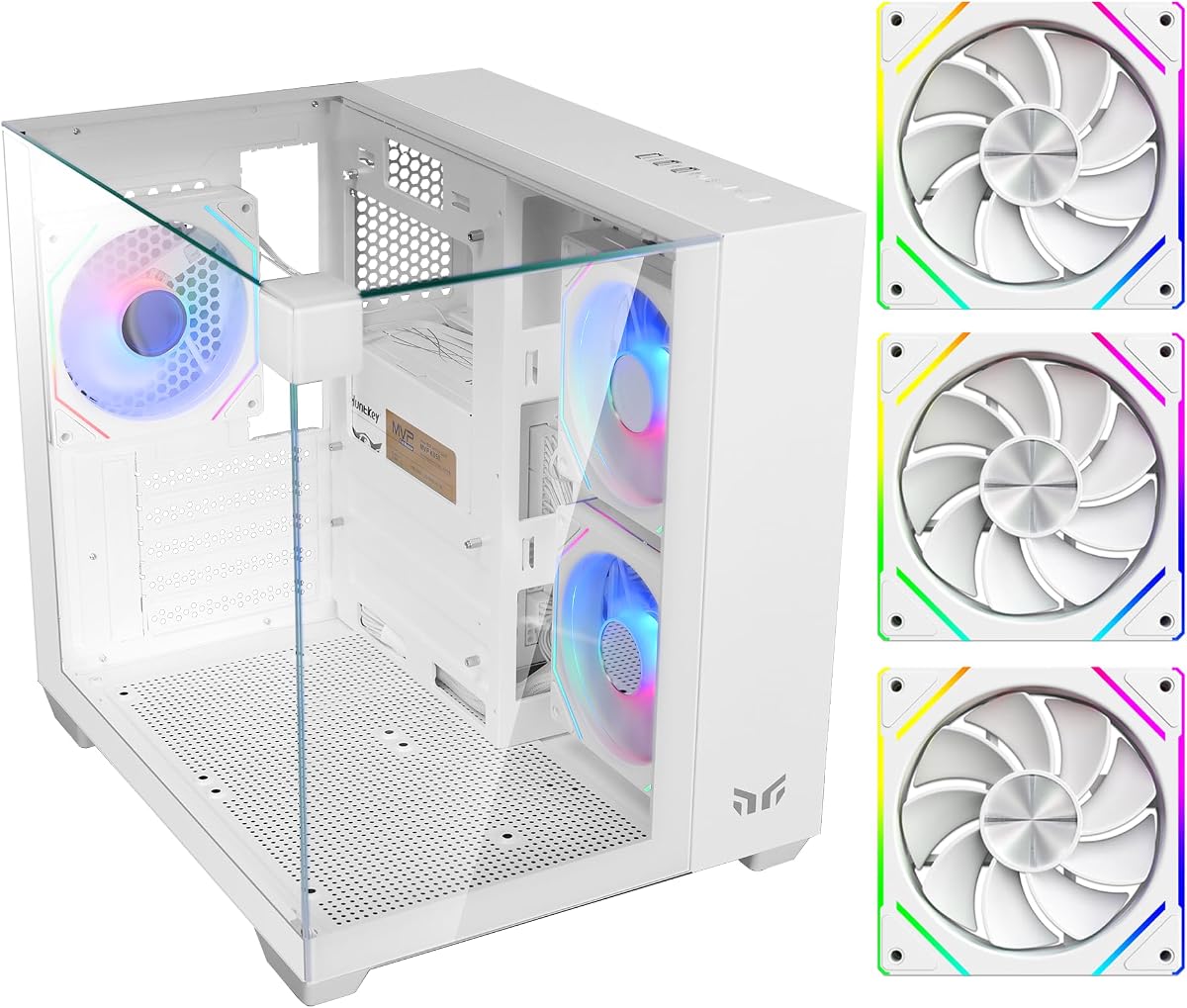
The Yeah Magic Cube is a compact gaming enclosure built around visual presentation, with three tempered glass panels and a pillar-less design providing a 270-degree view of the components. It holds a 4.7 rating, and that strong showing reflects an appealing combination of panoramic styling, practical dimensions, and useful included hardware. Its white finish and pre-installed ARGB lighting make it especially noticeable as a display-style build.
We may earn a commission when you buy through this link, at no additional cost to you.
Three 120mm ARGB fans are already installed, giving a new system a useful cooling foundation without requiring immediate fan purchases. The case supports up to five 120mm fans and a side-mounted 240mm liquid cooler, providing room to expand the thermal setup later. A 28.5-liter layout accommodates Mini-ITX and Micro-ATX motherboards, graphics cards up to 325mm, and CPU air coolers up to 155mm.
The dedicated cable-routing design and PSU shroud help keep the visible interior tidy, which is especially important when nearly every viewing side is transparent. Front I/O includes USB 3.0, USB 2.0, and audio connections. The main limitation is motherboard format: full-size ATX and E-ATX systems will not fit, so builders need to confirm that their board is Micro-ATX or Mini-ITX before buying.
This is a strong recommendation for a builder who wants a visually dramatic compact PC and already plans to use a Micro-ATX or Mini-ITX motherboard. It is less suitable for someone committed to a full ATX board or unusually long graphics card. Subject to those hardware constraints, the combination of glass, fans, lighting, and orderly interior makes it an especially attractive cube-shaped option.
The three-sided tempered glass design gives the Cube a more open presentation than a conventional windowed tower. With the pillar-less layout, it is easier to appreciate the graphics card, motherboard, cabling, and ARGB lighting from multiple directions.
Three pre-installed ARGB fans provide airflow from the outset, while the shroud and routing spaces reduce visual clutter. Additional fan and 240mm liquid-cooler support make it practical to tune the system for heavier workloads later.
We may earn a commission when you buy through this link, at no additional cost to you.
The Cooler Master QUBE 540 is a substantial cube-style ATX mid-tower with a 4.4 rating. Unlike many compact cube cases, it supports ITX, ATX, and E-ATX motherboards, including boards up to 11 inches wide. Its most unusual feature is the ability to operate in either horizontal or vertical positions, with a reversible I/O panel and movable handles supporting different desk layouts.
We may earn a commission when you buy through this link, at no additional cost to you.
Cooling starts with a full mesh front panel and a pre-installed SickleFlow 120mm fan. The mesh is intended to maximize airflow while the glass area preserves visibility into the build. Graphics card clearance reaches 415mm when the front fan is not installed, offering enough room for high-end cards such as the RTX 5090 and RX 9070 XT, although builders using a large cooler may need to account for that fan position.
The front I/O includes two USB 3.2 Gen1 ports and one USB 3.2 Gen2 Type-C port, offering a modern mix of familiar connectors. The case is less plug-and-play than many competitors because it includes only one fan, so a complete cooling plan may require additional units. Its broad body also occupies more desk space than the smaller models in this guide.
Choose the QUBE 540 if motherboard flexibility, large graphics cards, and the option to rotate the enclosure matter more than maximum compactness. It is an excellent fit for a full ATX gaming build that still wants a distinct cubed appearance. Builders who want the strongest hardware support in the list will find this enclosure particularly compelling.
The reversible I/O panel and movable handles make horizontal and vertical placement practical. This flexibility helps builders fit the case beside a monitor, on a display shelf, or in a wider entertainment setup.
Graphics card clearance of up to 415mm is a major advantage for modern flagship cards. Check the installed front-fan configuration, because the quoted maximum assumes the front fan is removed.
We may earn a commission when you buy through this link, at no additional cost to you.
The Apevia Prism-WH is a cube-style Micro-ATX case that combines dual tempered glass panels with an unusually generous fan package. It has a 4.2 rating and is designed for builders who want RGB illumination, visible components, and a cooling foundation without assembling every fan position from scratch. Its dual-chamber layout separates the cable-management area from the main hardware chamber.
We may earn a commission when you buy through this link, at no additional cost to you.
Five 120mm ARGB PWM fans come pre-installed, and their 366 lighting modes can be selected using the top-mounted control. The system can also synchronize with a compatible ARGB motherboard by holding the lighting button, although that feature will not work with a standard non-ARGB board. A ventilated metal side panel adds another route for airflow, while the magnetic top dust filter can be removed and washed.
Component support includes graphics cards up to 340mm and CPU coolers up to 155mm. Water-cooling options extend to a 240mm radiator. Storage includes room for two 3.5-inch hard drives or one 3.5-inch hard drive and one 2.5-inch drive, while screw-in PCI Express covers simplify graphics card installation. The top I/O includes USB 3.0, two USB 2.0 ports, audio jacks, power and drive indicators, and the lighting control.
This case is a compelling option for a Micro-ATX gaming build that prioritizes lighting and included fans over full-size ATX support. The main compatibility caveat is the need for an ARGB motherboard if motherboard synchronization is desired. Even without that feature, the five included fans, dual glass panels, and ventilated side make it a well-equipped compact cube.
Five ARGB PWM fans provide both cooling and illumination from the start. The lighting switch offers multiple modes, while motherboard synchronization is available when the selected board supports ARGB.
The separate rear cable chamber keeps wiring out of the main display area. A top dust filter and ventilated metal side panel help maintain airflow while preserving the clean, symmetrical appearance.
We may earn a commission when you buy through this link, at no additional cost to you.
The Zalman CUBIX-G is a compact Micro-ATX cube-style case with a 4.4 rating. It targets space-conscious builders who still want visible RGB lighting, multiple fans, and support for mainstream desktop hardware. The black-and-white Panda finish gives it a distinctive appearance without requiring the full-size footprint of a conventional ATX tower.
We may earn a commission when you buy through this link, at no additional cost to you.
Three pre-installed FRGB fans use a fixed 3-pin DC lighting connection, providing a coordinated look without depending on ARGB synchronization. Hardware support covers graphics cards up to 280mm, ATX power supplies up to 140mm, and CPU air coolers up to 155mm. The drive arrangement accepts up to three 2.5-inch hard drives and one 3.5-inch hard drive, with the supplied configuration allowing a mix of sizes.
Front connectivity is modern for such a compact model, with USB Type-C and USB 3.0. The fixed lighting connection means users who want their fans to react to motherboard software or other ARGB ecosystems will need to consider a different model. The shorter GPU allowance can also rule out the longest modern graphics cards.
The CUBIX-G is best for a smaller Micro-ATX build where desk space, included lighting, and everyday connectivity take priority. It works particularly well for a colorful general-purpose gaming system that does not need flagship graphics card clearance. Prospective owners should verify their power supply, card, and cooler dimensions before ordering.
Three pre-installed FRGB fans make the CUBIX-G visually complete out of the box. The case also accepts standard-size ATX power supplies, which can simplify parts planning for compact systems.
USB Type-C and USB 3.0 provide convenient access to compatible peripherals. Multiple 2.5-inch and one 3.5-inch drive positions add useful flexibility for a smaller gaming or productivity build.
We may earn a commission when you buy through this link, at no additional cost to you.
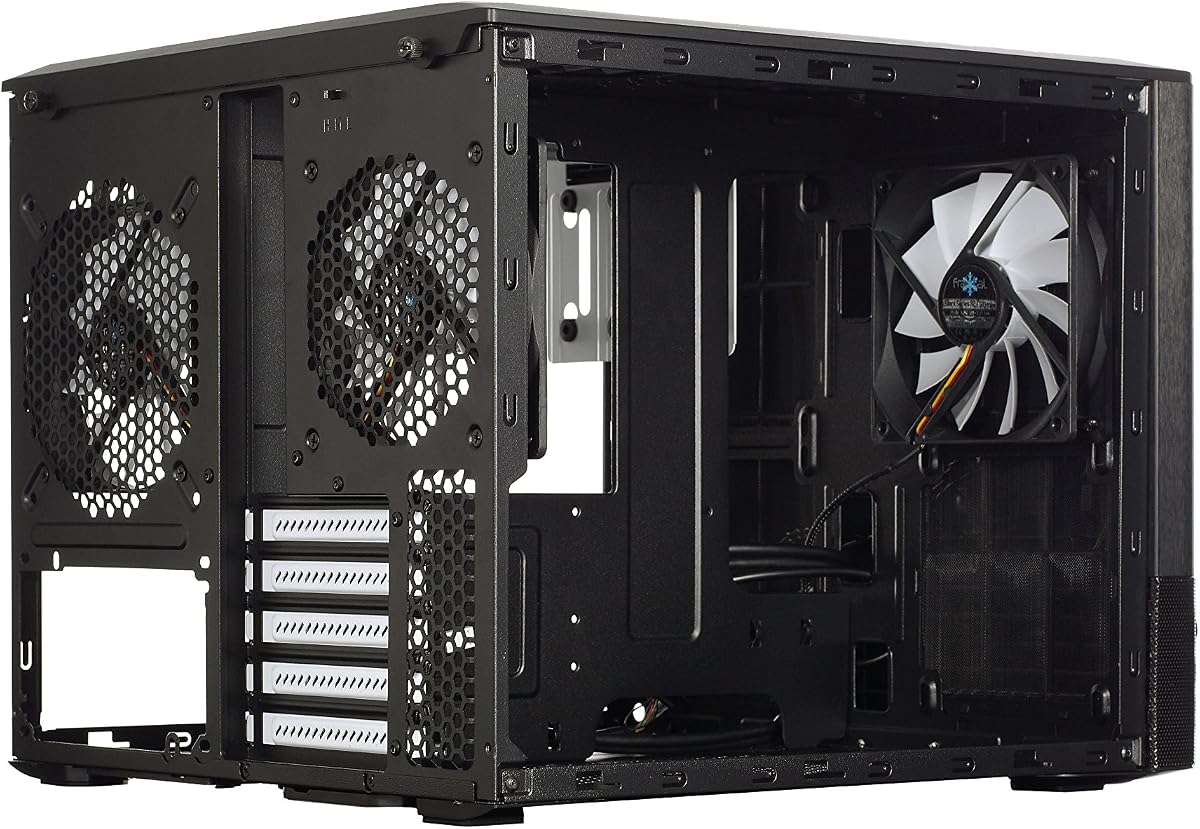
The Fractal Design Node 804 is a premium Micro-ATX cube with a 4.7 rating. Its defining feature is a dual-chamber interior, which separates hardware and cooling zones and gives the enclosure an uncommon amount of flexibility. The brushed aluminum front panel and restrained Scandinavian styling make it a more mature alternative to the more aggressively illuminated gaming cubes in this list.
We may earn a commission when you buy through this link, at no additional cost to you.
Three Fractal Design Silent R2 120mm fans are included, and the case has space for up to seven additional fans. Its cooling structure can accommodate up to four radiators simultaneously, making it suitable for a highly customized air- or liquid-cooled system. Removable dust filters on the intakes help maintain cleaner airflow over time, while the windowed side panel provides a view into the build.
The unique drive mounting system supports combinations of up to eight 3.5-inch drives, four 2.5-inch drives, or as many as ten 3.5-inch and two 2.5-inch drives. The motherboard format is Micro-ATX, with Mini-ITX also fitting because of the smaller size. The trade-off is physical bulk: this cube asks for more room than compact models such as the CUBIX-G or Zalman CUBIX M-ATX.
The Node 804 is a strong choice for a builder who values airflow, radiator options, storage, and a restrained exterior more than front Type-C connectivity. It also suits advanced builders who intend to add substantial cooling over time. For a smaller desk or a simple system, its size and unused capacity may be unnecessary, but for a carefully planned cube it is remarkably flexible.
The dual-chamber arrangement makes it possible to organize the power supply, wiring, and cooling more deliberately. Numerous fan positions and support for four radiators create an unusually broad foundation for future upgrades.
The modular drive system can accommodate either many 2.5-inch drives or a mixture of larger and smaller storage devices. This is valuable for storage-heavy workstations as well as gaming systems that keep games on multiple drives.
We may earn a commission when you buy through this link, at no additional cost to you.
The Apevia Prism-Elite-BK is a cube-style dual-chamber ATX mid-tower with a 4.0 rating. Its defining selling point is an exceptionally complete cooling package: seven 120mm PWM ARGB fans are pre-installed. It is aimed at builders who want full ATX support, strong graphics card clearance, and abundant cooling without immediately needing to fill every mounting position.
We may earn a commission when you buy through this link, at no additional cost to you.
The fans support motherboard ARGB synchronization when an ARGB motherboard is used and offer 366 lighting modes through the top control. Their 4-pin PWM connections allow fan-speed adjustment through a compatible motherboard. Hardware limits include 400mm for graphics cards and 165mm for CPU air coolers, giving the system more flexibility than most compact Micro-ATX cubes.
Liquid-cooling options are extensive. The rear supports 120mm radiators, while top or side mounting can accept 240mm, 280mm, and 360mm radiators. The top I/O includes USB-C, USB 3.0, USB 2.0, and HD audio connections. Storage capacity includes three 2.5-inch SSDs or one 3.5-inch hard drive with two 2.5-inch SSDs. A large magnetic dust filter on top is removable for cleaning.
This case makes sense for a high-airflow ATX build where the included fans and broad radiator support are priorities. It is less attractive for a minimalist workspace because its fan-heavy design and substantial exterior require more physical space. The lighting system also depends on compatible hardware for synchronization, although its standalone modes remain available.
The large pre-installed fan array provides immediate airflow and illumination. Because these are PWM fans, compatible motherboards can also help manage their speed alongside the rest of the system.
Rear, top, and side radiator positions allow builders to create a dedicated cooling loop. The three 360mm-compatible locations provide considerable freedom when planning a high-performance cube.
We may earn a commission when you buy through this link, at no additional cost to you.
The Zalman CUBIX M-ATX is a straightforward compact cube for Micro-ATX systems, carrying a 4.5 rating. Its 17.1-liter volume makes it one of the more space-conscious options here, while the 0.8mm steel construction gives it a sturdier character than cases built primarily around thin decorative panels.
We may earn a commission when you buy through this link, at no additional cost to you.
Despite its small dimensions, the case accepts standard ATX power supplies, graphics cards up to 260mm, and CPU air coolers up to 137mm. The perforated front panel supports airflow, and an 80mm fan is pre-installed. That fan is modest compared with the 120mm arrays offered by many gaming-oriented cubes, so serious builders may want to verify available mounting positions and add compatible cooling.
Front I/O consists of one USB 3.0 port, one USB 2.0 port, and a 3.5mm stereo audio jack. The restrained feature set focuses on core functionality rather than panoramic glass, extensive lighting controls, or premium connectivity. The compact dimensions and limited cooler height can also require more careful component selection than a full-size ATX chassis.
This is a sensible choice for a budget-conscious builder who wants a small, sturdy desktop enclosure and does not need elaborate RGB effects. It suits moderate-power Micro-ATX configurations with careful attention to GPU and CPU cooler dimensions. The case offers fewer bells and whistles than many alternatives, but its straightforward design and strong rating make it a credible compact choice.
At 17.1 liters, the CUBIX is designed to reduce the space occupied by the finished computer. The steel frame and panels provide a more robust foundation for a frequently moved or frequently used desktop system.
The perforated front and included 80mm fan establish a basic cooling path. Builders using powerful components should check cooler height, fan options, and airflow direction before completing the build.
We may earn a commission when you buy through this link, at no additional cost to you.
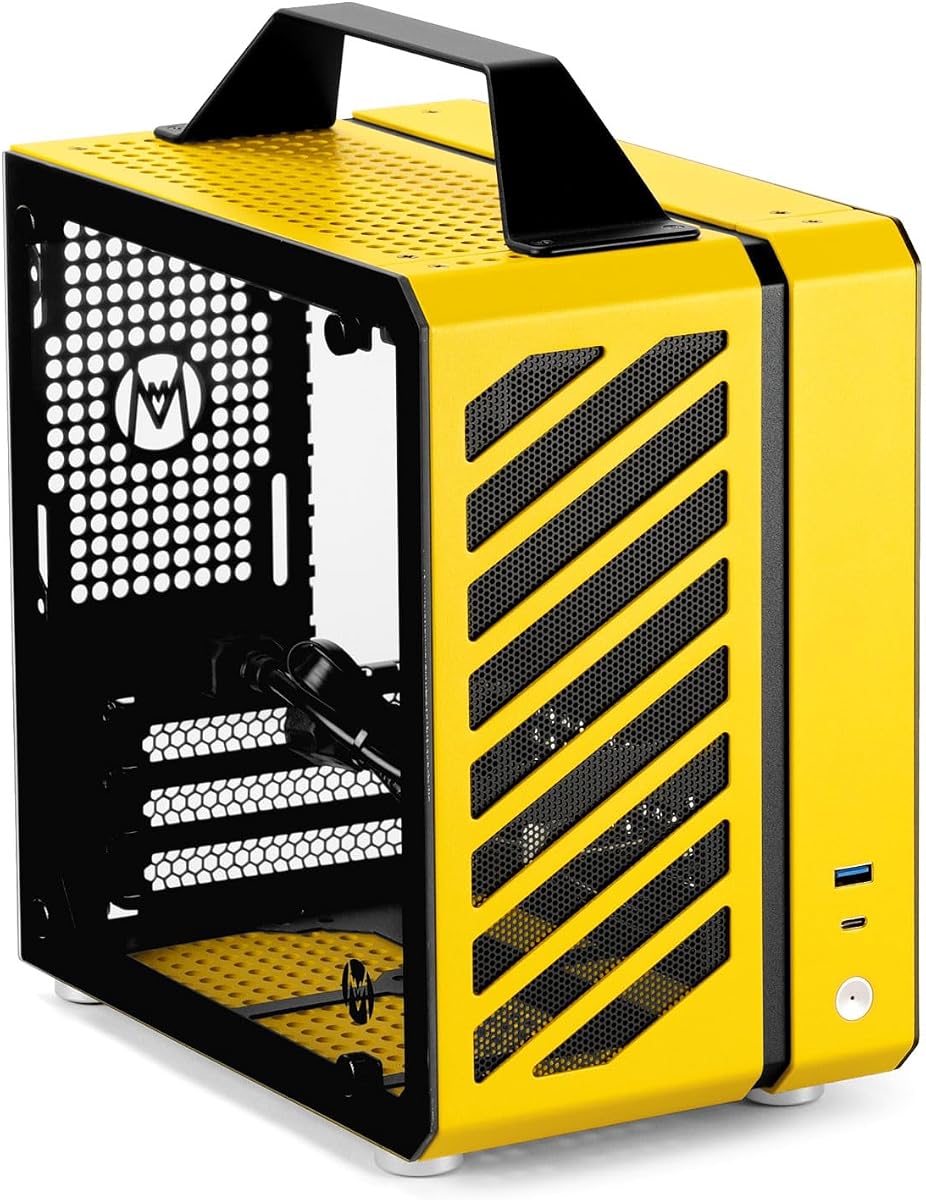
The Mechanic Master C24 is the most portable option in the guide, with a 9.9-liter volume and a built-in aluminum handle. It has a 4.4 rating and serves as a compact Mini-ITX case rather than a conventional Micro-ATX cube. The handle gives the enclosure a distinct identity and makes it easier to move between gaming events, LAN gatherings, or different workspaces.
We may earn a commission when you buy through this link, at no additional cost to you.
The case supports Mini-ITX and DTX motherboards, SFX power supplies, CPU coolers up to 135mm, or 120mm liquid cooling. Graphics card examples mentioned in the supplied information include RTX 3060 and RTX 4060 series models. An aluminum-steel hybrid frame combines detachable panels with tool-free installation, and a detailed screw kit is included to assist with assembly.
Cooling can be configured with two 8cm fans at the top, one 9cm fan at the rear, and one 12cm fan at the bottom. Two 2.5-inch SSD mounts and pre-installed dust filters add practical everyday features. The portability and modular panels are balanced by tight component limits: full ATX boards and standard ATX power supplies will not fit.
The C24 is ideal for a small-form-factor builder who values mobility and tool-free access. It also suits a compact LAN PC, where the handle makes moving the completed system easier. It is not the right case for a conventional tower replacement, but within Mini-ITX systems it offers a remarkably focused combination of portability, modular construction, and manageable size.
The integrated handle and 9.9-liter volume make the C24 easy to carry between locations. Once installed, a complete system can be moved without treating the case like a fragile display object.
Detachable panels and tool-free installation can simplify access during the initial build or later upgrades. Dust filters are pre-installed, reducing the need to source and fit them separately.
We may earn a commission when you buy through this link, at no additional cost to you.
The Fractal Design Node 804 is a Micro-ATX cube with a 4.7 rating and a particularly strong emphasis on storage capacity. This listing uses the Node 804 platform in black and identifies the case as aluminum and steel construction. It supports Micro-ATX and Mini-ITX motherboards, giving compact builders more board flexibility than a Mini-ITX-only case.
We may earn a commission when you buy through this link, at no additional cost to you.
Its internal bay configuration supports combinations of 3.5-inch and 2.5-inch hard drives or solid-state drives. The listed arrangement accepts eight 3.5-inch and four 2.5-inch drives, or as many as ten 3.5-inch and two 2.5-inch devices. The dual-chamber layout can separate the storage and power components from the primary hardware area, helping with both organization and thermal planning.
Compared with the more detailed Node 804 listing elsewhere in this guide, this product entry provides fewer specifics about included fans, radiator positions, filters, and front I/O. Those details should be verified with the manufacturer or current listing before purchase. The enclosure is also physically substantial, so a user with a tightly constrained desk should measure the available area.
The Node 804 is a strong fit for a storage-heavy Micro-ATX workstation, a media server, or a gaming PC that keeps multiple drives installed. Its high rating, broad drive support, and dual-chamber design make it especially compelling for builders who plan to add capacity over time.
The drive bays provide a substantial foundation for users who want to retain hard disks, SSDs, and media libraries. Flexible combinations make it possible to match the layout to the storage actually needed.
Keeping cables and selected components away from the display area supports a cleaner interior. The separated structure also gives builders more freedom when planning airflow within a large cube.
We may earn a commission when you buy through this link, at no additional cost to you.
The Cooler Master Qube 540 in Moonstone is a compact ATX cube with a 3.8 rating. Its rounded or softened visual treatment distinguishes it from the sharper industrial designs of many gaming cases. The core appeal is straightforward: an ATX-capable system in a cube format that can sit more compactly than a conventional mid-tower.
We may earn a commission when you buy through this link, at no additional cost to you.
The supplied listing confirms the compact ATX format and Moonstone finish but provides fewer technical details than the more detailed QUBE 540 entry in this guide. Because of that limited information, prospective buyers should review the full current product listing for graphics card clearance, CPU cooler limits, fan positions, radiator support, and front I/O before finalizing a purchase.
Its rating is the lowest among the ten products here, so it does not rank as highly for specification visibility, included cooling, or connectivity. That does not make it unsuitable; it instead signals that this particular listing offers fewer documented details than the competing QUBE 540 version. The same general product family is presented elsewhere in the guide with a mesh front, tempered glass, flexible orientation, and broader motherboard support.
The Moonstone version is worth considering for builders who value a refined color and an ATX cube layout more than a large bundle of pre-installed fans. Confirming the complete specification with the seller is especially important. If the detailed QUBE 540 functions are present, its ATX flexibility and striking enclosure form make it a distinctive desktop centerpiece.
The Moonstone finish gives the enclosure a lighter and more refined appearance than many black gaming cubes. It may suit a desk setup where visual coordination matters alongside compact dimensions.
The short supplied description does not detail fan support, radiator locations, clearance, or I/O. Reviewing the current listing and comparing component dimensions is essential for a confident purchase.
We may earn a commission when you buy through this link, at no additional cost to you.
A successful cube case purchase depends on matching the enclosure to the hardware, the available desk space, and the cooling strategy. The most important checks are motherboard format, graphics card length, CPU cooler height, power supply size, and radiator placement.
Choose a Micro-ATX cube when you want a smaller desktop system without giving up mainstream component options. Choose full ATX support only when the larger board and its power and cooling requirements genuinely suit the build.
Leave practical clearance whenever possible. For a long modern graphics card, prioritize a case with a documented 340mm or greater allowance and confirm the required cooling configuration.
Check the exact model of air cooler, not only its advertised class. The safest build includes enough clearance for the cooler, its mounting hardware, and nearby cables or fans.
Plan intake and exhaust deliberately, and check whether quoted GPU clearance assumes the removal of a front fan. The best compact case is one whose cooling layout still works with the installed hardware.
An SFX power supply offers a straightforward solution for the C24, while standard ATX units work in several of the larger compact cases. Never assume that a power supply will fit solely because the case is described as ATX compatible.
Most gaming builds can focus on SSD capacity, while multi-drive users should pay closer attention to the case's modular bay layout. More drive positions can also increase cable management requirements.
Prioritize the connector types you actually use, not the total number of ports. Audio jacks, power controls, drive indicators, and a separate lighting button can also improve daily usability.
For a display-style build, tempered glass and ARGB lighting create the strongest visual effect. For a work-focused or portable system, a restrained exterior, compact dimensions, and flexible orientation may matter more.
Before installing components, compare every major part against the case's clearance figures. Confirm the motherboard format, graphics card length, CPU cooler height, power supply dimensions, and radiator position. Assemble the system on a clean, protected surface and keep the glass panels away from hard edges to reduce the chance of damage. Follow the case manual for the proper order of screws, standoffs, and panel removal, particularly around a dual-chamber or dual-glass design.
Plan the cable paths before connecting drives and front-panel wires. Route power and data cables through the dedicated spaces, leaving enough slack for component removal and service access. Connect fans to the correct headers, use the stated ARGB or PWM connections only with compatible motherboards and controllers, and verify that no cable blocks the stated graphics card clearance. After power-on, confirm that every fan spins in the intended direction and that the lighting control behaves as expected.
Maintain airflow by cleaning removable dust filters on the schedule recommended by the manufacturer. Use gentle cleaning methods for mesh and magnetic filters, allow them to dry fully before replacement, and avoid spraying liquid directly onto glass, electronics, or fan bearings. Keep the exterior panels clean with a soft microfiber cloth, check that cables have not shifted into fan blades, and revisit the layout if fan noise or temperatures change after upgrades.
Not automatically. Cooling depends on the case's vent placement, fan configuration, radiator options, and the hardware installed. Some compact cubes use restrictive glass panels, while larger dual-chamber models can support many fans and several radiators. Compare documented airflow paths and clearance figures rather than judging by the cube shape alone.
Yes, but only certain models support full ATX boards. The Cooler Master QUBE 540 accepts ITX, ATX, and large E-ATX motherboards, while most of the smaller Micro-ATX and Mini-ITX cubes do not. Confirm the exact motherboard dimensions and supported form factor before purchasing either the board or the enclosure.
The Mechanic Master C24 is the smallest by listed volume at 9.9 liters. It is a portable Mini-ITX or DTX design with an integrated handle and requires an SFX power supply. The Zalman CUBIX M-ATX is also very compact at 17.1 liters but supports standard ATX power supplies and a broader range of everyday components.
No. The Yeah Magic Cube includes three ARGB fans, the Apevia Prism-WH includes five, and the Apevia Prism-Elite-BK includes seven. The Zalman CUBIX-G includes three fixed-RGB fans, while the Zalman CUBIX M-ATX includes one 80mm fan without a stated lighting feature. Check the included-fan count and lighting connection before assuming a motherboard can synchronize the lighting.
It can be, but fan choice matters more than the case styling alone. Models with many pre-installed ARGB PWM fans may be adjustable through a compatible motherboard, while a basic case with one 80mm fan may produce a different acoustic profile. Large CPU coolers can also conflict with a compact glass enclosure, so assess cooling and clearance together.
Start with a model that has removable or washable dust filters, such as the Apevia Prism-WH, Apevia Prism-Elite-BK, or Fractal Design Node 804. Clean filters regularly, keep intake openings unobstructed, and route cables away from fans. Periodic inspection also helps catch buildup that is not visible through the glass panels.
Choose based on the available desk space and the case's supported orientation. The Cooler Master QUBE 540 is designed for both horizontal and vertical placement, with a reversible I/O panel and movable handles. Other cases may be optimized for one orientation, so verify the manual and confirm that front ports remain accessible in your preferred position.
Check the card's full length, including its bracket and connector overhang, against the case's published clearance. Also check whether the maximum rating assumes that a front fan is removed. Long cards may interfere with radiators, side fans, or cable routing even when they technically fit inside the stated dimension.
The Yeah Magic Cube is the standout all-around choice for a compact Micro-ATX or Mini-ITX build, combining panoramic tempered glass, three ARGB fans, and organized cable management. The Fractal Design Node 804 stands out for its dual-chamber construction, storage flexibility, and extensive cooling options, while the Cooler Master QUBE 540 is ideal for builders who need full ATX support and flexible orientation.
Prioritize hardware compatibility before appearance. Confirm motherboard format, graphics card length, CPU cooler height, power supply dimensions, and radiator positions using the manufacturer's current documentation. The Apevia models offer the most elaborate factory lighting and fan bundles, the Zalman CUBIX options suit smaller or more restrained builds, and the Mechanic Master C24 serves a distinct portable Mini-ITX use case.
Ratings, specifications, product availability, and prices can change over time, so check the current listing and manufacturer information before making a final purchase. Once the core dimensions are confirmed, choose the cube whose cooling layout and style best fit the build rather than assuming that the largest number of fans or the smallest volume is automatically the most suitable option.