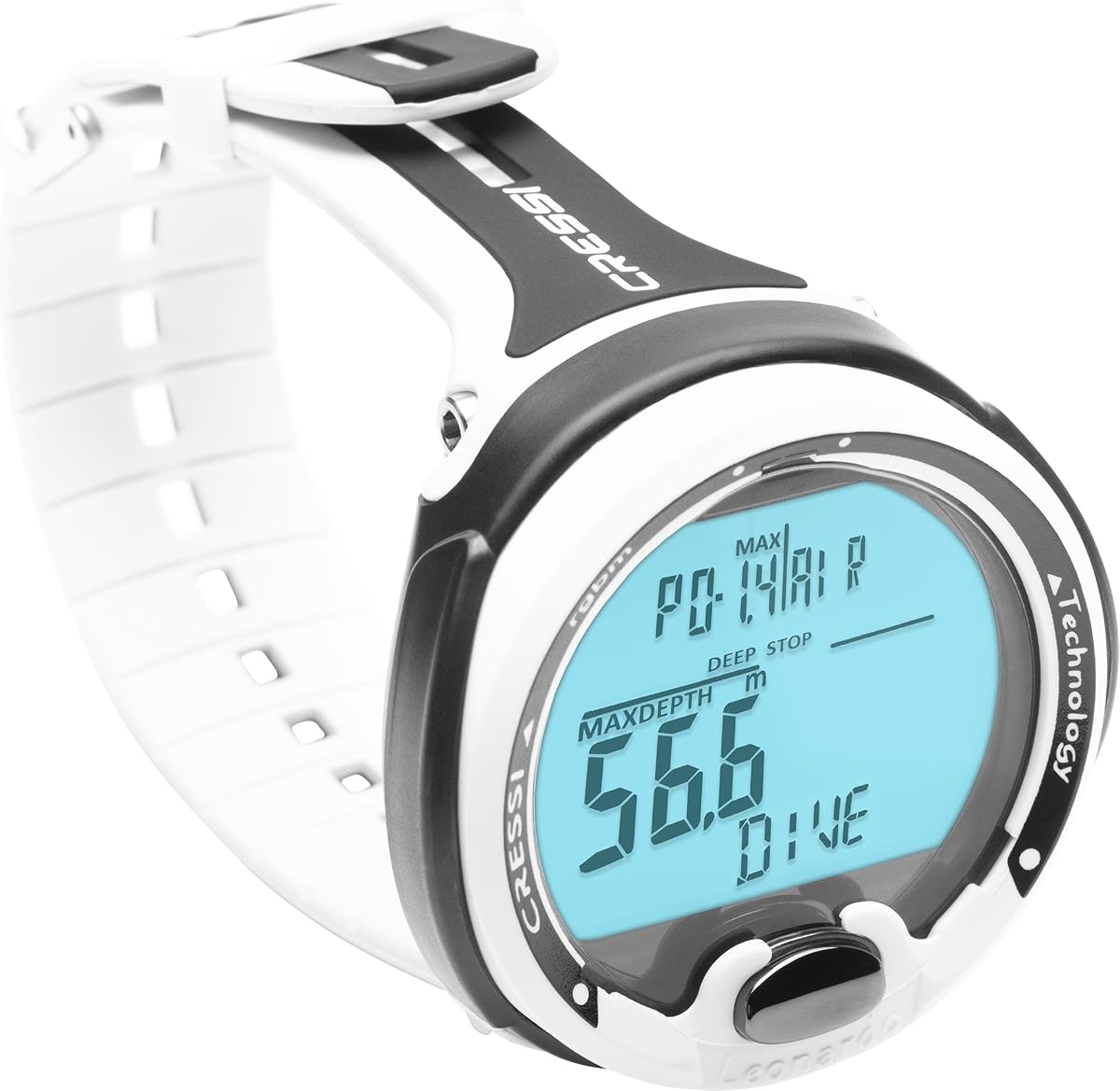
CRESSI Leonardo 2.0 G2
4.2Editor score
Single-button underwater controls
Air, Nitrox, and Gauge modes
iOS and Android connectivity
Dive computers for beginners simplify safety, navigation, and logbook tasks; this guide compares ten leading models, features, ratings, and daily usability.
Dive computers for beginners should make important information easy to read without turning a recreational dive into a technical-planning exercise. The right computer tracks depth, time, no-decompression limits, and other essential data while presenting it in a clear underwater display. It also reduces the amount of mental calculation required during a dive.
We compared the supplied specifications, supported dive modes, navigation systems, alarms, connectivity, displays, battery information, and user ratings for ten dive computers. The list includes approachable single-button models, feature-rich watches, and more advanced options for divers who may want to expand their skills. It also covers wrist computers designed for scuba, freediving, and mixed-gas environments.
Each pick reveals what type of beginner it may suit, from a simple first computer to a rugged multifunction watch. Ratings and specifications help establish the practical starting point, but personal comfort with menus and displays remains essential. Product availability, features, and current pricing can change, so confirm the latest listing and manual information before purchasing.
4.2Editor score

4.7Editor score

4.7Editor score
The comparison below organizes all ten computers by their most useful beginner-facing characteristics, including display style, supported modes, navigation features, connectivity, and battery information. Specifications describe the supplied product data and should be checked against the current manual and manufacturer listing before a purchase.

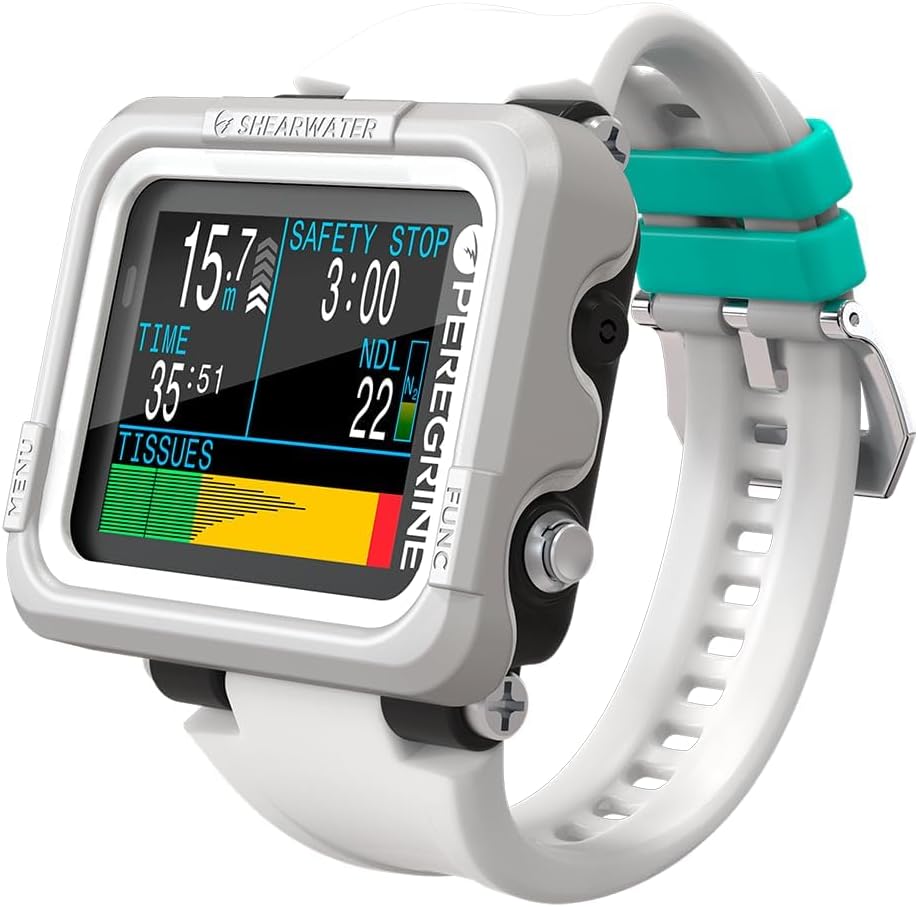


The Shearwater Research Peregrine is a strong all-around choice for a beginner who wants a dedicated dive computer without an oversized smartwatch. It carries a 4.7 rating, one of the strongest figures in this guide, and its defining strength is a deliberately simple two-button interface. Instead of requiring constant attention to dense menus, the Peregrine uses a state-aware structure that guides users toward the functions relevant to the current stage of a dive.
We may earn a commission when you buy through this link, at no additional cost to you.
That focus on usability is especially valuable for recreational divers still learning how to interpret depth, remaining time, and no-decompression information. The computer has 316 stainless steel buttons, adding a more substantial feel to controls that must remain operable with cold or gloved hands. Its stated battery life reaches up to about 30 hours at medium brightness, and the included USB wireless charging station removes the need to hunt for a proprietary charging cable when preparing at home.
The main compromise is specialization. The Peregrine is designed around diving rather than a broad collection of everyday smartwatch functions, so buyers who want heart-rate trends, payments, and extensive sports apps may find a Garmin watch more versatile. It also does not become simpler merely by owning it: a new diver still needs training, a backup computer plan, and time to learn the menus. Nevertheless, the focused design, strong rating, rechargeable battery, and uncomplicated control scheme make the Peregrine a convincing first dive computer.
I would recommend the Peregrine to beginners who prioritize clear navigation and dependable everyday dive data over smartwatch extras. It is especially appropriate for recreational scuba divers using open-circuit air and likely moving into recreational Nitrox later. Before buying, check the current manual, supported gas and depth limits, and what is included with the package. Learn every alarm and menu operation before entering the water, and continue to carry a separate depth and timing reference as a backup.
The two-button, state-aware menu is the Peregrine's most useful beginner feature. It reduces the number of actions required to reach common information while keeping the controls physically distinct and dependable. A new diver can practice the basic menus at home, making the first underwater trip less complicated.
The included USB wireless charging station and stated battery life of up to about 30 hours make routine preparation straightforward. Charge fully before traveling, confirm the computer starts correctly, and keep the charging dock accessible for home use.
We may earn a commission when you buy through this link, at no additional cost to you.
The CRESSI Leonardo 2.0 G2 is a practical entry point for divers who want a watch-style computer with uncomplicated underwater operation. Its 4.2 rating sits below the leaders in this list, but the product's strongest feature is difficult to overlook: a single-button interface. A new diver can learn the control pattern without managing multiple keys, and the supported Air, Nitrox, and Gauge modes cover the most common recreational diving situations.
We may earn a commission when you buy through this link, at no additional cost to you.
Safety information is presented through visual and audible alarms, which is helpful because important warnings should not depend on a diver noticing a small symbol. The Leonardo also supports iOS and Android connectivity and offers USB and infrared transfers for moving dive logs to a computer. Those functions make it more than a basic instrument: divers can review profiles after a trip and maintain a more useful record of their time underwater.
The trade-off is that the Leonardo is built around an older, more economical design language rather than the expansive screens and surface-navigation systems found in modern premium watches. Its rating of 4.2 indicates generally favorable user sentiment, but it does not suggest the same level of consensus as the highest-rated products here. One-button navigation can also become confusing if a beginner skips instructions, because advancing through several menu screens may require learning the press-and-hold logic.
The Leonardo 2.0 G2 is best for budget-conscious recreational divers who value alarms, simple controls, and familiar Air and Nitrox functions over advanced navigation. New users should read the quick-start guide, program the display and gas settings carefully, and practice the button sequence until they can check key data without hesitation. Use it with a training agency's approved procedures and retain a separate backup timing and depth instrument.
The single-button system keeps the physical layout clean and can be effective with gloves. It does not eliminate menu complexity, so beginners should practice each sequence until the relevant screens can be reached quickly and without hesitation.
USB and infrared transfer options support organized record keeping outside the water. Paired with a compatible phone, the computer can also help divers review dive information and build a stronger understanding of how their dives develop.
We may earn a commission when you buy through this link, at no additional cost to you.
The SUUNTO D5 combines a color display with wireless tank pressure, vibration alarms, a digital compass, and mobile connectivity in a relatively approachable watch format. Its 4.0 rating is the lowest among the ten products, which makes it important to judge it on feature fit rather than assuming it is a poor choice. For a diver who values alerts and wireless information without carrying a large console-style wrist computer, the D5 remains a practical option.
We may earn a commission when you buy through this link, at no additional cost to you.
The 100-meter water-resistance specification supports its use as a dive watch, while vibration alerts offer a way to notice important changes without relying exclusively on a visual cue. A digital compass provides basic directional information, and wireless mobile connection allows compatible interaction with a phone. Those features give a beginner several tools that extend beyond a basic depth and timer display.
Compared with the Shearwater Peregrine and the feature-heavy Garmin models, the D5 supplies less information about battery endurance, display size, detailed menu behavior, and supported gas configurations in the supplied specifications. Its rating also warrants more careful buyer research, including a review of the current manual and common questions from owners. New divers should not choose a dive computer solely because it resembles a large sports watch; the safety information and control workflow must remain easy to understand.
I would consider the D5 for a beginner who wants wireless tank-pressure support, vibration alarms, and a compass in a color-screen watch. Confirm compatibility with the transmitter and phone, verify the current setup procedure, and ensure the computer displays the information you need clearly under actual conditions. A hands-on visit to a dive shop can be especially helpful when choosing between a compact Suunto layout and a larger screen.
Wireless tank-pressure and mobile-connection features can reduce the need to handle separate equipment before and after a dive. Confirm that the required transmitter or phone is supported and learn the pairing process before heading to the water.
Vibration alarms provide another way to notice a critical change, especially when a diver is focused on surroundings. They should complement, not replace, careful monitoring of the display and training in the proper response to every alarm.
We may earn a commission when you buy through this link, at no additional cost to you.
The Shearwater Peregrine Adventures Edition combines the Peregrine's approachable two-button design with a larger 2.2-inch enhanced-color LCD and support for Air, Nitrox, three-gas Nitrox, and Gauge modes. Its 4.7 rating places it among the most well-regarded products in this guide. The result is a compelling option for a beginner who appreciates a large display and may gradually move beyond a single basic gas configuration.
We may earn a commission when you buy through this link, at no additional cost to you.
The computer uses the Buhlmann ZHL-16C algorithm with adjustable gradient factors, providing a more advanced framework for managing decompression information. Importantly for the supplied specifications, Shearwater computers do not lock out when a dive plan is deviated from. That can be reassuring for recreational divers who make a normal course correction, although it does not mean a computer should be treated as permission to disregard training or safety procedures.
The larger color screen is the main attraction. It can show more information at once and may be easier for a new diver to interpret than a compact monochrome display. The trade-off is that more visible data can also encourage overreliance on the device, and advanced gas modes add menus that a novice may not need immediately. Battery life is stated at up to about 30 hours at medium brightness, and a USB wireless charging station is included.
The Adventures Edition suits beginners who want room to grow, especially those who want a highly visible screen and may train for multi-gas dives later. It may be less attractive to someone who wants the smallest possible watch or the fewest possible settings. Confirm wrist fit, study all supported modes, and keep the conservative configuration aligned with your training. As always, use the computer as one part of a broader safety system rather than the sole source of dive information.
The 2.2-inch LCD with enhanced color and saturation gives a diver more visual room for essential numbers and status indicators. A larger screen is useful in bright conditions or when a diver needs to glance at information more frequently, although it may feel bulky to some wrists.
Air, Nitrox, three-gas Nitrox, and Gauge modes create a progression path. Beginners should not select advanced configurations merely because they are available; use a mode matched to certified training and a conservative plan.
We may earn a commission when you buy through this link, at no additional cost to you.
The Cressi Raffaello combines a 4.4 rating, four operating modes, an integrated digital compass, and a user-replaceable battery with an expected life of four years. Those qualities make it an interesting choice for divers who want a long-term wrist computer without routinely replacing a rechargeable cell. Its mode selection includes apnea and gauge alongside the core scuba functions, broadening its usefulness for freediving and other activities.
We may earn a commission when you buy through this link, at no additional cost to you.
Navigation is improved by the built-in compass, reducing the need to carry a separate directional instrument. Planning features use an RGBM-based mixed-gas system, while Bluetooth and USB connectivity provide two practical ways to review and transfer dive history. This combination of surface tools and logging flexibility is helpful for a diver who wants to compare profiles and understand trends after repeated dives.
The tradeoff is that the Raffaello's feature set can feel more involved than a minimal recreational computer. A mixed-gas planner, four modes, and multiple transfer options are meaningful features, but they also create a larger learning responsibility. The expected four-year battery life is an advantage, yet a replaceable battery should still be replaced on schedule and carried as a backup if a long, remote dive trip makes a failure inconvenient.
This model is well suited to a beginner who wants a durable, serviceable computer and may participate in more than one kind of diving. Start in the appropriate simple scuba mode, learn the compass calibration procedure, and treat the advanced planning tools as something to learn with an instructor. For someone who will dive only air, a simpler model may provide less friction, but for a multi-activity diver, the Raffaello offers a broad feature foundation.
Four modes allow the computer to serve scuba, apnea, and gauge-oriented use. This is useful for divers who rotate between activities, though each mode should be configured only after understanding its assumptions and limits.
A user-replaceable battery with an expected four-year life can simplify long-term ownership. Follow the specified replacement interval, confirm the correct battery type, and keep a spare available for extended travel.
We may earn a commission when you buy through this link, at no additional cost to you.
The Garmin Descent X30 is the most feature-rich conventional dive computer in this group, combining a 2.4-inch vibrant color display with surface GPS, a 3-axis compass, and a 10 ATM dive rating. Its 4.7 rating reinforces its position as a strong premium choice. The large display can present more data simultaneously, while flip-screen mode and four large metal leakproof buttons make the physical controls easier to identify.
We may earn a commission when you buy through this link, at no additional cost to you.
The supplied specifications list scuba single-gas, multigas, and trimix profiles, giving the X30 considerable flexibility as a diver advances. A water-temperature sensor helps identify thermoclines, while NDL Aware depth metrics explain how depth changes affect the remaining no-decompression limit. Those features add educational value for a beginner because they connect the computer's calculations to the physical experience of the dive.
Surface GPS is the standout for boat and shore divers because it can guide users toward dive sites and mark entry and exit points. The tradeoff is size, complexity, and the possibility of paying for capabilities a new recreational diver will rarely use. A large screen can be excellent for readability but may not suit smaller wrists or those who prefer a lightweight everyday watch. Its suite of metrics also requires thoughtful configuration to avoid clutter.
The X30 is a good premium pick for a beginner who wants one device for serious recreational scuba, surface navigation, and a broad view of dive data. It is especially appealing to divers who expect to add multigas or trimix through training and want room for that progression. Start with a simple display page and conservative gas configuration, learn the GPS and compass functions ashore, and verify current firmware and compatibility before the trip.
Integrated GPS can guide a diver toward a site and record the approximate start and end of a dive. It adds useful context to the underwater log and is especially helpful when returning to an unfamiliar entry point in changing conditions.
NDL Aware metrics show how a particular depth change influences the no-decompression limit. For beginners, this can make abstract planning information more tangible, provided the diver still follows the conservative limits established during training.
We may earn a commission when you buy through this link, at no additional cost to you.
The Garmin Descent G2 brings dive tracking into a familiar watch-style format with a 1.2-inch AMOLED display, sapphire lens, leakproof buttons, and a 10 ATM dive rating. Its 4.6 rating makes it one of the stronger products here. Unlike a dedicated dive-only computer, it also supports recreational, advanced, technical, freediving, and pool apnea activities, making it a flexible choice for an active beginner.
We may earn a commission when you buy through this link, at no additional cost to you.
Multi-GNSS support can mark surface entry and exit points, and a built-in dive log stores dives for later review in the Garmin Dive smartphone app. At the same time, the watch includes built-in sports apps, training features such as VO2 max, and a dive-readiness function based on sleep, stress, exercise, and recent dives. These are estimates rather than medical measurements, but they may help a diver think more holistically about fatigue and preparation.
The main tradeoff is that smartwatch breadth can distract from diving fundamentals. New users face smart notifications, contactless payments, Connect IQ personalization, heart-rate estimates, Pulse Ox, sleep information, and Body Battery data in addition to core dive controls. The AMOLED screen also remains active as a conventional watch, and stated battery life differs by mode: up to 27 hours in dive mode and up to 10 days in smartwatch mode.
The G2 is a compelling choice for a beginner who wants one watch for diving, exercise, travel, and everyday connectivity. The 46-millimeter case and supplied wrist-size ranges should be checked for fit, while the sapphire lens and leakproof buttons support regular outdoor use. Program only the dive settings required for current training, review estimated wellness features cautiously, and never treat readiness metrics as permission to skip a safety check or rest when needed.
The support for recreational scuba, advanced diving, technical diving, freediving, and pool apnea expands the device beyond a niche dive watch. It is particularly useful for beginners who already wear a sports or smartwatch and want to reduce the number of devices on the wrist.
Sleep, stress, exercise, and recent-dive information can add context to a diver's preparation. These readings are intended as estimates, so use them as general wellness prompts rather than medical advice or a substitute for a proper pre-dive check.
We may earn a commission when you buy through this link, at no additional cost to you.
The CRESSI Giotto is designed around versatility, supporting up to three Nitrox gas mixes, oxygen settings from 21% to 99%, depths to 393 feet, and altitude diving. Its 4.2 rating places it behind several newer models, but those specifications make it a distinctive option for a beginner who plans to encounter varied environments and wants room for different gas configurations.
We may earn a commission when you buy through this link, at no additional cost to you.
Altitude support is particularly relevant for divers traveling to mountain lakes or elevated sites, where pressure assumptions used at sea level may be inappropriate. The adjustable FO2 range also allows divers to configure multiple Nitrox mixes for different plans. Because advanced settings increase the risk of configuration errors, a beginner should only use the values prescribed by training and the dive plan, not simply because the computer permits them.
The Giotto stores up to 70 hours of dive data and supports downloading records to a PC, making it practical for maintaining a detailed log. Its watch format is more traditional than the color and AMOLED models in this list. The supplied information does not emphasize modern wireless connectivity, so a diver who wants automatic app synchronization may find a newer model more convenient.
The Giotto is a good match for a beginner whose training or travel plans include altitude diving, Nitrox, or a broader range of recreational depths. Its depth capability should not be interpreted as a reason to dive deeper; depth planning, gas management, and decompression training remain essential. Check the latest manual for setup details, confirm the correct altitude setting before every high-elevation dive, and download the log regularly to preserve a clear history.
Altitude diving support accounts for environmental conditions that standard sea-level configurations may not. Divers visiting mountain lakes should set the computer for the actual elevation before the dive and confirm the reading with the current manual.
Three Nitrox mixes and a broad FO2 range support varied gas planning. The range is a capability rather than a recommendation, and every programmed mix should be checked against the written plan and verified before entering the water.
We may earn a commission when you buy through this link, at no additional cost to you.
The Mares Puck Lite combines a 4.4 rating with a watch-style design, a clear 800-segment chip-on-glass display, and one-button control. Its Bühlmann ZH-L16C algorithm and customizable gradient factors provide a more advanced calculation framework than a basic recreational watch. At the same time, its straightforward physical design keeps the device approachable for divers who want useful data without a crowded smartwatch display.
We may earn a commission when you buy through this link, at no additional cost to you.
Nitrox mixtures from 21% to 50% can be configured, giving recreational divers room to use enriched air after receiving appropriate training. The logbook stores up to 100 dives with graphs and detailed profiles, while Bluetooth connectivity allows synchronization with the Mares and SSI apps. These logging tools can help a new diver spot patterns, but reviewing a graph is most useful when paired with an understanding of the dive plan and conditions.
The segment display favors clear numerals and a restrained layout rather than colorful graphics. That can be an advantage for users who want essential information at a glance, although it will not satisfy someone seeking a smartwatch-like visual experience. Another consideration is that gradient-factor customization is an advanced setting; beginners should understand its purpose before changing conservative defaults and should never make a computer more permissive merely to obtain a longer dive.
The Puck Lite is a good choice for a beginner who wants advanced decompression and Nitrox capability in a simple watch. Its single-button operation may work particularly well with gloves, but practice the sequence until basic information can be accessed without delay. Start with conservative settings, confirm Nitrox values carefully, and use the apps to review logs after the dive. Above all, treat the algorithm as a tool within a broader, training-based dive plan.
The Bühlmann ZH-L16C algorithm and adjustable gradient factors provide sophisticated calculations without requiring a large touchscreen. Beginners should learn the meaning of these settings and avoid changing them without guidance.
Storage for 100 dives, graphs, and profiles supports review through the Mares and SSI apps. Consistent downloads make it easier to compare depth, time, and safety information across a series of similar dives.
We may earn a commission when you buy through this link, at no additional cost to you.
The Garmin Descent G1 is a rugged watch-style dive computer with a monochrome display, sapphire lens, silicone bands, and a 4.6 rating. It supports GPS, GLONASS, and Galileo, allowing divers to mark approximate surface entry and exit locations. That position support, paired with a simpler monochrome display, gives the G1 a distinct identity between minimal dive computers and larger color-screen models.
We may earn a commission when you buy through this link, at no additional cost to you.
The watch can store up to 200 dives for upload, sharing, and review in the Garmin Dive smartphone app. It also supports recreational, advanced, technical, freediving, and spearfishing activities, along with more than 30 built-in sports apps and training features such as VO2 max. Health-oriented estimates include heart rate, Pulse Ox, Body Battery, and sleep score, adding everyday utility without replacing dedicated medical equipment.
Battery specifications differ sharply by mode: up to 25 hours in dive mode, 21 days in smartwatch mode, and 26 hours in GPS mode. These figures make sense for different activities, but a diver should fully recharge before travel and avoid assuming smartwatch endurance applies underwater. Compared with modern color models, the monochrome screen is less visually rich, and the supplied specifications do not mention a wireless tank-pressure function.
The G1 suits a beginner who likes the Garmin ecosystem, wants durable everyday construction, and values both surface positioning and extensive activity tracking. It may be a better fit than a large color watch for people who prefer understated displays and wrist sizes that feel manageable. Check the wrist fit, understand the mode-specific battery behavior, and use the dive app to establish a reliable review routine. As with every computer, verify settings and carry an independent backup.
GPS, GLONASS, and Galileo support can improve the usefulness of surface entry and exit markers. This is particularly helpful for shore and boat dives where finding the starting point after surfacing matters.
The sapphire lens, silicone band, and 200-dive storage make the G1 suitable for regular use and long-term logging. Review and upload dives regularly so the on-watch history remains a useful record rather than an unexamined archive.
We may earn a commission when you buy through this link, at no additional cost to you.
A first dive computer should prioritize safe data access, dependable alarms, a readable display, and a control system you can operate without hesitation. The extra features matter only after they support a clean, repeatable dive workflow.
The display is your primary connection to the dive plan, so prioritize numbers and status indicators that can be understood at a glance. A large screen may be easier to read, but physical size also affects comfort and wrist fit. Segment displays are direct and restrained, while color and AMOLED screens can provide more visual hierarchy and context. Consider whether the information remains clear through glare, movement, darkness, and the viewing angle you naturally use underwater. Look for a display that shows essential information without requiring excessive menu navigation. If possible, view the device in a shop or study photographs that show its actual menu layout rather than a promotional close-up.
Beginners benefit from a computer with a short, learnable control sequence. One-button models reduce physical complexity but may require repeated presses for some settings. Two-button interfaces can make back-and-forth navigation faster, while state-aware menus can limit irrelevant choices. Smartphone apps are useful for reviewing logs and updating software, but they should not be required for essential information during a dive. Evaluate the number of steps between the main display and common functions such as mode selection, gas configuration, and log review.
Choose modes that match your present training rather than the broadest list the computer offers. Recreational scuba divers generally need reliable air and possibly Nitrox support, while freedivers may want apnea timing. Gauge mode can be useful for a different type of technical or planning use, but only with appropriate knowledge. Multi-gas and trimix capabilities create room for future progression, yet they also increase the risk of incorrect setup. Check whether the supported configurations align with the environments, gases, and courses you expect to use.
Surface GPS can help a diver navigate toward a boat, shore entry, or marked dive site, while a digital compass provides basic directional information underwater. These tools are useful but are not substitutes for a dive plan, visibility, landmarks, or proper navigation training. Multiband and multi-GNSS support may improve positioning in more situations than a basic receiver. Underwater compass readings also require correct calibration, and GPS is not available while submerged. Consider whether you need location features for boat diving, travel, or simply want a straightforward computer for recreational sites.
Visual, audible, and vibration alarms can make the computer easier to monitor without staring constantly at the display. A beginner should know what each warning means, how loud or noticeable it is, and whether it can be acknowledged safely. Check for ascent-rate, depth, time, and no-decompression warnings appropriate to the device. Some computers also support wireless tank pressure, which adds a useful layer of gas information but requires compatible hardware. Alarm usefulness depends on correct configuration, including sound and vibration preferences, as well as the diver's ability to respond promptly.
Battery endurance should be considered in the mode you will actually use. A watch that lasts many days as a smartwatch may have a different underwater runtime, and GPS use can consume power quickly. Rechargeable models need a dependable charging routine and the correct cable or dock, while replaceable-battery models require knowledge of the correct cell, tools, and replacement schedule. For travel, calculate realistic total dive time plus margin, inspect contacts, and begin with a full charge. A computer that unexpectedly powers off underwater is a serious concern, so carry a backup timing and depth instrument regardless of stated endurance.
A digital log can reveal patterns that are easy to miss during a dive, such as consistent depth, rushed ascents, or a better sense of remaining time. Look for the number of stored dives, downloadable profiles, graphing options, and compatibility with a usable phone or desktop application. Bluetooth, USB, and infrared transfers serve different needs, so verify the workflow you prefer before buying. Some ecosystems are more tightly integrated, which can be convenient if you already use that brand's sports or health applications. Downloads should supplement a proper dive plan and never be used to reconstruct critical limits after the fact.
A dive computer must be comfortable enough to wear for an entire trip and durable enough for exposure to water, salt, and impact. Check case dimensions, band range, button protection, lens material, and the stated dive rating. A watch-style device may be worn daily, but a larger case can interfere with sleeve movement or be uncomfortable while sleeping in some dive gear. A dedicated computer may have fewer everyday functions yet feel more focused underwater. Consider whether a smartwatch's notifications, payment features, and sports apps add value or distraction to your routine.
Begin by reading the complete manual supplied with the computer, then complete the manufacturer's guided setup or recommended learning process. Enter personal information only when required for relevant features, configure the display and units, and set the correct date, time, altitude, and dive mode. For Nitrox, multi-gas, or trimix models, use the exact oxygen fractions and gas combinations from the written dive plan. Verify every setting twice, run through the button sequence on land, and learn how to acknowledge, silence, and respond to each alarm.
Before every dive, confirm the computer is in the correct mode, the battery is adequate, the display is readable, and there is no warning or error message. Check the current depth, time, gas, and no-decompression information from a trusted source. When using a compass, calibrate it as directed. When using GPS, mark the intended entry point when appropriate. Pair and synchronize the phone when useful, but do not allow app configuration to distract from the pre-dive checklist. Carry a separate depth gauge, timer, and whatever additional backup equipment your training requires.
After the dive, rinse the computer with fresh water, paying particular attention to buttons, seals, charging contacts, and the strap connection. Avoid exposing it to harsh chemicals, extreme heat, or physical impact, and follow the manufacturer's instructions for battery care and storage. Download logs, examine the profile for lessons, and record any unusual message or battery concern. If the device is serviced or its battery is replaced, repeat the full setup and verification process before relying on it again. Retire or replace a computer that gives inconsistent readings, sustains physical damage, or fails a functional check.
The easiest device is the one whose display and controls you can understand without rushing. The Cressi Leonardo 2.0 G2 uses a single-button interface, while the Shearwater Peregrine offers a state-aware two-button menu, and both are approachable options. Physical simplicity does not remove the need to learn alarms, gas settings, and mode controls before diving. Practice the complete setup and display-reading sequence on land before your first outing.
GPS can be helpful for boat and shore divers because it can guide the user toward a site and mark approximate entry and exit points. It is not a substitute for a dive plan, compass, landmarks, or navigation training, and it does not function underwater. A beginner who dives from familiar local sites may gain less than a traveling diver, while anyone boating across unfamiliar water may find the feature especially valuable.
Most recreational beginners can begin with an air-capable computer and add Nitrox only after appropriate training. Multi-gas and trimix modes provide room for later technical development, but they also create more opportunities for configuration mistakes. Select a mode that matches your certification and written plan rather than enabling advanced settings for appearance. If you expect to train toward technical diving, a compatible model can be useful as long as you learn each setting with qualified instruction.
A larger display can make numbers and status indicators easier to read, especially when many fields are shown at once. It may also be bulkier, less comfortable, or harder to wear with certain exposure gear. A smaller segment or monochrome display can provide a cleaner view of essential information. Compare the actual menu layouts, nighttime visibility, wrist fit, and underwater readability rather than judging only by screen size.
The useful figure is the stated battery life in the mode used for diving, because smartwatch and GPS runtimes are much different from dive-mode endurance. The products in this guide list varied dive-mode figures, including up to about 25, 27, or 30 hours for selected models. Start every trip fully charged, allow margin for multiple dives and delays, and carry a separate backup timing and depth instrument regardless of the advertised duration.
Apps generally improve post-dive review, profile storage, firmware management, and sometimes surface navigation, but they do not replace the computer underwater. Some computers transfer through Bluetooth, while others use USB or infrared, so compatibility matters. A beginner should learn the standalone controls first. Treat app data as a way to review and understand dives rather than a substitute for conservative limits or professional instruction.
A dedicated dive computer can offer more focused controls, a clearer dive display, and purpose-built underwater features than a general smartwatch. Some dive-capable watches are excellent choices, but only when their depth rating, dive modes, battery life, and controls meet the intended use. For technical or remote diving, follow training guidance on approved computer types and redundancy. Never assume that a general smartwatch is suitable merely because it tracks workouts.
Rinse the unit with fresh water after every dive, especially around buttons, seals, strap attachments, and charging contacts. Dry it before storage and follow the manual's battery, charging, and service instructions. Inspect for physical damage and confirm that the display, buttons, alarms, and sensor readings remain normal. After any repair, battery replacement, or firmware change, repeat the full setup and test before relying on the computer underwater.
The Shearwater Research Peregrine is the strongest general choice in this guide because it combines a 4.7 rating with a focused two-button interface, solid battery specification, and convenient wireless charging. The Cressi Leonardo 2.0 G2 is the best budget-oriented option for divers who want simple controls, Air and Nitrox modes, and useful alarms. The Garmin Descent X30 takes the premium position for divers who want a large color screen, surface GPS, a compass, and extensive gas-profile support.
Whichever model you choose, prioritize the qualities you will use every dive: a readable display, understandable controls, dependable alarms, correct gas and mode settings, and a comfortable fit. Advanced navigation, mixed-gas capability, smartwatch functions, and wellness metrics can be worthwhile, but they should not distract from the basic workflow of monitoring the plan. The most beginner-friendly computer is not necessarily the one with the longest feature list; it is the one you can operate calmly and consistently.
Check the current manufacturer information, manual, compatibility requirements, and retailer listing before making a final decision. Product features, available accessories, ratings, and current pricing can change, and no dive computer should be bought without understanding its limits. Learn the device, carry independent backup equipment, and follow the procedures established by your training. Those habits matter more than any screen, algorithm, or extra menu.