
KIWITATA 2.4GHz Wireless Controller for Original SNES
4.4Editor score
Original SNES console compatibility
Rechargeable lithium-ion battery
Thirty-foot 2.4GHz range
Includes seven-pin console adapter
A serviceable SNES controller can restore responsiveness without requiring a complete repair, while a modern replacement can add wireless freedom or make emulation more convenient. The right choice depends on whether the original controller still works with a cable, whether only its conductive pads have failed, or whether the system is being used for PC gaming.
This guide compares ten products across genuine repair parts, wired console replacements, and USB or wireless controllers designed for classic games. Compatibility, connection method, power source, platform support, control layout, and the information provided by each manufacturer are considered so readers can distinguish console replacements from emulator accessories.
The results include practical choices for different needs rather than suggesting that every product solves the same problem. Some picks repair an original controller, while others replace it entirely or support a computer-based retro setup. Ratings and product details reflect the supplied listings, while prices and availability can change, so check the current listing before buying.
4.4Editor score

4.6Editor score

4.3Editor score
As an Amazon Associate we earn from qualifying purchases.
The table below separates true repair components from full controller replacements and highlights each product's connection method, intended platform, and main compatibility limitation.

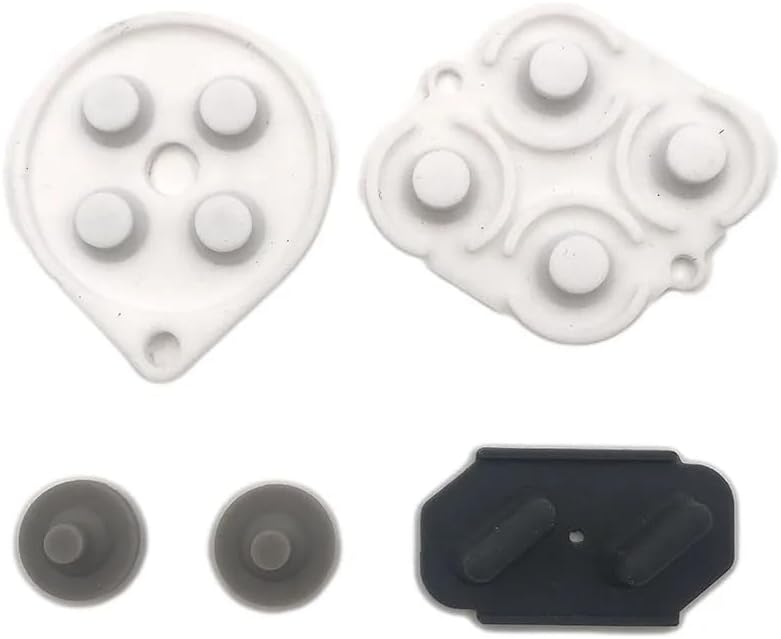


This product is not a complete controller; it is a set of soft silicone conductive button pads intended to replace the contact membranes inside an SNES or SFC controller. With a supplied rating of 3.7, it offers a focused repair solution for owners whose original controller still has a suitable casing, cable, and circuit board but has developed unresponsive buttons. The key advantage is that it addresses contact failure without discarding the rest of the controller.
We may earn a commission when you buy through this link, at no additional cost to you.
The replacement material is silicone, and the listing describes the soft buttons as conductive pads designed for this specific controller family. That makes the product most appropriate when buttons no longer register reliably, respond inconsistently, or require unusual pressure. Because the package includes a conductive rubber silicone pad set, it can restore communication between the button and the controller's original contact system when installed correctly.
The important limitation is scope. This product will not replace a broken cable, damaged exterior, missing buttons, or a nonresponsive controller with a larger electrical fault. It is also limited to Nintendo SNES and SFC controllers, so buyers should compare the photographs, dimensions, and model description carefully before opening their gamepad. Installation also requires basic electronics confidence and careful reassembly.
This is a sensible option for a collector who wants to preserve a working original controller or a hobbyist comfortable replacing internal membranes. It is not the easiest choice for someone seeking an immediate plug-and-play replacement. Choose it when the rest of the controller is in good shape and the problem is clearly isolated to conductive button contacts.
When most of the controller remains sound, replacing only the conductive pads can preserve the original shell and wiring. This approach is particularly useful for restoring unresponsive face buttons or directional inputs without purchasing an entirely new gamepad.
Check whether the original controller responds to any input, whether the cable is secure, and whether the affected buttons behave inconsistently. If the electronics do not function at all, a pad set is unlikely to solve the broader problem.
We may earn a commission when you buy through this link, at no additional cost to you.
This KIWITATA package provides two third-party wireless controllers for original SNES hardware, combining a familiar console shape with a 2.4GHz connection. Its supplied rating of 4.4 reflects a strong overall result, and the main appeal is freedom from the original controller's fixed cable. It is especially attractive for players who enjoy original-console games but prefer more comfortable seating or want to reduce cable clutter around a television.
We may earn a commission when you buy through this link, at no additional cost to you.
The controller supports the original SNES console through an included seven-pin connector adapter. Its 2.4GHz technology has a stated range of up to 30 feet, while the built-in 3.7V, 500mAh lithium-ion battery is described as providing more than 10 hours of continuous use. Pairing is presented as a simple process involving the console adapter and Start button, which reduces the setup burden compared with configuring generic computer controllers.
Compatibility boundaries are important. The product is for the old-school SNES or Super Nintendo console and does not support SNES Mini, SNES Classic, or NES Classic Edition. It also does not support simultaneous use of both controllers for Super Famicom games and is limited to one-player games. It uses proprietary 2.4GHz communication rather than Bluetooth, so it should not be treated as a general-purpose wireless device.
This package is a strong choice for original-console owners who prioritize wireless freedom and a rechargeable battery. It is less suitable for local multiplayer, mini-console owners, or anyone expecting Bluetooth support. Buyers should verify that their console and desired games meet the stated restrictions before ordering.
The included seven-pin adapter lets the controller connect to an original SNES without relying on the stock wired gamepad. The stated 30-foot range provides enough flexibility for most living-room arrangements without requiring a Bluetooth-capable system.
A built-in lithium-ion battery removes the need for disposable batteries during regular sessions. The listing states a continuous runtime of more than 10 hours, making recharging a convenient part of the ownership routine.
We may earn a commission when you buy through this link, at no additional cost to you.
This two-pack of KIWITATA USB controllers is designed for playing SNES-style games through emulators on a computer rather than on original Nintendo hardware. Its supplied rating of 4.3 makes it a solid value-oriented option for Windows, Mac, Linux, and Raspberry Pi users. The pair is particularly useful when two players want to share an emulator without dealing with wireless receivers or complicated software configuration.
We may earn a commission when you buy through this link, at no additional cost to you.
The controller uses a standard USB 2.0 plug and includes a 1.5-meter, or five-foot, cable. The listing states that no drivers are needed, which helps reduce setup time, although buttons and directional axes must be assigned manually within the emulator. It supports a wide range of emulator software, including RetroArch, OpenEmu, VirtuaNES, Sens9x, Zsens, SensGT, uoSNESW, NESEmu, and Jnes.
The most important limitation is that it is not a replacement for an original SNES controller. Its USB plug is designed for computers, so it will not connect directly to an original SNES console or Super Famicom system. It also does not support Nintendo Switch. Software configuration is another consideration because the controller does not automatically assign every control when connected.
This is a good match for retro-gaming PC builds, laptop gaming sessions, and Raspberry Pi projects where a physical gamepad is preferred. It is less appropriate for someone seeking to replace a controller attached to a classic console. Confirm your emulator and operating system first, then expect to spend a few minutes mapping the controls.
The two-controller package is useful for couch multiplayer and head-to-head classic games. Each controller uses a direct USB connection, so there is no pairing process or receiver interference to manage.
Support for common platforms such as Windows, Mac, Linux, and Raspberry Pi makes the set versatile across different retro-computing setups. The listed emulator software gives buyers a useful starting point, although individual control assignment remains necessary.
We may earn a commission when you buy through this link, at no additional cost to you.
The Hyperkin Scout is a direct wired controller replacement for SNES owners who want a new gamepad without changing the console connection method. Its supplied rating of 4.6 is the highest among the products in this guide, and its combination of premium construction, an ergonomic design, and compatibility across all Super NES models makes it the most broadly suitable console option here.
We may earn a commission when you buy through this link, at no additional cost to you.
Its primary advantage is uncomplicated compatibility. Unlike USB emulator controllers or proprietary wireless gamepads, the Scout is presented as a controller for Super NES systems and uses a long 10-foot cable. That lets players sit comfortably farther from a television while retaining the responsive, low-latency experience of a direct connection. The stated premium build quality also suggests it was designed as a durable alternative to aging original hardware.
The tradeoff is that it remains a wired peripheral. It does not offer the cable-free freedom of the KIWITATA or ZAMPAM wireless products, and the supplied information does not identify it as a USB controller for computers or emulators. Its appeal therefore depends on valuing dependable console integration, a familiar control format, and straightforward use over wireless flexibility.
This is the strongest recommendation for someone whose original SNES controller has worn out but whose console remains in regular use. It is also suitable for owners of different SNES models who want one controller that covers the console family without platform-specific setup. Choose the Scout when a dependable, familiar wired replacement is the main goal.
Compatibility with all Super NES models reduces the risk of choosing a controller intended for only one console variation. That makes the Scout easier to recommend for owners of different regional hardware or multiple systems.
The 10-foot cable offers practical room to sit away from the display, while the ergonomic shape is intended to reduce hand fatigue. There is no receiver, charging process, or wireless pairing to manage.
We may earn a commission when you buy through this link, at no additional cost to you.
The GUANKE product is another focused repair option rather than a complete gamepad. It consists of one set of conductive rubber button pads designed for an SNES controller. The listing states that the pads are intended to make a controller look and operate like new again, making them relevant when worn contact membranes are causing missed or inconsistent inputs.
We may earn a commission when you buy through this link, at no additional cost to you.
A full set of replacement contacts can address several buttons at once and allows an owner to preserve the original controller's exterior, cable, and electronics. The listing asks buyers to compare the photographs and descriptions carefully and verify the controller model before purchasing, which is sensible because small differences in pad shape or placement can matter during installation.
No numerical customer rating is supplied for this listing, so it is impossible to compare its customer feedback with the rated products in this guide. It should also be understood as a repair component with a narrower use case. It cannot replace a missing shell, damaged cable, failed circuit board, or complete controller, and buyers need basic comfort with opening and reassembling a gamepad.
Choose this pad set when you have diagnosed conductive contact problems and want to retain an original SNES controller. For a plug-and-play experience, choose a complete wired or wireless controller instead. Comparing the pad shape with your controller before ordering is the most important precaution.
Replacing the membrane allows the original shell and wiring to remain in service. That can be preferable for collectors who value the appearance and continuity of a familiar controller.
The seller's instruction to compare images and descriptions is important. A replacement pad that resembles an SNES pad visually may still differ in the areas that transfer pressure to the original contacts.
We may earn a commission when you buy through this link, at no additional cost to you.
The ZAMPAM two-pack is a wireless, computer-oriented alternative to an original SNES controller. It uses 2.4GHz receivers and supports Windows PC, Mac OS, Linux, Raspberry Pi, RetroPie, Recalbox, Switch 1, and a range of emulator platforms. Its supplied rating of 4.0 reflects a versatile package with some important platform and battery-life limitations.
We may earn a commission when you buy through this link, at no additional cost to you.
The controllers adopt a classic SNES-style layout with sensitive face buttons and a directional pad designed for precise input. Plug-and-play operation is a major convenience: no drivers or dedicated setup software are required, and the listing states that the receiver can be connected to compatible devices before play begins. This makes the package approachable for a family retro-gaming setup or a Raspberry Pi gaming station.
The built-in 240mAh rechargeable battery is listed as delivering up to three hours of continuous play, with a charging time of about one hour. That is shorter than the runtime stated by several competing wireless packages, so users who play for extended periods may need to recharge between sessions. The product also does not support Nintendo Switch 2, and compatibility with other devices depends on their ability to accept a standard USB game controller.
This two-pack is a good fit for users who want wireless multiplayer across computers and supported retro platforms. It is less suitable for original SNES console use, since its connection is described as a USB receiver for computers and supported systems rather than the original console's proprietary controller port. Check platform support before buying.
The broad compatibility list includes major desktop operating systems, Raspberry Pi distributions, and several emulator environments. That makes the controllers useful beyond a single classic-game application.
Plugging the USB receiver into a supported device avoids the driver installation associated with some older gamepads. The familiar layout also helps users transition from original-console memories to modern emulation setups.
We may earn a commission when you buy through this link, at no additional cost to you.
This ZAMPAM wireless controller is built for USB receiver use on computers and selected mobile or Android devices rather than for original SNES hardware. With a supplied rating of 4.2, it combines a broad platform orientation with a useful turbo feature. The product is aimed at emulator users who want a wireless gamepad and the ability to adapt face-button functions.
We may earn a commission when you buy through this link, at no additional cost to you.
The controller uses 2.4GHz technology with a stated range of 24 feet and a rechargeable lithium-ion battery. A USB receiver provides the connection, while software such as Joystick Mapper may be needed to configure keys on some computers. The turbo function can be assigned to the A, B, X, or Y buttons by using the Select combination described in the listing.
Compatibility requires care. The product is explicitly not compatible with the Mini SNES, Super Nintendo, or SNES Classic console. It also requires a supported USB receiver environment and may need additional configuration on some systems. While this makes it unsuitable for a direct console replacement, it can be a strong option for emulators on Windows, Linux, and compatible Android devices.
Buy this controller if wireless freedom, configurable turbo behavior, and cross-platform emulation are the priorities. Skip it if the goal is to replace a damaged controller for an original console. Users new to gamepad mapping should be prepared to follow the supplied setup guidance and verify that their chosen emulator recognizes the controller.
The ability to designate a face button as the turbo control can reproduce the rapid button functions found in some classic games. The listing provides a straightforward Select-plus-face-button method for enabling or disabling the feature.
The receiver-based design supports Windows, Linux, and compatible Android or iOS environments, depending on device support. The result is a more adaptable option for users who operate emulators on several types of hardware.
We may earn a commission when you buy through this link, at no additional cost to you.
This two-pack of wireless USB controllers is designed for retro emulators on Windows PCs, macOS systems, Linux, and Raspberry Pi devices. Its supplied rating of 4.2 and inclusion of two controllers make it a practical choice for multiplayer sessions where a stable receiver connection and long operating time are priorities.
We may earn a commission when you buy through this link, at no additional cost to you.
The controllers use 2.4GHz technology with a stated range of up to 10 meters, or 33 feet, and sensitive buttons intended for accurate input. The built-in rechargeable battery is listed as supporting 10 hours of runtime. The package includes wireless controllers, USB receivers, charging cables, and a user manual, providing most of the essential components for setting up a two-player computer system.
The listing is explicit about incompatible devices. It does not support Android TV boxes, Fire TV, Chromebook, SteamOS, Tesla, C64, or Nintendo Switch, and the Switch exclusion is attributed to the lack of the required button configuration. It is also a USB receiver product rather than a replacement for an original SNES controller, so it cannot serve a classic console directly.
This package suits households that emulate on a desktop or Raspberry Pi and want two wireless controllers for local multiplayer. It is less appropriate for living-room console use or any setup involving one of the excluded devices. Confirm both the physical platform and the specific games or emulators you plan to use before purchasing.
Two controllers and their corresponding receivers make it easier to set up shared retro-gaming sessions. The package reduces the need to source a matching second gamepad independently.
The listed 10-hour battery runtime and 33-foot range are useful for extended play in a room away from the computer. Charging cables are included, so maintaining both controllers should be straightforward.
We may earn a commission when you buy through this link, at no additional cost to you.
The miadore two-pack is a pair of wired USB controllers intended for SNES-style games played through emulators. Its supplied rating of 4.4 places it among the stronger-rated products in the guide. The two-controller bundle, direct plug-and-play USB connection, and broad platform support make it a practical option for multiplayer retro gaming.
We may earn a commission when you buy through this link, at no additional cost to you.
Compatibility is listed for numerous versions of Windows, Mac OS X and later, emulators, Raspberry Pi models, Retro Pi OS, and the Retropi system. The controllers use a standard USB plug and generally require no separate drivers or software. As with many emulator gamepads, users may still need to enter their emulator's input settings and map the buttons if they are not detected as expected.
The control scheme follows the familiar retro design, including an eight-way directional pad, six digital buttons, concave X and Y buttons, convex A and B buttons, and rubberized Start and Select buttons. The approximately five-foot cord provides enough distance for most seated computer or Raspberry Pi gaming arrangements without the complexity of wireless pairing.
This set is a good recommendation for a household that wants two reliable USB gamepads for emulators. It is not a solution for a broken original SNES controller because the third-party USB connection does not plug into an original console. Buyers should use the included pair with an emulator and verify the game platform before ordering.
Both gamepads are included, which is convenient for cooperative or competitive classics. The wired design also removes receiver pairing and wireless interference from the setup process.
Concave and convex face buttons, an eight-way directional pad, and dedicated Start and Select controls reproduce the control language of classic consoles. That familiarity makes the package approachable for new emulator users.
We may earn a commission when you buy through this link, at no additional cost to you.
The KIWITATA Original SNES Wireless controller combines console support with a USB wireless mode, making it one of the more versatile products in this guide. It works with an original SNES through an included seven-pin adapter and also supports 2.4GHz USB use on Windows, Mac, and compatible Raspberry Pi hardware. No numerical customer rating is supplied, so the product's appeal rests on its stated feature set.
We may earn a commission when you buy through this link, at no additional cost to you.
Its rechargeable 3.7V, 500mAh lithium-ion battery is stated to provide more than 10 hours of continuous operation. The controller uses 2.4GHz technology with a stated range of up to 30 feet, and the package includes a USB dongle along with the console adapter. That combination allows the same controller style to move between an original console and a computer-based retro setup.
The product is third-party hardware rather than an original Nintendo controller, and it is intended for the classic SNES and related supported systems. It should not be confused with mini or classic reissue consoles unless the listing specifically confirms support. The supplied information does not make a clear claim about using two controllers simultaneously for every multiplayer game.
This is an attractive option for someone who wants one wireless controller for both an original SNES and a computer. It is also a practical alternative to owning separate console and USB gamepads. Verify the ports on your hardware, your platform, and your multiplayer requirements before making the purchase.
The included seven-pin console adapter and USB dongle allow the controller to serve both original SNES hardware and compatible computer systems. This reduces the need to switch between separate gamepad styles.
A built-in battery and more than 10 hours of stated runtime remove the inconvenience of disposable batteries. The 30-foot stated range also allows comfortable placement away from the console or computer.
We may earn a commission when you buy through this link, at no additional cost to you.
The most important decision is whether you need to repair an original controller, replace it for an original console, or add a controller for emulated games. Platform, connection, power, and control requirements should then guide the final selection.
A conductive silicone pad is not a substitute for a complete gamepad. These products are intended for a controller whose body, cable, circuit board, and buttons remain intact but whose contact membranes have become unreliable. A complete controller is more appropriate when the original peripheral has extensive physical damage, a broken cable, missing components, or electronics that no longer respond. Before choosing a repair part, inspect the controller and test each input. If only several buttons register poorly, replacing the conductive pads may be a focused solution. If the controller does not power up or has visible damage, buying a new controller is generally more practical than attempting an extensive rebuild.
A controller that looks like an SNES controller is not necessarily compatible with an original SNES console. Many products in this category use a USB plug for emulators, while a true console replacement needs the correct original hardware interface. The Hyperkin Scout is explicitly described as compatible with all Super NES models. The KIWITATA 2.4GHz console controller and the KIWITATA Original SNES Wireless model include a seven-pin console adapter. Their limitations still matter: the 2.4GHz two-pack supports only one-player games, and neither should be assumed to work with mini or classic reissue consoles. Always verify the exact system and the product's exclusions.
For PC gaming, prioritize operating-system support, emulator recognition, and whether the controls can be assigned easily. The KIWITATA Classic USB controller supports Windows, Mac, Linux, and Raspberry Pi but requires manual mapping. The miadore pair covers a similar range and also notes that input settings may need adjustment. Wireless packages such as the two ZAMPAM options and the two-pack wireless USB controller use standard USB receivers and may offer simpler setup, but they still depend on the receiving device and emulator accepting a standard gamepad. Download the intended emulator first if necessary, and review its controller settings before finalizing a purchase.
A wired controller offers immediate responsiveness, no charging, and no pairing process. It remains the simplest choice for a stationary console setup, and the Hyperkin Scout's 10-foot cable gives players room to sit comfortably. A wireless controller removes cable restrictions and can make multiplayer sessions less cluttered, but it introduces receiver setup, battery management, and a possible compromise in connection behavior. Wireless options in this guide use 2.4GHz technology rather than Bluetooth. They should not be purchased based on the word wireless alone; confirm the required receiver, stated range, and platform restrictions first.
Rechargeable wireless controllers require charging time and may need recharging during longer sessions. The KIWITATA console controllers claim more than 10 hours of continuous use from a 500mAh battery. The two-pack wireless USB SNES also states a 10-hour runtime. By comparison, the ZAMPAM 2.4GHz USB controllers list up to three hours from a 240mAh battery. Actual results can vary with use, but these stated figures help indicate which package is better for extended gaming. Wired controllers avoid the question entirely because they draw power from the console or computer.
An SNES-style replacement should be comfortable for long sessions and familiar in its control placement. The KIWITATA and ZAMPAM products describe concave directional keys designed to resist slipping, along with responsive face buttons. The miadore controller uses concave X and Y buttons, convex A and B buttons, an eight-way directional pad, and rubber Start and Select buttons. The Hyperkin Scout emphasizes ergonomic construction and a premium feel. Beyond shape, consider cable flexibility, button spacing, and whether a low-latency wired experience is more important than wireless convenience. A controller that matches your preferred layout can reduce the adjustment period when moving from an original gamepad.
Two-controller packages are useful for local multiplayer, but not every two-pack supports the same games or connection method. The KIWITATA Classic USB controller and miadore pair use separate wired USB plugs. The ZAMPAM 2.4GHz and two-pack wireless USB packages include two controllers, although receiver arrangements should be checked for the intended platform. The KIWITATA console 2.4GHz two-pack is restricted to one-player games despite including two controllers. Review the box contents, number of receivers, adapters, and charging cables to make sure the package supports the intended multiplayer arrangement.
Begin by identifying the platform and connection method. For an original SNES controller, attach the correct console connector or supplied seven-pin adapter and power on the console before pressing Start. For a USB controller, connect it to the computer, open the emulator, and select the appropriate input device from its settings. If directions or buttons do not respond, revisit the emulator's mapping menu rather than repeatedly pressing the controller. Wireless models should be charged, switched on, and paired with their included receiver according to the product's instructions.
When installing a conductive pad set, work on a clean, static-safe surface and retain every small screw in a labeled container. Remove the controller shell carefully, note the orientation and position of the original pads, and transfer the replacements into the correct locations. The pads must sit flat and maintain contact with the button plungers. Reassemble the controller fully before testing it, and disconnect the controller from the console or computer while opening it.
For long-term care, keep wired controllers free from sharp bends and strong pulling forces, and avoid placing heavy objects on their cables. Charge wireless controllers on a suitable surface and replace aging rechargeable batteries if runtime becomes noticeably shorter. Clean the controller exterior with a soft, dry or lightly damp cloth, but keep moisture away from openings and seams. Periodically check connectors, receiver placement, and button response so minor wear can be addressed before it becomes a complete failure.
It can refer to either a complete replacement gamepad or a small repair component such as conductive button pads. A complete controller is appropriate when the original unit has major physical or electronic damage. A pad set is more suitable when the controller otherwise works but individual buttons have become intermittent or unresponsive.
Generally, no. USB controllers in this guide are intended for computers, emulators, Raspberry Pi systems, or other supported platforms. A controller for an original SNES must use the console's appropriate proprietary connection, whether through a wired plug or a compatible wireless adapter.
The featured wireless products use 2.4GHz technology and generally require a compatible receiver or the included console adapter. They should not be treated as standard Bluetooth gamepads. Check the package contents and platform requirements before ordering, especially if your preferred device expects a particular wireless protocol.
That depends on the product. Some two-controller packs are intended for USB emulation and can support local multiplayer, while the KIWITATA 2.4GHz original-console two-pack is explicitly limited to one-player games. Confirm the console or emulator, included receivers, and supported game modes before purchasing a multipack.
Most USB products in this guide state that no separate drivers are required, but many still need buttons and directions assigned inside the emulator's input settings. Download the emulator first, connect the controller before launching a game, and consult that emulator's mapping controls if the inputs appear incorrect.
Compare the replacement pads with the original membranes in shape, size, number, and placement. The supplied listings specifically recommend checking photographs and model descriptions before ordering. If the pad geometry is uncertain, avoid forcing it into the controller because a poor fit may prevent buttons from pressing evenly.
The KIWITATA original-SNES wireless products are expressly not intended for SNES Mini or SNES Classic systems, and other USB controllers are not automatically compatible either. Original-console replacement models support the classic console through their proper adapters. Always verify the exact reissue console and its controller port before purchasing.
Repair the controller if the shell, cable, circuit board, and buttons are intact and only the conductive contacts have worn out. Replace it if damage is extensive, multiple electrical systems have failed, or you lack confidence in opening and reassembling the unit. A complete replacement offers faster setup and more predictable support.
The Hyperkin Scout is the strongest general console replacement in this guide because it combines a 4.6 supplied rating, broad Super NES compatibility, premium construction, and a long wired cable. The KIWITATA 2.4GHz console two-pack is ideal for original-SNES owners seeking wireless freedom and rechargeable operation, while the KIWITATA Classic USB pair offers an economical way to add two controllers to an emulator setup.
Your priority should determine the category. Choose a complete wired controller for straightforward original-console use, a 2.4GHz model for cable-free play, and a USB controller for emulators or Raspberry Pi projects. If the original controller is otherwise sound, a correctly matched conductive pad set can restore button contact while preserving the rest of the unit.
Finally, check the current product listing, availability, compatibility notes, and price before ordering. Ratings, bundle contents, and product details can change over time, and the right replacement may differ depending on whether your priority is repairability, console compatibility, multiplayer, or computer use.