
TBS2604v2 UHD HDMI Encoder
5.0Editor score
4K UHD H.265 encoding
3840×2160 at 30fps
Dual independent streams
Web UI remote control
H265 H264 HDMI Iptv Encoders compared for 4K support, streaming protocols, audio, overlays, ease of setup, and deployment flexibility.
H265 H264 HDMI Iptv Encoders convert an HDMI source into network-ready video for live streaming, IPTV, digital signage, surveillance, and broadcast workflows. A strong encoder should balance input resolution, frame rate, protocol support, audio handling, and dependable management rather than focusing on one specification alone.
This guide compares ten hardware encoders using the information supplied for each model. We examine H.265 and H.264 support, 4K or 1080p capabilities, streaming formats, simultaneous outputs, overlays, external audio, remote management, installation requirements, and practical suitability for popular platforms such as YouTube, Facebook Live, Twitch, OBS, VLC, and compatible NVR systems.
Each review identifies the configuration that makes a particular model attractive and the compromises that buyers should consider. The strongest general-purpose choice leads the list, while smaller and more specialized models serve mobile, space-constrained, PoE, or simpler streaming installations. Prices and availability can change, so confirm current specifications before ordering.
5.0Editor score
4.1Editor score

4.0Editor score
The comparison below highlights resolution, codec flexibility, protocol coverage, overlays, and operational features, helping buyers match each encoder to a specific streaming environment.


This URayCoder model combines 4K UHD HDMI handling with H.265 and H.264 encoding in a dedicated streaming appliance. Its 4.5 rating reflects a broadly capable product aimed at users who need more than a simple HDMI-to-network converter. The most compelling feature is the ability to generate four outputs with different protocols, making it useful for simultaneous platform distribution, IPTV feeds, and local distribution systems.
We may earn a commission when you buy through this link, at no additional cost to you.
Maximum input and output resolution reaches 3840×2160, with up to 30fps at 4K and as much as 120fps at 2K or lower. HDCP 1.4 decoding expands source compatibility. Protocol support includes HTTP, RTSP, RTMP and RTMPS, SRT, HLS, MP4, multicast, FLV, WebRTC, TRTC, and ICECAST. This breadth allows one source to serve YouTube, Facebook, Twitch, and other services while also supporting dedicated network destinations.
Branding and operational controls are unusually thorough. Static text, scrolling captions, logos, and timestamps can be added, while resolution, frame rate, and bitrate remain adjustable. Cropping, rotation, flipping, and mirroring make the encoder useful when the incoming framing is not ideal. Embedded HDMI audio and line-in audio are both supported, giving operators more flexibility when a mixer or presentation source provides separate sound.
This is a strong all-purpose choice for churches, events, education, digital signage, and professional live-production rooms. The main drawback is that its many options may feel complex to a first-time streamer. Users should map their destinations, protocols, and network requirements before setup. Even so, the combination of 4K input, four-stream output, extensive customization, and broad platform compatibility makes it one of the strongest general-purpose models in this guide.
The four-output architecture is the key differentiator. Different streams can use separate protocols and target different networks or platforms, reducing the need for multiple boxes when one event must reach several audiences.
Built-in text, logo, timestamp, crop, rotate, flip, and mirror tools let operators prepare a more polished feed before it reaches viewers. These controls are especially useful for recurring corporate, worship, and educational streams.
We may earn a commission when you buy through this link, at no additional cost to you.
This encoder stands out through the combination of a 4.7 rating, 4K UHD support, and exceptional protocol coverage. It is designed to move HDMI sources across professional IP networks and live-streaming services, and its feature set covers the main requirements encountered in IPTV, events, online video, and NVR installations. Among the products reviewed, it offers the most balanced combination of capability and customer feedback.
We may earn a commission when you buy through this link, at no additional cost to you.
The H.265 and H.264 encoder supports 3840×2160 input and output, reaching 30fps at 4K and up to 120fps at lower resolutions. HDCP 1.4 decoding helps it accept a wider range of protected ultra-HD sources. Four streams can run simultaneously with different protocols, including HTTP, RTSP, RTMP or RTMPS, SRT, HLS, MP4, multicast, ONVIF, FLV, WebRTC, TRTC, and ICECAST.
The configuration controls support more than codec selection. Operators can place static text, scrolling captions, logos, and timestamps over their video. Resolution, frame rate, and bitrate can be adjusted, along with crop, rotate, flip, and mirror functions. HDMI embedded audio and line-in audio provide separate source options, while adjustable sound quality helps the output fit different streaming environments.
Management is designed to be more approachable than the feature list suggests. A user interface, instruction manual, and terminal access allow setup through a computer or mobile phone, and stream status can be viewed through a URL. Buyers seeking one encoder for several platforms will find this especially valuable. The tradeoff is the need to understand IP addresses, protocol choices, and destination settings. For a flexible, multi-purpose deployment, this is the leading recommendation.
ONVIF, WebRTC, TRTC, ICECAST, RTMP, RTSP, SRT, and HLS coverage makes the encoder suitable for conventional streaming services as well as IPTV, surveillance, and browser-based distribution. That makes it easier to retain equipment when a workflow changes.
Independent outputs can serve main and secondary destinations with different protocol requirements. This reduces duplicated hardware while preserving the option to tailor resolution, frame rate, and bitrate to each receiving system.
We may earn a commission when you buy through this link, at no additional cost to you.
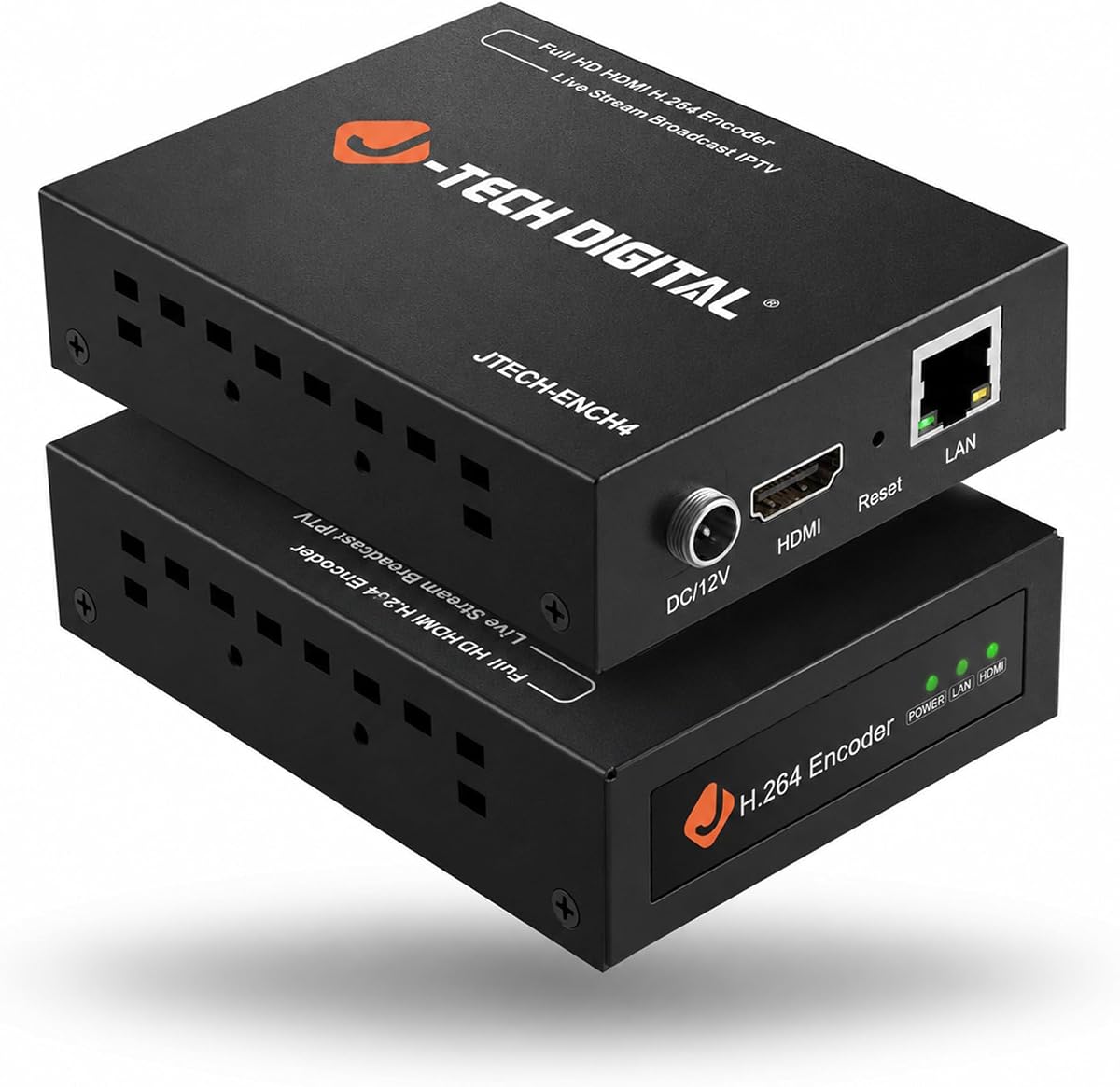
The J-Tech Digital JTECH-ENCH4 is built around a clear professional proposition: accept 4K at 60Hz, encode in H.264 or H.265, and distribute the result over standard TCP/IP. Its 4.1 rating is respectable, and the distinction between 4K60 input and 1080p60 output gives buyers a useful way to understand exactly what the device can deliver.
We may earn a commission when you buy through this link, at no additional cost to you.
One main stream and three substreams can operate simultaneously, with the substreams set at a lower resolution than the main output. Supported formats include RTMP and RTMPS, HLS, FLV, TS, MP4, RTSP, UDP, SRT, and TRTC. Compatibility with VLC is also noted, including playback through the encoder's HTTP-based transport stream address, making verification straightforward for users familiar with network video.
The web GUI allows remote adjustment of bitrate, frames per second, and IP settings. OSD text and logos can be added for branding or identification. Additional visual controls include flip, rotate, crop, contrast, and brightness adjustments. MPEG1 Audio Layer 2 support and CBR or VBR rate management from 32 Kbps to 32 Mbps add useful control over audio and network efficiency.
This encoder fits integrators who receive 4K60 source material but need a manageable 1080p60 network feed. It is less suitable for operators requiring native 4K60 output, since the supplied specification explicitly caps output at 1080p60. It also comes with a one-year manufacturer replacement warranty and free lifetime technical support. For controlled installations with mixed main-stream and substream destinations, it is a strong premium-oriented choice.
The encoder can ingest a high-frame-rate 4K source and produce a 1080p60 stream that is easier to deliver across existing networks. This is a sensible design for operators whose priority is smooth 60fps motion rather than native 4K output.
One main stream and three lower-resolution substreams support different receivers from a single source. This can simplify deployments involving a primary viewing platform, backup feeds, and lightweight monitoring endpoints.
We may earn a commission when you buy through this link, at no additional cost to you.
This compact encoder prioritizes affordability and straightforward operation without sacrificing the H.265 and H.264 support sought by modern streaming setups. It produces 1080p60 streams and is compatible with SRT, RTMP and RTMPS, RTSP, UDP, HTTP, HLS, WebRTC, TRTC, Icecast, and SHOUTcast. The 4.0 rating makes it a sensible entry point for regular live events and smaller installations.
We may earn a commission when you buy through this link, at no additional cost to you.
Dedicated hardware encoding removes the need to run an encoding application on a computer. The product claims H.265 can reduce bandwidth use by up to 50% compared with legacy H.264-only solutions while retaining clear output. Configuration takes place through a browser, which also removes desktop compatibility concerns. DHCP is enabled by default to help avoid IP conflicts, although basic knowledge of IP addressing and RTSP or RTMP setup remains beneficial.
Its enclosure is approximately 90 by 54 by 29mm, making it easy to position behind monitors, on shelves, or in equipment racks. Low power consumption is suited to continuous operation for live events, remote monitoring, and digital signage. HDMI embedded audio and an external 3.5mm input are supported, while an OSD generator can add scrolling text, logos, or timestamps.
This is the best choice for buyers who need a straightforward dedicated box at 1080p rather than 4K input. The limited resolution rules it out for UHD source requirements, and advanced network setups still demand attention. Even so, its compact design, protocol range, browser-based operation, and one-year warranty make it an attractive option for small venues, creators, and remote-monitoring installations.
Moving encoding into dedicated hardware reduces dependence on a powerful computer and avoids desktop encoder configuration. Browser access makes the unit approachable for users who already understand basic streaming destinations.
At roughly 90 by 54 by 29mm, the encoder can sit behind a display or inside a compact installation. Its low-power design is also practical for continuous signage and monitoring use.
We may earn a commission when you buy through this link, at no additional cost to you.
This multi-channel encoder is intended for more demanding environments where multiple sources and destinations must be coordinated. It supports H.265 and H.264 for 1080p HDMI input and is designed for broadcast, live streaming, IPTV, and NVR workflows. Its 4.3 rating indicates solid customer reception, while the multi-channel design differentiates it from basic single-output converters.
We may earn a commission when you buy through this link, at no additional cost to you.
Each HDMI input can produce two video streams simultaneously, and each stream can use a different protocol. Supported options include HTTP, RTSP, RTMP and RTMPS, SRT, HLS, UDP, RTP, MP4, ONVIF, multicast, Unicast, FLV, and WebRTC. The broad list supports platforms including YouTube, Facebook, Ustream, Livestream, Twitch, Vimeo, Streamspot, Dacast, Tikilive, and Netrmedi.
Output customization includes static text, scrolling text, logos, and time. Operators can alter resolution, frame rate, and bitrate, along with crop, rotate, flip, and mirror controls. Audio output is also adjustable, allowing the feed to be adapted more closely to different platforms and network conditions. Multiple stream types can be selected to balance bandwidth consumption against image quality.
The device is especially relevant to integrators because the supplied information notes that SDK and API access, CGI control protocol documents, and customization options are available. Those capabilities support secondary development and tailored firmware or hardware functions. Its higher acquisition cost may not suit casual users, but organizations managing multiple channels or building repeatable streaming systems can gain meaningful operational value. It is a strong choice where scalable control matters more than simple setup.
Producing two streams from each HDMI input allows one source to serve different services with separate protocols. The option to vary resolution, bitrate, and protocol makes it possible to optimize each destination independently.
SDK, API, and CGI control documentation provide a foundation for custom control systems. Shell customization and firmware or hardware development options make the platform more relevant to integrators than ordinary single-purpose streamers.
We may earn a commission when you buy through this link, at no additional cost to you.
This URayCoder model focuses on a highly practical full-HD configuration rather than chasing 4K specifications. It accepts 1920×1080 input and output at up to 60fps, making it a strong candidate for live production, corporate broadcasting, IPTV, and NVR workflows that prioritize smooth motion. The 4.5 rating is among the stronger results in this comparison.
We may earn a commission when you buy through this link, at no additional cost to you.
Its dual H.265 and H.264 encoding chip is paired with HDCP 1.4 decryption for compatible high-definition sources. Four video streams can be generated with different protocols, including HTTP, RTSP, RTMP and RTMPS, SRT, HLS, MP4, multicast, ONVIF, and FLV. These outputs can target services such as YouTube, Facebook, Twitch, and Vimeo simultaneously.
Branding and image controls are extensive. Static text, scrolling captions, logos, and timestamps can be added, while resolution, frame rate, and bitrate are adjustable. Operators can crop, rotate, flip, and mirror the image. HDMI embedded audio and line-in audio are both accepted, and sound quality can be adjusted, providing practical options for sources that route audio separately.
The interface is designed for a relatively smooth setup process, with an instruction manual and management through computers or mobile phones. Stream status can also be checked through a URL. This makes the encoder approachable despite its advanced protocol list. It does not support 4K input, so it is less relevant to UHD workflows. For stable-looking 1080p60 streams and multi-platform output, however, it remains an effective and well-rounded choice.
1080p60 is a practical target for live events where motion smoothness and network efficiency matter more than 4K resolution. The encoder preserves this full-HD frame rate across its stated input and output capability.
Supporting HDMI embedded audio alongside line-in audio gives operators more choices when combining a camera, presentation computer, or audio mixer. Adjustable sound quality adds another level of output control.
We may earn a commission when you buy through this link, at no additional cost to you.
The JTECH-ENCH4AP stands apart through Power over Ethernet support, making it an attractive choice for installations where running separate power and network cables is inconvenient. It also accepts 4K60 HDMI input and encodes to 1080p60 in H.264 or H.265. The 4.4 rating indicates a favorable reception, and the combination of PoE, analog audio, and branding tools is especially relevant to permanent AV setups.
We may earn a commission when you buy through this link, at no additional cost to you.
Supported protocols include RTSP, RTP, RTMP and RTMPS, HTTP, UDP, TS, and ONVIF. The unit can broadcast simultaneously to as many as four platforms, including YouTube, Facebook Live, Twitch, and others. A 3.5mm analog audio input can be embedded into the HDMI video, which is useful for live events, churches, and AV installations where the mixer carries a separate audio feed.
OSD customization includes text, logos, and a custom no-signal image. That last feature is particularly useful for digital-signage and monitoring systems because it provides a branded screen when the source disappears. The 4K60 input gives current cameras, computers, and playback devices room to feed high-refresh material, while the 1080p60 output keeps network delivery practical.
PoE is the defining convenience, but it is also a requirement: the product needs a compatible PoE network switch. It does not send native 4K60 output, so buyers whose receivers demand 4K should choose a different model. For churches, studios, campuses, and enterprise AV rooms where a single Ethernet cable can carry both power and data, this encoder offers an efficient, professional installation pattern.
PoE combines power and network data over one Ethernet connection. That can simplify wiring, reduce cable clutter, and make the encoder easier to relocate when an AV layout changes, provided the switch supports PoE.
A custom no-signal image gives unattended installations a polished fallback display. Text and logo overlays add further identity control for digital signage, monitoring, and event feeds.
We may earn a commission when you buy through this link, at no additional cost to you.
This URayCoder encoder combines 4K UHD processing with a broad collection of streaming formats. It supports H.265, H.264, and AVC and can send content through RTSP, RTMPS, HLS, UDP, SRT, HTTP, FLV, MP4, WebRTC, TRTC, and ICECAST. Its 4.4 rating suggests that users find the balance of capability and operation satisfactory.
We may earn a commission when you buy through this link, at no additional cost to you.
The encoder handles 3840×2160 input and output, reaching 30fps at 4K and up to 120fps at 2K and lower resolutions. HDCP 1.4 decoding supports compatible ultra-HD sources. As with other high-output models in this roundup, four streams can operate simultaneously with different protocols, including to YouTube, Facebook, Twitch, and Vimeo.
Image and branding controls cover static text, scrolling captions, logos, timestamps, crop, rotate, flip, and mirror. Resolution, frame rate, and bitrate are adjustable, as are embedded and line-in audio and sound quality. The web interface can be accessed from computers and mobile phones, with stream status visible through a URL. This creates a practical balance between dedicated controls and accessible monitoring.
The breadth of protocols is valuable for users whose destination requirements are not settled, including those operating OBS, browser-based systems, NVR environments, and web services. Its main disadvantage is complexity. Four simultaneous outputs and numerous adjustable parameters demand deliberate network design, and less technical users may need a simplified workflow. Buyers seeking strong 4K capability and future flexibility will find this model well equipped for the task.
The stated 3840×2160 capability gives operators room to use UHD sources while retaining lower-frame-rate options for lower resolutions. H.265 support can also help reduce bandwidth needs when network capacity is constrained.
The encoder can serve legacy-style UDP or RTMP destinations alongside newer SRT, WebRTC, TRTC, and ICECAST workflows. This range reduces the risk of choosing a device tied to only one type of receiver.
We may earn a commission when you buy through this link, at no additional cost to you.
The DDMALL CEV-2K is the smallest and most mobile-oriented encoder in this guide. Its enclosure measures 75 by 32 by 22mm and weighs 32g, making it easy to carry between events or deploy where installation space is limited. It supports 1080p60 input and output with H.265 and H.264 encoding, covering the core requirements of most compact streaming setups.
We may earn a commission when you buy through this link, at no additional cost to you.
Protocol options include SRT, RTSP, RTMP, RTMPS, TCP, and UDP. The encoder supports video bit rates up to 16Mbps and is compatible with third-party decoders, which is useful when the receiving environment is already established. Its low 2.4W power consumption and ability to draw power from compatible HDMI ports or a USB connection reduce dependence on a dedicated adapter.
Real-time OSD editing allows custom text, images, and logos to be placed on the stream while it is running. The encoder can be managed through a web interface or the DDMALL Cloud System. Remote control and monitoring through the cloud are particularly convenient for portable rigs where an operator may not have constant physical access to the device.
The product has no published customer rating in the supplied data, so it should be evaluated primarily on its documented specifications rather than social proof. It cannot deliver 4K output, and its tiny enclosure may offer fewer physical controls than larger appliances. For mobile producers, temporary event streams, and space-constrained deployments, however, its size, low power use, cloud access, and 1080p60 performance are compelling.
At 75 by 32 by 22mm and 32g, the CEV-2K can move easily between production locations. Its low-power operation also supports longer operation in temporary or mobile installations.
Cloud-based management allows operators to check and control the encoder from an internet-connected device. This is a practical advantage for unattended or traveling production setups.
We may earn a commission when you buy through this link, at no additional cost to you.
The TBS2604v2 UHD is a focused 4K encoder that combines H.265 and H.264 encoding with a perfect 5.0 rating in the supplied data. It supports a maximum resolution of 3840×2160 at 30fps and is positioned for IPTV and professional video distribution over LAN or WAN networks. Its streamlined feature set makes it appealing to operators who value clarity and dependable stream separation.
We may earn a commission when you buy through this link, at no additional cost to you.
H.264 and H.265 support gives buyers a practical way to manage bitrate and network constraints while preserving image quality. Supported protocols include HTTP, HLS with M3U8, RTSP, UDP unicast and multicast, RTMP and RTMPS, and SRT. This mixture covers browser-oriented delivery, local network playback, multicast distribution, and common live-streaming workflows.
Dual streaming is a major advantage. The main and substream can be encoded at different resolutions and bitrates, allowing one feed to serve both a high-quality primary destination and a more efficient secondary receiver. A Web UI and Telnet remote access provide two methods of managing the encoder, although secure network practices are important when enabling administrative protocols.
The TBS2604v2 is a strong choice for IPTV operators, professional distribution systems, and businesses that require genuine 4K output. It does not offer the four-output capacity of several URayCoder models, so buyers needing many simultaneous destinations should consider those alternatives. For a focused two-stream UHD workflow, however, its 5.0 rating, protocol coverage, and remote management make it one of the most compelling purchases in the guide.
Main and substreams can use separate resolutions and bitrates. A primary audience may receive a higher-quality feed while secondary systems use a lighter stream designed around network capacity.
HTTP, HLS, RTSP, multicast, RTMP, RTMPS, and SRT cover complementary distribution methods. Web UI management is convenient for routine operation, while Telnet provides an additional remote-access path for controlled environments.
We may earn a commission when you buy through this link, at no additional cost to you.
The right encoder depends on source resolution, destinations, network capacity, audio routing, and the amount of branding and remote control required.
Begin with the actual resolution and frame rate arriving at the encoder. Some models accept 4K60 input but output 1080p60, while others encode 4K UHD at 30fps. These are not equivalent. A high-frame-rate source may matter for fast motion, live sports, gaming, or detailed camera work, whereas 4K output is important when viewers need maximum image detail. Check the native output specification rather than relying on the highest number in the listing.
H.265 can provide greater bandwidth efficiency than H.264, while H.264 remains broadly compatible with platforms, decoders, NVRs, and legacy receivers. A dual-codec encoder offers more deployment freedom. Consider whether the downstream systems support HEVC, and retain H.264 as a fallback when compatibility is uncertain. Codec support alone does not determine stream quality; bitrate, frame rate, network conditions, and encoder implementation remain important.
Protocols determine where a stream can go. RTSP and UDP are common in IPTV and local-network systems, RTMP and RTMPS are familiar in online broadcasting, SRT is useful for contribution links, HLS supports browser and playlist-based playback, and WebRTC enables interactive web delivery. ONVIF and ICECAST can matter for professional monitoring and broadcast environments. Match the encoder to every destination rather than selecting a model based only on the platform named in its title.
A single output is adequate for a one-destination feed, but multi-stream models offer valuable redundancy and audience segmentation. One stream can carry a high-quality main feed while another supplies a lower-bandwidth version. Separate protocols also allow a local IPTV channel and a public streaming platform to be served at once. Multi-channel models may support additional HDMI inputs, while standard single-input products can still produce multiple outputs from the same source.
HDMI embedded audio is convenient when everything originates from one computer, but many live installations use a mixer with a separate analog or digital feed. Encoders with line-in or 3.5mm audio can embed that sound into the outgoing video. Audio bitrate and quality controls are also useful for balancing clarity against bandwidth. Confirm the connector type and ensure the audio source can be synchronized before the event begins.
Text, logos, timestamps, and scrolling captions can identify an event, display instructions, or reinforce branding. Image controls such as crop, rotate, flip, mirror, brightness, and contrast can correct awkward source framing or improve visibility. These features save time compared with adding overlays in a separate production system. Consider whether OSD editing must occur live, whether a custom no-signal screen is needed, and how the overlay will appear in every output.
Browser-based configuration is convenient, but remote management should be secured through appropriate network controls. A web interface, mobile access, cloud service, and Telnet can each serve different environments. PoE reduces cabling by carrying power and data together, though it requires a compatible switch. Dedicated Ethernet also avoids unreliable Wi-Fi behavior during a critical event. Static addressing or DHCP should be planned around the encoder's location in the network.
A palm-sized encoder works well for portable and space-limited installations, while a larger multi-channel appliance may suit equipment racks and permanent control rooms. Low power consumption helps with continuous digital-signage duty. Heat, ventilation, and placement around sensitive equipment still matter. Review the unit's physical dimensions, power method, operating requirements, and warranty terms before committing to a permanent installation.
Begin by identifying every video and audio source, then connect the HDMI source to the encoder and join the encoder to the network. Select a wired Ethernet connection when reliability is important, and confirm that the source resolution and frame rate fall within the model's supported input range. Power the unit according to its instructions, allowing for PoE requirements, USB power constraints, or the dedicated adapter where appropriate.
Open the local web interface using a computer or phone on the same network. Set the encoder's network address, then create and test each output independently. Choose H.265 when the receivers support it and bandwidth efficiency matters, or H.264 for broader compatibility. Configure resolution, frame rate, bitrate, audio input, overlays, and destination credentials before connecting the device to a live audience.
Perform a full rehearsal with the actual cameras, mixer, playback system, internet connection, and receiving platforms. Check for lip-sync issues, dropped frames, overlay placement, audio levels, and whether every receiver opens the stream. Keep the interface protected, use appropriate network security, and never expose administrative controls to an untrusted network. For continuous operation, provide ventilation and check cables, power, and network status regularly.
Not always. A computer with suitable software can handle basic streaming, especially for a single destination. A dedicated encoder becomes more valuable when you need 4K or 60fps handling, simultaneous outputs, protocol flexibility, remote management, reliable operation without computer distractions, or a permanent installation that avoids depending on general-purpose desktop software.
H.265 is generally more bandwidth-efficient, making it attractive for constrained networks or high-quality delivery. H.264 has broader historical compatibility and remains a safe choice when the platform or receiver may not support HEVC. Confirm that every output destination and decoder can handle the selected codec, and retain both options where possible.
4K input means the encoder can accept a UHD signal, while 4K output means it can transmit UHD to the receiver. Some products accept 4K60 but encode 1080p60, reducing the frame rate and resolution delivered over the network. Buyers should compare both specifications against the needs of their source, receiving equipment, and viewers.
Many of the reviewed models can generate multiple outputs with different protocols, allowing simultaneous delivery to services such as YouTube, Facebook Live, Twitch, and local IPTV or NVR destinations. Each platform still requires the correct credentials, endpoint, and compatible protocol. Test every destination independently before a live event.
Yes, hardware encoders are designed to run independently after configuration. Many can be managed through a browser from a computer or mobile phone, while the DDMALL model also offers cloud-based control. The management device may still be needed for initial setup or later adjustments, but ongoing encoding does not require a desktop encoding application.
No. PoE is a convenience for compatible installations because it combines power and network data through one Ethernet cable. The JTECH-ENCH4AP requires a suitable PoE network switch. Other encoders may use conventional Ethernet and a separate power connection, which can be preferable when existing PoE infrastructure is unavailable.
Consider the source resolution, frame rate, motion level, codec, network capacity, and quality expected by viewers. Higher bitrates preserve more detail but consume more bandwidth and may increase delay or instability on limited links. Start with a documented or manufacturer-recommended setting, then test under realistic network conditions before committing to a recurring production configuration.
Verify video resolution and frame rate, audio synchronization and level, overlay placement, connection stability, and playback on every intended receiver. Also test the live platform's latency and whether any password, authentication, or protocol settings expire. A rehearsal using the actual source devices is more reliable than testing with a simple test pattern alone.
The URayCoder 4K Network Encoder is the strongest all-around pick because it combines 4K support, H.265 and H.264, four simultaneous outputs, extensive protocol support, and detailed branding controls. The J-Tech Digital JTECH-ENCH4 is a notable premium choice for 4K60 input and main-plus-substream distribution, while the Compact 1080P60 HDMI Video Encoder delivers the most approachable dedicated solution for simpler 1080p deployments.
The right encoder should be selected around the receiving system rather than around the largest printed resolution. Count required outputs, confirm protocol compatibility, check audio routing, and decide whether PoE, cloud management, analog audio, or a custom no-signal screen will simplify the installation. Models with four outputs offer more distribution freedom, while dual-stream devices can be sufficient for a main feed and one secondary destination.
Finally, verify current specifications, supported source formats, destination requirements, warranty terms, and price before purchasing. Hardware encoder listings can change as new models and revisions appear, and network conditions can determine whether a promising configuration performs as intended. A complete rehearsal with the real source, mixer, network, and receiver is the final step before taking any encoder live.