
Sony GV-D200 Digital 8mm Recorder
4.7Editor score
Digital8 recording and playback
Hi8 and 8mm compatibility
FireWire editing connection
Compare the best Hi8 and 8mm video cassette players for tape playback, digitization, TV viewing, recording, and easy computer transfer.
Finding a Hi8 and 8mm video cassette player can be complicated because these compact tape formats rely on camcorder-style hardware rather than ordinary VHS decks. The right machine should match your tapes, support the outputs you need, and provide a dependable route to watch or preserve family recordings.
This guide compares ten players, camcorders, and conversion options based on supported formats, playback functions, transfer connections, included accessories, and stated warranties. It covers devices made for straightforward viewing as well as bundles designed to digitize tapes through USB, while separating true players from capture-only converters.
Each review explains the product's strongest use, limitations, and ideal buyer. The first three recommendations represent the best overall, premium, and budget choices, while the remaining entries provide alternatives for specific needs. Product availability and prices can change, so confirm current listing details before purchasing.
4.7Editor score

4.0Editor score

4.0Editor score
The comparison below covers dedicated tape players, hybrid camcorders, and a capture-only converter. Format support, bundled connections, and intended use vary considerably, so the best choice depends on whether the priority is viewing, recording, digitization, or saving space.


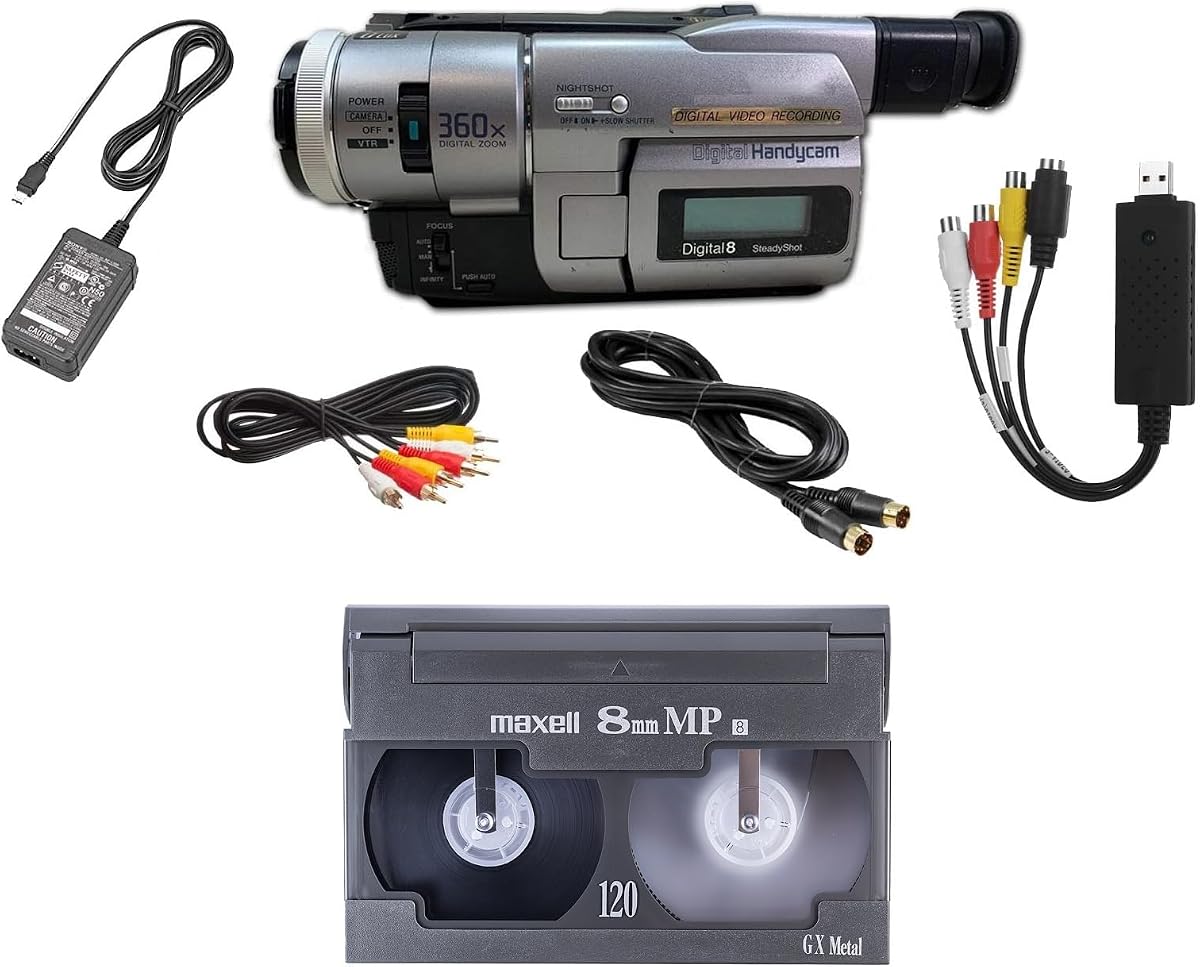

This Sony camcorder package combines broad legacy tape compatibility with a practical digitization workflow. Its 4.0 rating reflects a generally useful approach for households that want to watch and preserve tapes without buying separate playback and capture hardware. It supports regular 8mm, Video8, Hi8, and Digital8 media, giving it unusual flexibility within this category.
We may earn a commission when you buy through this link, at no additional cost to you.
The included USB capture device can move tape footage into computer files or support burning it to DVD. AV and S-Video cables provide alternative paths for television viewing or transfer setup, while the stated compatibility with Windows and Mac systems is useful for buyers working across different computers. Connections through USB, FireWire, and Thunderbolt add another layer of flexibility.
There are two important limitations. The device is intended for playback rather than recording video, and it does not support PAL. These constraints may not matter for someone archiving North American or NTSC tapes, but they can rule it out for collectors of PAL recordings. The product data also positions it as a playback-oriented camcorder, not a modern all-purpose camcorder.
This is the strongest all-around recommendation for a buyer who wants one package to handle several 8mm-family tapes and transfer them to a computer. It is especially attractive when the included cables, power supply, and capture device reduce the number of separate purchases. For PAL-heavy collections or users seeking a new recording camcorder, choose a more specialized alternative instead.
Rather than limiting playback to one cassette generation, the camcorder handles regular 8mm, Video8, Hi8, and Digital8 tapes. That makes it a practical centerpiece for mixed family archives where the tape formats may vary from one recording to the next.
The bundled USB capture device is designed to transfer tapes into computer files and burn captured footage to DVD. Including AV and S-Video cables also makes it easier to connect the unit to a television or separate transfer arrangement.
We may earn a commission when you buy through this link, at no additional cost to you.
The Sony GV-D200 stands out with the strongest listed customer rating in the group and a clear focus on the Digital8 format. Unlike many camcorder-style options listed here, it can both record and play Digital8 videocassettes. It also plays Hi-8 and regular 8mm media, making it the premium choice for someone who wants more than playback.
We may earn a commission when you buy through this link, at no additional cost to you.
Its integrated 20-segment assemble editing offers a meaningful advantage for owners who want basic scene assembly without immediately moving every project to a computer. The built-in IEEE 1394 FireWire iLink port supports direct connectivity to compatible editing systems, while composite outputs provide a straightforward route to viewing tapes on a television.
Its age is the central trade-off. FireWire was once a common editing interface, but modern computers generally require adapters or alternate workflows to work with it. The device is also a portable legacy recorder rather than a contemporary mini USB camcorder, so buyers seeking compact file-based recording should not mistake format support for modern convenience.
Choose the GV-D200 if preserving or recording Digital8 is important, you appreciate physical editing controls, or you already use compatible legacy equipment. Among the products supplied, its 4.7 rating, multi-format playback, and recording capability justify the premium recommendation. Users focused only on quick computer capture may find the Sony transfer kit more convenient.
The GV-D200 can record and play Digital8 tapes while also reading Hi8 and regular 8mm cassettes. That combination gives collectors a genuine recording option rather than limiting the device to viewing and transfer duties.
Twenty-segment assemble editing lets a user combine selected scenes directly on tape. It is not a replacement for modern nonlinear editing, but it can be useful when creating a quick edited copy of legacy recordings.
We may earn a commission when you buy through this link, at no additional cost to you.
This Tech Collector bundle is a well-rounded starting point for viewers and digitizers. Its 4.0 rating puts it in the middle of the field, but the product's appeal comes from the range of included essentials. It is designed to play and transfer 8mm, Hi8, and Digital8 tapes using a camcorder and USB adapter.
We may earn a commission when you buy through this link, at no additional cost to you.
Tape footage can be transferred to computer files or burned to DVD, while the included battery and AV cables support transfer work or direct television playback. A blank 8mm tape is also supplied, giving buyers an immediate way to test the setup or experiment with the format. The stated guarantee that the unit works and the free-returns policy can provide added confidence when buying legacy electronics.
The listing provides less detail about operating systems and editing software than the Sony transfer kit, so compatibility should be confirmed before purchase. It is also centered on playback and transfer rather than new recording, which is sensible for most archival buyers but may not suit someone seeking a general-purpose camcorder.
This is the best budget pick for someone who wants a ready-made way to watch and digitize several common 8mm-family formats. It offers a clear balance of playback, transfer hardware, cables, and a test tape without requiring the buyer to assemble every component separately.
Support for 8mm, Hi8, and Digital8 makes this bundle adaptable to collections assembled over many years. The same camcorder-based setup can therefore handle more than one generation of compact tape.
The USB capture device, battery, AV cables, and blank tape give a new user several essential elements at once. This reduces setup friction for anyone who is unfamiliar with legacy camcorder connections.
We may earn a commission when you buy through this link, at no additional cost to you.
This camcorder-style tape player offers a focused solution for regular 8mm and Hi8 tapes. Its listing does not provide a numerical customer rating, so it is difficult to judge owner satisfaction from the available information. What is clear is that it combines playback, computer transfer, and vintage-style recording in a relatively approachable package.
We may earn a commission when you buy through this link, at no additional cost to you.
A USB capture device handles transfers to a computer, while a blank 8mm tape allows users to test the mechanism or create new footage with a warm, retro aesthetic. The product is presented as suitable for shooting throwback video as well as recovering existing recordings, making it more versatile than a dedicated playback deck.
The lack of stated Digital8 compatibility is important because it narrows the device compared with several other recommendations. Users with a large Digital8 archive should favor a product explicitly designed for that format. The absence of a listed rating also makes independent returns and warranty terms especially important.
This is a sensible option for someone whose collection consists mainly of 8mm and Hi8 tapes and who also wants the ability to shoot styled footage on cassette. It may appeal to beginners, but buyers with mixed archives should prioritize broader format support or a product with an established customer history.
The device handles existing 8mm and Hi8 playback while also offering USB transfer. This makes it easier to watch a tape on a television, capture it digitally, and use the same unit for original cassette recording.
A blank tape is included, which gives buyers a way to verify playback and explore the camera's recording function. It also reduces the need to locate a compatible test tape before beginning a transfer project.
We may earn a commission when you buy through this link, at no additional cost to you.
This Hi8 and 8mm Handycam combines archival playback with intentionally retro video creation. Its 4.2 rating is among the stronger results among the more compact listings, indicating comparatively favorable owner feedback. The title also highlights Nightshot, a low-light imaging function that may appeal to buyers creating atmospheric home videos.
We may earn a commission when you buy through this link, at no additional cost to you.
The listing emphasizes shooting directly to tape and recreating a nostalgic VHS-like look without filters. A USB adapter and digitizing software are included, allowing the same device to move existing footage toward a computer. The stated ability to play tapes on a television or computer broadens its usefulness beyond capture alone.
Specific output resolutions, operating-system requirements, and input details are not provided. That makes it prudent to confirm the supplied software and adapter with the intended computer before purchase. The product data also does not explicitly list every playback format, so buyers with Digital8 or Video8 tapes should seek clarification.
This is the most appealing recommendation for a creative user who wants a vintage look as well as access to older tapes. Its favorable rating, USB accessory, blank tape, and playback flexibility make it more than a simple conversion tool. For a large archival collection, however, a model with an exhaustive format list may be preferable.
Recording directly to tape gives new clips a deliberate throwback appearance. For family videos, short films, or retro-themed projects, that limitation can become a creative advantage rather than a drawback.
The included USB adapter and software support digitization, while the stated television and computer playback makes it possible to check tapes before committing to a larger transfer project.
We may earn a commission when you buy through this link, at no additional cost to you.
The Portta converter is not itself a Hi8 or 8mm tape player, but it is one of the strongest capture tools in this guide for converting analog sources once they have been played through a compatible camcorder or deck. Its 4.5 rating is the second-highest listed score. It records video and audio to digital files without requiring a personal computer, software, or drivers.
We may earn a commission when you buy through this link, at no additional cost to you.
Recording resolution is listed at up to 1080P 30Hz, with MP4 video and MP3 audio output. The device includes a three-inch preview LCD and a built-in speaker, while USB and TF card storage provide flexible destinations. Support for composite AV, S-Video, and AUX inputs makes it useful with multiple kinds of analog equipment.
Its most important limitation is explicit: it cannot play tapes or DVDs by itself. Hi8 material still requires a source player or compatible camcorder, and the converter then captures that player's output. USB and TF storage devices are also not included, which should be considered when planning a complete archiving setup.
Choose this converter when you want a self-contained digital recorder that can handle VHS, DVR, DVD, Hi8, Mini DV, cassette players, and retro consoles. It is not a substitute for a tape deck, but it can be the ideal second half of a two-device preservation system.
Because the unit records directly to USB or TF storage, a laptop is not required for every transfer session. The preview screen and speaker also let one operator monitor sources and confirm that audio and video are arriving correctly.
Composite, S-Video, and auxiliary inputs give the converter broader utility than a single-purpose camcorder transfer kit. The same box can document multiple legacy media formats when each has a compatible playback source.
We may earn a commission when you buy through this link, at no additional cost to you.
The Tech Collector Sharp 8mm player is a compact camcorder-style option for people who want legacy playback and retro recording in one unit. Its 3.9 rating places it close to the middle of the field. The product data highlights shooting video directly to tape, creating a nostalgic VHS-style look, and transferring footage through USB.
We may earn a commission when you buy through this link, at no additional cost to you.
The bundle includes a blank tape, a USB adapter, and digitizing software. It is also stated to support playback on a television or computer and comes with a one-year warranty plus free returns. Those points make the package appealing for new users who want the essentials together rather than assembling a complicated transfer chain.
Compared with the broader Tech Collector bundle reviewed earlier, this listing supplies less detail about exact tape compatibility and no clear mention of Digital8. The lower rating also suggests that some buyers may have encountered drawbacks not fully captured in the listing. Confirm the format requirements of your collection before ordering.
This is a reasonable pick for someone focused on 8mm and Hi8 who wants to make short retro clips while also converting existing tapes. It is better suited to a light creative use case than a professional archive, and collectors needing comprehensive format assurance should choose a product with a more explicit compatibility list.
The camcorder can serve existing tapes and make new recordings on cassette. This dual purpose is useful for users who want both to preserve family footage and experiment with a deliberately vintage visual style.
A USB adapter, software, and blank tape are included, while the stated warranty and return policy add support for buyers unfamiliar with older tape hardware. The package is designed to make the first transfer less intimidating.
We may earn a commission when you buy through this link, at no additional cost to you.
This Handycam is designed around the same nostalgic recording proposition as several other compact camcorders in the guide, but its title also emphasizes 8mm, Digital8, and Hi8. It offers direct tape shooting, USB transfer accessories, and a blank tape. Its 3.3 rating is the lowest listed score, so buyers should assess the product more cautiously than higher-rated alternatives.
We may earn a commission when you buy through this link, at no additional cost to you.
The stated ability to achieve a vintage VHS-style effect without filters may be valuable for content creators seeking a deliberate analog appearance. Nightshot provides a low-light function, while the included software and USB adapter support moving footage to a computer. Playback on a television or computer provides additional ways to review recorded material.
The lower rating suggests that the overall experience may not meet every buyer's expectations. Detailed information about recording resolution, bundled cable types, and computer operating-system support is not supplied. Those omissions make direct comparison with the Sony transfer kit more difficult.
This product suits a buyer who values multiple format names in a creative camcorder and is comfortable managing the setup with limited published specifications. It is not the recommendation for a critical archival transfer where dependable documentation and established customer feedback matter most. In that situation, the Sony options or the Tech Collector bundle are stronger choices.
Direct-to-tape recording and the Nightshot feature give this camcorder a distinctive creative profile. It is aimed at users who want an intentional analog look and low-light shooting in addition to basic tape playback.
Mentioning 8mm, Digital8, and Hi8 suggests broad tape coverage for a compact unit. Buyers should still verify each exact format and model variation against the tapes they own before finalizing the purchase.
We may earn a commission when you buy through this link, at no additional cost to you.
This camcorder and tape player is deliberately focused on recovering regular 8mm recordings. Its 3.6 rating indicates mixed owner feedback, but the product data clearly identifies its main task: playing old tapes and digitizing them into files. It includes a battery, AV cables, and an 8mm tape, providing several basic accessories for viewing and transfer work.
We may earn a commission when you buy through this link, at no additional cost to you.
The inclusion of a blank 8mm tape offers a way to test the unit and gives buyers an opportunity to create original footage. The listed guarantee that the product works, along with free returns, provides some reassurance for shoppers purchasing a legacy electronic device.
The important limitation is format scope. Neither Hi8 nor Digital8 playback is stated, so this should not be selected on the assumption that all 8mm-family tapes are interchangeable. Owners with mixed media should verify whether their specific tapes can be handled or choose a product with a broader format statement.
This player is best for a collection consisting primarily of regular 8mm tapes and for buyers who want a direct path from playback to digital files. Its simplicity may be appealing, but the lower rating and narrower compatibility make it less suitable than the top-ranked Sony kit for mixed archives.
The camcorder is designed to play an existing 8mm cassette and digitize its contents. That makes it useful when the primary goal is to rescue aging recordings rather than explore multiple tape generations.
Battery and AV cables reduce the number of separate items needed for a first viewing or transfer. The included blank tape also provides a functional check of the transport and recording controls.
We may earn a commission when you buy through this link, at no additional cost to you.
The Panasonic PV-8450 is a full-size video cassette recorder rather than a compact 8mm or Hi8 camcorder. Its 3.9 rating indicates reasonably favorable customer feedback, but the supplied product data contains only the Panasonic and VCR identifiers. No explicit Hi8 compatibility, output details, recording formats, or computer-transfer functions are listed.
We may earn a commission when you buy through this link, at no additional cost to you.
That makes this option relevant primarily to buyers seeking a conventional VHS-style deck and comfortable with checking the full technical specification before buying. A full-size VCR can offer familiar television-oriented operation, physical buttons, and an established home-video form factor, none of which necessarily apply to the small camcorder-based products elsewhere in the guide.
It should not be assumed to play Hi8 or 8mm merely because it is a video cassette recorder. Tape formats use different physical dimensions and transport mechanisms. Likewise, no USB capture, DVD burning, editing, or computer file support is mentioned, so those should not be treated as included benefits.
This recorder is best for someone seeking a full-size Panasonic VCR for conventional tape viewing after confirming compatibility with the relevant media. It is a secondary recommendation for the core goal of Hi8 and 8mm playback. The Sony GV-D200 and Sony multi-format transfer kit provide much clearer format coverage for compact tapes.
Unlike the handheld camcorders in this list, the PV-8450 uses a conventional VCR layout. Buyers who prefer a stationary deck and familiar television-video controls may find this physical format more intuitive.
The available listing information does not establish Hi8 or 8mm support. Anyone considering this model for compact tapes should examine the complete manufacturer specifications or seller documentation before ordering.
We may earn a commission when you buy through this link, at no additional cost to you.
The right choice begins with the tape formats in your collection and the result you want: direct viewing, new recording, or digital preservation. Compatibility, connections, included accessories, and the availability of a usable source path are more important than cosmetic features.
8mm, Video8, Hi8, and Digital8 are related but not always interchangeable. A machine that plays regular 8mm may not accept Hi8 cassettes, and a camcorder marketed as a Digital8 device may not provide the same legacy playback capabilities as a multi-format player. Write down the exact format marked on every tape before comparing products. If your collection mixes several generations, select a listing that explicitly names each format rather than assuming that a broad camcorder description covers everything.
Choose a player whose stated format list completely contains your collection. Verify model-specific details whenever a listing mentions compatibility without listing every supported standard.
A playback device is enough for watching tapes or feeding them into a capture system. A recording-capable camcorder adds value if you want to create new footage on cassette or make edited tape copies. The Sony GV-D200 is explicitly designed for Digital8 recording and playback, while several lower-cost listings emphasize vintage-style recording as well as archive use. Buyers should separate genuine archival preservation from the visual appeal of recording onto obsolete media.
Prioritize reliable playback first if your goal is recovery. Choose recording capability only when it serves a specific creative or editing project.
A Hi8 and 8mm tape player does not automatically produce digital files. Transfer requires a suitable output, a capture device, and sometimes software. Some bundles include a USB adapter, while the Portta converter records directly to USB or TF storage but still needs a separate player for the tapes. Confirm whether the package includes the capture hardware, cables, and software or merely describes those as separate requirements.
For an all-in-one setup, favor a bundle that clearly includes the adapter and necessary video leads. For broader archival use, a dedicated capture converter may provide more input flexibility.
Composite AV is common for basic television viewing, while S-Video can provide a better analog picture and is useful for digitization. FireWire may suit older editing systems, whereas USB is more convenient with current computers. The Sony GV-D200 includes FireWire and composite outputs, while the Sony transfer kit includes AV and S-Video cables and supports several computer connection methods.
Match the outputs to your television or computer and bring your own known-good cables when necessary. Do not assume that a USB port alone guarantees a complete transfer setup.
Legacy camcorders may rely on capture software that was designed for older Windows or macOS environments. The Sony transfer kit explicitly lists compatibility with Windows and Mac through USB, FireWire, and Thunderbolt. Other listings mention a USB adapter and digitizing software without providing detailed operating-system requirements. For those products, verify the current software situation before purchasing, especially if your computer no longer supports legacy drivers.
A converter that works without a computer can sidestep some software issues, but it still requires enough storage and a reliable connection to a tape source.
A useful starter bundle may include a power supply, battery, AV or S-Video leads, a USB capture adapter, software, and a blank tape. These accessories save time and reduce compatibility guesswork. The Tech Collector transfer bundle and Sony multi-format kit are examples of packages that include several key components. However, more bundled items do not automatically make a device better, so evaluate the core machine separately from the accessories.
Prioritize the correct cables and capture device over decorative extras. Confirm that a blank tape is truly compatible with the intended format.
Analog tape standards vary by country, and playback equipment may not be equipped for every system. The Sony multi-format camcorder explicitly has no PAL support. The Portta converter lists several NTSC and PAL input standards, but that describes its capture capabilities rather than proving it can operate a PAL tape deck. For internationally sourced collections, the source player's standards must still be compatible.
Research the recording standard of your tapes and the capabilities of the proposed player. This prevents avoidable playback problems when migrating international recordings.
Legacy hardware can develop transport, belt, or connection issues, making warranty and return provisions especially valuable. Several products state free returns, a one-year warranty, a two-year warranty, or guaranteed working status. The Portta converter includes a two-year warranty and lifetime technical support, while the Sony GV-D200 provides the strongest listed rating at 4.7. These policies should be considered alongside product feedback rather than as a substitute for it.
Look for a reasonable return window and a clear guarantee on the exact model being sold. Keep packaging and accessories until you have confirmed playback.
Before inserting a tape, inspect the cassette shell for cracks, loose reels, or visible dirt. Clean the tape heads and transport only with materials approved for video equipment, and keep the room reasonably dry. Never force a cassette that does not load, because a jammed tape can damage the mechanism and obscure the original footage.
For direct viewing, connect the player's AV output to a television and select the correct input. For digitization, connect the capture device to the player and computer, then install the required software before selecting the input. Begin with a short test section, check the picture and sound, and confirm that the captured file updates in real time before running an entire tape.
Use the player regularly if you plan to record new material, but store archival tapes upright in their cases at a stable temperature. For long-term preservation, make more than one digital copy, verify that copies open correctly, and retain the original cassette even after digitization. Clean contacts gently with a dry cotton swab and unplug the equipment when it will not be used for long periods.
Some camcorders and players support both regular 8mm and Hi8, but compatibility is not universal. Check the listing for both formats explicitly before buying. Digital8 is a separate format, so a player should also name Digital8 if your collection includes those tapes.
They are related but distinct formats. Hi8 was designed as a higher-quality evolution of 8mm, and the physical cassette sizes may look similar. You should never assume that every 8mm mechanism can play every Hi8 tape, which is why the manufacturer's supported-format list matters.
It depends on the product. The Sony multi-format kit and Tech Collector transfer bundle include capture hardware, while some creative camcorder listings also include a USB adapter and software. A conventional playback-only unit may require a separate converter. The Portta device captures video but cannot play tapes independently.
No. The Portta converter is a capture and recording box, not a tape transport. You need a compatible Hi8 or 8mm player or camcorder to send the tape's analog output into the converter, which can then store the footage as digital files.
The Sony multi-format camcorder is the clearest choice in this list for regular 8mm, Video8, Hi8, and Digital8 tapes. It also includes a capture device and AV and S-Video cables. Verify computer compatibility, especially if you plan to use a modern operating system without legacy drivers.
Several listed camcorders can record directly to tape and emphasize a vintage VHS-style look. The Sony GV-D200 is the most clearly specified premium option because it records Digital8 while playing Hi8 and regular 8mm. For preservation rather than creative recording, playback and transfer quality should take priority.
It can be useful with compatible legacy computers and editing systems, particularly for the Sony GV-D200. Modern computers generally do not include FireWire ports, so you may need an adapter and suitable software. USB-based bundles or a standalone converter may offer a more convenient path today.
Confirm that the player supports the tape format and recording standard, then test a short section for stable playback, correct audio, and successful capture. Verify that the capture software recognizes the device and that the output file can be opened before processing the entire cassette. Always keep the original tape.
The Sony multi-format camcorder is the most complete choice for mixed 8mm, Video8, Hi8, and Digital8 archives because it combines broad playback with a bundled USB capture path. The Sony GV-D200 earns the premium recommendation for buyers who value Digital8 recording, editing controls, and the highest listed rating, while the Tech Collector transfer bundle offers the best balanced budget package.
Prioritize the formats you actually own, the type of result you need, and the complete connection chain. A creative buyer may prefer a direct-to-tape Handycam, while an archivist should favor reliable playback, computer compatibility, and a capture device that is clearly included. If you already own a source player, a standalone converter can expand the archiving system without replacing it.
Finally, review current product details and prices before ordering because listings, bundled accessories, ratings, and availability can change. Confirm the exact model, supported tape standards, included cables, software requirements, warranty, and return policy. That final check helps avoid an otherwise capable machine from becoming the wrong tool for your particular collection.