
ASRock Radeon AI PRO R9700 Creator 32GB Professional Graphics Card
4.4Editor score
32GB professional GDDR6 memory
RDNA 4 with AI accelerators
Blower cooling for dense systems
Four DisplayPort 2.1a outputs
Our GPU for DaVinci Resolve guide compares 10 graphics cards for 4K editing, color grading, AI workflows, rendering, cooling, and workstation reliability in
A GPU for DaVinci Resolve can transform demanding timelines, responsive color grading, and faster exports, but the strongest choice depends on your footage, resolution, effects, and working habits. Memory capacity, rendering architecture, cooling, display support, and workstation fit all influence the result.
We compared ten professional and enthusiast cards using their supplied specifications, including GPU memory, architecture, ray-tracing hardware, cooling systems, power requirements, display outputs, and creator-oriented features. The list covers NVIDIA, AMD, and Intel options for editing, color, AI, rendering, and multi-GPU workflows.
Each review explains who benefits most from the card and where its compromises may matter. The top recommendations balance Resolve-relevant performance, usable memory, thermals, and installation convenience. Product availability and prices change, so compare the current specifications and current retailer listings before purchasing.
4.4Editor score
4.9Editor score

4.7Editor score
This side-by-side comparison highlights memory, architecture, cooling, power, and display capabilities to help Resolve users narrow the field according to project scale and workstation design.




The GIGABYTE GeForce RTX 5080 Gaming OC is a high-end graphics card built around NVIDIA Blackwell architecture, 16GB of GDDR7 memory, and a 256-bit interface. Its 4.6 rating reflects a strong user reception, while the supplied specifications position it as a capable option for demanding Resolve timelines, effects, and high-resolution editing workflows.
We may earn a commission when you buy through this link, at no additional cost to you.
The combination of GDDR7 and a 256-bit bus is particularly relevant when the timeline contains multiple high-resolution layers, large stills, Fusion compositions, or color-heavy footage. PCIe 5.0 provides a modern platform foundation, while DLSS 4 and the RTX platform add specialized rendering capabilities that can benefit supported preview and graphics workflows.
Its main compromise is physical and professional connectivity. A WINDFORCE cooling card can require careful case planning, and the listed specifications do not mention a professional USB Type-C connection. The 16GB capacity is generous for many consumer creator systems, but it is not the same as having the much larger memory pool offered by high-end workstation cards.
This is a compelling option for an enthusiast creator who wants modern RTX performance without moving to a professional workstation flagship. It suits users with a spacious chassis and a suitably capable power supply. For very large AI models, multi-application projects, or a need for ECC memory, one of the workstation alternatives may be more appropriate.
The 16GB GDDR7 configuration and 256-bit memory interface provide a strong foundation for editing projects that need more than entry-level graphics memory. It is especially relevant for high-resolution media, complex compositing, and effects-heavy timelines where the working set can quickly become larger.
NVIDIA Blackwell architecture and DLSS 4 support target modern graphics workloads. RTX hardware can also assist with supported ray-traced effects and accelerated creative features, making this card more than a simple display adapter for demanding Resolve projects.
We may earn a commission when you buy through this link, at no additional cost to you.
The PNY NVIDIA Quadro RTX 4000 is aimed squarely at professional visualization and content creation, making it an interesting option for a compact workstation built around Resolve. It has a 4.4 rating and brings NVIDIA Turing architecture, real-time ray tracing, and professional application performance to an older platform generation.
We may earn a commission when you buy through this link, at no additional cost to you.
Its 36 RT cores are the defining feature. These dedicated ray-tracing processors accelerate photorealistic rendering and advanced shading, while the broader RTX feature set can help with supported creative effects and immersive VR workflows. That makes the card more relevant to studio work than a basic graphics card with only traditional rendering capabilities.
The drawback is its age relative to newer options. Turing does not include the latest Blackwell or RDNA 4 capabilities, and the product data does not list the newer AI TOPS figures or GDDR7 memory generation found elsewhere in this guide. Complex AI workflows and very large working sets may be better served by a newer card.
Choose the Quadro RTX 4000 when workstation-class features, compact professional design, and real-time ray tracing matter more than access to the newest architecture. It can be a sensible route into RTX-based production, especially for editing, finishing, visualization, and VR. Users planning demanding local AI or large 8K projects should compare memory and newer alternatives first.
Thirty-six dedicated RT cores support real-time ray-traced rendering and immersive visualization. This hardware remains useful for creators who rely on physically based lighting, reflections, and effects that benefit from dedicated ray-tracing resources.
The Quadro identity targets professional applications rather than gaming alone. That positioning is attractive for Resolve users who value a dedicated creator card and may also use their workstation for 3D, VR, or visualization tasks.
We may earn a commission when you buy through this link, at no additional cost to you.
The NVIDIA Titan RTX combines 24GB of graphics memory with 4,609 CUDA cores, 72 RT cores, and 577 Tensor Cores. Its 4.4 rating and still-substantial memory capacity make it a noteworthy option for Resolve users whose projects exceed the comfortable limits of many 8GB and 12GB cards.
We may earn a commission when you buy through this link, at no additional cost to you.
Memory headroom is the headline benefit. A 24GB pool can provide more room for high-resolution footage, complex node trees, AI-assisted workflows, and simultaneous creative applications. The CUDA, RT, and Tensor Core resources also give the card useful breadth beyond basic timeline playback.
The card is not new, and that age is its central trade-off. It lacks the Blackwell neural features, modern display claims, and newer memory generation offered by recent selections. Its recommended 650-watt power supply also demands a more capable system than the compact options in this list.
The Titan RTX makes most sense for an established workstation that needs more memory than a current midrange card but does not require the latest professional architecture. It is particularly attractive for creators balancing Resolve with AI or parallel applications. Buyers should carefully assess chassis clearance, power, and current driver support.
Twenty-four gigabytes gives Resolve users a broader memory pool for demanding timelines and layered media. It can also support other GPU-enabled applications alongside editing, reducing the likelihood that a large project will immediately exhaust available graphics memory.
The combination of CUDA cores, ray-tracing processors, and Tensor Cores provides multiple acceleration paths. That makes the Titan RTX useful for creators who need the card to handle more than one stage of a post-production workflow.
We may earn a commission when you buy through this link, at no additional cost to you.
The ASRock Radeon AI PRO R9700 Creator is explicitly engineered for AI development, professional content creation, and compute-intensive work. Its defining advantage is 32GB of GDDR6 memory on a 256-bit bus, a combination that provides exceptional headroom for 8K editing, large projects, 3D rendering, and local AI workflows.
We may earn a commission when you buy through this link, at no additional cost to you.
AMD RDNA 4 adds 64 compute units, third-generation ray tracing, and dedicated second-generation AI accelerators. The professional blower cooler is particularly useful in dense workstation and server configurations because it exhausts heat directly out of the chassis, allowing several cards to sit in adjacent slots.
Its 4.4 rating is respectable for a specialized professional product, but compatibility deserves careful attention. The supplied guidance explicitly recommends verifying driver and software support. AMD's creator ecosystem differs from NVIDIA's, so users should confirm that their Resolve effects, plug-ins, AI tools, and preferred applications are supported on their chosen platform.
For a creator who values memory capacity, multi-GPU density, and professional workflow design, this is the strongest premium pick in the guide. It is particularly relevant to 8K projects, AI development, and 3D work. Confirm application support and workstation clearances before ordering, and consider acoustic preferences when comparing a blower to an open-air cooler.
The 32GB pool gives Resolve users substantial room for high-resolution media, complex effects, and memory-intensive parallel work. It is also a meaningful advantage for local AI models and detailed 3D scenes that can exceed the capacity of conventional gaming cards.
The single-blower design directs exhaust outside the chassis and preserves adjacent card space. The standard two-slot format and four DisplayPort 2.1a outputs make it practical for professional multi-display and multi-GPU configurations when software support and power requirements are confirmed.
We may earn a commission when you buy through this link, at no additional cost to you.
The GIGABYTE Radeon RX 9070 XT Gaming OC earns the highest listed rating in this guide at 4.7. It combines 16GB of GDDR6 memory with a modern Radeon RX 9070 XT implementation and PCIe 5.0 support, giving Resolve users a capable alternative to the NVIDIA-focused selections.
We may earn a commission when you buy through this link, at no additional cost to you.
Its 16GB memory is a useful balance for 4K and higher-resolution editing, effects, and gaming-oriented creator systems. The WINDFORCE cooling system, Hawk Fan, and server-grade thermal conductive gel are designed to manage sustained workloads, while RGB lighting adds little practical value but may suit a visible system build.
The important consideration is ecosystem. NVIDIA retains exceptionally broad support for many Resolve-adjacent plug-ins and AI tools, so a Radeon card should be selected only after confirming the specific effects and software in the user's workflow. The supplied data does not make claims about professional ISV certification for this particular card.
The RX 9070 XT is a strong general-purpose option for a creator who wants 16GB of memory, modern graphics architecture, and a high-rated card without moving into enterprise hardware. It may be especially attractive for editors who also game. For plug-in-heavy or AI-first workflows, an NVIDIA or certified professional alternative may carry less risk.
A 16GB pool is increasingly useful for contemporary creative work, particularly when timelines contain multiple 4K layers, Fusion nodes, or large media. It offers more breathing room than many lower-memory cards while remaining suited to a general-purpose workstation.
The WINDFORCE system and Hawk Fan configuration are intended to move heat away from the GPU during extended loads. Thermal management matters during long exports, grading sessions, and rendering because sustained heat can influence the stability of a workstation.
We may earn a commission when you buy through this link, at no additional cost to you.
The NVIDIA RTX PRO 6000 Blackwell represents the absolute high end of this guide, combining 96GB of DDR7 ECC memory with fifth-generation Tensor Cores, fourth-generation RT cores, and PCIe Gen 5 connectivity. Its 4.3 rating and workstation specifications point toward studios, research teams, and creators running exceptionally large projects.
We may earn a commission when you buy through this link, at no additional cost to you.
The 96GB pool can accommodate massive datasets, local AI model work, large 3D environments, multi-application workflows, and complex Resolve timelines. The product data also cites Universal MIG, which can divide the GPU into isolated instances for concurrent workloads, a feature particularly relevant to shared compute environments.
This is not a conventional desktop upgrade. Its double-flow-through cooling design is optimized to sustain performance under 600-watt loads, while the package includes OEM bulk packaging rather than retail packaging. Export controls, licensing, and compliance requirements may also affect availability outside the United States. The 4.3 rating is lower than several less specialized cards, which may reflect the product's specialized market rather than mainstream consumer appeal.
Choose this GPU when memory capacity, ECC reliability, and enterprise-scale compute are non-negotiable. It can serve complex Resolve, AI, simulation, engineering, and visualization workloads far beyond ordinary editing. Most individual editors and even many small studios will gain little from a card of this class, making it primarily a high-end institutional purchase.
The 96GB ECC memory configuration is the defining advantage. It allows large models, huge textures, detailed scenes, and broad project working sets to remain resident, reducing the likelihood of memory exhaustion in demanding professional workflows.
ECC memory and Universal MIG support make the card useful where reliability and workload isolation matter. Studios and technical teams can allocate separate GPU instances to different tasks or users, although software support must be validated for each application.
We may earn a commission when you buy through this link, at no additional cost to you.
The ASUS TUF Gaming GeForce RTX 5080 is a large, thermally focused high-end card with 16GB of GDDR7 memory and an OC boost clock of 2730MHz. Its 4.6 rating and emphasis on durable construction position it as a dependable choice for a powerful editing and effects workstation.
We may earn a commission when you buy through this link, at no additional cost to you.
The three-and-a-half-slot cooler uses a massive fin array and three Axial-tech fans, while a phase-change GPU thermal pad supports heat transfer and long-term reliability. Protective PCB coating adds resistance to moisture and debris, and military-grade components target durability in demanding systems.
Physical planning is essential. The card measures 348mm in length, weighs 4.3 pounds, and requires a minimum 850-watt power supply with a 16-pin 12V-2×6 connector. A large chassis with ample slot spacing and adequate airflow is therefore a practical requirement, not a minor consideration.
This TUF model suits creators who want high-end RTX performance, abundant memory, and a robust cooler. It is a good match for a dedicated editing, color, and motion-graphics workstation that can accommodate the dimensions and power requirements. Users with a compact case or a modest power supply should consider a more compact RTX 5080 alternative.
Three Axial-tech fans, a large fin array, and a phase-change thermal pad work together to manage sustained GPU loads. This is valuable for editors who keep Resolve open through long sessions while also rendering, denoising, or exporting.
Military-grade components, protective PCB coating, and ASUS Auto-Extreme manufacturing focus on dependable construction. GPU Tweak III adds useful monitoring and thermal controls for users who want visibility while tuning performance.
We may earn a commission when you buy through this link, at no additional cost to you.
The ASRock Intel Arc Pro B60 Creator is a compact workstation card with 24GB of GDDR6 memory, Intel Xe2-HPG architecture, and a 200-watt power design. Its 3.9 rating is the lowest in the comparison, but the specification profile is interesting for creators who need generous memory without a massive graphics card.
We may earn a commission when you buy through this link, at no additional cost to you.
The 192-bit memory interface provides 456GB/s of stated bandwidth, and 20 Xe cores with 160 XMX engines support AI-oriented workloads. More immediately relevant to Resolve users are the twin media transcoders, which support hardware encode for AV1, H.264, and HEVC and can accelerate high-resolution export tasks.
The compact two-slot blower design is 271mm long, requires one 8-pin power connector, and includes four DisplayPort 2.1 outputs. These characteristics make it attractive for compact professional workstations. The lower rating and smaller NVIDIA-like ecosystem may still give pause, so users should validate their preferred Resolve effects and AI applications before committing.
This card is best viewed as a specialist alternative for users who prioritize memory, media transcoding, compactness, and professional certification. It may serve Linux-based multi-GPU deployments particularly well. Those with a broad NVIDIA-centered plug-in collection should choose an RTX alternative for maximum ecosystem familiarity.
Dual encode engines with AV1, H.264, and HEVC support provide hardware-accelerated media processing. Resolve users who regularly export compressed deliverables can benefit from this feature, depending on their chosen codec and export settings.
The two-slot blower layout, 200-watt TDP, and single 8-pin connector reduce the physical and electrical burden compared with large high-end cards. The card also supports up to four high-resolution displays through DisplayPort 2.1.
We may earn a commission when you buy through this link, at no additional cost to you.
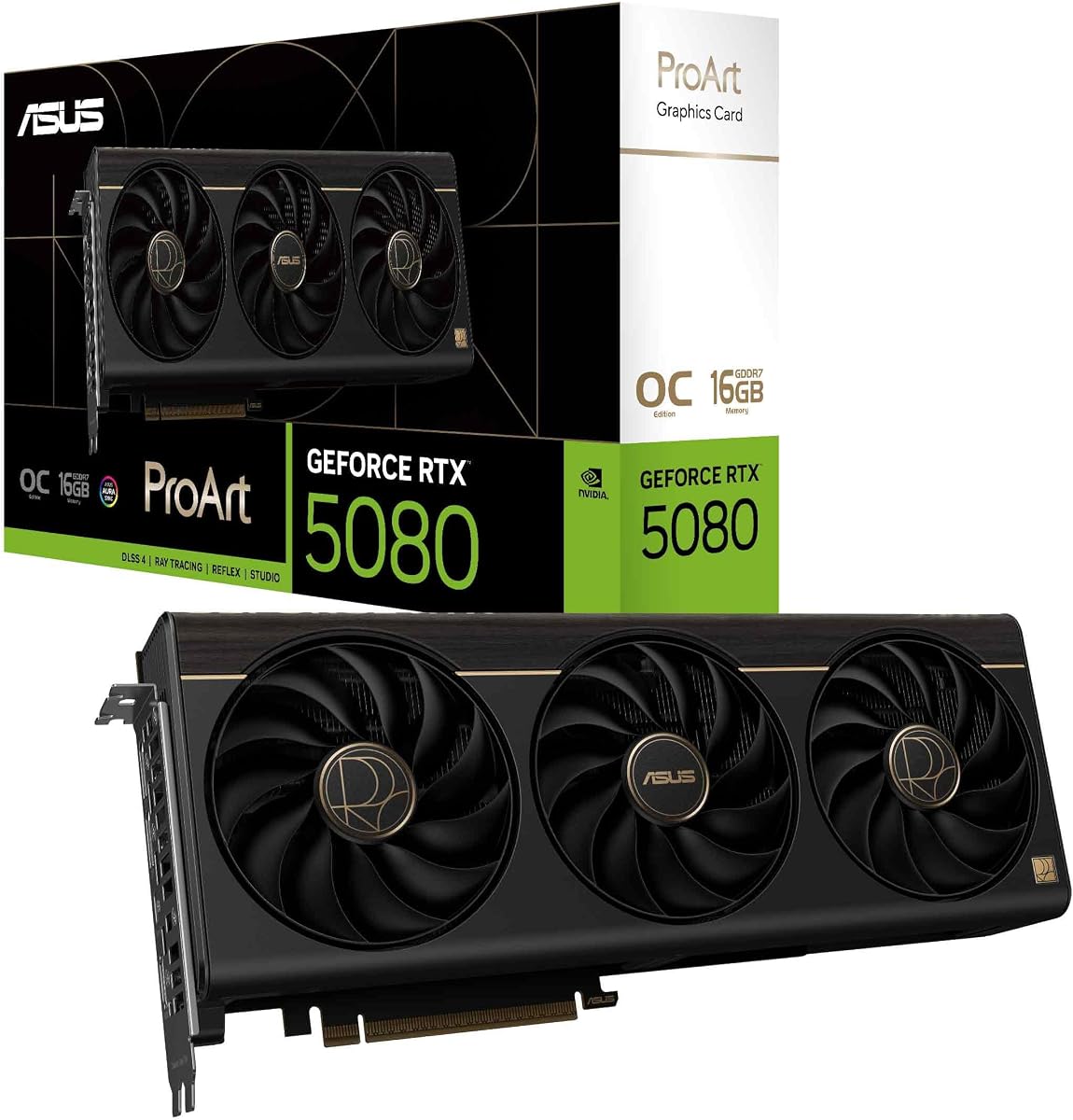
The ASUS ProArt GeForce RTX 5080 combines a 4.9 rating with a creator-focused feature set that makes it the strongest overall recommendation. Its 16GB of GDDR7 memory, 2730MHz OC clock, and NVIDIA Blackwell architecture provide a modern foundation for demanding Resolve editing, color, and effects.
We may earn a commission when you buy through this link, at no additional cost to you.
The integrated USB Type-C port is a meaningful differentiator for content creators. It can simplify certain display, peripheral, and workstation connections without requiring a separate add-in card. The two-and-a-half-slot design also aims to balance performance with case compatibility, making it more practical than a large three-and-a-half-slot alternative.
Thermal design remains a priority. A MaxContact heatsink with vapor chamber, phase-change GPU thermal pad, and Axial-tech fans support sustained performance, while GPU Tweak III offers thermal controls and system monitoring. The ProArt styling is restrained compared with gaming cards, which may be preferable in a professional workspace.
This is the most balanced choice for a high-end creator who wants current RTX performance and 16GB of memory without moving to enterprise pricing. It suits Resolve users who also value media connectivity, solid cooling, and a relatively restrained design. For exceptionally large projects, a 24GB or 32GB card may offer more room, but for mainstream professional workflows, the ProArt stands out.
The integrated USB Type-C port adds practical connectivity in a post-production desk, while the understated ProArt appearance avoids the visual footprint of a gaming card. These details matter in a workstation that is used for long, productive sessions.
A vapor chamber, phase-change thermal pad, and Axial-tech fans create a robust cooling package within a two-and-a-half-slot design. That balance makes the card appealing to creators who need thermal capacity without choosing the largest multi-fan option available.
We may earn a commission when you buy through this link, at no additional cost to you.
The ASUS Dual GeForce RTX 5060 Ti is a sensible entry point into a dedicated Resolve GPU, especially for editors who want more memory than many budget cards provide. It combines 16GB of GDDR7 with Blackwell architecture, DLSS 4, and a 4.7 rating.
We may earn a commission when you buy through this link, at no additional cost to you.
Its 2632MHz OC clock and 16GB memory pool make it well suited to 4K editing, Fusion work, color correction, and typical effects-driven timelines. The dual BIOS is a useful addition because users can select between Quiet and Performance profiles, changing the card's operating behavior according to the task.
Cooling is more modest than on the larger ProArt and TUF models, using a single Axial-tech fan in a two-and-a-half-slot design. That smaller cooler makes the card easier to install but may be less ideal for continuous maximum-load rendering. Its listed 767 AI TOPS figure also trails the higher-end RTX 5080 models substantially.
This is the best budget recommendation for a creator building a capable Resolve editing system without moving to workstation pricing. It offers an unusually useful balance of 16GB memory, modern architecture, compact dimensions, and flexible operating modes. Serious local AI, huge 8K projects, or heavy sustained rendering may justify stepping up to more memory or a larger cooler.
The 16GB GDDR6 configuration provides enough memory for many demanding 4K timelines without forcing users toward a workstation card. It is a meaningful advantage for Fusion, multilayered sequences, and projects that include a substantial number of media elements.
The dual BIOS lets a user move between Quiet and Performance profiles. This is convenient for switching between everyday editing, where lower noise may be preferable, and intensive exports or effects work that call for stronger performance settings.
We may earn a commission when you buy through this link, at no additional cost to you.
The right GPU for DaVinci Resolve depends on project resolution, media complexity, effects, memory needs, cooling, and physical constraints. These factors help separate a capable editing card from a workstation-class solution.
Video memory determines how much footage, texture, cache, and effect data the GPU can handle at once. A 16GB card is a useful modern target for 4K editing and many effects-heavy timelines, while 24GB and 32GB options provide more breathing room for high-resolution sources, complex nodes, AI tools, and multiple applications. Memory is not the only performance factor, but running out of it can interrupt workflows or force less convenient workarounds.
Architecture affects ray tracing, AI acceleration, graphics features, power efficiency, and the capabilities available to creative software. Blackwell, RDNA 4, and Intel Xe2-HPG represent the newest architecture families in this list, while Turing is an older professional generation. The newest architecture does not automatically guarantee the best Resolve experience because plug-in support and software certification remain important.
DaVinci Resolve includes a broad set of native tools, but creators often add third-party effects, color plug-ins, denoising tools, and AI packages. NVIDIA has the most familiar ecosystem among the cards here, while the ASRock Radeon AI PRO R9700 and Intel Arc Pro B60 are positioned as professional alternatives with their own validation and driver policies. Check the support pages for the exact versions of Resolve, Fusion, third-party effects, and operating system in use.
Resolve sessions can keep a GPU under sustained load during playback, grading, effects, and export. Open-air coolers with multiple fans generally offer abundant thermal capacity, while blower-style cards direct hot air outside the chassis and are useful in dense multi-GPU systems. A blower may be acoustically less desirable in a quiet edit bay, whereas a large multi-fan card needs sufficient case airflow and clearance.
A capable graphics card demands a compatible power supply and wiring. The ASUS TUF RTX 5080 specifies a minimum 850-watt PSU and a 16-pin 12V-2×6 connector, while the Intel Arc Pro B60 lists a 200-watt TDP and single 8-pin connection. Users should calculate the combined demand of the CPU, GPU, drives, memory, and accessories rather than relying on the graphics card's recommendation alone.
Card length, height, slot width, and cooler style determine whether a GPU physically fits. The ASUS TUF RTX 5080 is 348mm long and occupies 3.6 slots, while the ProArt and Dual RTX 5060 Ti use a two-and-a-half-slot design. Display requirements also matter: the professional ASRock and Intel cards each provide four DisplayPort outputs, which can simplify high-resolution multi-monitor editing, grading, and client-review arrangements.
Ray tracing, Tensor Cores, XMX engines, and dedicated AI accelerators can accelerate specific effects, denoising, generative tools, and rendering operations. They are most valuable when the software explicitly supports the hardware and precision format. The RTX 5080 cards list Blackwell neural capabilities and DLSS 4, the ASRock Radeon AI PRO R9700 includes dedicated AI accelerators, and the RTX PRO 6000 adds Universal MIG and FP4 support for specialized professional workloads.
Workstation cards may provide ISV certification, professional drivers, ECC memory, and designs validated for sustained operation. These qualities can matter in studios, managed fleets, and servers where failures or application incompatibilities are costly. The NVIDIA RTX PRO 6000 lists 96GB of DDR7 ECC memory, while the ASRock Radeon AI PRO R9700 emphasizes professional build quality and workstation cooling. Consumer-oriented cards can still be excellent for personal editing systems.
Before installation, confirm that the power supply meets the card's requirements, the case has enough physical clearance, and the operating system has an appropriate display driver. Connect the required power cable without forcing it, install the card with the system powered down, and connect the monitors through the outputs you plan to use. On first startup, verify that Resolve recognizes the intended GPU.
After installation, update the workstation, graphics driver, Resolve version, and required plug-ins. Open a representative project and check playback, effects, color views, and exports. Keep reasonable space around the card, avoid restricting intake or exhaust paths, and clean dust from the workstation filters and fans. A large multi-fan card should not be installed in a tightly packed position without adequate airflow.
For extended work, use workstation power-saving options when appropriate and monitor GPU temperature, memory usage, and frame rates. Back up project files regularly and avoid interrupting a write during a critical save. Do not change clocks, fan profiles, or firmware without understanding the warranty implications, and consult the card supplier or system builder when a display, driver, or power issue appears.
For most 4K editing projects, 16GB of GPU memory is a useful target, especially when timelines contain several layers, Fusion compositions, or color effects. 24GB provides more room for high-resolution media and complex work, while 32GB or 96GB cards are aimed at demanding AI, 3D, simulation, and enterprise workflows. The best choice also depends on codec, resolution, effects, and whether other GPU applications run alongside Resolve.
No. NVIDIA cards benefit from a broad ecosystem of third-party effects, AI tools, and GPU-accelerated software, which often makes them the safest all-purpose choice. AMD and Intel professional cards can still provide strong performance, modern acceleration, and useful memory capacities. Users should verify driver stability and support for every plug-in and effect in their specific workflow before choosing a non-NVIDIA card.
Yes, many modern gaming cards work very well for Resolve, particularly when they offer 16GB of memory and a capable cooling system. Enthusiast cards such as the RTX 5080 options in this guide can deliver strong results for 4K editing, color, effects, and rendering. Workstation cards become more compelling when an organization needs professional certification, ECC memory, multi-GPU density, or managed driver support.
It can be sufficient for straightforward 4K timelines, but memory pressure rises quickly with extra layers, Fusion work, denoising, and multiple applications. A 16GB card offers a safer modern starting point and better room for future workflows. The card should ideally have a strong cooler because sustained 4K editing and rendering can keep the GPU busy for long periods.
No. Export speed depends on the source codec, timeline format, export settings, CPU, storage speed, driver, and the specific hardware features used by the encoder. Large GPU memory can help avoid bottlenecks while preparing complex projects, but it does not guarantee faster encoding. Cards with dedicated media transcoders may be especially relevant for hardware-accelerated H.264, HEVC, or AV1 workflows.
A blower cooler is particularly useful in dense multi-GPU systems because it exhausts heated air directly out of the chassis. In a quiet single-card editing desk, a large open-air cooler may provide greater thermal capacity and lower perceived noise. The best choice depends on case layout, adjacent components, workstation acoustics, and the card's cooling design.
Possibly. High-end cards can require substantially more power than a previous upgrade, and connector types must match. The ASUS TUF RTX 5080 specifies a minimum 850-watt PSU with a 16-pin 12V-2×6 connection, while other cards may use standard or single 8-pin power. Check the full system draw, PSU quality, available connectors, and the case's cable routing space.
Choose 16GB for mainstream 4K editing and moderate effects, 24GB for heavier timelines, local AI, or parallel applications, and 32GB for professional 8K, 3D, and compute-intensive workflows. More memory improves flexibility but does not guarantee better performance in every scene. Match capacity to the real workload rather than to the largest available project you might occasionally attempt.
The ASUS ProArt GeForce RTX 5080 is the best overall recommendation because it combines 16GB of GDDR7, modern Blackwell architecture, a strong cooling system, creator-friendly USB Type-C connectivity, and a relatively balanced physical design. The ASRock Radeon AI PRO R9700 Creator is the premium choice for 32GB of memory, professional workstation features, and dense multi-GPU configurations.
The ASUS Dual GeForce RTX 5060 Ti is the best budget selection, offering 16GB of GDDR7, a compact two-and-a-half-slot design, and selectable Quiet and Performance profiles. For buyers with specialized requirements, the Intel Arc Pro B60 prioritizes media transcoding and compact workstation efficiency, the Titan RTX provides 24GB of memory, and the RTX PRO 6000 delivers 96GB of ECC memory for institutional workloads.
Before buying, verify current Resolve and plug-in compatibility, physical clearance, display needs, and power-supply capacity. Product prices and availability change regularly, so check current retailer listings and recent driver notes before making a final purchase. The right card is the one that comfortably fits your media, software stack, workstation, and creative ambitions.