
Joso PS5 Digital Edition Faceplate
4.4Editor score
ABS replacement faceplates
Improved ventilation fins
Original Digital Edition fit
Compare the best PS5 skins for every console edition, including vinyl decals, full faceplates, controller wraps, and protective designs for personalization.
PS5 skins transform a familiar console into a more personal gaming setup while adding protection against dust, fingerprints, and everyday scratches. The right product depends on your console edition, whether you want a full-body redesign, a simple controller accent, or replacement side plates, and how much protection you expect during regular use.
We compared all ten options by examining edition compatibility, included console and controller pieces, material, installation method, cutout access, and stated protective qualities. The guide covers original Digital and Disc models, the PS5 Pro Disc Edition, controller-only skins, full replacement panels, and universal decal designs where supported.
Each pick reveals what it does best, from coordinated console-and-controller coverage to durable faceplates and removable vinyl graphics. Product listings and availability can change, so verify the model code printed on the bottom of your console before ordering, especially when purchasing a skin for a Slim, Pro, Digital, or Disc Edition system.
4.4Editor score

4.6Editor score

4.6Editor score
The table below compares the ten PS5 skins by coverage, compatibility, material, installation method, and included pieces, making it easier to identify the right choice for your console and controllers.

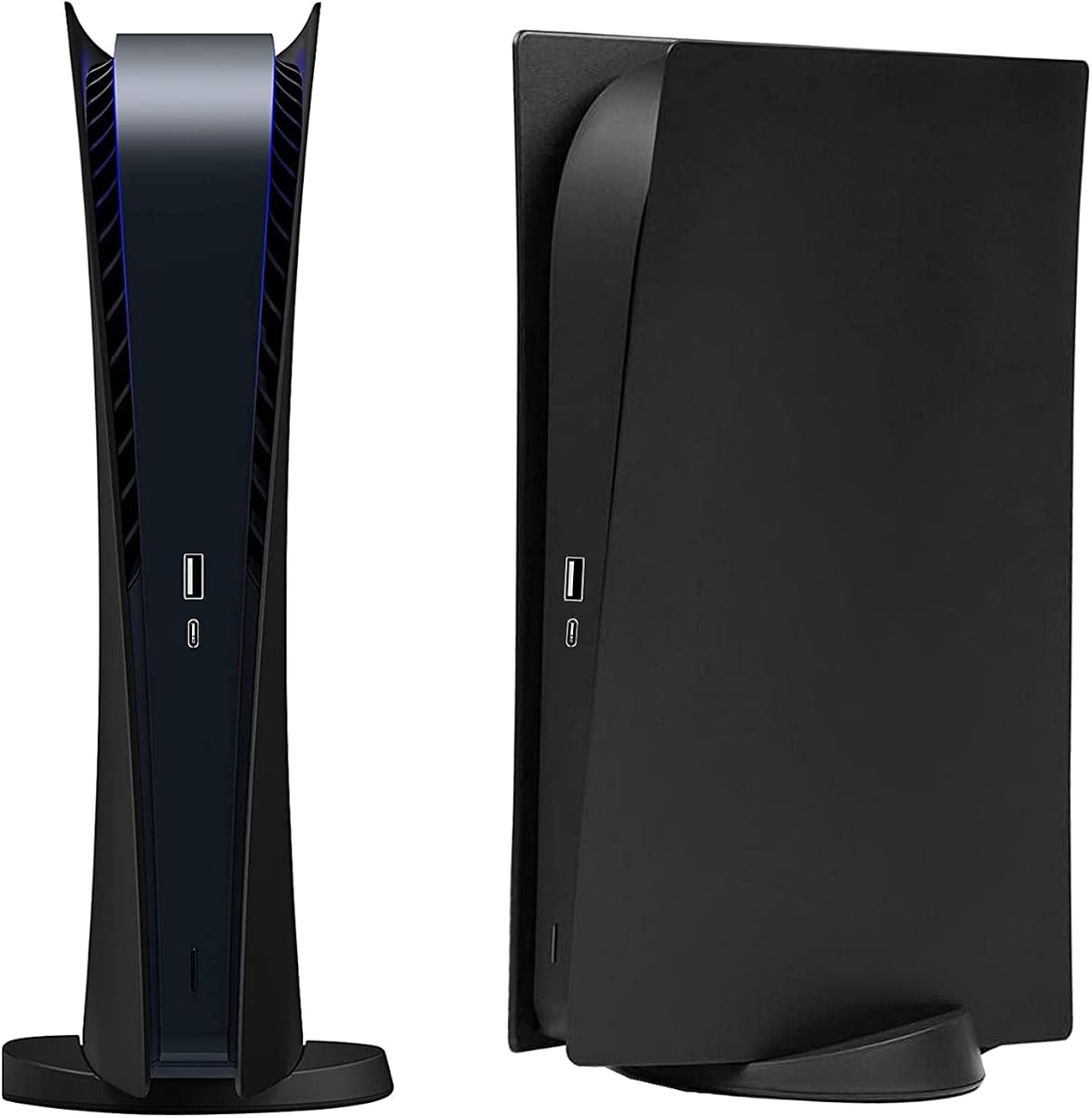


The Joso faceplate is a rigid replacement-cover option for the original 2020 PS5 Digital Edition, earning a 4.4 rating from buyers. It distinguishes itself from thin decals with an ABS construction and a revised panel design featuring small fins intended to support ventilation and heat resistance.
We may earn a commission when you buy through this link, at no additional cost to you.
The package includes one top cover and one bottom cover, allowing the console's white exterior to be transformed without applying graphics directly to the original panels. Its semi-hard shell is designed to defend against scratches, dust, and everyday damage while keeping ports, buttons, and console functions accessible.
Compatibility is the main trade-off. This set fits the original Digital Edition model numbers CFI-10xxB, CFI-11xxB, and CFI-12xxB, but it does not fit the 2023 PS5 Slim CFI-20xx and CFI-21xx models or the PS5 Pro CFI-70xx. Buyers who own another version should not assume that similar appearance means the same dimensions.
This is the strongest choice for Digital Edition owners who want durable, substantial coverage rather than a removable sticker. Check the model code under your console, clean the original panels before fitting the replacements, and allow care when handling the rigid plastic near the ports.
ABS faceplates create a physical barrier between the console's original exterior and common sources of scuffs, dust, and fingerprints. The two-piece design also provides a more noticeable visual transformation than a small accent decal.
Small fins are incorporated into the replacement design to support airflow and heat resistance. Buyers should still maintain clear space around the console and follow Sony's normal ventilation guidance.
We may earn a commission when you buy through this link, at no additional cost to you.
This Blue Fire decal gives the original PS5 Digital Edition and two DualShock controllers a coordinated graphic treatment. It carries a 4.2 rating and uses HD vinyl that the listing describes as resistant to fading and peeling while providing a thin barrier against scratches and dust.
We may earn a commission when you buy through this link, at no additional cost to you.
The set includes one console decal and two controller skins. Its precision-cut design is intended to preserve access to buttons, controllers, and connectors, a particularly important detail for a full-body skin because an ill-aligned cutout can make a console or controller feel awkward to use.
The trade-off is protection. A thin vinyl layer is better suited to cosmetic customization and light surface defense than to shielding the console from impacts. It is also restricted to the Digital Edition, with no stated support for the Disc, Slim, or Pro systems.
Choose this option when coordinated console-and-controller graphics matter more than rigid armor. It is a straightforward decorative upgrade for an eligible Digital Edition owner, particularly those who want a coordinated look without replacing the console's original faceplates.
Including both a console decal and two controller skins creates a more unified gaming setup than buying controller graphics separately. The matching pieces also simplify the decision for households with multiple eligible controllers.
The material adds a useful barrier against dust, fingerprints, and minor scuffs without changing the console's overall shape. It is best viewed as cosmetic protection rather than impact-resistant armor.
We may earn a commission when you buy through this link, at no additional cost to you.
The Digital Edition Face Plates receive a 4.6 rating, placing them among the strongest-reviewed products in this guide. They replace the original console panels with a black protective shell made from impact-resistant hard material, offering more physical coverage than a printed vinyl decal.
We may earn a commission when you buy through this link, at no additional cost to you.
A key feature is the attention to functional access. The design is shaped to leave cable ports and buttons usable, while the easy installation process is intended to make the transition from the original panels straightforward. Dust, scratches, and daily wear are the principal hazards addressed by the shell.
The limitation is model specificity. The product is only suitable for the PS5 Digital Version, and it does not include skins for the controllers. Buyers seeking a complete console-and-controller package should account for that additional purchase separately or choose a bundled decal instead.
For a Digital Edition owner seeking a straightforward black redesign with meaningful physical protection, this is an excellent balance of appearance, function, and simplicity. Confirm compatibility, align each plate carefully, and retain the original panels if you may want to restore the console later.
Precision around buttons and cable connections helps preserve the everyday usability of the console. Good cutout alignment is especially important when replacing large exterior panels.
The solid black appearance provides a more restrained customization option than a graphic decal. It can make a white-and-black console look visually unified while covering the original exterior.
We may earn a commission when you buy through this link, at no additional cost to you.
This Blue Fire set is designed specifically for the original PS5 Disc Edition and two DualShock controllers. Its 4.2 rating reflects a well-liked decorative option with a similar blue fire theme to the Digital Edition version, but with geometry tailored to the disc console's exterior.
We may earn a commission when you buy through this link, at no additional cost to you.
HD vinyl is used to help protect against scratches and dust while resisting fading and peeling. Precision cuts are intended to keep buttons, controllers, and connectors accessible, and the stated installation process involves cleaning, sticking, and removing the decals without leaving residue.
As with other thin skins, this set does not offer the same impact resistance as a hard replacement faceplate. It also cannot be used on a Digital Edition because the console's disc-drive layout changes the panel shape and cutouts.
Disc Edition owners who want their console and both controllers to share a single visual theme should find this practical and approachable. Verify the disc-drive configuration, align the pieces before pressing them down, and use a clean, dry application surface for the best result.
The console decal is shaped for the original disc-drive model, avoiding the mismatched openings that a generic full-body design may create around the drive area.
One console skin and two controller decals provide a complete visual package for a shared gaming space or a household with more than one controller.
We may earn a commission when you buy through this link, at no additional cost to you.
The Horror console skin offers a bold themed redesign for both original PS5 Disc and Digital Edition consoles. It earns a 3.5 rating and includes one console decal plus two controller skins, making it one of the few products in the guide that addresses two console editions with the same design.
We may earn a commission when you buy through this link, at no additional cost to you.
Its construction is described as having five protection layers, offering ultra-thin coverage with stated resistance to fading, water, scratches, and glue residue. The installation method calls for cleaning the surface, applying the skin, using a hair dryer or blower to help adhesion, and allowing the material to settle.
The major compromise is model range: the product explicitly does not fit the PS5 Slim. Its 3.5 rating is also the lowest among the ten picks, making it advisable to review customer feedback and inspect the listing imagery carefully before choosing this more expressive design.
This skin is best for a buyer with a non-Slim console who wants a dramatic horror aesthetic and coordinated controllers. Confirm that the graphic proportions meet your preferences, follow the four-step application process carefully, and avoid forcing the decal around tight curves.
Supporting both original Disc and Digital Edition models simplifies planning for a shared space or for buyers comparing console editions. The disc-drive area still requires accurate alignment.
The recommended use of a hair dryer or blower can help the vinyl conform more closely to the console's curves. Moderate heat and careful smoothing reduce the likelihood of trapped bubbles.
We may earn a commission when you buy through this link, at no additional cost to you.
This three-piece vinyl set personalizes the PS5 controller without altering the console itself. Its 4.2 rating reflects a flexible option with high-definition digital printing, a frosted surface texture, and compatibility with both Digital and Disc controller versions.
We may earn a commission when you buy through this link, at no additional cost to you.
The decals are precision cut to follow the controller's curved geometry while preserving access to its controls and ports. Their stated benefits include reducing scuffing, blocking dust, resisting water, and removing without leaving residue, all useful benefits for a controller handled frequently.
This product is specifically for controller customization, so buyers expecting a complete console makeover would be disappointed. The frosted texture changes the feel of the controller surface and may not appeal to everyone who wants a completely smooth original finish.
It remains a sensible choice for players who want a quick controller refresh, own multiple controllers, or do not want to apply graphics around the console's more complicated openings. Test the feel of a decal on an eligible controller and keep the controller away from moisture during installation.
The frosted finish is intended to simulate the feel of human skin and may provide a subtly different texture during long sessions. Personal preference remains important when changing the controller surface.
The set includes three controller skins, which is useful for a household with several PS5 controllers or for keeping a spare ready. Each controller is not included.
We may earn a commission when you buy through this link, at no additional cost to you.
The PS5 Pro Center Decal is a narrow customization option for the center side panel of the PS5 Pro optical-drive model. It has a 3.7 rating and uses removable PVC adhesive to provide a solid black surface that helps mask fingerprints, dust, and scratches.
We may earn a commission when you buy through this link, at no additional cost to you.
The decal is designed to preserve access to the console's socket, reducing the risk that the graphic will interfere with a connected accessory. Its removable construction allows a user to change the appearance without committing to a permanent coating or replacing a full panel.
Coverage is more limited than that of a full-console skin, and compatibility is exceptionally narrow. The product applies to the PS5 Pro Disc Edition, not the original PS5, Slim, or Digital versions, so the model must be confirmed before purchase.
Choose this decal when you own the Pro Disc model and want a focused black accent around the central panel. It is less appropriate for a total redesign, but it can provide a cleaner appearance and a light protective layer in a frequently touched area.
The pure-black design offers a restrained visual change for owners who prefer subtle customization over large illustrated graphics or complete faceplate replacement.
The PVC adhesive is described as removable without leaving a trace. Removal still requires patience, particularly around the central panel's contours.
We may earn a commission when you buy through this link, at no additional cost to you.
The Alien Monster pack brings a playful illustrated look to PS5 controllers with two precision-cut vinyl skins. Its 4.2 rating makes it one of the better-rated controller-focused options, and the product supports both standard PS5 controllers and PS5 Slim controllers.
We may earn a commission when you buy through this link, at no additional cost to you.
The vinyl is described as easy to apply and remove without leaving scratches, while the precision cuts preserve access to buttons, controls, and connectors. A thin protective layer against dust and scratches is an added benefit, although the actual controllers are not included in the pack.
Two decals make this a more modest bundle than the three-piece controller set, and the artwork is a deliberate stylistic choice rather than a neutral color change. Owners who prefer the stock controller appearance or subtle textures may find a plain full-body decal more suitable.
This is a good option for standard or Slim controller owners who want a recognizable sci-fi theme without applying graphics to the console. Match the wrap to the controller contours carefully and avoid pulling the center cutout at a sharp angle.
Compatibility with standard and Slim PS5 controllers makes this pack useful for users who may upgrade their console while keeping an existing controller.
The monster artwork offers a more noticeable personality change than a solid-color skin. It is well suited to gaming spaces that favor playful, collectible accessories.
We may earn a commission when you buy through this link, at no additional cost to you.
The PEYANZ skin is a comprehensive Disc Edition package with a 4.6 rating. Its box contains four console stickers and two controller skins, offering broad coverage for the original PS5 disc-drive console and a matching pair of controllers.
We may earn a commission when you buy through this link, at no additional cost to you.
High-grade polyvinyl chloride is used to create a thin protective layer against scratches and dust without affecting heat dissipation. The product description highlights 4K-resolution laser printing and an anti-oxidation coating intended to maintain color sharpness and resist fading.
Installation is reported to take around ten minutes, and the material can be repositioned if the initial alignment is unsatisfactory. That flexibility helps with the console's split panels and the disc-drive area, although it does not make careless handling risk-free.
This is a strong all-in-one choice for an original Disc Edition owner who wants coordinated console and controller graphics with a broad set of pieces. It is not intended for Digital Edition systems, and buyers seeking hard impact protection should choose faceplates instead.
The listed 4K laser-printing process is designed to produce sharper graphics than lower-resolution alternatives. Actual appearance also depends on screen quality, lighting, and the underlying console surface.
Four console decals and two controller skins cover more of the setup than a typical single-piece design. That makes the package particularly convenient for a complete room or entertainment-center refresh.
We may earn a commission when you buy through this link, at no additional cost to you.
The Black Marble decal brings a restrained, textured look to the original PS5 Digital Edition and two DualShock controllers. It holds a 4.2 rating and uses the same HD vinyl format found in the related Blue Fire digital set, combining decorative design with light protection from scratches and dust.
We may earn a commission when you buy through this link, at no additional cost to you.
Precision cutting helps the skin follow the console and controller contours while leaving controls and connectors accessible. The stated installation process is straightforward, and the material is described as removable without residue, making it practical for users who like seasonal or periodic changes.
Its thin construction provides less defense than rigid faceplates, and the design is limited to the original Digital Edition. Owners of a Disc, Slim, or Pro console should avoid selecting it based solely on the shared PS5 name.
This is a fitting option for Digital Edition users who prefer sophisticated, understated graphics to loud illustrated themes. It combines the console and both controllers in one coordinated package, simplifying setup while offering a practical way to refresh the system's appearance.
The black marble pattern personalizes the console without relying on a brightly colored character theme. It can complement a restrained gaming setup and existing black accessories.
Because the vinyl is removable, owners can refresh the console more easily than they could with replacement panels. The original surface should still be cleaned before and after application.
We may earn a commission when you buy through this link, at no additional cost to you.
Choosing a PS5 skin involves balancing console compatibility, coverage, material, visual design, and installation demands. The most important first step is identifying the exact console and controller models in your setup before comparing the available formats.
Confirm the edition for every product in your setup, not just the console. A mixed household may have a Disc Edition console with a controller produced for a different hardware generation, so controller compatibility should be checked independently.
Do not expect a thin decal and a hard shell to deliver equivalent physical protection. Match the product format to how heavily the console is handled and whether the original panels need to remain completely untouched.
Inspect the included pieces carefully. Some products provide one broad console skin divided into sections, while others include four smaller console stickers. Either approach can work, but the installation workflow differs.
For a coordinated setup, choose a package with matching console and controller graphics. For a simpler upgrade, a controller-only set may be sufficient and can also be used with a console that already has a faceplate.
Choose a style you will still enjoy after the novelty fades. Neutral finishes suit minimalist setups, while character and genre themes can make a gaming space feel more expressive.
Allow enough time to fit the decals before use. Rushing around ports, narrow seams, and curved edges can produce bubbles or lifted corners that are difficult to correct later.
If preserving resale condition matters, removable vinyl is generally preferable to a permanent coating. Keep the original console panels in good condition regardless of the chosen format.
Follow the console's normal setup guidance and leave clear space around the system. A skin should personalize and protect the console without restricting its cooling.
Begin by disconnecting the console and identifying its exact model. Check the model code on the bottom panel, then confirm that the skin is designed for that edition. Gather the included pieces, read the installation instructions, and clean the original surface thoroughly with a dry or lightly damp cloth before allowing it to dry completely.
For vinyl decals, start at a simple corner and work gradually toward the curved edges. Use a card to guide the material and push out small air pockets without stretching it. If a piece is crooked, lift it carefully and reposition it before the adhesive fully bonds. A hair dryer or blower on a low setting may help difficult curves conform when the product instructions recommend it.
For hard faceplates, align each panel before applying pressure and check every port, button, seam, and ventilation area. Do not force a plate if it resists. Once installed, clean the skin with a soft microfiber cloth, avoid harsh chemicals and abrasive pads, and keep liquids away from the console. Remove and reinstall the plates only when the system is off and completely cool.
No. Original PS5 Digital and Disc Editions have different exterior shapes, and the PS5 Slim and PS5 Pro are also incompatible with many first-generation skins. Check the model code printed on the bottom of the console and compare it with the product's compatibility information before buying.
Vinyl decals are thinner, easier to reposition, and often provide a more detailed printed design. Replacement faceplates are rigid and generally offer stronger physical protection from scratches and minor impacts. Your priority should determine the choice: coordinated graphics and easy removal favor vinyl, while durable panel coverage favors hard shells.
A correctly installed skin should not cover or obstruct the console's ventilation areas. Some products specifically describe ventilation-conscious designs or state that heat dissipation is unaffected. Leave adequate clearance around the console and avoid placing it in a closed space without airflow.
Some controller skins are designed for both standard and Slim controllers, while others are intended only for the original DualSense design. The Alien Monster two-pack explicitly supports both versions, whereas other listings may not. Verify the controller model and the compatibility statement before ordering.
Usually not. These products generally include adhesive skins or decals for the controllers, not the controllers themselves. The PEYANZ package includes two controller skins, the Horror set includes two, and the Blue Fire and Black Marble Digital sets also include two controller decals.
Remove the skin slowly at a low angle while supporting the area around the edge. Do not pull it straight back or use sharp tools that could scratch the console. Residue risk increases when vinyl has remained bonded for a long time or the surface has become warm, so removal soon after purchase is generally easier.
The hard-shell products in this guide are described as easy to install and remove, and the Joso set is advertised as taking only a few seconds. No tools are specifically required, but careful alignment is still necessary to avoid forcing ports, buttons, or the panel's edges.
Stop installing it and recheck the console and controller model codes against the listing. Similar-looking PS5 versions may have different panel geometry or openings. Contact the seller or manufacturer if the stated model should match, and keep the original packaging and all pieces in place until compatibility is confirmed.
Review the current product listing before ordering, especially its compatibility notes and included-piece list. Listings, package contents, and product details can change over time, and confirming the model code on your console is the most reliable way to ensure the PS5 skin you choose fits properly.


