
Ethernet Adapter for Fire TV Stick, Firestick Micro USB to RJ45 Ethernet
4.7Editor score
10/100 Mbps Ethernet
Driver-free installation
LED status indicator
This guide compares the best Ethernet adapter for Fire TV devices, covering connector types, speeds, power, compatibility, and setup.
An Ethernet adapter can give a Fire TV Stick, Fire TV Cube, or other compatible streaming device a steadier connection than crowded Wi-Fi. The right model depends mainly on connector type, supported network speed, power requirements, and whether it matches your exact Fire TV hardware.
We compared all ten adapters using the supplied specifications, compatibility claims, connection standards, installation details, and customer ratings. The list includes micro-USB options for many popular Fire TV models, a USB-C adapter for the newest Fire TV Stick HD, and a USB-A adapter for devices such as the Fire TV Cube.
Each review explains the strongest use case, practical limitations, and setup considerations for its product. Ratings reflect the supplied customer feedback, while specifications and compatibility details can change, so readers should verify the connector on their own device and compare current options before buying.
4.7Editor score

4.5Editor score

4.3Editor score
The table below places all ten adapters side by side, emphasizing connector type, network standard, power approach, and the clearest compatible Fire TV devices. It is designed to make the first compatibility check faster before you consider speed, construction, or placement.


The Micro-USB Ethernet Adapter for Amazon Fire TV Devices offers the broadest explicitly listed Fire TV compatibility in this guide, earning a 4.5 customer rating. It is designed for owners of numerous Fire TV Stick generations, the Fire TV Cube, and the third-generation pendant-design Fire TV, making it a practical choice when exact model support matters more than headline speed.
We may earn a commission when you buy through this link, at no additional cost to you.
Installation is refreshingly direct. The adapter connects to the Fire TV's micro-USB port, while an Ethernet cable runs to the router. The supplied information also says the existing Fire TV power adapter can power the Ethernet adapter, reducing cable clutter. A 10/100 Ethernet connection is sufficient for many common streaming workloads, although it is not the fastest option in the roundup.
The main limitation is connector age. This product does not fit the Fire TV Stick HD (2nd Gen), which uses USB-C. Its 10/100 specification may also look modest beside adapters advertising 300 or 1000 Mbps, but internet speed still depends on the router, network, internet plan, and Fire TV itself, making a higher adapter rating alone no guarantee of better playback.
This is the strongest general recommendation for a confirmed micro-USB Fire TV because the compatibility list is unusually extensive and the power arrangement is simple. Check your device port first, and choose the right-angle USB-C option instead if you own the second-generation Fire TV Stick HD.
The stated support covers Fire TV Stick Lite, first- through fourth-generation-style Fire TV Stick models, Fire TV Stick 4K variants, Fire TV Cube, and the third-generation pendant-design Fire TV. That breadth makes the product useful for households with more than one streaming device.
The Fire TV connects to the adapter, the adapter connects to the router by Ethernet cable, and the existing power arrangement can remain in use. There is no stated driver installation, making it approachable for users who have never configured a wired network accessory.
We may earn a commission when you buy through this link, at no additional cost to you.
This right-angle USB-C Ethernet adapter is purpose-built for the Fire TV Stick HD (2nd Gen) with USB-C connectivity. Its 4.3 rating reflects solid customer feedback, and the right-angle form addresses one of the most common practical problems behind a television: limited clearance between the streaming stick and the wall or furniture.
We may earn a commission when you buy through this link, at no additional cost to you.
The product supports up to 480 Mbps when used with the specified Fire TV Stick HD model. That is a meaningful improvement over the 100 Mbps ceiling listed for several micro-USB adapters, although actual throughput remains limited by the device, router, network conditions, and internet service. Its specialized compatibility should be viewed as a strength rather than a flaw.
This adapter cannot be used with the first-generation Fire TV Stick HD because that model uses micro-USB. Buyers should also avoid choosing it merely because USB-C appears more modern; the connector must physically match the Fire TV. Because the supplied product information focuses on one device family, its feature set is narrower than that of a general-purpose micro-USB adapter.
Choose this option if you specifically own the USB-C Fire TV Stick HD (2nd Gen), especially if the right-angle profile helps with a tight installation. For any other Fire TV with a micro-USB power and network port, one of the micro-USB models will be the safer match.
This adapter fills an important gap left by micro-USB accessories. It is designed for the second-generation Fire TV Stick HD with USB-C, so matching the connector before ordering can prevent the most common compatibility mistake.
The angled connector can make it easier to fit the adapter and Ethernet cable in a narrow space. It is especially relevant for wall-mounted televisions, furniture with shallow back clearances, and setups where a straight connector would protrude awkwardly.
We may earn a commission when you buy through this link, at no additional cost to you.
The ELECTOP 1000 Mbps Ethernet Adapter combines a high advertised network rate with a broad list of micro-USB streaming-device support. It has a 4.1 customer rating, and its aluminum construction, status LED, and included adhesive pads distinguish it from simpler adapters that offer little beyond a basic Ethernet connection.
We may earn a commission when you buy through this link, at no additional cost to you.
Its headline attraction is 1000 Mbps Ethernet support, which provides considerable theoretical headroom for local network traffic. The product also lists support for Fire TV Stick 4K, Google Home Mini, several Chromecast models, and Raspberry Pi Zero. A driver-free, plug-and-play process keeps initial setup simple, while the optional power cable can support a more stable connection.
Compatibility requires care. The connector is micro-USB rather than USB-C, so it is not suitable for the Chromecast with Google TV HD, Fire TV Stick 4K Max from 2021 onward, or USB-C Chromecast Ultra models mentioned in the supplied information. It also excludes first-generation Fire TV Stick, Roku devices, Fire HD tablets, and phones. VPN use is not supported.
This is a sensible choice for a micro-USB Fire TV owner who wants a higher advertised ceiling and values physical design details. The 4.1 rating is lower than several alternatives, but the specification sheet offers useful features. Confirm the port and model before purchasing, and expect the full potential to depend on the rest of the network.
A 1000 Mbps Ethernet specification gives compatible devices more theoretical capacity than 100 Mbps or 300+ Mbps options. For a high-speed local network, that headroom can be valuable, although the Fire TV, router, and internet plan determine what users experience in practice.
The aluminum alloy housing is intended to dissipate heat during extended use, while the LED makes active status easy to see. These physical details can be useful when the adapter remains plugged in behind a television for many hours.
We may earn a commission when you buy through this link, at no additional cost to you.
This Firestick Ethernet Adapter focuses on a straightforward 100 Mbps wired connection and a clean installation process. It carries a 4.2 customer rating, supports several common micro-USB streaming devices, and includes a power cable plus adhesive pads for more stable placement.
We may earn a commission when you buy through this link, at no additional cost to you.
Its main appeal is consistency. A wired network removes the variability associated with Wi-Fi signal strength and congestion, which can be particularly noticeable during high-resolution playback, downloads, and gaming. The adapter also uses an aluminum alloy housing for heat dissipation and provides a status LED so users can see whether the connection is active.
The product does not fit first-generation Fire TV Stick, Roku devices, Fire HD tablets, or phones. It is also not compatible with USB-C devices, including the Chromecast with Google TV models and other newer streaming hardware. Although the listing mentions Fire TV Stick 4K Max among supported devices, the separate compatibility note says this micro-USB version is not for USB-C models, so the exact connector must be verified.
The recommendation is best for a user with a compatible micro-USB Fire TV who values a straightforward, stable connection over high theoretical speed. The included power cable and mounting pads help address the two most common physical issues: insufficient power and a dangling adapter creating an unreliable plug connection.
A 100 Mbps wired path can be more dependable than an unstable Wi-Fi link, particularly in crowded homes. It does not guarantee perfect streaming, but it removes signal fluctuation as one potential source of interruptions.
The included micro-USB power cable is recommended for stable performance, and two adhesive pads allow the adapter to be secured in a suitable position. These details reduce both loose connections and the strain caused by a hanging Ethernet cable.
We may earn a commission when you buy through this link, at no additional cost to you.
The ZEXMTE Ethernet Adapter combines a 4.5 customer rating with a concise installation process and support for several widely used Fire TV Stick generations. It uses a micro-USB to RJ45 connection, offering a practical wired option for Fire TV Stick Lite, second- and third-generation sticks, Fire TV Stick 4K, and Fire TV Stick 4K Max as stated in the supplied information.
We may earn a commission when you buy through this link, at no additional cost to you.
The adapter's main benefit is simplicity. Users connect it to the Fire TV's USB port and then connect an Ethernet cable to the router, with the product positioned as a roughly one-minute setup. At 10/100 Mbps, the stated speed is modest, but it can still offer a steadier link than Wi-Fi in a congested or poorly positioned environment.
An aluminum casing is designed to manage heat, and smart status lights provide immediate visual confirmation that the network connection is operating. These details make the adapter more practical for permanent installation behind a television than a bare dongle would be. As with every micro-USB model, the connector must match the user's specific Fire TV, and the title's list should not be interpreted as covering every possible hardware revision.
This is a good all-rounder for owners of a compatible micro-USB Fire TV Stick who prioritize a high customer rating, fast setup, and tidy construction over maximum bandwidth. It is especially appealing for standard-definition and many 4K streaming workloads where consistent delivery matters more than the highest possible local network rate.
With one adapter connection to the Fire TV and one Ethernet cable to the router, the installation avoids menus, drivers, and complicated network configuration. That simplicity is valuable for users making their first switch from Wi-Fi.
The aluminum casing and status lights suit an adapter that remains connected behind a TV. They also help users confirm at a glance that the wired link has been established before troubleshooting the Fire TV interface.
We may earn a commission when you buy through this link, at no additional cost to you.
This generic Micro USB to RJ45 Ethernet adapter has the highest customer rating in the supplied group at 4.7, while combining a 10/100 Mbps network connection with a straightforward plug-and-play design. It is positioned as a budget-friendly solution for Fire TV Stick owners who want reliable wired internet without installing software.
We may earn a commission when you buy through this link, at no additional cost to you.
The adapter plugs into a TV stick's micro-USB port and accepts a standard Ethernet cable from the router. A built-in LED shows working status, and an aluminum alloy body is intended to dissipate heat during long viewing sessions. Two self-adhesive pads let users position the adapter so the Ethernet cable does not hang awkwardly or pull the connector out of alignment.
Its obvious constraint is the micro-USB connector. It will not work with Chromecast with Google TV or other USB-C streaming devices, and the product should not be purchased unless the Fire TV has the matching micro-USB port. The 100 Mbps ceiling is also lower than the advertised rates of the ELECTOP, Cable Matters, and MOGOOD products, although real streaming quality frequently depends on internet service and router performance.
For a compatible micro-USB Fire TV, this is a compelling budget recommendation because it combines a strong rating with useful mounting and status features. It is best for users seeking dependable 10/100 Mbps connectivity, uncomplicated setup, and a tidy installation without paying for a higher advertised speed they may not need.
The 10/100 Mbps connection can provide a more consistent stream than an unreliable Wi-Fi link. It is a sensible minimum for common streaming, browsing, and download tasks, provided the rest of the network and internet service are equally adequate.
A dangling adapter can place strain on the Fire TV's connector. Mounting the unit with the included pads helps maintain a consistent physical connection and keeps the installation neater behind the television.
We may earn a commission when you buy through this link, at no additional cost to you.
The UGREEN Ethernet Adapter for Fire TV Stick stands out for its 3.3-foot micro-USB and USB power cable, a useful feature when a television or stand leaves little room behind the screen. It has a 4.4 customer rating, provides 10/100 Mbps Ethernet, and uses a driver-free installation process.
We may earn a commission when you buy through this link, at no additional cost to you.
Its power arrangement is the distinguishing feature. The included USB-A cable can power the Ethernet adapter and the Fire TV Stick at the same time, although the supplied information specifies connection to a USB wall charger over 5 watts rather than a television USB port. That requirement may mean an additional compatible charger if the user does not already have one.
Compatibility is narrower than some competing listings. It supports Fire TV Stick Basic, second-generation, 4K, and Lite models, along with several Chromecast generations, Google Home Mini, and third-generation Fire TV. It expressly excludes all Roku devices, first-generation Fire TV Stick, and Fire TV Stick 4K Max, and it is not a USB-C solution.
This is a particularly good option when cable reach matters, such as with narrow media furniture or a wall-mounted television. The long power lead reduces awkward strain, while the combined power design keeps the setup orderly. Confirm both the connector and the available wall charger before ordering.
The 3.3-foot, or 100-centimeter, cable can be valuable where the Fire TV is positioned close to a wall or inside a compact cabinet. It gives the adapter and power lead more room to sit without being bent sharply.
The USB-A power cord can support both the network adapter and the Fire TV Stick. Users should use a suitable wall charger over 5 watts and should not substitute the television's USB port for the specified power source.
We may earn a commission when you buy through this link, at no additional cost to you.
The Cable Matters Micro USB to Ethernet Adapter offers a 300+ Mbps Ethernet specification, making it faster on paper than the many 10/100 Mbps alternatives in this guide. Its 4.4 customer rating and support for the Fire TV Stick, Fire TV Cube, Chromecast, Chromecast Ultra, and Google Home Mini give it broad practical appeal.
We may earn a commission when you buy through this link, at no additional cost to you.
A three-foot USB power cable is included for connecting the adapter to a wall charger, allowing power and wired network connectivity to operate together. Installation requires no drivers or software, which keeps the process straightforward: attach the micro-USB connector, connect the Ethernet cable, and provide power.
The micro-USB format is the central trade-off. Newer Fire TV hardware increasingly uses USB-C, so this product is best for an older or confirmed micro-USB device. A higher adapter speed also does not automatically produce faster downloads or streaming if the Fire TV, router, network, or internet plan is the limiting factor.
Choose the Cable Matters adapter when your Fire TV uses micro-USB and you want more rated Ethernet capacity than 100 Mbps without moving to a gigabit specification. It is also one of the clearer choices for Fire TV Cube owners, subject to confirming the device's available port and power arrangement.
The 300+ Mbps specification gives compatible micro-USB devices more headroom than the common 100 Mbps category. It also remains backward compatible with earlier Ethernet standards, making it a middle ground between basic and gigabit adapters.
The included three-foot power lead allows the Fire TV to remain connected to a charger while it uses the Ethernet adapter. This is especially useful for Fire TV Cube owners and anyone who wants a permanent wired installation.
We may earn a commission when you buy through this link, at no additional cost to you.
This Micro USB to RJ45 adapter is a basic wired option for second-generation, third-generation, and 4K Fire Stick versions. With a 4.4 customer rating and a stated maximum speed of 100 Mbps, it emphasizes dependable, uncomplicated networking rather than maximum throughput.
We may earn a commission when you buy through this link, at no additional cost to you.
The listing positions the product for congested Wi-Fi, weak wireless coverage, homes without a wireless router, older 802.11b routers, and streaming devices with poor wireless performance. Its driver-free, plug-and-play operation avoids the compatibility problems associated with wireless settings, channels, frequencies, interference, and security types.
The connector is described as Type-B micro-USB, and it will not fit newer oval-shaped USB-C connections. The 100 Mbps limit means it is less future-facing than the 300+ Mbps or gigabit products, but many households will not require the higher rating for standard streaming. Buffering can also have causes beyond Wi-Fi, so users should not expect this adapter to eliminate every playback issue.
This model makes sense for a compatible Fire Stick that needs a simple Ethernet connection at the lowest complexity level. It is particularly relevant for a home with an older router or consistently poor wireless performance. For newer hardware, check the connector first and consider a USB-C-specific adapter.
A wired path can be valuable in homes where Wi-Fi coverage is inconsistent or the wireless network becomes crowded. The adapter provides a direct route from the streaming device to the router without changing the Fire TV's network settings.
The adapter operates without installed software and bypasses common Wi-Fi configuration issues. This makes it useful for users who want a stable wired connection without navigating complex network menus.
We may earn a commission when you buy through this link, at no additional cost to you.
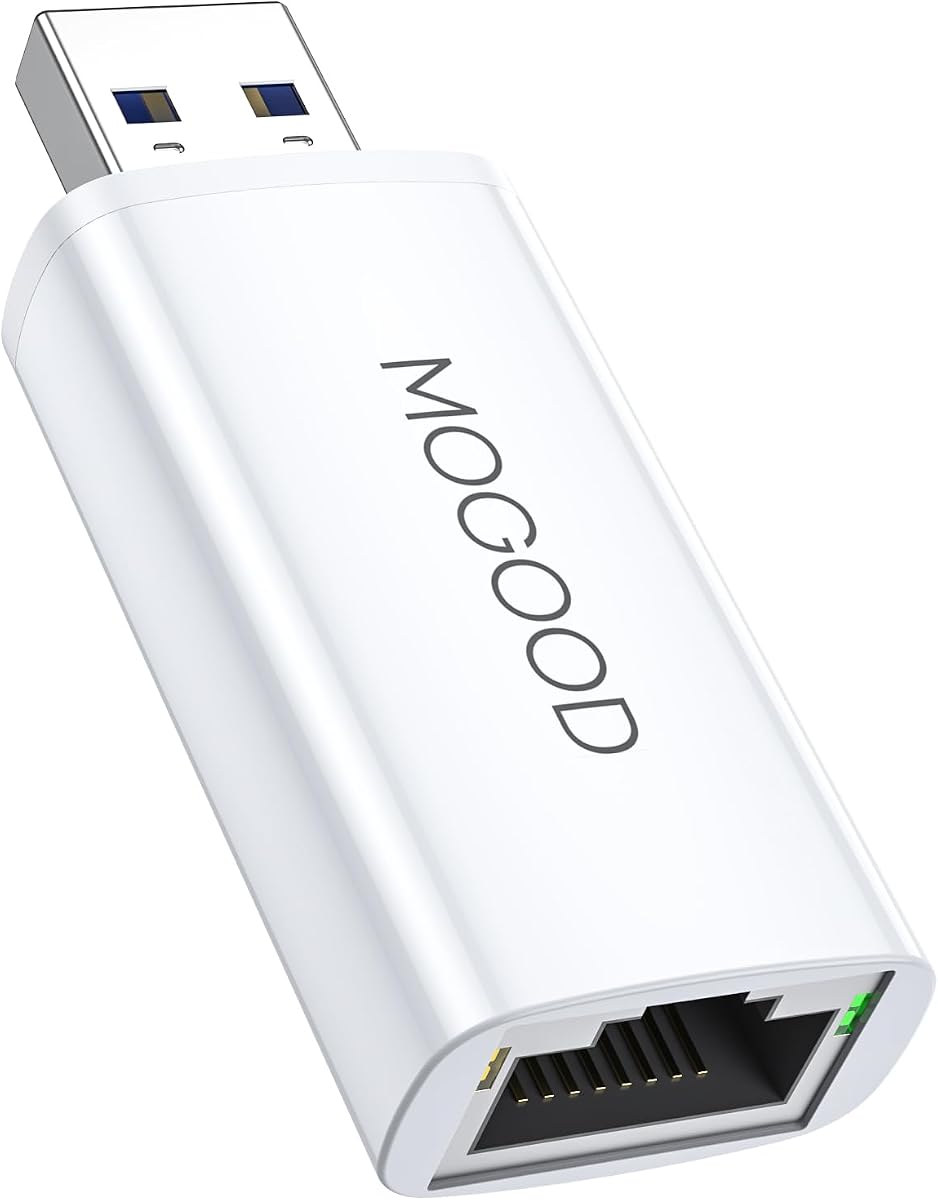
The MOGOOD USB 3.0 to Gigabit Ethernet Adapter is the most versatile non-stick option in the guide because it supports laptops, Chromebooks, Macs, Surface Pro devices, the Fire TV Cube, and the Nintendo Switch. Its 4.4 rating and 1000 Mbps specification make it attractive for users who want one wired network accessory across several types of hardware.
We may earn a commission when you buy through this link, at no additional cost to you.
The USB 3.0 interface is backward compatible with USB 2.0 and provides a stable gigabit LAN connection for streaming, gaming, and online calls. Plug-and-play operation requires no driver on most supported systems, making it useful beyond a Fire TV-specific installation. Its RJ45 port accepts a standard Ethernet cable.
This product is not a direct micro-USB or USB-C Fire TV Stick adapter. It requires a host device with a usable USB-A connection, so owners of most Fire TV Sticks will need a different option. The Fire TV Cube is explicitly listed, but its exact port layout and power arrangement should still be checked. A Fire TV may also need its normal power supply while the adapter occupies a USB port.
Choose this adapter for a Fire TV Cube or other compatible USB-A device, especially if you also want gigabit Ethernet for a computer. For a standard Fire TV Stick, verify whether your model has a USB-A host port; if it does not, the dedicated micro-USB or USB-C adapters in this guide are the more appropriate choices.
Unlike adapters designed around a specific Fire TV Stick connector, this USB-A model can also serve compatible laptops, Chromebooks, Macs, Surface Pro devices, and a Switch. That makes it a more general-purpose purchase for a mixed-device household.
The 1000 Mbps Ethernet specification and USB 3.0 interface provide ample local-network headroom. Actual performance still depends on the host device, router, cables, network utilization, and internet service.
We may earn a commission when you buy through this link, at no additional cost to you.
The decisive factor is physical connector compatibility, followed by power requirements, network speed, and intended placement. Reviewing the Fire TV's port and the adapter's complete compatibility list before comparing speed prevents the most common purchasing mistake.
Most Fire TV Stick models use a micro-USB connection for power and network functions, while the Fire TV Stick HD (2nd Gen) uses USB-C. A USB-A adapter can suit a Fire TV Cube, but it will not connect to a Stick that exposes only micro-USB or USB-C. Inspect the port directly instead of relying on the device name, because similarly named models may use different connectors.
A listing that names Fire TV Stick 4K may not cover every 4K Max revision, first-generation stick, or newer USB-C model. Compare the compatibility notes and exclusions with the precise model you own. Some products list older Chromecast, Google Home Mini, or Raspberry Pi devices as supported too, but those claims do not guarantee compatibility with the newest equivalents.
Some Fire TV adapters draw enough power from the streaming device, while others include a USB power cable or require a wall charger. Products such as UGREEN specify a USB wall charger over 5 watts, and the Firestick 100 Mbps adapter recommends its included cable. A Fire TV that needs its regular power connection may therefore need two power-related arrangements.
The guide includes 10/100 Mbps, 300+ Mbps, 480 Mbps, and 1000 Mbps options. A higher number can provide more headroom, but it does not override a slower Fire TV, router port, internet plan, or congested network. For many streaming uses, a stable 100 Mbps wired connection is sufficient, while users with faster local networks may prefer a higher ceiling.
The Ethernet cable must reach from the adapter to the router, and the Fire TV power lead must also remain usable. Adhesive pads can secure adapters and reduce strain on the micro-USB plug. A right-angle housing may help in tight spaces, while a long power cable can be valuable when the television is close to a wall or positioned inside compact furniture.
An LED indicator can show whether the adapter is receiving power or establishing a network link, making troubleshooting much faster. Aluminum housings are intended to dissipate heat during long streaming sessions. These features are not substitutes for compatibility, but they make a permanently installed adapter easier to monitor and maintain.
All ten products describe simple setup, with most explicitly stating that no driver is required. This is valuable for Fire TV users because the device is designed to connect to a router through a standard Ethernet cable. It also means setup should not involve searching for television menus, downloading special software, or manually selecting a network adapter.
A Fire TV-specific micro-USB adapter is usually the simplest choice for a streaming stick, while a USB-A gigabit adapter can be reused with computers and other supported devices. If you may upgrade to a USB-C Fire TV Stick HD, buying for your current device and keeping the connector requirement in mind can prevent another purchase later. Compatibility should always be the first priority.
Before connecting anything, identify the port on your Fire TV and confirm that the adapter uses the matching connector. Read the model's compatibility and exclusion notes, especially if you own a Fire TV Stick 4K Max or Fire TV Stick HD. Gather a standard Ethernet cable and any required power cable or wall charger mentioned in the product instructions.
Connect the adapter to the Fire TV, run the Ethernet cable from the adapter's RJ45 port to a LAN port on the router, and provide power as specified. Some models can use the Fire TV's existing power arrangement, while others recommend a dedicated micro-USB power lead or USB wall charger. Once connected, check the adapter's LED and restart the Fire TV if the network does not appear automatically.
Position the adapter where the Ethernet cable does not hang from the Fire TV or pull sharply against the connector. Use the supplied adhesive pads when available, secure cables within reach of the television, and keep the adapter away from sources of heat or moisture. Periodically check the plug and cable because a loose connector can create more problems than an imperfect wireless signal.
Check the connector shape on your Fire TV before ordering. Most Fire TV Sticks use micro-USB, the second-generation Fire TV Stick HD uses USB-C, and some devices such as the Fire TV Cube use USB-A. The physical connector must match exactly, and the product's detailed compatibility list should still be checked because models with similar names can differ.
It can, particularly when Wi-Fi is weak, crowded, or inconsistent. A wired connection removes signal variation and interference, so playback may become steadier even when its nominal speed is only 100 Mbps. It will not exceed the limits of the Fire TV, router, internet plan, or local network, and buffering can also result from app servers and other factors.
The products in this guide describe plug-and-play operation, and several explicitly state that no driver is required. In most cases, connecting the Fire TV to the adapter, the adapter to the router, and providing any necessary power is enough. If the wired network does not appear, restarting the Fire TV and checking the adapter's status light are sensible first steps.
No. The right-angle USB-C option is specifically designed for the second-generation Fire TV Stick HD and is not compatible with the first-generation Fire TV Stick HD because that device uses micro-USB. Trying to force a mismatched connector can damage the device, so identify the port before purchasing.
Physical strain is a common cause. A heavy Ethernet cable can pull the micro-USB plug out of alignment, especially when the adapter is left hanging. Secure the adapter with adhesive pads, provide the recommended power cable, check the plug and cable, and make sure the Fire TV has sufficient power. If the connection remains unstable, test another cable and a different router LAN port.
For a single Fire TV, a stable 100 Mbps connection can support many common streaming experiences. Actual 4K quality also depends on the app, source material, internet plan, Wi-Fi or Ethernet performance, and the device itself. A faster adapter offers more headroom but cannot create bandwidth the Fire TV, router, or internet service cannot provide.
It depends on the adapter and the Fire TV. Some products can draw power through the Fire TV connection, while others include a separate micro-USB power cable or require a suitable wall charger. The UGREEN and Firestick 100 Mbps options specifically recommend external power for stable performance. Follow the instructions supplied with the chosen model.
It depends on the connector and supported devices. The MOGOOD USB 3.0 adapter lists compatibility with the Fire TV Cube, laptops, Chromebooks, Macs, Surface Pro devices, and a Switch. Most micro-USB adapters are tailored to compatible Fire TV Sticks and may not work with a computer, so check the connector, operating environment, and power requirements.
The Micro USB to RJ45 Adapter stands out as the top budget pick because it combines the highest listed customer rating with a simple 10/100 Mbps setup, status light, and mounting pads. The Amazon Micro-USB adapter is the editor's choice for its unusually broad Fire TV compatibility, while the right-angle USB-C adapter is the specialized choice for the second-generation Fire TV Stick HD.
For most Fire TV Stick owners, correct connector type is more important than the largest advertised speed. A 100 Mbps connection with reliable power and a secure mount may outperform a faster adapter that is poorly matched to the device. For a Fire TV Cube or other USB-A product, the MOGOOD gigabit adapter offers a more versatile path to wired networking.
Ratings, inventory, device designs, and current prices can change, so check the connector and compatibility notes again before ordering. Compare the current product listing, confirm that you have the necessary Ethernet and power cables, and select the adapter that fits both your Fire TV and the space behind your television.
