
AMBIR PS667
5.0Editor score
Local customer database storage
Automatic 2D barcode extraction
Customizable age restrictions
Anti-passback and ban-list tools
Id scanners for dispensaries help staff verify age, read identity information, and document customer interactions more consistently. The best models combine accurate 2D barcode or magnetic stripe reading with clear prompts, dependable age calculations, and workflows suited to a busy sales counter. A scanner should simplify compliance without slowing down legitimate adult customers.
This guide compares ten handheld, portable, and countertop scanners based on their stated ID compatibility, age-verification features, data-management options, power requirements, portability, and included software. It covers devices intended for regulated retail environments as well as compact systems that extract information from 2D barcodes and store records locally on a connected computer.
Each review explains the scanner’s most useful features, practical trade-offs, and ideal operating environment. The top selections highlight the strongest combinations of verification, customer management, and deployment flexibility, while every product remains a viable option when matched to a dispensary’s workflow. Product availability and prices can change, so check the current listing before purchasing.
5.0Editor score

4.8Editor score

5.0Editor score
As an Amazon Associate we earn from qualifying purchases.
The comparison below organizes each scanner by form factor, supported credentials, age-verification capabilities, and operational requirements, making it easier to identify the right system for a dispensary counter or mobile verification station.




The Unitech EA660 is a portable ID and passport scanner built around fast, touchless verification. Its 4.0 rating reflects a practical combination of hardware convenience and age-checking software, while its stated uses include bars, dispensaries, medical offices, hotels, schools, and other controlled-access venues. For a dispensary, the most immediately useful feature is the electronic touch interface, which lets staff read a credential without pressing a physical scan button.
We may earn a commission when you buy through this link, at no additional cost to you.
VeriScan Basic software supports verification of US state IDs, Canadian IDs, military identification, and passports. The system is designed to automate visitor management after a driver’s license or other ID is scanned, reducing the need for staff to calculate age manually. A charge dock, case, screen protector, and hand strap are included, making it a reasonably complete package for mobile use at an entrance, reception counter, or restricted sales area.
The main trade-off is that the package includes one year of VeriScan Basic rather than a permanently bundled full software service. Buyers should also determine whether their operation needs advanced customer profiles, loyalty tools, or detailed compliance reporting beyond the stated basic verification features. The supplied information does not describe a large touchscreen, elaborate record database, or optional authentication service comparable to some other scanners in this guide.
The EA660 is a strong fit for dispensaries that want a portable, touchless device and need to handle more than ordinary driver’s licenses. It is especially attractive where staff move between service points or where a fixed computer terminal is not convenient. Choose it when its supported credentials, visitor-management approach, and touchless workflow align with the store’s policies, and review the current software terms before finalizing the purchase.
The electronic touch interface supports a clean one-handed workflow. Staff can present the credential, wait for the verification result, and move the customer through the transaction without repeatedly handling a scan button.
Support for state IDs, Canadian IDs, military identification, and passports gives the EA660 more flexibility than a scanner limited to one document format or one country’s licenses.
We may earn a commission when you buy through this link, at no additional cost to you.
The IDVisor Smart V2 combines a 4.8 rating with one of the most complete feature sets in this guide. It reads passports, driver’s licenses, IDs from all 50 states, Canadian provincial credentials, and military IDs in approximately one second. The handheld format, 12-plus-hour battery life, included spare battery, and charging cradle make it particularly well suited to a dispensary with active customer flow or occasional off-counter verification.
We may earn a commission when you buy through this link, at no additional cost to you.
Automatic age calculation is supported by intuitive icons, vibration, spoken warnings, and pop-up alerts for underage, expired, tagged, and passback situations. Challenge questions can be used for additional verification, while age thresholds can be customized according to jurisdiction. The customer-management system highlights new and returning clients, tracks visits and venue occupancy, stores contact details, supports loyalty membership, and can upload or download records through Wi-Fi or USB.
Its customer records can include two photos per entry, while custom tags and notes help distinguish VIP customers or banned individuals. A find-my-device feature can locate the scanner on Google Maps, lock it, or erase its data remotely. These capabilities are extensive, but they also create a more complex system than a basic desktop reader. Staff onboarding and a clear policy for collecting, retaining, and deleting customer information are important.
The Smart V2 is the strongest all-around recommendation for a dispensary that wants age verification and customer management in one portable device. It works particularly well for operators seeking repeat-visit tracking, loyalty features, multiple alert methods, and cloud or USB record access. Businesses focused strictly on extracting an ID number may find a simpler AMBIR desktop scanner easier to administer.
The Smart V2 does more than calculate age: it can identify returning customers, record visit activity, assign loyalty status, and attach custom notes. That makes it useful when repeat customer service is part of the dispensary workflow.
A 12-plus-hour operating period, 350-plus hours of stated standby time, an included spare battery, and a cradle reduce the likelihood that verification will stop because a handheld scanner needs to remain tethered to power.
We may earn a commission when you buy through this link, at no additional cost to you.
The AgeVisor Mini is a compact countertop scanner aimed at businesses that want fast, automatic age verification without a full-size customer-management platform. Its 3.9 rating is lower than the leaders, but the device offers an attractive operational combination: one-second scans, motion activation, automatic age calculation, optional passport support, lifetime software upgrades, and complimentary US-based support without subscription fees.
We may earn a commission when you buy through this link, at no additional cost to you.
The scanner reads IDs from all 50 states, Canadian provinces, military credentials, and optional passports. It automatically identifies age, expired documents, and barcode detective status, while allowing age thresholds to be customized for applicable jurisdictions. Optional functions include customer banning, photo capture, and anti-passback, giving an operator room to scale from basic compliance toward more detailed customer controls.
Its counterfeit-document features deserve attention. A free subscription to Barcode Detective examines hidden barcode information, while a separate pay-per-use DMVCheck service can verify scanned IDs with issuing agencies in more than 40 states. The additional check can be valuable, but it should be considered an optional workflow rather than something every transaction must include. Its countertop format also means it is less flexible than a handheld unit when a door check, delivery handoff, or roaming verification is needed.
The AgeVisor Mini fits a dispensary with one dedicated verification point and a desire for automatic scanning without button presses. It is particularly suitable for operators who appreciate straightforward installation, no subscription requirement, and built-in barcode detective analysis. If portability, extensive CRM, or remote device management is more important, a handheld system may be a better fit.
Motion-activated scanning allows staff to present a document and receive a result in about one second. The design is aimed at reducing unnecessary steps during frequent counter transactions.
Barcode Detective can check hidden document data as part of the workflow, while optional DMVCheck adds an issuing-agency verification path for locations that require that additional level of review.
We may earn a commission when you buy through this link, at no additional cost to you.
The IDVisor Smart Plus is built around a larger 5-inch LCD screen, making it easier to display verification results and age warnings at a glance. It receives a 4.2 rating and shares the Smart V2’s one-second scanning performance, 12-plus-hour battery life, 350-plus-hour standby time, and compatibility with passports, state credentials, Canadian IDs, and military identification.
We may earn a commission when you buy through this link, at no additional cost to you.
Age is calculated automatically and presented through icons, vibration, and human voice warnings. Pop-up alerts identify underage customers, expired IDs, tagged customers, and passback activity. Challenge questions provide a second layer of age verification, while custom categories and expiration dates support VIP and banned-customer management. The product also offers location, remote locking, and remote erasure features for device oversight.
Customer records distinguish new patrons from returning patrons, track visit count and venue occupancy, and support manually entered contact information and loyalty membership. Records can be exported in Excel format through Wi-Fi or USB, while an optional IDVisor Sync cloud database supports multiple devices. The broad feature set may be unnecessary for a basic counter, and the larger handheld screen does not make the device less dependent on regular charging.
The Smart Plus is a good choice for dispensaries that want a large, highly visible verification screen while retaining portable operation. It is especially suitable for businesses using customer tags, return-visit tracking, or multiple synchronized scanners. Operators seeking the same general system with a smaller form factor may prefer the Smart V2.
The 5-inch LCD gives staff more room to see age status, warnings, and customer information. That can be valuable during busy periods when a quick visual confirmation is easier than interpreting a small display.
Excel exports through Wi-Fi or USB make the Smart Plus practical for businesses that want to move records into other systems. Optional cloud synchronization extends the workflow across multiple devices.
We may earn a commission when you buy through this link, at no additional cost to you.
The Countertop ID Scanner is a fixed, plug-in system created for continuous age-verification work at a sales point. Its 4.5 rating reflects a clear operating concept, fast barcode results, configurable compliance logs, and optional advanced authentication. Unlike many portable units, it is designed specifically for a countertop rather than roaming staff use.
We may earn a commission when you buy through this link, at no additional cost to you.
The scanner reads the barcode on US driver’s licenses and state-issued IDs and displays results in under a second. It automatically checks age and expiration and clearly identifies a “Sale” or “No Sale” decision. It works without a computer, can export flexible logging data, and includes no photo capture or storage. Passports, damaged cards, and certain Florida IDs with barcode issues can be handled through manual entry.
Standard scanning is unlimited and free, including automatic age and expiration checks and creation of a compliance log. Optional on-demand fake-ID detection compares encrypted barcode data with a live security database and includes six trial checks. Additional checks use scan credits rather than unlimited authentication. The scanner also includes a durable notice decal that tells customers their IDs are being scanned and verified.
This model is a strong fit for a dispensary with a permanent verification station and a need for straightforward compliance documentation. It is especially appealing to operators that want live authentication only when needed and do not want the device collecting photographs. It is not the right choice for entrances, mobile checks, or locations without a dedicated outlet and counter space.
Every standard scan can create a log entry, and the logging configuration can be adjusted for business, audit, or compliance needs. Exportable records make the results more useful during internal reviews.
The system does not take or store customer photos during ordinary scanning. That limits the amount of visual personal information captured while still supporting age and expiration checks.
We may earn a commission when you buy through this link, at no additional cost to you.
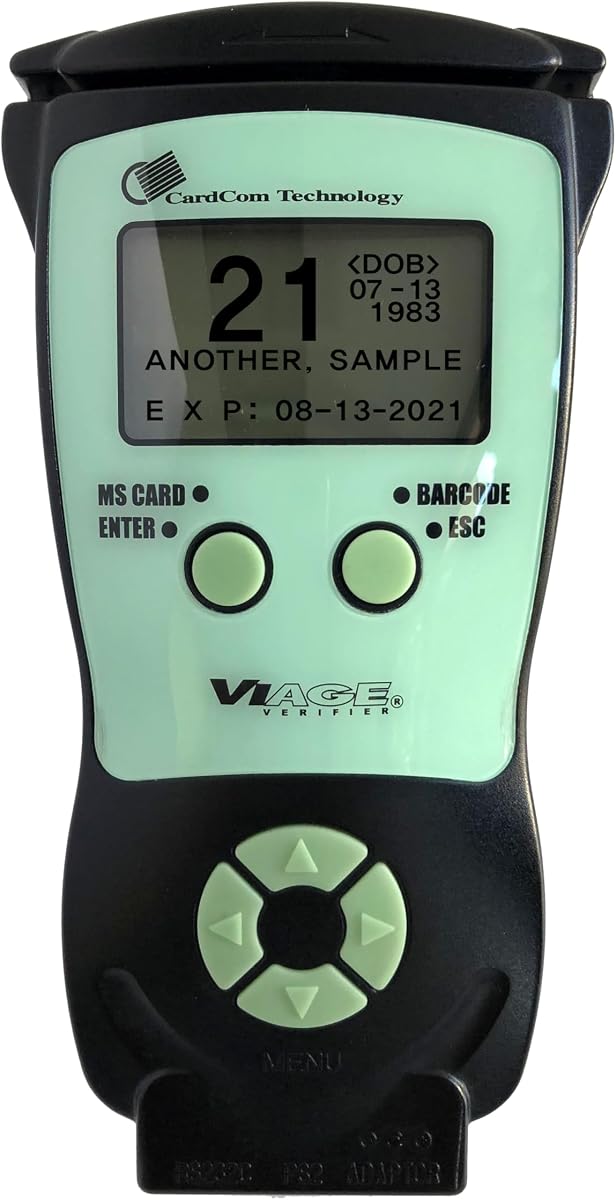
The CAV3200 is a portable, stand-alone ID scanner designed for quick age and expiration checks. Its 4.7 rating and straightforward configuration make it appealing to dispensaries that want a compact verification tool without a complicated customer relationship platform. It works independently and does not require an external computer or system.
We may earn a commission when you buy through this link, at no additional cost to you.
The device combines a 2D barcode reader and magnetic stripe reader, allowing it to work with different ID card formats used in the United States and Canada. A backlit display makes age and expiration information easier to see, and the compact ergonomic housing should be straightforward to move around a counter. Results are presented quickly without requiring prior user training.
Memory can be enabled or disabled depending on the operator’s reporting needs. The included compliance software supports due-diligence reporting, while lifetime ID updates and the absence of subscription fees simplify ongoing ownership. The supplied information does not list passport support, cloud synchronization, customer photographs, loyalty tools, or a remote device-management function.
The CAV3200 fits a dispensary that values portability, simple operation, and durable document reading over extensive customer profiling. It is a practical option for staff who need to move the scanner between service points or verify credentials without tying the process to a desktop. Operators requiring a complete CRM, challenge questions, or advanced authentication should examine a more specialized system.
Supporting both 2D barcodes and magnetic stripes improves compatibility with different credential formats. The dual-reader approach is useful when a staff member may encounter more than one style of state or driver identification.
Stand-alone operation allows the scanner to be placed wherever verification is needed. It can move between service points without requiring a connection to an external device or management system.
We may earn a commission when you buy through this link, at no additional cost to you.
The Quantum Edge V3 is a handheld reader built for demanding environments where spills, dust, and frequent movement could affect ordinary equipment. Its 4.5 rating reflects a capable verification system with fast validation, multiple credential types, audible and vibration feedback, and a water- and dust-sealed enclosure. A carry case and accessories are included for mobile deployment.
We may earn a commission when you buy through this link, at no additional cost to you.
IDetect software can read and validate credentials from all 50 states, Canada, Mexico, military identification, and many other countries. It calculates age, records the check, and supports optional passport authentication. Up to three pictures can be captured for the entrant and ID, while age indicators and audible warnings help staff interpret the result without relying on the screen alone.
The device is described as suitable for high-volume locations such as hospitals, banks, and busy points of sale, as well as bars and clubs. Wi-Fi allows connection with multiple devices, and optional PC software supports data transfer with free updates and support. The sealed housing is a meaningful advantage in a busy retail environment, although it does not eliminate the need to protect the scanner from drops or improper storage.
The Quantum Edge V3 is best for a dispensary that expects frequent handheld use, possible splashes, and a need to validate more than standard state licenses. It is also well suited to operators that want a tactile alert for rejected customers. A business wanting only local document extraction may find the dedicated AMBIR models more straightforward.
The sealed enclosure is designed to withstand small dust amounts and splashes such as rain or drink residue. That makes it more practical for high-traffic or less controlled environments than an exposed desktop reader.
Audible warnings, age indicators, and vibration feedback give staff several ways to recognize a no-entry result. Tactile feedback is particularly helpful when the employee is focused on the customer or another task.
We may earn a commission when you buy through this link, at no additional cost to you.
The AMBIR DS687 is a desktop document scanner with software designed specifically for extracting data from valid US and state-issued identification cards. Its 4.3 rating reflects a straightforward turnkey package with automatic data extraction, age restrictions, expired-ID detection, and local storage. The scanner reads 2D barcodes and captures both sides of a card in one pass.
We may earn a commission when you buy through this link, at no additional cost to you.
Information such as name, address, date of birth, and other available fields can be extracted without repeated manual entry. The computer can flag minors, identify expired credentials, detect repeated cards within a selected period, and store records locally. A password-protected interface, backup and restore functions, a two-year hardware warranty, and US-based support round out the administrative tools.
Unlike a stand-alone handheld, the DS687 connects to a PC by USB and draws power through the computer. It is compatible with Windows and Mac systems, and no external power supply is needed. Local storage means routine operation does not require cloud storage or an internet connection. The trade-off is that the operator must have a suitable computer available and follow a defined process for entering, retaining, and deleting records.
The DS687 is a strong choice for a dispensary that primarily needs reliable 2D barcode extraction, age screening, and repeat-identification control at a fixed workstation. It is particularly useful when local data control and no recurring subscription are priorities. A location that needs passport support, remote device management, or a roaming workflow should consider a more specialized reader.
Duplex scanning captures both sides of an identification card during a single pass. This reduces handling and supports a more consistent intake process at a fixed verification station.
Records remain on the local system rather than requiring cloud storage or internet access. Password protection, backup, restore, and anti-passback features help administrators manage that data responsibly.
We may earn a commission when you buy through this link, at no additional cost to you.
The ACUANT AssureTec ID-150 Sentinel is specialized desktop hardware for organizations that need detailed identification-card capture as part of an authentication workflow. Its 5.0 rating and 600 dpi resolution distinguish it from basic barcode readers, while color and near-infrared imaging provide multiple ways to examine a document physically and electronically.
We may earn a commission when you buy through this link, at no additional cost to you.
The scanner captures the front and back of an ID card in one pass and connects to a Windows 10 or Windows 11 PC through USB 2.0. It supports ISO 7811 AAMVA magnetic stripes for US and Canadian credentials. These hardware features make it appropriate for a dispensary that intends to use a dedicated authentication and document-imaging platform rather than a simple age calculator.
The important qualification is that this is hardware only. It works with AssureID or AcuFill software, but those licenses are sold separately. As a result, the scanner’s stated capabilities are not the same as a complete age-verification package, and a buyer must evaluate the compatible software, licensing model, deployment requirements, and record-handling features separately.
The ID-150 Sentinel is a premium fit for a dispensary with an established authentication workflow or a technical team ready to integrate specialized software. It offers finer document capture than standard barcode extraction and can support a more comprehensive review process. For a business seeking a ready-to-use age scanner with bundled management tools, one of the complete systems in this guide will generally be a simpler starting point.
Color and near-infrared image capture at 600 dpi supplies the document detail needed for specialized authentication workflows. This is the Sentinel’s main distinction from scanners focused only on age and expiration.
The scanner integrates with AssureID or AcuFill through its desktop connection. Buyers should confirm the required software, operating environment, and license terms before treating it as a complete solution.
We may earn a commission when you buy through this link, at no additional cost to you.
The AMBIR PS667 is a desktop ID reader and software package that focuses on the fundamentals of age verification and customer control. Its 5.0 rating reflects a capable turnkey system with automatic 2D barcode extraction, local storage, visit tracking, ban lists, and anti-passback security. It is especially attractive to dispensaries that want straightforward operation without subscription fees.
We may earn a commission when you buy through this link, at no additional cost to you.
The software reads 2D barcodes on valid US and state-issued IDs and extracts information including name, address, date of birth, and other available fields. Age restrictions can be customized, expired documents can be flagged, and duplicate scans can be detected within a selected period. Customer-management tools track visits, maintain ban lists, and support export of the customer database for marketing campaigns.
The scanner connects by USB and draws power from the PC, making it suitable for a permanent workstation without a separate power supply. Windows and Mac compatibility broadens the options for existing infrastructure. Data is stored locally, so routine use does not depend on cloud storage or internet access. Password protection, backup and restore capabilities, a two-year hardware warranty, and US-based support support controlled deployment.
The PS667 is a strong recommendation for a dispensary seeking an affordable, practical, locally managed age-verification system. It offers more customer administration than a basic reader while avoiding the feature complexity of a large handheld CRM platform. It is best for fixed-counter use with common domestic 2D-barcode IDs, not roaming verification or specialized passport imaging.
Hardware and software are supplied as a single package, and the listed feature set does not require ongoing subscription payments. That makes the system easier to budget for and administer.
Visit tracking, ban lists, exports, and anti-passback detection turn a basic age reader into a practical customer administration tool for a fixed retail counter.
We may earn a commission when you buy through this link, at no additional cost to you.
The right ID scanner depends on where verification occurs, which credentials customers present, how records must be managed, and how much staff training your workflow can support. These factors matter more than feature count because a capable scanner is only useful when it fits the dispensary’s daily process.
Begin with the physical location of the check. A fixed countertop scanner is efficient when every age-restricted transaction occurs at the same register, reception point, or compliance station. Plug-in models generally simplify installation and can remain available throughout the day. A handheld scanner is more valuable when employees need to check credentials at an entrance, move between service areas, handle a customer away from the register, or use a roaming verification policy. Portable devices add battery, charging, and device-management considerations, so the form factor should reflect the actual movement pattern rather than a preference for wireless flexibility.
Check the exact formats and locations your customers are likely to present. Many desktop readers extract data from 2D barcodes found on valid US and state-issued IDs. Other models add magnetic stripe reading, Canadian provincial credentials, military identification, or passports. A device intended for international use may also cover Mexico and other countries, but that broader support should be confirmed against the listed specifications. Manually entered fallback procedures are useful for passports, damaged cards, and documents with unreadable barcodes. The best choice reads the credentials common in your location without making staff handle exceptions outside the normal workflow.
A scanner should calculate age accurately and make the result unmistakable. Some models use color-coded icons, spoken warnings, vibration, pop-up alerts, and clear sale or no-sale decisions. Customizable age thresholds are important because regulated product rules can vary by jurisdiction, and a business may need to establish its own internal policy. Look for automatic expiration notifications as well, because a valid date of birth does not make an expired credential acceptable. Additional challenge questions, tagged-customer alerts, and anti-passback functions can improve control, but the best system is one whose prompts are easy for staff to interpret under pressure.
Decide how much customer information the business needs beyond the current transaction. Basic tools may show age, expiration, and a verification log. More advanced systems can distinguish new and returning customers, record visit counts, store contact details, assign loyalty membership, add VIP or banned tags, capture customer images, and upload or download records through Wi-Fi or USB. These functions can improve service and repeat-visit analysis, but they also require policies for consent, access, retention, and deletion. A simple local database may be more appropriate than a cloud-connected platform for a business that only needs age checks and an audit trail.
Some scanners arrive as complete packages with age verification, reporting, and management software already included. Others are only document-capture hardware and require separate licensing for authentication or data-management tools. Also distinguish bundled functionality from optional services, such as live barcode authentication, issuing-agency verification, cloud synchronization, or advanced fake-ID checks. These services can add useful scrutiny, but they may introduce separate usage requirements. Before purchasing, list the features the dispensary will use and confirm whether they are included, optional, or unavailable. A product with lifetime updates and no recurring subscription may simplify ownership, while a modular system may be better for an organization with specialized authentication requirements.
ID verification involves sensitive personal information, so security should be evaluated alongside speed. Local-only storage can reduce dependence on cloud services and may suit a dispensary with strict data-control requirements. Other useful controls include password-protected access, backup and restore functions, remote locking, remote erasure, and GPS location tracking for portable devices. Some scanners store customer photographs, while others take no photos during standard scanning. Decide whether visual records are necessary, limit access to the people who need them, and establish a deletion schedule. Cloud synchronization should be evaluated with the same attention given to local storage rather than treated as automatically more convenient or more secure.
Consider where the scanner will be plugged in, charged, stored, and updated. A desktop USB model depends on a suitable computer, while a handheld needs a charging cradle or other dependable power routine. A fixed plug-in scanner can remain continuously available, making it appropriate for a high-volume counter. Wi-Fi access is useful for cloud synchronization or multi-device coordination, but local operation may be preferable when connectivity is inconsistent. Routine maintenance includes cleaning the reading surface, using a protective case, charging batteries as directed, keeping software updated, and reviewing stored records. Choose a system your staff can maintain without frequent troubleshooting.
Standard age and expiration screening does not necessarily authenticate an entire document. Barcode detective tools can examine hidden information for signs of tampering, while live database checks can compare encrypted barcode data with current security information. Some systems also support verification with issuing authorities. These deeper checks can strengthen controls but may require optional services, separate credits, or compatible software. A fixed scanner with a clear sale or no-sale result and compliance log is a practical choice when standard verification is the requirement. A premium document-capture system is more relevant when the business needs high-resolution color and near-infrared imaging as part of a formal authentication workflow.
Begin by defining the verification policy and configuring the scanner before it enters normal service. Set the appropriate age threshold, confirm expiration alerts are enabled, and decide whether compliance logging or customer images should be recorded. For a portable device, assign responsibility for charging, check-in, and daily connection to the intended network. For a desktop system, create local user accounts and restrict access to the records the business actually needs.
Train staff to ask for identification consistently, place the credential in the correct orientation, and wait for a clear result before proceeding. When a document is underage, expired, tagged, or otherwise rejected, follow the dispensary’s established procedure without making assumptions beyond the scanner’s output. Challenge questions should be used only under the approved policy. If a card cannot be read, follow the documented manual-entry or exception process rather than repeatedly forcing a damaged document through the reader.
Clean the scanner according to the manufacturer’s guidance, especially the window or platen that contacts credentials. Keep the device dry, protect it from impact, and store it in its case or on a stable surface when not in use. Review software and ID updates, confirm that backups are succeeding, and delete or archive records on the established schedule. Periodically review flagged entries and scanning logs so that a staff shortcut or workflow problem does not become a hidden compliance gap.
It depends on the model and the dispensary’s workflow. Some scanners are designed to show age and expiration without creating a customer record, while others log scans, track visits, store contact details, assign loyalty status, or capture photos. A business should decide what information is necessary, restrict access, and establish retention and deletion rules before enabling stored records. Local-only scanners can be useful where the operator wants to avoid cloud storage.
Age and expiration checks are not always the same as full counterfeit authentication. Some products include barcode analysis or optional live security-database checks, while the ACUANT ID-150 Sentinel provides high-resolution color and near-infrared capture for use with separately licensed authentication software. Buyers should identify the level of document scrutiny they need and confirm which detection tools are bundled, optional, or unavailable.
A handheld scanner is better for roaming checks, entrances, and multiple service points because it can be carried between staff members. A countertop scanner is generally simpler to keep continuously available at a fixed register and may use plug-in power. Handheld units may require battery management, while desktop units normally require a connected computer and local software.
Not necessarily. The AMBIR DS687 and AMBIR PS667 store information locally and do not require cloud storage or internet access for routine use. Other systems use Wi-Fi for record synchronization, remote device management, or optional cloud features. Dispensaries with unreliable connectivity should look for local operation or define a clear policy for how records are synchronized when a connection becomes available.
Several models in this guide explicitly support passports, including the Unitech EA660, IDVisor Smart V2, AgeVisor Mini with optional passport capability, IDVisor Smart Plus, and Quantum Edge V3. Other desktop readers focus on 2D barcodes and valid US or state-issued IDs. Verify the exact document support and any optional configuration before purchasing for an area where passports are common.
The appropriate threshold depends on the products being sold, applicable local rules, and the business’s own policies. Many scanners allow age restrictions to be customized for different jurisdictions and age-restricted products. Operators should confirm current legal requirements, set the threshold according to policy, and retrain staff on how the device communicates underage and expired-document warnings.
That depends on the model. The AMBIR DS687, AMBIR PS667, CAV3200, and IDVisor products include stated management or compliance capabilities. The ACUANT AssureTec ID-150 Sentinel is hardware only and works with AssureID or AcuFill software whose licenses are sold separately. Optional live checks, issuing-agency verification, and cloud synchronization can also have separate requirements, so the full software package should be reviewed before purchase.
Use the manufacturer’s cleaning and maintenance instructions, and do not apply liquid directly to the device or reading window. Keep the scanner away from excessive moisture, impact, and unstable surfaces, and return handheld units to their charging area when not in use. Confirm that software and credential updates are current, backups are functioning, and stored records are handled according to the dispensary’s retention policy.
The IDVisor Smart V2 stands out as the most complete overall choice for a dispensary that wants age verification, customer history, loyalty tools, cloud or USB record access, and portable operation in one system. The AMBIR PS667 offers a focused alternative for fixed counters that prioritize local storage, configurable age checks, visit tracking, and no subscription requirement. For specialized authentication workflows, the ACUANT AssureTec ID-150 Sentinel delivers detailed color and near-infrared image capture, although its software is licensed separately.
The right choice for the remaining options depends on the operating environment. The AgeVisor Mini is compact and automatic, the IDVisor Smart Plus emphasizes a large display, the dedicated Countertop ID Scanner prioritizes clear compliance results, the CAV3200 offers portable stand-alone operation, and the Quantum Edge V3 emphasizes a sealed handheld design. The Unitech EA660 is a touchless option for mobile verification, while the AMBIR DS687 provides duplex extraction at a connected workstation.
Before making a final selection, verify the credentials your customers actually use, the age and expiration behavior your staff need, the amount of customer data you should retain, and whether every advanced feature is included. Check the current product listing for availability, software requirements, included accessories, and pricing at the time of purchase, because configurations and commercial terms can change.