
Fire TV Voice Remote
4.3Editor score
Alexa voice control
Remote finder function
Streaming app shortcuts
Extended wireless range
Our Insignia TV Replacement Remote guide compares ten options for compatibility, setup, voice control, response speed, durability, build quality, and ease of
Finding a replacement remote for an Insignia television is simpler when you know which platform your TV uses, which remote model it accepts, and which features matter most. Older LED and LCD sets may use infrared remotes, while Fire TV editions call for a voice-enabled smart remote with dedicated streaming shortcuts.
This guide compares ten replacement and universal remotes based on the supplied compatibility information, setup requirements, range, response speed, button durability, voice-control functions, special features, and customer ratings. It covers traditional Insignia LED and LCD televisions, Fire TV models, Roku-equipped sets, and remotes designed to work across several supported brands.
Each review explains who the remote is best for, where it stands out, and where its compatibility limitations may matter. Ratings reflect the listed customer feedback and can change over time. Product availability, promotions, and prices also fluctuate, so confirm the current model information and listing details before buying.
4.3Editor score
4.7Editor score

4.6Editor score
The table below compares the ten remotes by television platform, compatibility approach, setup needs, and standout functions. It is especially important to distinguish standard Insignia LED LCD remotes from Fire TV and Roku-compatible replacements before making a selection.


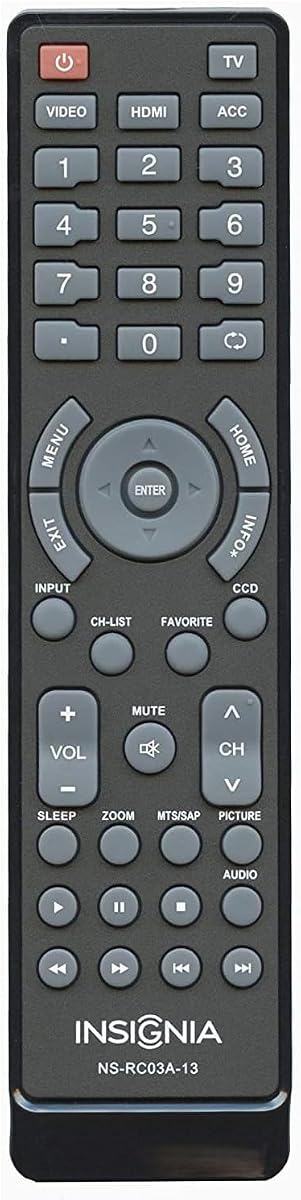
The Insignia NS-RC03A-13 OEM remote leads this roundup with a 4.7 customer rating, the highest listed rating among the ten products. It is designed as a model-specific OEM-style replacement for numerous Insignia LCD televisions from the NS-19E310A13, NS-24E340A13, NS-32D series, NS-39D series, NS-42D and NS-42E families, and other listed sets. Its strongest advantage is specificity: when your original remote was an NS-RC03A-13, this is a more focused choice than a broad universal option.
We may earn a commission when you buy through this link, at no additional cost to you.
The listing provides an extensive collection of compatible model numbers and related identifiers, including NS-RC03A-13, 118020397, 601120020A, 601120020B, 158141, 49.31S39.003, and both 398GRABDANEBYJ and 398GRABDANEBYH. That level of detail is useful when a television is mounted, stored away, or no longer accompanied by its paperwork. It also tells buyers that a sticker labeled Remote Control may need to be removed to reveal the Insignia logo.
The main limitation is platform scope. This remote is presented for conventional Insignia LCD televisions rather than as a Fire TV voice remote, and the supplied information does not claim compatibility with Insignia Roku sets. It also does not advertise voice commands, streaming shortcut keys, a remote finder, or a stated transmission distance. Those omissions make sense for an older-style OEM replacement but limit its appeal to owners of modern streaming televisions.
Buy this remote if its listed model numbers correspond to your television and you want the closest match to the original control. It is particularly suitable for replacing a lost or damaged NS-RC03A-13, restoring simple infrared control, or keeping a spare for an older Insignia LCD set. For a Fire TV or Roku television, choose a platform-specific option instead.
The extensive model-number list is the defining feature of this remote. It allows owners to match a specific television rather than rely on a general promise of universal compatibility, making it especially useful for older Insignia sets whose original remotes are difficult to identify.
This option focuses on the traditional TV remote experience. It is intended for compatible Insignia LCD televisions and does not add streaming-platform features, so its appeal comes from restoring familiar controls rather than expanding the television's capabilities.
We may earn a commission when you buy through this link, at no additional cost to you.
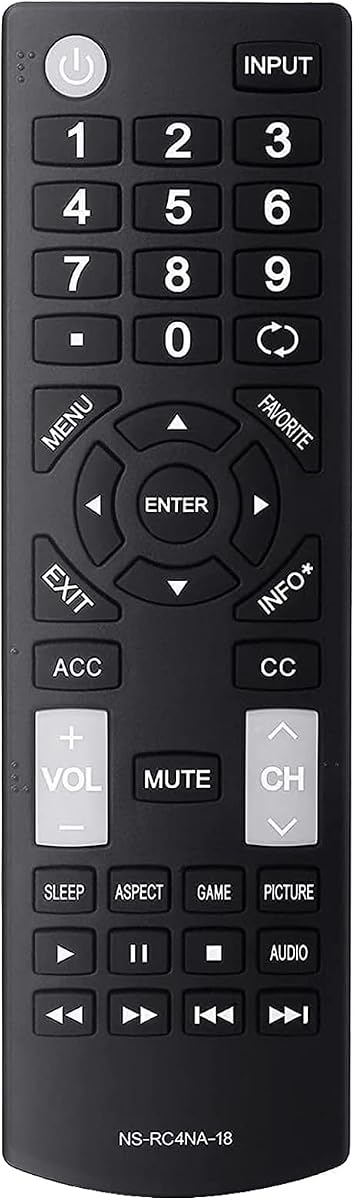
The NS-RC4NA-18 basic remote earns a 4.6 customer rating and stands out as a straightforward, economical replacement for conventional Insignia televisions. Rather than requiring an app, on-screen code, or pairing process, it works after batteries are inserted. That simplicity makes it useful for anyone who wants a familiar remote without navigating a modern setup procedure.
We may earn a commission when you buy through this link, at no additional cost to you.
The compatibility information names several specific sets, including NS-32D311NA17, NS-32D311MX17, NS-40D420NA18, NS-49D420NA18, NS-55D420NA18, NS-40D420MX18, NS-55D420MX18, NS-39D310NA17, NS-50D510NA17, and NS-50D510MX17. The package contains one remote, and the identified model is NS-RC4NA-18. Buyers can therefore compare the model printed on their original remote with the listing before ordering.
This is a no-frills choice. It does not advertise voice control, dedicated application buttons, a find-my-remote feature, wireless operation, or a measured response time. Its range also is not specified in the supplied details, so it should be considered a conventional infrared replacement rather than a feature-oriented smart remote. Owners of Insignia Fire TV or Roku televisions should not assume that a generic Insignia remote will control those platforms.
This is a strong pick for a standard Insignia LED LCD HDTV whose original remote matches NS-RC4NA-18. It suits households that value straightforward operation, a familiar button layout, and minimal setup. It is also a sensible backup remote because it requires no learning process after the correct TV compatibility has been confirmed.
The main benefit is immediacy. Insert the appropriate batteries and the remote is ready to use according to the listing, avoiding the code-search routines associated with many general-purpose universal remotes.
This remote is aimed at compatible traditional Insignia television models. It is most appropriate when the original control was an NS-RC4NA-18 and the television does not depend on Fire TV or Roku-specific features.
We may earn a commission when you buy through this link, at no additional cost to you.
This NS-RC4NA-18 replacement has a 4.4 customer rating and differentiates itself through upgraded chips, a stated operating distance of up to 10 meters, and a listed response time of less than 0.3 seconds. It retains the familiar no-programming approach while adding performance specifications that are useful when the television is mounted at a distance.
We may earn a commission when you buy through this link, at no additional cost to you.
The remote supports a long collection of Insignia model numbers, including several D311, D420, D510, and MX-series televisions, and the listing notes additional compatible models. Installation requires two AAA batteries, which are not included, but there is no pairing or programming stage. Its compact size and ergonomic shape are intended to make the remote easier to grip and less likely to slip.
Compared with the more basic NS-RC4NA-18 listing, this option offers clearer performance claims and a button durability figure of more than 160,000 tested clicks. Those details can make it more appealing if range, response speed, and long-term use matter. However, it remains a standard Insignia replacement with no listed voice function or app shortcut buttons, and buyers should not treat its broad model list as proof of Fire TV or Roku compatibility.
Choose this version if you own a compatible traditional Insignia model and want a compact remote with a stronger stated range and response performance. It is a practical alternative to the simplest replacement, especially for users who want fast operation without a setup routine. Confirm the television model and original remote number before purchase.
With a stated response below 0.3 seconds and a range reaching 10 meters, this remote is positioned for wall-mounted televisions or seating arrangements that are farther from the screen.
The combination of an ergonomic, compact body and battery-only installation makes this an approachable replacement for users who prioritize familiar operation over app-based setup.
We may earn a commission when you buy through this link, at no additional cost to you.
The NS-RC03A-13 OEM-style remote is another model-specific choice for conventional Insignia LCD televisions, and its 4.7 rating reflects favorable customer feedback. It is especially compelling when the original remote was labeled NS-RC03A-13 because the listing provides many of the television model numbers it is intended to operate.
We may earn a commission when you buy through this link, at no additional cost to you.
Compatibility spans numerous families, including NS-19E310A13, NS-19E320A13, NS-22E340A13, NS-24E340A13, NS-24L120A13, NS-24L240A13, NS-26E340A13, NS-29L120A13, NS-32D120A13, NS-32E320A13, multiple 32-, 39-, 40-, 42-, 46-, 50-, 55-, and 65-inch model groups. The page also notes that a Remote Control sticker should be removed to reveal the Insignia logo.
Its limitation is equally specific: this is not presented as a voice remote for Fire TV, nor as a Roku-compatible unit. It focuses on replacing the functions associated with older Insignia LCD sets. Owners of newer smart televisions who want voice search, streaming shortcuts, or wireless navigation will get more value from a platform-specific option.
This remote is best for households that still use an older compatible Insignia television or need an exact spare for the NS-RC03A-13. The long compatibility list makes the decision more precise than choosing a generic remote, although buyers should locate the model number on the television or its original remote before ordering.
The listing goes well beyond naming one remote code. Its detailed television list gives owners a practical way to confirm that the replacement is intended for their exact set.
This remote restores the conventional control experience for compatible Insignia LCD televisions. It avoids unnecessary smart-platform features while focusing on core navigation and power functions.
We may earn a commission when you buy through this link, at no additional cost to you.
The all-model infrared remote carries a 4.3 customer rating and emphasizes quick setup, fast response, and after-sale support. It is designed for Insignia LED-LCD HDTV televisions, with the NS-RC4NA-18 listed as its universal replacement model. The operating idea is uncomplicated: insert two AAA batteries, and the remote is ready to use.
We may earn a commission when you buy through this link, at no additional cost to you.
Its stated transmission distance extends beyond 10 meters, and the response time is listed at no more than 0.2 seconds. The buttons are described as soft-touch and resistant to dust, while testing reportedly supports more than 150,000 clicks. These specifications make it a reasonable option for a wall-mounted Insignia set or a room where the seating area is far from the television.
What it does not add is platform depth. There are no listed Alexa commands, application shortcuts, a remote finder, or Fire TV-specific pairing behavior. It is therefore best understood as an enhanced conventional remote rather than a universal solution for every Insignia television platform. The buyer should verify that the television uses the expected infrared control system.
This product is well suited to users who want straightforward operation plus defined performance and service benefits. The 360-day return service and stated response target provide additional confidence, particularly when replacing a lost remote for a compatible standard Insignia television.
The remote combines a 0.2-second stated response with an infrared range of more than 10 meters. That makes it useful when line-of-sight distance would challenge a less capable replacement.
A listed 360-day return service and a customer-reply target of 12 hours distinguish this option from minimal replacements. Buyers can seek assistance if the model or function does not match expectations.
We may earn a commission when you buy through this link, at no additional cost to you.
The Fire TV voice remote is the most feature-rich selection in this guide, earning a 4.3 customer rating. It targets Insignia Fire TV sets and a broad collection of Fire TV-compatible models from Toshiba, Hisense, TCL, and Pioneer. It is built for viewers who want voice search, quick access to streaming services, and a way to locate a misplaced remote.
We may earn a commission when you buy through this link, at no additional cost to you.
Alexa compatibility allows users to press and speak to find programs, switch inputs, and navigate the television without typing. A remote finder emits a beep to help locate the control, while four shortcut keys provide one-touch access to Prime Video, Netflix, Peacock, and Disney. The listing also states that an auto-sleep function can extend battery life beyond 12 months.
Performance claims include a wireless range of 40 feet, response under 0.2 seconds, and buttons tested for more than 150,000 clicks. Setup is still simple: insert two AAA batteries and pair the remote. Because it uses Fire TV functionality, it is not the appropriate choice for a conventional Insignia LED LCD set or a Roku television.
This is the best pick for owners of an Insignia Fire TV who want to recover the complete smart-remote experience. The voice function, locator, and app shortcuts justify choosing a specialized remote over a basic infrared replacement. It is particularly convenient for users who navigate streaming menus frequently or often misplace a remote between cushions.
Alexa voice commands let users search for content, change inputs, and navigate the television hands-free. This is the feature that most clearly separates the remote from a conventional Insignia control.
Four app buttons reduce the time needed to reach major streaming services, while the audible locator helps recover a remote hidden near furniture. Automatic sleep further reduces the likelihood of unnecessary battery drain.
We may earn a commission when you buy through this link, at no additional cost to you.
The lightweight NS-RC4NA-18 replacement has a 4.6 rating and stands out for its physical design and strong durability claims. It is intended to control compatible Insignia smart TVs, including a broad selection of D311, D420, D510, and MX-series models, while also working as a backup for a lost or damaged original remote.
We may earn a commission when you buy through this link, at no additional cost to you.
Its most notable specifications are a response time under 0.2 seconds, reliable control up to 10 meters, and testing for more than 200,000 button clicks. That is the highest click figure stated in the supplied product data. The lightweight, ergonomic shape is designed to resist slipping and support comfortable one-handed use in a living room, bedroom, or secondary viewing space.
Installation remains uncomplicated: add two AAA batteries, and no programming or setup is required. The listing does not claim Alexa compatibility, a locator, or app-specific shortcut buttons, so it should not be confused with a Fire TV voice remote. Although some listings describe compatibility with Insignia smart TVs generally, the more precise and conservative choice is to compare the television's exact model number with the stated list.
Buy this remote if you want fast response, strong stated button durability, and a lightweight body for a compatible standard Insignia television. It is a particularly attractive backup because it is easy to store, easy to handle, and ready to use without a learning sequence.
The stated testing beyond 200,000 clicks gives this model a stronger durability position than many conventional alternatives. Responsive buttons are intended to retain their feel despite repeated use.
Its light weight and slip-resistant ergonomic shape make the remote easier to hold for long viewing sessions. It can also serve as a convenient second remote in another room.
We may earn a commission when you buy through this link, at no additional cost to you.
The luminous NS-RC4NA-18 remote earns a 4.1 customer rating and is built around a practical nighttime advantage. Its power, channel, and volume buttons feature a luminous function, allowing those frequently used controls to be located more easily in a dark room. That benefit may be particularly valuable for anyone who watches television before bed.
We may earn a commission when you buy through this link, at no additional cost to you.
The remote is presented as an upgraded version of NS-RC4NA-14, NS-RC4NA-16, and NS-RC4NA-18, with a long list of compatible Insignia LED and LCD model numbers. Installation requires two AAA batteries, which are not included, but there is no pairing or programming. It also comes with a stated one-year after-sale service and a claimed customer-reply target of 10 hours.
The most important limitation is prominently stated: it does not support Insignia Roku televisions or Fire TV operating systems. Those users need a remote designed for the relevant platform. Even though the listing uses universal language, the supported group is conventional Insignia LED LCD televisions rather than every modern Insignia ecosystem.
This is a compelling choice for a compatible traditional Insignia set, especially for nighttime viewing or households that value easy location of essential buttons. Choose it over a plain replacement when illuminated power, volume, and channel keys would meaningfully improve daily use.
Glow-in-the-dark power, channel, and volume controls reduce the need to turn on bright lights during late-night viewing. The feature targets the most frequently pressed buttons rather than making every key luminous.
The listing explicitly states that the remote is not for Insignia Roku or Fire TV systems. This transparency helps conventional LED LCD owners make an informed choice and prevents an avoidable platform mismatch.
We may earn a commission when you buy through this link, at no additional cost to you.
The basic Insignia replacement has a 4.6 customer rating and focuses on a clear proposition: install fresh batteries and use the remote without programming. It is intended for a wide selection of conventional Insignia television models and promises the same functions as the original remote.
We may earn a commission when you buy through this link, at no additional cost to you.
The compatibility list includes the NS-32D311NA17, NS-32D311MX17, NS-40D420NA18, NS-49D420NA18, NS-55D420NA18, NS-39D310NA17, NS-40D420MX18, NS-55D420MX18, NS-50D510NA17, NS-50D510MX17, NS-24D310NA19, and other models. It is also identified as a replacement for the NS-RC4NA-18. No pairing, programming, or code entry is needed.
The important qualification is equally straightforward: the listing says the remote does not work for Insignia Fire TV or Roku televisions. It therefore should not be selected for a streaming platform merely because it uses the Insignia name. It also offers no listed voice search, app shortcuts, remote finder, measured range, or tested click endurance.
This is a good pick for owners of a compatible standard Insignia television who want the least complicated replacement possible. It is also a practical backup for an Airbnb, bedroom, or spare television where quick access and familiar operation matter more than smart features. Verify the model before ordering.
The remote needs only batteries, with no setup sequence. That makes it well suited to restoring television access after a remote is lost, damaged, or misplaced.
Its stated goal is to provide the same functions as the original control. Buyers seeking familiar operation and broad support for older Insignia LED and LCD sets will find that focus useful.
We may earn a commission when you buy through this link, at no additional cost to you.
The luminous manual-included remote has a 3.5 customer rating, the lowest in the group, but it addresses a few needs clearly. It is designed as an NS-RC4NA-18 replacement for standard Insignia LED, LCD, and Smart TVs, with a button layout that mirrors the original and a guide included in the package.
We may earn a commission when you buy through this link, at no additional cost to you.
The remote works after two AAA batteries are installed, with no codes, pairing, or manual lookup required for basic operation. The included instruction sheet is still useful for orientation, particularly for seniors, children, Airbnb hosts, or anyone setting up a remote in a hotel or rental property. Luminous power, channel, and volume buttons improve visibility in a dark room.
Its performance claims include a response under 0.2 seconds, a range up to 33 feet, and testing for more than 100,000 button presses. These are reasonable specifications for a standard replacement, though they are less ambitious than the click counts and response figures stated by some competitors. The product also lacks the voice controls, app buttons, and remote finder found on the dedicated Fire TV option.
Choose this remote when an included guide, luminous core controls, and familiar layout are more important than the highest customer rating. It is well suited to a compatible conventional Insignia set, but owners of Roku televisions should choose a Roku-compatible remote instead.
The included manual makes the product more approachable for first-time remote buyers. Although pairing is unnecessary, the guide can help users understand button locations and basic navigation.
Simple battery installation, familiar controls, and luminous essential buttons are useful in an Airbnb, guest room, or secondary family television. The remote can be stored as a spare without complicated preparation.
We may earn a commission when you buy through this link, at no additional cost to you.
The most important decision is platform compatibility, not appearance. Start with the operating system and model number of your television, then compare those details with the exact models supported by the replacement remote before considering extras such as voice control or illuminated buttons.
Insignia televisions can use several different remote systems. Standard LED and LCD sets generally use infrared controls, while Fire TV models require a compatible smart remote with voice functions and pairing. Roku-equipped Insignia televisions use yet another remote system. A physically similar Insignia logo does not guarantee that a replacement will work. Review the platform named on the television box, the operating system in its settings, or the model information on the original remote before buying.
The original remote often displays a model number on its back. The NS-RC4NA-18 appears across many of the standard-model listings in this guide, while the NS-RC03A-13 is associated with a separate OEM-style remote and many older LCD sets. Compare the full model number and any alternative identifiers printed on the original control. This step is especially important for less common television models.
A remote's compatibility statement is only useful if it includes the television you own. Some listings list many model numbers, while others provide broader summaries. Search within the product information for your exact television model, including suffixes such as NA, MX, E, L, or D. If the model is absent, do not assume that nearby models are interchangeable.
Many conventional Insignia LED LCD remotes work immediately after two AAA batteries are inserted. Fire TV replacements generally require a pairing process, even if it takes less than a minute. Choose the simplest method that matches your television and your comfort with technology. A no-code remote is usually preferable for shared spaces, but a pairing remote is necessary when the platform calls for it.
Voice control is valuable when an Insignia television runs Fire TV. The dedicated Fire TV remote in this guide includes Alexa commands, a remote finder, and shortcuts for Prime Video, Netflix, Peacock, and Disney. Standard infrared replacements cannot provide those functions merely by being labeled universal. Only pay attention to smart features when the television actually runs a compatible streaming operating system.
The listed conventional remotes offer stated ranges of approximately 10 meters or 33 feet, while the Fire TV voice remote claims a 40-foot range. Response figures range from under 0.2 seconds to under 0.3 seconds. These specifications are most relevant for large rooms, wall-mounted sets, or seating positioned away from the television. For close-up viewing, setup and compatibility remain more significant.
A lightweight, slip-resistant body can improve comfort, particularly for older adults or anyone using the remote extensively. Luminous power, channel, and volume buttons are helpful in dark rooms. A remote finder is even more useful on Fire TV sets. These details should support your needs rather than distract from the essential platform and model match.
Most products require two AAA batteries, and the supplied information generally does not indicate that batteries are included. Keep a fresh pair on hand before setting up a new remote. Some listings also mention after-sale service periods, return windows, or customer-reply targets. These terms can add confidence, but they do not replace checking compatibility or following the remote's pairing instructions.
Begin by confirming that the remote model and television model appear in the same compatibility information. Install two fresh AAA batteries in the correct polarity, then point the remote at the television. For standard infrared replacements, allow a few seconds for the TV to recognize the signal. If there is no response, move closer and test the batteries before attempting any additional troubleshooting.
Fire TV remotes require a pairing sequence. Follow the pairing instructions supplied with the television or the remote, keep both devices close enough to communicate, and wait for the on-screen confirmation. Once paired, test power, navigation, voice, and shortcut keys. For other streaming platforms, do not infer pairing steps from an Insignia LED LCD remote; use the instructions associated with the television's actual platform.
Handle the remote with clean, dry hands and avoid food or liquids near the buttons. Do not disassemble it, expose it to excessive heat, or clean it with abrasive chemicals. Remove the batteries if the remote will be stored for a long period, and replace them periodically so leakage is less likely. Treat the luminous buttons and voice microphone as intended by the manufacturer rather than applying solvents or scratching surfaces.
Look for the remote model number on the back of your original remote and compare it with the replacement listing. Also check the full television model number, including all letters and numbers. If the original remote is missing, consult the television's settings, support information, or model documentation. Avoid choosing solely by screen size because several Insignia families use the same remote.
No. The NS-RC4NA-18 is aimed at many standard Insignia LED and LCD models, but it is not a universal answer for every Insignia product. The listings in this guide explicitly exclude Fire TV and Roku systems for several NS-RC4NA-18 options. Always compare your exact television model with the remote's supported list before ordering.
Yes, the dedicated Fire TV voice remote requires batteries and a pairing process. The stated setup can be completed quickly, but it should be compared with the television's on-screen instructions. A conventional infrared remote that works without pairing will not automatically provide the same voice, app shortcut, or remote-finder features as the Fire TV version.
Most of the listed products require two AAA batteries, and the supplied information generally states that batteries are not included. Prepare a fresh set before setup, particularly for remotes with upgraded chips, wireless functions, or a remote finder. Rechargeable AAA batteries can be used if they fit correctly and provide reliable power.
They are designed as replacements for different groups of Insignia televisions. The NS-RC4NA-18 options cover numerous listed LED and LCD model numbers, while the NS-RC03A-13 is an OEM-style control tied to a separate set of older models. The model printed on the original remote is the most reliable way to determine which one you need.
Do not assume so. Several conventional remotes explicitly exclude Insignia Fire TV and Roku models because those platforms use different control systems. Fire TV owners should choose a compatible voice remote with pairing, while Roku owners should select a remote designed for Roku navigation and the shortcut keys provided by that platform.
They are particularly useful for late-night viewing because the power, volume, and channel buttons are easier to locate in a dark room. The feature does not improve signal range or compatibility, however, so it should remain secondary to confirming that the remote supports your television model and operating system.
First, test it with fresh batteries and point it directly at the television's infrared sensor. Check the battery contacts and make sure the television is responding to its original controls. For a Fire TV remote, repeat the pairing instructions. If it still fails, revisit the exact TV model and platform compatibility rather than attempting a random code sequence.
The best overall choice is the NS-RC03A-13 OEM-style remote for owners of a compatible older Insignia LCD television because it offers the highest listed customer rating and highly specific model guidance. The NS-RC4NA-18 basic remote is a strong budget selection for straightforward infrared control, while the dedicated Fire TV voice remote is the best premium option for smart features, app shortcuts, and hands-free navigation.
Before buying, identify your television's platform and exact model number, then confirm both in the replacement remote's listing. Choose a no-pairing remote for a conventional LED LCD set, a Fire TV voice remote for an Insignia Fire TV, and a platform-specific Roku remote when appropriate. Consider luminous buttons for nighttime use, range for distant seating, and click durability for frequent operation.
Ratings, product availability, promotions, and prices can change, so review the current listing and compatibility details before making a final decision. Comparing the television model with the remote model is the most important step; it prevents an otherwise convenient replacement from becoming an expensive platform mismatch.