
Thermaltake Toughpower GT 850W
4.5Editor score
Native PCIe 5.1 connector
Fully modular flat cables
Smart Zero Fan operation
Discover the best 850W PSU options for modern gaming PCs, comparing efficiency, modularity, ATX 3.1 support, noise, and build fit with confidence.
An 850W PSU sits in a practical middle ground for many modern gaming computers, providing enough headroom for demanding processors and graphics cards without requiring a much larger unit. A good example should combine efficient power conversion, clean modular cabling, dependable electrical protections, and enough connector support for current hardware. Quiet cooling and a practical case footprint also matter.
This guide compares ten 850W power supplies using the supplied specifications, customer ratings, efficiency certifications, modularity, transient-power features, fan designs, connector support, warranty coverage, and physical details where available. It covers ATX 3.0 and ATX 3.1 models, native 12V-2×6 options, and alternatives designed for quiet, compact, or visually tidy builds.
The selections show which products stand out for overall balance, quieter operation, straightforward cable management, stronger warranty coverage, or convenient support for newer graphics cards. Ratings and product details can change over time, and prices fluctuate frequently, so verify the latest listing, component requirements, and connector compatibility before purchasing.
4.5Editor score

4.8Editor score

4.7Editor score
The comparison below places all ten power supplies side by side, focusing on efficiency, modern connector support, modular construction, cooling behavior, and warranty coverage.
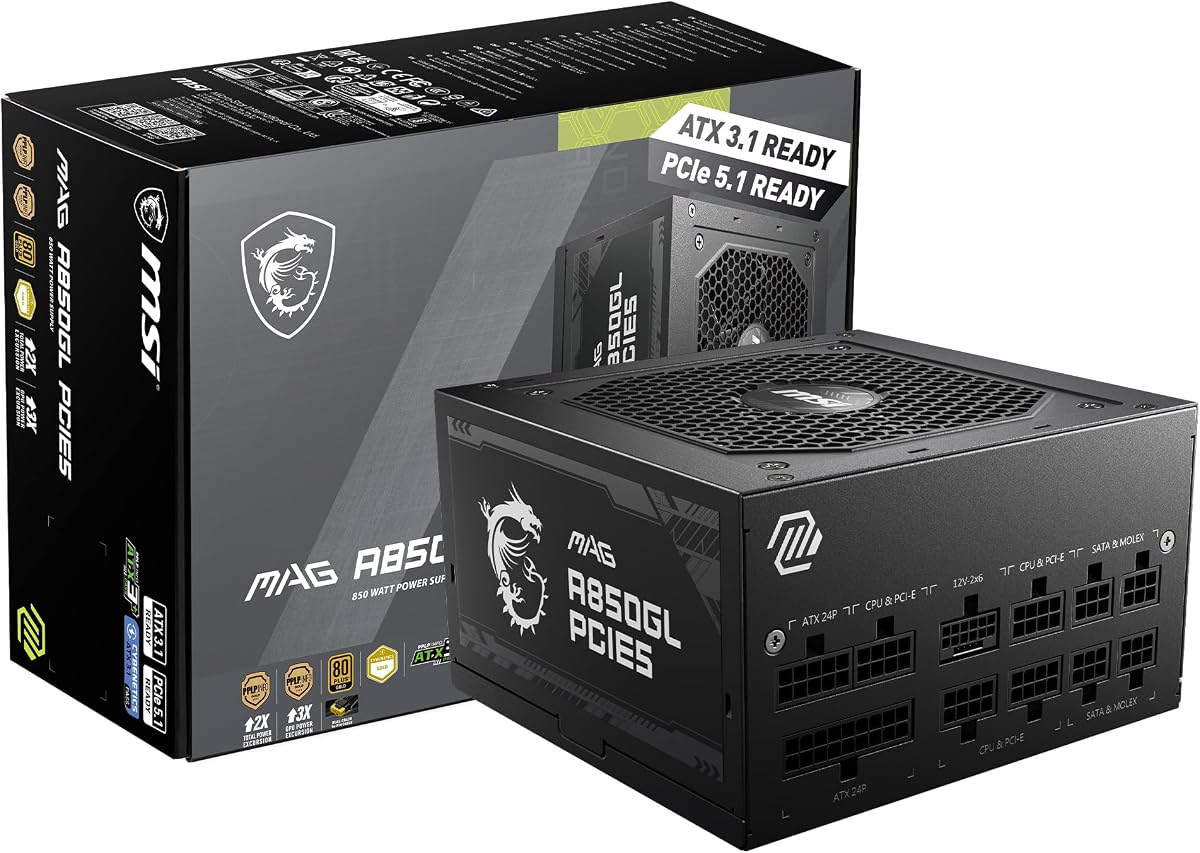


The MSI MAG A850GL PCIE5 is a well-rounded 850W power supply for gaming systems that want modern power standards without moving into the largest or most specialized units. Its 4.5 rating reflects a favorable balance of customer feedback and specifications. Standout qualities include 80 PLUS Gold certification, full modularity, ATX 3.1 and PCIe 5.1 readiness, a native dual-color 12V-2×6 cable, and a particularly long warranty.
We may earn a commission when you buy through this link, at no additional cost to you.
Its most useful feature for a new build is the native 12V-2×6 connection, which allows compatible graphics cards to connect directly without relying on a multi-adapter arrangement. Full modularity means unused leads can remain out of the chassis, helping reduce visual clutter and preserve airflow. The listed compact format may also make installation easier in smaller cases where every millimeter of clearance matters.
The trade-offs are mostly aesthetic and informational. The dual-color cable is designed to coordinate with MSI styling, although buyers who want every lead to match a monochrome theme may prefer alternatives with more neutral cable finishes. The supplied product information also emphasizes the main platform and efficiency attributes rather than presenting an extensive breakdown of every electrical specification, so careful review of the final manufacturer listing remains important.
This MSI is an appealing choice for gamers building around a modern ATX 3.1 platform, particularly when a native high-power GPU cable and long warranty coverage matter. It is less compelling for a minimalist workstation whose cables must visually disappear into a dark case. For a balanced gaming PC, however, the combination of modular construction, modern readiness, and warranty assurance makes it a strong overall recommendation.
The bundled dual-color 12V-2×6 cable provides a direct route for compatible graphics cards. It can reduce the need for multiple adapter cables and simplify cable routing in a crowded chassis.
Because every fixed cable is removable, builders only need to install the leads their components require. That supports tidier layouts, easier maintenance, and unrestricted airflow around the power supply.
We may earn a commission when you buy through this link, at no additional cost to you.
The Thermaltake Toughpower GT 850W combines current ATX hardware support with features normally associated with more expensive flagship units. It carries a 4.5 customer rating and emphasizes 80 PLUS Gold efficiency, a native 450W PCIe 5.1 connector, full modularity, and Smart Zero Fan behavior. That makes it an appealing option for builders who want a modern, tidy design without paying for premium-brand positioning.
We may earn a commission when you buy through this link, at no additional cost to you.
ATX 3.1 compatibility is the main attraction. The native 12V-2×6 cable can supply up to 450W directly to a compatible graphics card, avoiding the need to coordinate several smaller PCIe connectors. Flat black modular cables are easier to route behind a motherboard tray, while the single high-amperage +12V rail provides a straightforward power architecture for contemporary components.
Its main limitation is the five-year warranty, which is shorter than the ten years offered by the MSI MAG A850GL PCIE5 and the eight years offered by the ASUS Prime 850W Gold. The specified 450W native connector is also distinct from the 600W connection described for the Rosewill VMG 850W, which may matter for unusually power-hungry graphics hardware. Buyers should also confirm the cable and GPU requirements for their exact system.
The Toughpower GT is a strong recommendation for a modern gaming build that values a native GPU connection, quiet light-load behavior, and tidy cable management. It works especially well for mainstream and high-end gaming configurations that do not require the longest possible warranty. For a straightforward 850W upgrade, it delivers the most important modern features with restrained complexity.
Smart Zero Fan technology adjusts the cooling fan according to load and can keep it stopped during lighter operations. This is useful for gaming systems that spend time in menus, browsing, or less demanding applications.
Low-profile flat black leads bend neatly around the motherboard tray and reduce the visual bulk associated with traditional bundled wiring. Full modularity also prevents unnecessary cables from entering the chassis.
We may earn a commission when you buy through this link, at no additional cost to you.
The Thermaltake GF1 is a quiet-focused 850W PSU with a 4.4 rating and a traditional high-quality feature set. It offers 80 PLUS Gold certification, full modularity, a large 140mm fluid bearing fan, Smart Zero Fan operation, and a high-amperage single +12V rail using DC-to-DC conversion. Those details make it an interesting fit for quiet builds that do not specifically require a native next-generation GPU connector.
We may earn a commission when you buy through this link, at no additional cost to you.
The oversized 140mm fan is a straightforward way to reduce noise because it can move air effectively at relatively low rotational speeds. Smart Zero Fan further reduces sound by stopping the fan during suitable low-load periods. Intel C6/C7 and ErP readiness are also beneficial for energy-conscious systems, while the fully modular design lets builders connect only the cables that are needed.
The largest caveat is the absence of an explicit ATX 3.1 or PCIe 5.1 claim in the supplied specifications. While the unit may still work with current graphics cards, buyers should not assume that it includes a native 12V-2×6 cable. Those using a high-power GPU should check the full cable list carefully, especially if their graphics card requires a specific 12V-2×6 connection or manufacturer-supplied adapter.
The GF1 is best suited to a quiet workstation, conventional gaming PC, or upgrade where a full modular layout and low-noise fan are the priorities. It offers a 4.4 rating and a focused set of proven features rather than the newest platform specification. If quiet operation matters more than native next-generation GPU power, it remains a sensible 850W option.
A 140mm fluid bearing fan provides useful airflow without relying on aggressive high-speed cooling. The result is a design centered on lower acoustic output, particularly when paired with zero-RPM behavior.
The high-amperage single +12V rail with DC-to-DC design provides a centralized source of power for modern components. This arrangement works well with contemporary CPUs and graphics cards that draw power from 12V.
We may earn a commission when you buy through this link, at no additional cost to you.
The CORSAIR RM850x offers an exceptionally balanced feature set and the highest customer rating in this group at 4.8. Its supplied specifications highlight Cybenetics Gold certification, up to 91% efficiency, Intel ATX 3.1 compliance, a native 12V-2×6 connector, and fully modular embossed cables. It is one of the most convincing choices for a current high-performance gaming system.
We may earn a commission when you buy through this link, at no additional cost to you.
ATX 3.1 support and transient-spike resistance make this unit particularly relevant to systems using demanding modern graphics cards. A native 12V-2×6 connection removes the need for an adapter when used with a compatible GPU. The embossed cable design is also notably flexible, while the included low-profile combs help align the leads into neat bundles behind the motherboard tray.
There is an unusual inconsistency in the supplied Amazon title, which calls the product a 750W power supply even though the product name, features, and model designation identify it as an 850W RM850x. Because titles can be reused or modified by sellers, buyers should verify the model number and final specifications on the product page. It is a minor concern in an otherwise strong offering, but an important detail when placing an order.
This RM850x is a top recommendation for gamers who want high efficiency, modern transient-power support, straightforward GPU cabling, and a clean modular layout. It also suits creators assembling a workstation that will later receive a more demanding graphics card. Unless the listing discrepancy raises concerns, its 4.8 rating and well-rounded design make it an easy all-around choice.
ATX 3.1 compliance is especially relevant to modern graphics cards that can produce abrupt power spikes. Supporting PCIe 5.1 and resisting transient excursions helps the unit handle demanding workloads more appropriately.
Embossed, ultra-flexible cables are easier to bend without creating bulky loops. Low-profile combs keep the wiring aligned and help the modular leads disappear neatly inside a finished system.
We may earn a commission when you buy through this link, at no additional cost to you.
The CORSAIR RM850e 2025 is a polished 850W option with a 4.7 rating and a focus on stable modern operation. Its headline features include Intel ATX 3.1 certification, PCIe 5.1 readiness, support for two GPU transient-power excursions, a quiet 120mm rifle bearing fan, 105°C-rated capacitors, and Modern Standby compatibility. It suits builders who prioritize electrical refinement over elaborate visual details.
We may earn a commission when you buy through this link, at no additional cost to you.
The transient-power support is particularly valuable for high-end GPUs, while the calculated fan curve is designed to limit noise even at full load. 105°C-rated capacitors support steady electrical performance and long-term reliability. Modern Standby can also improve wake-from-sleep behavior and low-load efficiency, making the unit suitable for a system that is used frequently rather than only for extended gaming sessions.
The provided product information focuses on the platform, cooling, and component qualities without explicitly describing the appearance or exact configuration of the modular cables. That is not necessarily a drawback, but buyers comparing this model visually with the RM850x may want to inspect the included leads and connector arrangement. As with any PSU, the final manufacturer documentation should also be checked for detailed rail and protection information.
The RM850e 2025 is a strong recommendation for a modern gaming PC that needs ATX 3.1 support, efficient standby behavior, and a fan designed around low noise. It may be especially appealing to builders who recognize the RM850e platform and value a 4.7 rating. Its strengths are understated, practical, and centered on dependable performance.
The ATX 3.1 platform withstands two transient power excursions from the GPU, which adds useful margin during abrupt changes in graphics-card demand. This is a meaningful feature for modern high-performance systems.
Modern Standby compatibility supports fast wake-from-sleep behavior and better low-load efficiency. It is a practical feature for a primary computer that is started, stopped, and resumed frequently.
We may earn a commission when you buy through this link, at no additional cost to you.
The be quiet! Pure Power 13 M 850W is designed for builders who place efficiency and acoustic performance near the top of their priorities. Its 4.6 rating is supported by a 4.6 customer rating and an extensive feature list that includes 80 PLUS Gold certification, up to 94.4% efficiency, ATX 3.1 support, a native 12V-2×6 connector, semi-passive cooling, and LLC topology.
We may earn a commission when you buy through this link, at no additional cost to you.
Connector versatility is one of its strongest attributes. A native 12V-2×6 lead serves newer PCIe 5.1 graphics cards directly, while four PCIe 6+2-pin connectors support current-generation GPUs and a range of other equipment. The power supply also claims the ability to handle excursions up to twice its rated power, which can offer useful operating margin with demanding processors and graphics cards.
The quiet-operation strategy combines a completely stopped fan under low load with airflow-optimized fan blades. That makes the unit especially compelling for systems intended to remain acoustically unobtrusive during browsing, media playback, or lighter productivity tasks. The main unanswered question in the supplied data is warranty duration, so buyers should confirm that coverage and the full product documentation before ordering.
This Pure Power 13 M is an excellent choice for a premium quiet gaming PC or a high-end workstation where efficient conversion and modern power handling matter. It is especially attractive when the build needs both a native 12V-2×6 cable and traditional PCIe connectors. The premium-oriented feature set rewards careful selection rather than serving as a simple budget replacement.
An efficiency rating of up to 94.4% reduces wasted energy and heat. Cooler internal operation can help the fan remain quiet and contributes to a stable environment for the PSU and surrounding components.
The native 12V-2×6 cable serves modern graphics cards, while four PCIe 6+2-pin connectors preserve flexibility for other hardware. This broad selection simplifies future upgrades and mixed-component builds.
We may earn a commission when you buy through this link, at no additional cost to you.
This CORSAIR RM850x ATX 3.1 combines a 4.7 rating with a specification sheet aimed directly at modern gaming systems. It is a fully modular 850W unit with Cybenetics Gold certification, up to 91% efficiency, ATX 3.1 compliance, PCIe 5.1 support, transient-spike resistance, and a native 12V-2×6 connector. It is a straightforward option for builders who want current standards and tidy cabling.
We may earn a commission when you buy through this link, at no additional cost to you.
The native GPU connection allows compatible graphics cards to attach directly to the PSU, avoiding an adapter arrangement. That can make installation more elegant and reduce the number of separate power leads occupying the cable-management space. The embossed, flexible cables and low-profile combs complete a polished internal layout, while full modularity prevents unused cables from blocking airflow.
Its feature set closely resembles the other RM850x model in the comparison, so distinguishing between the two listings requires attention to the exact title, model information, and seller details. The supplied data does not state a warranty length for this version, and no additional connector inventory beyond the native 12V-2×6 is provided. Those omissions make careful review of the final listing advisable.
The RM850x ATX 3.1 is a compelling choice for a gaming PC with a current-generation graphics card, particularly one that values low-profile cable management. Its 4.7 rating, efficiency credentials, and transient-power support provide a convincing package. Buyers should compare it carefully with the other RM850x listing to ensure they select the exact model and accessory set they intend to install.
Up to 91% efficiency means less energy is lost during conversion. The lower heat output can contribute to cooler operation, quieter cooling, and better overall system efficiency.
A native 12V-2×6 cable gives compatible PCIe 5.1 graphics cards a direct PSU connection. Avoiding an adapter keeps the cable layout simpler and reduces dependence on loose multi-connector arrangements.
We may earn a commission when you buy through this link, at no additional cost to you.
The Rosewill VMG 850W is a compact and unusually ambitious ATX 3.0 and ATX 3.1 power supply. It carries a 4.5 rating and includes a native PCIe 5.1 12V-2×6 cable, full modularity, 80 PLUS Gold efficiency, Japanese electrolytic capacitors, a 120mm fluid dynamic bearing fan, and an extensive six-protection suite. It is particularly interesting for builders with limited case space.
We may earn a commission when you buy through this link, at no additional cost to you.
The supplied dimensions of 140 by 150 by 86mm make the chassis 35% smaller according to the product information. A smaller unit can free up room for cable routing, larger coolers, or additional storage. Despite that compact body, the unit claims support for up to 235% overall power excursions and 300% GPU power excursions, which are unusually high figures within this group.
Its native cable is described as delivering up to 600W directly to new graphics cards, making it worth comparing against the native connector ratings of the other ATX 3.1 models. The five-year warranty is respectable but trails the MSI and ASUS options. Buyers should also consider whether the brand's support network and their familiarity with the platform match that offered by more established alternatives.
The VMG is a strong choice for a small-form-factor or space-conscious gaming PC that still needs modern GPU power. The combination of a compact chassis, 600W native cable, modular construction, and high excursion claims is compelling. It is also a credible budget-oriented alternative to larger premium units, provided the buyer is comfortable with the specific protections, efficiency behavior, and support framework.
The 140 by 150 by 86mm enclosure is designed to fit where a longer PSU may be inconvenient. Compact dimensions can simplify airflow routing and leave more room for other components in tight cases.
The listed OCP, OPP, OTP, OVP, SCP, and UCP suite covers overcurrent, overload, temperature, voltage, short-circuit, and undercurrent conditions. Multiple safeguards add useful protection for a high-output system.
We may earn a commission when you buy through this link, at no additional cost to you.
The Cooler Master MWE Gold 850 V2 is a conventional modular 850W power supply with a 4.4 rating. It focuses on proven fundamentals: 80 PLUS Gold efficiency at 90%, full modularity, flat black cables, dual EPS connectors, and support for operation up to 50°C. It is a logical choice for a straightforward upgrade when a builder does not need the newest connector platform.
We may earn a commission when you buy through this link, at no additional cost to you.
Two EPS connectors provide broad motherboard compatibility, including boards that require more CPU power than a single four-pin arrangement can comfortably supply. The flat black cables are easy to manipulate and remain visually discreet behind a motherboard tray. Full modularity improves airflow and keeps the chassis clean by removing the need to store unused fixed leads.
The principal drawback is that the supplied information does not claim ATX 3.1 compliance, PCIe 5.1 readiness, or a native 12V-2×6 connection. Modern graphics cards may still work with the appropriate PCIe leads or manufacturer-supplied adapter, but compatibility must be checked. The absence of a stated warranty term is another detail buyers should confirm on the current listing.
The MWE Gold 850 V2 suits mainstream gaming PCs, office-capable gaming builds, and systems being upgraded without a major motherboard and graphics-card change. It is less ideal for a new ATX 3.1 platform centered on a high-power GPU. As a basic modular unit, however, it delivers the essentials in a familiar, straightforward package.
Two EPS connectors make the PSU suitable for motherboards with multiple CPU-power sockets. This is useful for robust power delivery to demanding processors without relying on an unusual adapter.
Flexible black cables bend into tighter paths and remain less conspicuous than bulky molded leads. Combined with modularity, they make cable management straightforward in a finished build.
We may earn a commission when you buy through this link, at no additional cost to you.
The ASUS Prime 850W Gold is a well-equipped premium option with a 4.7 rating, ATX 3.1 compatibility, full modularity, and an eight-year warranty. Its fan uses dual ball bearings, which ASUS states can last up to twice as long as sleeve-bearing designs. Low-ESR capacitors and other premium components underpin the 80 PLUS Gold certification, while two color options provide some flexibility for matching a finished system.
We may earn a commission when you buy through this link, at no additional cost to you.
The included 16-pin PCIe cable is compatible with PCIe Gen 5.0 graphics cards, providing the modern connection style required by many current GPUs. Full modularity allows builders to omit unused leads and maintain a clean interior. The axial-tech fan design uses a smaller hub and longer blades to improve downward airflow, which can assist cooling within the PSU enclosure.
The supplied specifications do not state the exact wattage rating of the 16-pin cable, nor do they provide a full inventory of every connector. It would therefore be prudent to confirm cable availability before installation, particularly for a very high-power graphics card. Buyers should also note that ATX 3.1 compatibility is stated clearly, but the eight-year warranty is shorter than the MSI MAG A850GL PCIE5's ten-year coverage.
The ASUS Prime 850W Gold is an excellent selection for builders who want a long warranty, modern platform compliance, premium internal components, and a polished modular design. It works well in a high-end gaming PC or enthusiast workstation and may also appeal to builders who want a choice between two visual finishes. Its combination of durability, efficiency, and warranty support makes it a premium recommendation.
An eight-year warranty provides meaningful long-term reassurance, particularly for a PSU expected to remain inside a system through several component upgrades. The MSI model extends this further with ten years of stated coverage.
Dual ball bearings are designed for extended service and are stated to last up to twice as long as sleeve-bearing designs. That durability complements the unit's premium component and warranty positioning.
We may earn a commission when you buy through this link, at no additional cost to you.
Choosing an 850W PSU involves balancing real power needs, efficiency, connector compatibility, acoustic behavior, cable management, physical clearance, and long-term coverage. The right choice depends more on the exact components and case than on wattage alone.
Start with the power demands of the CPU and graphics card rather than relying on a single recommended wattage. A product can advertise 850W while still being pushed close to its limits by a high-end processor and GPU combination. Review each component's recommended PSU guidance, then leave additional headroom for short-term graphics-card spikes, peripheral devices, storage drives, and future upgrades. An 850W unit is most comfortable when the system is not consistently operating near its upper limit.
ATX 3.1 is the most relevant standard for a new high-performance build because it was designed around modern power-delivery behavior and transient spikes from contemporary graphics cards. The model with a 750W in its title is an exception that should be checked carefully. Older ATX 3.0-compatible units can still work, but buyers should confirm cable support and graphics-card requirements instead of assuming compatibility.
Modern GPUs may require a native 12V-2×6 connection or use several traditional PCIe power leads. Native cables generally make installation cleaner, but the stated wattage of each connector matters. Options in this guide range from a 450W native connection to a 600W cable. Confirm the graphics-card requirement, the supplied PSU cable, and whether a manufacturer adapter is permitted before assembling the system.
Efficiency determines how effectively AC power becomes usable DC power. The models here carry 80 PLUS Gold or Cybenetics Gold credentials, with stated efficiency levels ranging from about 90% to as high as 94.4%. Higher efficiency can reduce heat and fan activity, which is particularly helpful in quiet systems. Certification also encourages better behavior across different loads rather than only at a single operating point.
Quiet operation depends on more than simply labeling a PSU silent. Look for zero-RPM or semi-passive behavior, a suitable fan size, and a fan curve designed to balance cooling with noise. A 140mm model may move air at lower speeds, while a carefully controlled 120mm design can also remain quiet. Remember that a power supply in a quiet build still needs adequate airflow around its intake and exhaust.
A fully modular PSU lets builders install only the required cables, improving airflow and keeping the interior clean. Flat, flexible leads are easier to route around a motherboard tray, while low-profile combs can keep several wires aligned. Non-modular alternatives may be less expensive in some situations, but every unnecessary fixed cable occupies space and can obstruct airflow inside a compact case.
Power supply dimensions matter because cases can restrict rear clearance or place drives, fans, and cable channels close to the enclosure. The Rosewill VMG 850W is specifically highlighted as a compact 140mm design, while other 850W units may have different proportions. Before buying, compare the PSU length with the case's supported area and check whether the modular sockets, cable bend radius, and adjacent components will have adequate room.
Warranty length can provide useful context for long-term ownership. Coverage in this group ranges from five to ten years, with the MSI MAG A850GL PCIE5 offering the longest stated term. Also look for documented electrical protections against overcurrent, overload, overvoltage, short circuits, temperature issues, and undercurrent. Longer coverage and a complete protection suite are useful indicators, though they should complement rather than replace compatibility checks.
Install the PSU with the system powered off and disconnected. Position the unit with its fan and ventilation openings facing an unobstructed area of the case, attach the required modular cables before placing it into position, and confirm every connector is firmly seated. Match each cable to the correct socket because visually similar connectors may use different pin arrangements. Consult the PSU manual and component instructions whenever a connector does not fit easily.
Route cables away from sharp case edges, hot exhaust areas, and moving fans. Use the supplied cable combs or suitable clips to keep modular leads grouped, but avoid bundling them so tightly that they cannot bend naturally. Connect the 24-pin motherboard cable, the appropriate CPU power leads, storage power, and the graphics card's specified power cable. Never force a connector or substitute a cable from another power supply for compatibility.
After installation, check that all cables are seated and that no extra objects block the fan. Power on the system and listen for unusual fan or coil noise while watching temperatures under realistic workloads. If a protective shutdown occurs, reduce the load and verify connector compatibility, cable seating, and the PSU's supported power envelope. Keep the PSU dust-free, use only gentle cleaning methods, and never open the enclosure because the internal capacitors can retain dangerous voltage.
An 850W PSU is suitable for many modern gaming systems, provided the combined CPU and graphics-card demand leaves sensible headroom. Check the power recommendations for every major component and compare their combined peak requirements with the unit's capacity. A 240mm graphics card paired with a power-hungry processor may require more capacity, while a midrange CPU and GPU combination may fit comfortably within 850W.
ATX 3.1 is worthwhile for a new build using a recent high-power graphics card because it addresses transient-power behavior and supports PCIe 5.1. An older 850W unit can still work with compatible hardware, but you may need traditional PCIe leads or a supported adapter. The graphics-card manufacturer's instructions should determine which connection method is permitted.
Both connectors serve high-power graphics cards, but they are distinct connector formats and should not be treated as interchangeable without verification. The products in this guide specifically identify native 12V-2×6 support, while others may rely on conventional PCIe power leads. Always confirm the socket shape, electrical rating, and manufacturer instructions before connecting a cable.
A fully modular PSU generally makes installation and airflow management easier because unused leads do not need to be stored inside the case. It also produces a cleaner finished appearance. The practical advantages are especially noticeable in compact builds, although cable routing and connector compatibility still require care regardless of whether the unit is modular.
80 PLUS Gold certification indicates that a power supply converts AC power into DC power with a specified level of efficiency across relevant loads. Less wasted energy becomes heat, which can assist fan control and reduce cooling demands. It does not mean the PSU supplies exactly 850W of usable power at every moment; actual delivery depends on its design, load, and operating conditions.
Not automatically. A larger fan can move more air at a lower speed, but acoustics also depend on fan design, bearing type, fan curve, and case acoustics. Units with zero-RPM or semi-passive behavior can be especially quiet at light load. Adequate case ventilation and the avoidance of restrictive cable routing are also necessary for the fan to operate quietly.
It depends on the unit's age, condition, connector inventory, and the requirements of the new components. A high-quality older PSU may remain serviceable, but it may lack ATX 3.1 support, native 12V-2×6, or the transient-power handling expected by a newer graphics card. Check the label, connectors, warranty status, and manufacturer guidance before reusing it.
A comfortable margin helps the unit operate below its maximum sustained output and leaves room for power spikes, additional components, and future upgrades. The appropriate margin depends on the CPU, graphics card, workload, and manufacturer recommendations. If the estimated demand approaches 850W closely, choosing a higher-capacity unit may be wiser than relying on short-term peak figures alone.
The CORSAIR RM850x stands out for its 4.8 rating, ATX 3.1 compliance, native 12V-2×6 connection, strong efficiency credentials, and polished modular cabling. The Thermaltake Toughpower GT is a compelling value-focused option with a modern native connector and Smart Zero Fan, while the ASUS Prime 850W Gold provides premium components, dual ball bearings, and an eight-year warranty for long-term peace of mind.
Prioritize compatibility before comparing the finer points. Confirm the case dimensions, required motherboard and processor connectors, graphics-card power instructions, and the available native cable. After those fundamentals are settled, choose based on efficiency, fan behavior, modular routing, transient-power support, and warranty coverage. A slightly less expensive unit that fits the build perfectly can be a better purchase than a premium model with an awkward cable or connector mismatch.
Customer ratings provide useful context, but they do not replace component-level planning or current manufacturer documentation. Prices and seller listings change frequently, and model names can appear with inconsistent specifications across marketplace pages. Before purchasing, verify the exact model, included cables, warranty terms, connector ratings, and up-to-date listing details to ensure that the selected 850W PSU fits both your present hardware and planned upgrades.