
GETPALS Wireless Charger Station
4.2Editor score
Folds for travel
Charges three Apple devices
Includes overheat protection
This guide compares the best charging docks for multiple Apple devices, covering wireless charging, power, compatibility, portability, safety, and organization.
A charging dock for multiple Apple devices should replace scattered adapters and tangled cables without creating new charging problems. The right station combines useful wireless zones, sufficient wired power, broad device compatibility, dependable safety features, and a layout that suits a bedside table, office desk, or travel bag.
We compared ten options ranging from compact three-device wireless stands to large charging organizers with laptop-capable USB-C ports. The evaluation considers charging paths, included accessories, case and adapter requirements, safety protections, portability, device support, ease of organization, and the rating available for each product.
Each review identifies the dock's strongest benefit, important limitations, and the type of user most likely to appreciate it. The list includes budget-friendly all-wireless designs, feature-rich bedside stations, and high-power organizers for busy households. Prices and product configurations can change, so check current listings before ordering.
4.2Editor score

4.2Editor score

4.6Editor score
The table below compares charging capacity, wireless support, wired power, portability, and the most important practical distinction for each dock.
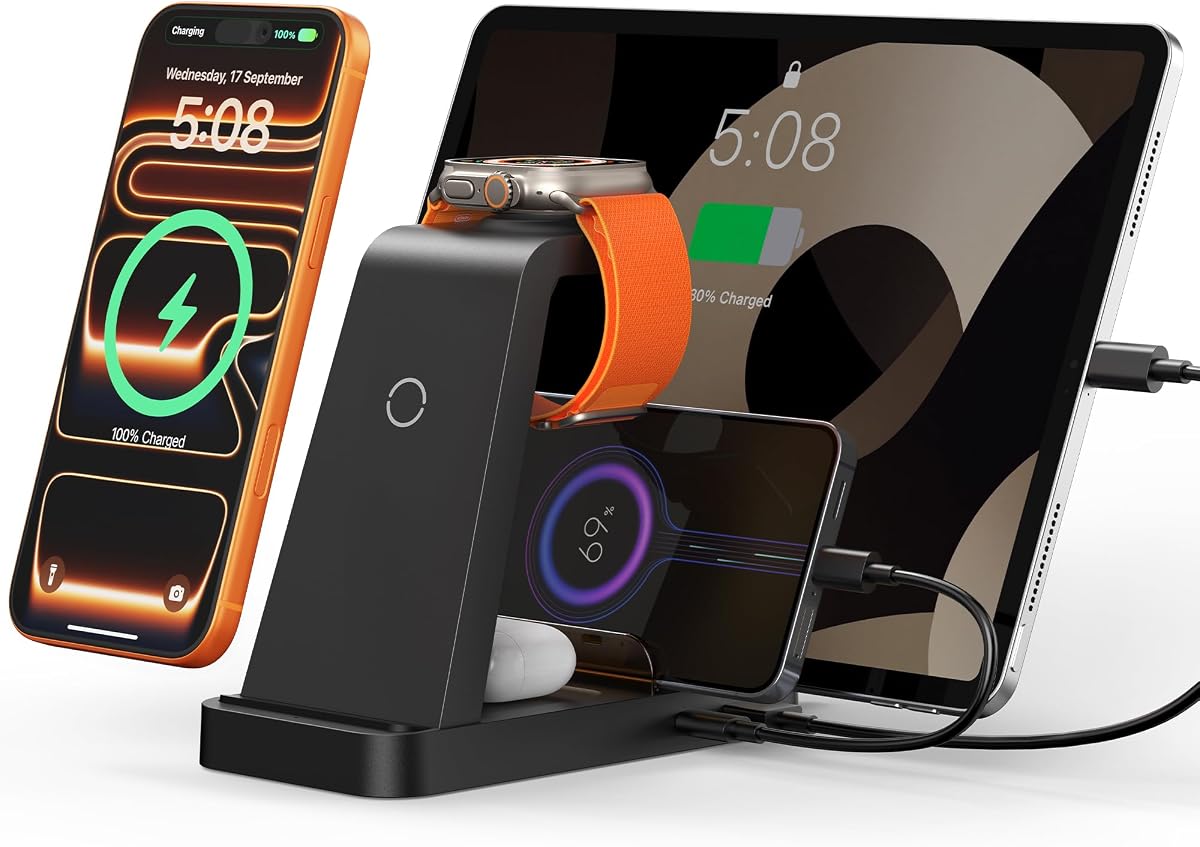

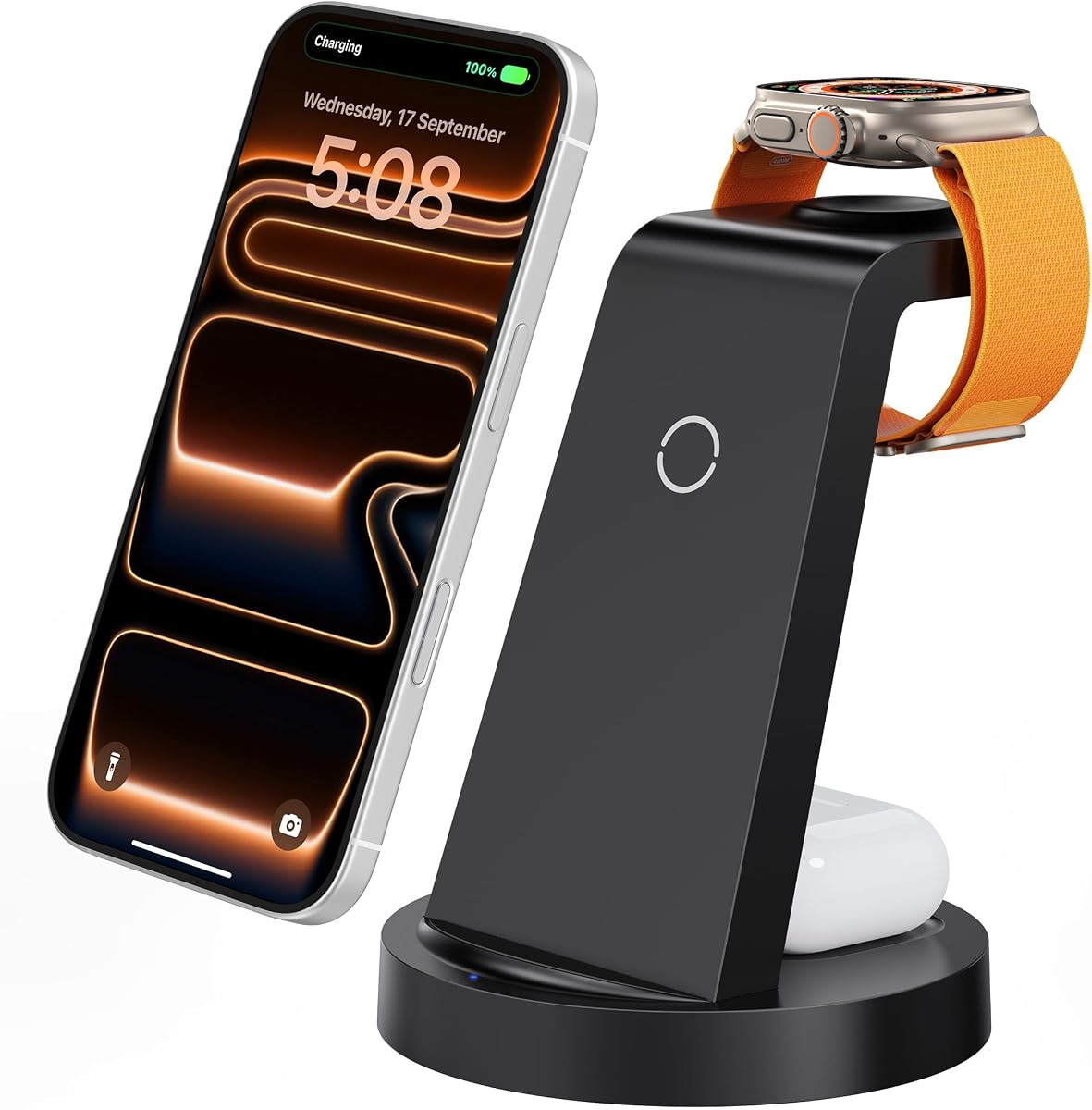


The GETPALS Wireless Charger Station is a compact three-in-one dock for an iPhone, Apple Watch, and compatible AirPods case. Its 4.2 rating reflects a straightforward product that prioritizes portability, recognizable Apple-device support, and a single-cord footprint. The foldable construction is its most immediately useful feature for people who want one dock at home and another in a travel bag.
We may earn a commission when you buy through this link, at no additional cost to you.
Charging output is listed at up to 7.5W for the phone, 3W for earbuds, and 2.5W for the watch. That is suitable for routine overnight charging and convenient top-ups, although it will not match the higher wireless output offered by premium Qi2 equipment. The station supports a broad list of iPhone, Apple Watch, and AirPods series, including older wireless-capable iPhone 8 models and recent Apple Watch families.
Case compatibility deserves attention. The manufacturer supports cases no thicker than 0.16 inches, or 4mm, and advises against cases containing metal rings, pockets, or magnets. The AirPods requirement is also specific: AirPods 2, 3, and 4 need a MagSafe-compatible charging case. These restrictions are reasonable for a folding travel dock, but they can make the product less convenient for users who rely on thick or accessory-heavy cases.
Overcurrent, overvoltage, and overheating protection help support dependable use, while a clear LED indicator communicates charging status. This is an attractive recommendation for a traveler, student, or light Apple-device user who values one compact charging point more than maximum charging speed. It is our best budget pick because it covers the central Apple three-device charging routine without becoming a large desktop organizer.
The lightweight, foldable body is easy to pack and can serve as a phone stand. It is particularly useful for trips where carrying three separate charging accessories would be inconvenient.
Separate charging surfaces keep the phone, watch, and earbuds organized on one platform. Maximum output is more modest than premium alternatives, making the dock best suited to scheduled charging rather than rapid daytime top-ups.
We may earn a commission when you buy through this link, at no additional cost to you.
The 5-in-1 Wireless Charging Station is a highly flexible option for Apple users whose devices extend beyond an iPhone, watch, and AirPods. Its 4.3 rating reflects a balanced combination of wireless zones, wired connections, included accessories, and a 36W power adapter. It can charge as many as five devices at once, making it well suited to a shared desk or a household with more than one Apple ecosystem.
We may earn a commission when you buy through this link, at no additional cost to you.
Wireless charging areas support an iPhone, an Apple Watch, and AirPods, while the remaining wired connections handle devices such as an iPad, Magic Mouse, numeric keypad, power bank, electric toothbrush, or electric shaver. The package includes a USB-to-Lightning cable and a Type-C-to-Type-C cable, reducing the likelihood that new users will need to source both immediately.
The manufacturer advises removing the phone case during charging to avoid affecting speed, and the stated case limit is less than 5mm. It specifically recommends using the provided 36W adapter for optimal performance. Ventilation openings and four non-slip pads help manage heat and keep the base stable, while foreign-body detection, overcurrent, overvoltage, and over-temperature protections cover the core safety categories.
This is the editor's choice for readers who want one station that can handle both wireless Apple accessories and cabled peripherals. It is less elegant than a dedicated three-device MagSafe dock, but the additional ports and broad ecosystem support make it more adaptable. Choose it when desk organization, laptop-adjacent charging, and family-device variety matter more than a minimal footprint.
The strongest advantage is the combination of dedicated wireless surfaces and replaceable wired connections. This makes it easier to charge an iPad, Mac accessory, or other USB device without adding another adapter to the desk.
With support for five devices and multiple included cables, the station is well suited to shared homes and offices. Its 24-month warranty and 24-hour customer-service commitment also add reassurance for a frequently used household hub.
We may earn a commission when you buy through this link, at no additional cost to you.
The MERGROLY 320W Charging Station is built for households that need more outlets than a conventional three-device Apple dock can offer. Its 4.4 rating is supported by ten wired ports, an aggregate output of up to 320W, and a physical layout designed to hold many phones, tablets, and other connected devices in one place. It also includes an Apple Watch charger holder, although the watch cable is not supplied.
We may earn a commission when you buy through this link, at no additional cost to you.
The port mix includes two 65W USB-C ports, three 30W USB-C ports, and five USB-A fast-charging ports. That distribution makes the station useful for a MacBook Pro, iPads, Android devices, Kindles, and accessories alongside Apple phones. Eight short cables—four Type-C-to-Type-C, three USB-to-Lightning, and one USB-to-Micro—help reduce the immediate clutter around the stand.
This is primarily a wired charging organizer rather than a true all-wireless Apple station. Buyers who want to place an iPhone directly on a charging surface or use a proprietary Apple Watch puck will need separate accessories. Smart chips are described as detecting connected devices and supplying appropriate current, while a central anti-slip section and eight bottom pads help keep devices and the stand stable.
The raised and widened slots can accommodate thicker devices, including phones that remain in protective cases. The product is a strong fit for a busy family desk, shared office, or dorm where wired charging is acceptable and many devices need power at once. It is less appropriate for a minimalist nightstand or for someone whose priority is a single magnetic three-device Apple setup.
Two 65W USB-C outputs and a 320W aggregate ceiling provide useful headroom for laptops and tablets. This makes the station more than a basic phone charger for homes with several device types.
Wide raised slots, dividers, and a central anti-slip area help keep a large collection of devices upright and visible. The included short cables reduce the visual length of charging runs around the organizer.
We may earn a commission when you buy through this link, at no additional cost to you.
The Acer Gadget 7-in-1 Wireless Charging Station stands apart through its smart display and bedside-oriented features. Its 4.2 rating reflects a broad seven-function design that can power up to six devices at once. Two wireless phone positions, wireless earbud charging, Apple Watch charging, and USB-A and USB-C wired connections cover a wide range of everyday devices.
We may earn a commission when you buy through this link, at no additional cost to you.
The built-in clock synchronizes automatically through Bluetooth after connecting a phone to the device named S1. It also displays the day of the week and indoor temperature, while adjustable warm and cool lighting lets the user tune the station's appearance for a bedroom, office, or living space. These conveniences make the product feel more like a multifunctional bedside hub than a basic charging pad.
A 30W adapter is supported for faster simultaneous charging, but the case restriction is notably tight at less than 2mm. Users with standard protective cases may need to remove them for reliable phone charging. AirPods must be centered on its charging area, and the product does not support Samsung Watch devices. These limitations matter when comparing it with docks that allow thicker cases or specify broader smartwatch compatibility.
Overcurrent, overvoltage, and temperature protection support overnight use, and the product includes an 18-month warranty with 24-hour customer support. This is our best budget pick among feature-rich bedside stations because it offers more everyday functions than a bare three-device charger without moving into the premium MagSafe category. It is especially appealing to Apple users who want a clock and ambient light beside their bed.
Bluetooth time synchronization, weekday and temperature displays, and adjustable lighting add useful functions between charging cycles. The result feels closer to a bedside organizer than a simple set of charging pads.
Having two separate wireless phone areas allows two people to charge iPhones together. AirPods and Apple Watch have dedicated positions, while the two wired ports expand support to other accessories.
We may earn a commission when you buy through this link, at no additional cost to you.
The Anlmz 3-in-1 Charging Station is a straightforward wireless dock for an iPhone, Apple Watch, and compatible AirPods. Its 4.2 rating is supported by broad model compatibility, an included 18W adapter, and a straightforward bedside design. It uses a single USB-C connection to organize three of the most frequently recharged Apple devices on one compact platform.
We may earn a commission when you buy through this link, at no additional cost to you.
The phone area is explicitly non-MagSafe, which is an important distinction from magnetic stands. Users must center the iPhone carefully, but the dock supports cases up to 5mm, or 0.2 inches, if they contain no metal, magnets, or credit cards. This is a more accommodating case allowance than many of the 3-in-1 options in the guide.
Its smart chipset reportedly protects against overcharging and switches to trickle mode once the device is full. Foreign-object detection can pause charging when metal accessories are detected, and the ABS housing supports heat dissipation. A soft blue LED provides status information without the harsher light sometimes found on bedside charging equipment.
This dock is best for an Apple user who values a simple nightstand setup and a relatively generous case allowance more than magnetic alignment. It supports iPhone 8 and newer wireless models, a wide range of Apple Watch series, and AirPods with a wireless MagSafe charging case. The included 18W adapter, 3.3-foot USB-C cable, manual, and support make setup straightforward.
The support for cases up to 5mm is useful for people who keep a thin protective shell on their iPhone. Because this is not a magnetic design, accurate centering remains the key to starting a reliable charge.
Trickle charging, foreign-object detection, and a soft blue indicator make the dock suitable for nighttime use. These features help distinguish a simple charging accessory from a more visually complex bedside system.
We may earn a commission when you buy through this link, at no additional cost to you.
The Foldable Magnetic Charging Station is designed for Apple users who want one compact charging setup at home and in a travel bag. Its 4.2 rating reflects a useful combination of magnetic iPhone positioning, a 180-degree folding mechanism, and simultaneous charging for an iPhone, Apple Watch, and compatible AirPods. Only one cord is needed to power the three-device arrangement.
We may earn a commission when you buy through this link, at no additional cost to you.
The magnetic charging surface is intended for iPhone 12 and later models, including the listed iPhone 12, 13, 14, 15, 16, and 17 families and their Pro, Plus, and Max variations. Magnetic assistance helps align the phone, a significant advantage over center-only charging pads. The station also supports a wide range of Apple Watch models and Ultra devices.
AirPods compatibility is less universal than the headline device count may initially suggest. The description specifies AirPods 2, 3, and 4 with magnetic charging support, so buyers should confirm that their case works with the station. The included 18W adapter and charging cable remove the need to select a separate power supply, while FCC certification and temperature, overvoltage, short-circuit, and overcurrent protections support safer operation.
This is a strong recommendation for travelers, commuters, and anyone who values magnetic alignment over maximum desktop power. Folding it flat makes packing easier, while setting it up at an angle turns the iPhone into a stand for video calls, messaging, or entertainment. It is not intended to serve as a laptop charger or a broad wired charging hub.
The 180-degree folding design reduces the footprint when the dock is not in use. One cable powers all three charging areas, eliminating the need to pack a separate charger for every Apple device.
For supported iPhone models, the magnetic surface provides a more consistent starting position than a flat pad. The phone can also remain upright in landscape or portrait orientation for convenient viewing.
We may earn a commission when you buy through this link, at no additional cost to you.
The Lcssio 300W Charging Station is a wired charging hub with the highest customer rating among the large organizers in this guide. Its 4.5 rating reflects eight ports, modern USB-C support, and a 300W aggregate output ceiling. It is built for a busy family or office where phones, tablets, laptops, and accessories need a dependable central power source.
We may earn a commission when you buy through this link, at no additional cost to you.
Five USB-C ports provide more compatibility with current equipment than an all-USB-A design. Two 65W outputs can handle compatible laptops such as MacBook Pro and MacBook Air models, while 30W and 20W ports are positioned for tablets and smartphones. A dedicated port mix makes it possible to vary cable types without replacing the entire station each time a device changes.
The housing is described as a single solid construction rather than an organizer with removable dividers. Two wider and higher slots accommodate thicker devices, including some phones and tablets that remain in cases. Four anti-slip rubber pads protect the surface and limit movement, making the charger more stable on a desk or counter.
The package includes the station, a power cord, two iPhone-and-iPad cables, three Type-C cables, and one Micro-B cable. Protection is listed for flame retardance, overcurrent, overvoltage, overcharge, overload, overheating, and short circuits. It is a compelling shared charging hub, but buyers focused on the cleanest bedside Apple setup should note that it has no integrated wireless charging area.
Five USB-C connections and three USB-A ports support current and legacy accessories. The two 65W USB-C outputs add meaningful laptop capability without requiring a second charger.
The solid housing and widened central slots prioritize stability over modularity. Devices can remain in many cases while organized around a single station, making it useful for shared spaces.
We may earn a commission when you buy through this link, at no additional cost to you.
The 13-in-1 Wireless Charging Station is the broadest all-in-one option in the guide. Its 5 rating reflects a design that combines a 10-port wired charging station with a 3-in-1 Apple wireless section. It can charge up to 13 devices simultaneously and offers up to 600W aggregate output, making it suitable for high-device-count homes, offices, or communal workspaces.
We may earn a commission when you buy through this link, at no additional cost to you.
The wired section includes two 100W USB-C ports for compatible laptops, two 65W USB-C ports, two 60W USB-C ports, and four 30W USB-A ports. This broad power distribution can serve MacBook models, Samsung Galaxy devices, Android phones, Kindles, gaming switches, and other USB-powered products. The Apple section handles an iPhone, Apple Watch, and AirPods series, allowing the two charging approaches to operate together.
GaN 5 technology and intelligent circuitry form the basis of the power system. Listed protections include overcurrent, overvoltage, over-temperature, and overcharging. A non-slip base helps stabilize the large unit, while the phone and earbuds indicators illuminate green for five seconds and then switch off, avoiding persistent light at night.
One potentially confusing detail is that the USB-C port on the Apple Watch wireless stand is non-charging. It is a physical port rather than an additional power input. The station is also large and feature-dense, so buyers should confirm that its footprint suits their desk. Despite those considerations, it is the most capable option for a household that wants thirteen device connections in one unit.
The 3-in-1 Apple section sits alongside ten wired ports, allowing the station to serve phones, watches, earbuds, laptops, and smaller accessories at the same time. That scale sets it apart from ordinary bedside charging pads.
Two 100W USB-C ports and additional 65W, 60W, and 30W outputs provide meaningful power distribution. The 600W aggregate ceiling is designed for busy setups rather than only overnight phone charging.
We may earn a commission when you buy through this link, at no additional cost to you.
The Anker MagGo 3-in-1 Qi2 15W Charging Station is the most focused premium Apple dock in the guide. Its 4.6 rating reflects strong wireless phone performance, official Apple Watch certification, and a compact adjustable stand. It charges three core devices—an iPhone, Apple Watch, and AirPods—without adding a large organizer or collection of wired ports.
We may earn a commission when you buy through this link, at no additional cost to you.
The Qi2 phone pad delivers up to 15W, matching the output associated with original MagSafe technology and exceeding the more modest phone rates of several budget 3-in-1 stations. The Apple Watch charging section is officially certified, and the manufacturer states that an Apple Watch Series 10 can charge from zero to 100% in one hour and 13 minutes under internal lab conditions. Actual results can vary in normal use.
The stand adjusts vertically up to 45 degrees, allowing the user to choose a comfortable viewing angle for notifications, video calls, or StandBy mode in landscape orientation. The package includes a 40W USB-C adapter, a five-foot USB-C-to-C cable, a welcome guide, a 24-month warranty, and customer support, so the core setup is complete out of the box.
This dock is best for a dedicated Apple user who values faster wireless phone charging, precise magnetic placement, and a refined three-device design. It offers fewer expansion options than the high-capacity organizers, but it solves the core task with less visual bulk. Choose it when charging speed, adjustability, and brand-specific certification outweigh the need for USB-A ports or laptop charging.
The 15W wireless output provides meaningful headroom for an iPhone and is the station's main advantage over entry-level three-device pads. Magnetic alignment also makes the supported phone position easier to repeat.
The adjustable vertical angle supports notifications, calls, and landscape StandBy use. This turns the dock from a passive charging platform into a useful phone and watch display.
We may earn a commission when you buy through this link, at no additional cost to you.
The 15-in-1 Charging Station Organizer is built to consolidate the charging demands of a very device-heavy household. Its 4.2 rating reflects an extensive combination of 12 wired ports and an integrated three-in-one Apple wireless section. The product can charge up to 15 devices simultaneously, giving it the highest listed device capacity in this roundup.
We may earn a commission when you buy through this link, at no additional cost to you.
The wired portion includes eight USB-C ports: two rated at 100W, two at 65W, and four at 60W. Four USB-A ports provide 20W output, and the wireless section adds dedicated iPhone, Apple Watch, and AirPods charging. The overall design supports a wide range of Apple and Android equipment, including phones, tablets, earbuds, Kindles, and other compatible products.
GaN III technology manages the high-output USB-C configuration, while an eight-layer protection system addresses flame retardance, overcurrent, overvoltage, overcharge, overload, overheating, and short circuits. A soft green indicator illuminates for five seconds when the wireless device is connected and then turns off, making the setup suitable for darker rooms.
The extra-wide laptop slot measures 1.57 inches wide and 1.77 inches high, allowing a laptop or child's iPad to remain upright even in a thick protective case. The station's size and port density make it better suited to a family console, home office, study table, or large nightstand than a compact bedside table. It is a practical choice when one central hub must handle nearly every device in the home.
Fifteen potential charging positions make this station suitable for homes where several adults and children bring phones, tablets, computers, and audio devices to the same shared space.
The widened laptop slot and upright arrangement can accommodate thicker equipment without requiring case removal. Raised storage helps keep those devices stable while their cables remain connected.
We may earn a commission when you buy through this link, at no additional cost to you.
The most useful dock is not necessarily the one with the most ports. Start with the devices you charge, the space available, the importance of wireless alignment, and whether laptops or accessories need power from the same unit.
Begin with a realistic inventory of the devices that need regular charging. A three-device dock may cover an iPhone, Apple Watch, and AirPods perfectly, but it will not handle a shared iPad, laptop, power bank, or second family member's phone without additional connections. Five-in-one stations add wired flexibility, while the largest organizers are intended for households with many wired and wireless devices.
Check every model against the actual products in your home. Pay particular attention to iPhone generation, Apple Watch size, AirPods case type, iPad connection, and whether any device needs a dedicated magnetic watch charger. Choose a dock that covers your routine without forcing you to use unsuitable adapters.
Wireless charging offers the cleanest Apple setup because a phone, watch, and AirPods case can rest on dedicated surfaces without individual cables. It is especially convenient at a bedside or on a shared coffee table. Wired charging, however, tends to support more device types, offers greater power flexibility, and is more practical for tablets and laptops.
A hybrid station is the safest all-purpose choice for mixed needs. Look for at least one USB-A and one USB-C connection if you use older accessories or newer devices. If your goal is a neat three-device nightstand and nothing more, a focused wireless dock may be cleaner and easier to use than a large multiport organizer.
Wireless output varies substantially across the guide. Some three-device stations provide up to 7.5W for the phone, while the Anker MagGo Qi2 model supports up to 15W. The Anlmz and Acer options emphasize other features, including case tolerance, lighting, or a time display, rather than premium Qi2 power.
Choose a higher output when rapid daytime top-ups are important, but remember that charging speed also depends on the device, adapter, cable, temperature, and charging standard. Overnight charging generally benefits more from reliable placement and safe thermal management than from headline wattage alone.
Magnetic stands make it easier to place a supported iPhone correctly and can provide a more consistent connection. Center-only pads are simpler and may accommodate some cases more generously. Published case limits range from less than 2mm to 5mm, so a protective case can determine whether a dock is convenient for you.
Remove cases with metal rings, pockets, magnets, or credit cards when the manufacturer warns against them. For the Anlmz dock, center the phone carefully because it lacks magnetic alignment. For foldable and MagSafe-oriented models, verify that the iPhone generation supports the magnetic surface before expecting automatic positioning.
Some stations include a power adapter, while others may require one with sufficient output. The Acer Gadget supports a 30W adapter, the foldable magnetic dock includes an 18W adapter, and the Anker MagGo includes a 40W unit. Multiple-port hubs may need a more substantial wall adapter to deliver their advertised output across several devices.
Review the package contents and the manufacturer's power requirements before purchase. Stations that include short mixed cables can reduce desk clutter, but buyers should confirm they own compatible cables for every intended device. Using the specified, undamaged adapter is particularly important for large multiport charging stations.
Look for overcurrent, overvoltage, over-temperature, overcharge, short-circuit, and foreign-object detection protections. These safeguards matter more when a station powers several devices at once or remains plugged in overnight. Ventilation, stable rubber feet, and heat-dissipating housings are also useful indicators that a product was designed for sustained use.
A long list of protections does not eliminate the need for sensible placement. Keep charging stations on a hard, ventilated surface rather than under pillows or soft bedding, and maintain the space around vents. Follow the supplied instructions, especially when a manufacturer specifies case removal or a particular adapter.
Compact three-device docks occupy little room and may fold for travel. Large organizers with 8, 10, 12, or 13 ports require more surface area but keep many cables and devices together. Measure the intended bedside, desk, or counter space before buying, particularly for models with tall laptop slots.
Raised dividers and wide slots improve stability, while short included cables help control clutter. If your priority is a vacation-ready accessory, prioritize a folding design and single-cord operation. If the priority is a shared family command center, prioritize port count, device capacity, and power distribution.
A charging dock can do more than provide power. The Acer Gadget adds a Bluetooth-synchronized clock, weekday and temperature displays, and adjustable warm or cool lighting. These functions are useful at a bedside, although they may be unnecessary on a busy work desk.
Pay attention to indicator behavior as well. A light that turns off after a few seconds is less distracting at night than a permanently illuminated status LED. Standby viewing, adjustable phone angles, and wide dividers can also improve the everyday usefulness of a dock without adding another electronic device to the table.
Place the station on a stable, hard, level surface with its ventilation openings unobstructed. Read the compatibility notes before adding devices, connect the manufacturer-specified power adapter, and allow the dock to establish power before positioning a phone, watch, or AirPods case. For models with a folded phone stand, fully open it and confirm that the device is stable before applying pressure.
Center magnetic or non-magnetic devices carefully. AirPods cases must sit in the designated charging area, and compatible Apple Watch models should rest fully on their charging puck. Remove unsupported metal, magnetic, or credit-card accessories from cases, and follow the stated thickness limits. If charging is inconsistent, reposition the device, reseat the cable, and test again with the case removed before assuming a fault exists.
Keep the dock away from fabric, bedding, moisture, and excessive heat. Clean the surface gently with a dry or lightly damp soft cloth, but do not spray liquid into the charging areas or openings. Inspect cables for damage, keep the power adapter dry, and unplug the station when it will be unused for an extended period. Follow the product's own instructions whenever they differ from general care advice.
Yes, provided the dock has separate charging areas compatible with all three devices. Many of the 3-in-1 options in this guide support an iPhone, Apple Watch, and AirPods simultaneously, but some AirPods models require a wireless or MagSafe-compatible charging case. Confirm both the device series and case type before purchasing.
A 3-in-1 dock is usually cleaner and more convenient for a single user's phone, watch, and earbuds. A multiport station is more useful when you also need to charge iPads, laptops, power banks, and several family members' devices. The right choice depends on device variety and whether wireless placement matters more than maximum wired power.
A Qi2 or MagSafe dock can provide faster wireless phone charging than many basic three-device pads. The Anker MagGo model in this guide supports up to 15W, while some alternatives list up to 7.5W. Actual charging time also depends on the phone model, adapter, alignment, temperature, and the device's charging limits.
Charging docks designed for overnight use commonly include over-temperature, overcurrent, overvoltage, overcharge, and foreign-object protection. Place the dock on a hard, ventilated surface with nothing covering it, follow the manufacturer's instructions, and use the supplied or specified power adapter. Never operate a charging station under pillows or other soft bedding.
A thick case, poor alignment, an underpowered adapter, cable limitations, or simultaneous high-power charging can reduce charging speed. Check the dock's case-thickness guidance and use the recommended adapter. For a multiport station, verify that its total available power is sufficient for the number and type of connected devices.
It depends on the model. The Acer Gadget lists a limit below 2mm, GETPALS supports cases up to 4mm, and Anlmz supports up to 5mm, while the 5-in-1 station advises removing the case to avoid reducing charging speed. Cases with metal rings, pockets, magnets, or credit cards should generally be removed.
Some high-output organizers can, provided the laptop receives a compatible USB-C connection and its power requirement falls within the appropriate port rating. Products with 65W or 100W USB-C ports are better suited than basic three-device wireless stands. Check the laptop model's charging requirements and the station's total output before connecting multiple high-power devices.
Most of the included watch charging surfaces support a broad range of Apple Watch series, but dimensions and charging interfaces can differ. A large wired organizer may include a holder without supplying the proprietary watch cable, while a 3-in-1 station usually includes the complete watch charging path. Verify compatibility with the exact watch series before ordering.
The GETPALS Wireless Charger Station offers the best budget balance for a traveler or light user, while the Acer Gadget 7-in-1 Wireless Charging Station adds the most useful bedside features at a competitive tier. The Anker MagGo Qi2 15W station is the premium choice for faster magnetic charging, adjustable viewing, and official Apple Watch certification.
Prioritize the charging paths you actually use. Choose a wireless 3-in-1 for a clean personal setup, a hybrid 5-in-1 for iPads and accessories, and a high-output multiport organizer for laptops or a large household. Also check case thickness, included adapters, watch charging requirements, and AirPods case compatibility before making a final selection.
Ratings, configurations, and prices can change, and promotions may alter the relative value of these models. Check the current Amazon listing, included components, warranty terms, and compatibility notes at the time of purchase. That final verification helps ensure the selected charging dock matches your devices, space, and charging routine.